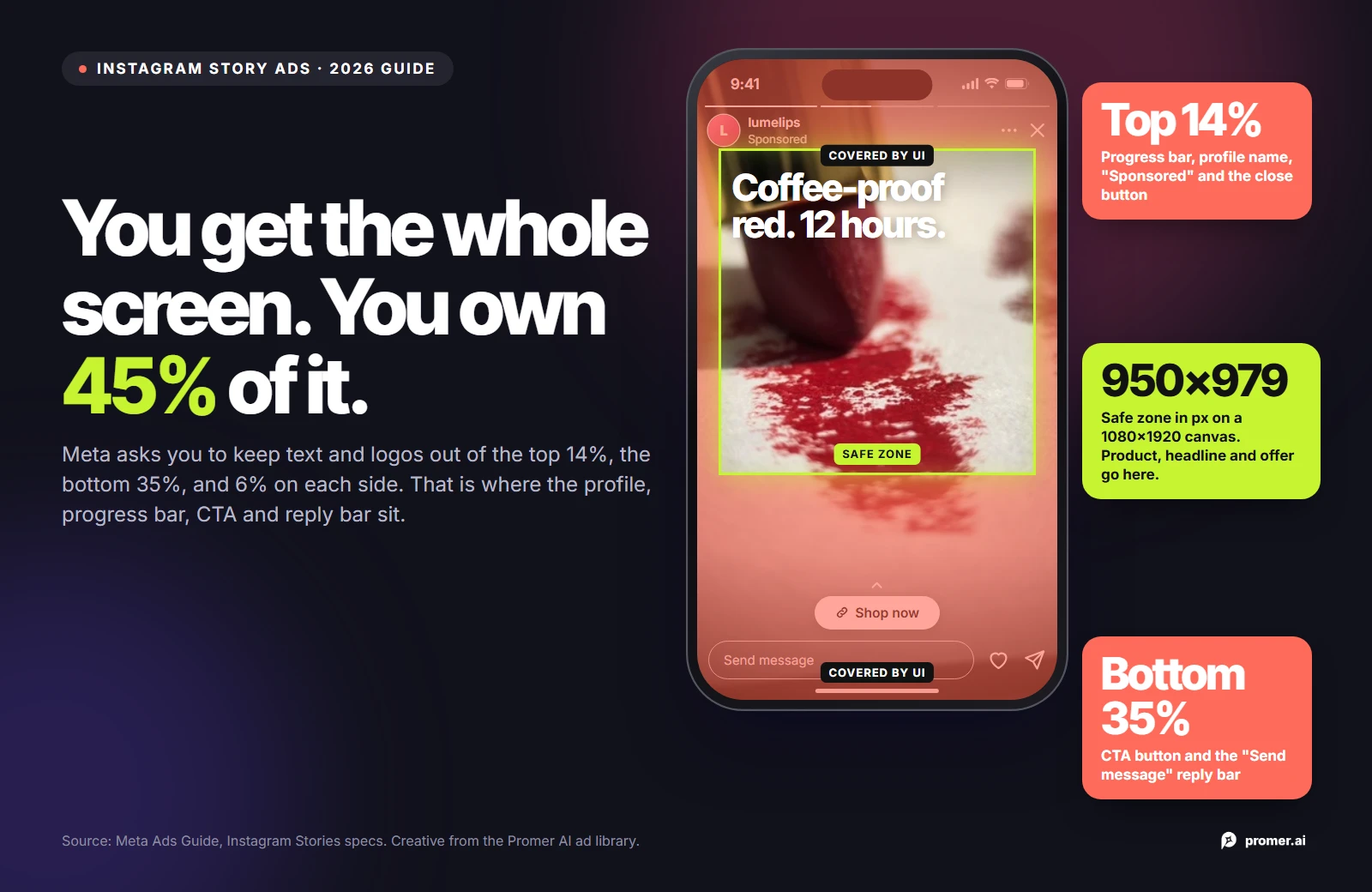
An Instagram Story ad fills the whole phone screen, but you only get to use part of it. Meta's own specs tell advertisers to keep text and logos out of the top 14% of the frame, the bottom 35%, and 6% on each side. On a 1080 x 1920 canvas, that leaves a box of roughly 950 x 979 pixels, about 45% of the screen.
Most guides on how to make Instagram Story ads spend their time on Ads Manager menus. This one starts with the creative: what to put inside that box, how to build for 9:16 instead of resizing a feed ad, how to hook a viewer who has the sound off, and how to keep a video short enough that Meta plays it in one piece.
To make an Instagram Story ad, build a native 9:16 creative at 1080 x 1920 or larger, keep the product, headline, and offer inside the central safe zone, make the first two seconds readable with the sound off, and keep video under 16 seconds so it plays in full. Then choose the Instagram Stories placement in Meta Ads Manager and upload the 9:16 version for it.
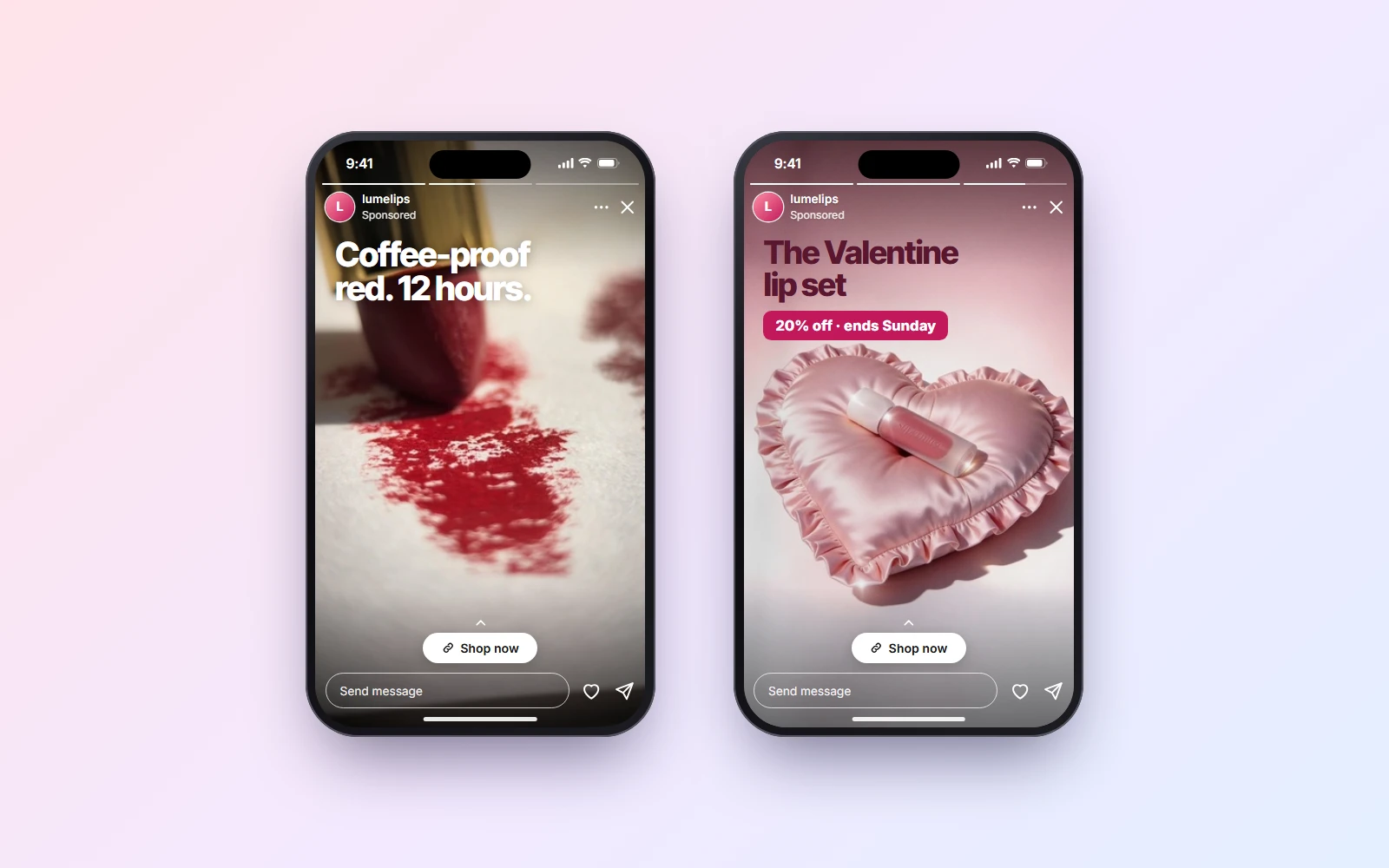
The workflow below has seven steps, from picking one angle per Story to publishing in Ads Manager, followed by examples, a checklist for choosing an Instagram Story ads maker, and the mistakes that waste Stories spend.
Key takeaways
- Instagram Story ads use a 9:16 ratio. Meta lists 1440 x 2560 as the recommended resolution, and 1080 x 1920 is the common working size.
- The safe zone is the middle of the frame: keep the top 14%, the bottom 35%, and 6% on each side free of text and logos. That leaves about 45% of the screen for your message.
- Image Story ads show for 5 to 16 seconds. Videos under 16 seconds play in full, while longer ones may be split into up to three cards.
- A feed ad resized to 9:16 usually wastes the screen. Build the Stories version on purpose, with the product filling the frame.
- Write the hook as on-screen text, because many people watch Stories with the sound off. Use audio as extra, not as the message.
What makes Instagram Story ads different from feed ads?
A feed ad competes with posts above and below it. A Story ad takes over the screen for a few seconds between friends' Stories, and the viewer can tap past it at any moment. That changes three things about the creative.
First, the frame is vertical and full screen, so a square image looks small and leaves empty space. Second, Instagram's interface sits on top of the ad: the profile picture, brand name, and progress bar at the top, and the call-to-action button and reply area at the bottom. Third, attention is short. People tap through Stories quickly, so the ad has to make its point in the first frame.
If you're building for every Instagram placement at once, the wider guide on how to create Instagram ads with AI covers feed, Stories, and Reels in one workflow. This article goes deeper on Stories only.
Instagram Story ad specs for 2026
These figures come from Meta's Ads Guide for the Instagram Stories placement. Check them again before a big production run, since Meta updates its specs without much notice.
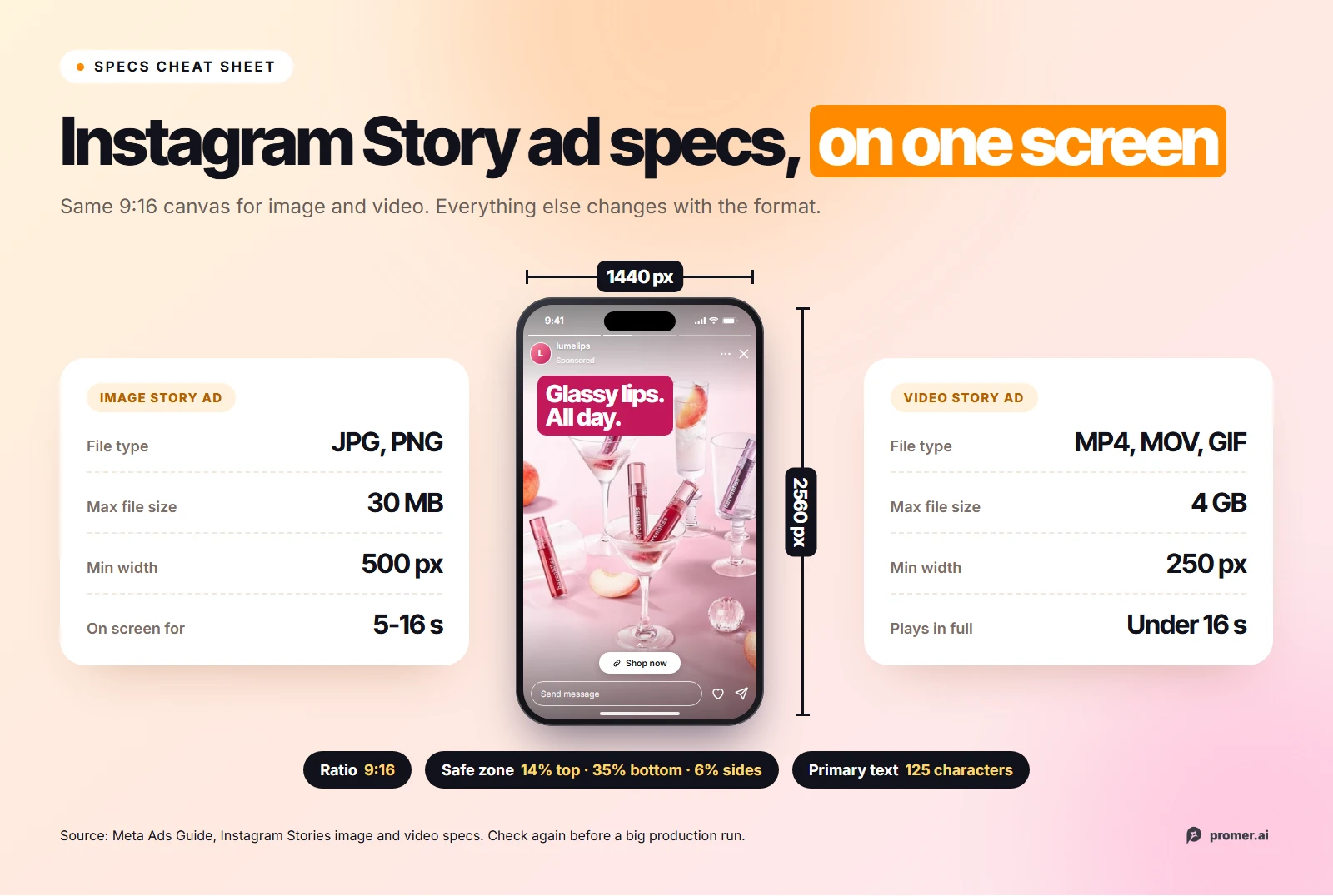
The length rule matters more than the 60-minute maximum suggests. Meta plays Story videos under 16 seconds in full. Videos of 16 seconds or longer may be split into separate Story cards, and Instagram shows one, two, or three of those cards depending on the viewer. So if your key message comes at second 20, some viewers will never see it.
Converted to pixels on a 1080 x 1920 canvas, the safe zone works out to about 270 pixels clear at the top, about 670 pixels at the bottom, and about 65 pixels on each side. Meta lists captions and sound as optional but recommended for video.
How to make Instagram Story ads in 7 steps
The steps below follow the order a small team would actually work in: idea first, then layout, then motion, then publishing.
Step 1: Pick one angle per Story
A Story ad has a few seconds and less than half a screen, which is enough room for one idea. Pick the single reason a buyer should care, such as a problem the product fixes, a result they can see, or an offer, and build the whole Story around it. If you have three good angles, make three Story ads instead of one crowded one.
If you don't have an angle yet, Promer AI's AI Ad Concept reads your product page and pulls out the product highlights, ideal customer, pain point, and need. It then returns several concepts, each with its own target audience, core idea, and hook, so you can give each Story a different angle.
Step 2: Build native 9:16, don't resize a feed ad
The quickest way to make a Story ad is to take a square feed ad and let it fill a 9:16 frame. It's also the most common way to waste the placement. The product shrinks to the middle third, filler takes up the rest, and any text near the bottom of the original lands under the call-to-action button.
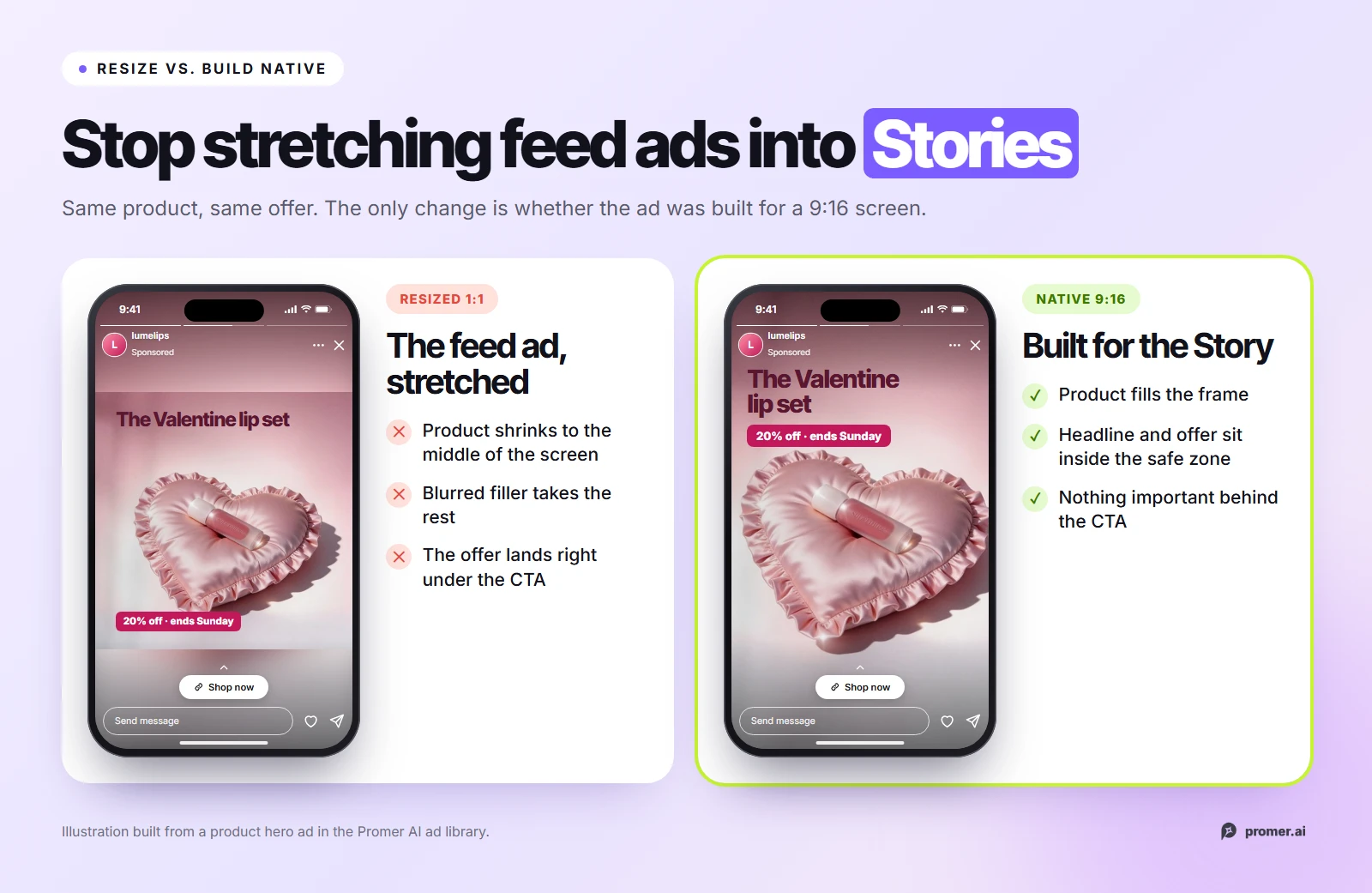
Meta's Advantage+ creative options can expand an image to fit more placements, but expansion only adds background around the creative you uploaded. It doesn't move your headline out of the CTA area or make the product bigger. Generate or design the 9:16 version on its own, at 1080 x 1920 or larger, and pick the 9:16 ratio before you generate rather than cropping afterward.
Step 3: Lay out everything inside the safe zone
Treat the 950 x 979 pixel center box as your real canvas. Everything a viewer must read or recognize goes there:
- Product: Large and centered, ideally taking up at least a third of the safe zone.
- Headline: One short line, placed in the upper part of the safe zone, where the eye lands after the profile row.
- Offer or proof: A price, discount, review count, or result, sitting just above the bottom edge of the safe zone.
- Logo: Inside the safe zone, not in the top-left corner where the profile picture already shows your brand.
The top 14% and bottom 35% don't have to be empty. Fill them with background, texture, or the edges of a lifestyle shot, just nothing a viewer needs to read.
Step 4: Write a hook for the first 2 seconds, with the sound off
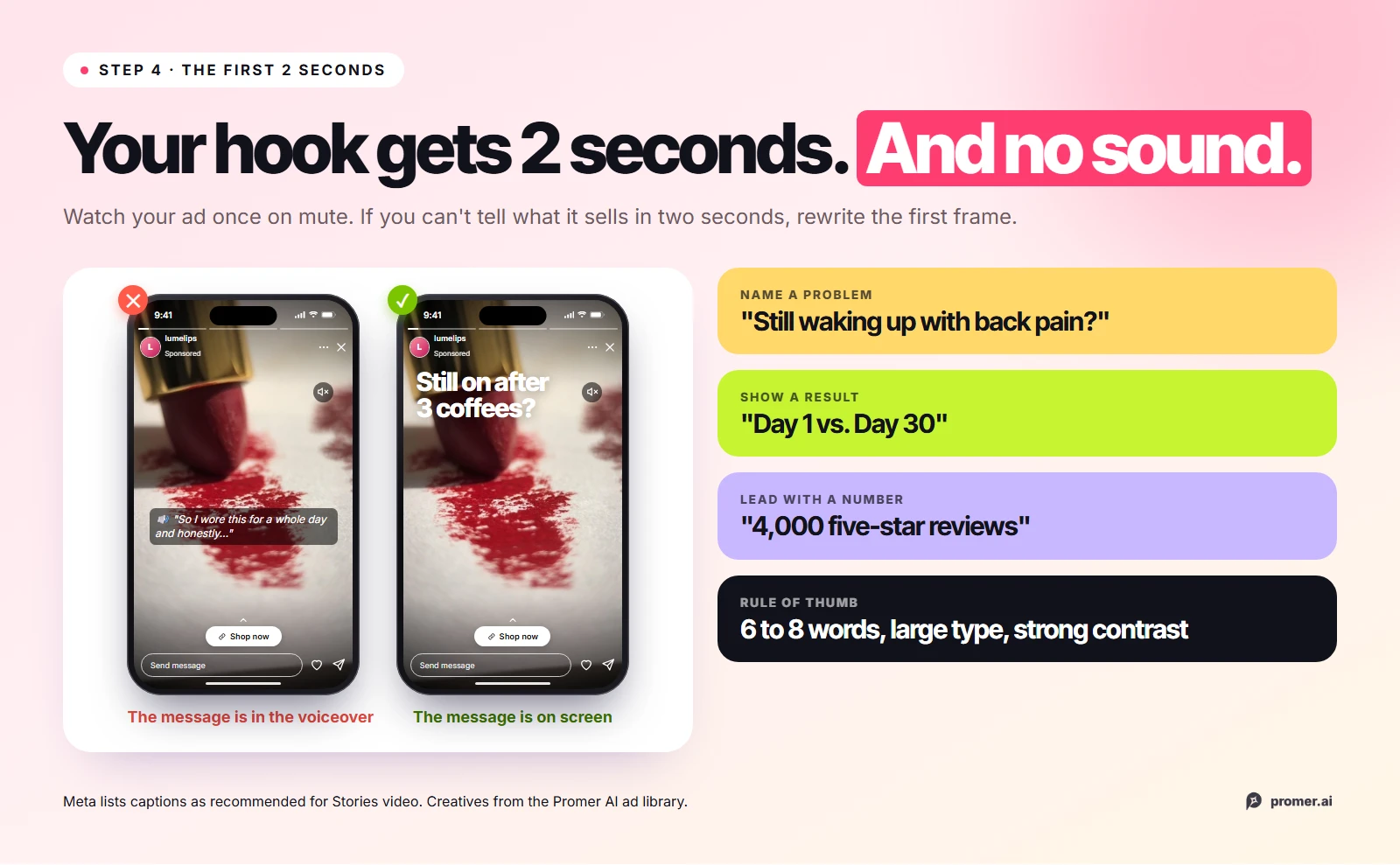
Viewers decide in a moment whether to keep watching, so the first frame has to work on its own. Put the hook in on-screen text, in large type with strong contrast, and keep it to about six to eight words. Good Story hooks usually name a problem ("Still waking up with back pain?"), show a result ("Day 1 vs. Day 30"), or lead with a number ("4,000 five-star reviews").
Write voiceover and music as a bonus layer. Meta recommends captions for Story video, and an ad that only makes sense with audio loses everyone who watches muted. Before you publish, watch the ad once on mute: if you can't tell what it's selling within two seconds, rewrite the first frame.
Step 5: Add motion
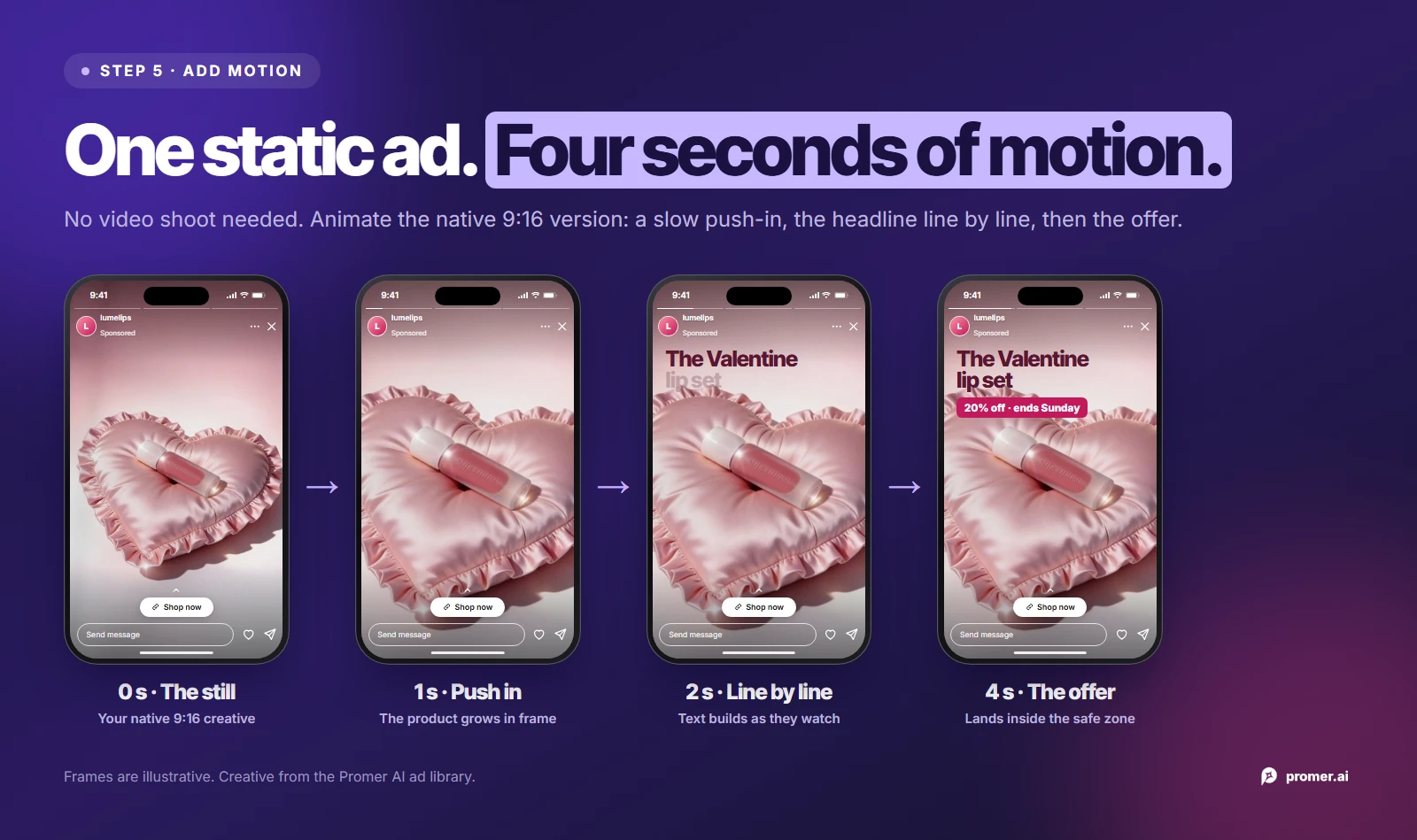
Stories run on video, and a static image with a little movement often holds attention better than a still frame. You don't need a video shoot to get there. Start from the static Story ad that already works and animate it: a product rotating, text appearing line by line, or a before and after wipe.
Promer AI's AI Ad Animation turns a static creative into a short video ad. Set the aspect ratio to 9:16 and it suggests animation scripts, each with a brief, an effect, and placement tags such as Instagram stories. If the source creative isn't 9:16, it may show black bars, so animate the native Story version from Step 2, not the feed ad.
Step 6: Plan the frames so the ad plays in full
Because videos under 16 seconds play in full, a 15-second Story ad split into three beats is a reliable structure. Each beat has one job, and each one can also work as a separate image if you'd rather run a static sequence.
- Hook (0-5 seconds): The problem or the result in one line of text, with the product visible.
- Proof (5-10 seconds): A demo, a before and after, a review count, or a statistic that backs up the hook.
- Offer (10-15 seconds): The price, discount, or reason to buy now, with the product clearly in frame.
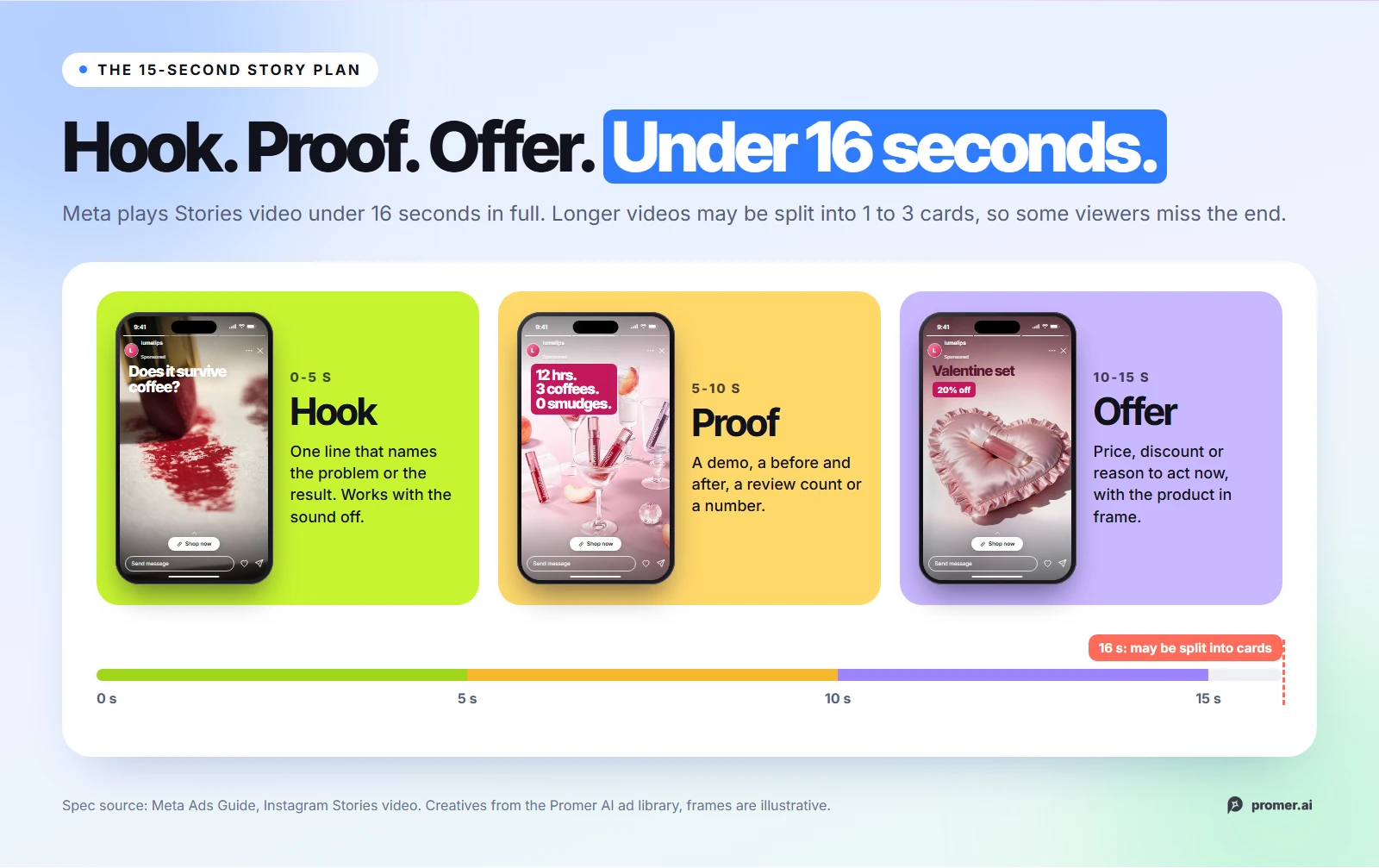
If you only have time for one frame, combine the hook and the offer and skip the proof. A clear product and a clear reason to tap beat a longer story that gets cut off.
Step 7: Publish in Ads Manager
Story ads are created in Meta Ads Manager, not posted from the Instagram app like an organic Story. The setup is short once the creative is ready:
- Create a campaign and choose an objective, such as Sales or Traffic.
- At the ad set level, use manual placements if you want Stories only, or keep Advantage+ placements on and add a dedicated 9:16 asset.
- At the ad level, upload your creative and use the placement asset customization option so Stories gets the 9:16 file and feed gets the 1:1 or 4:5 file.
- Check the Instagram Stories preview to confirm nothing important sits under the profile row or the CTA button, then publish.
Run at least two different Story ads in the same ad set, built on different angles, so you learn which idea works and not only which color or headline works.
Instagram Story ad examples
Every example below is a 9:16 creative built for Stories placements. Each one lists its placement, ratio, and hook type, then what makes it work in the Story format. Two of them also have a safe-zone problem worth fixing when you recreate them. A "Try AI Ad Clone" button sits under each creative if you want to recreate the structure with your own product.
1. Rescue Dog Customer Quote (Testimonial)
Placement: Instagram Stories | Ratio: 9:16 | Hook type: Customer quote
A pet dental supplement fills a navy Story with one customer's words about her rescue dog's teeth getting whiter. Two round dog photos frame the quote, and the product tub sits low in the corner.

Why it works in Stories:
- The quote sits in the middle of the frame, inside the safe zone, so the profile row and CTA button never cover it
- A named customer and a specific before and after (yellow teeth getting whiter) read as proof, not a brand claim
- The product sits in the bottom corner, where being partly covered by the reply bar costs nothing
2. Handheld Creator Recommendation (UGC: Native Story)
Placement: Instagram Stories | Ratio: 9:16 | Hook type: Creator endorsement
A hand holds a face primer and a liquid foundation over a bathroom counter, with a short caption praising them as a non-toxic makeup option. The whole ad is framed like a creator's own Story, down to the username at the top.

Why it works in Stories:
- It looks like a Story from a friend, so it doesn't trigger the quick tap-past that polished ads get
- The caption is short and placed just under the top edge of the safe zone, where the eye lands first
- Both products fill the center of the frame, large enough to recognize at phone size
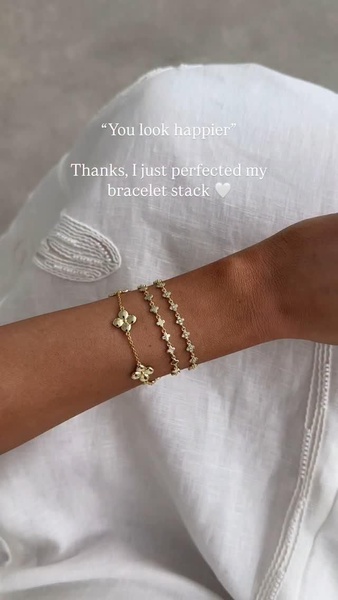
3. "You Look Happier" Compliment Hook (Social Proof: Lifestyle)
Placement: Instagram Stories | Ratio: 9:16 | Hook type: Compliment dialogue
A close-up of a gold bracelet stack on a wrist against white linen, with a two-line exchange overlaid: someone says "You look happier," and the reply credits a perfected bracelet stack.
Why it works in Stories:
- A tiny bit of dialogue works with the sound off and reads in under two seconds
- The text sits in the upper safe zone and the product in the center, so nothing important lands in the bottom 35%
- The soft, low-contrast photo feels organic, which suits Stories better than a hard-sell layout
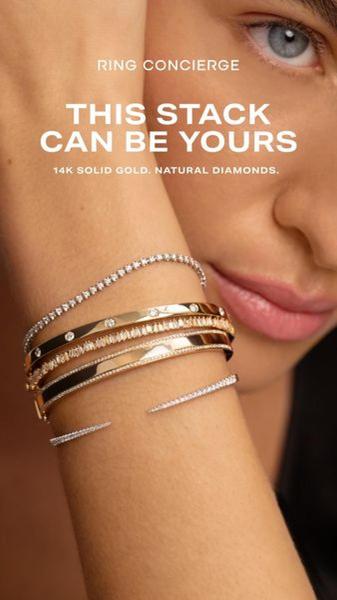
4. "This Stack Can Be Yours" Benefit Headline (Feature and Benefit)
Placement: Instagram Stories | Ratio: 9:16 | Hook type: Direct benefit
A tight crop of a face and wrist wearing stacked gold and diamond bracelets, under a bold white headline and a single line naming the materials.
Why it works in Stories:
- The product fills most of the 9:16 frame, which a resized square ad can't do
- One headline plus one material line is about as much copy as a Story viewer reads
- The headline starts just below the top 14%, so the profile row doesn't hide it
5. New Color Drop With Palette Dots (Bold Claim: Product Launch)
Placement: Instagram Stories | Ratio: 9:16 | Hook type: New arrival
A model in a matching lilac activewear set on a white background, with a "new in" label and a bold headline (the original is in Portuguese) inviting viewers to mix colors from the season's palette. Three small color dots hint at the other shades.

Why it works in Stories:
- A full-body shot uses the whole vertical frame, which is exactly what 9:16 is good at
- Color dots tell viewers more shades exist without adding any text
- One thing to fix when you clone it: the "new in" label sits close to the top 14%, so move it down a little to keep it clear of the profile row
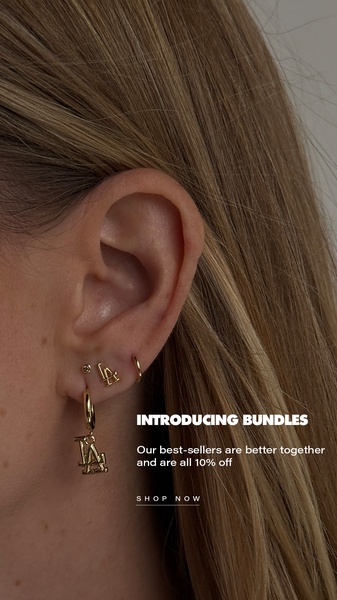
6. "Introducing Bundles" Offer (Offer and Sale)
Placement: Instagram Stories | Ratio: 9:16 | Hook type: Direct offer
A macro shot of an ear styled with several gold earrings, with a short announcement that best-sellers now come as bundles at 10% off and a small "Shop now" line underneath.
Why it works in Stories:
- Showing the pieces styled together sells the bundle better than separate product shots
- The offer is concrete (10% off) and fits in two short lines
- One thing to fix when you clone it: the offer copy sits in the bottom third, where Instagram's CTA button and reply bar go, so move it up into the safe zone for a Stories placement
How to choose an Instagram Story ads maker
Most design tools can export a 1080 x 1920 file. What separates an Instagram Story ads maker that saves you time from one that only resizes is whether it handles the parts of the format that are easy to get wrong. Check these before you commit:
An AI Instagram ad generator built for ecommerce covers most of this list: it starts from a product URL or image, generates feed and Stories ratios, and can animate a static creative for 9:16. Whichever tool you use, check the output in the Ads Manager preview before spending, because AI-generated creatives can still contain mistakes in text or product details.
Common mistakes when making Instagram Story ads
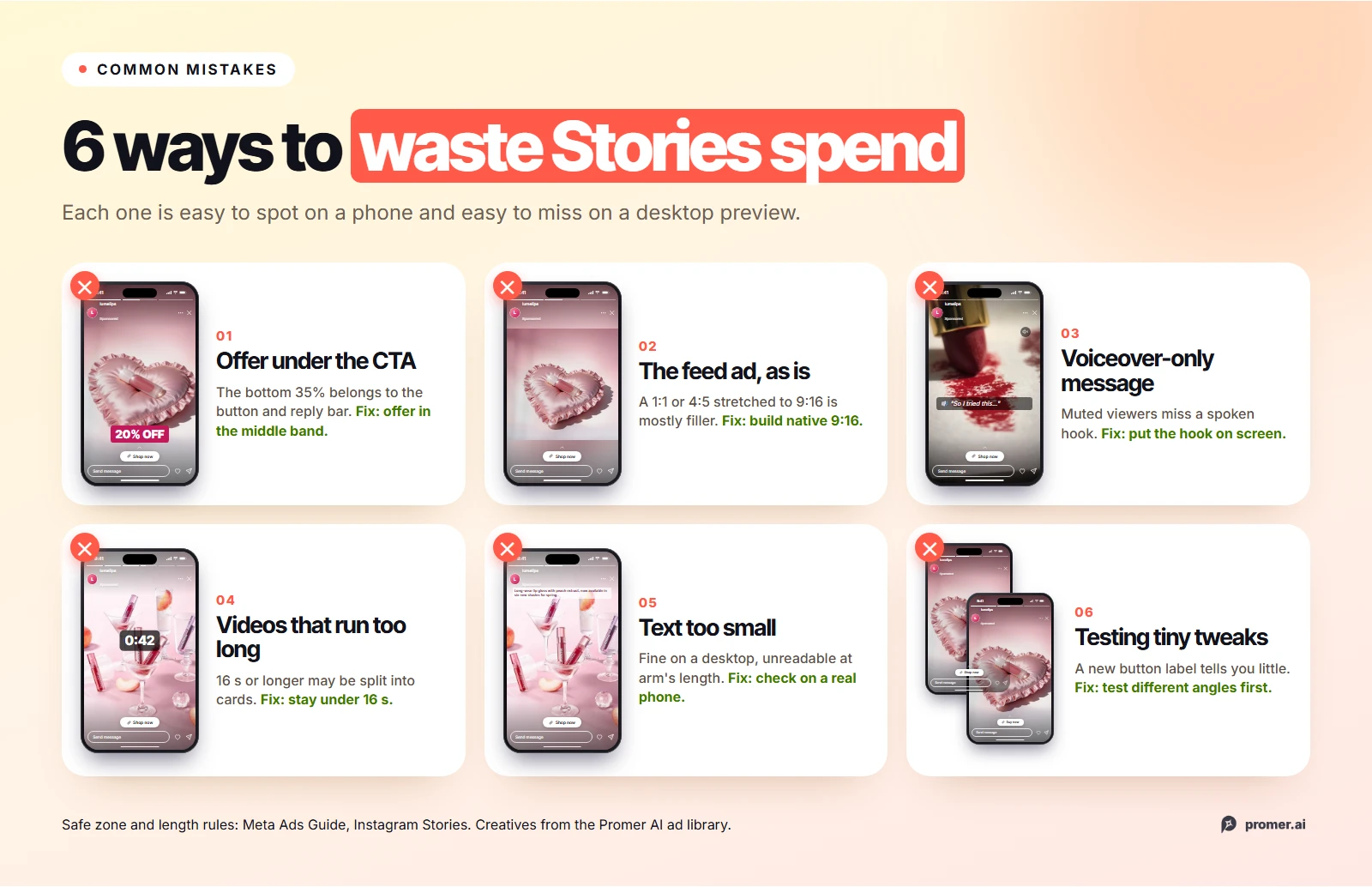
- Putting the offer at the bottom of the frame: The bottom 35% is where the call-to-action button and reply area sit. A discount placed there is partly or fully covered.
- Running the feed ad in Stories as is: A 1:1 or 4:5 creative stretched to 9:16 leaves the product small and the frame mostly filler.
- Relying on voiceover for the message: Viewers with the sound off see only the visuals. If the hook is spoken, not written, they miss it.
- Making videos that are too long: Videos of 16 seconds or longer may be split into cards, and not every viewer sees every card.
- Small text: Text that reads fine on a desktop preview is too small on a phone held at arm's length. Check on an actual phone.
- Testing only small variations: Changing the button color or the background tells you little. Test different angles first, then refine the winner.
FAQs about making Instagram Story ads
What size should an Instagram Story ad be?
Use a 9:16 vertical ratio. Meta recommends 1440 x 2560 pixels, and 1080 x 1920 is the common working size. Keep text and logos out of the top 14%, the bottom 35%, and 6% on each side.
How long can an Instagram Story ad be?
Image Story ads show for 5 to 16 seconds, or until the viewer moves on. Video can run from 1 second to 60 minutes, but videos under 16 seconds play in full, while longer ones may be split into up to three cards. For most product ads, 15 seconds or less works best.
Can I make Instagram Story ads directly in the Instagram app?
Instagram lets you boost some content from the app, but full Story ad campaigns are built in Meta Ads Manager. Ads Manager gives you control over placements, lets you upload a separate 9:16 file for Stories, and makes it easier to test several creatives at once.
Should Instagram Story ads be images or videos?
Both work. Video or a lightly animated image usually holds attention better in Stories, while a strong static image is faster to produce and test. A common approach is to test angles with static Story ads first, then animate the winner.
Do Instagram Story ads need sound?
No. Meta lists sound as optional but recommended. Design the ad so it makes sense on mute, with the hook and offer in on-screen text, and treat music or voiceover as extra.
Can AI make Instagram Story ads?
Yes. AI ad tools can generate 9:16 creatives from a product URL or image, suggest angles and hooks, and animate a static ad into a short video. Review every output before running it, since AI-generated creatives can include mistakes, and check the layout in the Instagram Stories preview.
Summary
Making Instagram Story ads comes down to respecting the format. Build in 9:16 from the start, keep the product, headline, and offer inside the central 45% of the screen, write a hook that works with the sound off, and keep video under 16 seconds so it plays in full.
Start with one angle per Story, use the hook, proof, and offer structure when you have the time for motion, and test different ideas rather than small variations. If you want to go from a product link to Story-ready creatives without a designer, an AI advertisement generator can handle the concepts, the 9:16 layouts, and the animation, while you decide which ideas are worth the spend.
Sources
- Meta Business Help Center: Instagram Stories image ad specifications - https://www.facebook.com/business/ads-guide/update/image/instagram-story - accessed 2026-11-05
- Meta Business Help Center: Instagram Stories video ad specifications - https://www.facebook.com/business/ads-guide/update/video/instagram-story - accessed 2026-11-05