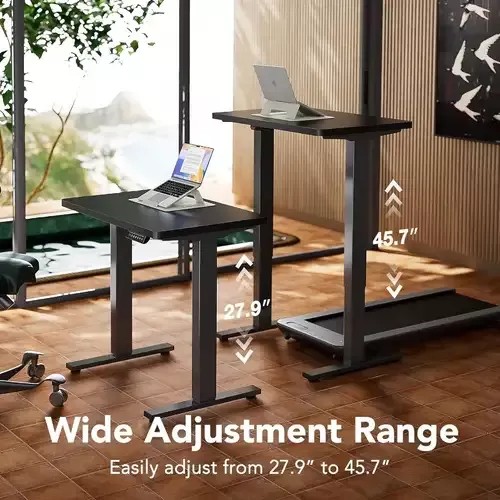
This creative displays two height levels for a black standing desk, effectively communicating the wide adjustment range through a clear visual comparison.

Standing Desk Height Adjustment Feature

This creative displays two height levels for a black standing desk, effectively communicating the wide adjustment range through a clear visual comparison.

Ad Details
Style
Feature & Benefit
Format
1:1
Industry
Electronics
Platforms
Facebook · Instagram
Language
English
Clone this ad with AI

Free credits included. No card required

Why this ad works

The standing desk is presented through a clear visual comparison that anchors on functional capability rather than abstract design. By using a split-level height demonstration to highlight the 27.9-inch to 45.7-inch range, the creative immediately answers the user's primary concern regarding utility and flexibility.

This structure works because it removes the guesswork for the customer, allowing them to visualize the product's fit in their own space. Using Promer AI to analyze such high-converting visual demonstrations helps teams replicate this pattern of prioritizing objective specifications over complex marketing copy.

The winning ingredients

  • Dual-Height Visual The 1:1 image uses a side-by-side display to show the product at its lowest and highest settings simultaneously.
  • Clear Metric Callout Overlaying the specific 27.9-inch and 45.7-inch measurements directly on the desk legs provides instant, verifiable proof of the product feature.
  • Clean Studio Background The neutral, high-end professional environment ensures that the hardware remains the primary focus of the consumer's gaze.
A winning creative should perform the work of a spec sheet through a single, unmistakable visual hook.

How to make it yours

  1. Start by initiating an AI Ad Clone to import the structure and layout logic from this specific desk example.
  2. Paste your product URL so that the system can intelligently swap the standing desk for your item while maintaining the brand colors and logo.
  3. Refine the copy to highlight your product's specific height or width metrics, select the 1:1 ratio, and generate high-performing variations.

Pro tip

When showcasing physical dimensions, pair your numbers with arrows or directional indicators as seen here. This guides the viewer's eye along the vertical axis, creating a more intuitive understanding of the adjustment range.


Vantrue N4S Feature Showcase
Adjustable Tripod Stand Feature Highlight
Digitek DTR-525 SS Tripod Offer
Sigma fp Deconstruction
Minimalist Camera Filter Reveal
Capture Every Moment Phone Tripod Ad
Capture Every Moment Phone Tripod Creative
Compact Tripod Feature Breakdown
High-Definition Baby Monitor Close-Up
Sleep Peacefully with Nanit
EOS R6 V Product Hero Shot
Camera Spotlight Hero
Enhance Your Travel Photography
Digitek Tripod Offer Creative
X-GO Carbon E Professional Tripod Spec Sheet
Everyday Filter Product Showcase
Baby Monitor Battery Comparison
CCTV Surveillance Direct Benefit Ad
Split View Baby Monitor Feature Showcase
K&F Concept Lens Filter Product Display

Your next winning adis already out there.

Promer helps you find the pattern, adapt it to your product, and create your own version in minutes.


Free credits included
No credit card required
Ship in minutes.




















