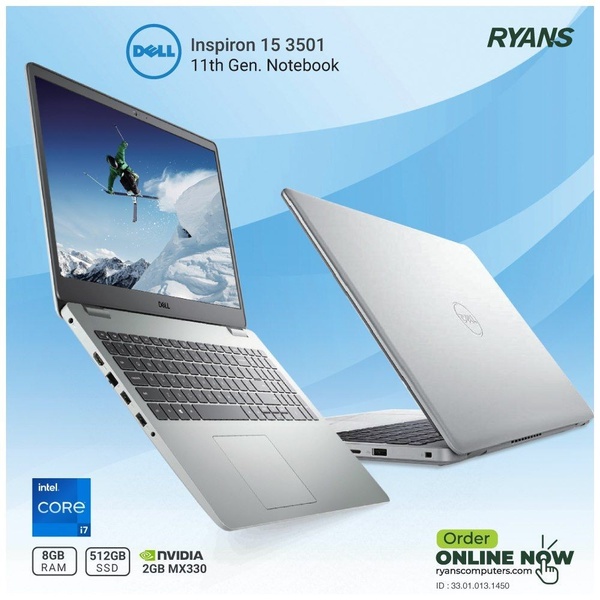
A high-clarity 1:1 square graphic featuring the Dell Inspiron 15 3501 notebook shown from both front-open and rear-closed angles against a clean blue gradient background.

Dell Inspiron 15 3501 Dual-Angle Product Display

A high-clarity 1:1 square graphic featuring the Dell Inspiron 15 3501 notebook shown from both front-open and rear-closed angles against a clean blue gradient background.

Ad Details
Style
Feature & Benefit
Format
1:1
Industry
Electronics
Platforms
Facebook · Instagram
Language
English
Clone this ad with AI

Free credits included. No card required

Why this ad works

This laptop ad creative succeeds by leveraging a dual-view composition that instantly communicates both the physical design and screen quality of the device. By displaying the unit from both an open and closed perspective, the brand maximizes the informational density of the square frame without cluttering the layout, effectively positioning the device as both a functional tool and a sleek accessory.

Designers at Promer AI recognize that for electronics, viewers often need to verify both hardware aesthetic and screen interface simultaneously. This professional approach uses a clean blue-to-white gradient to draw the eye toward the hardware highlights, ensuring that the critical specs like RAM and SSD remain legible. When using this pattern, ensure the contrast between the hardware finish and the background is high to prevent the subject from blending into the creative.

The winning ingredients

  • Dual-view composition The 1:1 frame utilizes two distinct product angles to showcase both the exterior shell and the active screen interface simultaneously.
  • High-contrast background The soft blue-to-white gradient creates a clean, airy environment that emphasizes the silver finish of the notebook without distracting from the core subject.
  • Focused spec hierarchy Core technical specifications are placed at the bottom in clear, badge-style layouts, allowing potential customers to identify key hardware capabilities in a single glance.
A high-performing product display relies on showing the customer exactly what they get from multiple angles within the first few seconds of exposure.

How to make it yours

  1. Start a new project by initiating an AI Ad Clone to import your product imagery and replicate the multi-angle structure.
  2. Paste your product URL into the generator so that it can swap the branding, logo, and color scheme while maintaining the professional studio-quality look.
  3. Rewrite the technical specifications to match your specific hardware and generate several variations to test which layout best highlights your most important features.

Pro tip

When showcasing hardware in a 1:1 aspect ratio, always maintain a consistent color palette between the device and the background. Using a slight gradient helps break up the monotony of a flat background while keeping the focus squarely on the product's premium build.


Vantrue N4S Feature Showcase
Adjustable Tripod Stand Feature Highlight
Digitek DTR-525 SS Tripod Offer
Sigma fp Deconstruction
Minimalist Camera Filter Reveal
Capture Every Moment Phone Tripod Ad
Capture Every Moment Phone Tripod Creative
Compact Tripod Feature Breakdown
High-Definition Baby Monitor Close-Up
Sleep Peacefully with Nanit
EOS R6 V Product Hero Shot
Camera Spotlight Hero
Enhance Your Travel Photography
Digitek Tripod Offer Creative
X-GO Carbon E Professional Tripod Spec Sheet
Everyday Filter Product Showcase
Baby Monitor Battery Comparison
CCTV Surveillance Direct Benefit Ad
Split View Baby Monitor Feature Showcase
K&F Concept Lens Filter Product Display

Your next winning adis already out there.

Promer helps you find the pattern, adapt it to your product, and create your own version in minutes.


Free credits included
No credit card required
Ship in minutes.




















