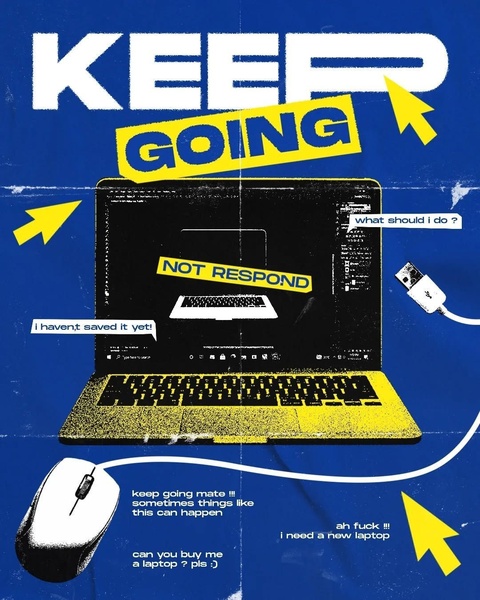
A creative visual showing a crashed laptop screen with a 'Not Respond' error, using humor to address the common pain point of technical failure.

Keep Going - Laptop Error

A creative visual showing a crashed laptop screen with a 'Not Respond' error, using humor to address the common pain point of technical failure.

Ad Details
Style
Bold Claim
Format
4:5
Industry
Electronics
Platforms
Instagram Feed · Facebook Feed
Language
English
Clone this ad with AI

Free credits included. No card required

Why this ad works

This creative uses a high-contrast, distressed visual style to turn a common pain point into an immediate hook for a laptop. By showcasing a relatable 'Not Respond' error screen, it taps into the instant frustration of the viewer, effectively stopping the scroll with a problem the user immediately recognizes as their own. This approach leverages emotional resonance to build an instant connection between the product and the audience.

For most ecommerce teams, this pattern works because it prioritizes the user's struggle over generic product features, making the brand feel human and understanding. You can replicate this strategic framing through Promer AI, which allows you to test similar pain-point-driven concepts for your own product category without needing extensive design resources.

The winning ingredients

  • Relatable Pain Point The ad uses a universally recognized 'Not Respond' error screen on a laptop to create an immediate sense of urgency and frustration.
  • High Contrast Palette The use of bold yellow against a deep blue background ensures high visibility and helps the central visual pop in a crowded feed.
  • Conversational Copy The text overlay balances professional frustration with casual, human-sounding phrases like 'keep going mate' to build rapport.
  • Text-Heavy Design By placing multiple directional arrows and status updates around the product, the ad forces the viewer's eye to traverse the entire creative.
Great ads start from an idea, a feeling, or a structure, not a blank design.

How to make it yours

  1. Start by initializing an AI Ad Clone to import the existing layout, ensuring your new ad maintains the same high-performing visual hierarchy as the original.
  2. Input your product URL so that the platform can intelligently swap the laptop visual and apply your specific brand colors and logo assets to the template.
  3. Rewrite the copy to match your unique brand voice, select the 4:5 ratio for optimal feed performance, and generate multiple design variations to test.

Pro tip

When using a high-frustration hook like this, ensure your primary solution follows immediately in the headline or the very first sentence. If the hook is too distracting without a clear, fast transition to your product benefit, you risk building frustration rather than solving it.


Vantrue N4S Feature Showcase
Adjustable Tripod Stand Feature Highlight
Digitek DTR-525 SS Tripod Offer
Sigma fp Deconstruction
Minimalist Camera Filter Reveal
Capture Every Moment Phone Tripod Ad
Capture Every Moment Phone Tripod Creative
Compact Tripod Feature Breakdown
High-Definition Baby Monitor Close-Up
Sleep Peacefully with Nanit
EOS R6 V Product Hero Shot
Camera Spotlight Hero
Enhance Your Travel Photography
Digitek Tripod Offer Creative
X-GO Carbon E Professional Tripod Spec Sheet
Everyday Filter Product Showcase
Baby Monitor Battery Comparison
CCTV Surveillance Direct Benefit Ad
Split View Baby Monitor Feature Showcase
K&F Concept Lens Filter Product Display

Your next winning adis already out there.

Promer helps you find the pattern, adapt it to your product, and create your own version in minutes.


Free credits included
No credit card required
Ship in minutes.




















