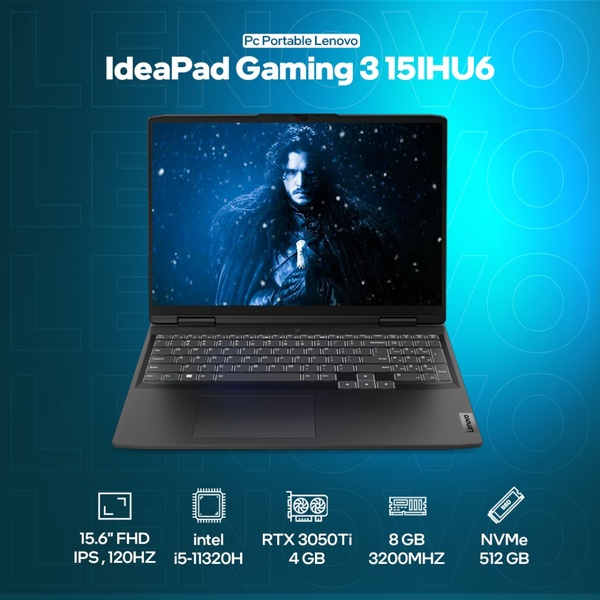
A clean, technical specification display for a gaming laptop, using a high-contrast blue gradient background to make core hardware features pop.

IdeaPad Gaming 3 15IHU6 Feature Overlay

A clean, technical specification display for a gaming laptop, using a high-contrast blue gradient background to make core hardware features pop.

Ad Details
Style
Feature & Benefit
Format
1:1
Industry
Electronics
Platforms
Facebook · Instagram · Display Networks
Language
English
Clone this ad with AI

Free credits included. No card required

Why this ad works

This gaming laptop creative relies on a high-contrast, data-dense layout that treats technical specifications as the primary visual hook. By stripping away clutter and focusing on the core hardware stats, the ad communicates value to a technical audience who prefers specs over emotional messaging. This structure works because it removes cognitive load, allowing users to instantly parse the value proposition of the hardware.

For most performance teams, this approach creates clarity for high-intent shoppers who know exactly what technical requirements they need. Promer AI provides a structured environment to replicate this professional look without the need for manual design changes, ensuring brand consistency across your entire product line.

The winning ingredients

  • Technical Iconography The use of simplified white line icons for CPU, GPU, and memory allows viewers to digest complex technical details at a glance.
  • High-Contrast Gradient The navy to cyan gradient background creates a premium tech-aesthetic that draws the eye directly toward the centered product.
  • Clear Hierarchy By placing the model name at the top and critical hardware specs at the bottom, the creative establishes a logical path for the eye to follow.
A powerful product ad starts from a clear, structured presentation of the features that your ideal customer values most.

How to make it yours

  1. Begin by selecting the AI Ad Clone tool to mirror the clean layout and technical aesthetic of this winning creative.
  2. Paste your product URL so that the system automatically extracts your specifications and applies your unique brand colors and logo.
  3. Refine the technical copy to highlight your product's specific advantages, select your preferred aspect ratio, and generate variations for testing.

Pro tip

When creating a tech-spec ad, ensure your icons are uniform in line weight and size. This consistency prevents the visual fatigue that often happens when cramming too many technical labels into a single 1:1 image.


Vantrue N4S Feature Showcase
Adjustable Tripod Stand Feature Highlight
Digitek DTR-525 SS Tripod Offer
Sigma fp Deconstruction
Minimalist Camera Filter Reveal
Capture Every Moment Phone Tripod Ad
Capture Every Moment Phone Tripod Creative
Compact Tripod Feature Breakdown
High-Definition Baby Monitor Close-Up
Sleep Peacefully with Nanit
EOS R6 V Product Hero Shot
Camera Spotlight Hero
Enhance Your Travel Photography
Digitek Tripod Offer Creative
X-GO Carbon E Professional Tripod Spec Sheet
Everyday Filter Product Showcase
Baby Monitor Battery Comparison
CCTV Surveillance Direct Benefit Ad
Split View Baby Monitor Feature Showcase
K&F Concept Lens Filter Product Display

Your next winning adis already out there.

Promer helps you find the pattern, adapt it to your product, and create your own version in minutes.


Free credits included
No credit card required
Ship in minutes.




















