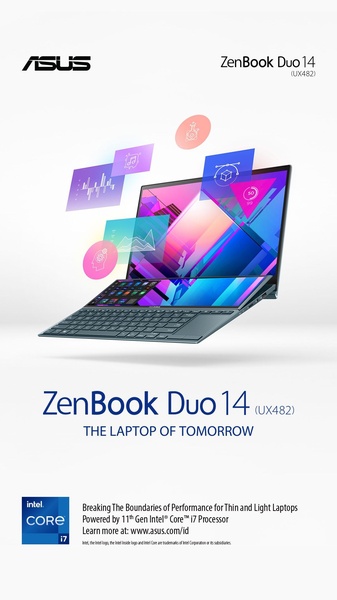
An aesthetic product showcase featuring a dual-screen laptop surrounded by floating digital workspace icons against a clean white background.

ZenBook Duo 14 Dual-Screen Display

An aesthetic product showcase featuring a dual-screen laptop surrounded by floating digital workspace icons against a clean white background.

Ad Details
Style
Feature & Benefit
Format
9:16
Industry
Electronics
Platforms
Instagram Stories · Facebook Stories · TikTok
Language
English
Clone this ad with AI

Free credits included. No card required

Why this ad works

This ad creative utilizes a floating UI design to highlight the multitasking capabilities of this dual-screen laptop. By isolating the device in a clean white space and surrounding it with vibrant digital icons, the brand immediately signals that this hardware is designed for complex, creative, and professional workflows without requiring long-form text. In most cases, visually exploding the product components creates a sense of sophistication and cutting-edge innovation. Promer AI empowers you to replicate this structured approach by automating the separation and presentation of your own product features within a clean digital environment. This modular style typically performs well because it removes visual friction, allowing the viewer to grasp the primary benefit of the hardware in a single, well-composed glance.

The winning ingredients

  • Floating Component Layout The design features floating digital icons that visually represent the laptop's various performance functions and multitasking capabilities.
  • Minimalist White Space The stark white background minimizes distractions and forces the viewer to focus entirely on the product design and its unique dual-screen architecture.
  • Vibrant Color Accents Using purple and blue gradients in the floating UI icons creates a high-contrast focal point that catches the eye during rapid scrolling.
Great ads start from a structured visual language that clearly maps a product's unique features to the customer's desired outcome.

How to make it yours

  1. Start by using AI Ad Clone to import a high-quality, transparent background image of your product to mirror this minimalist layout.
  2. Input your product URL so that Promer AI can automatically analyze your brand assets, swap your product imagery, and align the composition with your specific brand colors.
  3. Refine the generated copy to emphasize your key selling points, adjust for the 9:16 vertical ratio, and generate variations to test different UI icon placements.

Pro tip

When creating a visual explosion hook, ensure that your floating elements align with specific user pain points. Instead of random icons, use visuals that directly represent software or tasks your core audience uses every day to make the product feel indispensable.


Vantrue N4S Feature Showcase
Adjustable Tripod Stand Feature Highlight
Digitek DTR-525 SS Tripod Offer
Sigma fp Deconstruction
Minimalist Camera Filter Reveal
Capture Every Moment Phone Tripod Ad
Capture Every Moment Phone Tripod Creative
Compact Tripod Feature Breakdown
High-Definition Baby Monitor Close-Up
Sleep Peacefully with Nanit
EOS R6 V Product Hero Shot
Camera Spotlight Hero
Enhance Your Travel Photography
Digitek Tripod Offer Creative
X-GO Carbon E Professional Tripod Spec Sheet
Everyday Filter Product Showcase
Baby Monitor Battery Comparison
CCTV Surveillance Direct Benefit Ad
Split View Baby Monitor Feature Showcase
K&F Concept Lens Filter Product Display

Your next winning adis already out there.

Promer helps you find the pattern, adapt it to your product, and create your own version in minutes.


Free credits included
No credit card required
Ship in minutes.




















