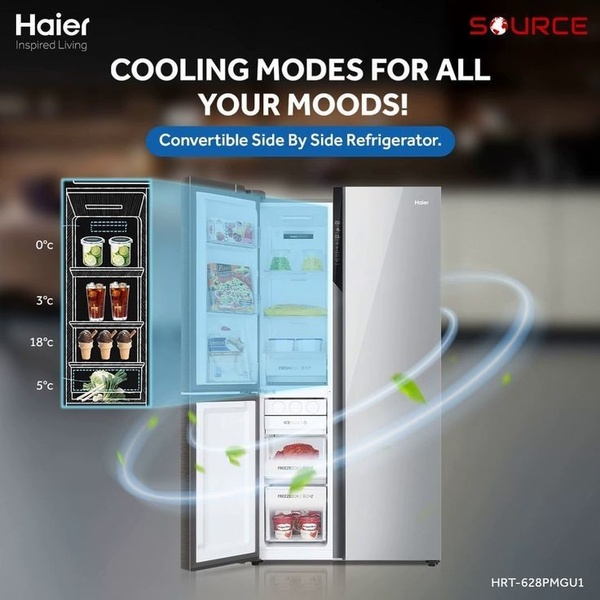
A split-view product demonstration highlighting internal temperature zones and cooling modes for a side-by-side refrigerator.

Haier Convertible Side-by-Side Refrigerator Feature Showcase

A split-view product demonstration highlighting internal temperature zones and cooling modes for a side-by-side refrigerator.

Ad Details
Style
Feature & Benefit
Format
1:1
Industry
Electronics
Platforms
Facebook · Instagram · LinkedIn
Language
English
  • Electronics
  • Fridge
  • Refrigerator
  • Split-view layout
  • Technical illustration
  • Minimalist aesthetic
  • 1:1
Clone this ad with AI

Free credits included. No card required

Why this ad works

This refrigerator ad succeeds by translating complex internal technical specs into a highly digestible visual format. The split-view design provides immediate clarity on temperature control zones, turning abstract technical features into tangible user benefits. By mapping specific cooling temperatures directly to product shelving, the brand reduces cognitive load for customers evaluating a high-ticket appliance.

For most home appliance brands, clear visualization beats technical jargon. Utilizing Promer AI to structure your product assets in a similar split-view layout can help focus attention on core value drivers. This approach allows potential buyers to see exactly how their specific usage habits align with your product's capabilities before they even read a line of copy.

The winning ingredients

  • Split-view Layout The creative uses a dual-view approach to show the exterior product alongside a detailed schematic of internal cooling zones.
  • Data Visualization Clearly labeling temperatures like 0°C and 3°C anchors the technical claims in hard, verifiable data.
  • Color Palette The use of cool blue tones reinforces the refrigerator's function, creating a cohesive visual link between the product and its primary benefit.
Great ads start from a visual logic that makes complex features feel simple and intuitive for the end-user.

How to make it yours

  1. Use the AI Ad Clone tool to input your product and establish the structural framework of this split-view layout.
  2. Upload your product image to allow the platform to automatically segment your key features into the corresponding overlay zones.
  3. Refine the technical copy to highlight your specific unique value propositions, choose your platform-appropriate ratio, and generate high-performing variations.

Pro tip

When creating a technical schematic for your product, keep the annotations minimal to avoid overwhelming the viewer. Ensure the text is large enough to be legible on mobile, as this ad type often relies heavily on the quality of the technical callouts.


Vantrue N4S Feature Showcase
Adjustable Tripod Stand Feature Highlight
Digitek DTR-525 SS Tripod Offer
Sigma fp Deconstruction
Minimalist Camera Filter Reveal
Capture Every Moment Phone Tripod Ad
Capture Every Moment Phone Tripod Creative
Compact Tripod Feature Breakdown
High-Definition Baby Monitor Close-Up
Sleep Peacefully with Nanit
EOS R6 V Product Hero Shot
Camera Spotlight Hero
Enhance Your Travel Photography
Digitek Tripod Offer Creative
X-GO Carbon E Professional Tripod Spec Sheet
Everyday Filter Product Showcase
Baby Monitor Battery Comparison
CCTV Surveillance Direct Benefit Ad
Split View Baby Monitor Feature Showcase
K&F Concept Lens Filter Product Display

Your next winning adis already out there.

Promer helps you find the pattern, adapt it to your product, and create your own version in minutes.


Free credits included
No credit card required
Ship in minutes.




















