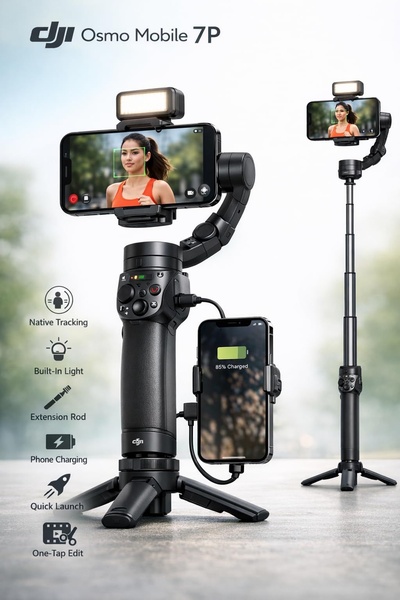
A high-clarity product visual displaying a smartphone stabilizer with a secondary phone attached, highlighting six distinct technical features through clear icons and labels.

Osmo Mobile 7P Feature Breakdown

A high-clarity product visual displaying a smartphone stabilizer with a secondary phone attached, highlighting six distinct technical features through clear icons and labels.

Ad Details
Style
Feature & Benefit
Format
3:4
Industry
Electronics
Platforms
Facebook · Instagram
Language
English
Clone this ad with AI

Free credits included. No card required

Why this ad works

This ad works by pairing a crisp, professional product shot of the smartphone stabilizer with a systematic list of six core features. The visual hierarchy forces the viewer to process the utility of the hardware before evaluating the price or brand. By using clear, identifiable icons next to technical claims, the creative reduces cognitive load and allows the customer to quickly understand how the device solves common filming frustrations.

For most ecommerce teams, this structured approach is highly effective because it treats the product as a solution rather than an abstract object. Using Promer AI to replicate this type of educational layout can help clarify complex hardware benefits, which typically leads to higher engagement from users who are in the middle or bottom of your sales funnel.

The winning ingredients

  • Icon-Led Feature List The left-hand side provides six distinct, easily scannable benefit markers that immediately inform the user of the device's technical capabilities.
  • Functional Context Showing the stabilizer in active use with a phone attached effectively bridges the gap between hardware and real-world application.
  • High-Contrast Palette The use of black and white tones ensures the stabilizer remains the visual hero, keeping the viewer's focus on the product itself.
Effective product ads succeed when they simplify complex functionality into an easily scannable, visual story.

How to make it yours

  1. Start a new AI Ad Clone session to match the visual layout of this feature-focused creative.
  2. Paste your product URL so the platform can automatically identify your product, swap the brand assets, and generate a new visual shell.
  3. Refine the specific technical labels to highlight your unique selling points, select the 2:3 vertical ratio, and generate variations.

Pro tip

When showcasing hardware, use icons that correspond directly to the most frequent customer pain points discovered in your support tickets. This ensures your feature breakdown is framed as a solution rather than just a list of specifications.


Vantrue N4S Feature Showcase
Adjustable Tripod Stand Feature Highlight
Digitek DTR-525 SS Tripod Offer
Sigma fp Deconstruction
Minimalist Camera Filter Reveal
Capture Every Moment Phone Tripod Ad
Capture Every Moment Phone Tripod Creative
Compact Tripod Feature Breakdown
High-Definition Baby Monitor Close-Up
Sleep Peacefully with Nanit
EOS R6 V Product Hero Shot
Camera Spotlight Hero
Enhance Your Travel Photography
Digitek Tripod Offer Creative
X-GO Carbon E Professional Tripod Spec Sheet
Everyday Filter Product Showcase
Baby Monitor Battery Comparison
CCTV Surveillance Direct Benefit Ad
Split View Baby Monitor Feature Showcase
K&F Concept Lens Filter Product Display

Your next winning adis already out there.

Promer helps you find the pattern, adapt it to your product, and create your own version in minutes.


Free credits included
No credit card required
Ship in minutes.




















