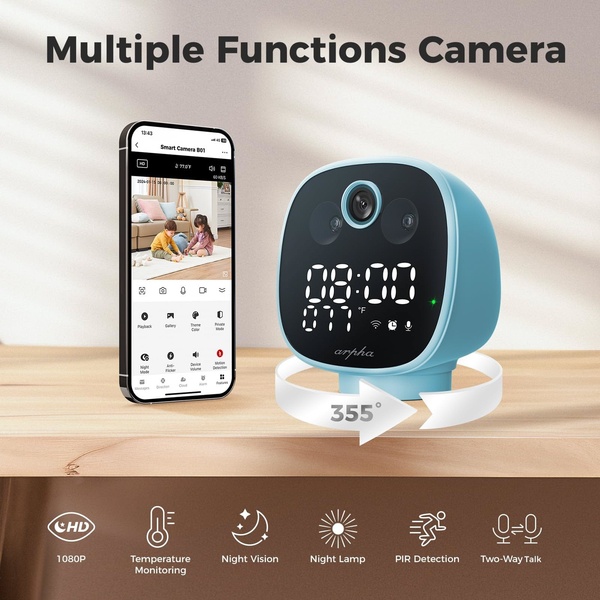
This creative demonstrates a smart camera's capabilities by placing the hardware alongside its app interface, highlighting key features like night vision and temperature monitoring.

Smart Camera Multi-Function Display

This creative demonstrates a smart camera's capabilities by placing the hardware alongside its app interface, highlighting key features like night vision and temperature monitoring.

Ad Details
Style
Feature & Benefit
Format
1:1
Industry
Electronics
Platforms
Facebook · Instagram
Language
English
Clone this ad with AI

Free credits included. No card required

Why this ad works

This smart camera creative succeeds by utilizing a split-screen visual structure that bridges the gap between hardware and software experience. By showcasing the device alongside its mobile application interface, the viewer instantly perceives the control and functionality they gain upon purchase, effectively lowering the barrier to understanding complex tech products. The clean background and professional lighting ensure that the device remains the focal point while the key features are clearly indexed at the bottom for quick consumption.

Visual clarity in technical marketing is the key to maintaining audience interest, as it reduces cognitive load for potential customers. Using Promer AI to standardize this layout allows advertisers to replicate professional high-conversion assets without needing deep design expertise. This pattern is particularly effective for hardware in the home security category where users demand both aesthetic appeal and proven technical performance.

The winning ingredients

  • Dual-focus framing The ad pairs a 3D product render of the smart camera with its corresponding mobile app interface to provide a comprehensive look at the ecosystem.
  • Iconographic feature list A row of clear icons at the bottom visually highlights 1080p, night vision, and two-way talk features, ensuring critical information is visible without reading walls of text.
  • Rotational visualization An arrow graphic wrapped around the base of the camera suggests 355-degree motion, intuitively explaining the product's range of motion without the need for video.
Effective product ads communicate value by layering the physical device experience with the digital user interface in one cohesive glance.

How to make it yours

  1. Start an AI Ad Clone and upload your product's high-resolution images to match this professional studio style.
  2. Paste your product URL so our AI engine can swap the hardware, brand colors, and logo automatically.
  3. Rewrite the feature copy to reflect your unique value proposition, select your preferred aspect ratio, and generate multiple creative variations.

Pro tip

When showcasing smart home devices, always emphasize the app integration as much as the physical hardware. Customers are buying a digital experience as much as a physical object, so ensure your mobile UI screenshots are as high-quality as your product shots.


Vantrue N4S Feature Showcase
Adjustable Tripod Stand Feature Highlight
Digitek DTR-525 SS Tripod Offer
Sigma fp Deconstruction
Minimalist Camera Filter Reveal
Capture Every Moment Phone Tripod Ad
Capture Every Moment Phone Tripod Creative
Compact Tripod Feature Breakdown
High-Definition Baby Monitor Close-Up
Sleep Peacefully with Nanit
EOS R6 V Product Hero Shot
Camera Spotlight Hero
Enhance Your Travel Photography
Digitek Tripod Offer Creative
X-GO Carbon E Professional Tripod Spec Sheet
Everyday Filter Product Showcase
Baby Monitor Battery Comparison
CCTV Surveillance Direct Benefit Ad
Split View Baby Monitor Feature Showcase
K&F Concept Lens Filter Product Display

Your next winning adis already out there.

Promer helps you find the pattern, adapt it to your product, and create your own version in minutes.


Free credits included
No credit card required
Ship in minutes.




















