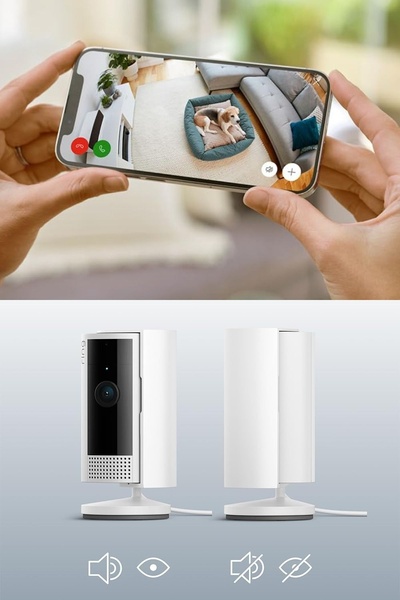
This creative displays a side-by-side view of a smartphone app interface and the security camera device, highlighting the ease of remote observation.

Dual-Perspective Remote Monitoring

This creative displays a side-by-side view of a smartphone app interface and the security camera device, highlighting the ease of remote observation.

Ad Details
Style
Feature & Benefit
Format
3:4
Industry
Electronics
Platforms
Instagram · Facebook
Language
English
Clone this ad with AI

Free credits included. No card required

Why this ad works

The use of a security camera in this ad relies on a split-screen visual narrative that bridges the gap between the device and the end-user experience. By showing the physical product alongside the mobile application view, the creative immediately validates the convenience and reliability of the monitor for the viewer. This structure reduces friction by answering the most common user question: how does the camera appear on my phone?

This pattern works effectively for hardware products because it visualizes the functional benefit rather than just the physical build. By utilizing Promer AI to replicate this dual-layout strategy, advertisers can demonstrate product integration seamlessly, which typically builds significantly more trust than traditional static product photography.

The winning ingredients

  • Dual-Screen Visuals The ad pairs the smartphone app interface with the hardware device to show a complete product ecosystem in a single 2:3 frame.
  • Clean Color Palette The dominant use of white and neutral tones creates a sense of reliability and cleanliness, which is a common psychological preference in home monitoring.
  • Clear Use Case The image clearly shows the product being used to watch a pet, which immediately signals the primary benefit and target audience.
Great ads start from an idea, a feeling, or a structure, not a blank design.

How to make it yours

  1. Start an AI Ad Clone to import the layout of this split-screen comparison and establish the visual hierarchy for your product.
  2. Paste your product URL so the AI platform can automatically swap the original camera for your product, update the brand colors, and integrate your specific logo.
  3. Edit the headlines to highlight your specific app features, adjust the ratio to fit your preferred social placement, and generate variations for A/B testing.

Pro tip

When using a visual comparison hook, ensure the mobile screen reflects a high-utility scenario that triggers an emotional response, such as pet safety or home peace of mind. This keeps the technical product feature grounded in a relatable, everyday benefit for the customer.


Vantrue N4S Feature Showcase
Adjustable Tripod Stand Feature Highlight
Digitek DTR-525 SS Tripod Offer
Sigma fp Deconstruction
Minimalist Camera Filter Reveal
Capture Every Moment Phone Tripod Ad
Capture Every Moment Phone Tripod Creative
Compact Tripod Feature Breakdown
High-Definition Baby Monitor Close-Up
Sleep Peacefully with Nanit
EOS R6 V Product Hero Shot
Camera Spotlight Hero
Enhance Your Travel Photography
Digitek Tripod Offer Creative
X-GO Carbon E Professional Tripod Spec Sheet
Everyday Filter Product Showcase
Baby Monitor Battery Comparison
CCTV Surveillance Direct Benefit Ad
Split View Baby Monitor Feature Showcase
K&F Concept Lens Filter Product Display

Your next winning adis already out there.

Promer helps you find the pattern, adapt it to your product, and create your own version in minutes.


Free credits included
No credit card required
Ship in minutes.




















