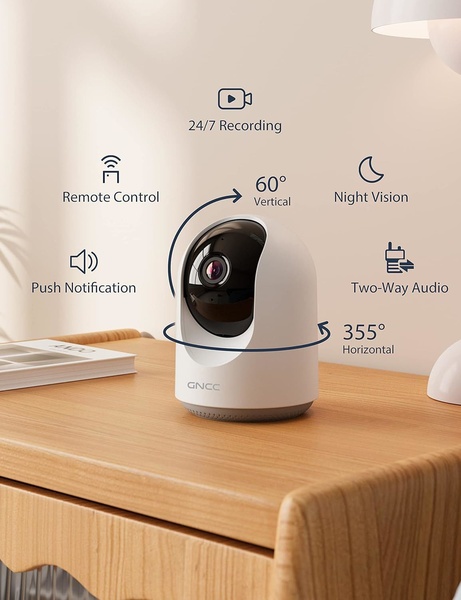
A clean, studio-lit shot of a security camera on a wooden desk, using clear icons and arrows to annotate key technical features like two-way audio and night vision.

Security Camera Feature Visualization

A clean, studio-lit shot of a security camera on a wooden desk, using clear icons and arrows to annotate key technical features like two-way audio and night vision.

Ad Details
Style
Feature & Benefit
Format
3:4
Industry
Electronics
Platforms
Instagram · Facebook
Language
English
Clone this ad with AI

Free credits included. No card required

Why this ad works

This security camera ad leverages a minimalist studio aesthetic to build immediate trust, using clean line-art icons to annotate core features. By isolating the hardware on a neutral surface and connecting its physical capabilities directly to the device via arrows, this approach removes cognitive load for the viewer.

This structure works for most ecommerce teams because it presents complex technical specifications in a digestible, scannable format. Using Promer AI allows you to rapidly create similar high-trust, feature-led product visuals that clearly communicate your value proposition without cluttering the frame.

The winning ingredients

  • Minimalist Product Staging The camera is centered in a clean, high-key studio environment to minimize distractions.
  • Logical Feature Mapping Clear icons paired with short, descriptive text blocks help users identify key benefits like 24/7 recording and night vision instantly.
  • Visual Directional Cues The circular rotational arrow effectively demonstrates the 355-degree horizontal and 60-degree vertical range of motion.
Great ads translate product specifications into immediate user benefits through visual clarity and intuitive graphic design.

How to make it yours

  1. Start by initiating an AI Ad Clone to mirror the clean, feature-annotated layout of this high-performing creative.
  2. Paste your product URL so that the system can automatically replace the camera with your hardware, detect your brand colors, and apply your logo.
  3. Refine the annotation labels to match your specific product benefits, select a 3:4 ratio for optimal mobile viewing, and generate your custom variations.

Pro tip

When building technical annotations, ensure that the icons have consistent line weights to match the visual style of your product. This prevents the graphic overlays from feeling like an afterthought and keeps the entire ad looking like a cohesive professional render.


Vantrue N4S Feature Showcase
Adjustable Tripod Stand Feature Highlight
Digitek DTR-525 SS Tripod Offer
Sigma fp Deconstruction
Minimalist Camera Filter Reveal
Capture Every Moment Phone Tripod Ad
Capture Every Moment Phone Tripod Creative
Compact Tripod Feature Breakdown
High-Definition Baby Monitor Close-Up
Sleep Peacefully with Nanit
EOS R6 V Product Hero Shot
Camera Spotlight Hero
Enhance Your Travel Photography
Digitek Tripod Offer Creative
X-GO Carbon E Professional Tripod Spec Sheet
Everyday Filter Product Showcase
Baby Monitor Battery Comparison
CCTV Surveillance Direct Benefit Ad
Split View Baby Monitor Feature Showcase
K&F Concept Lens Filter Product Display

Your next winning adis already out there.

Promer helps you find the pattern, adapt it to your product, and create your own version in minutes.


Free credits included
No credit card required
Ship in minutes.




















