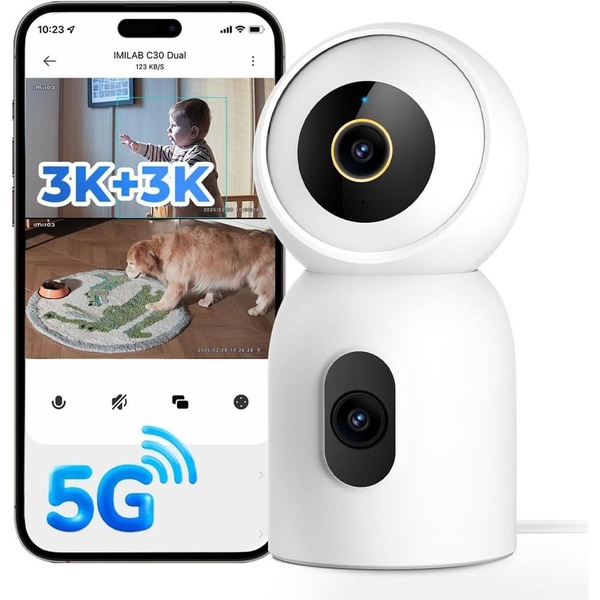
A split-screen creative demonstrating dual-view monitoring capabilities on a mobile device alongside the product hardware.

Dual-View Security Camera Feature Highlight

A split-screen creative demonstrating dual-view monitoring capabilities on a mobile device alongside the product hardware.

Ad Details
Style
Feature & Benefit
Format
1:1
Industry
Electronics
Platforms
Instagram · Facebook
Language
English
Clone this ad with AI

Free credits included. No card required

Why this ad works

This creative focuses on the core utility of a security camera by using a split-screen design that simultaneously showcases the hardware and its actual app interface. By clearly visualizing the dual-view capability, the ad provides immediate proof of function to the viewer without requiring them to read complex technical specifications. This structure allows the user to grasp the value proposition within seconds of scrolling. Using Promer AI allows you to deconstruct such high-performing visual hierarchies and apply them to your own product lineup. This approach typically works well for electronic goods where the software interface is as important as the physical product design, provided the creative remains clean and avoids overwhelming the user with excessive text overlays.

The winning ingredients

  • Split-screen layout The 1:1 ratio uses a vertical split to pair the mobile app interface with the physical hardware, showing exactly how the monitoring works in real-time.
  • High-contrast text The bright blue 3K+3K and 5G indicators stand out against the imagery to highlight the most critical tech specs at a glance.
  • Contextual imagery Using a baby and a pet in the app view creates an emotional connection, demonstrating practical everyday home use cases.
Great ads start from an idea, a feeling, or a structure, not a blank design.

How to make it yours

  1. Start an AI Ad Clone to import the layout structure and identify the key visual focal points from this winning example.
  2. Upload your product photography so the platform can automatically integrate your specific hardware, brand colors, and company logo into the existing frame.
  3. Customize the overlay text to highlight your unique features, choose a ratio that matches your target placement, and generate variations for A/B testing.

Pro tip

When showcasing app interfaces in a physical product ad, ensure the text on the screen remains legible at small sizes. Use clean sans-serif fonts and high-contrast callouts just like this example to prevent visual clutter.


Vantrue N4S Feature Showcase
Adjustable Tripod Stand Feature Highlight
Digitek DTR-525 SS Tripod Offer
Sigma fp Deconstruction
Minimalist Camera Filter Reveal
Capture Every Moment Phone Tripod Ad
Capture Every Moment Phone Tripod Creative
Compact Tripod Feature Breakdown
High-Definition Baby Monitor Close-Up
Sleep Peacefully with Nanit
EOS R6 V Product Hero Shot
Camera Spotlight Hero
Enhance Your Travel Photography
Digitek Tripod Offer Creative
X-GO Carbon E Professional Tripod Spec Sheet
Everyday Filter Product Showcase
Baby Monitor Battery Comparison
CCTV Surveillance Direct Benefit Ad
Split View Baby Monitor Feature Showcase
K&F Concept Lens Filter Product Display

Your next winning adis already out there.

Promer helps you find the pattern, adapt it to your product, and create your own version in minutes.


Free credits included
No credit card required
Ship in minutes.




















