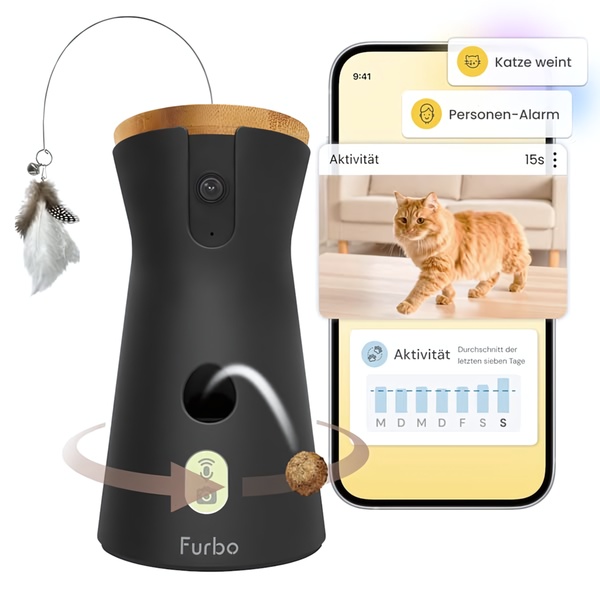
A split-screen composition showing a pet camera device next to a smartphone interface demonstrating real-time pet activity monitoring and treat dispensing.

Furbo Pet Camera Feature Showcase

A split-screen composition showing a pet camera device next to a smartphone interface demonstrating real-time pet activity monitoring and treat dispensing.

Ad Details
Style
Feature & Benefit
Format
1:1
Industry
Electronics
Platforms
Instagram · Facebook
Language
English
Clone this ad with AI

Free credits included. No card required

Why this ad works

This ad works by pairing the physical hardware of the pet camera with its digital interface to bridge the gap between product form and user utility. By placing the device and the app screen side-by-side, the brand creates a visual narrative that immediately demonstrates how the technology solves a specific pain point - knowing what your pet is doing while you are away. Visual clarity drives trust when presenting complex tech features to potential customers.

For most ecommerce teams, this side-by-side structure provides a clean, non-distracting way to educate your audience on core product capabilities. You can replicate this high-converting format easily with Promer AI to showcase your own brand's unique value proposition. This approach is highly effective for any product that relies on a companion app or digital ecosystem to deliver its core benefits.

The winning ingredients

  • Split-screen Layout The 1:1 ratio uses a balanced, side-by-side composition to give equal visual weight to the physical device and the digital app interface.
  • Direct Feature Callouts Floating labels like 'Cat weeps' and 'Person alert' provide instant, at-a-glance information on the smart notification features.
  • Dynamic Action Element The illustration of a treat being dispensed from the device adds a layer of movement and interaction that draws the eye toward the product's primary action.
Great ads start from an idea, a feeling, or a structure, not a blank design.

How to make it yours

  1. Start an AI Ad Clone and select a structure that emphasizes a dual-view or hybrid product-and-interface layout.
  2. Paste your product URL so that the platform swaps the product imagery, brand colors, and logo automatically to match your unique brand identity.
  3. Refine the generated copy to focus on the specific benefits your customers care about most, select the appropriate aspect ratio, and generate your custom variations.

Pro tip

When presenting tech-heavy products, use the interface screen to show the exact 'alert' or 'benefit' screen your customer sees in real-time. This reduces cognitive load and helps the user visualize the benefit without reading a long list of specifications.


Vantrue N4S Feature Showcase
Adjustable Tripod Stand Feature Highlight
Digitek DTR-525 SS Tripod Offer
Sigma fp Deconstruction
Minimalist Camera Filter Reveal
Capture Every Moment Phone Tripod Ad
Capture Every Moment Phone Tripod Creative
Compact Tripod Feature Breakdown
High-Definition Baby Monitor Close-Up
Sleep Peacefully with Nanit
EOS R6 V Product Hero Shot
Camera Spotlight Hero
Enhance Your Travel Photography
Digitek Tripod Offer Creative
X-GO Carbon E Professional Tripod Spec Sheet
Everyday Filter Product Showcase
Baby Monitor Battery Comparison
CCTV Surveillance Direct Benefit Ad
Split View Baby Monitor Feature Showcase
K&F Concept Lens Filter Product Display

Your next winning adis already out there.

Promer helps you find the pattern, adapt it to your product, and create your own version in minutes.


Free credits included
No credit card required
Ship in minutes.




















