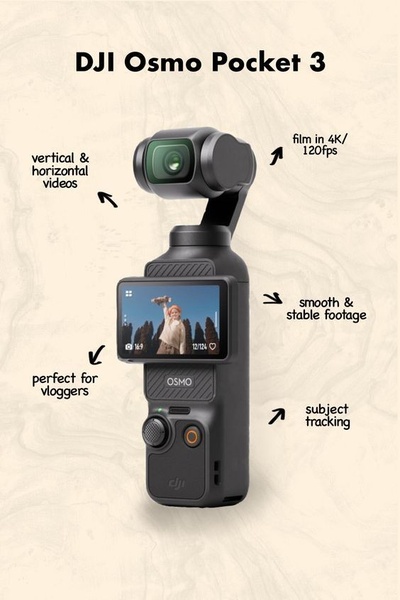
A clean, vertical infographic layout that uses arrows to call out specific technical capabilities of the Osmo Pocket 3 camera.

Osmo Pocket 3 Feature Map

A clean, vertical infographic layout that uses arrows to call out specific technical capabilities of the Osmo Pocket 3 camera.

Ad Details
Style
Feature & Benefit
Format
3:4
Industry
Electronics
Platforms
Instagram · TikTok · Pinterest
Language
English
Clone this ad with AI

Free credits included. No card required

Why this ad works

This Osmo Pocket 3 creative leverages a direct infographic style to immediately communicate product utility without fluff. By pairing a high-quality product shot with precision-point arrows to highlight key performance metrics, the ad reduces cognitive load for viewers scanning their feeds. It effectively uses the negative space to keep the focus entirely on the hardware capabilities.

This structural choice works well for tech hardware because it converts abstract benefits into concrete features, a process simplified by using Promer AI to standardize your brand presentation. For most ecommerce teams, this clean, minimalist approach avoids the 'clutter fatigue' common in competitive niches and keeps the viewer focused strictly on what the product does.

The winning ingredients

  • Direct Feature Mapping Every line of text serves as a direct label for a specific hardware feature, ensuring no information is wasted.
  • Minimalist Color Palette The use of a cream-colored background allows the dark-toned product to pop while maintaining a modern, high-end professional aesthetic.
  • Optimized Vertical Ratio The 2:3 vertical layout is perfectly calibrated for full-screen mobile viewing on platforms like Instagram and TikTok.
Great ads start from a clear structure that places your product's most essential benefits in the direct path of the user's eye.

How to make it yours

  1. Start a new AI Ad Clone session to mirror this feature-callout structure with your own hardware.
  2. Paste your product URL so that the system automatically swaps the product while preserving the professional brand colors and layout.
  3. Rewrite your specific feature labels, select the 2:3 ratio, and generate high-fidelity variations for your next campaign.

Pro tip

When building an infographic ad, limit your callouts to five or fewer to prevent visual overload. Ensure each callout uses short, punchy verbs that speak directly to the primary problem your product solves.


Vantrue N4S Feature Showcase
Adjustable Tripod Stand Feature Highlight
Digitek DTR-525 SS Tripod Offer
Sigma fp Deconstruction
Minimalist Camera Filter Reveal
Capture Every Moment Phone Tripod Ad
Capture Every Moment Phone Tripod Creative
Compact Tripod Feature Breakdown
High-Definition Baby Monitor Close-Up
Sleep Peacefully with Nanit
EOS R6 V Product Hero Shot
Camera Spotlight Hero
Enhance Your Travel Photography
Digitek Tripod Offer Creative
X-GO Carbon E Professional Tripod Spec Sheet
Everyday Filter Product Showcase
Baby Monitor Battery Comparison
CCTV Surveillance Direct Benefit Ad
Split View Baby Monitor Feature Showcase
K&F Concept Lens Filter Product Display

Your next winning adis already out there.

Promer helps you find the pattern, adapt it to your product, and create your own version in minutes.


Free credits included
No credit card required
Ship in minutes.




















