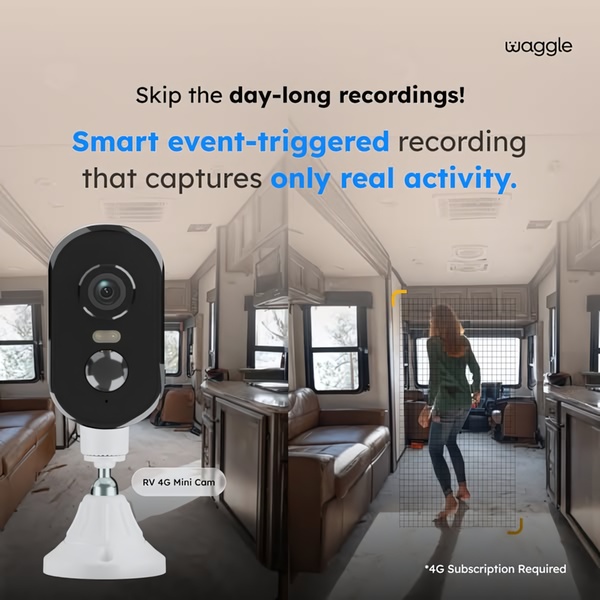
This ad visualizes the efficiency of event-triggered recording by contrasting a mini camera with a real-time motion capture zone in an RV setting.

Smart Event-Triggered Mini Camera Recording

This ad visualizes the efficiency of event-triggered recording by contrasting a mini camera with a real-time motion capture zone in an RV setting.

Ad Details
Style
Feature & Benefit
Format
1:1
Industry
Electronics
Platforms
Facebook · Instagram
Language
English
  • Electronics
  • Camera
  • Mini Camera
  • Split-screen comparison
  • Minimalist product presentation
  • 1:1
Clone this ad with AI

Free credits included. No card required

Why this ad works

This mini camera creative wins by immediately identifying and solving a common user frustration: the time spent reviewing hours of useless footage. By utilizing a clean, high-contrast split-screen layout, the ad visually proves its value proposition—only capturing relevant movement—before the viewer can scroll past.

The core strategy is to present the product as a functional solution to a specific inconvenience rather than just a hardware item. When using Promer AI to refine this approach, focusing on the pain point allows you to build trust with customers who are tired of bloated software features. This pattern typically converts well for technical products because it clarifies complicated tech specs into simple, immediate lifestyle benefits.

The winning ingredients

  • Direct Pain Hook The opening headline calls out the specific annoyance of day-long recordings, instantly grabbing the attention of those who want efficiency.
  • Split-Screen Clarity Using a side-by-side view allows the brand to show both the device and the resulting benefit simultaneously without requiring a long-form video.
  • Action-Oriented Contrast The use of a blue grid overlay on the interior space makes the smart detection feature tangible, turning an abstract software capability into a visual feature.
Great ads start from a specific, relatable friction point that the product removes, not just a static image of the hardware itself.

How to make it yours

  1. Start by initiating an AI Ad Clone to mirror the split-screen layout and benefit-first copy architecture used in this example.
  2. Paste your product URL into the tool so that your specific hardware, brand colors, and logo are automatically swapped into the creative template.
  3. Rewrite the headline to address your customers' primary pain point, adjust the aspect ratio for your intended platform, and generate your variations.

Pro tip

When advertising utility-based products, ensure your hook is visually distinct from the rest of your feed by using high-contrast colors like the blue accents seen here. Always clarify the requirement for subscriptions or secondary services, as transparency at the top of the funnel generally improves lead quality.


Vantrue N4S Feature Showcase
Adjustable Tripod Stand Feature Highlight
Digitek DTR-525 SS Tripod Offer
Sigma fp Deconstruction
Minimalist Camera Filter Reveal
Capture Every Moment Phone Tripod Ad
Capture Every Moment Phone Tripod Creative
Compact Tripod Feature Breakdown
High-Definition Baby Monitor Close-Up
Sleep Peacefully with Nanit
EOS R6 V Product Hero Shot
Camera Spotlight Hero
Enhance Your Travel Photography
Digitek Tripod Offer Creative
X-GO Carbon E Professional Tripod Spec Sheet
Everyday Filter Product Showcase
Baby Monitor Battery Comparison
CCTV Surveillance Direct Benefit Ad
Split View Baby Monitor Feature Showcase
K&F Concept Lens Filter Product Display

Your next winning adis already out there.

Promer helps you find the pattern, adapt it to your product, and create your own version in minutes.


Free credits included
No credit card required
Ship in minutes.




















