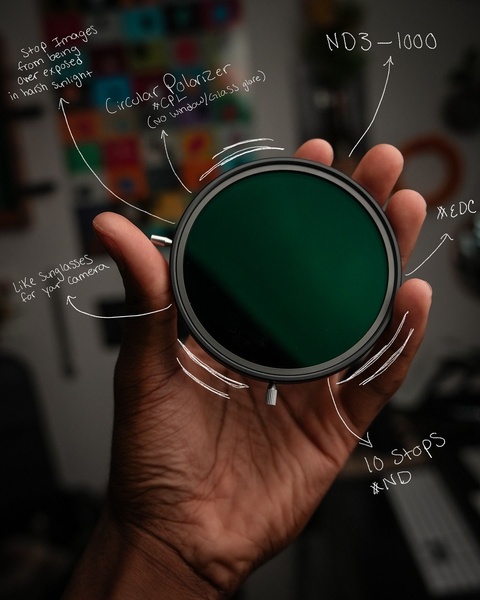
A close-up hand-held shot of a camera lens filter with handwritten-style labels explaining its primary light-reducing and glare-eliminating benefits.

Camera Filter Educational Annotations

A close-up hand-held shot of a camera lens filter with handwritten-style labels explaining its primary light-reducing and glare-eliminating benefits.

Ad Details
Style
Feature & Benefit
Format
4:5
Industry
Electronics
Platforms
Instagram · TikTok
Language
English
Clone this ad with AI

Free credits included. No card required

Why this ad works

This approach uses clear visual annotations on a high-quality product shot to demystify a technical camera filter. By layering handwritten-style text directly over the core features, the ad immediately captures attention while providing high-value technical context to the viewer. This pattern works because it respects the customer's intelligence while removing the barrier of complex jargon.

For most ecommerce brands selling technical hardware, this direct-to-viewer education is a massive conversion driver. Promer AI allows you to rapidly test this style by overlaying clear, benefit-driven text on your own product shots. This method helps reduce buyer hesitation by clearly defining what the item does in the exact moment the user is considering it, rather than hiding details in a long-form description.

The winning ingredients

  • Direct Visual Education The ad uses handwritten annotations to point directly to the hardware, translating technical specs like ND3-1000 into practical benefits.
  • High Contrast Framing The dark grey and black color palette of the filter contrasts with the white handwritten text, keeping the focal point strictly on the product.
  • Mobile-Optimized Ratio The 4:5 aspect ratio is designed specifically for vertical social feeds, filling the screen to maximize engagement for mobile users.
A great ad educates the customer about the solution before they even realize they had a problem.

How to make it yours

  1. Use an AI Ad Clone to mirror the structure of this annotation-heavy creative and set the baseline for your own product layout.
  2. Paste your product URL into the platform so the software automatically swaps the product while preserving your brand's unique colors and identity.
  3. Rewrite the instructional text to highlight your own product's unique benefits, choose your ratio, and generate high-converting variations.

Pro tip

When using the visual annotation hook, avoid overcrowding the frame with too many lines. Stick to 3-5 high-impact labels to keep the cognitive load low while ensuring the viewer can still easily digest the primary selling points of your camera filter.


Vantrue N4S Feature Showcase
Adjustable Tripod Stand Feature Highlight
Digitek DTR-525 SS Tripod Offer
Sigma fp Deconstruction
Minimalist Camera Filter Reveal
Capture Every Moment Phone Tripod Ad
Capture Every Moment Phone Tripod Creative
Compact Tripod Feature Breakdown
High-Definition Baby Monitor Close-Up
Sleep Peacefully with Nanit
EOS R6 V Product Hero Shot
Camera Spotlight Hero
Enhance Your Travel Photography
Digitek Tripod Offer Creative
X-GO Carbon E Professional Tripod Spec Sheet
Everyday Filter Product Showcase
Baby Monitor Battery Comparison
CCTV Surveillance Direct Benefit Ad
Split View Baby Monitor Feature Showcase
K&F Concept Lens Filter Product Display

Your next winning adis already out there.

Promer helps you find the pattern, adapt it to your product, and create your own version in minutes.


Free credits included
No credit card required
Ship in minutes.




















