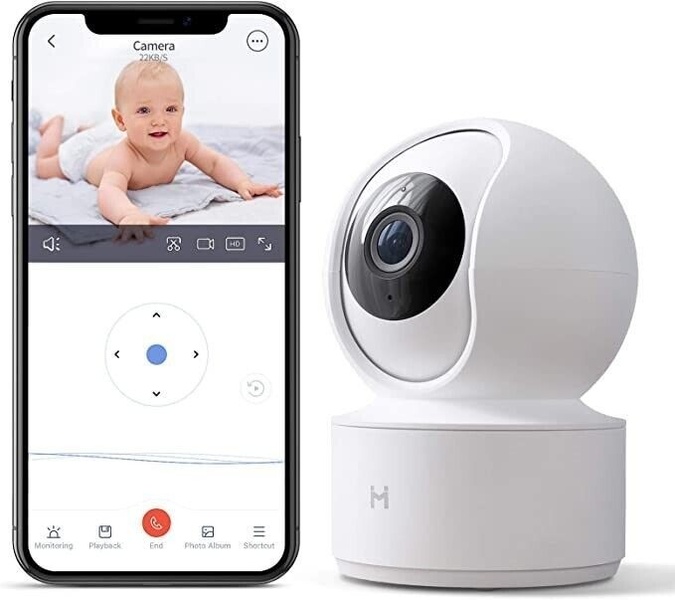
A split-view creative showing the mobile application interface alongside the hardware device, highlighting the remote monitoring and control features.

Baby Monitor App and Device Duo

A split-view creative showing the mobile application interface alongside the hardware device, highlighting the remote monitoring and control features.

Ad Details
Style
Feature & Benefit
Format
3:4
Industry
Electronics
Platforms
Instagram Feed · Facebook Feed
Language
English
Clone this ad with AI

Free credits included. No card required

Why this ad works

This baby monitor ad relies on a clean, dual-perspective visual strategy to immediately communicate functional utility. By presenting both the app interface and the hardware unit side-by-side, the creative minimizes cognitive load for parents looking for a reliable, easy-to-use solution for their home monitoring needs. It works because it focuses entirely on the user experience rather than abstract benefits.

For most ecommerce teams, clear product documentation is the fastest path to conversion. Promer AI helps you maintain this high level of visual consistency across all your product categories, allowing you to showcase specific features like mobile connectivity or hardware design without cluttering the frame with unnecessary graphic elements.

The winning ingredients

  • Dual-View Composition The 5:4 aspect ratio effectively frames the smartphone interface on the left and the physical hardware on the right for immediate visual impact.
  • Minimalist Color Palette The use of white, grey, and soft blue tones creates an aesthetic of simplicity and cleanliness that signals reliability to the target demographic.
  • Interface Realism Showing the actual baby monitor app feed provides social proof that the software is intuitive and highly functional.
Great ads are built on clear product storytelling where the interface and hardware work in tandem to solve a specific pain point.

How to make it yours

  1. Start a new project using the AI Ad Clone tool to mirror the dual-view composition of this high-performing creative.
  2. Upload your product photography and interface screenshots so the system can automatically swap out the original brand elements with your specific brand colors and logo.
  3. Rewrite the ad copy to focus on your primary product utility, select your preferred aspect ratio, and generate multiple layout variations for A/B testing.

Pro tip

When showcasing tech products, always ensure your app screenshots are updated to reflect the current interface version. This builds trust and ensures potential customers know exactly what the mobile experience feels like before they make a purchase.


Vantrue N4S Feature Showcase
Adjustable Tripod Stand Feature Highlight
Digitek DTR-525 SS Tripod Offer
Sigma fp Deconstruction
Minimalist Camera Filter Reveal
Capture Every Moment Phone Tripod Ad
Capture Every Moment Phone Tripod Creative
Compact Tripod Feature Breakdown
High-Definition Baby Monitor Close-Up
Sleep Peacefully with Nanit
EOS R6 V Product Hero Shot
Camera Spotlight Hero
Enhance Your Travel Photography
Digitek Tripod Offer Creative
X-GO Carbon E Professional Tripod Spec Sheet
Everyday Filter Product Showcase
Baby Monitor Battery Comparison
CCTV Surveillance Direct Benefit Ad
Split View Baby Monitor Feature Showcase
K&F Concept Lens Filter Product Display

Your next winning adis already out there.

Promer helps you find the pattern, adapt it to your product, and create your own version in minutes.


Free credits included
No credit card required
Ship in minutes.




















