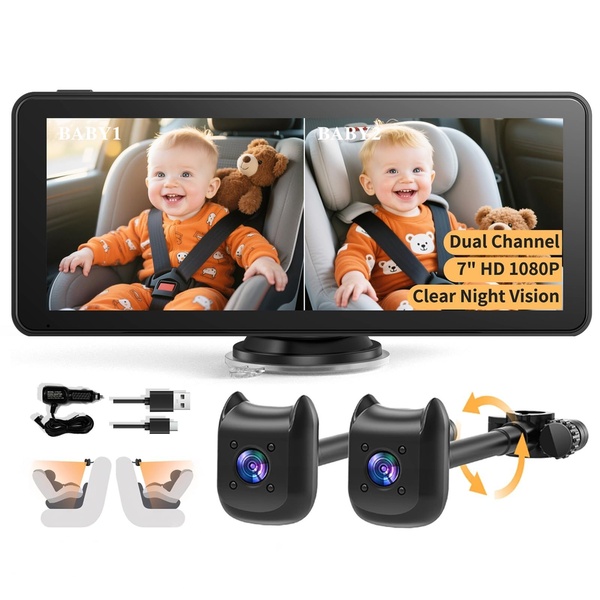
This creative showcases a dual-channel baby monitor with a split-screen display, clearly showing two children in the backseat via separate night-vision cameras.

Dual-Channel Baby Monitor Split-Screen Comparison

This creative showcases a dual-channel baby monitor with a split-screen display, clearly showing two children in the backseat via separate night-vision cameras.

Ad Details
Style
Feature & Benefit
Format
1:1
Industry
Electronics
Platforms
Facebook · Instagram
Language
English
Clone this ad with AI

Free credits included. No card required

Why this ad works

The ad effectively utilizes a split-screen layout to immediately solve a primary pain point for parents with multiple children: monitoring the entire backseat simultaneously. By positioning the baby monitor as a dual-channel device with night vision, the visual hierarchy allows the viewer to see the product's primary utility at a single glance without reading a word of copy.

This straightforward pattern is a staple for high-converting Promer AI users because it removes friction between the ad and the customer's need. When your product solves a complex problem, relying on simple, high-contrast side-by-side shots typically results in higher engagement compared to lifestyle scenes that might obscure the actual features.

The winning ingredients

  • Split-Screen Display The composition is divided equally to demonstrate the dual-channel capability of the unit in real-time.
  • Feature Overlays Text bubbles provide concise specs like '7-inch HD 1080P' which reinforces the value proposition without cluttering the main visual.
  • Neutral Background The isolated, high-key white background ensures that the monitor and its included accessories remain the absolute focus of the frame.
Effective product ads don't just display the item; they map the physical hardware directly onto the user's specific daily problem.

How to make it yours

  1. Launch an AI Ad Clone session to begin structuring your product imagery based on this proven layout.
  2. Paste your product URL so the system can automatically extract your brand identity, logo, and color palette for the new creative.
  3. Rewrite the feature highlights to match your specific product angle, select your preferred aspect ratio, and generate high-fidelity variations.

Pro tip

When running split-screen comparisons, ensure that both sides of your frame maintain equal lighting quality to avoid creating an unintentional bias toward one side of the product. This consistency helps viewers process the image faster and improves overall click-through rates.


Vantrue N4S Feature Showcase
Adjustable Tripod Stand Feature Highlight
Digitek DTR-525 SS Tripod Offer
Sigma fp Deconstruction
Minimalist Camera Filter Reveal
Capture Every Moment Phone Tripod Ad
Capture Every Moment Phone Tripod Creative
Compact Tripod Feature Breakdown
High-Definition Baby Monitor Close-Up
Sleep Peacefully with Nanit
EOS R6 V Product Hero Shot
Camera Spotlight Hero
Enhance Your Travel Photography
Digitek Tripod Offer Creative
X-GO Carbon E Professional Tripod Spec Sheet
Everyday Filter Product Showcase
Baby Monitor Battery Comparison
CCTV Surveillance Direct Benefit Ad
Split View Baby Monitor Feature Showcase
K&F Concept Lens Filter Product Display

Your next winning adis already out there.

Promer helps you find the pattern, adapt it to your product, and create your own version in minutes.


Free credits included
No credit card required
Ship in minutes.




















