Quick verdict: UGCVideo AI is a low-cost AI avatar video tool for Shopify and TikTok sellers who want quick presenter clips to test hooks. Creator costs $19 a month, or $9.5 a month on yearly billing, for 300 credits. My test clip cost 50 credits. The presenter looked natural, but the product changed shape in the last shot, so plan to check every frame before you spend on ads.
This review is for you if any of these sound familiar:
- You sell a physical product and need fresh video hooks every week, but a creator shoot doesn't fit this month's budget.
- You've seen AI avatar ads that look plastic, and you want to know whether UGCVideo AI's "Real Imperfections" pitch fixes that.
- You want to know what one clip costs in credits before you enter a card.
I spent the free account's 50 credits on a single 14-second clip for a dark red mini handbag, then read the pricing page, the refund policy and the one independent test I could find. Here is what came back.
UGCVideo AI is a good fit for cheap, labeled presenter clips on simple products: the face and voice held up in my test, but the bag's colour and shape drifted between shots, and the refund window closes once you use more than 20 credits.
If you only came for the price, skip to the pricing section. If you want to see the output first, the test section has the frames side by side with the product photo. And if "UGC-style ad" itself is a new term, what UGC ads actually are is a quick primer before the rest of this gets specific.
Key takeaways for store owners
- Price the clip, not the plan. The UGC Ad Video screen charges 50 credits per clip, so Creator's 300 credits cover 6 clips, not the 20 "videos" on the plan card.
- Pick your billing before your first clip. Creator, Pro and Scale cost $19, $49 and $199 a month, or $9.5, $24.5 and $99.5 a month when billed yearly.
- Check the product, not the face. In my clip the presenter looked like a real person on a real street. The bag was the part that changed.
- Test on the free credits first. A refund is off the table once more than 20 credits are used, and one clip uses 50.
- Label it as AI. TikTok requires a label on realistic AI content, and the FTC's 2024 rule bans testimonials from people who don't exist. Use it for presenter demos, not fake customers.
What is UGCVideo AI, and which seller is it built for?
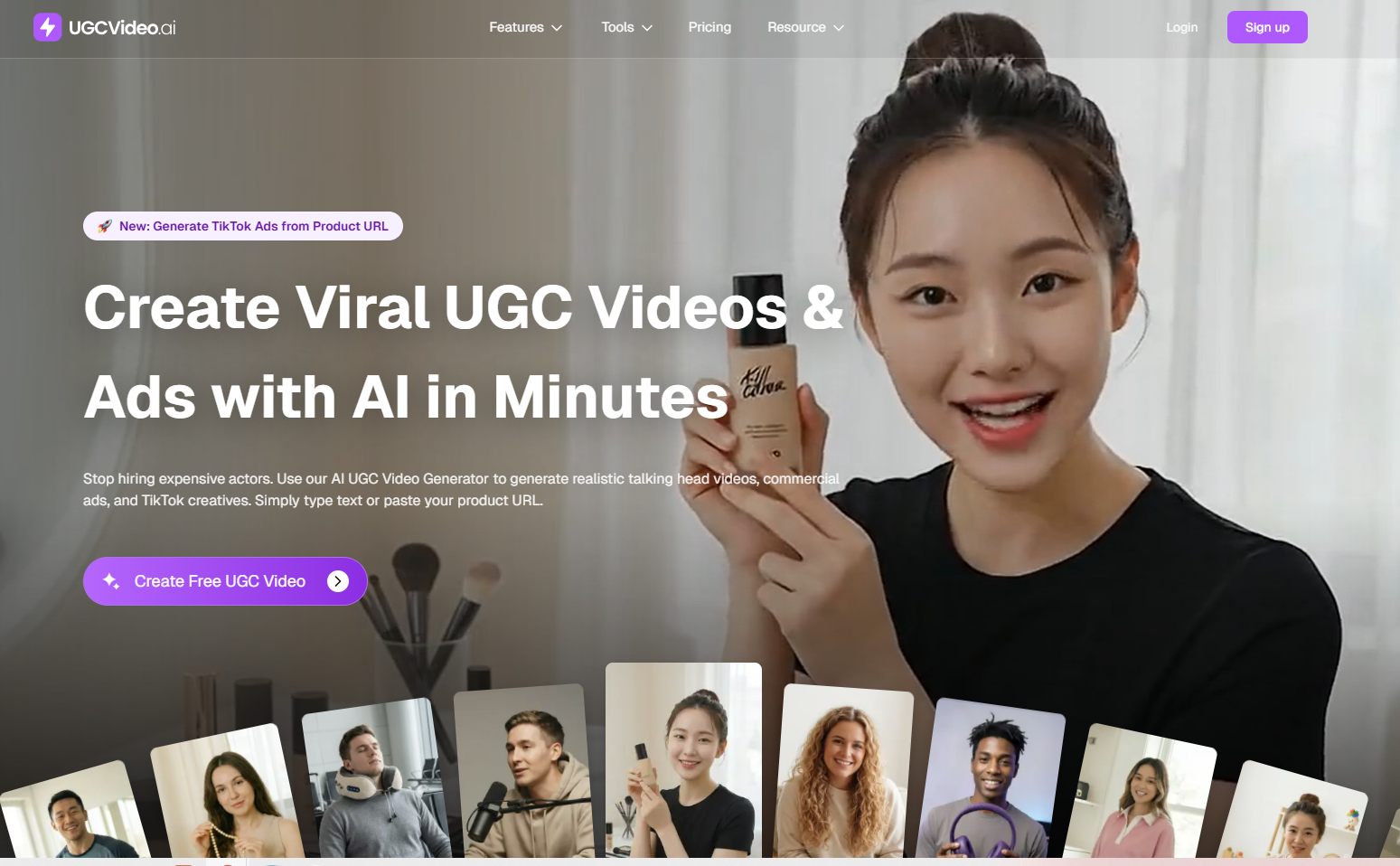
UGCVideo AI calls itself an "AI Avatar & UGC Video Generator" and an "AI Ad Generator". You upload a product image or paste a product link, pick an AI presenter, write a prompt, add a voice, and it renders a vertical clip for TikTok, Instagram or Facebook. The homepage headline reads "Create Viral UGC Videos & Ads with AI in Minutes", and a banner above it announces a new "Generate TikTok Ads from Product URL" feature.
Once you log in, the home screen splits the tool into UGC Image, UGC Video, UGC Ad Video, Talking Video and Motion Sync, which is one way to carve up the same handful of different styles of UGC ads most tools in this category offer. Two e-com formats, Product Unboxing and App Showcase, were marked "Coming" on 30 September 2026, even though the marketing site already has an AI Unboxing Video Generator page. The homepage says 5,000+ ecommerce brands and agencies trust the tool; that figure is the company's own.
The fit is a solo Shopify, TikTok Shop or dropshipping advertiser who wants presenter-led hook tests and will finish the edit elsewhere.
UGCVideo AI reviews from my test: 1 handbag clip on 50 free credits
I used UGC Ad Video, the module the home screen describes as the one to "Make high-converting UGC ad videos". The product was a small dark red faux leather bag with a cut-out handle, a ruched bottom and two knotted side straps, with no logo on it. That mix of soft folds, a colour that's easy to shift, and thin straps is exactly where product accuracy slips.
The setup: 4 fields and 1 Generate button
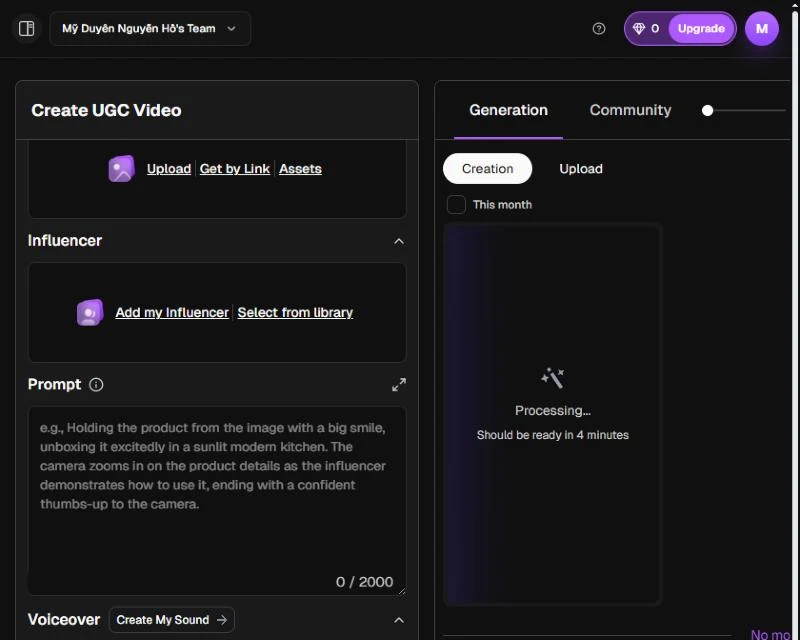
The Create UGC Video screen has four blocks: Product / App Reference Image (Upload, Get by Link, or Assets), Influencer (Add my Influencer or Select from library), a Prompt box with a 2,000-character limit, and Voiceover (Create My Sound or Add Voice). Under them sit the model "UGC Video 1.0", the ratio "9:16", a count of "x1" and the button "Generate ( Credit: 50)".
I uploaded the bag photo, picked the library presenter Saskia Vestergaard (a woman in a green coat on a city street), and chose the voice "Daria - Young flexible female", tagged Female, Pleasant, Young, English. The voice picker lists each voice with gender, tone, age and language tags and a preview player. My prompt described the bag, asked for a handheld phone look with visible skin pores, and gave a 15-second script ending in "Link below." I added one guard line: do not say any price, discount or claim that is not in the script.
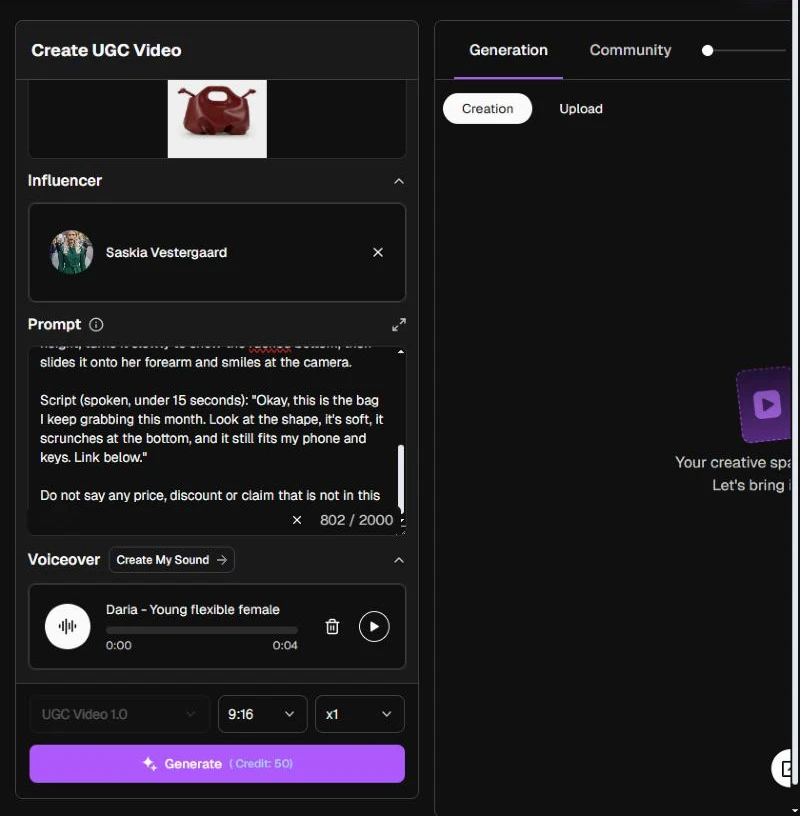
After I clicked Generate, the balance dropped from 50 to 0 and the result card read "Processing... Should be ready in 4 minutes." The form also cleared itself, so copy your prompt somewhere before you hit the button if you plan to rerun it.
What came back: a 14-second, three-shot clip
The clip ran 14.2 seconds at 720 x 1280. UGCVideo AI cut it into three shots on its own: the presenter holding the bag on the street, a close-up of two hands holding the bag against a stone building, and the presenter again with the bag on her forearm. Captions were burned in word by word ("Okay,", "it's soft,", "below."), and the lines matched my script.
The presenter is the strong part. Skin, hair and the street behind her read like a phone video, and nothing in the script drifted into a price or an offer I hadn't written.
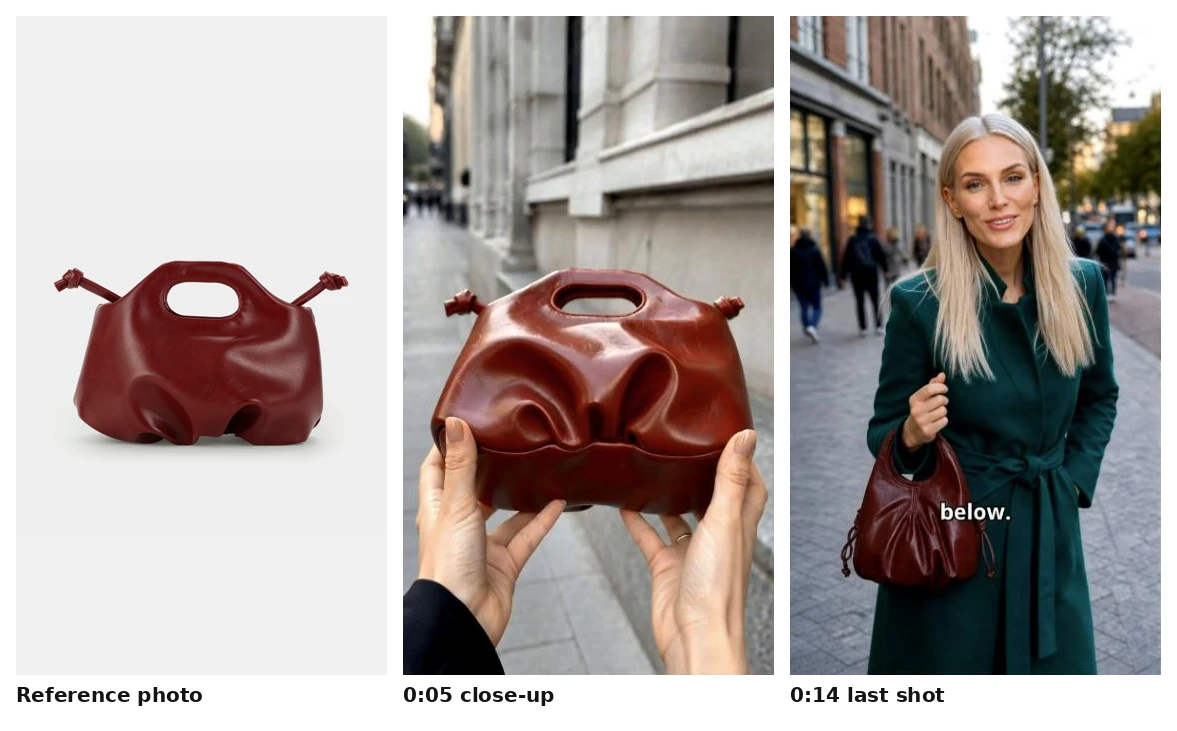
Where the product drifted?
- Colour: the dark red leather came out as a lighter reddish brown in the close-up.
- Straps: the long knotted side straps were cut down to short stubs next to the handle.
- The last shot swapped the bag: at 0:14 the presenter holds a gathered hobo pouch with drawstring cords and no cut-out handle. A shopper who clicks through would not find that bag in the store.
- Hands: the close-up hands wear a black sleeve, while the presenter wears a green coat.
I'm not the only one who saw the last point. Tran Nguyen, who ran three live tests for ReviewAIApps (3 August 2026), notes that edited ads sometimes use b-roll of someone other than your character. The close-up still did one thing well: the ruched folds and the cut-out handle held their shape in that shot.
One clip is a small sample, so treat this as a warning to check, not a failure rate. The practical fix is to pause on every shot where the product fills the frame and compare it with your product page before the clip goes near an ad account.
The "Real Imperfections" pitch: What UGCVideo AI's skin presets claim to fix?
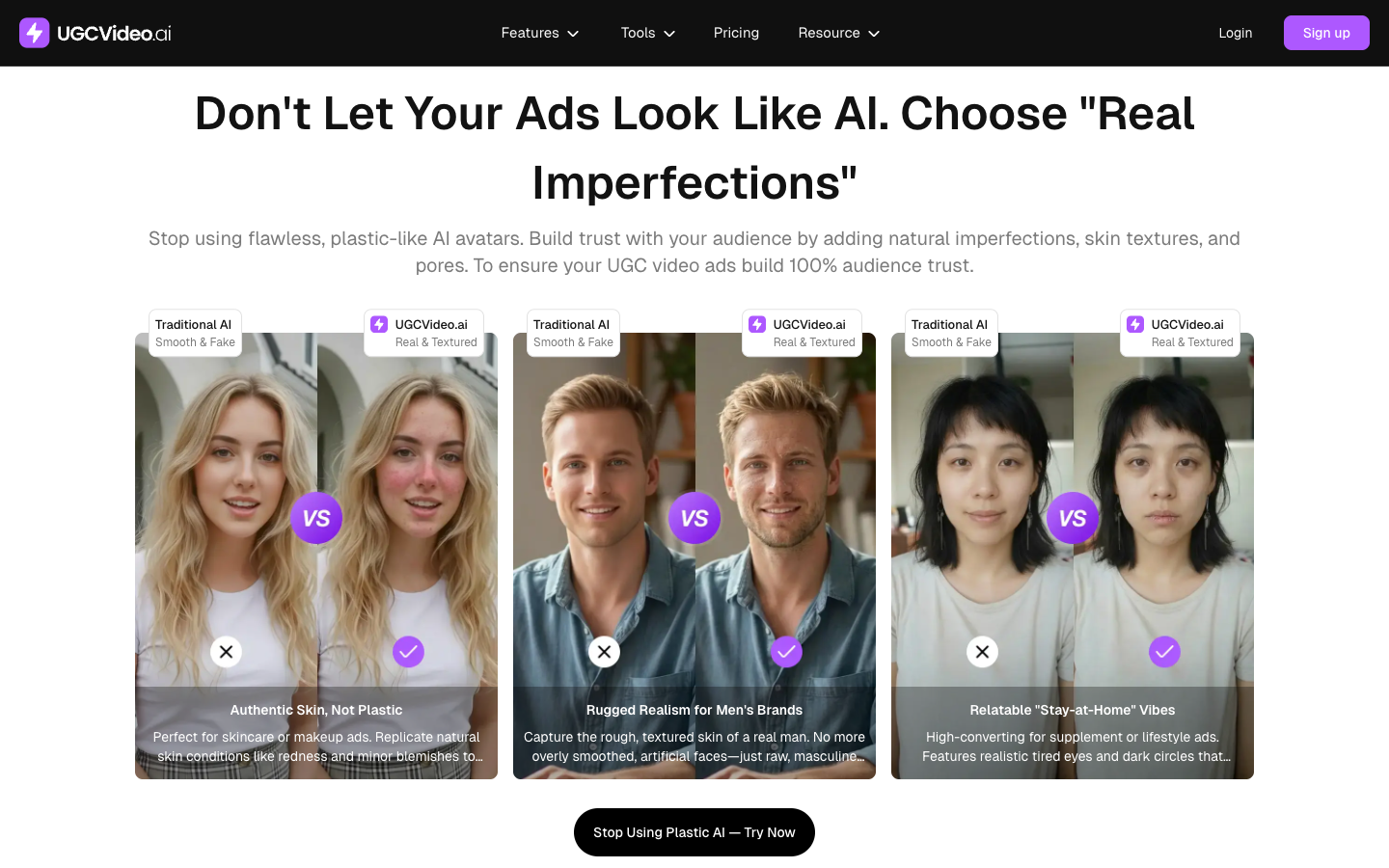
In avatar ads, the first giveaway is usually skin smoother than any phone camera would record. UGCVideo AI names that exact problem on its homepage in a section titled "Don't Let Your Ads Look Like AI. Choose "Real Imperfections"", which sets "Traditional AI: Smooth & Fake" against "UGCVideo.ai: Real & Textured" three times.
| Preset on the homepage | What it adds, in their words | Category it is sold for |
|---|---|---|
| Authentic Skin, Not Plastic | "natural skin conditions like redness and minor blemishes" | Skincare and makeup ads |
| Rugged Realism for Men's Brands | "the rough, textured skin of a real man" | Men's brands |
| Relatable "Stay-at-Home" Vibes | "realistic tired eyes and dark circles" | Supplement and lifestyle ads |
The pairing is sound ad thinking. A skincare ad fronted by flawless skin undercuts its own claim, and a supplement ad aimed at exhausted parents lands better when the presenter looks like one.
One thing to know before you buy for this feature: the UGC Ad Video screen I used has no skin or imperfection setting. On that screen, realism comes from the presenter you pick and what you write in the prompt; the homepage ties the texture controls to building your own AI influencer, which I didn't test. I asked for visible pores in my prompt and the presenter looked natural.
UGCVideo AI pricing: $19 a month, or $9.5 on yearly billing
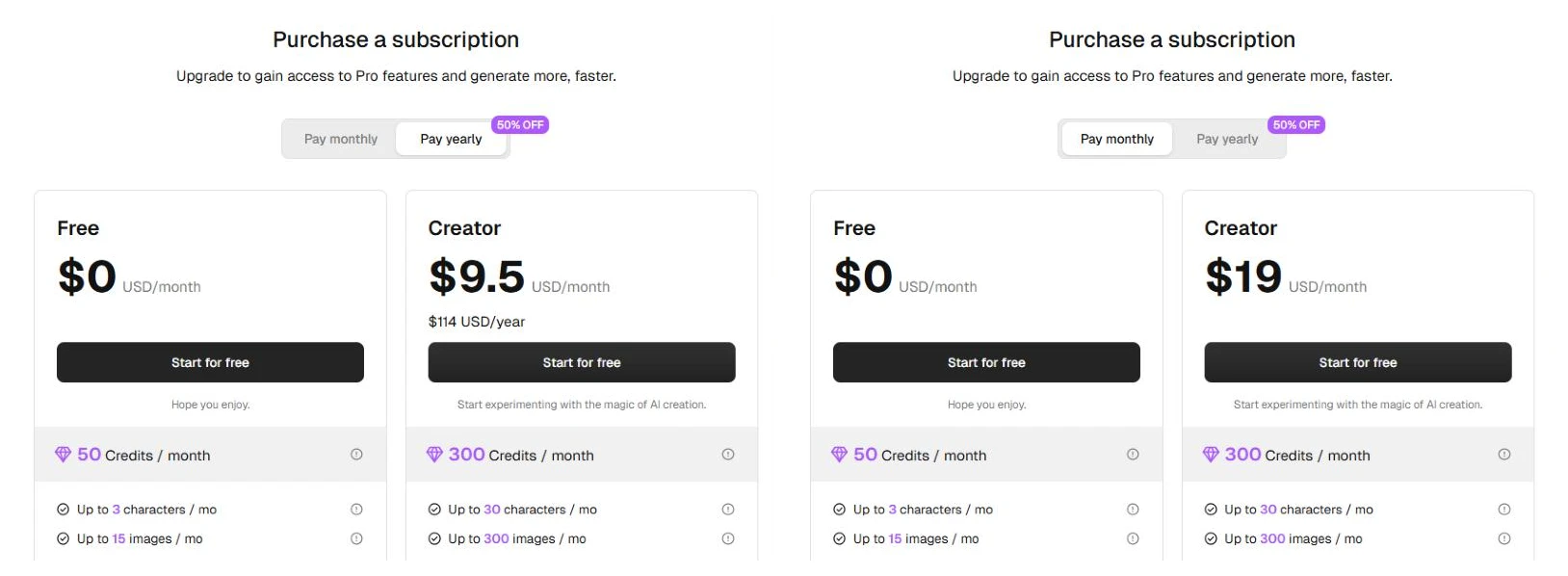
UGCVideo AI pricing is credit-based, with four plans and a toggle that reads "Pay monthly | Pay yearly 50% OFF". The page opens on yearly prices, so the first number you see is the discounted one.
| UGCVideo AI plan | Free | Creator | Pro | Scale |
|---|---|---|---|---|
| Pay monthly | $0 | $19 / month | $49 / month | $199 / month |
| Pay yearly (per month) | $0 | $9.5 ($114 / year) | $24.5 ($294 / year) | $99.5 ($1,194 / year) |
| Credits per month | 50 | 300 | 1,000 | 6,000 |
| Videos per month (plan card) | Up to 2 | Up to 20 | Up to 66 | Up to 400 |
| Parallel generations | 1 | 10 | 30 | 100 |
| Watermark | Yes | No | No | No |
| Use rights | Personal use only (Non-commercial) | Commercial use rights | Commercial use rights | Commercial use rights |
How many credits does one UGCVideo AI video use?
It depends on the module. The pricing FAQ says consumption depends on the model, avatar, duration, number of outputs, resolution and extras like custom avatars and voiceovers, and that the cost shows before each generation. On 30 September 2026 the Generate buttons read:
- UGC Image (Nano Banana Pro, 1K): 1 credit
- UGC Ad Video and Talking Video (UGC Video 1.0, 9:16): 50 credits
- UGC Video (Kling 3.0, 720p, 8 seconds): 88 credits
Tran Nguyen's August test reported a 34-second UGC Ad Video for 20 credits, so the price per clip has either changed or depends on settings I didn't see. Plan on the number the Generate button shows you that day, and benchmarking UGC ad performance against the cost per clip is the next question worth answering once you know that number. Unused subscription credits don't roll over, while one-time credit packs never expire but can't be refunded.
| Plan | Clips at 50 credits | Cost per clip, monthly | Cost per clip, yearly |
|---|---|---|---|
| Free | 1 | Not usable in ads (non-commercial) | |
| Creator | 6 | About $3.17 | About $1.58 |
| Pro | 20 | About $2.45 | About $1.23 |
| Scale | 120 | About $1.66 | About $0.83 |
The homepage compares traditional filming at "$2000+/Video, 7 Days" with "AI UGC video ($2/Video, 2 Mins)". The $2 figure holds on yearly billing. On monthly Creator it's closer to $3, and every rerun spends credits too, so budget for attempts, not finished ads.
UGCVideo AI refund and renewal rules to plan around
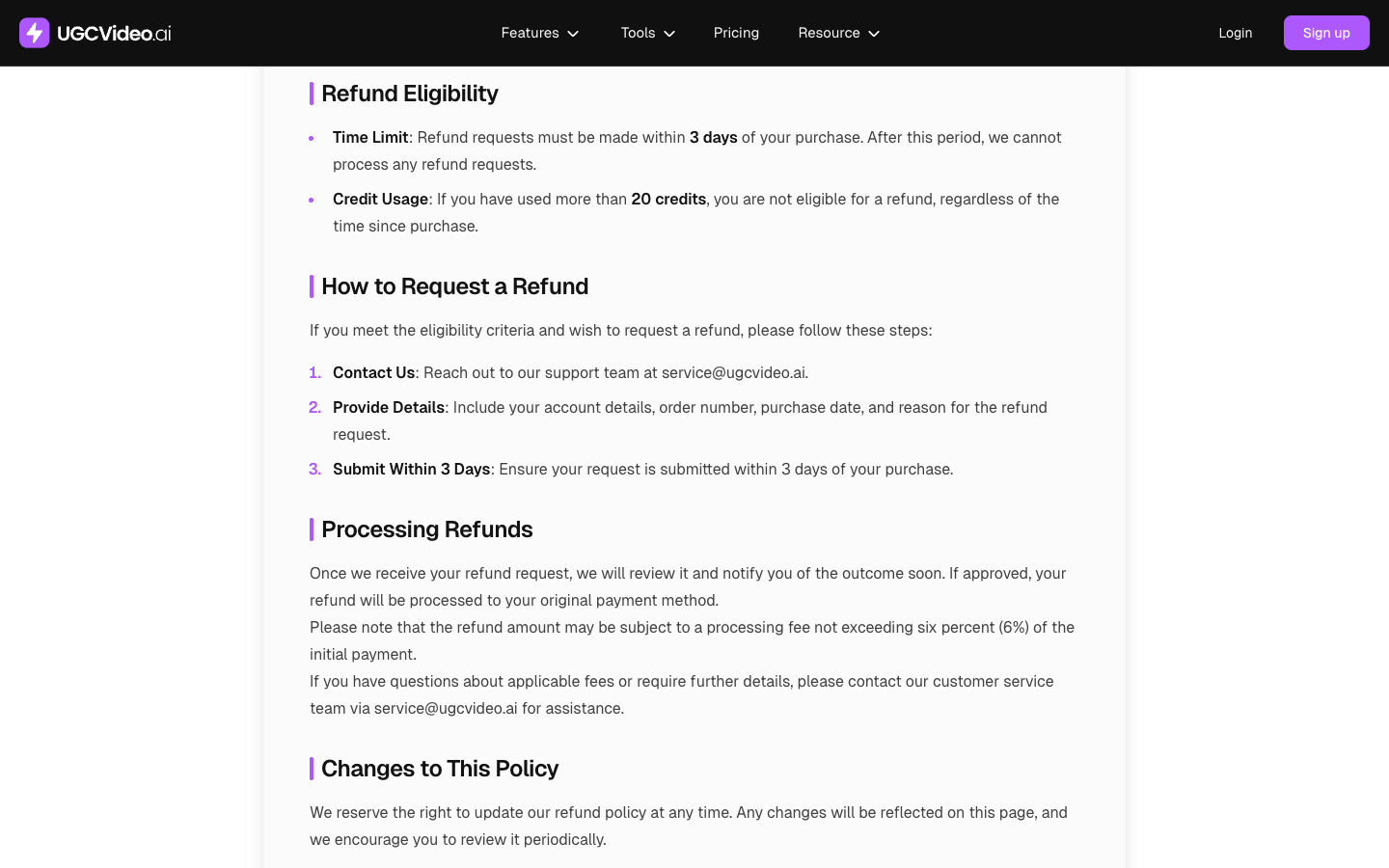
The refund policy has two conditions. Requests must be made within 3 days of purchase, and "if you have used more than 20 credits, you are not eligible for a refund, regardless of the time since purchase." Since one UGC Ad Video clip uses 50 credits, the free plan is the place to judge output quality; the first paid clip ends refund eligibility. Approved refunds can carry a processing fee of up to 6%, and requests go to [email protected].
The terms of service add that subscriptions renew automatically and must be cancelled "five (5) days before the subscription period renewal date". If you buy one month to test, set a calendar reminder six days before renewal on day one. On rights, section 2.1 says UGCVideo AI claims no ownership of your inputs or outputs and doesn't restrict commercial use, though outputs "may not be unique". Free plan clips stay non-commercial.
UGCVideo AI pros and cons
| Where UGCVideo AI is strong | What to plan around |
|---|---|
| Commercial rights from $9.5 a month on yearly billing, $19 monthly | One UGC Ad Video clip uses 50 of Creator's 300 monthly credits |
| Natural-looking presenters and street settings in my test | Product colour and shape drifted between shots |
| Script followed as written, with captions burned in | B-roll hands can belong to someone other than your presenter |
| UGC Image costs 1 credit, a cheap way to test presenter and product pairings | Refund ends after 20 credits used, within a 3-day window |
| Up to 30 parallel generations on Pro for batch hook tests | No timeline or scene editor on the UGC Ad Video screen |
| Voice library with gender, tone, age and language tags plus search | No independent star rating to check yet |
The lesson for any AI UGC tool: Check the product, not the face
Most AI UGC marketing, UGCVideo AI's included, is about faces: pores, blemishes, tired eyes. In my test the face was the part I didn't need to worry about. The product was. A presenter who looks real while holding a bag your store doesn't sell is worse for an ad than a slightly plastic presenter holding the right one, because the shopper finds out on the product page, which is exactly the check spotting high-converting UGC ads comes back to before anything else.
The other half of the lesson is disclosure. UGCVideo AI's review video page pitches testimonials "indistinguishable from real customer content". The US Federal Trade Commission's final rule on fake reviews (14 August 2024) prohibits testimonials that misrepresent they come from "someone who does not exist, such as AI-generated fake reviews". TikTok requires creators "to label all AI-generated content that contains realistic images, audio, and video", and says the label won't affect distribution for posts that follow its Community Guidelines.
So the useful pass mark is: the product matches your product page in every shot, and the clip still holds attention with the AI label on. Presenter demos, POV hands-on clips and voiceover explainers all fit that; a made-up customer describing a purchase doesn't. (This isn't legal advice; check Meta's AI disclosure rules and local law for your market.)
UGCVideo AI alternatives for ecommerce video ads
| Tool | Role | Entry price shown | Pick it when |
|---|---|---|---|
| Promer AI | UGC ads built from product context | Free plan (~30 credits) covers a static ad; video needs a paid plan | You want set ad formats and a script built from your product page |
| CapCut | Free editor for filmed UGC | Free; Pro $7.99 to $19.99 a month by region, per BIGVU | You already have real footage |
If you already have creator footage, CapCut's free plan covers cutting, captions and resizing. BIGVU's CapCut pricing guide by Jessica Becker (2 July 2026) lists a multi-track timeline, basic AI voiceover and 1080p export on the free plan.
Where Promer AI fits: UGC ads built from product context
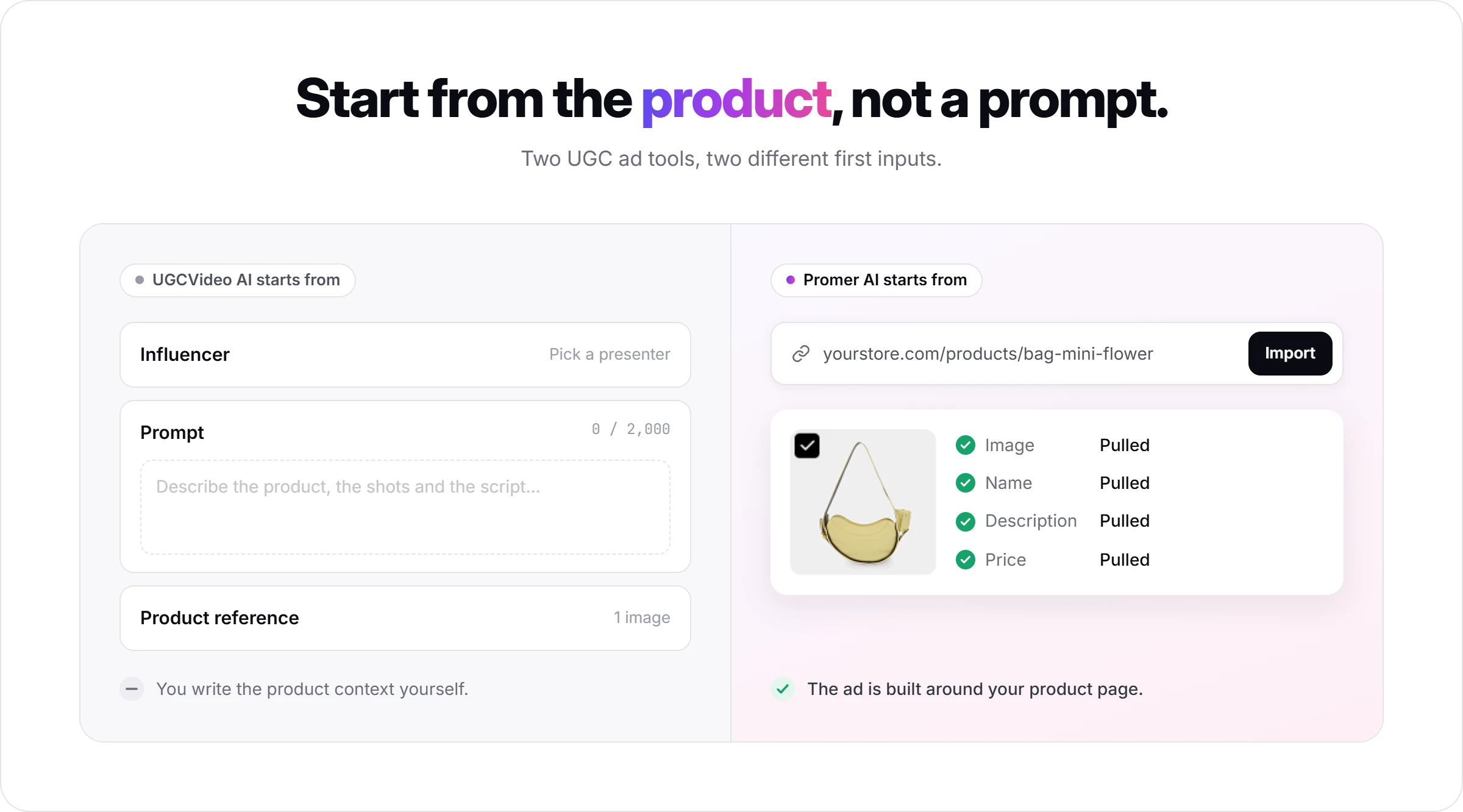
Promer AI is an AI ad creative performance platform for ecommerce advertisers, and it starts from a different input. UGCVideo AI starts from a presenter and a prompt you write. Promer AI starts from the product: paste a product URL and it pulls the image, name, description and price, then builds the ad around that context.
Set against what this review's own test found, the differences that matter most:
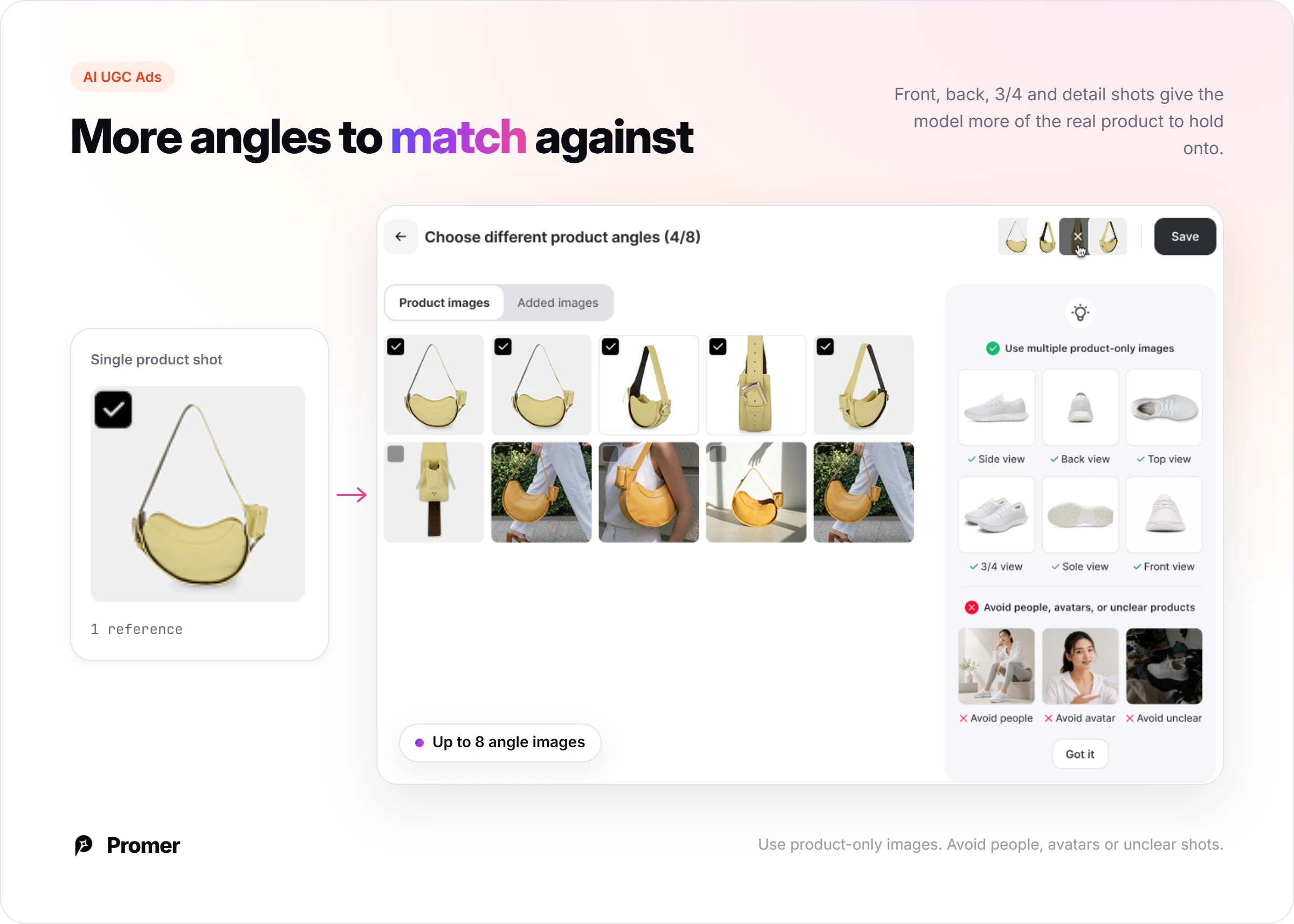
More than one product photo to match against. This review's UGCVideo AI test uploaded a single product shot, which is where the colour and shape drift showed up. Promer AI's AI UGC video generator accepts up to eight product angle images (front, back, 3/4, detail) as reference, more for the model to match than one photo.
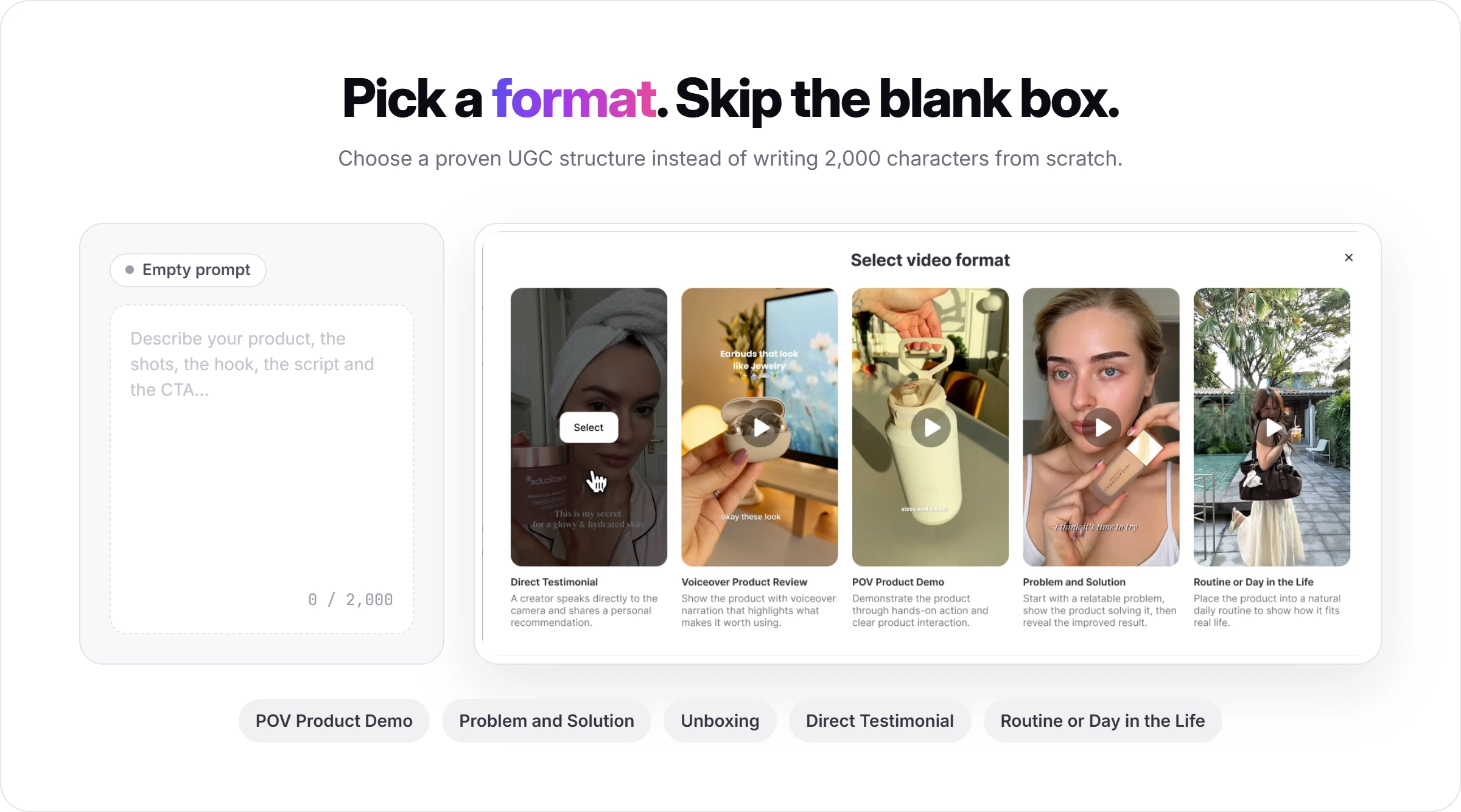
Set ad formats instead of a 2,000-character prompt box. Pick a format such as POV Product Demo, Problem and Solution, or Unboxing, and AI suggests the hook, message, visual, and CTA instead of starting from an empty prompt.
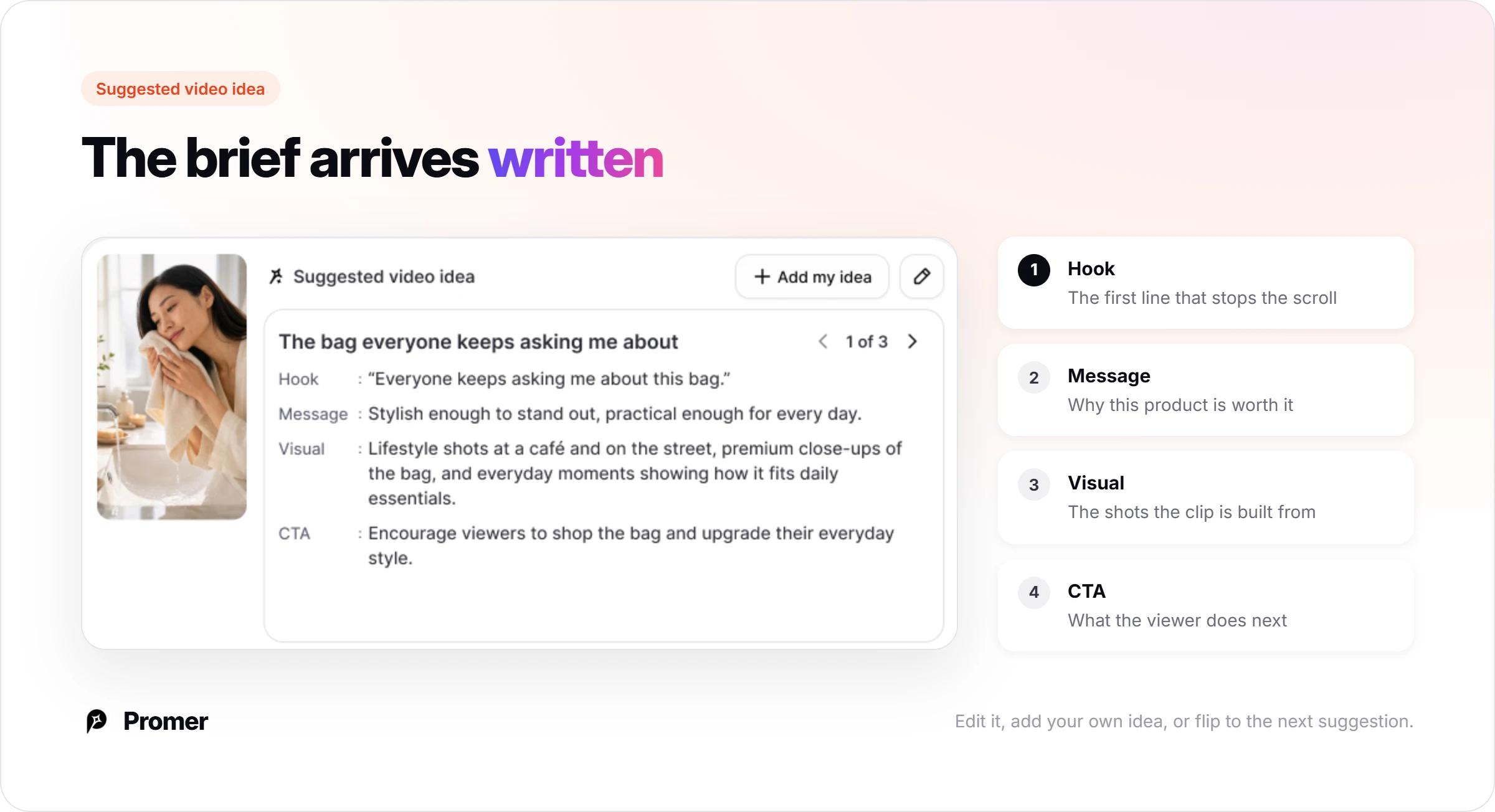
Built from the product page, not an empty Influencer-plus-Prompt form. Paste a product URL and the name, description, and price come in automatically before generation starts.
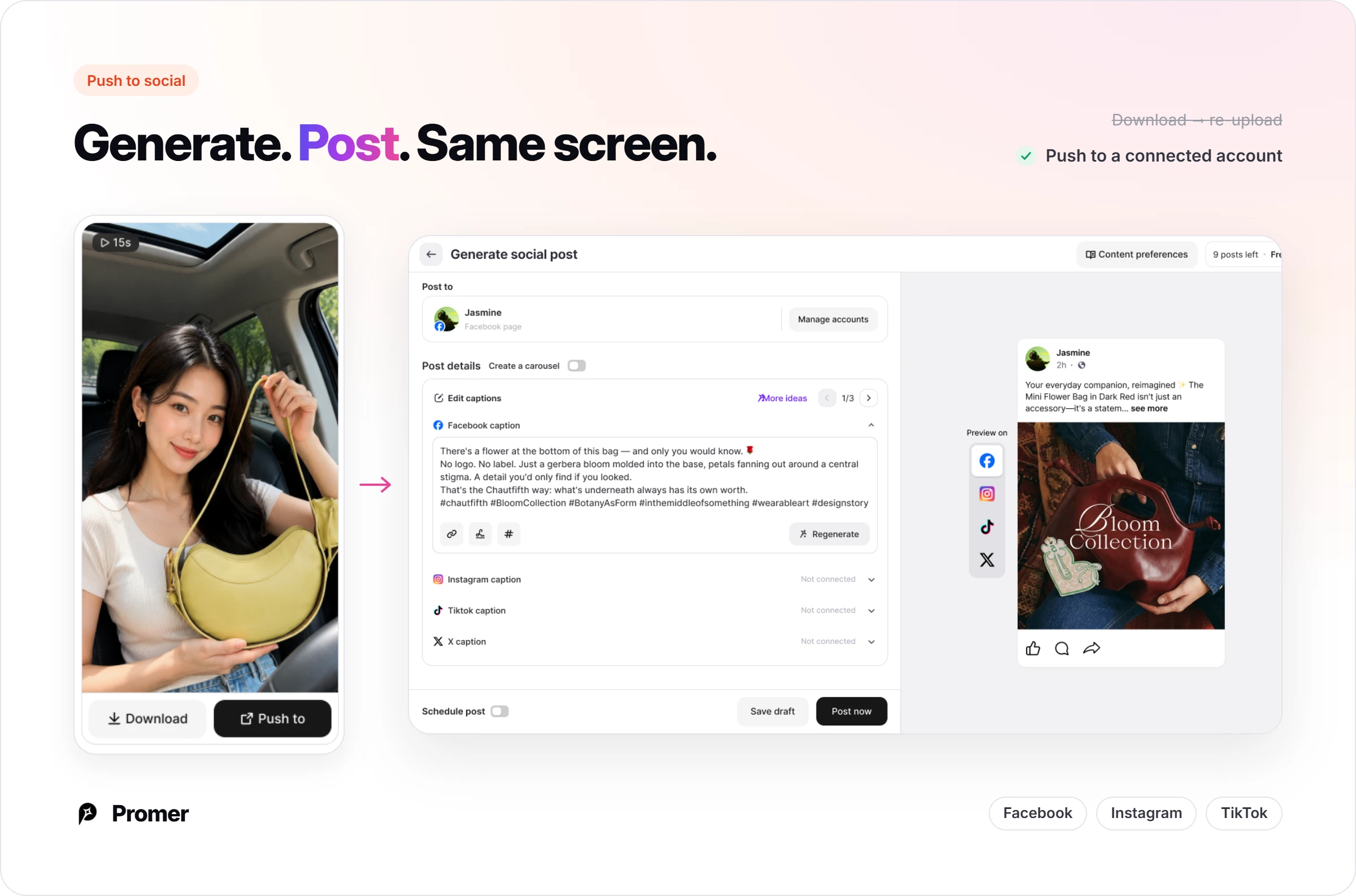
Publish without the download-reupload step. Push the finished video straight to a connected Facebook, Instagram, or TikTok account from the same screen it was generated on.
Free credits render a static ad, not video. The Free plan's roughly 30 credits are enough to see how your product renders in a static ad before paying for anything; running the same accuracy check across video frames, the way this review recommends for UGCVideo AI, needs a paid AI UGC Ads plan.
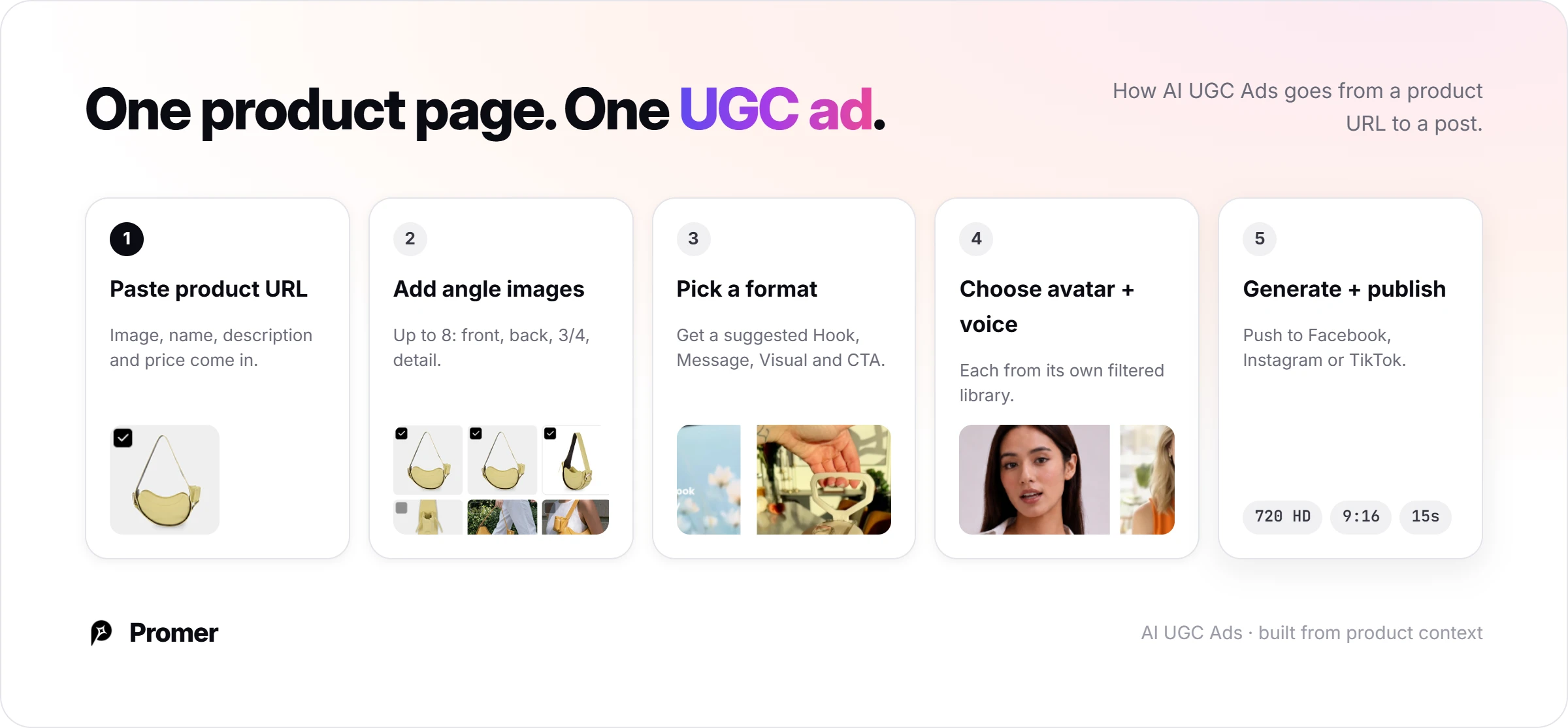
For video, AI UGC Ads lets you add product angle images, pick a format such as POV Product Demo, Problem and Solution or Unboxing, and get an AI-suggested idea with a Hook, Message, Visual and CTA.
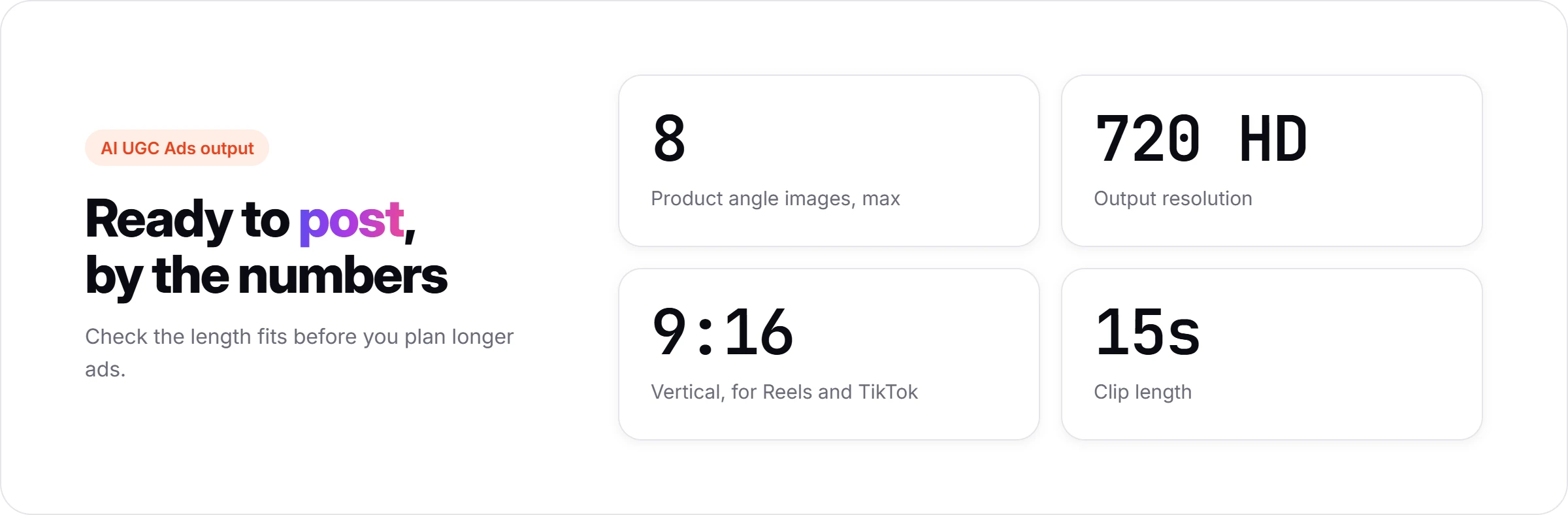
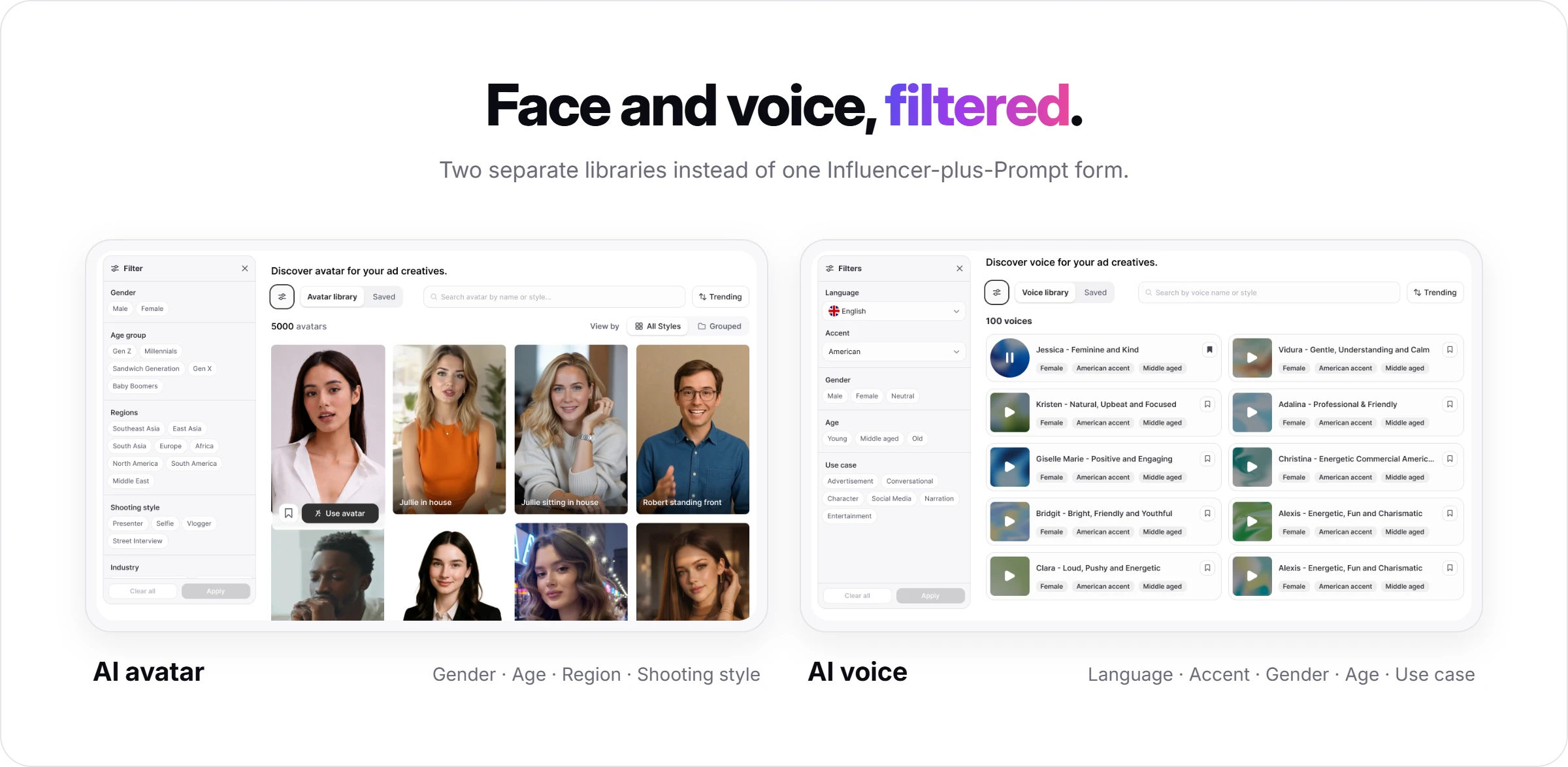
You then choose an AI avatar and an AI Voice, and the output is 720 HD, 9:16, 15 seconds, ready to publish to Facebook, Instagram or TikTok.
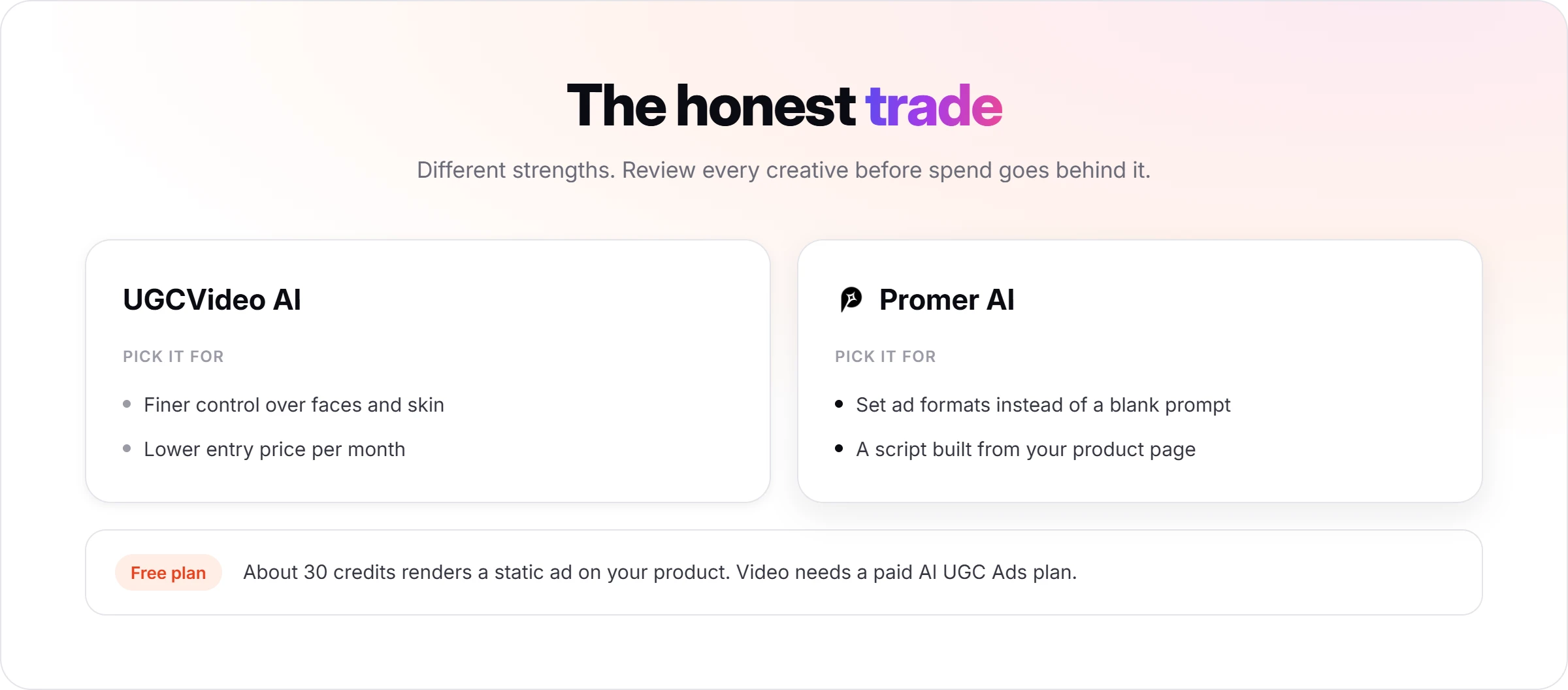
The honest trade: UGCVideo AI gives you finer control over faces and skin and a lower entry price per month. Promer AI gives you set ad formats and a script built from your product page, which is closer to how a hook test is planned. Whichever you use, review each creative before spend goes behind it. If the job is a steady supply of product ads to test, an AI ad maker built around product context is the closer fit. The Free plan's roughly 30 credits are enough to test a static ad on the same product before paying for video credits.
UGCVideo AI review verdict: who should try it?
UGCVideo AI is worth trying if you want low-cost, labeled presenter clips for hook tests and you'll check every product shot before it runs; skip it if you need the product rendered exactly the same in every frame without checking.
Choose UGCVideo AI if:
- You want commercial presenter clips at $19 a month, or $9.5 on yearly billing.
- You sell skincare, supplements, grooming or fashion and want natural-looking presenters.
- You'll cut the final ad in your own editor and label it as AI.
Look at another tool if:
- Your product has details that must stay exact (colour, straps, printed labels) and you can't review every frame.
- You want a free trial you can refund after testing on a paid plan.
- You want ad formats and scripts built from your product page, where Promer AI's AI UGC Ads fits better.
Before you pay, spend the free 50 credits on your hardest product, the one with the most colour or detail, and compare every shot with your product page. If it holds up there, it will hold up on the easy ones.
FAQ
Is UGCVideo AI legit?
Yes, UGCVideo AI is a working product with public pricing, a refund policy and terms of service revised 1 March 2026. My free-account test produced a 14-second clip from 50 credits, and an independent August 2026 test on ReviewAIApps concluded the tool does what it says. UGCVideo AI has no Trustpilot profile yet and publishes little about who runs it, so start with the free credits before paying.
How much does UGCVideo AI cost?
UGCVideo AI costs $19, $49 or $199 a month for Creator, Pro and Scale on monthly billing, or $9.5, $24.5 and $99.5 a month billed yearly. Those plans include 300, 1,000 and 6,000 credits a month. The Free plan gives 50 credits a month with a watermark and personal use only. Prices were checked on 30 September 2026.
How many credits does one UGCVideo AI video use?
A UGC Ad Video clip cost 50 credits in my 30 September 2026 test. UGC Image costs 1 credit and an 8-second UGC Video on Kling 3.0 costs 88. UGCVideo AI says cost depends on model, duration, resolution and extras, and it shows the cost on the Generate button before you confirm. At 50 credits, Creator's 300 credits cover six clips.
Can I use UGCVideo AI free plan videos in ads?
No, the UGCVideo AI free plan is marked "Personal use only (Non-commercial)". Commercial use rights and watermark-free exports start on the Creator plan. The free 50 credits are still the best place to test output quality, because a refund is refused once more than 20 paid credits are used.
Can you get a refund from UGCVideo AI?
Only within 3 days of purchase, and only if you have used 20 credits or fewer. One UGC Ad Video clip uses 50 credits, so the first paid clip ends refund eligibility. Requests go to [email protected] and approved refunds can carry a processing fee of up to 6%. To stop renewal, cancel at least 5 days before the renewal date.
Can UGCVideo AI videos pass as real UGC?
The presenter in my UGCVideo AI test looked like a real phone video, but the product changed between shots, and passing as a real customer is the wrong goal anyway. The FTC's 2024 rule bans testimonials from people who don't exist, and TikTok requires a label on realistic AI content. Judge clips on product accuracy with the AI label on.
What is a good UGCVideo AI alternative for ecommerce ads?
It depends on the job: Promer AI for UGC ads built from your product page, or CapCut for editing filmed UGC for free. Promer AI's AI UGC Ads uses set formats such as POV Product Demo and Problem and Solution and suggests a Hook, Message, Visual and CTA from the product. Output is 720 HD, 9:16 and 15 seconds, so check that fits before planning longer ads.
Related reviews and ecommerce guides
- Creatify AI review: a Shopify product walked through Creatify's URL to Video flow, with the Starter and Pro plans, credits and refund terms.
- What Is AI UGC? Definition, Examples & How It Works: when AI UGC works in paid campaigns, and when real creators still win.
- How to Evaluate ROI of AI-Generated UGC Ads: hook rate, CTR, CPA, ROAS, and how to test AI UGC fairly against creator content.
Reference Sources
Federal Trade Commission. (2024). Federal Trade Commission announces final rule banning fake reviews and testimonials. https://www.ftc.gov/news-events/news/press-releases/2024/08/federal-trade-commission-announces-final-rule-banning-fake-reviews-testimonials
TikTok. (n.d.). About AI-generated content. TikTok Support. https://support.tiktok.com/en/using-tiktok/creating-videos/ai-generated-content
UGCVideo.ai. (n.d.). AI avatar and UGC video generator, AI ad generator. https://www.ugcvideo.ai/