You have a Shopify store, a product page you are proud of, and no time to film a creator holding your product. Creatify promises to turn that product link into video ads, and in 2026 it also promises to test and run those ads for you. I pasted one real Shopify link into it on 23 September 2026 to see how far the first promise goes, and read through everything Creatify has shipped on the second.
Creatify AI reviews are strong for a reason: from one product link, Creatify wrote four scripts, built 13 video previews without spending a credit, and rendered a 1080x1920 ad for 8 credits, but you still pick the right product images and check every claim before you render. Above that video tool, AdMax and AI Media Buyer make Creatify one of the few ad generators that also reaches into testing and campaign management.
Last updated 23 September 2026. Prices and ratings were checked at the linked sources on that date. Not sponsored by Creatify.
| Quick verdict | Details |
|---|---|
| Best for | Shopify, Amazon and Etsy sellers who want UGC-style video ads with an AI avatar from a product URL, and teams that want creative and campaign tools in one place |
| Not ideal for | Stores whose main output is static image ads, or buyers who want a refundable way to try a paid plan |
| Price checked | Free plan with 10 credits a month and watermarked exports; Starter $39 a month; Pro from $99 a month; AdMax and Enterprise by demo |
If you only care about cost, skip to the pricing section. If you want to know what AdMax is, it has its own section. If you are comparing tools, the alternatives table is near the end.
What Creatify is in 2026: from URL-to-video tool to ad agent
Creatify is an AI ad generator that started with one move: paste a product URL, and Creatify reads the page, writes an ad script, and assembles a short video with an AI avatar presenting the product. That is still the tool most people sign up for, and it is the one I tested.
Around that core, Creatify has built a second layer aimed at what happens after the video exists. Its 2026 product updates list AdFlow (April), AdFlow Copilot (May), Creatify Agent (May), AI Media Buyer (June) and Boreal, its own video model (September). The AdMax page sums up the direction: creation and testing handled by the platform, with performance data from Meta feeding back into new creatives.
The easiest way to understand the product is by the job each part does:
Plan placement was checked on the Creatify pricing page and in the app on 23 September 2026.
How this Creatify test was run
Here is exactly what was tested, so you can judge how far this review stretches. The product was the Allbirds Men's Wool Runners page, a real Shopify store. I ran the URL to Video tool from link to preview, and one preview was rendered into a finished video, which used 8 credits.
AdMax, AI Media Buyer, AdFlow and the Competitor Ad Tracker need a paid plan or a demo, so those sections describe what Creatify publishes, and say so. For lip sync quality and long-term use, I rely on what G2 and Trustpilot reviewers report.
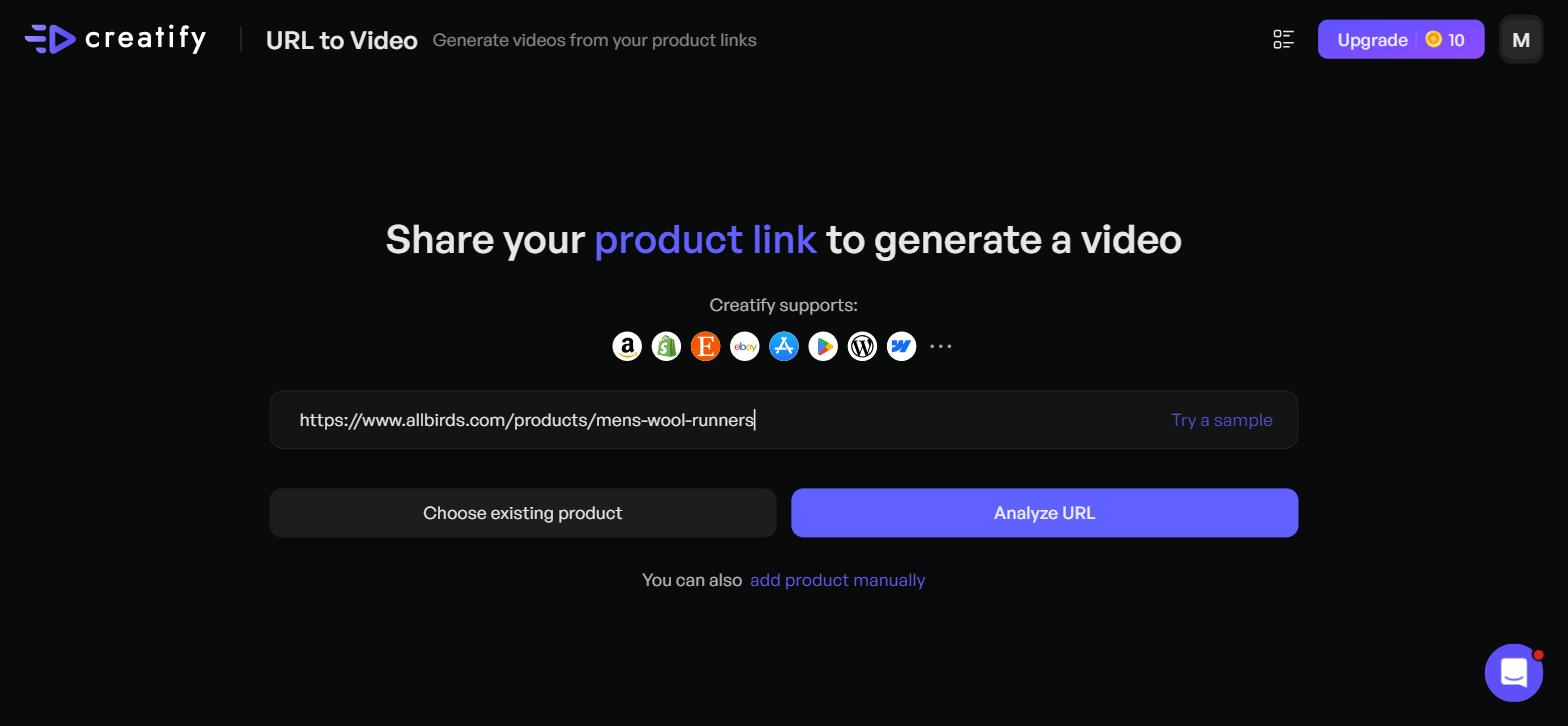
Pasting an Allbirds Shopify product link into Creatify's URL to Video tool
A Shopify product link through Creatify URL to Video, step by step
The URL to Video screen asks one thing: share your product link. The supported-platform icons under the field include Amazon, Shopify, Etsy, eBay, the App Store, Google Play and WordPress. You can also pick an existing product or add one manually.
Step 1: What Creatify pulled from the product page
After I clicked Analyze URL, the "Gathering info" stage ran for roughly 40 seconds. The result was a mixed bag, and it is the most useful thing a Shopify seller can learn from this test.
The product name came back as "Allbirds: Sustainable Men's Shoes, Wear-All-Day Comfort", and the description was a one-line brand tagline. Neither was specific to the Wool Runner. The asset grid held more than 20 images, but they covered several Allbirds products (sneakers, a slide, flip-flops), plus the brand logo and a small US flag icon. The one image pre-selected for me was a flip-flop.
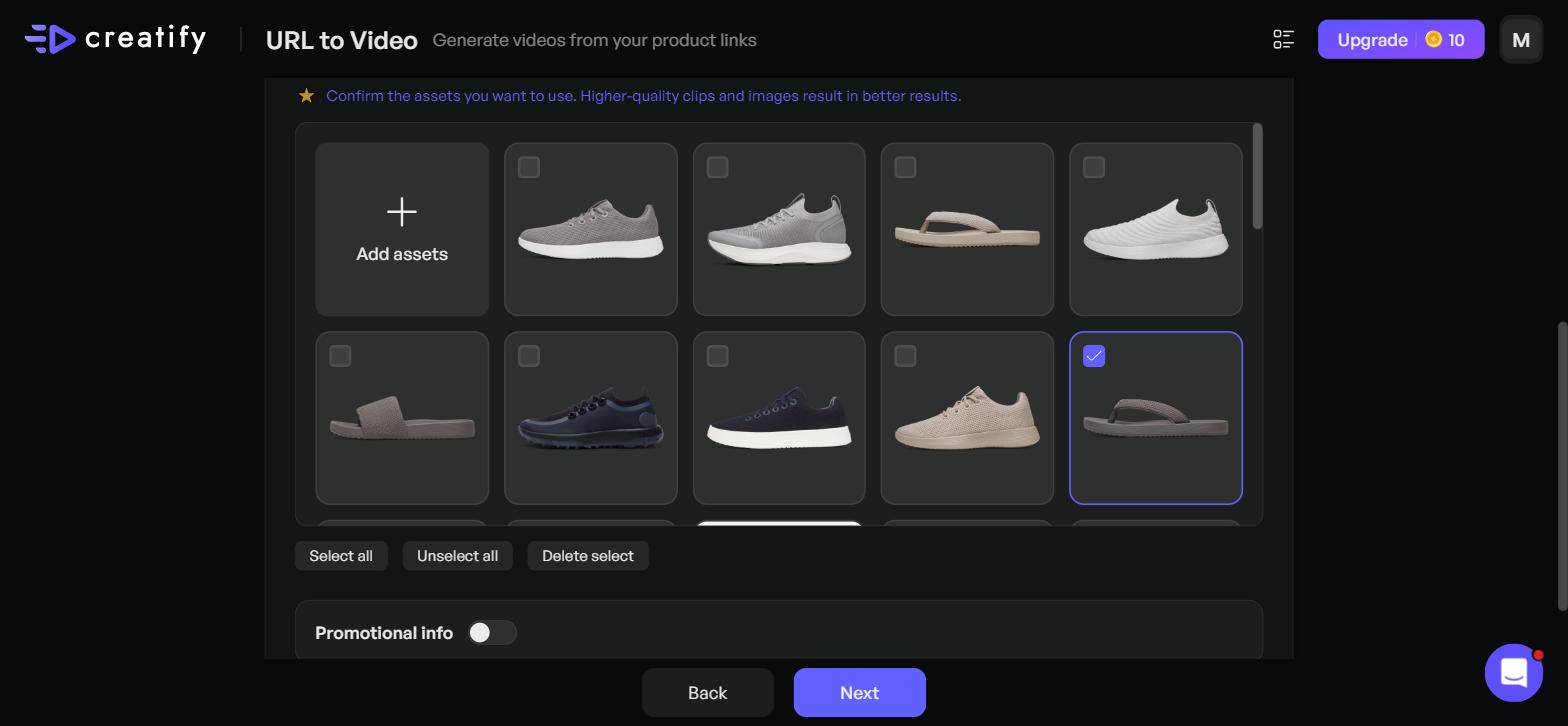
Creatify pulled catalog-wide product assets, auto-selecting an unrelated flip-flop.
None of this is hard to fix. "Unselect all", then two clicks on the right shoes, and you are back on track. But if you click Next without looking, your Wool Runner ad opens on a flip-flop. Plan two minutes per product for asset curation.
The Promotional info toggle offers Original price and Promo price fields. On my run both were empty, so if you want a price in the ad, you type it in.
Step 2: Video settings and target audience
The Video settings screen is where Creatify earns its speed reputation. You pick an aspect ratio (9:16, 16:9 or 1:1), a duration (15, 30 or 60 seconds), a language, a brand kit, and a target audience.
The language dropdown listed 75 languages when I counted them. For the audience, Creatify suggested seven segments from the product page, such as "Eco-conscious men", "Urban commuters" and "Minimalist style advocates". I picked Urban commuters and 15 seconds in 9:16.
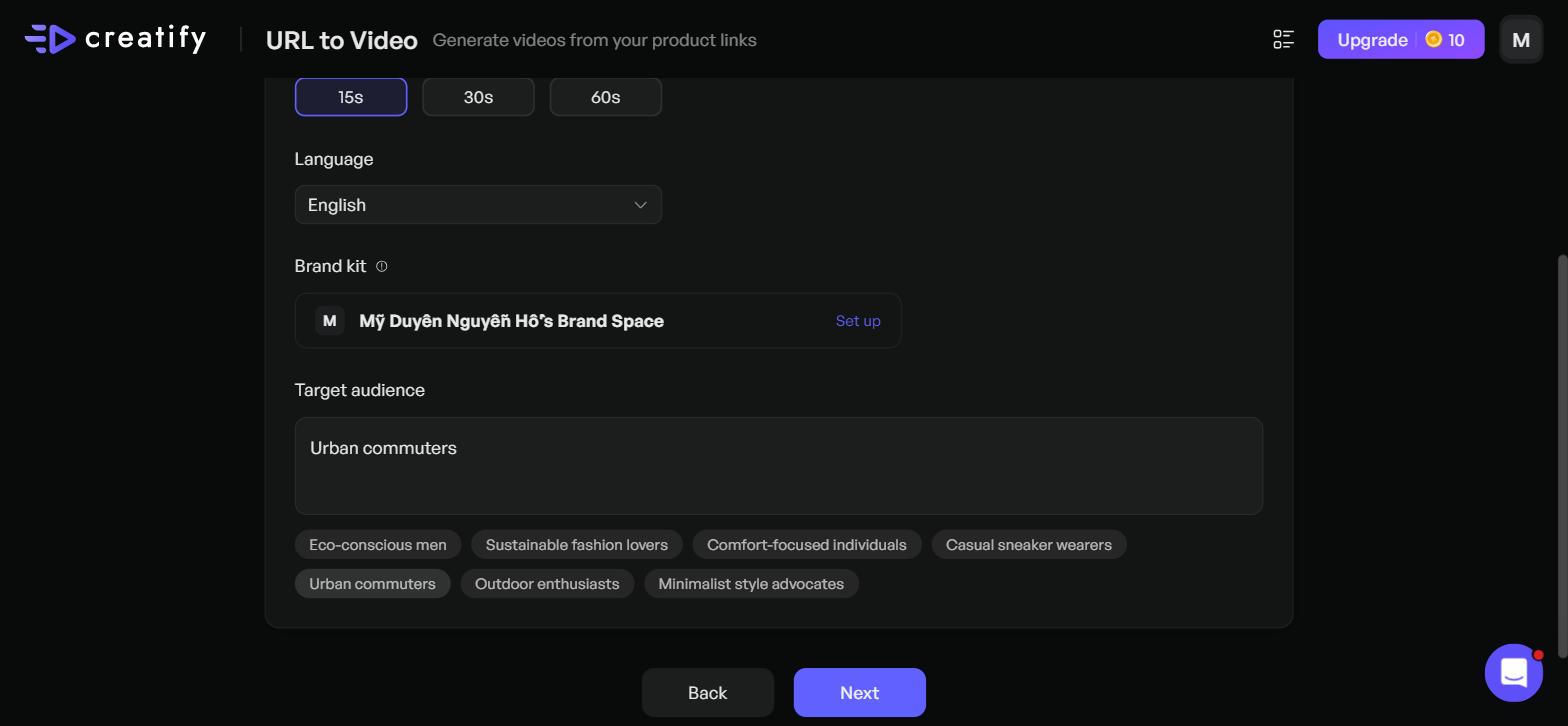
Setting duration and picking "Urban commuters" from Creatify's AI target audience suggestions
Step 3: Four AI scripts, each with a tone switch
After about a minute and a half of "AI generating scripts", Creatify offered four ad scripts: User Experience, Eco Awareness, Before After and Versatility, with a button to generate more. Each script has a tone dropdown, including Engaging, Gen Z, Motivational, Commercial Advertising, Professional and Inspiring. You can also switch to "Use your own script".
The User Experience script opened with a tidy hook: "Morning commute. Client meeting. Happy hour." That is a usable start for a commuter audience. The same script also promised "zero break-in period", a product claim I would check against the brand's own page before letting an avatar say it on camera.
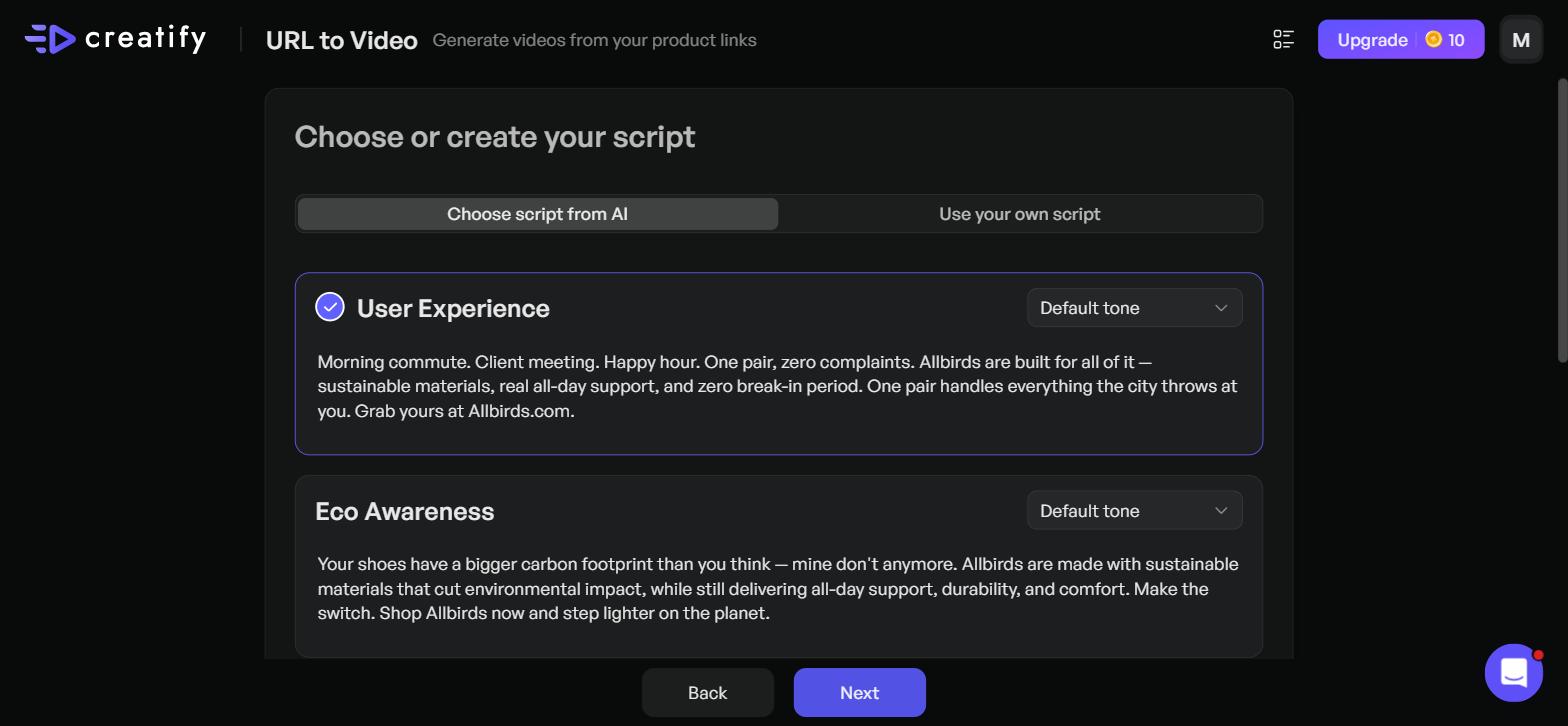
Creatify generated four marketing script angles, each with customizable tone controls
Step 4: Avatars, then 13 previews before any credit is spent
The avatar screen lets you pick up to two avatars or let "AI Smart match" choose. The library mixes realistic creator-style avatars with animated characters.
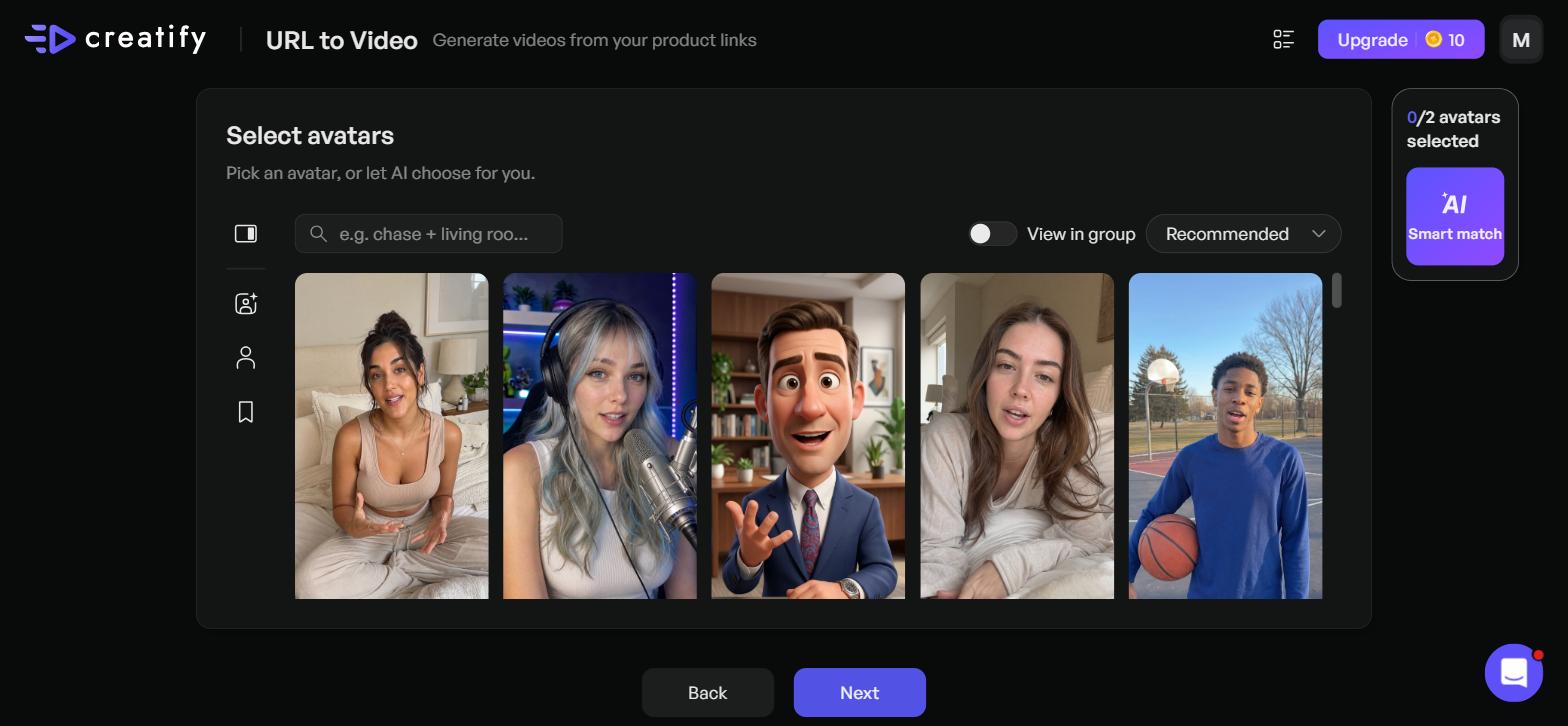
Selecting presenter avatars manually or letting AI Smart match pick the best fit
A little over four minutes later, Creatify showed "13 videos are generated! Select one or more to render." Each preview uses a different template, including Dynamic Green Screen Effect, Product Presenter, Quick Transition, Emotional and Avatar Focus Intro. My credit balance still read 10.
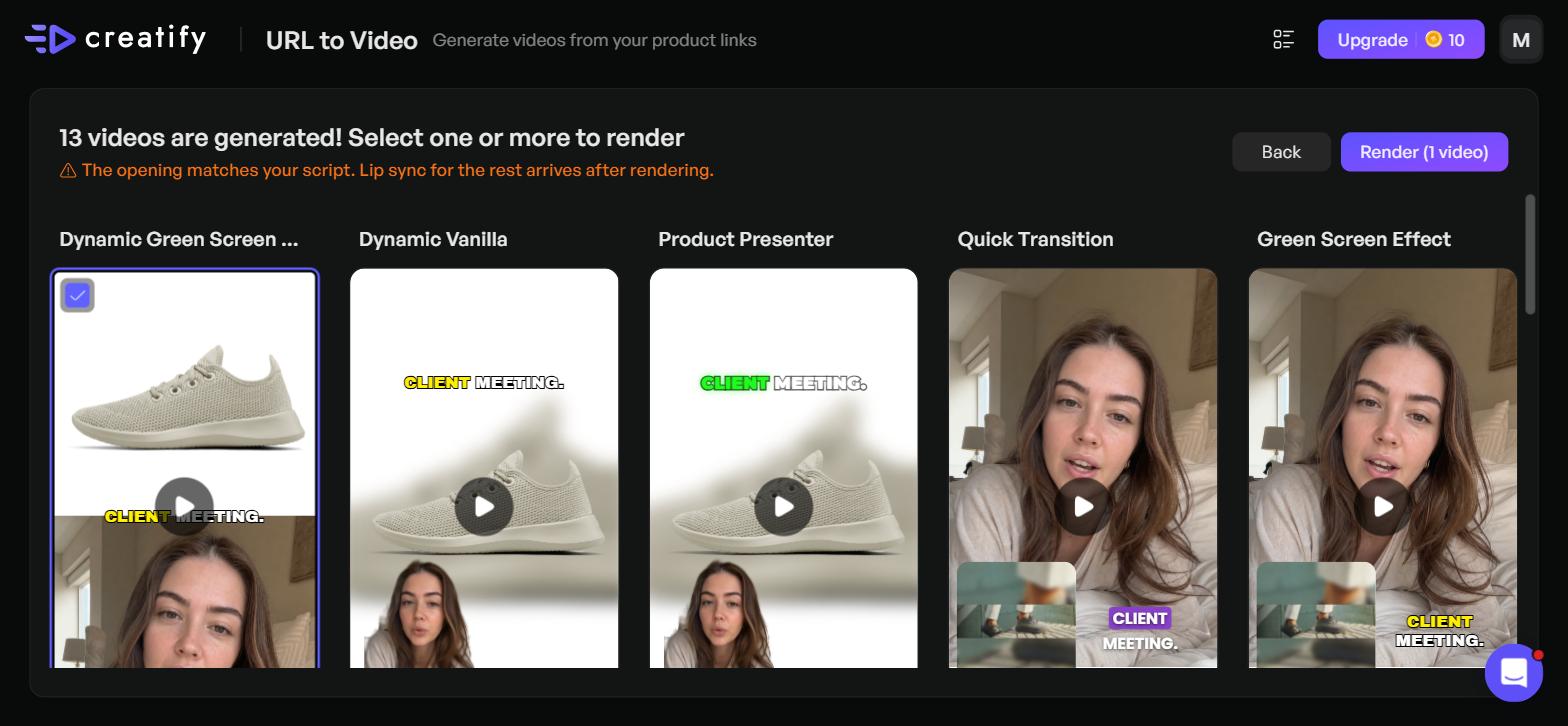
13 video ad template variations generated from one script before consuming any account credits
Two details on this screen matter. First, a warning line: "The opening matches your script. Lip sync for the rest arrives after rendering." The preview is not the final lip sync. Second, ten previews ran 16 seconds, not the 15 I selected, and three ran 22 seconds.
Those three longer ones were offer-led templates named Secret Discount Share, Still Full Price and Best Deal Ever. Their captions talk about a limited-time discount, even though I had left Promotional info switched off. They are good hook formats to test, and they only belong in your ad if you are running a real offer.
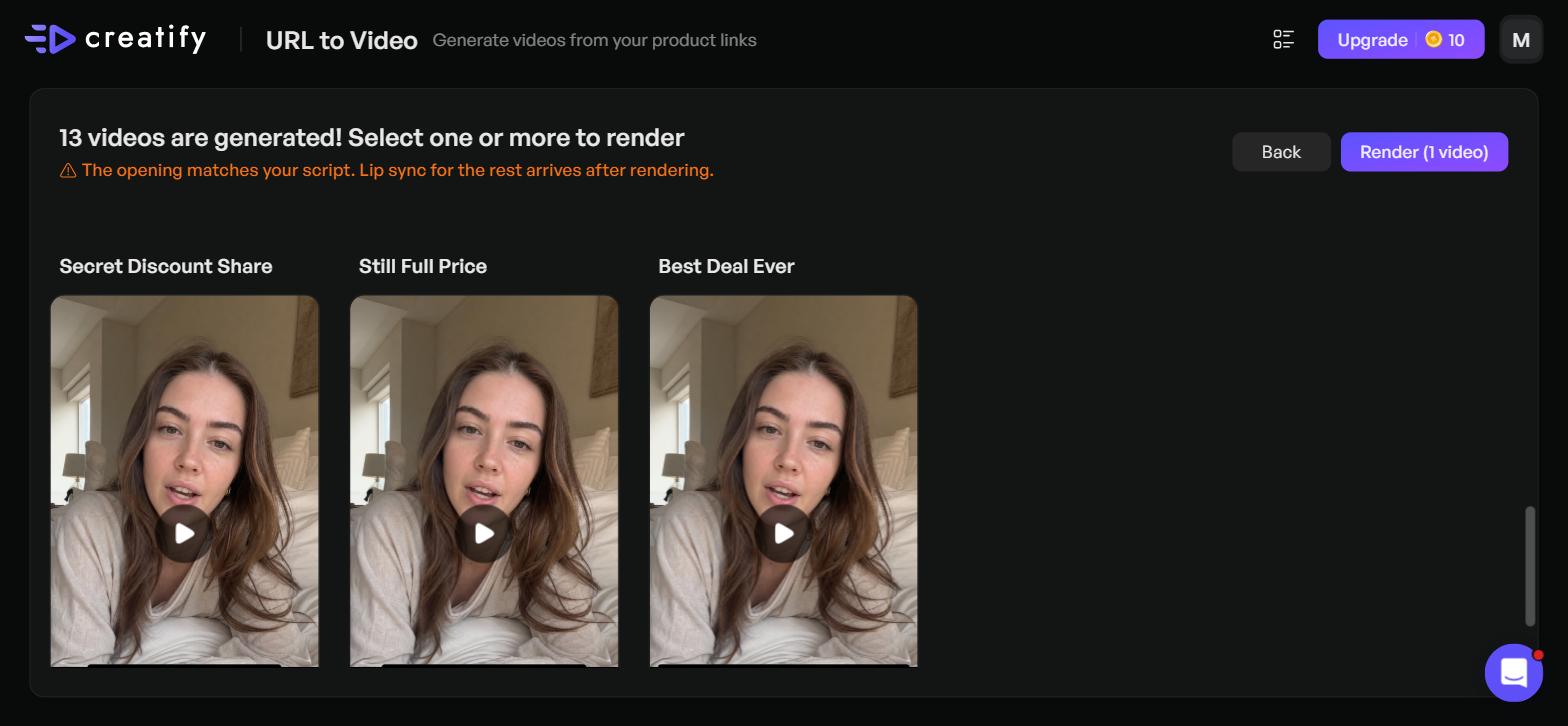
Offer-led preview templates with discount hooks appeared even without promotional data enabled
Step 5: The render price, shown before you commit
Clicking Render opened a confirmation panel: Credits needed 8, Available credits 10. The info tooltip explained the rate as "4 credits per 15 seconds, rounded up". A 16-second preview rounds up to two blocks, so it costs the same as a 30-second one.
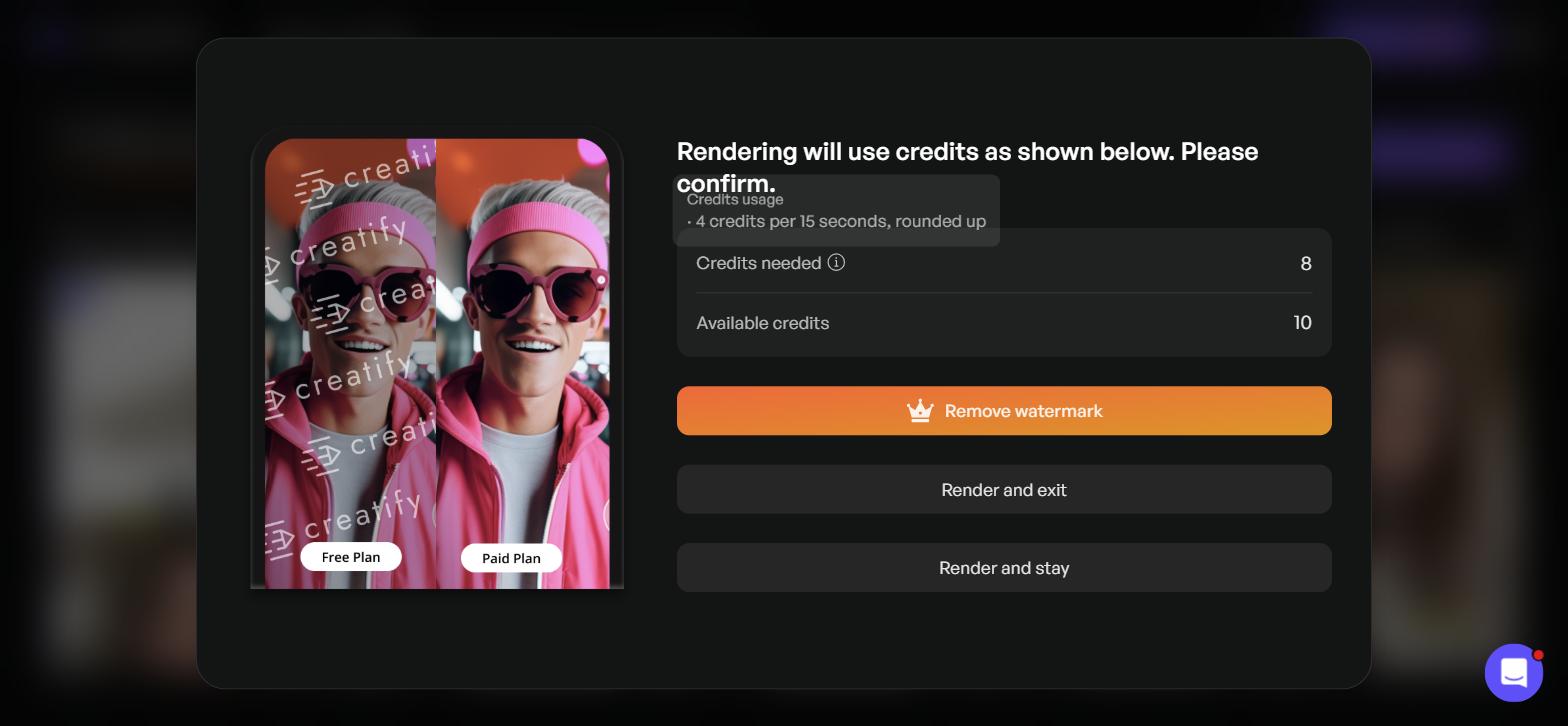
Transparent pricing before export: Creatify charges 8 credits for a 16-second render (rounded up)
Showing the exact cost before rendering is a genuinely good practice, and Creatify does it clearly. It also explains the free plan: 10 credits cover one short render, enough to judge output quality, not enough to test several hooks.
Step 6: The rendered ad
The Dynamic Green Screen Effect preview rendered into a 15.7-second video at 1080x1920, and the account balance dropped from 10 to 2 credits. The ad opens on the product shot with bold word-by-word captions, then cuts to the avatar speaking the script with the lifestyle photo of the shoes inset below her.
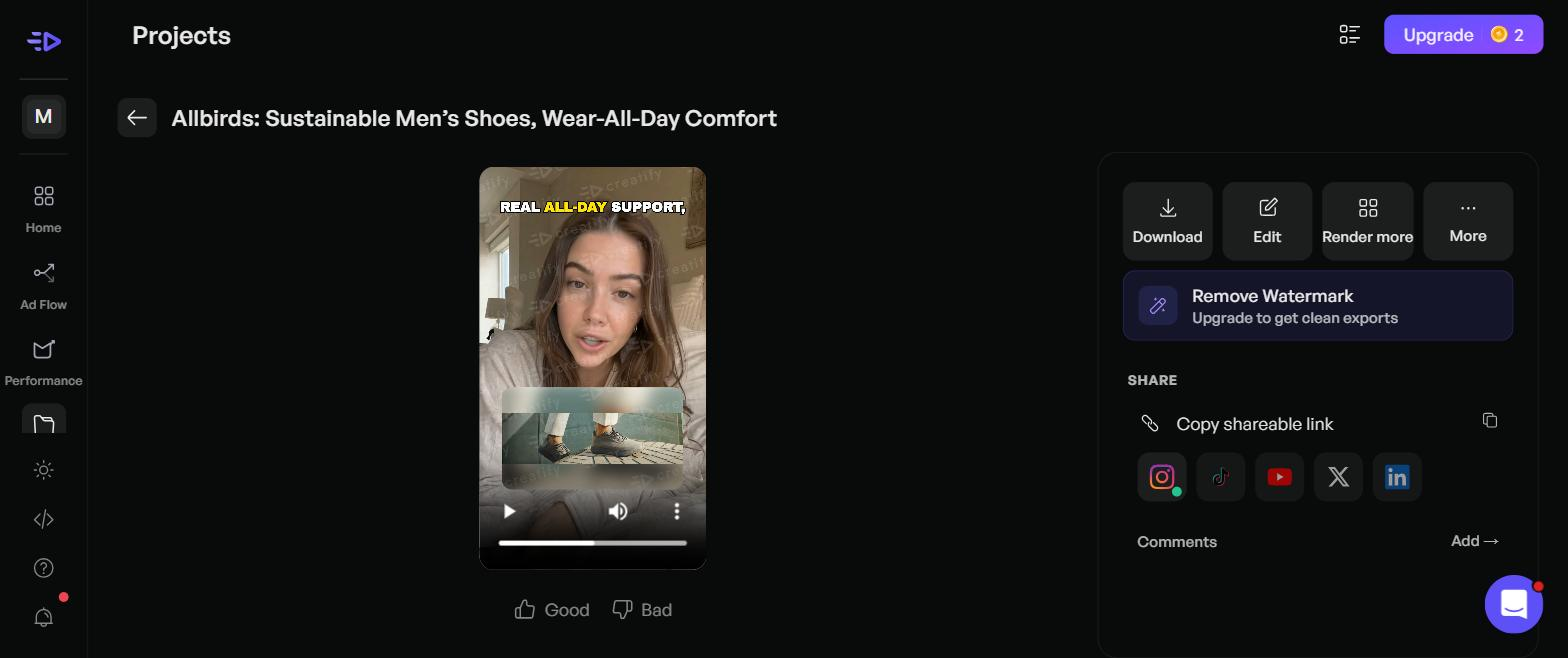
The final 15.7-second vertical video ad exported on Creatify's free plan with a diagonal watermark
Two things stood out on the free render. A faint diagonal Creatify watermark runs across the whole frame, which makes it a test file rather than something you would put spend behind. And the lifestyle photo was a wide image, so Creatify framed it with blurred fill inside the vertical video. If you want full-bleed product footage, upload vertical assets.
From the finished video page you can download it, edit it, render more versions, or share to Instagram, TikTok, YouTube, X and LinkedIn. The Projects list also carries a Launch Ads button, which is where the video tool hands off to the campaign side.
Where Creatify URL-to-video stops, and what you still make yourself
Creatify automates the parts that used to take a day: the script, the avatar, the template, the captions and the aspect ratio. What it cannot know is which of the scraped images is your product, which claims your brand can make, and whether you are running a discount this week. Those stay with you.
Here is the checklist I would run on every product before pressing Render. It takes about five minutes and it protects both your credits and your ad account.
- Asset check. Unselect all, then select only images of the exact product and variant in the ad. Delete logos and icons that slipped into the grid, and add vertical assets if you have them.
- Name and description check. Rewrite the product name and description if Creatify picked up a collection title or brand tagline instead of the product.
- Claim check. Read every script line against your product page. Remove any promise you do not make yourself, such as comfort, results or durability claims.
- Offer check. Skip discount-led templates unless the offer is live, and type the real prices into Promotional info if it is.
- Length check. Look at the preview length before rendering. A clip that runs one second past a 15-second block costs a second block.
This is the shape of the category more than a Creatify flaw. Every URL-to-video tool starts from your product page, so the output can only be as specific as the page and the assets you approve.
Creatify AdMax: the ad agent layer above the video tool
AdMax is Creatify's answer to the question every video generator leaves open: which of these ads should I run, and what should I make next? Creatify introduced it in May 2025 as part of Creatify 4.0, and its help centre announced it at launch as a $299 a month tier with unlimited credits. Today the AdMax page has no price and routes to a demo.
The AdMax page lists five things you get: unlimited variant generation, a smart asset library with tags, notes and performance history, AI insights on hooks, formats, CTAs, lengths and fatigue, competitor trend tracking across Meta, TikTok and YouTube, and a personalised dashboard with creative recommendations. Its FAQ describes the difference from the regular tool as adding industry trends, asset management, creative testing and live performance data from Meta.
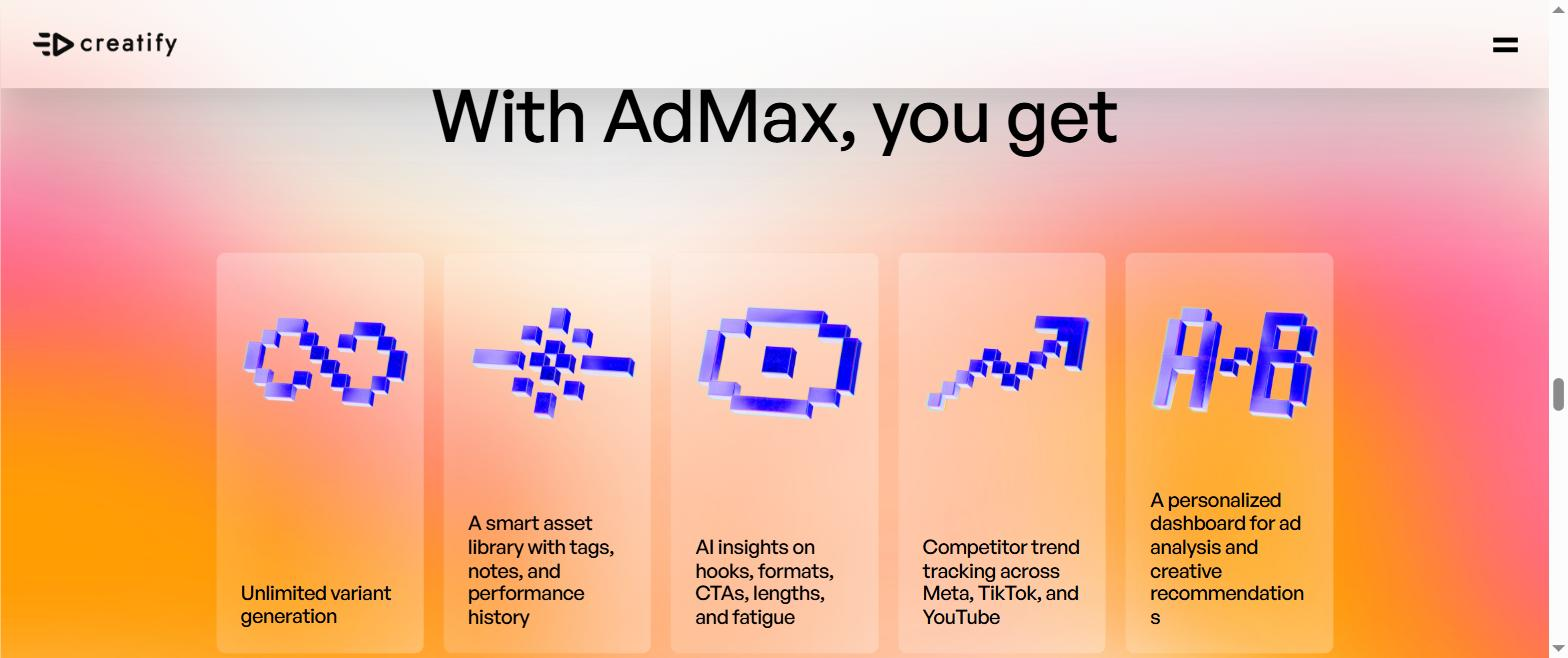
Creatify AdMax feature overview: creative fatigue tracking and performance feedback loop
The idea that sets AdMax apart is the feedback loop. Most AI ad generators stop at export. AdMax is pitched as a system that reads how your ads perform, flags creative fatigue before ROAS drops, and feeds that back into the next batch of ad variations. For a team running real ad creative testing at volume, that is the part of the workflow that usually lives in spreadsheets.
In the app on 23 September 2026, the Performance item in the sidebar opens a page titled Performance Agent, described as connecting your ad accounts to analyse data, recommend what to do next, and do it for you. Creatify's June 2026 launch post for AI Media Buyer goes further: it connects Meta, Google Ads, TikTok, Shopify and Google Analytics, answers questions like "audit my account", and builds campaigns, targeting, budgets and creative before launching them.
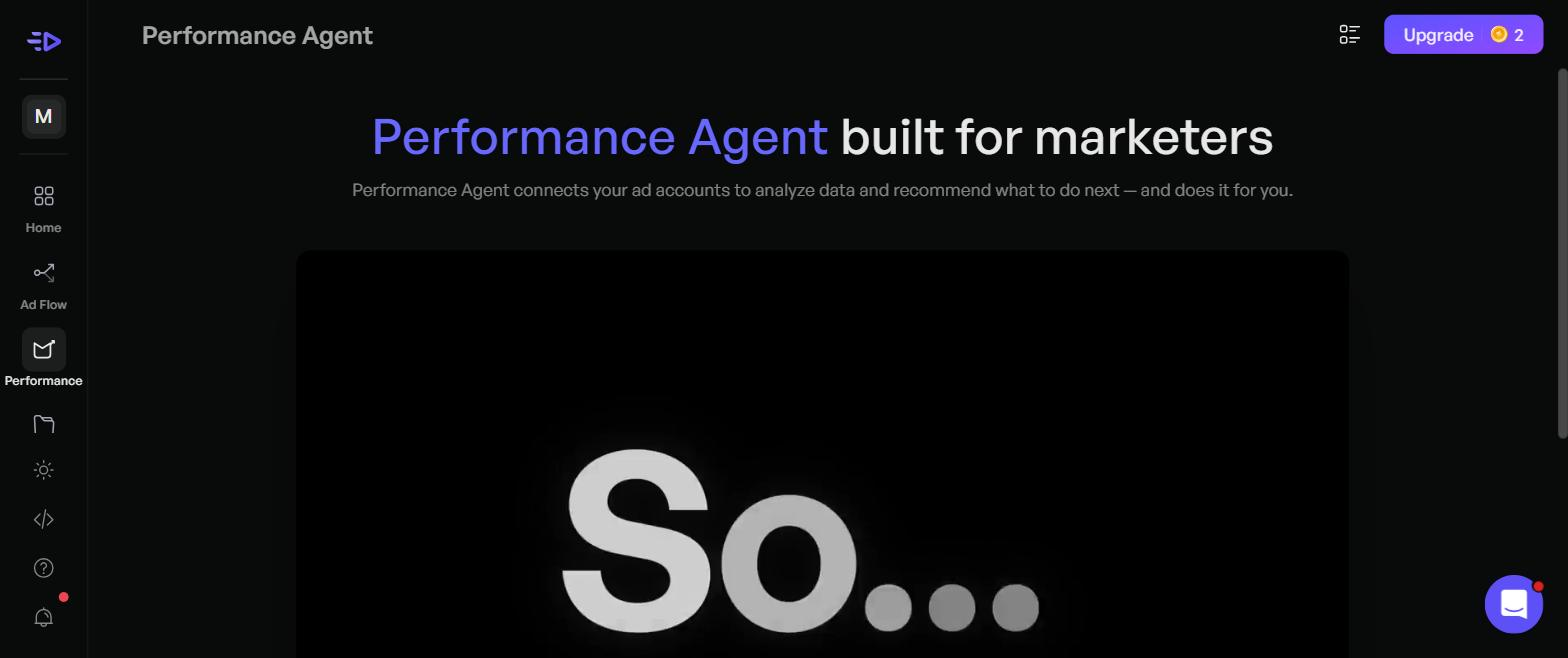
Creatify's Performance Agent interface, connecting ad accounts to automate recommendations and launches
Two cautions before you plan around it. The AdMax help centre article from the 2025 launch listed Creative Testing on Meta as "Coming Soon", and I could not run AdMax or AI Media Buyer on a free account, so this review cannot confirm how well either performs. Book the demo with a list of the exact tests you want automated, and ask which of them are live on your plan.
If campaign management is not your problem, you can ignore this layer entirely. URL to Video, avatars and AdFlow work on their own, and many Creatify reviews on G2 are from people who only use the creation side.
AdFlow, Ad Clone and Boreal: Creatify's other core tools
AdFlow, launched in April 2026, is a node-based canvas for ad production. You link steps together (a product image into a video generator, a script into a voiceover, a hook into a CTA) and save the chain so it can run again on the next product. AdFlow Copilot, added in May, builds that pipeline from a plain-language description of the ad you want.
In the app, AdFlow opens with a prompt box and template rows such as Trending, UGC Style, Hooks, Photo to Clip, Product Commercials, Fashion, Meta Top Ads and Avatar Showcase. Ad Clone, which rebuilds a reference ad around your product, now lives inside AdFlow according to Creatify's help centre. AdFlow, Agent and Ad Clone use a variable number of credits that Creatify cannot show upfront.
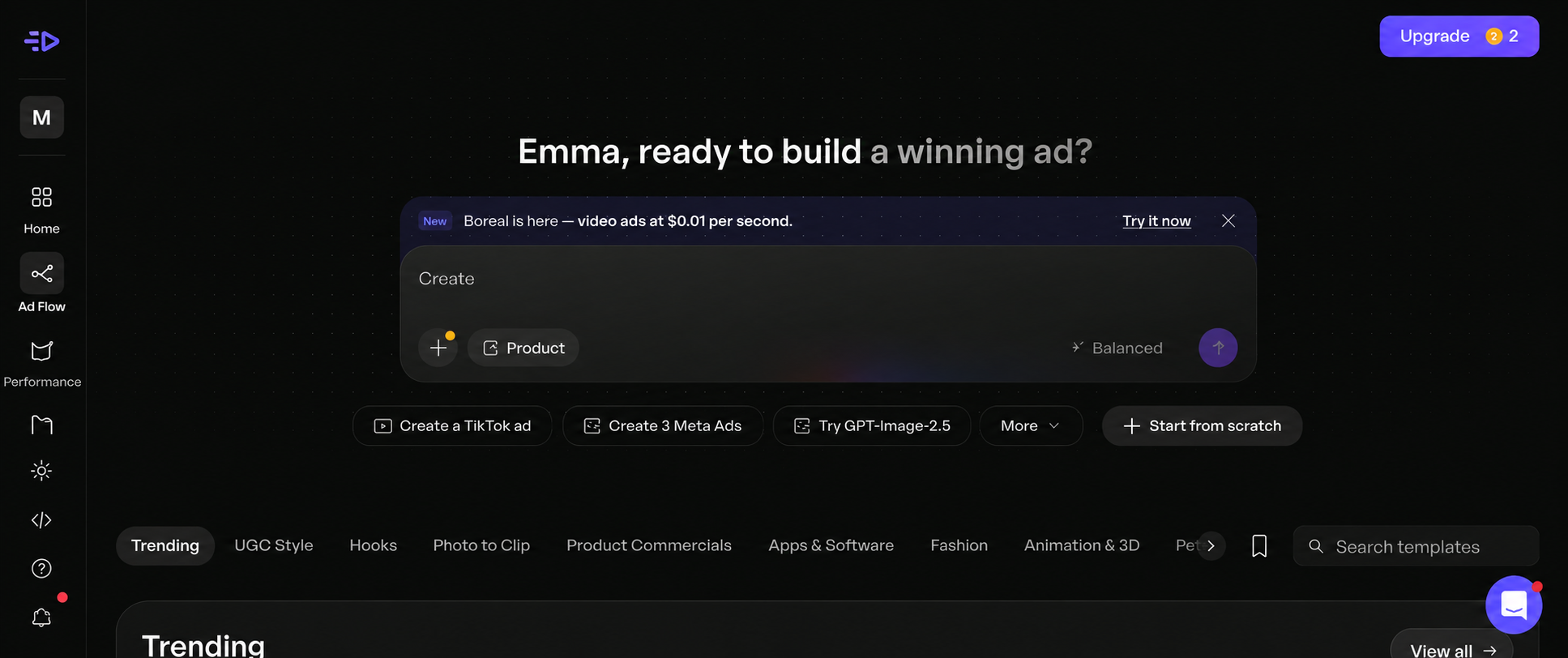
Creatify AdFlow: a node-based visual canvas for automated, repeatable ad production
Boreal is the newest piece. Creatify launched it on 15 September 2026 as its own video model for advertising, priced at one cent per second of video, or about $0.05 for a five-second clip, and described as rendering in roughly real time. The in-app banner advertises it as one credit a clip. Creatify's launch post compares it with closed models on its own benchmarks, so treat the quality claims as vendor-reported until independent tests appear.
A few smaller features round out the product: a Model Playground with 120+ image, video and audio models, static Image Ads, HTML interactive ads (added March 2026), a Slack agent you call with "@Max", and a Creatify MCP for Claude and ChatGPT listed on the Pro plan.
Creatify AI ad generator pricing and features: what $39 and $99 buy
Creatify publishes its pricing openly, with credit-based pricing on every paid plan. On 23 September 2026 the monthly prices were $39 for Starter and $99 for Pro, with Enterprise on a custom quote and AdMax by demo. Switching the page to annual billing showed Starter at $19 a month and Pro at $49 a month, under a banner offering up to 50% off annual plans.
Prices checked on creatify.ai/pricing on 23 September 2026. One version of the page's comparison table still lists 1 seat for Pro, while the Pro plan card lists "up to 5 seats (2 included)". Confirm the seat count at checkout if it decides your purchase.
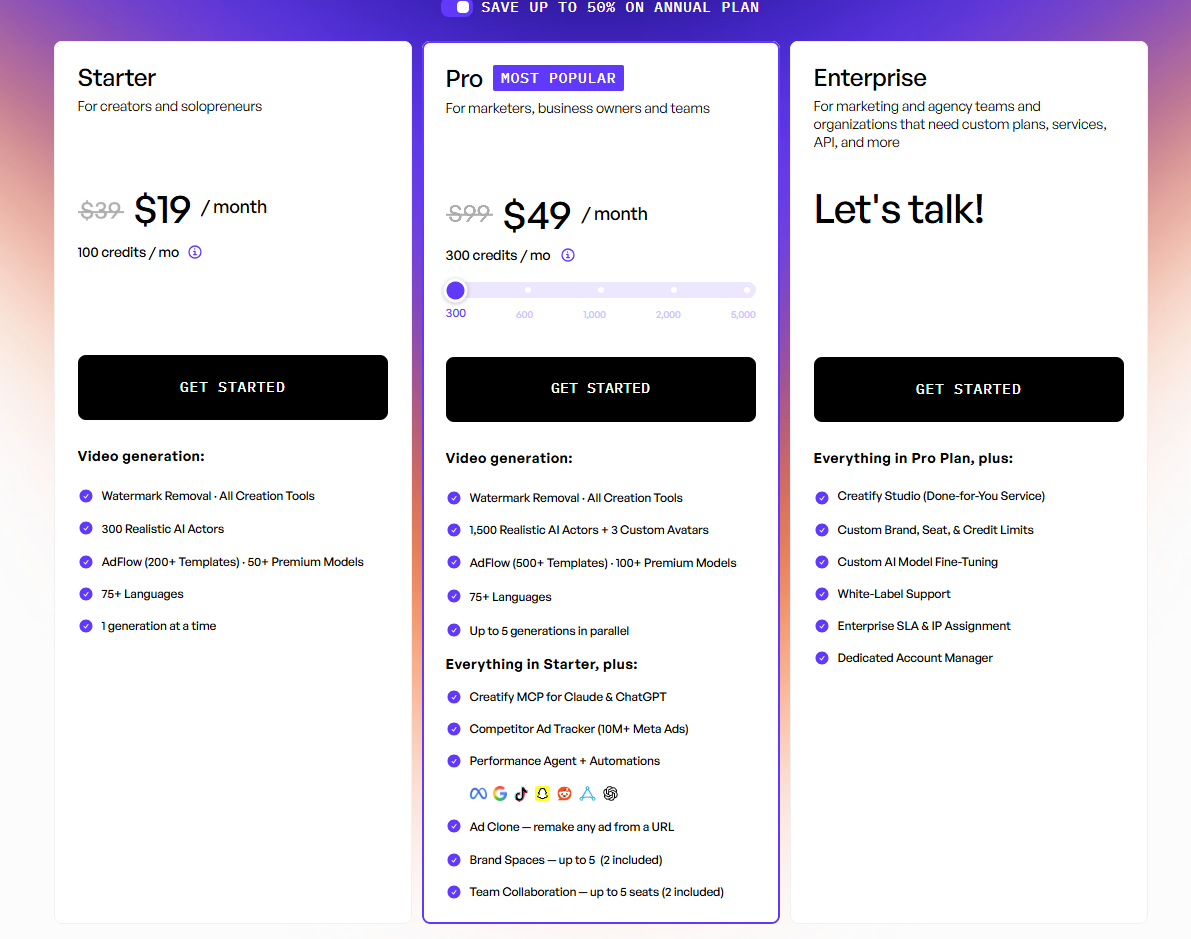
Creatify pricing plans with annual discount applied, dropping Pro from $99 to $49 a month
The free plan includes 10 monthly credits, which Creatify's pricing FAQ describes as around 2 video ads or 20 image ads, and exports carry a watermark. Starter removes the watermark and allows one generation at a time. Pro adds up to five generations in parallel, which matters if batch video generation is how you test hooks, plus the Competitor Ad Tracker, Ad Launcher, AI Media Buyer and Performance Agent.
On credits, there are two numbers to know. The in-app tooltip on my render showed 4 credits per 15 seconds, rounded up. Creatify's help centre article on credit usage, dated 19 August 2026, states 5 credits per 15 seconds for Video Ad, Avatar Video and AI Shorts, and 3 credits per 15 seconds for revisions. Pro revisions are free when you keep the script, avatar and voice.
The billing terms are simple and worth reading once. Creatify's Terms of Service say paid plans renew automatically on the cycle you choose, you can cancel at any time on the website or by emailing support, and payments are non-refundable except where required by law. So the $19 annual Starter price is a year paid upfront. If you are unsure, test on the free plan, then start monthly.
What Creatify AI reviews on G2 and Trustpilot say
Creatify reviews split by platform, and both are worth reading for different reasons. On 23 September 2026, G2 showed 4.8 out of 5 across 1,735 reviews, with about 93% of them five-star. Trustpilot showed 3.9 out of 5 across 832 reviews, most of them five-star with a visible one-star group.
| Platform | Rating |
|---|
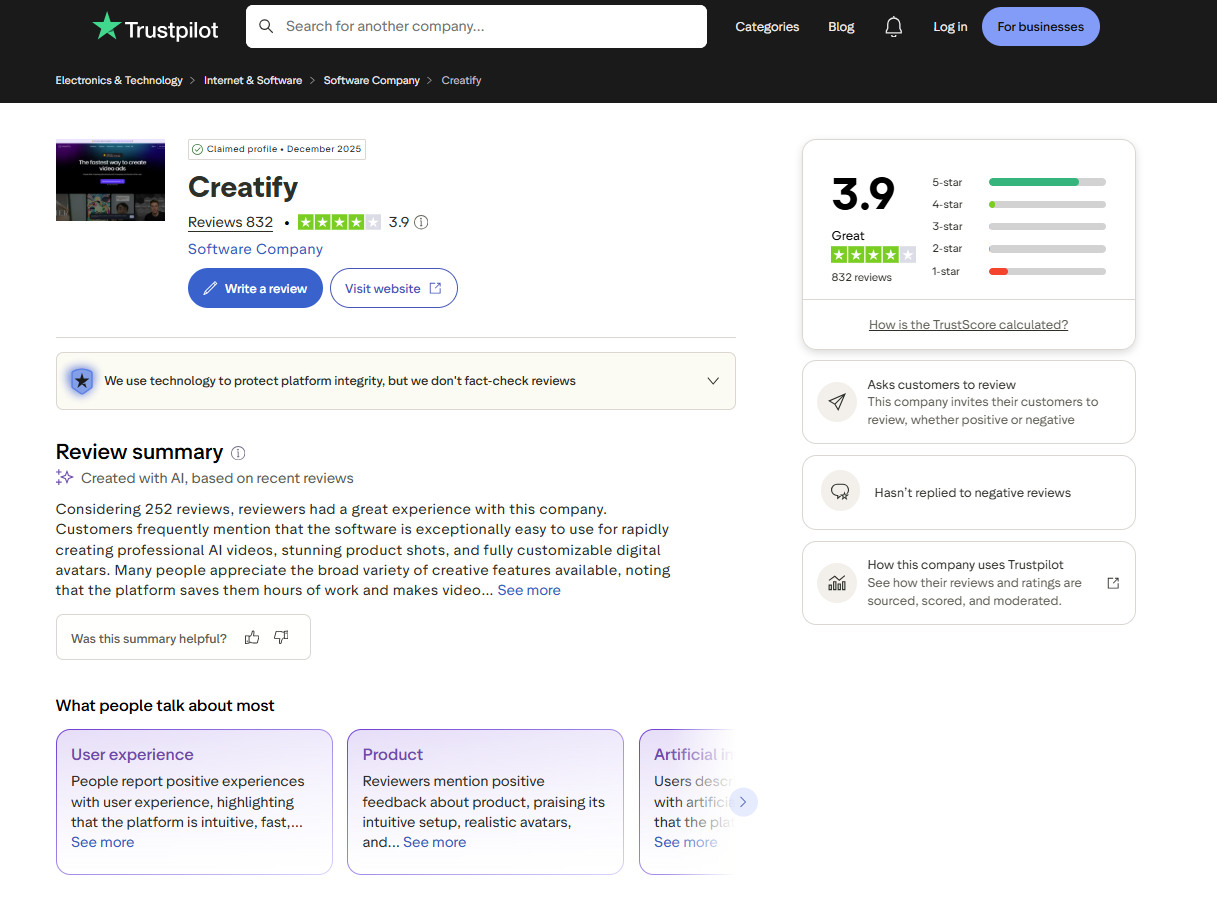
Creatify reviews on Trustpilot (3.9/5) highlighting both usability praise and recurring billing concerns
The G2 feedback lines up with this test. One G2 reviewer describes lip sync errors that require a re-render, which costs credits, and notes that support has refunded credits in some cases. Other G2 reviewers say AI scripts sometimes need small edits to match a brand's tone, which fits the claim check above.
The Trustpilot one-star group is mostly about billing rather than the product failing to work. A September 2026 reviewer says he meant to buy a monthly plan and was charged for an annual one, then struggled to get a refund. Read the checkout screen carefully and confirm whether the annual toggle is on before you pay.
Who Creatify fits, and who should pick something else
Creatify fits a seller who wants avatar-led, UGC-style video ads out of product links and is comfortable acting as the editor. It also fits a team that wants creative production, competitor research and campaign automation under one login, which few tools in this category attempt.
Creatify is a good pick if:
- You sell on Shopify, Amazon or Etsy and want short vertical video ads without booking creators.
- You test hooks in batches and value many template variations of one script.
- You need video in many languages; the URL to Video dropdown listed 75.
- You want competitor Meta ad research, an ad launcher and an AI media buyer in the same tool, and can budget for Pro or an AdMax demo.
Look elsewhere if:
- Most of your ads are static images, since Creatify's pricing is built around video seconds.
- You want to trial a paid tier with the option of a refund; test on the free plan instead.
- Your product pages have thin or mixed imagery and you do not have time to curate assets per product.
Creatify alternatives for ecommerce video ads
If Creatify is close but not quite right, these are the tools most often compared with it for ecommerce ad video. Prices were checked on 23 September 2026 at the linked sources; Arcads does not publish a pricing page, so its figure is third-party reported.
Promer AI is an AI ad creative performance platform for ecommerce advertisers. It starts from product context, the product page and its images, and uses market-proven ad patterns to decide what a creative should say before it is generated. The two features closest to what Creatify does are AI UGC Ads and AI Video Ad Clone.
Promer AI's AI UGC Ads takes your product and up to 8 angle images, then asks you to pick one of five formats: Direct Testimonial, Voiceover Product Review, POV Product Demo, Problem and Solution, or Routine or Day in the Life. The AI suggests a video idea split into Hook, Message, Visual and CTA, and you choose the avatar and voice before generating a 15-second 9:16 video in 720 HD. Creatify gives you many templates of one script; Promer AI asks you to pick the angle first, which helps when you do not yet know which creative idea to test.
AI Video Ad Clone is the counterpart to Creatify's Ad Clone. It analyses a winning video ad, breaks down its scene sequence, shows how well the structure fits your product, then scripts a new version, with output in 720 or 1080 HD, 9:16 or 16:9, and 7 languages.
The honest line is on campaigns. Promer AI is creative-side: its Launch ads feature pushes a creative and its ad copy to Meta with suggested settings, and it does not manage budgets, bidding or targeting. If you want an agent that audits accounts and runs campaigns, Creatify's AI Media Buyer covers ground Promer AI does not. Creatify also goes further on video length, up to 2 minutes on Starter and 10 on Pro.
Promer AI holds a 5.0 rating on Shopify, is used by 3,000+ merchants, and has generated over 1M ads. It helps you build ads with stronger performance logic, not guaranteed results, and AI-generated creatives can contain mistakes, so the same claim check applies before spend goes behind them.
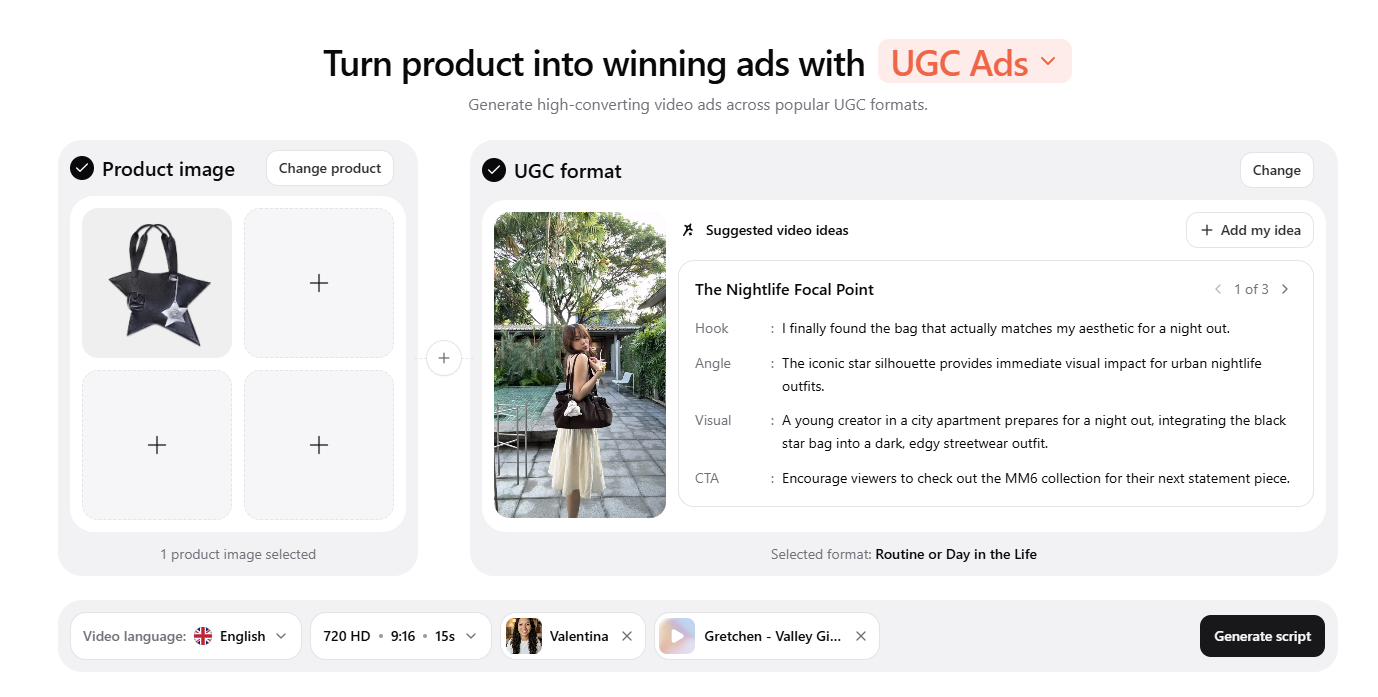
Promer AI focuses on planning the ad hook, message, and angle before generating the creative
Creatify.ai review 2026 verdict: worth it, with you as the editor
Creatify is worth trying in 2026 if you want avatar video ads from product links and will spend a few minutes per product curating images and checking claims. It wrote four usable scripts, offered 13 template previews for free, told me the exact render cost before charging a credit, and delivered a 1080x1920 ad. AdMax and AI Media Buyer make it one of the few tools in this category that also reaches into testing and campaign management, though that layer needs a demo to judge.
Start on the free plan and render one 15-second ad on your hardest-to-sell product, not your best one. If the lip sync holds up and the scripts fit your brand after light edits, start Starter monthly. Move to annual only once you know your monthly credit use, because payments are non-refundable.
Which part would you test first: the 13 templates from one script, or letting an agent decide what to run next?
FAQ
Is Creatify legit?
Yes, Creatify is a legitimate AI ad generator with a public pricing page and a working product. On 23 September 2026 Creatify held 4.8 out of 5 on G2 across 1,735 reviews and 3.9 out of 5 on Trustpilot across 832 reviews. The critical Trustpilot reviews focus mostly on billing, such as unexpected annual charges, so check the billing toggle at checkout.
How much does Creatify cost?
Creatify costs $0 on the free plan, $39 a month on Starter and from $99 a month on Pro, billed monthly. Annual billing showed $19 a month for Starter and $49 a month for Pro on 23 September 2026. The free plan gives 10 credits a month with watermarked exports. Enterprise and AdMax pricing is only available through a demo.
What is Creatify AdMax?
Creatify AdMax is an unlimited-credit tier that adds creative testing, competitor trend tracking and performance insights on top of Creatify's video tools. Creatify launched AdMax in May 2025 at $299 a month; in September 2026 its page offered only a demo. It lists unlimited variant generation, a smart asset library, AI insights on hooks and fatigue, and competitor tracking across Meta, TikTok and YouTube.
What do Creatify AI reviews say about output quality?
Creatify AI reviews generally praise ease of use and realistic avatars, with some complaints about lip sync and script tone. G2 reviewers mention re-rendering a video after lip sync errors, which uses more credits. In a September 2026 test, Creatify's preview screen noted that lip sync beyond the opening only appears after rendering, so judge a rendered clip, not a preview.
Does Creatify work with Shopify?
Creatify works with Shopify product links, which you paste into its URL to Video tool. In a September 2026 test with a Shopify product page, Creatify pulled images from across the store's catalog and a brand-level product name. Creatify's AI Media Buyer also lists Shopify among the accounts it can connect. Review the asset grid before generating, so the ad shows the right product.
How many credits does a Creatify video use?
A 16-second Creatify URL to Video render cost 8 credits in a September 2026 test. The in-app tooltip gave the rate as 4 credits per 15 seconds, rounded up, while Creatify's help centre lists 5 credits per 15 seconds. Creatify shows the exact cost before rendering, so check that screen, and trim videos to 15 seconds to avoid paying for a second block.
Can I cancel Creatify and get a refund?
You can cancel Creatify at any time, but its Terms of Service say payments are non-refundable except where required by law. Plans renew automatically on the billing cycle you chose. Cancelling through the website or by emailing support stops the next renewal, so test on the free plan before committing to a paid annual plan.
Is there a Creatify alternative that plans the ad angle first?
Promer AI is an option for ecommerce advertisers who want to choose the ad angle before the video is generated. Its AI UGC Ads feature suggests a Hook, Message, Visual and CTA across five UGC formats, then generates a 15-second 9:16 video with an AI avatar and voice. Promer AI is creative-side and does not manage campaigns. You can create your first ad free with the AI ad generator.
Sources
- Creatify homepage and product positioning, https://creatify.ai/ - accessed 2026-09-23
- G2: Creatify AI reviews, rating and review count, https://www.g2.com/products/creatify-labs-inc-creatify-ai/reviews - accessed 2026-09-23
- Wireflow: Arcads pricing in 2026 (third-party report, Arcads publishes no pricing page) ,https://www.wireflow.ai/blog/arcads-pricing - accessed 2026-09-23
- Allbirds Men's Wool Runners, the Shopify product page used in the test, https://www.allbirds.com/products/mens-wool-runners - accessed 2026-09-23