UGC Video Platform for Social Media Managers: The Real Test
Category
Blogs
Date
Authored by
Promer Team
Summary
A UGC video platform for social media managers needs to create, publish, and reply, not just generate clips. Here's the 3-job test to check it against.
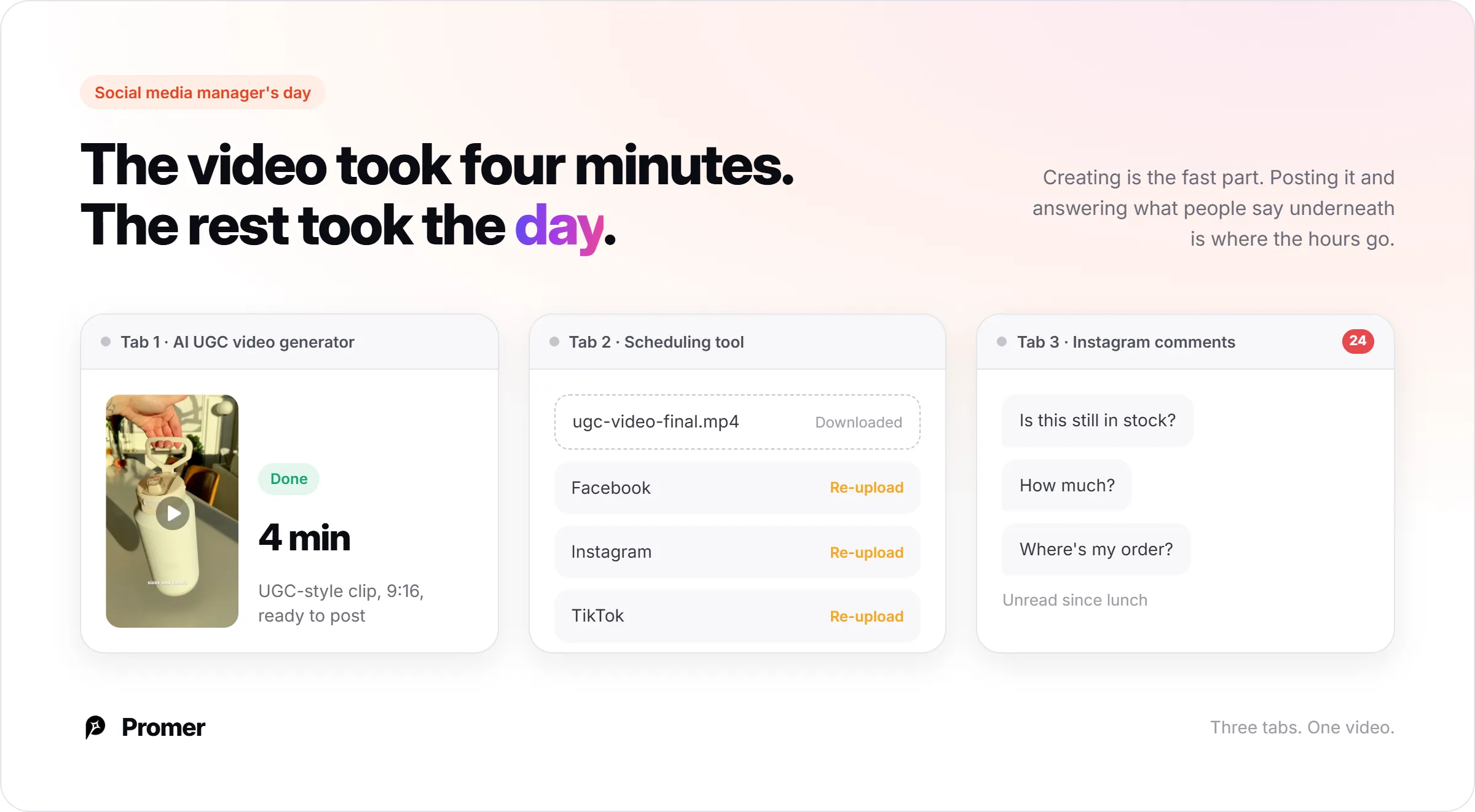
You've got an AI UGC video generator open in one tab, a scheduling tool open in another, and a notification badge on Instagram you haven't looked at since lunch.
The video itself took four minutes to make. Getting it onto the account, then dealing with what people say underneath it, is eating the rest of your day.
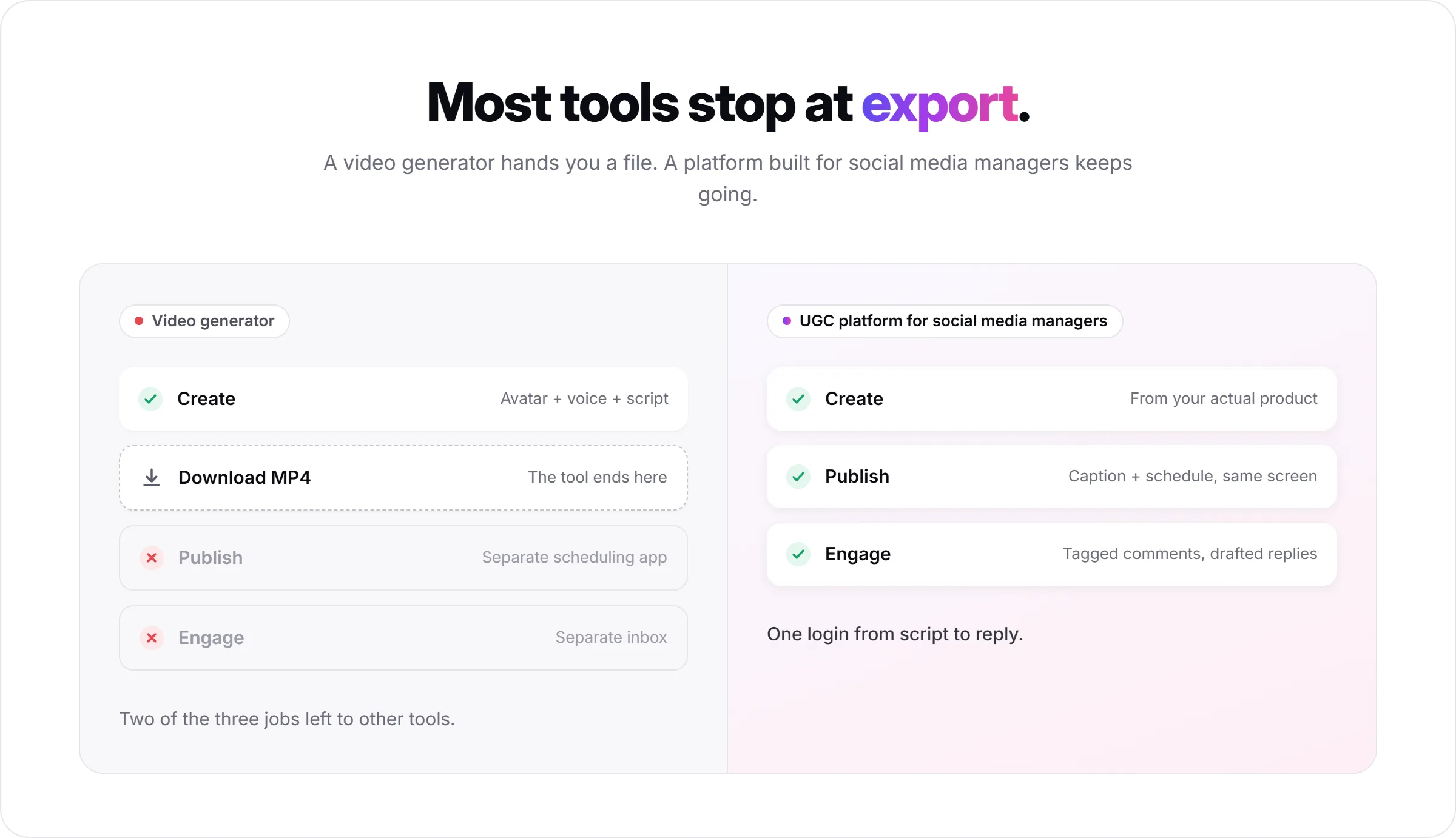
A UGC video platform for social media managers only earns that label if it does three jobs, not one: create the video, publish it to the right account at the right time, and handle what happens in the replies afterward. Most tools marketed this way stop at the export button. That's why the tab count keeps climbing instead of shrinking.
This piece lays out the three-job test, then walks through each job with Promer AI's Social Content tools as the concrete example, because it's one of the few platforms that currently tries to cover all three from one login.
Key takeaways
A UGC video platform is only "for social media managers" if it covers creation, publishing, and comment management. Video-only tools leave two of those three jobs to a separate app.
Generating the clip is usually the fastest part. The slower, less-automated parts are getting it onto the right account on schedule and replying to what it generates.
AI can draft a reply, tag a comment's sentiment, and even pull live product stock into that reply, but a person still has to approve it before it goes out.
Platform coverage isn't uniform: publishing and scheduling tend to reach more channels than comment management does, at least on the tools available right now.
Why "UGC video platform" almost always means just the video part?
Search for this category and most results are avatar-and-voice generators: pick a template, type a script, get a 15 or 30 second video that looks like a customer talking about a product. That's a real, useful piece of work. It's also only step one of a social media manager's actual day.
The wider category most of these tools sit in is the AI ad maker space, built first for paid social creative and organic UGC second. That history shows: plenty of tools will generate you a testimonial-style clip in minutes, then hand you a download button and stop. What they were built for was feeding an ads manager, not running an organic content calendar or a comment inbox.
A social media manager's job doesn't stop at the download. The video has to land on the right page, at the right time, with a caption that matches the platform, and someone has to answer the "is this in stock" comment that shows up an hour later.
A platform that only does the first part is a video generator that happens to be marketed at social teams. A real UGC video platform for social media managers does all three.
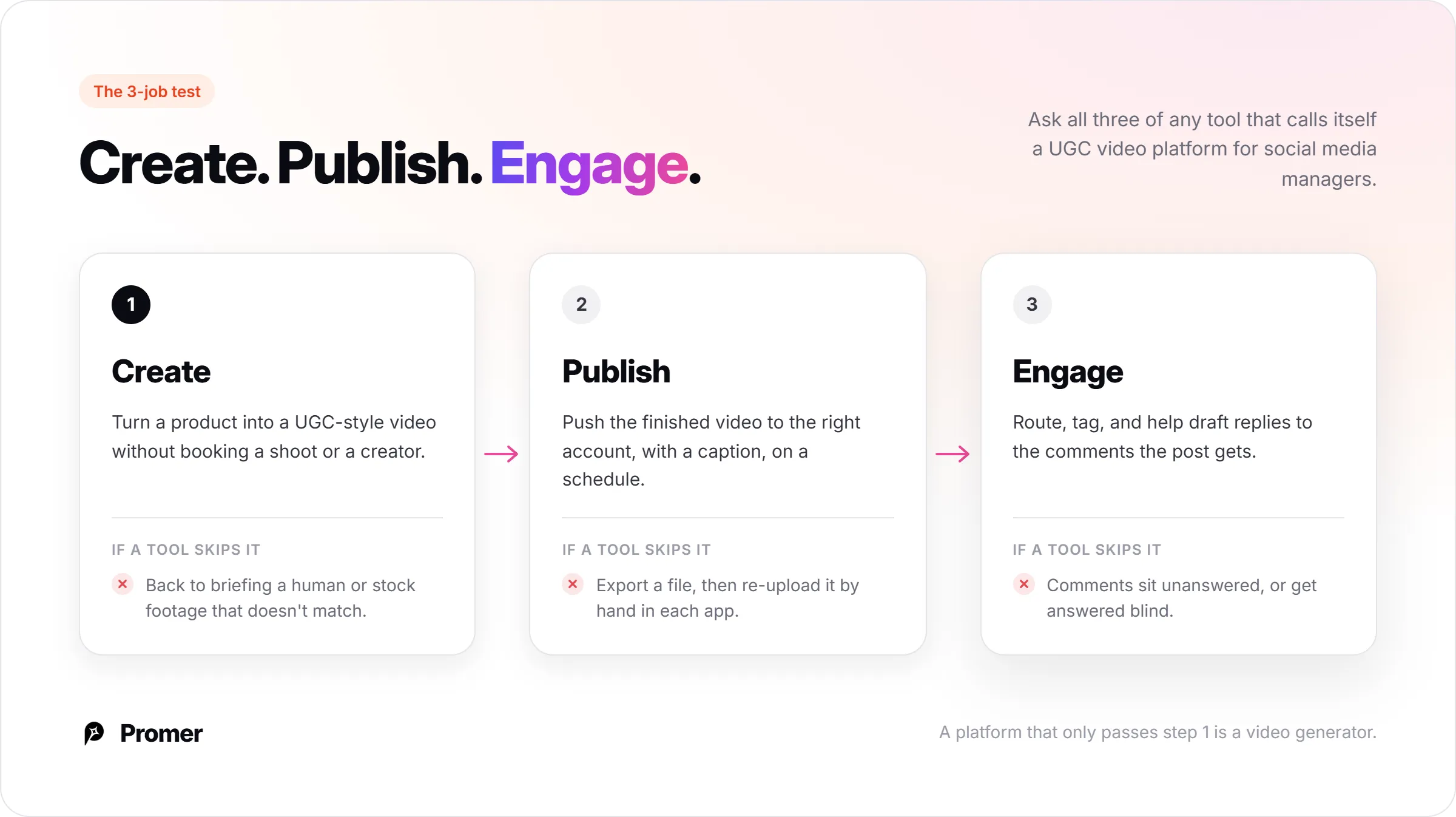
The create, publish, engage test
Three questions, asked of any tool claiming this category:
Job
What it means in practice
What breaks if a platform skips it
Create
Turn a product into a UGC-style video without booking a shoot or a real creator
You're back to briefing a human or using stock footage that doesn't match the product
Publish
Push the finished video to the right connected account, with a caption, on a schedule
You're exporting a file and re-uploading it by hand in each platform's native app
Engage
Route, tag, and help draft replies to the comments the post generates
Comments sit unanswered, or get answered without knowing which product the commenter is even asking about
The rest of this piece walks through each job using Promer AI's Social Content tools as the working example, since it's one of the few places all three currently live under one account. The test itself doesn't depend on that tool; run it against whatever you're evaluating next.
Creating UGC-style video without booking a shoot or a creator
This is the job most platforms compete hardest on, and it's gotten good. Promer AI's AI UGC Ads flow starts from a product already in your library, not a blank prompt: you can add up to eight angle images (front, back, 3/4, detail shots) so the output has more than one flat photo to reference.
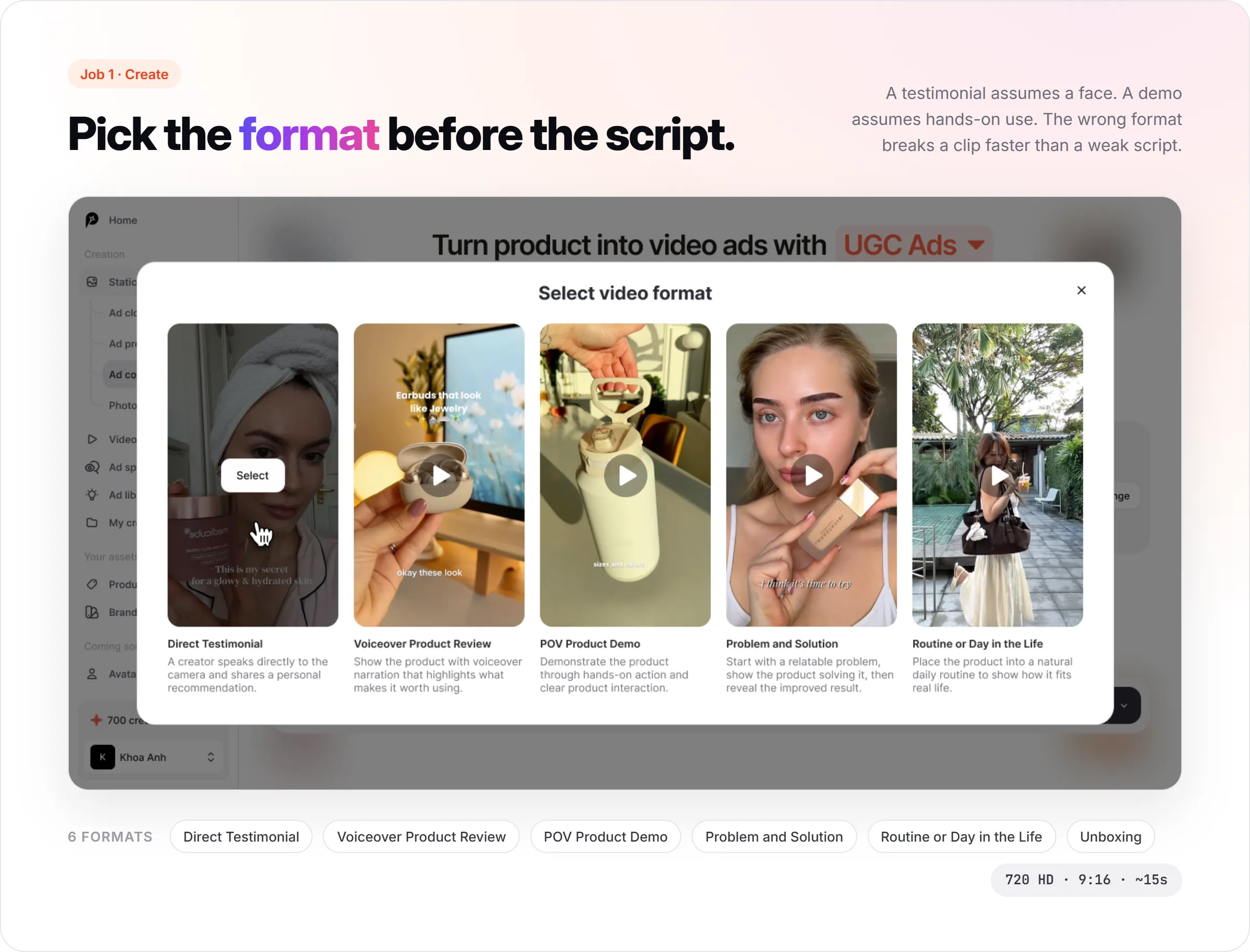
From there you pick a format. Promer AI currently offers six: Direct Testimonial, Voiceover Product Review, POV Product Demo, Problem and Solution, Routine or Day in the Life, and Unboxing. Picking the wrong one for the product is a more common failure point than a bad script, since a testimonial format assumes a face and a demo format assumes hands-on use.
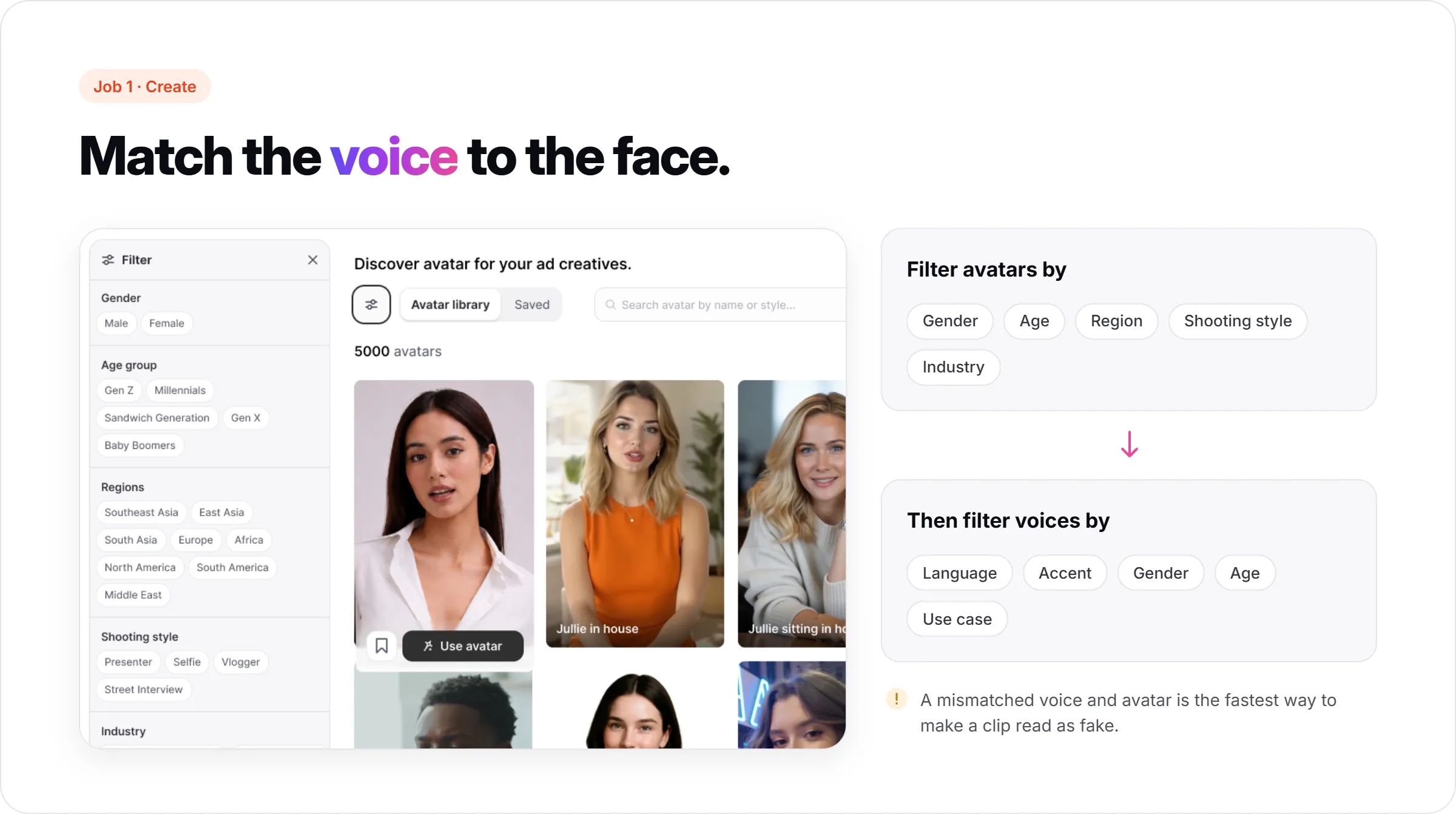
This is the shape of an AI UGC video generator built specifically for the job: AI suggests a video idea (hook, message, visual, call to action) you can browse through or override with your own, then you pick who delivers it. Avatar selection is filterable by gender, age, region, shooting style, and industry. Voice selection is filterable separately, by language, accent, gender, age, and use case, which matters more than it sounds: a mismatched voice and avatar is the fastest way to make a generated UGC clip read as fake.
Output comes back at 720 HD, 9:16, roughly 15 seconds, which is the safe default for Reels, Stories, and TikTok rather than a landscape feed post. For a fuller walkthrough of the workflow itself, from angle photos through to a finished script, see how to make AI UGC videos.
None of this is a guarantee. Promer AI's own product guidance is explicit that AI-generated creatives can carry mistakes, and a generated script still benefits from a human read before it goes anywhere near "Generate video."
Getting the video onto the right account, on schedule
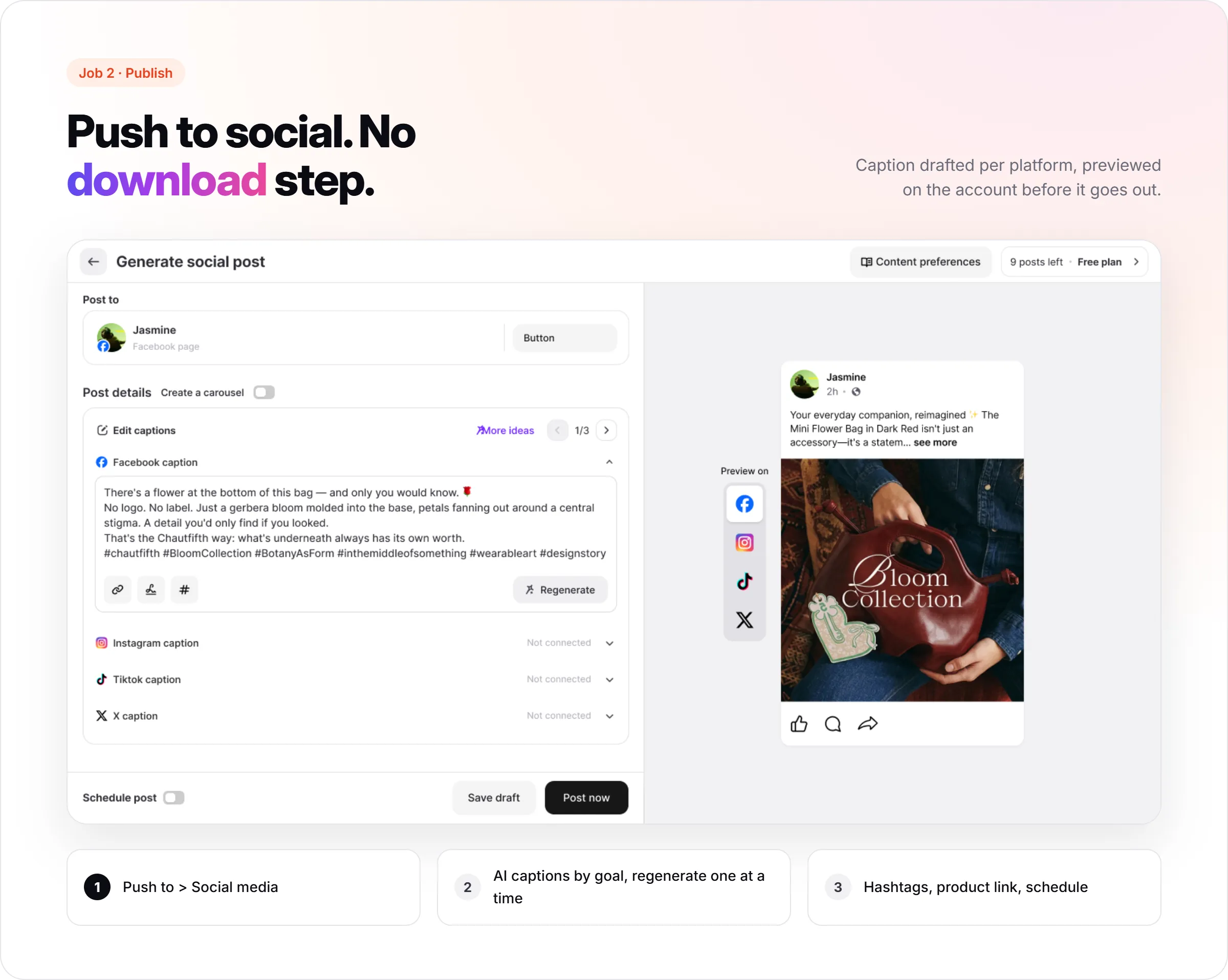
This is the job that's easy to underrate until you're the one doing it manually. Once a creative exists, Promer AI's Social Post flow lets you push it straight from the same screen: click "Push to," choose Social media, and it opens directly into a caption and account picker instead of forcing a download first.
Connecting an account is its own small hurdle worth naming. Facebook specifically requires your profile to have admin access to a Business Portfolio, and that Portfolio has to own the Page you're posting to, not just a personal profile login. It's a one-time setup cost, but it's not instant, and it's the kind of prerequisite that trips people up if nobody flags it in advance.
Once connected, caption generation is tied to a stated goal rather than a single guess: pick Awareness, Education, or a similar objective, and Promer AI returns several angle-tagged options (Storytelling, Education, Cultural, and so on) you regenerate individually instead of rerolling the whole caption. You can add hashtags manually or toggle them to auto-apply to future posts, attach a product link that auto-shortens on publish, and bundle multiple images into a carousel post.
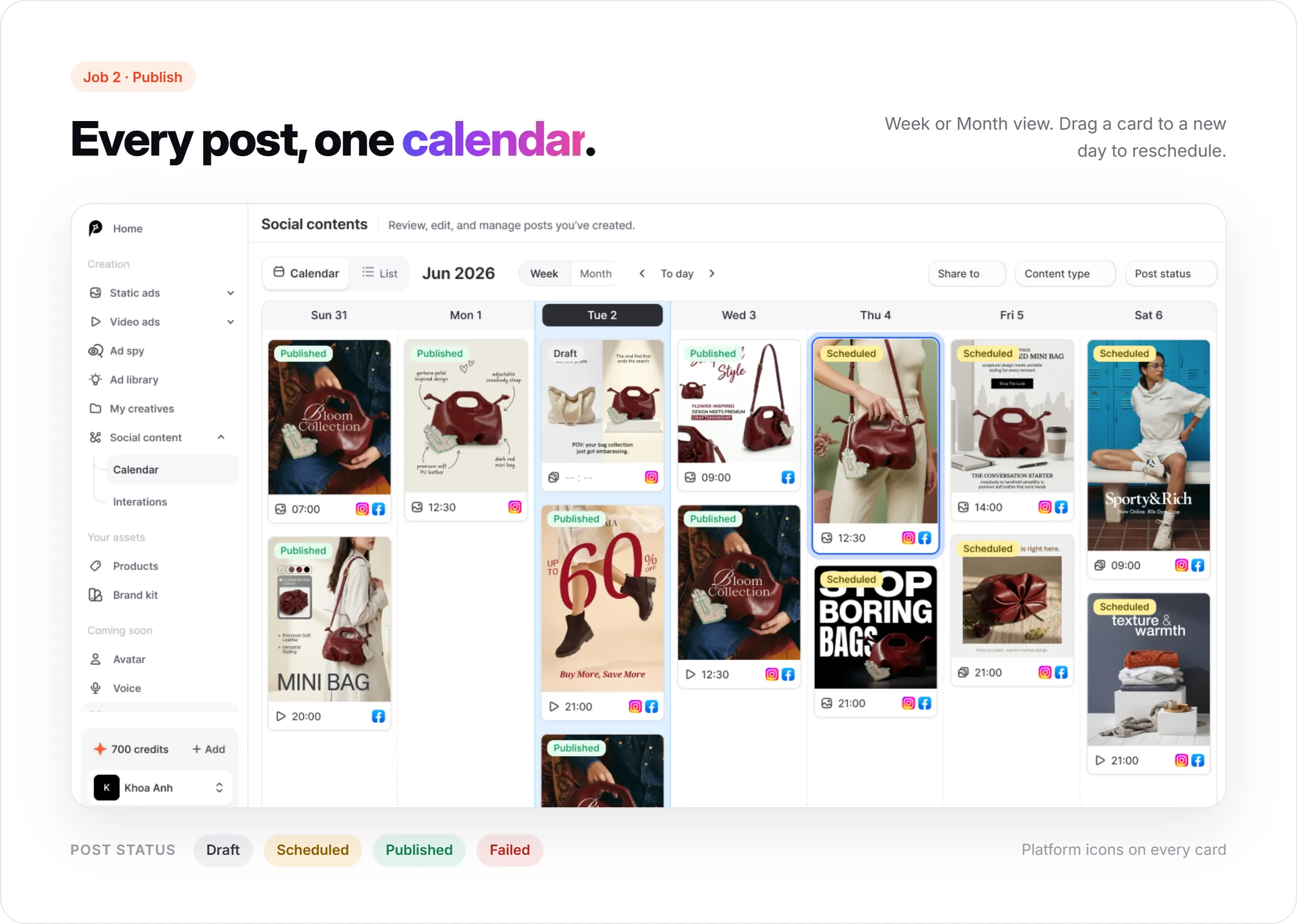
Scheduling is a straightforward date and time picker, with drafts, scheduled, published, and failed as the four states a post can sit in. That status feed is what shows up in the social media content calendar: a List view for scanning everything at once, and a Calendar view in Week or Month layout where each post appears as a small card with its publish time and platform icons, color-coded by status. Rescheduling in the Month view is drag and drop: pick up a card, drop it on a new day, and a confirmation toast fires.
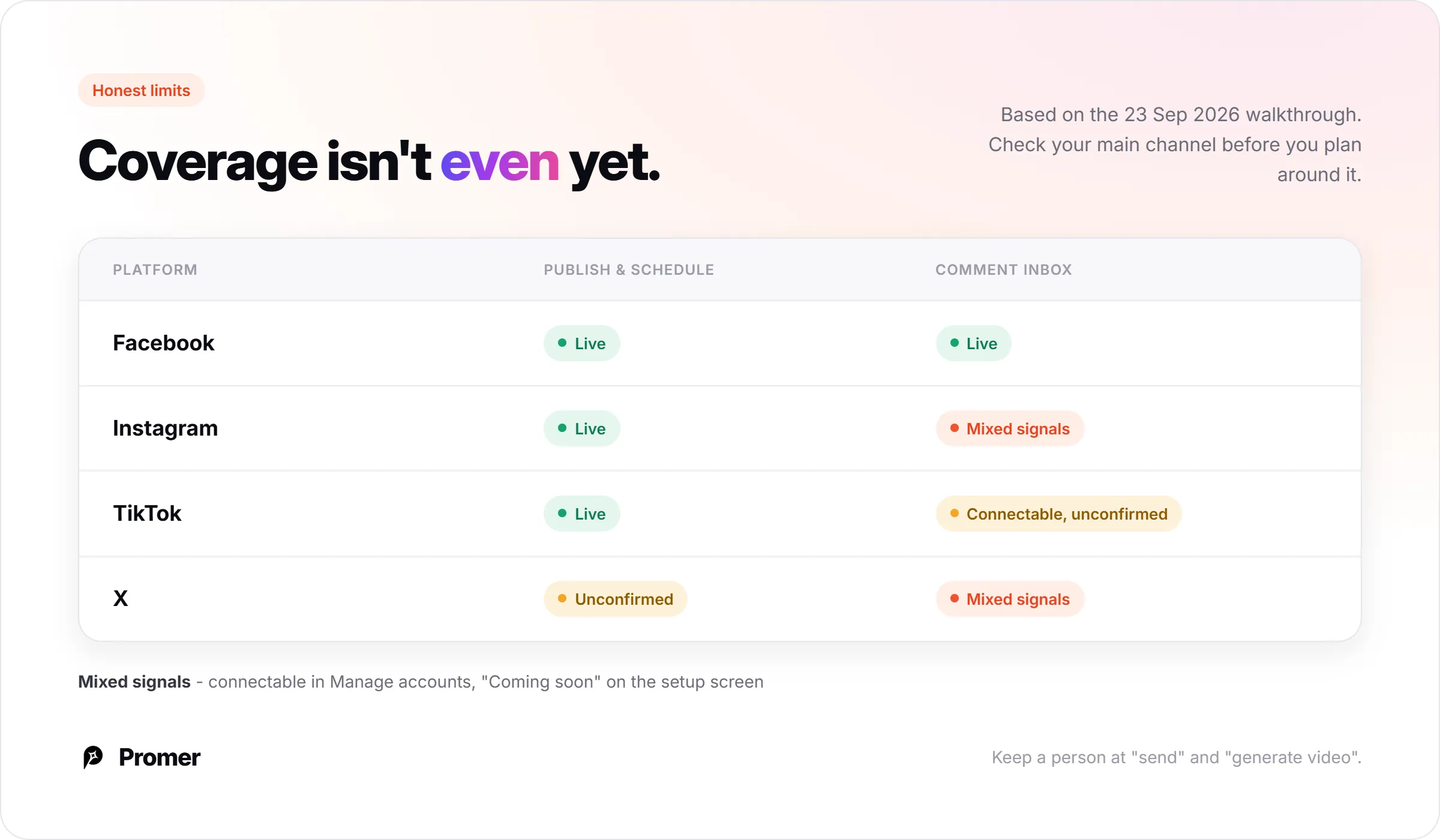
One gap worth flagging here rather than glossing over: Instagram and X both show as connectable in the account manager for posting, but they're not universally available everywhere in the product yet, which sets up the next section.
Closing the loop when a UGC video gets comments
This is the job that gets skipped most often, because most video tools were never built to touch it at all. Promer AI's Comment inbox pulls comments in from connected accounts (Facebook is live; TikTok, Instagram, and X show as connectable from the account manager, though the initial setup screen still lists Instagram and X as coming soon, so confirm current coverage before you plan around it).
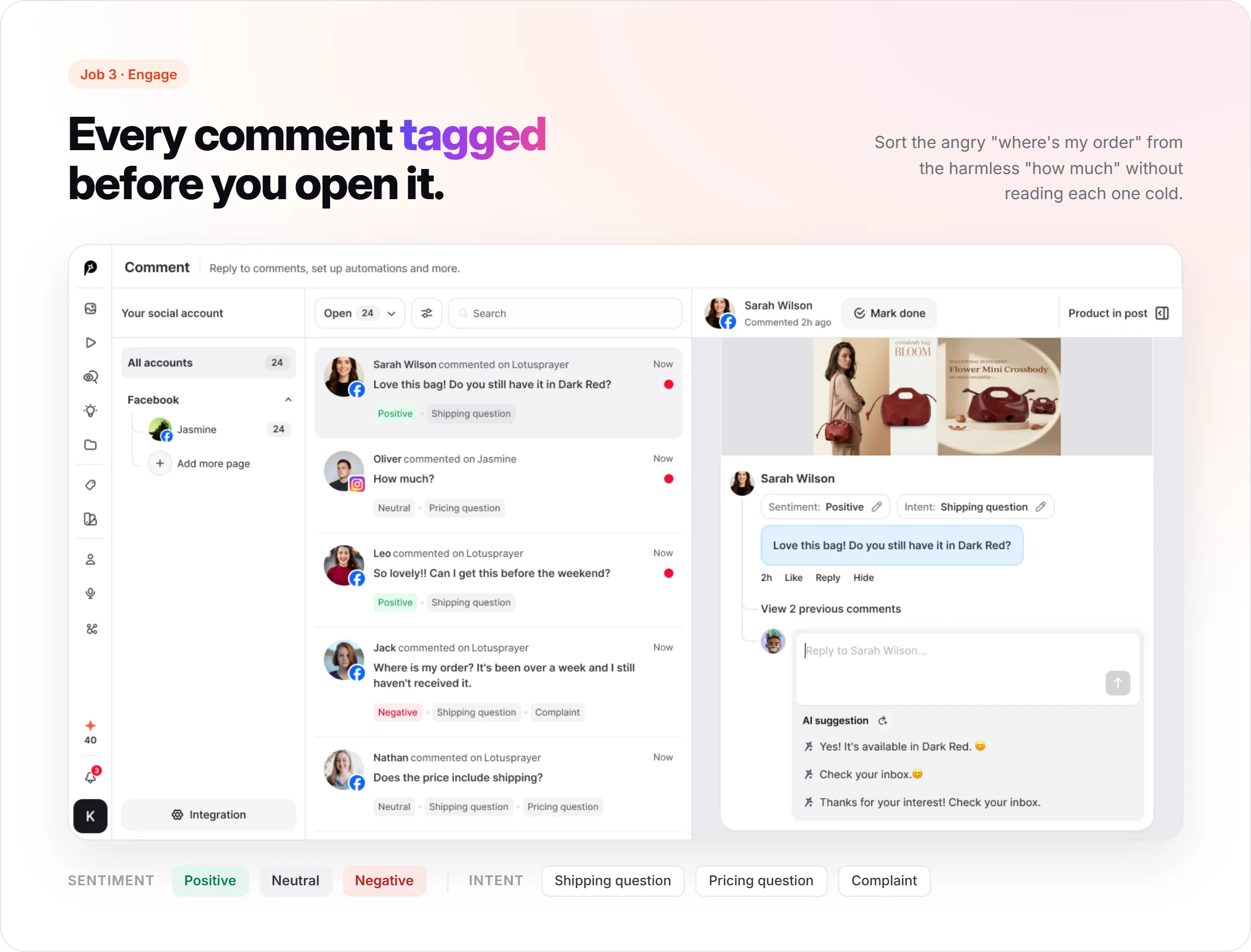
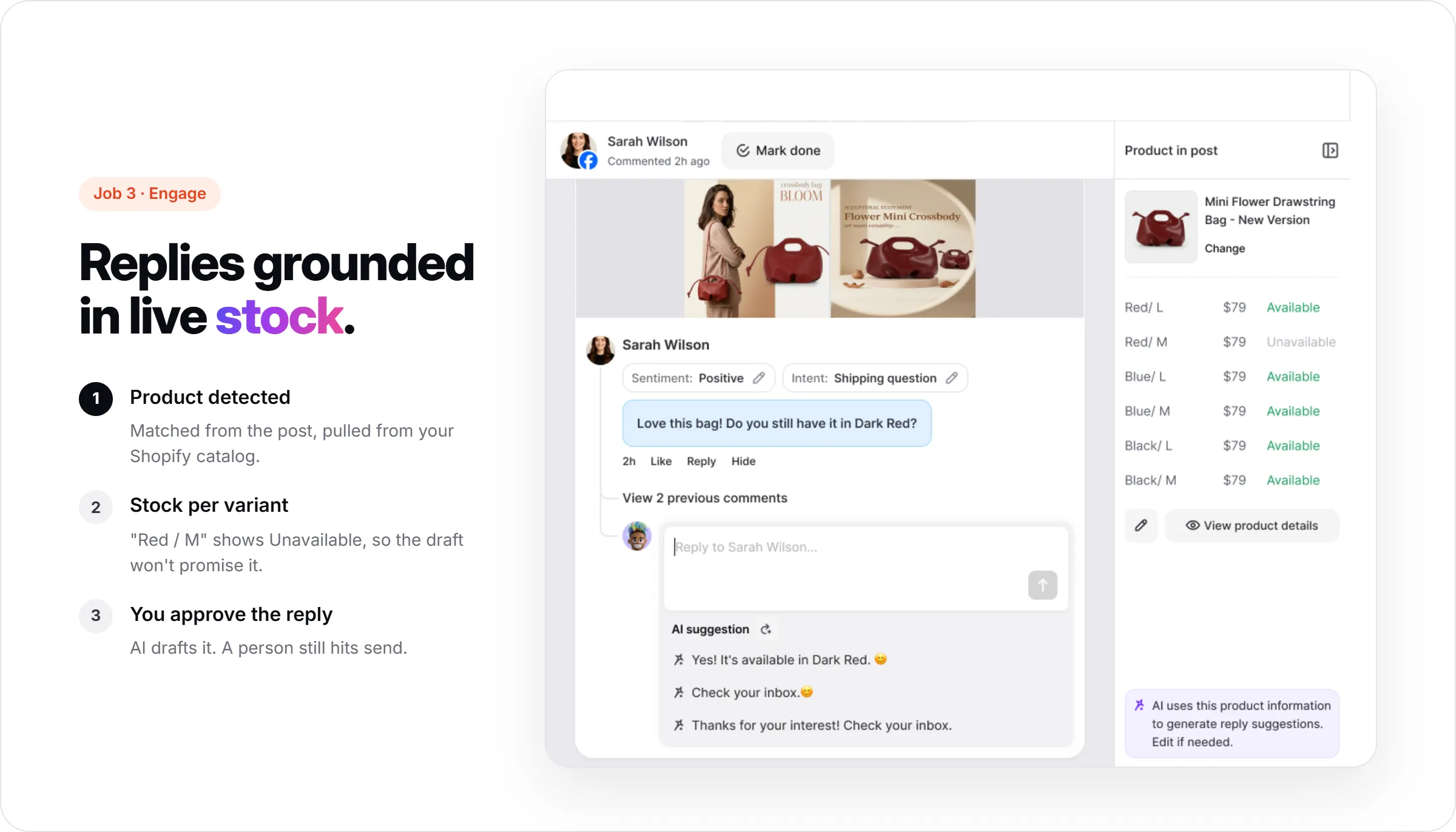
Every comment that lands in the inbox gets tagged automatically, before a manager even opens it: a sentiment (positive, neutral, negative) and an intent (shipping question, pricing question, complaint, and similar categories).
A manager scanning twenty-four open comments can sort the angry "where's my order" from the harmless "how much" without reading each one cold.
Open a comment and Promer AI drafts a reply, with a regenerate option if the first draft misses the tone. The useful part is what the draft is grounded in: a "Product in post" panel identifies which product the comment is about (pulled from a connected Shopify catalog) and shows live per-variant stock, so a drafted reply about a "Dark Red, size M" bag reflects whether that variant is in stock, not a generic "yes we have it."
When no product is detected in the post, the panel says so plainly and asks you to select one manually rather than guessing.
"Mark done" clears a thread once it's handled, which is the whole point of tagging in the first place: turning an open-ended inbox into a list you can clear by the end of a shift.
Where this breaks down today?
A framework like this is only honest if it says where the tool it's illustrated with doesn't fully hold up yet.
Platform coverage isn't even across the three jobs. Publishing and scheduling are confirmed live on Facebook, Instagram, and TikTok; X shows up as a fourth caption tab in the post composer, but it wasn't connected in this walkthrough, so treat it as unconfirmed until you check it yourself. Comment management is confirmed working on Facebook, with the other platforms showing mixed signals between "connectable" and "coming soon" depending on which screen you're looking at. If your comment volume lives mostly on Instagram, check that specifically before assuming full parity with posting.
Free plans cap how much you can generate and queue, the same as almost every credit-based tool in this category; check promer.ai/pricing for current tiers before assuming a number.
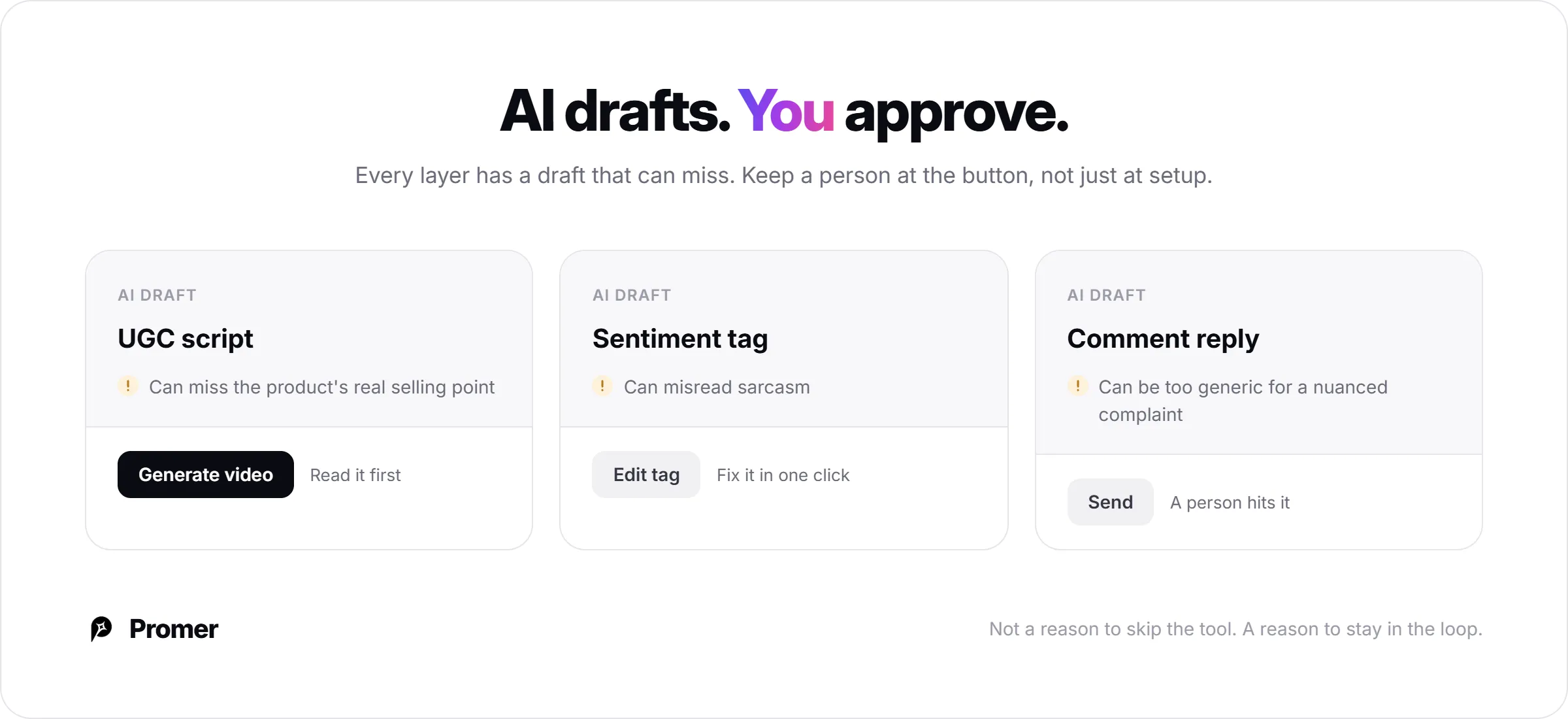
And the AI draft, in every layer of this, is a draft. Sentiment tags can misread sarcasm, a suggested reply can be too generic for a nuanced complaint, and a generated UGC script can still miss the product's actual selling point. None of that is a reason to skip the tool. It's a reason to keep a person in the loop at the "send" and "generate video" buttons, not just at setup.
Applying the create, publish, engage test to your own shortlist
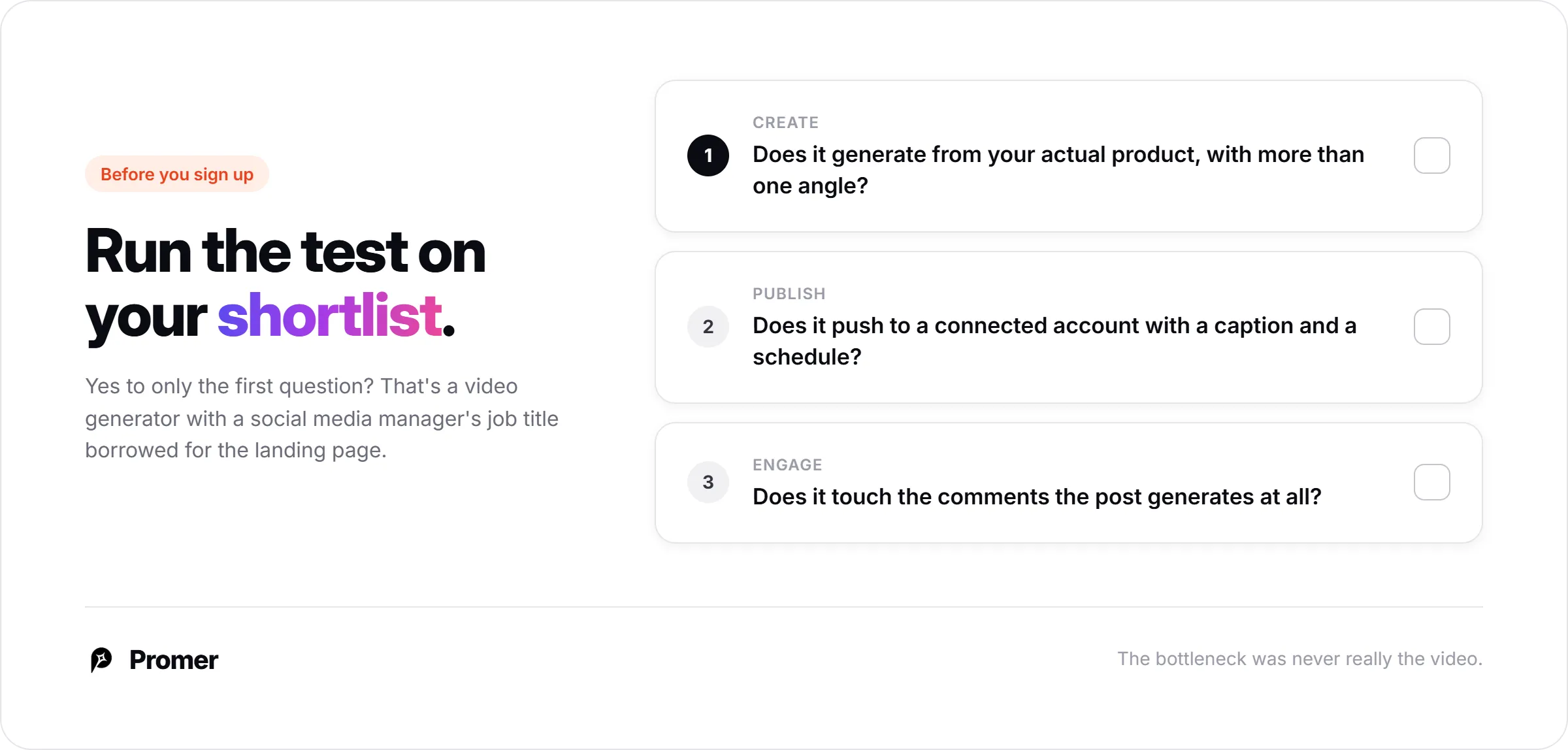
The test travels. Whatever you're evaluating next, run it through the same three questions before you sign up:
Create: Does it generate from your actual product, with more than one reference angle, or from a generic template that could be any brand's product?
Publish: Does it push straight to a connected account with a caption and a schedule, or does it hand you a file and expect a separate scheduling tool to take over?
Engage: Does it touch the comments the post generates at all, or does community management live entirely outside the tool?
A platform that answers yes to all three isn't automatically the right pick for your team. But a platform that only answers yes to the first one isn't a UGC video platform for social media managers. It's a video generator with a social media manager's job title borrowed for the landing page.
The bottleneck was never really the video. It's the three logins between generating it and knowing whether the comment underneath needs a manager's attention or just a stock number.
FAQ about choosing an UGC platform for social media managers
What is a UGC video platform?
A UGC video platform is software that produces short, casual-style video content that looks like it came from a real customer or creator, instead of a polished studio ad. Some platforms only generate the clip. A platform built for a social media manager's actual job also publishes it to the right account and surfaces the comments it gets afterward.
What should a social media manager look for in a UGC video platform?
Look for a platform that covers all three jobs: creating the video, publishing it with a scheduled caption, and managing the replies it generates. A tool that only exports an MP4 still leaves the posting and the community management to a separate app, which is exactly the gap most "UGC video platform" tools leave open.
Can AI-generated UGC videos be published directly to social media?
Yes, on platforms built for the full workflow, not just generation. In Promer AI, a generated UGC video or static creative can be pushed straight to a connected Facebook, Instagram, or TikTok account from the same screen it was generated on, with an AI-suggested caption attached, without a manual download-and-upload step.
Does a UGC video platform also handle replies to comments?
Only if it includes a dedicated comment management layer, which most video-generation tools don't. Promer AI's Comment inbox tags each incoming comment with a sentiment and an intent, then drafts a reply grounded in the specific product tagged in that post, which a manager still reviews before sending.
Is AI-generated UGC as effective as UGC from real creators?
AI-generated UGC can match real creator UGC on format and message, but it can still misread a product or a tone, so it isn't a blind swap. Promer AI's own product guidance is explicit that AI-generated creatives may contain mistakes, which is a fair caveat for any AI video tool, not just this one.
Which social platforms can a UGC video platform publish to?
Facebook, Instagram, and TikTok are confirmed live for publishing and scheduling in Promer AI, for both video and static posts. X appears as a fourth caption option in the post composer but wasn't shown connected in this walkthrough. Comment management runs confirmed on Facebook, with TikTok, Instagram, and X shown as connectable in the accounts manager, though the initial setup screen still flags Instagram and X as coming soon.
How much does a UGC video platform for social media managers cost?
Pricing usually runs on a credit or post-count model, with a free tier that caps how much you can generate or queue per month. Promer AI's in-app counter shows a live remaining-posts figure on its Free plan; check promer.ai/pricing for the current tier breakdown before committing, since credit allowances change.
Sources
Promer AI in-app walkthrough (Social Content: Social Post, Content calendar, Comment) - app.promer.ai, accessed 23 Sep 2026.
Promer AI internal product documentation (AI UGC Ads feature specification) - accessed 23 Sep 2026.