Quick verdict: TopView AI is a multi-model AI video platform with a product-link agent and an avatar that holds your product on camera. It suits Shopify and Amazon sellers who ship short video ads every month and can commit to annual billing. On the Free plan the agent will plan your ad and Product Avatar will make a watermarked image for 0.5 credit, but video generation needs a paid plan.
I attached a photo of a red handbag to TopView's AI Marketer, asked for a 15-second 9:16 UGC-style ad, and described the audience and the selling point. About a minute later the agent had a five-shot plan ready, then stopped: my Free account needed "an active subscription or more credits" before it would render anything.
For most TopView AI reviews, that's the first thing worth knowing: the setup is quick and the product-link brief is well built, but a real video ad starts at the paid plans, where a 15-second Seedance 2.5 clip at 720p costs about $4.50 in credits on annual Pro and $1.80 on annual Ultra.
Below is what the test showed screen by screen, what each plan costs per ad, what 257 Trustpilot reviewers and 6 G2 reviewers say, and the refund and training terms to read before you pay. If you only came for the numbers, skip to the pricing section. And if "UGC-style ad" itself is a new term, what UGC ads actually are is a quick primer before the rest of this gets specific.
Key takeaways for ecommerce merchants
- The brief is the best part. Audience, selling point, visual style, length and ratio all sit on one screen. If you already know your angle, you'll get to a plan in about a minute.
- Use the free credits on Product Avatar first. A watermarked image costs 0.5 credit, so 10 free credits are enough to see how an AI presenter holds your product before you pay for anything.
- Price each ad by the second, not by the plan. A 15-second Seedance 2.5 clip at 720p works out to about $4.50 in credits on annual Pro and about $1.80 on annual Ultra while the 20% discount runs. Multiply by your usual number of drafts.
- Don't plan launch-day creative around "unlimited." My first Product Avatar image said about 2 minutes and took over 16, and several Trustpilot reviewers say unlimited jobs can take a day.
- Spend credits before they expire. Ultra drops 500 credits a month and they don't roll over. Expiry and queues are the two complaints I saw most across 257 Trustpilot reviews (3.9 out of 5).
- Do two things before your first upload. If the product isn't launched yet, email [email protected] to opt out of model training. And remember refunds close three days after purchase, or as soon as you use a credit.
What is TopView AI? A video agent that grew out of product avatars
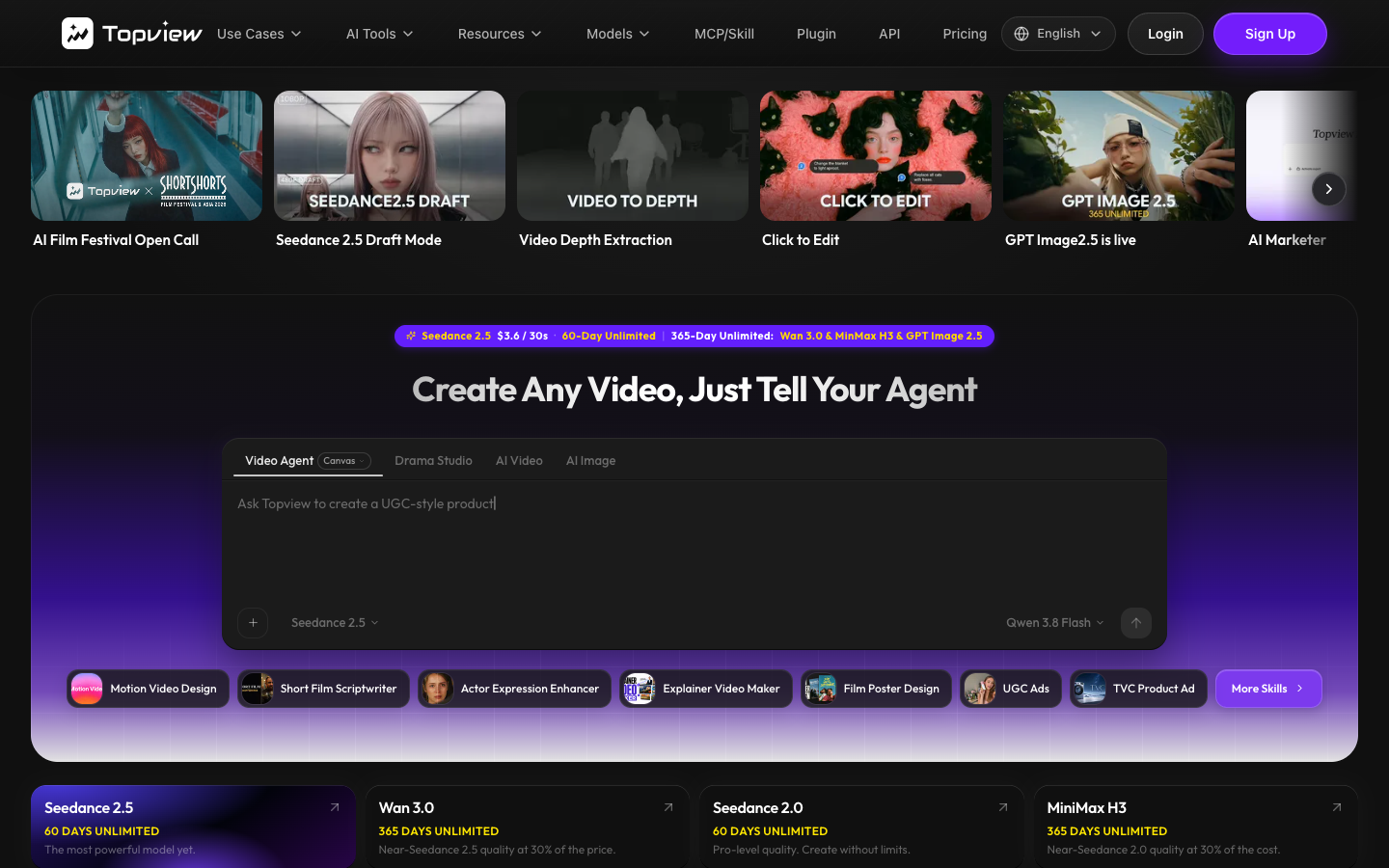
TopView AI is a multi-model AI video platform run by TOPVIEW PTE. LTD. of Singapore. You describe a video, or add a script, a reference video or a product URL, and its agent plans the scenes, picks a model and generates each shot on an editable canvas.
TopView calls itself an "AI Video Agent for Short Films & Marketing Videos", and the logged-in sidebar shows both sides: Canvas, Film Studio, Drama Studio and Motion Studio for storytelling, and AI Marketer, Board, Image, Video, Avatar and Audio for everything else. For a Shopify seller, the parts that matter are AI Marketer (with its URL to Video brief) and Product Avatar.
TopView doesn't build the video models it sells access to. Its footer says it "is not the developer of those third-party models," and the pricing page lists Seedance 2.5 and 2.0, Wan 3.0, MiniMax H3, Kling 2.6 and O1, Google Veo 3.1 Fast and a range of image models. One account, one credit balance, more than a dozen engines.
The ecommerce side came first. TopView's Product Avatar page says the company "introduced the Product Avatar concept publicly in early 2025": an AI presenter that holds and explains your product on camera. Its case studies and the "Join 50,000+ top sellers" line are TopView's own claims, so read them as vendor marketing rather than benchmarks.
How I tested TopView AI on a real product?
I used a new Free account and one product: a red sculptural handbag, shot on a plain studio background. The goal was to get from product to a usable ad draft without paying, and to note every point where TopView asked for credits. I ran the AI Marketer agent twice (once with a product page URL, once with the handbag photo attached) and generated Product Avatar images with the watermark option.
| Test detail | What I recorded |
|---|---|
| Date and plan | 29 September 2026, Free plan, 10 credits at start |
| Product | Red sculptural handbag, one studio photo (WebP) |
| Features tried | AI Marketer (URL to Video brief and a chat brief with the photo attached); Avatar › Product Avatar |
| Time to agent reply | About 1 minute per session |
| Credits per agent session | 1.11 and 1.52, shown in the session counter |
| Video rendered? | No. Both sessions stopped and asked for a subscription or more credits |
| Product Avatar image | 0.5 credit with watermark, 1 credit without; the first image took over 16 minutes against an estimate of about 2 |
Step 1: Two onboarding questions, then the workspace
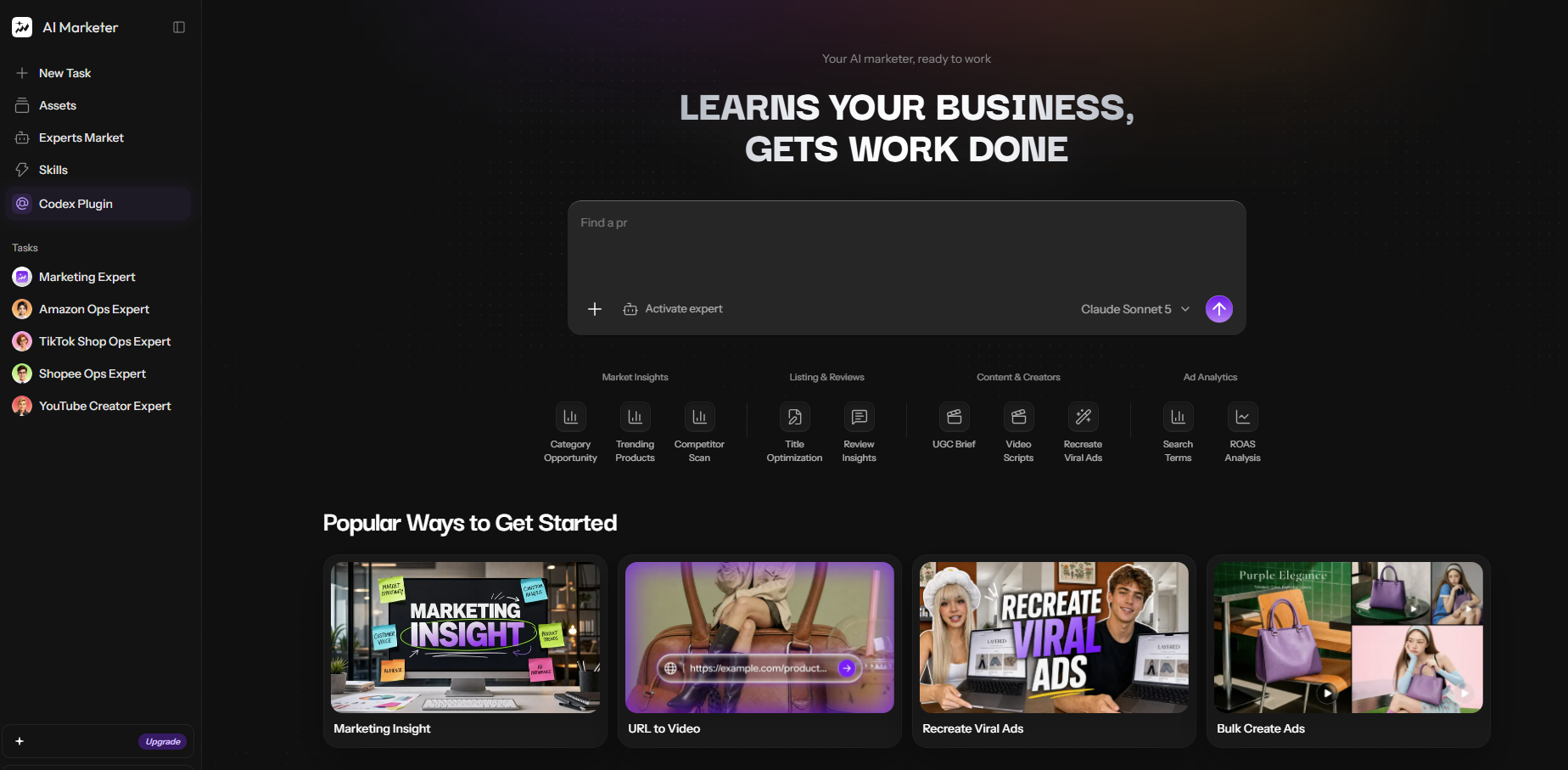
Before the home screen, TopView asks what you want to achieve (Cinematic Visuals & AI Films, Marketing / UGC Ads, Viral Content, TV & Short Drama, API Skills, MCP & Plugin, or Just Exploring) and how you heard about it. I picked Marketing / UGC Ads, and the home prompt switched to "Create marketing videos, just tell your agent."
One small inconsistency showed up right away. The logged-in banner advertised "Seedance 2.5 $3.6 / 30s · 30-Day Unlimited," while the pricing page the same day said 60-Day Unlimited. Go by the pricing page and your checkout.
Step 2: Briefing the AI Marketer agent
AI Marketer is TopView's newer agent workspace, with experts such as Marketing Expert, Amazon Ops Expert and TikTok Shop Ops Expert, and Claude Sonnet 5 as the default model in the picker. You can brief it two ways.
The structured way is URL to Video, under "Popular Ways to Get Started," which TopView describes as turning "a product page into a ready-to-run video ad," the same URL-to-video workflow most tools in this category now offer in some form. You paste the product URL, then describe the target audience and the key selling point. After that you pick one of nine visual styles (Clean studio, Cinematic luxury, Minimalist premium, Natural lifestyle, Bold & colorful, Futuristic tech, UGC style, Unboxing, Street style), a duration from 4 to 180 seconds or Auto, and one of six ratios from 21:9 to 9:16.
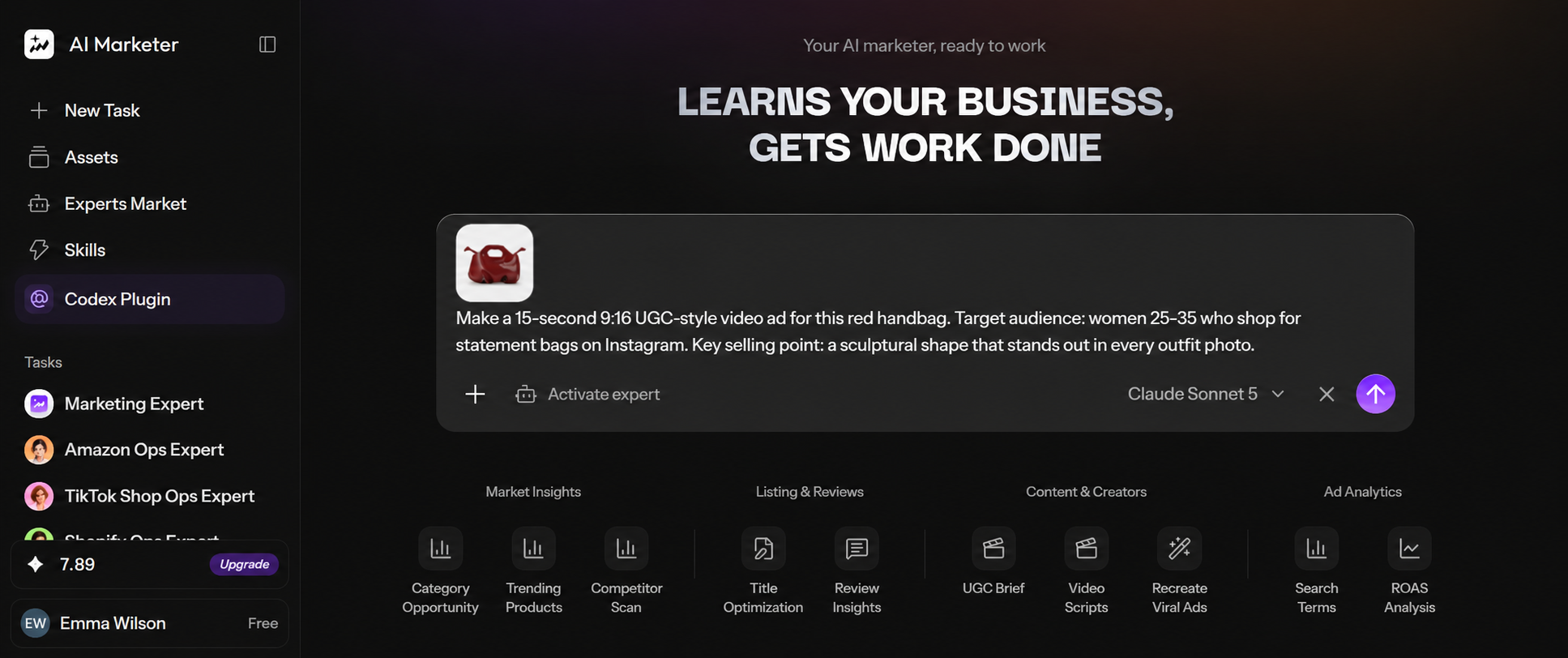
The loose way is the chat box, where you can attach a product photo and type the brief. For the handbag I attached the photo and asked for "a 15-second 9:16 UGC-style video ad," aimed at women 25 to 35 who shop for statement bags on Instagram, with the sculptural shape as the selling point.
Step 3: Where the Free plan stopped
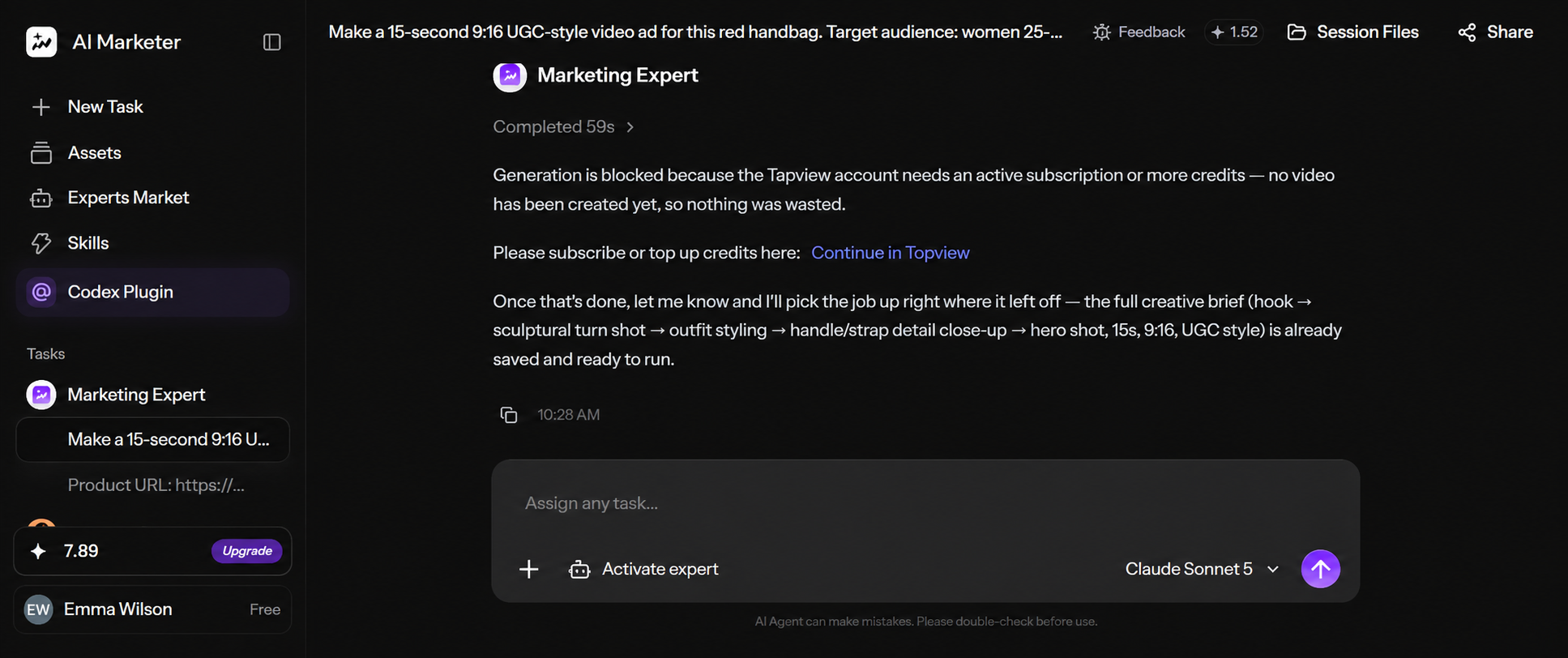
The Marketing Expert handed the job to a media-creator step, which fetched TopView's generation config and then returned: "This task needs an active TopView subscription before it can continue." The session counter showed 1.52 credits used on planning, although the reply said "nothing was wasted" because no video had been made.
The plan itself was reasonable for a 15-second UGC ad: a hook, a turn shot that shows off the sculptural shape, outfit styling, a close-up on the handle and strap, then a hero shot. It also promised to pick up from the saved brief once credits were added.
One detail worth knowing: the run log showed "Failed to read file.webp" before generation, so the agent seems to have planned from my text rather than the photo. If you test it, attach a JPG or PNG. The URL to Video session behaved the same way, stopping at the same subscription message after about 1.1 credits of planning.
Step 4: Product Avatar with the handbag
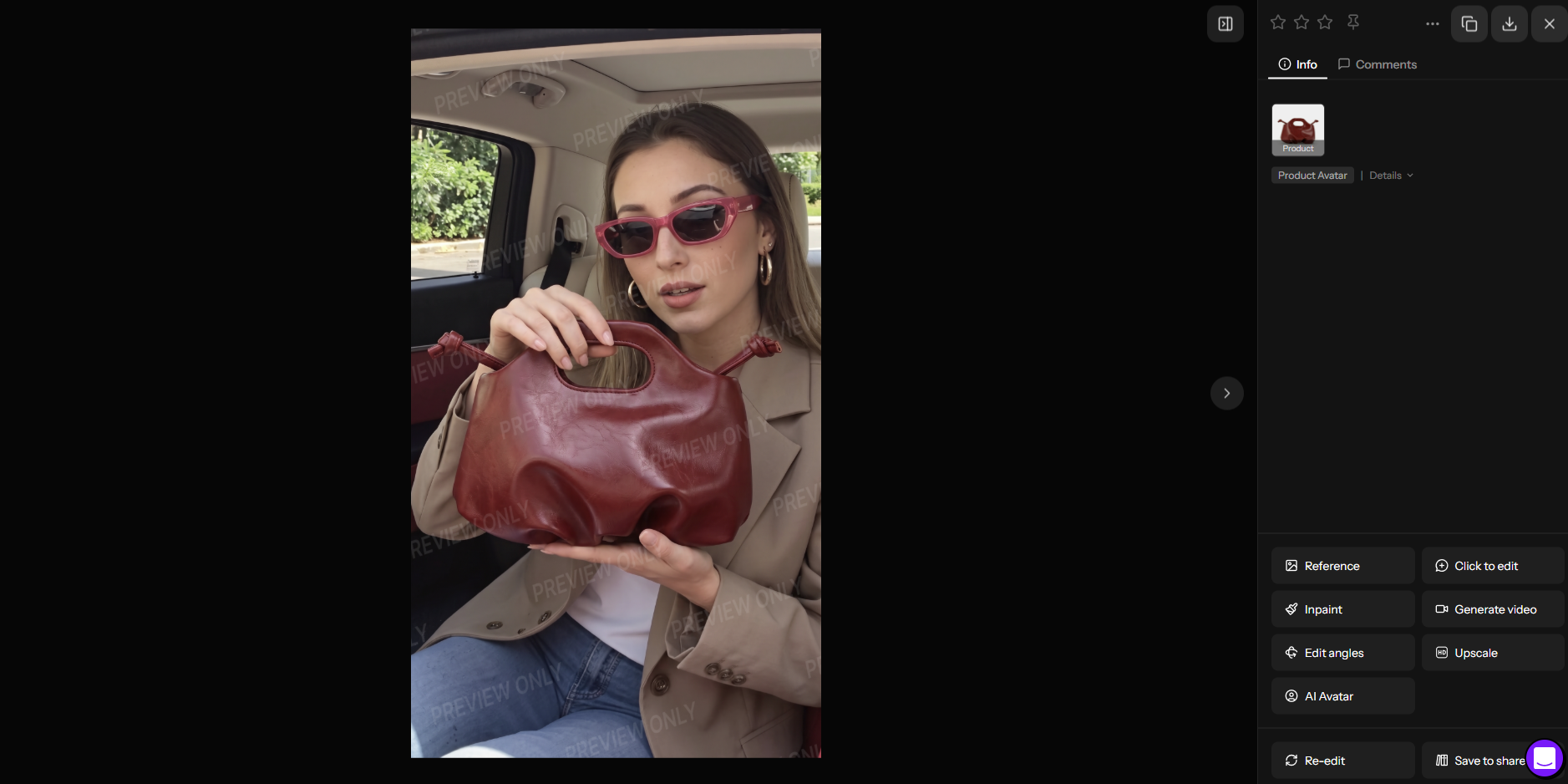
Product Avatar lives under Avatar in the left menu. It has an Auto Mode and a Manual Mode. You choose an avatar photo (Select from Templates, Upload Photo or Create with AI), upload the product image, and generate. Auto Mode places the product for you; Manual Mode lets you adjust placement.
The template library is sorted by category, and the Bags & Luggage filter had presenters holding handbags in everyday settings. TopView's template categories are really just preset UGC styles; different styles of UGC ads breaks down the same formats without being tied to one tool's template library. Some templates carry a crown icon, which marks them as paid. The generate button offers two routes: "Generate without watermark" for 1 credit, or "Generate with watermark," which took 0.5 credit off my balance.
Speed was the weak spot. My first watermarked request of the day returned "Failed to create task. Please try again later." The retry showed "Generating · ~2 min" and took more than 16 minutes to finish. The handbag image was still at 75% after about ten minutes. That lines up with the queue complaints in the user reviews below.
What the test tells you, and what it doesn't
It shows that the setup is fast, the brief asks for the two inputs that matter most (audience and selling point), and the agent reads a Shopify link well enough to name the product and pitch a relevant concept. It doesn't show video quality, lip sync or how the avatar handles fine print on packaging, because those need a paid plan. If you buy one, run the same product through URL to Video and Product Avatar first, and read the script against your product page before you spend credits on video.
How TopView's product link to video flow works on paid plans
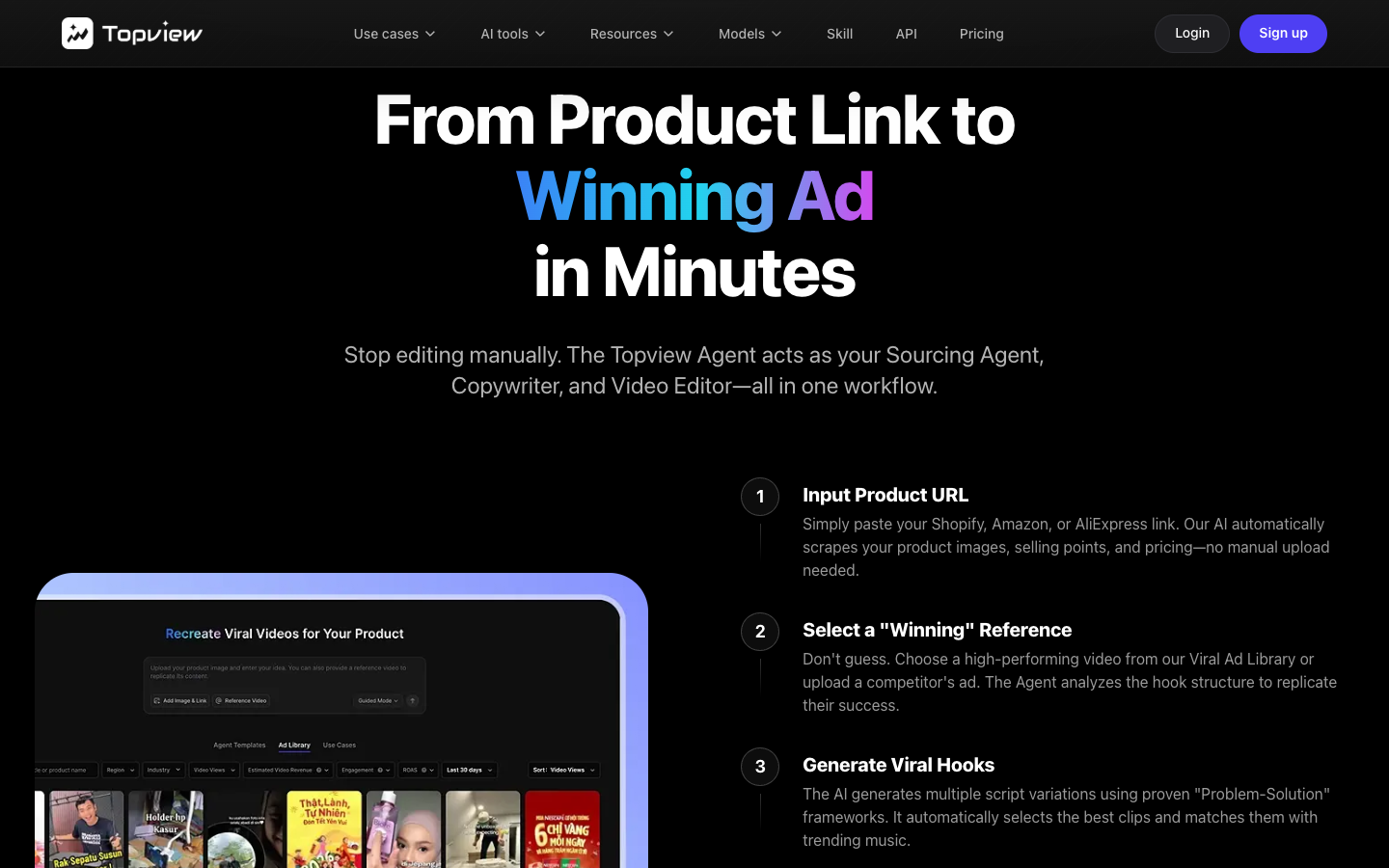
TopView describes the paid flow on its ecommerce page in five steps: paste a Shopify, Amazon or AliExpress link, pick a "winning" reference from its Viral Ad Library or upload a competitor ad, put an avatar in front of the product, set captions, CTA and language, then batch export. The ecommerce FAQ adds that you can make dropshipping ads before stock arrives by animating supplier photos, a workflow covered in more general terms in how to make video ads for dropshipping.
Link to Video, per TopView's own page, "reads page structure, captures product images, pricing, headlines, reviews, and benefit claims." Customer reviews are on that list, so check the script before you render. A review line that ends up in the voiceover becomes a claim in your ad, and ad review treats it as yours. Price, size, material and any number inside a benefit claim are the four things to compare against the product page.
Two published details matter for Meta advertisers. The pricing table labels the built-in library a "Video Agent TikTok Ad Library," so expect to bring your own references if you mostly run Facebook and Instagram ads. And none of the TopView pages I read describe publishing into Meta Ads Manager or TikTok Ads Manager, so plan on downloading files and uploading them yourself.
TopView's ecommerce page lists a spec for each ratio:
| Ratio | Resolution | Duration TopView lists | Placements TopView names |
|---|---|---|---|
| 9:16 vertical | 1080×1920 | 15s to 90s | TikTok Shop, IG Reels ads, YouTube Shorts |
| 4:5 portrait | 1080×1350 | 15s to 60s | Facebook feed, Instagram feed, Pinterest ads |
| 1:1 square | 1080×1080 | 15s to 60s | Amazon mobile, FB/IG carousel, DPA ads |
| 16:9 horizontal | 1920×1080 | 30s to 10m+ | Amazon desktop, Shopify hero, YouTube reviews |
That resolution is the delivery frame, not the model output. A Seedance 2.5 clip generated at 720p is still 720p footage inside a 1080×1920 frame, and 1080p costs almost two and a half times as many credits per second (14.8 credits per 4 seconds against 6 on Pro).
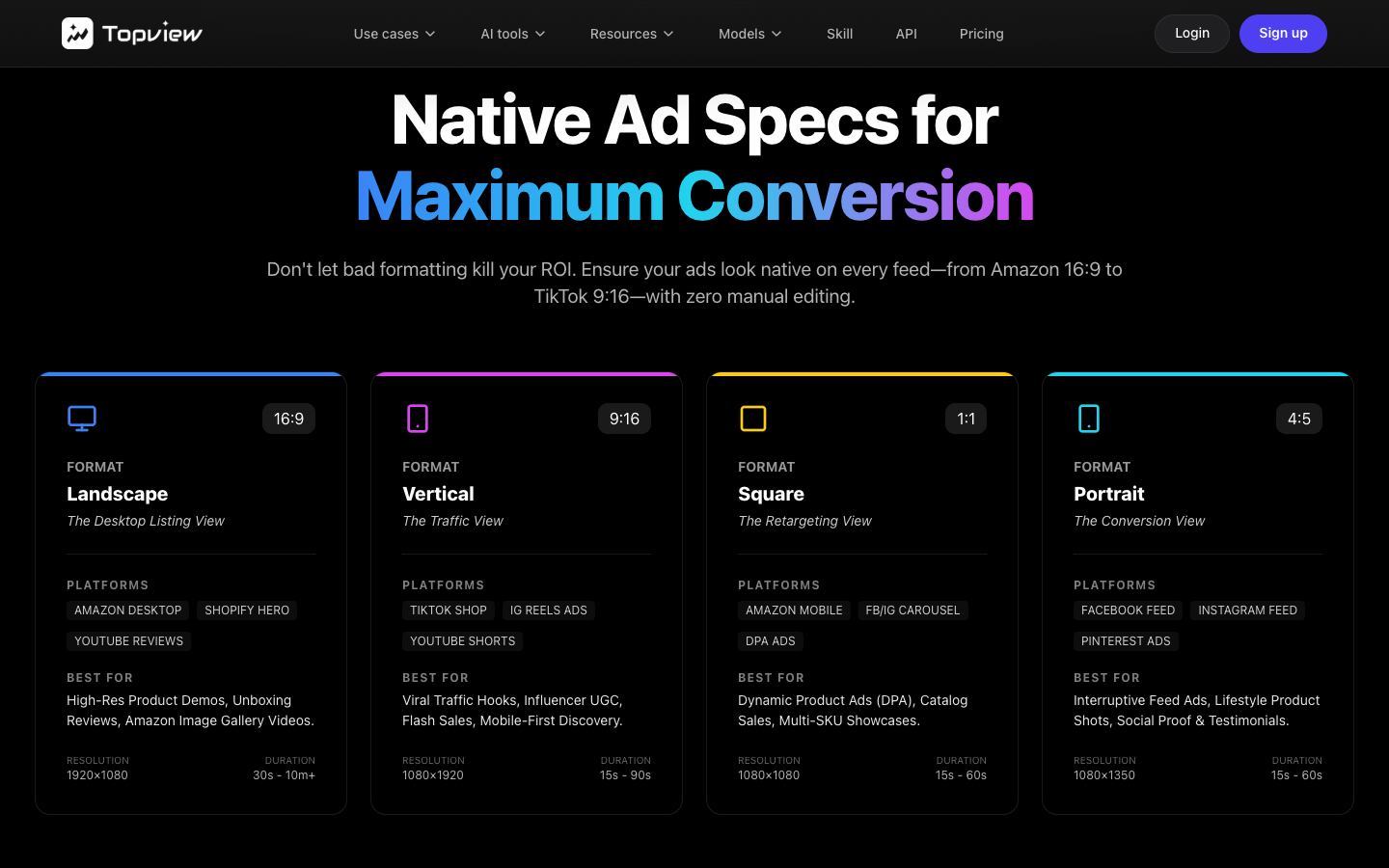
TopView's native ad specs by ratio and platform, captured September 2026.
TopView AI pricing: what a 15-second ad costs on each plan
TopView pricing is credit-based, and a credit's worth depends on the model, the resolution and the clip length. The plan cards describe allowances in "videos" and seconds, while the comparison table underneath gives the cost per 4 or 5 seconds for each model, so read the table. Downloads are free per the pricing FAQ: credits pay for generation.
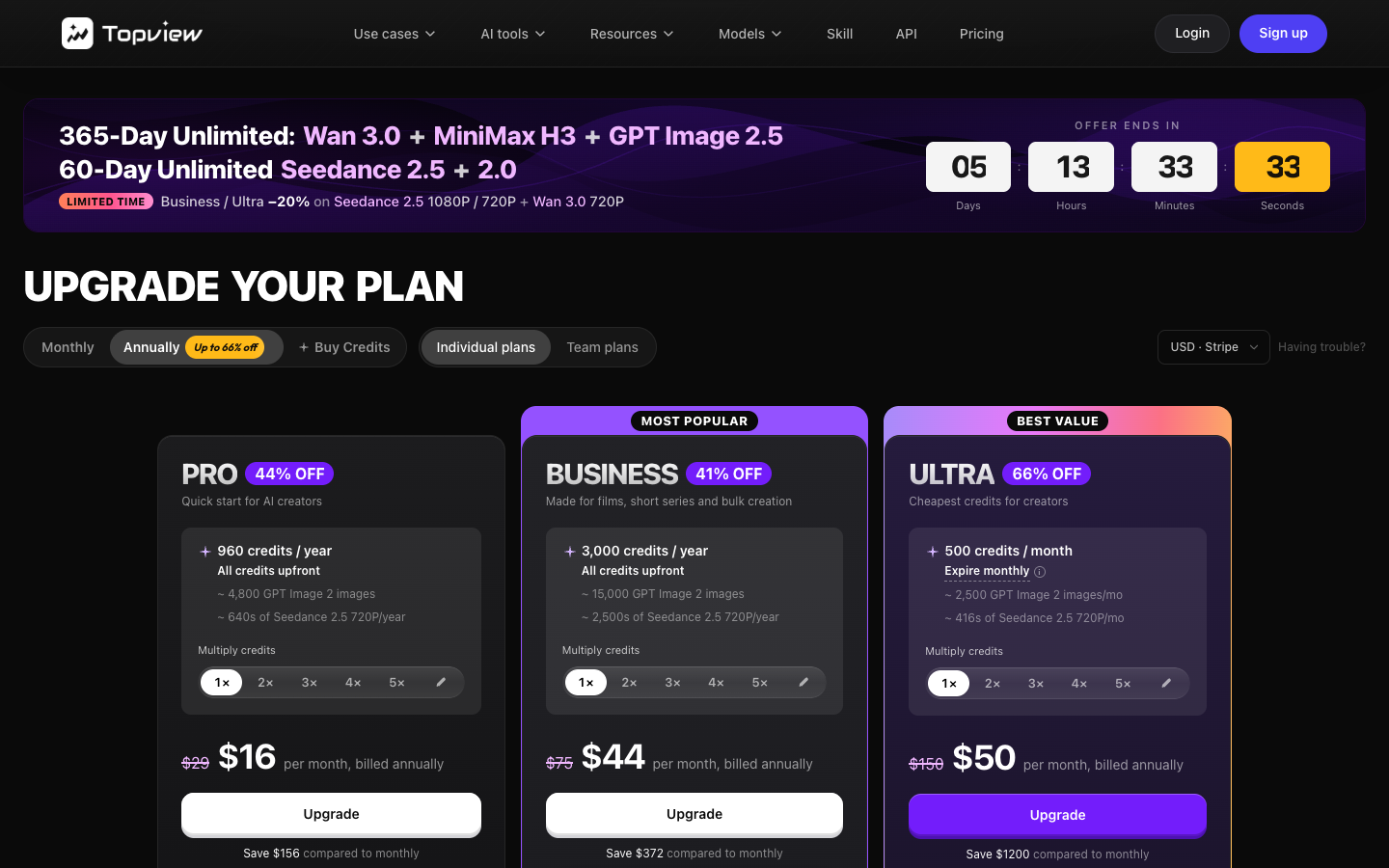
What Pro, Business and Ultra include
| TopView plan | Annual billing | Monthly price shown | Credits | Concurrent tasks | Unlimited and free models |
|---|---|---|---|---|---|
| Free | $0 | $0 | 10 on signup (my account) | Not shown | Watermarked Product Avatar images; agent planning only |
| Pro | $16/mo ($192/yr) | $29 | 960 per year, all upfront | 4 | Nano Banana 2 1K, Nano Banana Pro 1K, Seedream 5.0 2K for 365 days |
| Business ("Most popular") | $44/mo ($528/yr) | $75 | 3,000 per year, all upfront | 8 | Image models at 2K for 365 days; Kling 2.6, Kling O1 Video Edit, Kling Motion Control and Seedance 1.0 Pro Fast for 7 days |
| Ultra ("Best value") | $50/mo ($599.90/yr) | $150 | 500 per month, each drop expires | 12 | Seedance 2.5 and 2.0 at 720p for 60 days; Seedance 2.0 Mini and Fast, Wan 3.0 720p, MiniMax H3 and GPT Image 2.5 1K for 365 days |
| Team | $56 per seat/mo ($672 per seat/yr) | $180 | 500 per seat per month | Not shown | Not itemized |
Prices exclude VAT and local taxes, which TopView adds at checkout. Pro and Business credits arrive in one lump that resets yearly, while Ultra's annual credits arrive as 500 a month and each monthly drop expires on the next billing day. Unused credits don't roll over, except when you upgrade or switch from monthly to annual billing.
Editorial note: TopView's plan names and credit allowances change without notice (see the pricing FAQ quote below) - re-check topview.ai/pricing against this table before publishing.
What one 15-second product ad costs in TopView credits
The per-second math below is ours, built from the credit rates in TopView's plan comparison. It assumes a 15-second clip is charged at the per-second rate implied by the "credits per 4s" figure. Dollar figures divide each plan's annual price by its annual credits: $0.20 a credit on Pro, $0.176 on Business and $0.10 on Ultra.
| Model and resolution | Pro rate | Business and Ultra rate | 15s clip on Pro | 15s clip on Business | 15s clip on Ultra |
|---|---|---|---|---|---|
| Seedance 2.5, 720p | 6 credits / 4s | 4.8 credits / 4s (20% off) | 22.5 credits, about $4.50 | 18 credits, about $3.17 | 18 credits, about $1.80 |
| Seedance 2.5, 1080p | 14.8 credits / 4s | 11.84 credits / 4s (20% off) | 55.5 credits, about $11.10 | 44.4 credits, about $7.81 | 44.4 credits, about $4.44 |
| Wan 3.0, 720p | 2 credits / 4s | 2 credits / 4s | 7.5 credits, about $1.50 | 7.5 credits, about $1.32 | Unlimited for 365 days |
The Business and Ultra discount showed a "LIMITED TIME" label and a five-day countdown on 29 September 2026. Without it, a 15-second Seedance 2.5 clip at 720p on Ultra rises to about $2.25. In plain counts, Pro's 960 credits buy about 42 fifteen-second clips at 720p a year, and Ultra's 500 monthly credits buy about 27 a month on top of the unlimited allowance. Every regeneration comes out of the same pool, and the pricing FAQ says TopView can "update credit costs at any time, without prior notice."
TopView's own comparison table, dated "Checked August 7, 2026," puts discounted Ultra at $0.12 per second of Seedance 2.5 at 720p and places OpenArt, Higgsfield, Runway and Magnific between $0.215 and $0.277. It's TopView's table about TopView, so check rivals' current rates yourself. A quick rule for any credit-based tool: divide the annual price by the annual credits, multiply by the credits per second of the model you'd ship, then by your clip length and your usual number of drafts. Once you have a real cost per ad, benchmarking UGC ad performance is the next question worth answering, since cost per ad only matters next to what that ad actually returns.
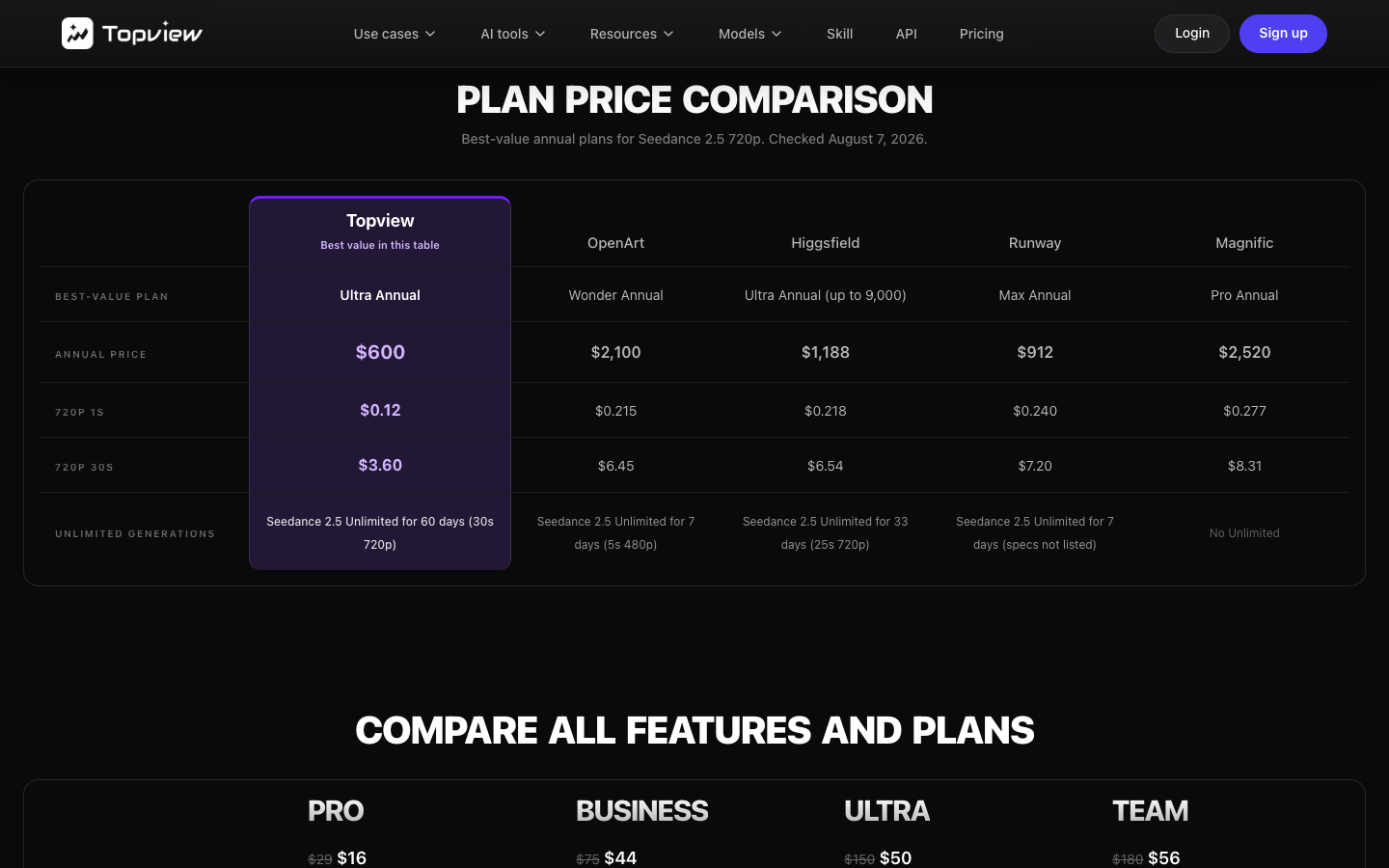
How Ultra's unlimited Seedance 2.5 works
Ultra is the plan the site banner promotes. Per the pricing page, unlimited Seedance 2.5 covers 720p and 30-second clips for 60 days, and the plan notes that "wait times may be lengthy." The FAQ adds that unlimited "defines credit-free access, not priority speed," that Ultra annual users get up to 6 concurrent unlimited tasks, and that Credit Mode skips the queue. Unlimited models work only on topview.ai, not through MCP, CLI or the API.
For a launch sprint, those 60 days are cheap footage. For a year of steady creative testing, plan around the 365-day unlimited models (Wan 3.0 720p, Seedance 2.0 Fast and Mini, MiniMax H3) plus 500 credits a month. The Trustpilot reviews below explain why the queue matters in practice.
TopView AI reviews on Trustpilot and G2: what users praise and flag
Both review sites were readable on 29 September 2026, and they tell a consistent story: people like the ease of use and the model range, and the complaints cluster around queues and expiring credits.
| Review platform | Rating | Review count | What the reviews focus on |
|---|---|---|---|
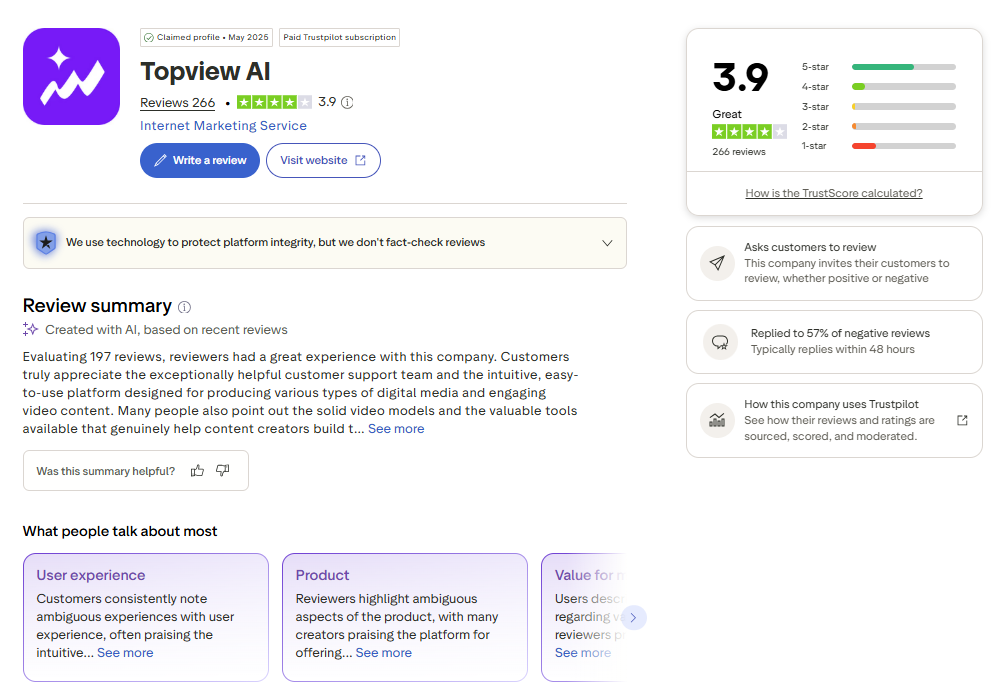
| Trustpilot | 3.9 / 5 | 257 (239 in the last 12 months) | 59% five-star, 23% one-star. Praise for ease of use and support; complaints about unlimited queues and credit expiry |
| G2 (TopView AI Video Creator) | 4.8 / 5 | 6 | Small sample. Praise for time saved on UGC and avatar content; notes on credit expiry and repetitive avatar motion |
Two caveats on the Trustpilot score. The profile is claimed by TopView on a paid Trustpilot subscription, and the company invites customers to review, so many of the short five-star reviews are marked "Invited." TopView has replied to 62% of negative reviews, typically within 48 hours.
What users praise
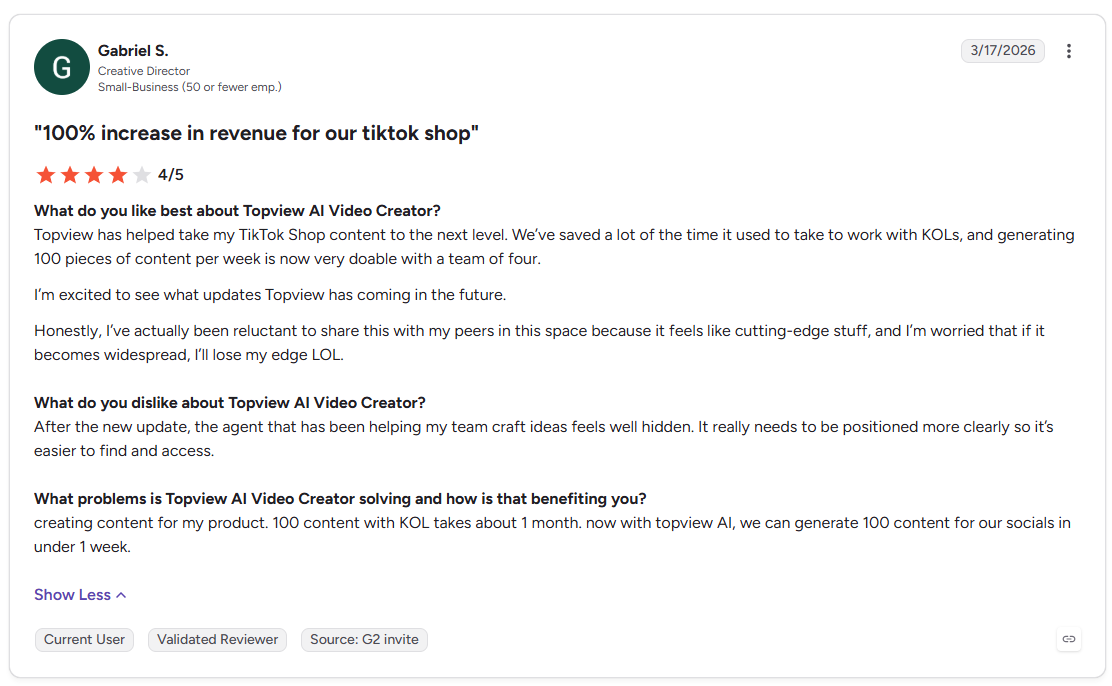
On G2, Gabriel S., a creative director at a small business, wrote in March 2026 that his team of four now produces around 100 pieces of TikTok Shop content a week, work that used to take about a month with KOLs. Ashante G., a lifestyle creator, said in January 2026 that avatars save her from filming herself, after some trial and error with scripts. On Trustpilot, Qing He wrote in July 2026 that support fixed an audio issue within two days, and Jeff Arnold (September 2026) singled out the product URL to video flow.
What users flag
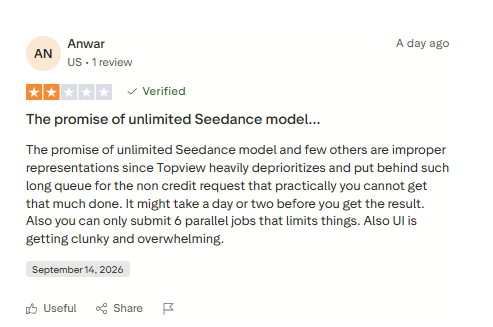
The one-star cluster is mostly about the unlimited queue. A US reviewer, Anwar, wrote on 14 September 2026 that unlimited Seedance jobs sit so far back in the queue that a result can take a day or two, and that the interface is getting cluttered. Another reviewer on 22 September 2026 liked the price but said relaxed-mode unlimited took more than a day per video, while credit-mode Seedance 2.5 jobs took 10 to 15 minutes.
Credit expiry is the second theme. A September 2026 Trustpilot reviewer warned against buying credits because they expire, an annual subscriber complained that points don't accumulate, and a Shopify growth manager on G2 made the same point in January 2026. On avatars, one G2 reviewer found Avatar 2 and 4 movements "still quite formulaic."
These match the published rules rather than contradict them: TopView says unlimited isn't priority speed and that monthly credits expire. The reviews tell you how that feels on a deadline.
TopView refund, model training and account deletion terms
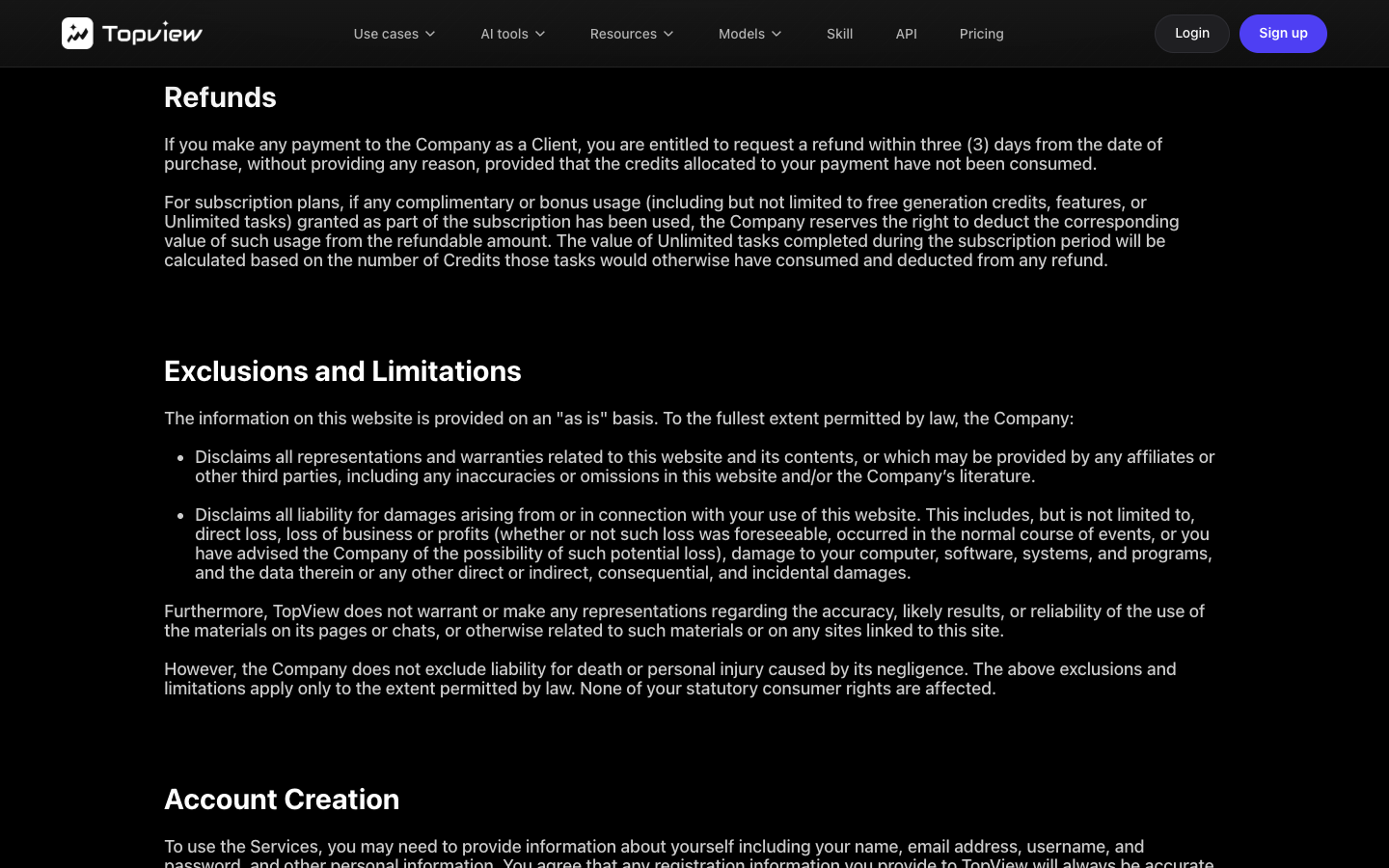
Refunds. TopView's terms, updated 9 September 2026, allow a refund request "within three (3) days from the date of purchase," and only if the credits from that payment are unused. TopView may also deduct bonus usage such as free credits or Unlimited tasks. So a refund covers a mistaken purchase, not a disappointing first render. Plans renew automatically, and cancelling keeps access to the end of the paid period.
Model training. TopView "may by default use Your Content and Output to train, develop, and improve" its models for anyone outside an Enterprise Agreement. To opt out, email [email protected] and wait for confirmation, which is worth doing before you upload an unreleased product. You keep your inputs, and TopView assigns you its rights in the output for any lawful purpose, though another user's output "may be similar or identical to your Output."
Deletion. Deleting a single file removes it within 30 days (90 from backups). Deleting the whole account forfeits remaining credits, and your content is "retained internally on a permanent basis," so delete files one by one first if you want them gone. One more mismatch: the pricing page says prices exclude VAT, while the terms say displayed prices include sales tax. Go by the checkout total.
TopView AI pros and cons
| Pros | Cons |
|---|---|
| A short product-link brief (audience, selling point, style, length, ratio) that the agent turned into a relevant concept in my test | No video on the Free plan: the agent plans, then asks you to upgrade |
| Many video models (Seedance 2.5, Wan 3.0, Kling, Veo 3.1 Fast, MiniMax H3) behind one credit balance | Unlimited generation runs in a slow queue, per the pricing FAQ and several Trustpilot reviewers |
| A low per-second rate at the top: about $0.12 per second of Seedance 2.5 at 720p on annual Ultra with the current discount | Credits expire (monthly on Ultra, yearly on Pro and Business), a repeated complaint on Trustpilot and G2 |
| Product Avatar with category templates (Bags & Luggage, Footwear, Beauty and more) and a 0.5-credit watermarked option | Three-day refund window that requires unused credits |
| Responsive support, per reviewers and a 62% reply rate to negative reviews | Model training on by default, with an email opt-out |
| Output rights assigned to you, for any lawful purpose | No native publishing to Meta or TikTok Ads Manager on the pages read; small inconsistencies across pages (30-day vs 60-day banner, 2,000+ vs 5000+ avatars, tax wording) |
TopView AI alternatives for product-link video ads
| Tool | Best at | Starting price (checked 29 Sep 2026) | Choose it when |
|---|---|---|---|
| Promer AI | UGC-style video and static ads built from product context | First ad free, no credit card required | You want a steady supply of product ads to test on Meta |
| TopView AI | Many video models, product-link agent, product-holding avatars | Free (10 credits, no video render); Pro $16/mo billed annually | You ship short video ads every month and can commit to annual billing |
| Creatify | Avatar-led URL to video ads | Free (10 credits a month, watermarked); Starter $39/mo | You want to try avatar video ads free before paying |
| CapCut | Editing footage you already have | Free; Pro $7.99 to $19.99/mo by region | You film your own clips or buy UGC from creators |
Promer AI, for ad creative built from product context
Promer AI is an AI ad creative performance platform for ecommerce advertisers, and it starts from the product rather than from a model menu. Paste a product URL from Amazon, Shopify, or any store, or upload a product image, and Promer AI pulls the image, name, description, and price, then builds ads around that product context and proven ad structures.
What that looks like for video, specifically:
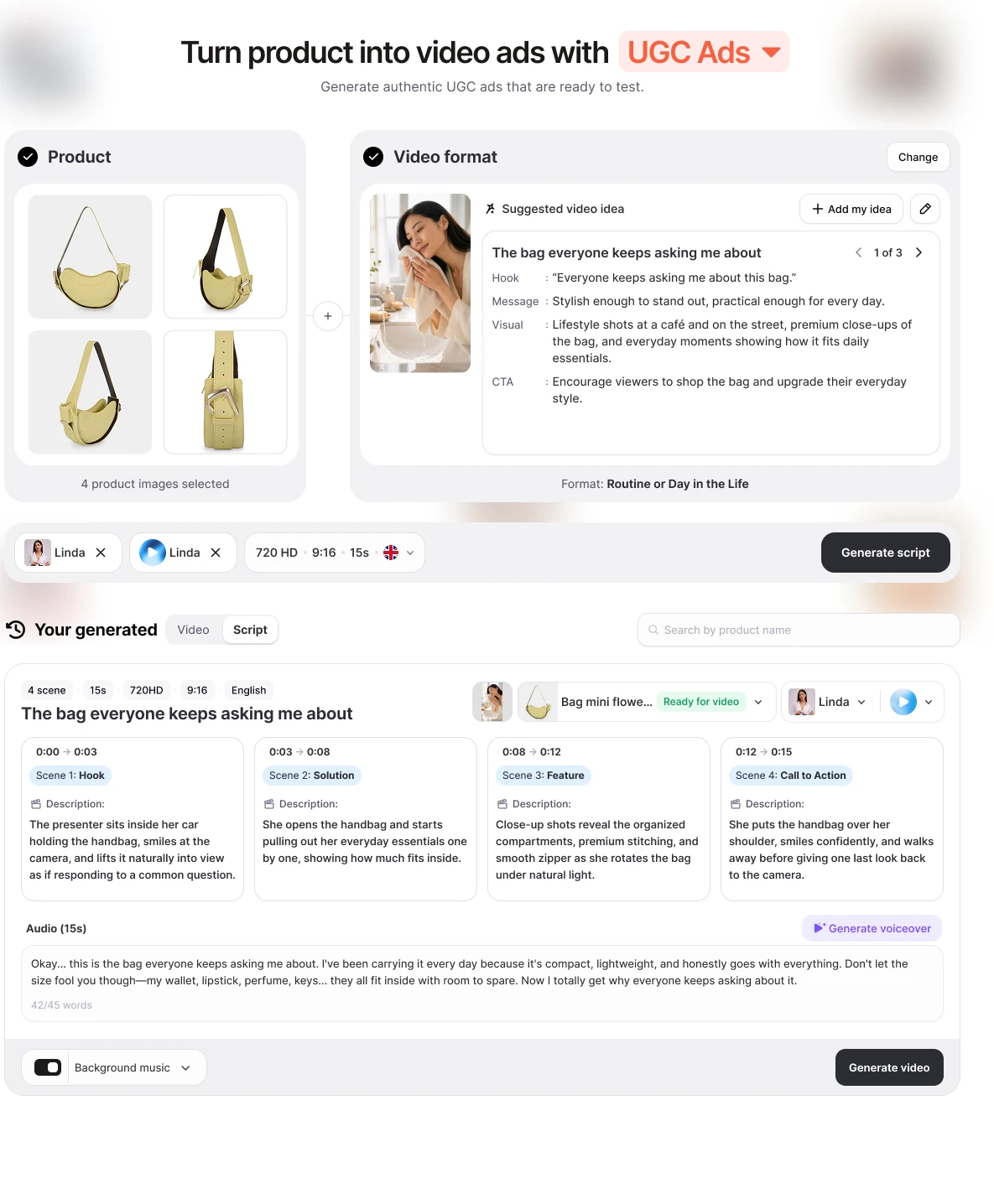
Format first, not a blank prompt. Pick a popular UGC format - Direct Testimonial, POV Product Demo, Problem and Solution, Unboxing, and others - and Promer AI's AI UGC video generator suggests the hook, message, visual, and CTA for it.
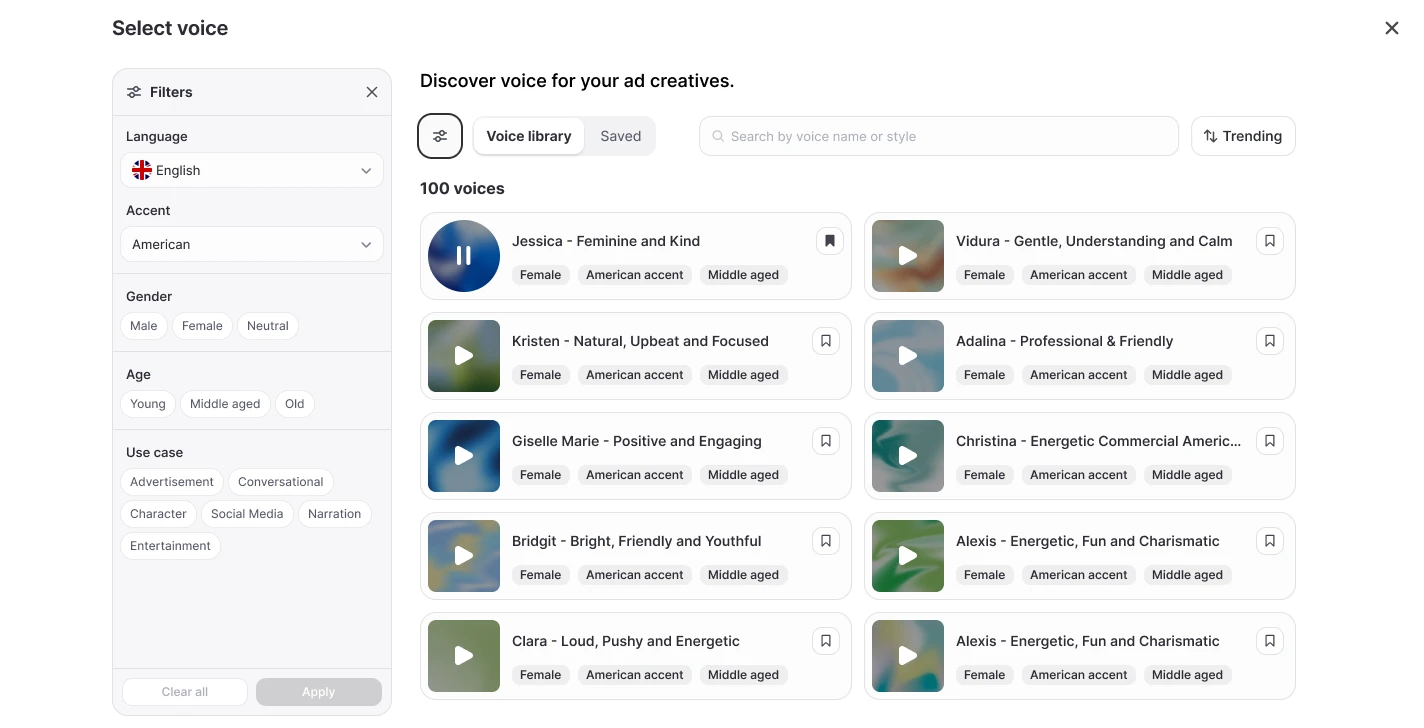
Avatar and voice, filtered separately. The AI avatar is filterable by gender, age, region, shooting style, and industry; the AI voice by language, accent, gender, age, and use case.
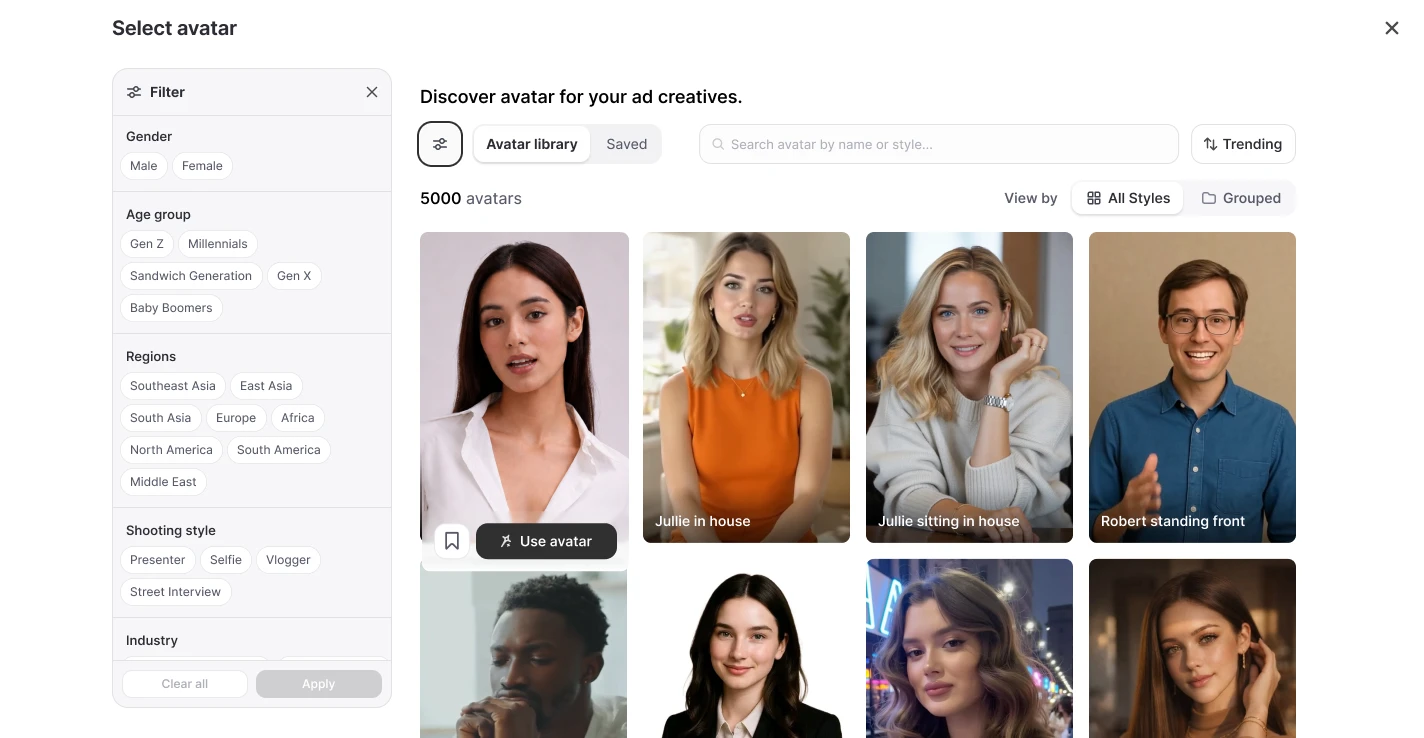
Avatar and voice are picked separately, each with its own filters, rather than bundled into one template choice.
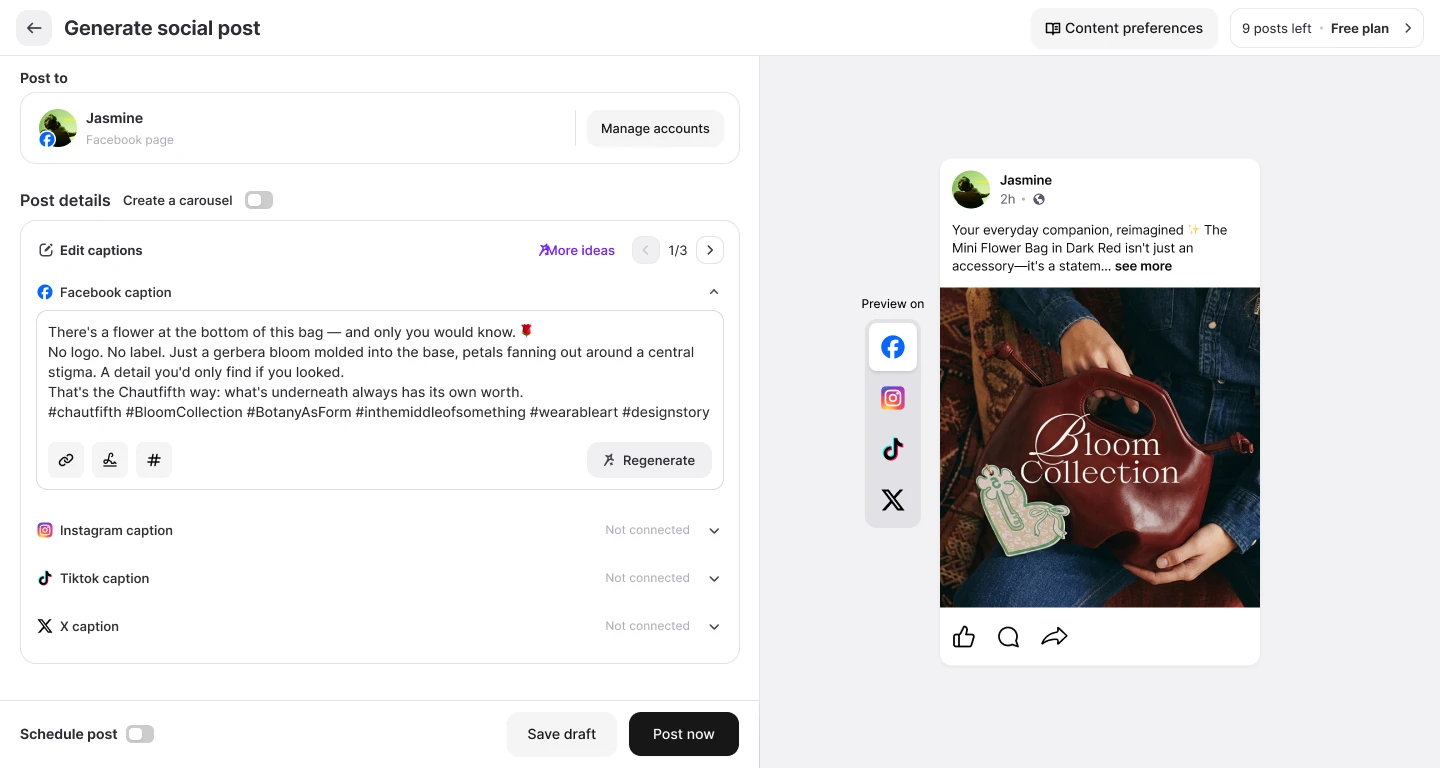
Publish without the download-reupload step. Push the finished creative straight to a connected Facebook, Instagram, or TikTok account from the same screen it was generated on.
Clone a winning structure. AI Video Ad Clone breaks down a reference video's scene sequence, checks product fit, and scripts your version instead of starting from a blank brief.
First ad free, no credit card. See a real rendered output before picking a plan, which is the opposite order of TopView's plan-then-pay-then-render flow.
Output are 720/1080 HD, 9:16, and 15 seconds per generation.
The trade against TopView is scope. TopView has more models, longer formats, film tools, and an avatar built to hold the product in frame. Promer AI sticks to ad formats and doesn't attempt short films. If your bottleneck is a steady supply of product ads to test rather than access to one particular video model, an AI ad maker built around product context is the closer fit. Like any AI output, review each creative before spend goes behind it.
Creatify, the avatar library specialist
Creatify also turns a product URL into avatar-led video ads, covered in more depth in Creatify AI Reviews. Its pricing page on 29 September 2026 showed a free plan with 10 monthly credits ("around 2 video ads or 20 image ads"), 300 AI actors and watermarked exports, and Starter at $39 a month for 100 credits. Pick Creatify if you want to see a finished avatar video before paying; pick TopView if you want Seedance 2.5, Wan 3.0 and Kling behind one balance.
CapCut, the free editing baseline
If you already have product footage, check CapCut before paying for generation. BIGVU's CapCut pricing guide (Jessica Becker, 2 July 2026) lists a free plan with a multi-track timeline, basic AI voiceover and 1080p export, and Pro at $7.99 to $19.99 a month depending on region. It's an editor, not a generator, so it won't help when the bottleneck is making footage from a product link.
TopView AI review verdict: Who should use it?
TopView AI is a capable product-link video tool for sellers who can commit to an annual plan and price each render by the second. It's a weaker fit if you want to see a finished video before paying.
Choose TopView if:
- You sell physical products that suit an in-hand demo, such as footwear, drinkware, beauty or gadgets.
- You'll use at least Ultra's 500 monthly credits, or you have a launch sprint that fits inside 60 days of unlimited Seedance 2.5.
- You want several video models behind one balance instead of separate subscriptions.
- You sell cross-border and need the same ad in more than one language.
Look elsewhere if:
- You want to test a finished video free before paying.
- You need renders on a deadline but plan to rely on unlimited mode.
- You make only a handful of video ads a month, since unused credits expire.
- You want a tool that publishes straight into Meta Ads Manager.
Before you pay, write down how many 15-second ads you ship in a normal month and how many drafts each takes, then multiply by 22.5 credits on Pro or 18 on Business and Ultra while the discount runs. If the total fits inside 500 credits a month, Ultra is the cheapest seat in the table.
FAQ
Is TopView AI legit?
Yes, TopView AI is a real, operating AI video platform run by TOPVIEW PTE. LTD. in Singapore. It holds a 3.9 out of 5 rating from 257 Trustpilot reviews and 4.8 out of 5 from 6 G2 reviews as of 29 September 2026. Its paid plans, credit rates, refund policy and terms are published on its own site, and I was able to sign up and use the product on a Free account.
What do TopView AI reviews say?
TopView AI reviews praise ease of use, model range and support, and criticize slow unlimited queues and expiring credits. On Trustpilot, 59% of 257 reviews are five-star and 23% are one-star. The one-star reviews mostly describe unlimited Seedance jobs taking a day or more, and credits that expire before they're used. G2 reviewers mention time saved on UGC content.
Is TopView AI free?
TopView AI has a Free plan, but it won't render a video ad from a product link. My Free account started with 10 credits. The AI Marketer agent planned my handbag ad and then asked for a subscription or more credits. Product Avatar images cost 0.5 credit with a watermark or 1 credit without, so 10 credits cover a handful of test images.
How much does TopView AI cost per month?
TopView AI costs $16, $44 or $50 a month on annual billing for Pro, Business and Ultra, or $29, $75 and $150 billed monthly. Annual Pro includes 960 credits a year, Business 3,000 a year, and Ultra 500 a month that expire monthly. Team is $56 per seat a month billed annually. Prices were checked on 29 September 2026 and exclude VAT.
Can TopView AI make a video ad from a product link?
Yes, TopView AI turns a Shopify, Amazon or landing page URL into a video ad through URL to Video, on a paid plan. The brief asks for the audience, key selling point, visual style, duration (4 to 180 seconds) and ratio. TopView says it captures product images, pricing, headlines and reviews, so read the script against your product page before generating.
Can you get a refund from TopView AI?
TopView AI refunds are available only within three days of purchase, and only if the credits from that payment are unused. The terms, updated 9 September 2026, also let TopView deduct bonus usage such as free credits or Unlimited tasks. Subscriptions renew automatically, and cancelling keeps access to the end of the paid period.
Does TopView AI use your videos to train its models?
By default yes, for anyone not on an Enterprise Agreement. TopView's terms say it may use your content and output to train and improve its models. You can opt out by emailing [email protected], and TopView stops once it confirms. Enterprise customers are excluded automatically.
Related reviews and ecommerce guides
- Higgsfield Reviews: Is a Cinematic Suite Worth It for Ads?: one of the rivals in TopView's own price table, with its credit costs and Cinema Studio controls.
- invideo AI Review: From First Prompt to Usable Ad: another tool that sells Seedance clips on credits, priced per clip.
Reference Sources
- Becker, J. (2026). CapCut pricing (2026): Free vs Pro, what's included, and alternatives. BIGVU. https://bigvu.tv/blog/capcut-pricing-2026-free-vs-pro-whats-included-alternatives/
- G2. (2026). TopView AI Video Creator reviews. https://www.g2.com/products/topview-ai-video-creator/reviews
- Trustpilot. (2026). TopView AI reviews. https://www.trustpilot.com/review/topview.ai