Quick verdict: AdScale is worth a 14-day trial for a Shopify store spending $1,000 to $3,000 a month on Google and Meta with no media buyer.
Use those two weeks to test control before you judge ROAS, and read the managed-service contract separately: several Trustpilot reviewers describe three-month terms that the self-service trial does not carry.
AdScale reviews on the Shopify App Store average 4.7 out of 5 across 373 merchants. Filter that page down to its 19 one-star reviews and the average stops telling the story: 13 of those 19 merchants had used the app for less than 30 days when they wrote. Two more had used it for about a month. On Trustpilot, where more of the reviewers bought the managed service, the same company holds 3.6 from 28 reviews.
That is the same window as AdScale's 14-day free trial and the first bill after it. So this AdScale review follows the handover itself, from the permissions you grant on day zero to what the optimizer does with your budget by the end of the trial, and sets what merchants report against what AdScale says it does.
If you only came for the price, skip to the pricing section. If you want the one-star reviews first, go straight to the complaints section, or to the Trustpilot section for the managed-service side. It is the longest part of this article for a reason.
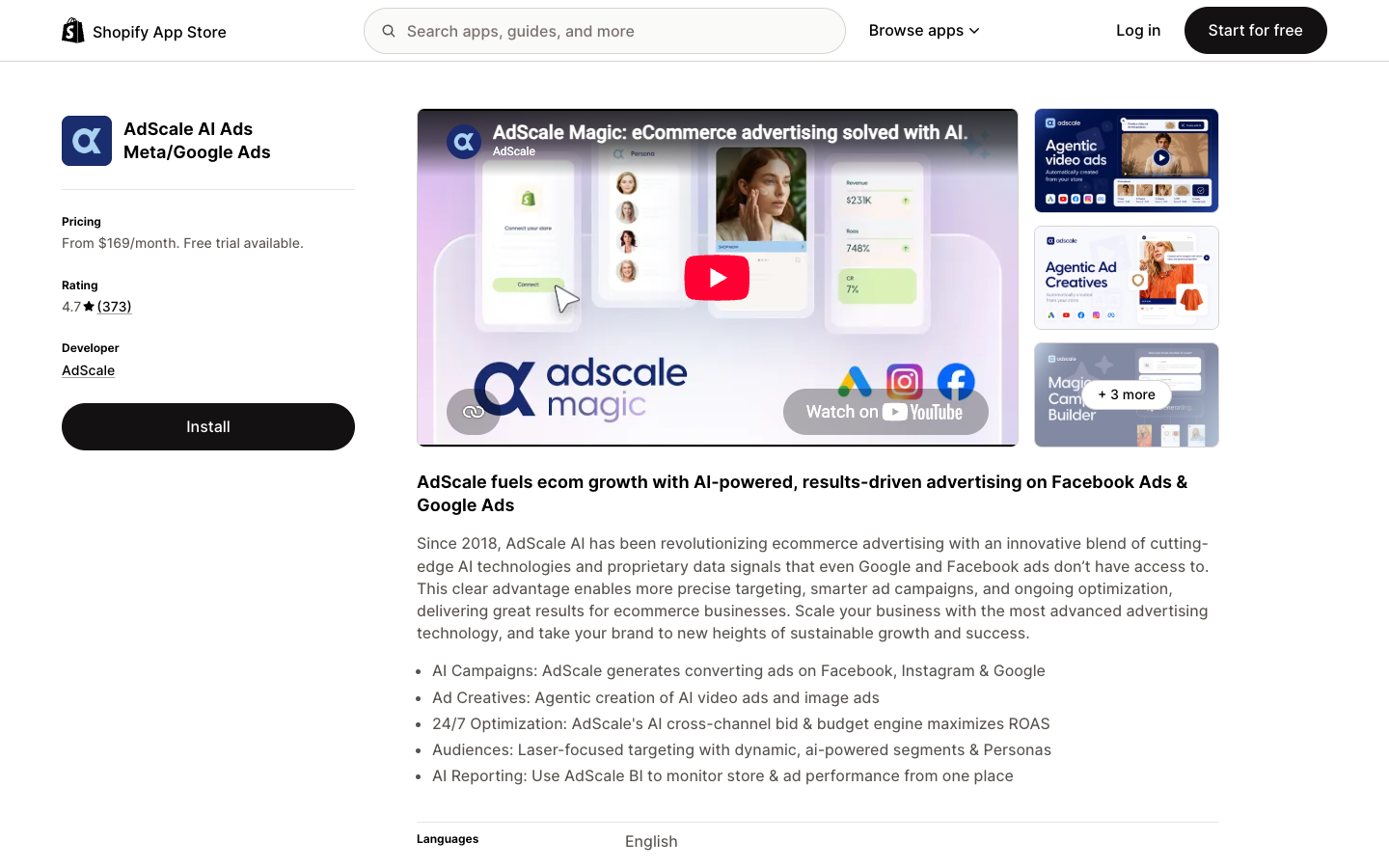
The AdScale listing on the Shopify App Store, captured September 2026.
Key takeaways
- AdScale is automated campaign management for Google (Search, Performance Max, Display) and Meta (Facebook, Instagram), priced by the ad spend it manages. It is an ad management tool first. Creative generation is an allowance inside it.
- The Shopify listing shows three plans: Basic at $169 a month for up to $1,000 of monthly ad spend, Growth at $249 for up to $2,000, and Elite at $329 for up to $3,000. Every plan has a 14-day free trial. (Pricing checked September 2026.)
- The fee is a flat step, so it weighs most at the bottom of each band: $169 is 16.9% of a $1,000 month and 56% of a $300 month (our arithmetic).
- AdScale's pricing FAQ describes a subscription charged upfront plus usage charged at the end of the period by ad spend tier, and the Shopify listing says some charges may be billed separately from your Shopify invoice.
- On Shopify, 345 of 373 reviews are five star and 19 are one star. Five-star reviews mostly credit a named account manager. One-star reviews cluster on spend the merchant says they did not approve, ownership of Google Merchant Center and Business Manager assets, and attribution. AdScale replied publicly to 13 of the 19. (Reviews checked September 2026.)
- On Trustpilot, AdScale holds 3.6 from 28 reviews, with 28% at one star. The negative reviews there lean toward the managed service: three-month billing periods, a 30-day cancellation notice and disputed account management.
- AdScale's pricing FAQ recommends at least $15 a day for Google ads, about $450 a month before any Meta spend.
What AdScale is: a Shopify ad automation app that runs Google and Meta campaigns
AdScale calls itself "AI Advertising for eCommerce on Meta & Google Ads" on adscale.com, and its homepage opens with "eCommerce advertising. Solved with AI." followed by "Let AI Advertising take over." That second line is the product in five words. You connect your store and your ad accounts, and AdScale builds, funds and adjusts the campaigns.
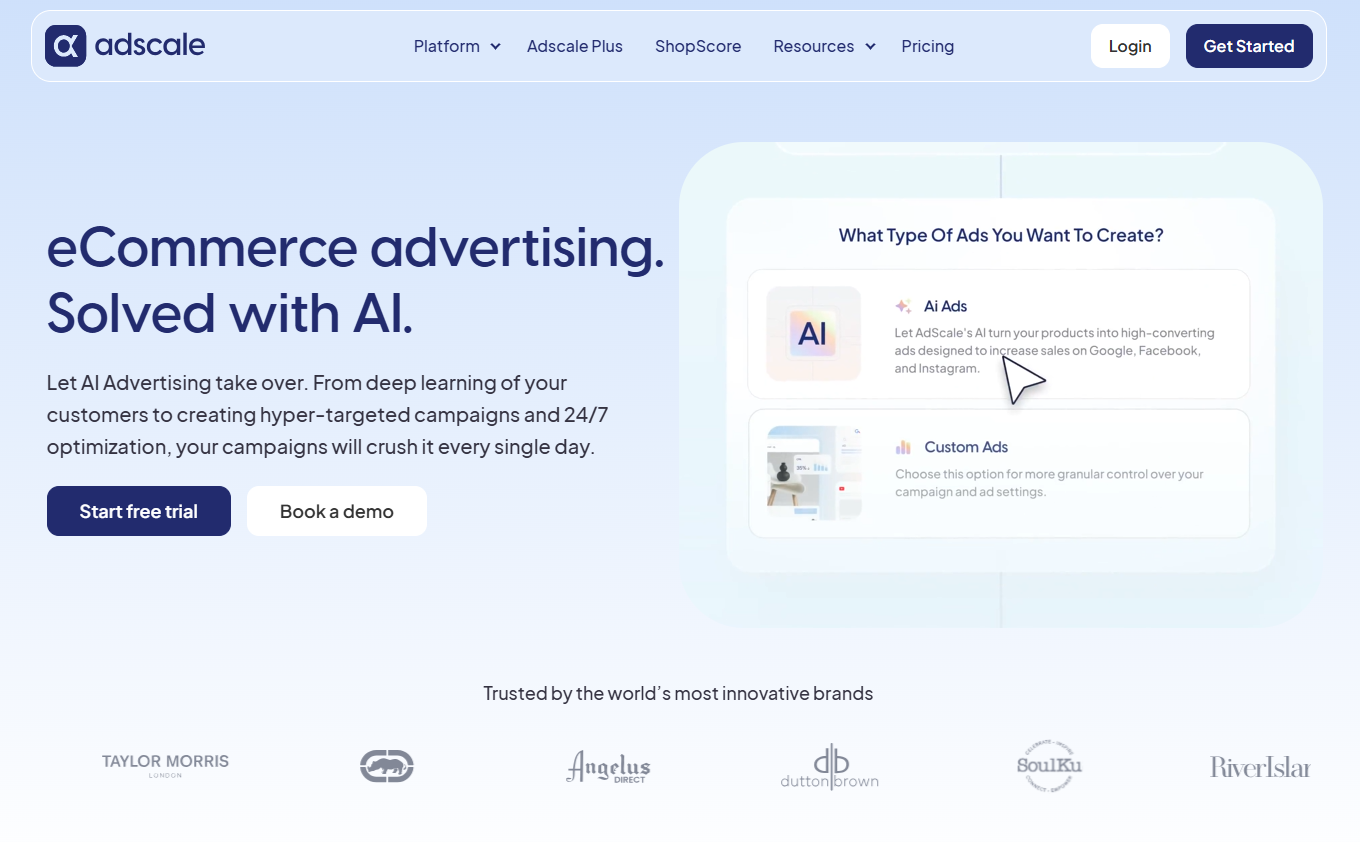
The AdScale homepage, captured September 2026.
The app has been on the Shopify App Store since 20 July 2018, listed as "AdScale AI Ads Meta/Google Ads", with a developer address in Yokneam, Israel. AdScale's terms name AdScale, Inc. as the company you contract with. On its homepage AdScale reports $5 billion in revenue processed, 54 million transactions, 18,000+ connected stores and 19 countries. Those are its own numbers, not audited ones.
The clearest way to place AdScale is by the job it replaces. It is a media buyer in software form: it plans the budget, builds the campaigns, moves money between them and reports back. Creative sits inside that loop as one of the inputs the system rotates, which is the reverse of how an ad creative tool is built.
The pricing page lists automated campaign creation for Google Search, Performance Max and Display, plus Facebook and Instagram. TikTok, Pinterest and Amazon do not appear on any AdScale page read for this review. Beyond Shopify, the integrations page lists WooCommerce, BigCommerce, Magento and PrestaShop, and marketing tools such as Klaviyo, Omnisend and Yotpo. The same pricing page lists email and SMS modules with trigger campaigns and an SMS flow builder.
Three products under one name: AdScale, AdScale Plus and AdScale Pro
AdScale sells the same engine three ways, and the reviews mix them up often enough that it is worth separating them before the trial.
- AdScale (self service): the app with public pricing, covered in the pricing section below.
- AdScale Plus: a fully managed service, pitched as "AI-powered advertising. Expertly Run for you." Its page lays out seven steps: connect and analyze, a discovery call with a dedicated account manager, deep strategic analysis, a media strategy presentation, campaign launch, ongoing optimization with monthly performance reports, and a quarterly business review. No price is published. The button says "Book a demo".
- AdScale Pro: a white-labeled version for agencies that manage several client accounts, also sold through a demo.
The line between the first two blurs in practice. Many five-star merchants on the self-service app listing thank a success manager by name, which is the promise AdScale Plus is sold on. Judge the trial with that in mind: part of what you are testing is the people.
The billing terms differ too. The 14-day free trial is published for the self-service app. Two 2026 Trustpilot reviewers describe the managed side running in three-month periods, which the next sections come back to. If a sales call moves you toward AdScale Plus, ask for the term and the notice period in writing.
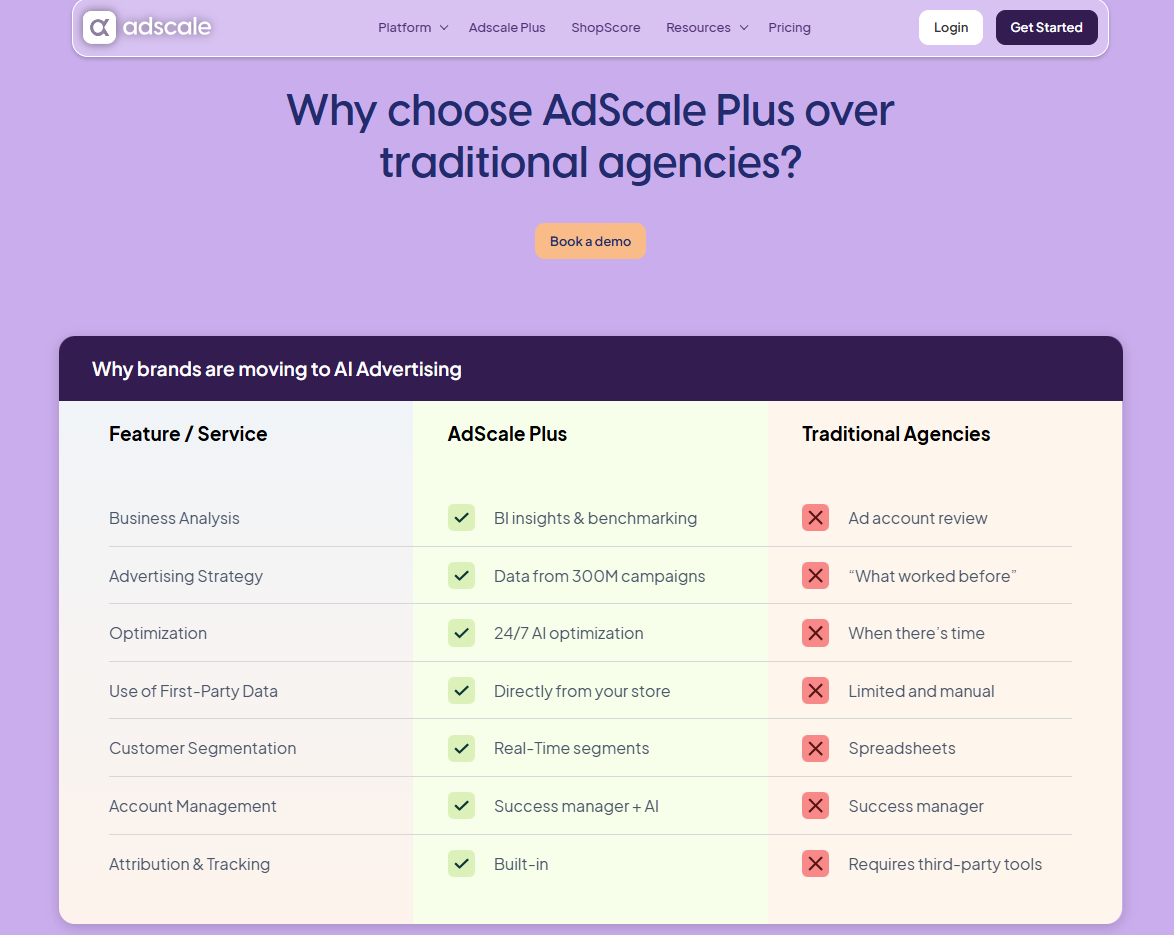
AdScale Plus, the managed service sold by demo with no public price, captured September 2026.
What AdScale's automation does during the 14-day free trial?
Every plan on the Shopify listing carries the same 14-day free trial. AdScale's homepage describes what happens inside it as five steps: analyze your business data, profile your ideal customer, set budget and goals, build campaigns on Google and Meta, then optimize them around the clock. Below, each stage is set against what merchants in Shopify reviews say happened at the same point. AdScale does not put days on those steps. The stage names below are this article's own way of lining them up against the trial, so read them as an order of events, not a timetable AdScale promises.
Before launch: the permissions and connections AdScale asks for
The Shopify listing spells out the data access AdScale needs: customer data marked sensitive (including device and activity data), plus permission to view and edit customers, products, orders, store analytics and the Online Store. On the ad side you connect Google and Meta. For Google Shopping, AdScale told one merchant in a public reply that "in order to run Google Shopping a web site claim is needed" in Google Merchant Center, and that onboarding says so.
That claim is where some of the oldest one-star reviews begin, and the complaints section covers them. AdScale's own help center hints at where setup friction sits. Its largest collection is "Technical & Connection issues" with 21 articles, two more than the 19 in the "Ads" collection.
First campaigns: your store data becomes a Google and Meta media plan
AdScale's campaign builder page promises a "1-click media plan across Google and Meta", built from store data and covering "budget allocation to channel mix". The homepage adds Budget Groups, which it calls "smart containers for cross-channel ads": you set a goal and a budget, and the AI splits it across platforms. The builder's FAQ answers "Do I need any advertising experience to use the AI Campaign Builder?" with "No."
Merchants report both ends of this stage. Fame Rugs, reviewing on 13 August 2026 after 21 days, wrote that "campaigns started performing faster than we expected." L For Light, reviewing on 20 October 2025 after two days, said the one search ad AdScale created used keywords that were "not even ranking or relevant", and that they had added the Performance Max headlines, descriptions, pictures and video themselves.
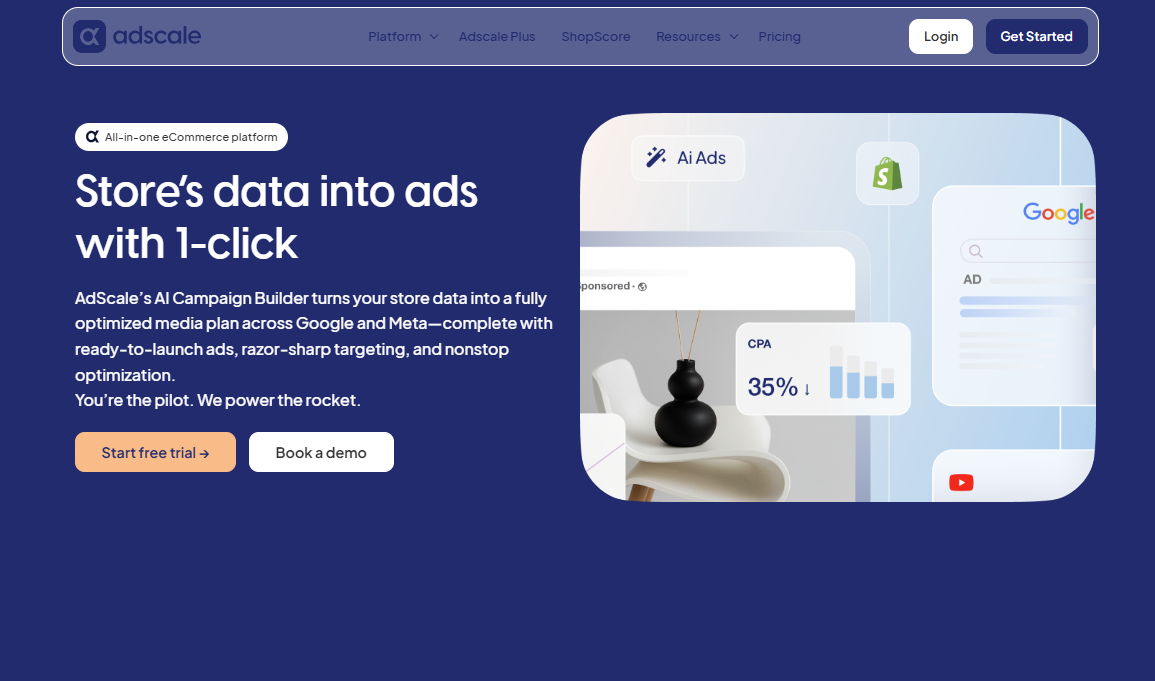
AdScale's AI Campaign Builder page, captured September 2026.
Once campaigns are live: the AI optimizer starts moving bids and budgets
Once campaigns are live, AdScale's AI optimizer page describes the rule in one sentence: "If underperforming, spending decreases; if results surge, the budget reallocates quickly." The homepage adds that the system shifts budgets, tweaks bids and refreshes ads "24/7".
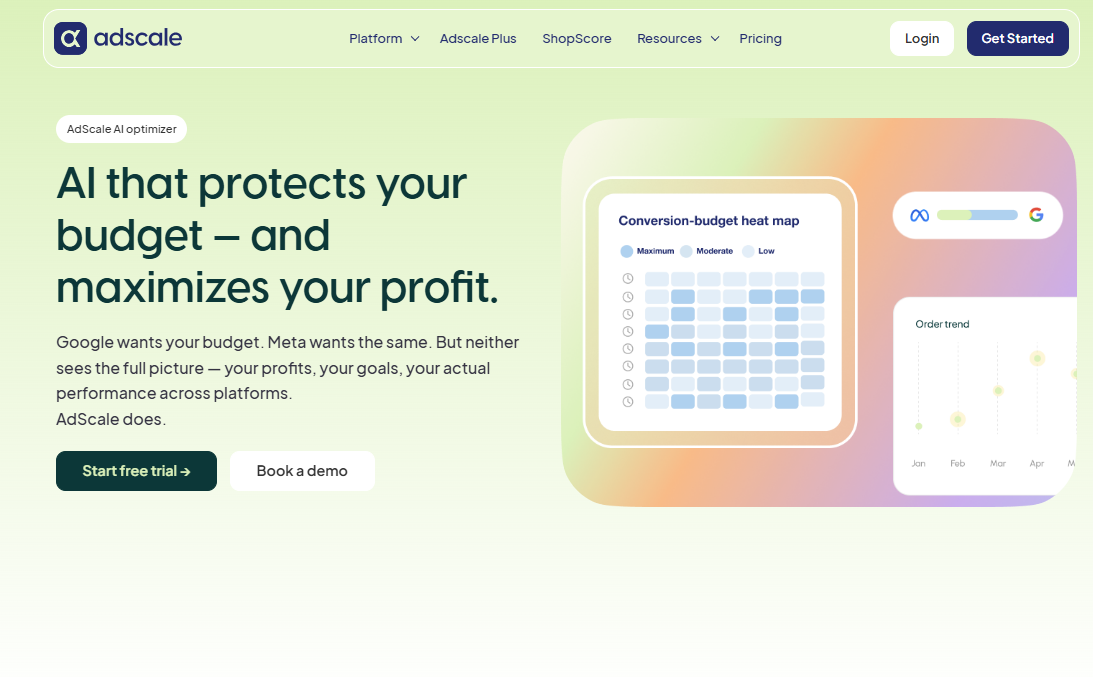
AdScale's AI Optimizer page, captured September 2026.
AdScale's Ecko Unltd. case study gives a sense of the pace. Over 11 months it logged 267 budget adjustments, 52 keyword updates, 301 bid modifications and 709 AI optimizations in total. At that rate (our arithmetic, and for a brand much larger than a typical trial store) a two-week window would hold about 30 automated changes.
Thirty changes you did not make yourself is the point of buying AI bid and budget optimization. It is also why the checklist later in this article asks for a daily look at spend per campaign during the trial, not a weekly one.
AdScale AI reviews: agentic creatives and what stays in your hands
The campaign builder page describes the split of control with a metaphor: AdScale is "the rocketship" and you are "the pilot". It says you can fine-tune creatives, budgets and targeting, and that "Your unique tone, brand feel, and secret sauce stay in your hands".
Creative generation comes with every plan. Each Shopify tier lists "FREE $20 agentic creatives (free trial)" and "FREE $40 agentic creatives (after trial)", alongside "Create stunning AI product videos" and "Create beautiful AI product images". The listing does not say how many images or videos $40 of agentic creatives buys, so treat it as a monthly allowance of unknown size until you see it in the account.
One long-term user adds a practical note. Antique Candle Co., six months in, wrote on 24 September 2026 that video and image sizing was "a bit of a learning curve", while calling AdScale "MUCH more user friendly than native Meta ads platform."
AdScale pricing: what $169, $249 and $329 buy in managed ad spend
AdScale pricing is set by how much ad spend the platform manages each month, not by seats or credits. The pricing page on adscale.com shows the entry tier as "Up to $1,000 ad spend $169/month", and the Shopify listing shows all three self-service plans side by side.
| AdScale plan (Shopify listing) | Basic | Growth | Elite |
|---|---|---|---|
| Price per month | $169 | $249 | $329 |
| Monthly ad spend covered | Up to $1,000 | Up to $2,000 | Up to $3,000 |
| Free trial | 14 days | 14 days | 14 days |
| Agentic creatives | $20 during trial, $40 a month after | $20 during trial, $40 a month after | $20 during trial, $40 a month after |
| Channels | Google Search and PMax, Facebook and Instagram | Same as Basic | Same as Basic |
The three plans list the same features. What changes is the ad spend ceiling. The Shopify link to "See all pricing options" returned a 404 when checked, so the price above $3,000 of monthly spend is not published anywhere read for this review. AdScale Plus and AdScale Pro are sold by demo with no public price.
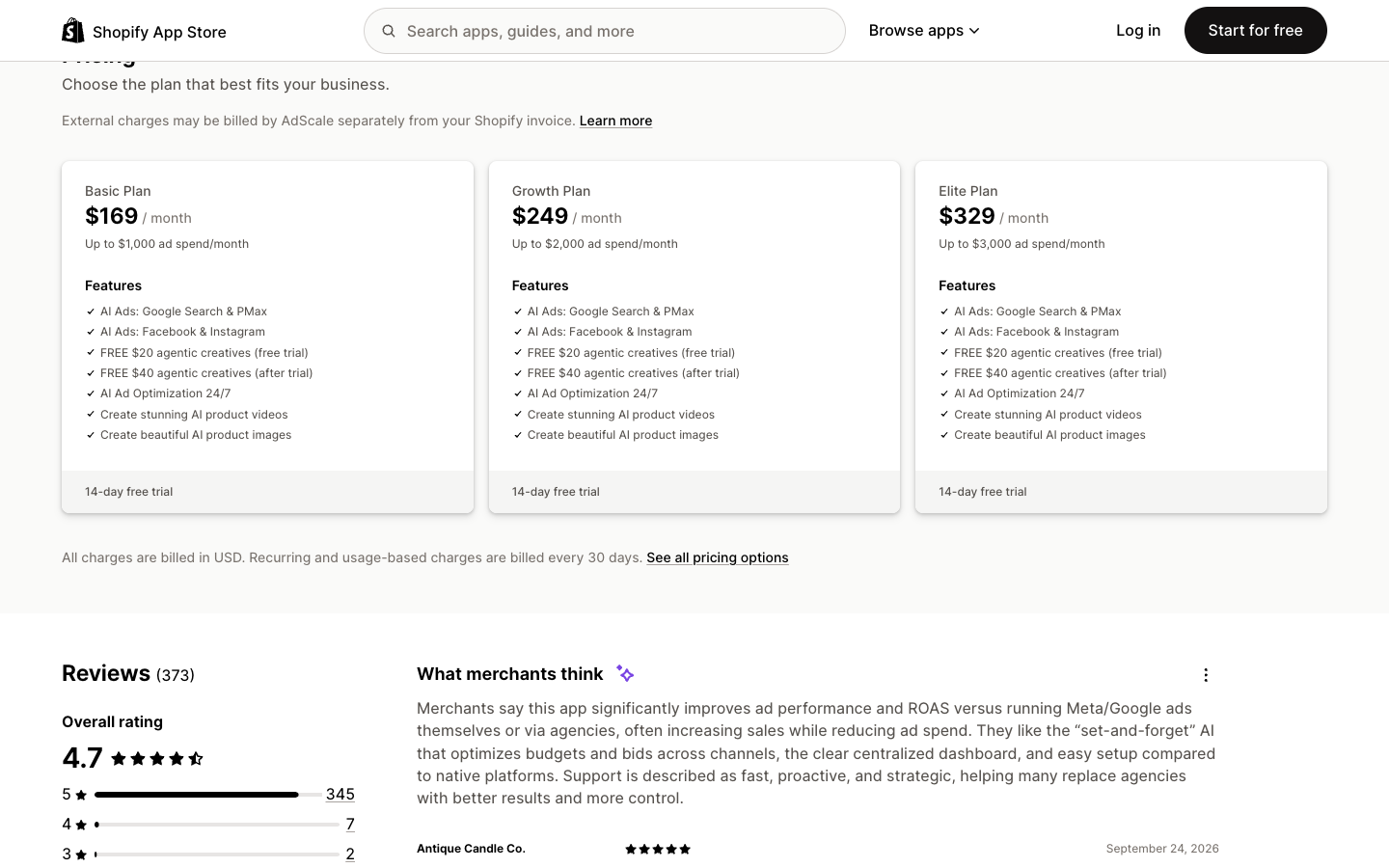
AdScale's three self-service plans and their ad spend ceilings on the Shopify App Store, captured September 2026.
What the AdScale fee costs as a share of your ad spend
Because the fee steps up at fixed ceilings, the cost relative to your media budget swings a lot inside each band. The table below is our arithmetic from the Shopify prices, assuming you sit on the cheapest plan that covers your spend.
| Monthly ad spend | Plan needed | AdScale fee | Fee as a share of spend |
|---|---|---|---|
| $300 | Basic | $169 | 56% |
| $600 | Basic | $169 | 28% |
| $1,000 | Basic | $169 | 16.9% |
| $1,100 | Growth | $249 | 22.6% |
| $2,000 | Growth | $249 | 12.5% |
| $2,500 | Elite | $329 | 13.2% |
| $3,000 | Elite | $329 | 11.0% |
The fee makes the most sense at the top of each band and the least sense just above a ceiling. A store spending $300 a month would pay AdScale more than half as much again as it pays Meta and Google. A store that grows from $1,000 to $1,100 jumps from 16.9% to 22.6%.
The same pricing FAQ sets a floor under the media budget as well. It recommends a minimum of $15 a day for Google ads and $2 per audience on Facebook. Fifteen dollars a day is about $450 a month on Google alone, which is why the fit section below puts the practical entry point near $600 of total monthly spend.
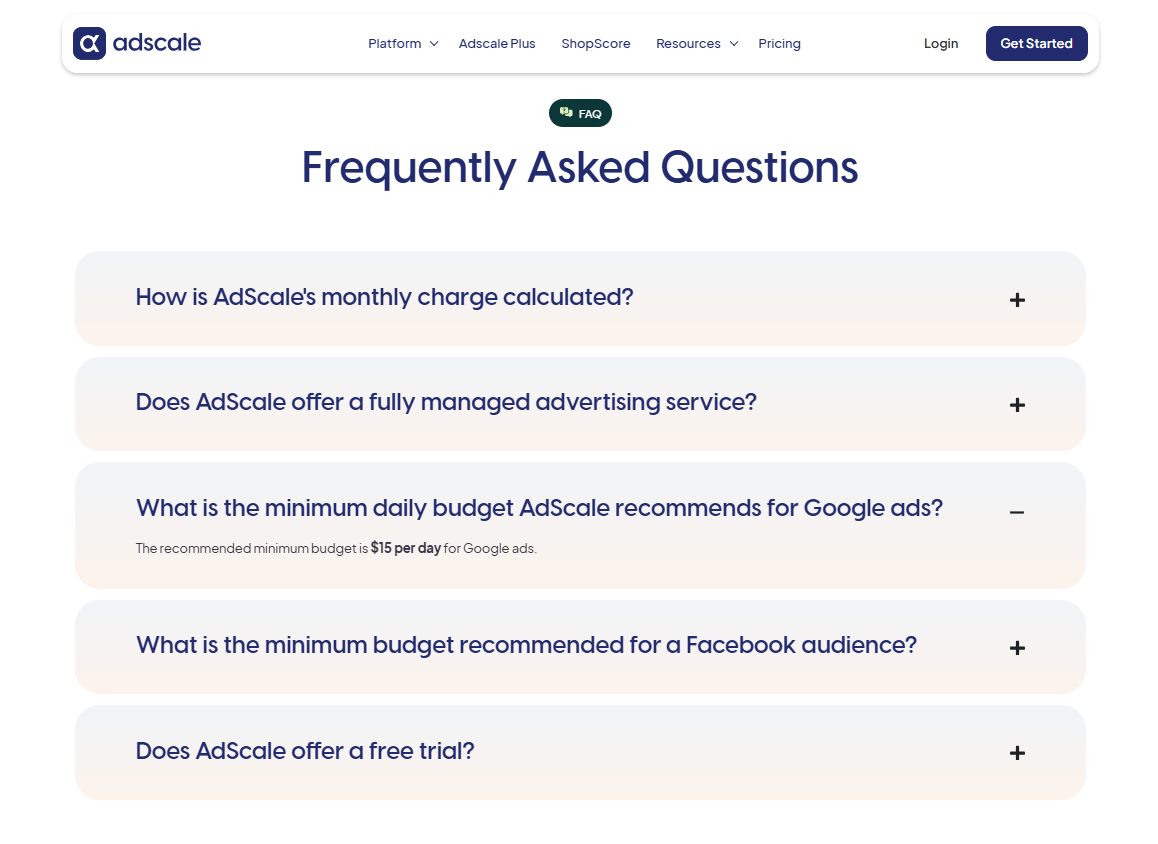
AdScale's pricing FAQ with the free trial and minimum budget answers expanded, captured September 2026.
The listing frames each plan as a cap on ad spend, which reads as the fee sitting on top of the media cost. Confirm with support how the media itself is billed before you connect a card.
The billing rules: subscription upfront, usage after, and charges outside Shopify
AdScale's pricing FAQ answers "How is AdScale's monthly charge calculated?" this way: "The monthly charge is typically a constant subscription charge paid at the start of the period, plus usage charges paid at the end based on your actual ad spend tier." Read that as two charges a month, one fixed and one that depends on where your spend lands.
The Shopify listing adds two lines under the plans: "External charges may be billed by AdScale separately from your Shopify invoice," and "Recurring and usage-based charges are billed every 30 days." If you reconcile app costs from your Shopify bill alone, an AdScale charge can land somewhere you are not looking.
The terms add the legal frame. Section 4.2 makes the customer "solely and fully responsible for all activities, including accrued charges, that occur in connection with its account." Section 4.3 lets AdScale suspend access if any amount due is not received within 15 days. The terms also have sections on fees and on termination, but the portion read for this review did not reach them, and no refund policy turned up on the pages checked. Ask support for the cancellation and refund policy in writing before the trial ends.
Older one-star reviews describe a different pricing model, so treat them as history. A 2018 review mentions a 5% card transaction fee and paying AdScale upfront for the monthly budget. A March 2019 review describes an unexpected bill of over $1,000 on a $5-a-day budget and says the company charged commission. The current plans are priced by ad spend band instead.
What the 14-day free trial can prove, and what it cannot
The trial includes $20 of agentic creatives, so you can see generated images and videos before you pay. You can also see how quickly the account manager answers, which permissions the setup needs, and whether the first campaigns look like your brand.
What 14 days cannot prove is ROAS. Any bidding system spends its first days on campaigns with no history, and AdScale's own proof leans on longer windows: the Ecko case study covers 11 months. If anyone on an onboarding call promises a ROAS number inside the trial, ask for it by email. One of the one-star reviews below turns on exactly that kind of promise.
The trial also only covers the self-service app. On Trustpilot, a two-star reviewer posting on 21 September 2026 says they were told they were signing up for a three-month trial, told their rep they were cancelling, and still saw two more charges because notice had to be given 30 days before the period ended.
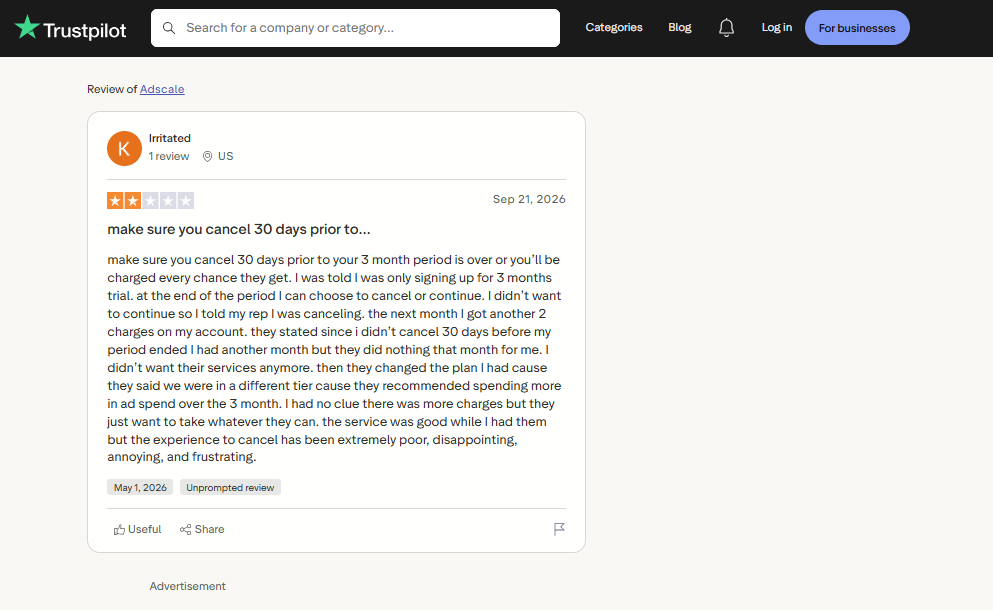
A two-star Trustpilot review of AdScale's managed service, captured September 2026.
AdScale reviews on Shopify: 4.7 stars from 373 merchants, and who gets the credit
Two independent review sources for AdScale could be read for this article: the Shopify App Store and Trustpilot. They describe noticeably different customers, so they are covered separately. G2 did not load on 29 September 2026 and a Capterra address for AdScale returned a 404, so no figures from those two appear here.
| Review platform | Rating | Reviews | Five-star share | One-star share |
|---|---|---|---|---|
| Shopify App Store | 4.7 / 5 | 373 | 92.5% | 5.1% |
| Trustpilot | 3.6 / 5 | 28 | 64% | 28% |
Both checked September 2026.
The Shopify breakdown by star looks like this.
| Stars | Reviews | Share of 373 |
|---|---|---|
| 5 | 345 | 92.5% |
| 4 | 7 | 1.9% |
| 3 | 2 | 0.5% |
| 2 | 0 | 0% |
| 1 | 19 | 5.1% |
Shopify's AI-written summary at the top of the page says merchants report better ad performance and ROAS than running Meta and Google themselves or through agencies, like the "set-and-forget" AI, and describe support as "fast, proactive, and strategic." The distribution backs the first half of that. Almost nothing sits in the middle: nine reviews between two and four stars, out of 373.
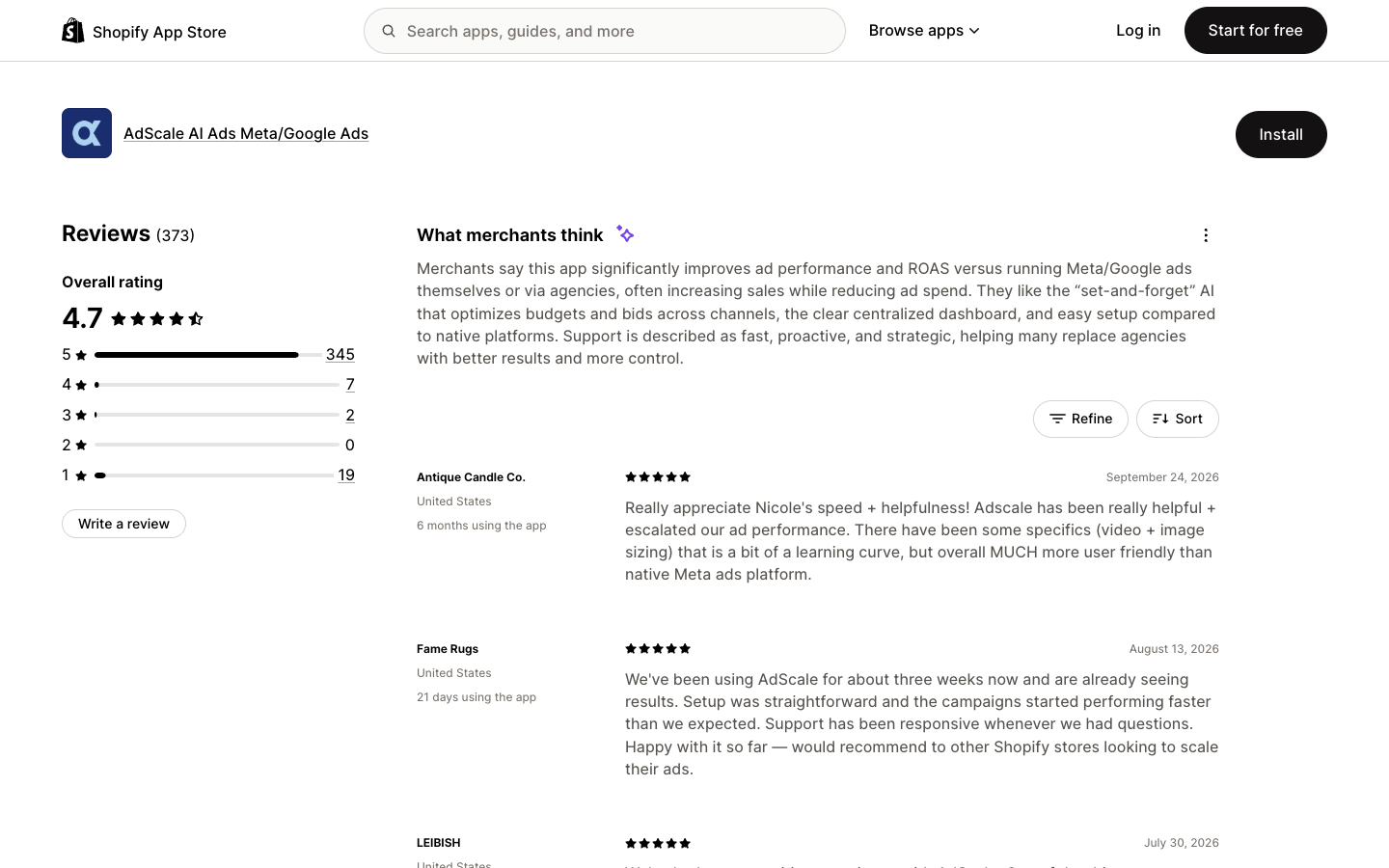
AdScale's rating distribution and Shopify's merchant summary, captured September 2026.
The five-star pattern: merchants thank a named account manager
On the default reviews page checked on 29 September 2026, six of the first ten reviews name an AdScale staff member, and Nicole appears most. Palmaira Sandals (30 July 2026, seven months on the app) credits "regular account reviews." Evoke Headwear (28 July 2026, two months) runs four stores and contrasts Anna's updates with previous agencies, where they "had great difficulty getting clear and concise information." Vassalli (25 June 2026, about a year) names Kesniya.
The rest describe the automation itself. Hulk Hogan's Wrestling Shop, almost two years in, says they "literally just set and forgot" AdScale and saw online sales rise "10 fold, if not more." WiseBond, about two years in, calls the dashboard easy to use and support "extremely proactive when it comes to new ads trends."
For a trial, this changes what the average means. Most happy long-term merchants are describing AdScale plus a person who watches the account. If you are buying it so you never have to talk to anyone, the 4.7 says less about your likely experience than it seems to.
AdScale reviews on Trustpilot: 3.6 from 28, and a different kind of customer
AdScale's Trustpilot profile is small and far more split than its Shopify page: 64% five star, 28% one star, and almost nothing between. Trustpilot notes that the company has not invited customers to review recently and has replied to 33% of negative reviews. The profile was claimed in November 2025.
The difference is who is writing. Shopify reviews come from merchants who installed the self-service app. Several Trustpilot reviewers describe the managed service, a WooCommerce or WordPress install, or a contract negotiated with a rep, so the complaints there are about terms and delivery rather than about the optimizer.
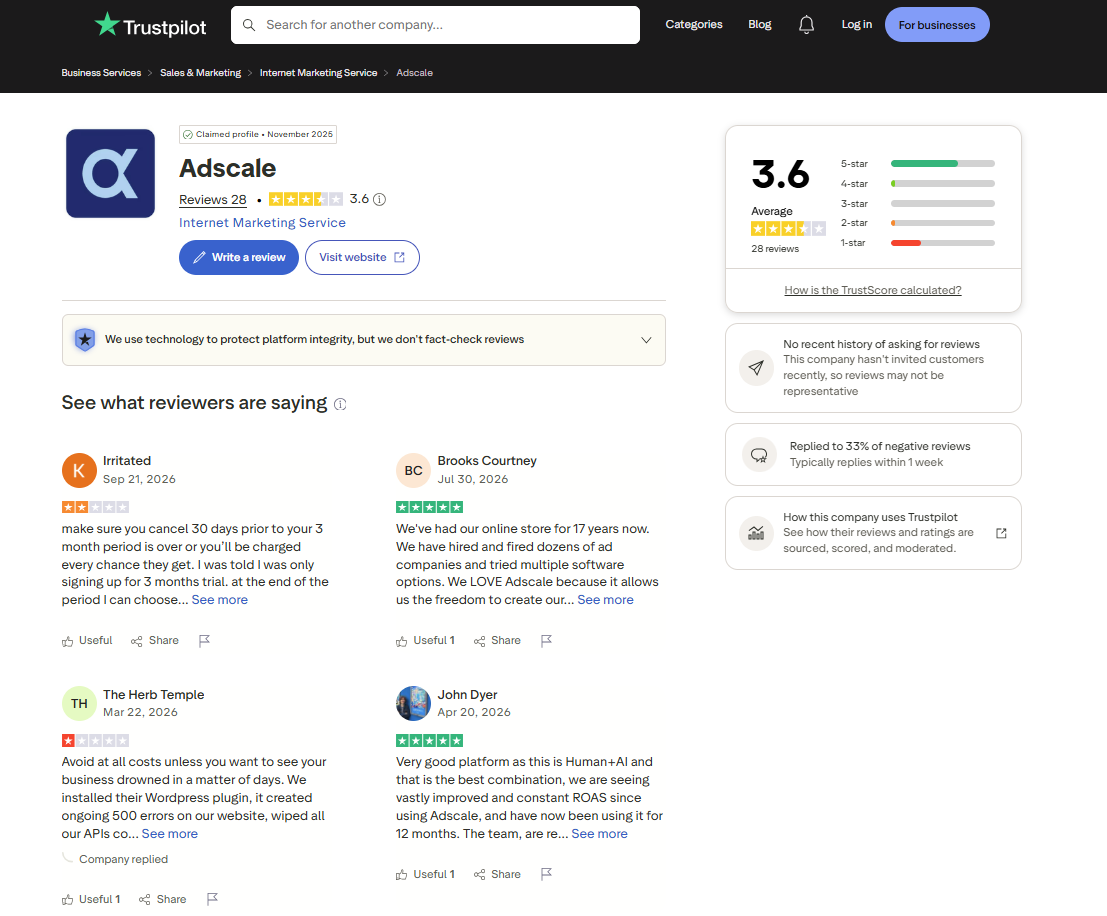
AdScale's Trustpilot profile and rating distribution, captured September 2026.
The two-week AdScale trial checklist: test control before you judge ROAS
Everything below is built from the complaint clusters above and AdScale's published billing rules. Copy it into your notes before you install, and run it across the 14-day free trial.
Before install (day 0):
- Screenshot your Google Merchant Center ownership, product feed status and Meta Business Manager admin list.
- Set an account spending limit in your Meta billing settings and a budget cap in Google Ads, at a number you could afford to lose in full.
- Write down the last 30 days of ROAS as Meta and Google report it, so you have a baseline that is not AdScale's.
- Email support three questions: who bills the ad spend itself, what the usage charge will be at your spend level, and what the cancellation and refund policy is.
- If you are offered AdScale Plus, ask for the contract length and the cancellation notice period in writing before you agree.
Onboarding call (day 1):
- Say that nothing goes live without your written approval, then confirm it by email the same day.
- Ask which permissions the Google Shopping setup will change, and whether any manual Shopping ads you already run will keep their feed.
During the trial (days 2 to 13):
- Check spend per campaign in Meta Ads Manager and Google Ads once a day, and open Google Ads Change History to see which edits came from AdScale.
- Review the generated creatives from the $20 trial allowance, and decide whether they are on brand enough to run or whether you will supply your own.
- Note, with the date, every change to spend, bids or live ads that you did not expect.
Before the trial ends (day 14):
- Compare the platforms' own reported ROAS with AdScale's number, and write down why they differ.
- Check that you still own every asset from the day 0 screenshots.
- Decide to keep or cancel on control and support. If you keep it, give the ROAS question two to three months.
Who AdScale fits: Shopify stores with $1,000 to $3,000 in monthly ad spend and no media buyer
AdScale fits a specific kind of online store owner: someone already paying for Google and Meta ads, running them alone at night, and ready to trade a percentage of spend for a system plus a person.
Try AdScale if:
- Your spend sits near the top of a band ($1,000, $2,000 or $3,000 a month), where the fee works out to between 11% and 17% of spend.
- Nobody on your team is a media buyer, and you want a named account manager as much as the software.
- You run Google Search and Performance Max as well as Meta, and want one dashboard with cross-channel budget moves.
- Your store runs on Shopify, WooCommerce, BigCommerce, Magento or PrestaShop, or your customer data lives in Klaviyo or Yotpo.
Skip it, or wait, if:
- You spend under about $600 a month, where the $169 fee is more than a quarter of the media budget.
- You already run manual Google Shopping ads that depend on your current Merchant Center setup and cannot afford a feed interruption.
- TikTok is your main paid social channel. It does not appear on any AdScale page read for this review.
- You want managed service but cannot commit to more than a month. Trustpilot reviewers describe three-month periods with a 30-day notice.
- You want to decide creative strategy yourself and mostly need more ads to test. AdScale's creative allowance is priced in dollars of "agentic creatives" and sits beside the core product.
The lesson from AdScale reviews for any ad automation: set the caps before you hand over the keys
The control complaints in AdScale's reviews show up in the native tools too. Meta's own free Facebook & Instagram app for Shopify holds 3.9 out of 5 from 5,706 reviews, with about 1,300 one-star ratings. A US store wrote on 18 September 2026 that with it, "ads can start themselves after stop date." Any tool with permission to spend can spend in a way you did not expect.
So the protection has to sit outside the tool. Account-level spending limits and screenshots of who owns which asset hold whichever optimizer you pick, and so does a baseline ROAS you pulled yourself. None of them depends on the vendor's reporting.
The second half of the lesson is about what automation can move. A bid and budget engine shifts money toward the best performers among the ads it has. Give it four creatives that make the same claim and it will find the best of four near-identical options.
The ceiling on what any optimizer can find is set by the creative pool, which is why an automated account still needs a steady supply of different angles to test.
AdScale alternatives for Shopify ad automation
Three other routes, cheapest first. The first two replace AdScale's job of running the campaigns. The third does a different job, supplying the creatives, and works alongside whichever system spends the budget.
| Option | Starting price | What it automates | Shopify App Store rating |
|---|---|---|---|
| Meta Advantage+ via the Facebook & Instagram app | Free to install, you pay Meta for ad spend | Meta audience, placement, budget and creative | 3.9 |
| Madgicx | $45 a month on its pricing page, "from $49/mo" on Shopify, 7-day trial | Meta-first automation, audiences, tracking | 4.1 |
| AdScale (for reference) | $169 a month up to $1,000 ad spend, 14-day trial | Google and Meta campaigns, bids, budgets | 4.7 |
| Promer AI | First ad free, no credit card required | Ad creatives from a product URL, no bidding or budgets | 4.7 |
Checked by September 2026
Madgicx, the Meta-first control panel
Madgicx sits between the native tools and a managed service. Its pricing page showed Madgicx Pro Complete at $45 a month at the lowest ad spend band, with a 7-day free trial and a Tracking Pro add-on at $49 a month. Its Shopify listing says "Subscriptions start at $49/mo", so check the number at checkout. The listing headline calls it "the one-stop shop for Facebook ad optimization", and it holds 4.1 from 16 reviews there, a sample too small to lean on.
Pick Madgicx if Meta is most of your spend and you want automation rules and tracking while keeping your own hands on the account. Skip it if Google Search and Performance Max matter as much as Meta, or if you want a named person running the account, which is what AdScale's five-star reviews praise most.
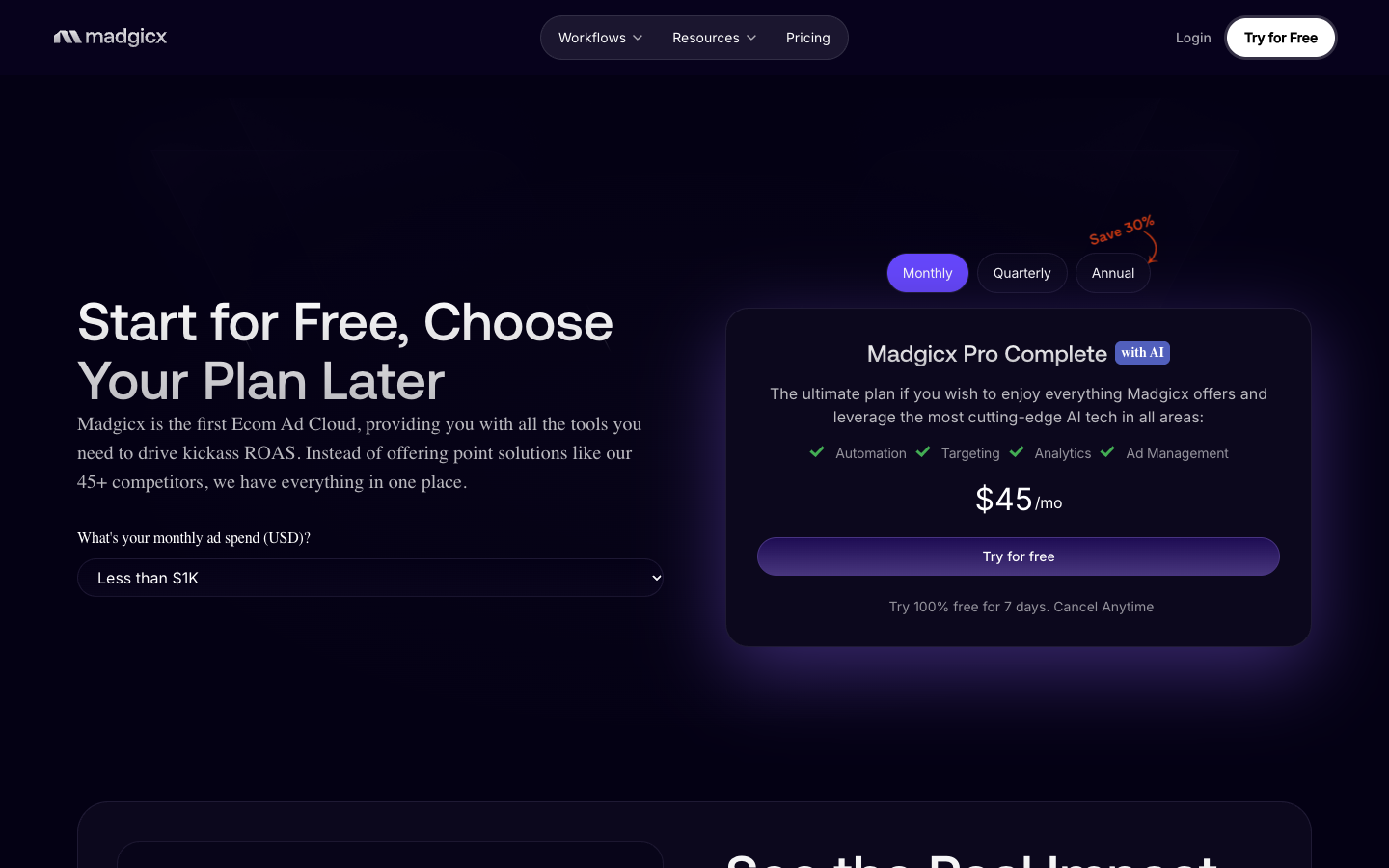
Madgicx pricing at the lowest ad spend band, captured September 2026.
Promer AI, the creative supply for whichever system runs the budget
Promer AI does a different job from the three tools above. It does not set bids, move budgets or build campaigns. It is an AI ad creative platform for ecommerce advertisers: you paste a product URL or upload a product image, and it generates static and video ad creatives from that product context.
The part that fits an automated account is angle variety. Promer AI's AI Ad Concept reads your product page, drafts an analysis of Product highlights, Ideal customer, Pain point and Need (all editable), then generates several concepts, each with its own name, target audience and core idea. AI Ad Clone rebuilds the structure of a winning reference ad with your product, so a concept that works can be turned into several versions.
Together those give an optimizer, whether AdScale, or Madgicx, a pool of different creatives to choose between. Like any AI output, its creatives can contain mistakes and need a check before spend goes behind them, and nothing about them guarantees ROAS.
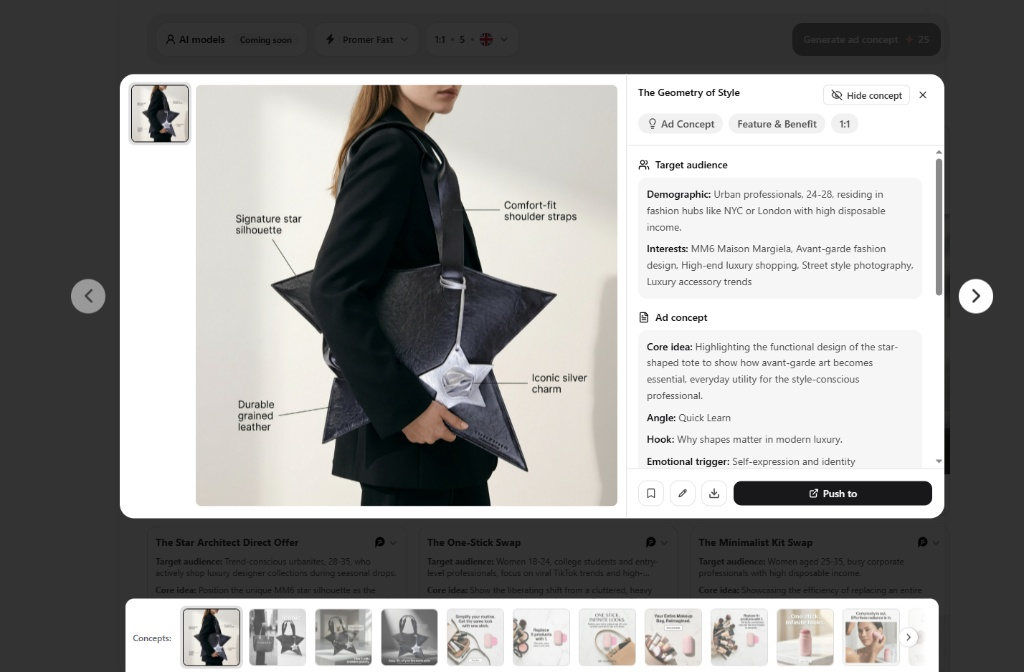
Promer AI Ad Concept interface turning product context into distinct angles and emotional hooks to combat ad fatigue.
If you want someone else to run Google and Meta campaigns, AdScale covers ground Promer AI does not attempt. If the automation is already in place and every ad in the account makes the same claim, an AI ad maker built around product context is the closer fit, and you can create your first ad free, with no credit card required.
FAQ
Is AdScale legit?
Yes, AdScale is an established company, AdScale, Inc., with a Shopify App Store listing live since July 2018 and published terms and pricing. The AdScale listing holds 4.7 out of 5 from 373 merchant reviews as of 29 September 2026. Its 19 one-star reviews raise concerns about account permissions, unapproved spend and attribution, and AdScale disputes several of them in public replies, so treat the trial as a control test. On Trustpilot it holds 3.6 from 28 reviews, where complaints focus on managed-service billing terms.
How much does AdScale cost?
AdScale costs $169, $249 or $329 a month on Shopify, for up to $1,000, $2,000 or $3,000 of monthly ad spend. AdScale's pricing FAQ describes a fixed subscription charged at the start of each period plus usage charges at the end based on your spend tier. The Shopify listing warns that some charges may be billed outside your Shopify invoice. Prices above $3,000 of spend, and for AdScale Plus, are not published.
Does AdScale have a free trial?
Yes, every AdScale plan on the Shopify App Store includes a 14-day free trial with $20 of agentic creatives. After the trial, the plans list $40 of agentic creatives a month. The AdScale trial is long enough to judge setup, support and permissions, and too short to judge ROAS on new campaigns. Ask support for the cancellation and refund policy in writing before day 14, since none appeared on the pages checked. The trial covers the self-service app; Trustpilot reviewers describe the managed service running in three-month periods.
What do AdScale reviews on Trustpilot say?
AdScale holds 3.6 out of 5 from 28 Trustpilot reviews, with 64% five star and 28% one star as of 29 September 2026. Five-star reviews praise named account managers and a mix of human support and AI. One-star reviews center on the managed service: three-month billing periods, a 30-day cancellation notice, and one merchant who says Google Ads Change History showed no AdScale edits for weeks.
Can AdScale spend more than my budget?
AdScale's optimizer is built to move budget between campaigns, and two 2026 one-star reviews describe spend the merchants say they did not approve. One says a Meta campaign went live during onboarding without approval, and another says the budget rose overnight. AdScale disputes both. Set account spending limits in Meta and Google yourself before connecting AdScale or any other automation tool.
Does AdScale create ad creatives?
Yes, AdScale generates AI image and video ads, but creative is a secondary feature inside an ad management platform. Each AdScale plan includes a dollar allowance of "agentic creatives" ($20 during the trial, $40 a month after), and the pricing page lists Magic AI copy and Magic video ads. The listing does not say how many assets that allowance buys, and some reviewers describe adding their own headlines, images and video.
Can I use Promer AI creatives inside AdScale campaigns?
Promer AI makes ad creatives and AdScale runs campaigns, so the two cover different jobs. Promer AI lets you download finished creatives as images ready for any ad platform, and AdScale's campaign builder page says you can fine-tune the creatives in your campaigns. Whether you can upload your own files at every step of AdScale's flow is not documented on the pages read for this review, so confirm it during the trial.
Related reviews and ecommerce guides
If you are comparing AdScale with creative tools or working out what your ads should cost, these guides on this blog cover the next questions:
- AdCreative.ai review: what an AdCreative.ai credit covers, how its Creative Scoring AI works, and what each plan costs per download.
- Zeely review: a mobile AI ad platform that also launches Meta campaigns, with its credit tiers and ad management fees broken down.
- How to evaluate ROI of AI-generated UGC ads: hook rate, CTR, CPA, ROAS and cost per variant, and how to test AI UGC fairly against creator content.
- How to make ads for dropshipping products: a step-by-step workflow for static and video ads, adapted by channel for Shopify, Meta, Pinterest and TikTok.
Reference Sources
- AdScale. (n.d.). AdScale Help Center. https://help.adscale.com/
- AdScale. (n.d.). AdScale: AI Advertising for eCommerce on Meta & Google Ads. https://adscale.com/
- Trustpilot. (n.d.). Adscale reviews. https://www.trustpilot.com/review/adscale.com
- Madgicx. (n.d.). Madgicx pricing. https://madgicx.com/pricing
- Meta. (n.d.). Meta Advantage+: Optimise Facebook and Instagram ads with AI. https://www.facebook.com/business/ads/meta-advantage-plus
- Shopify App Store. (n.d.). AdScale AI Ads Meta/Google Ads. https://apps.shopify.com/adscale