Last updated 22 September 2026. Prices and ratings checked at the linked sources on 22 September 2026. Desk research from invideo's public pages, terms and review platforms, with interface screenshots captured in a live invideo account. Not sponsored by invideo.
You have a product page, a Meta account that wants fresh creative every week, and no budget to fly a creator in for a reshoot. You have also seen the demos where a product link goes in and a talking creator comes out. This invideo AI review follows that exact path, from the first prompt to an ad you could run, and prices each step in credits.
invideo AI is worth paying for if you arrive with the script, the creator and the product rules already decided, and a costly place to work out an idea from scratch, because every generation spends credits and unused credits expire each billing cycle.
If you only came for the price, skip to invideo AI pricing. If you want to know whether the complaints you have read are about the product or about how it gets used, go to invideo AI reviews and complaints.
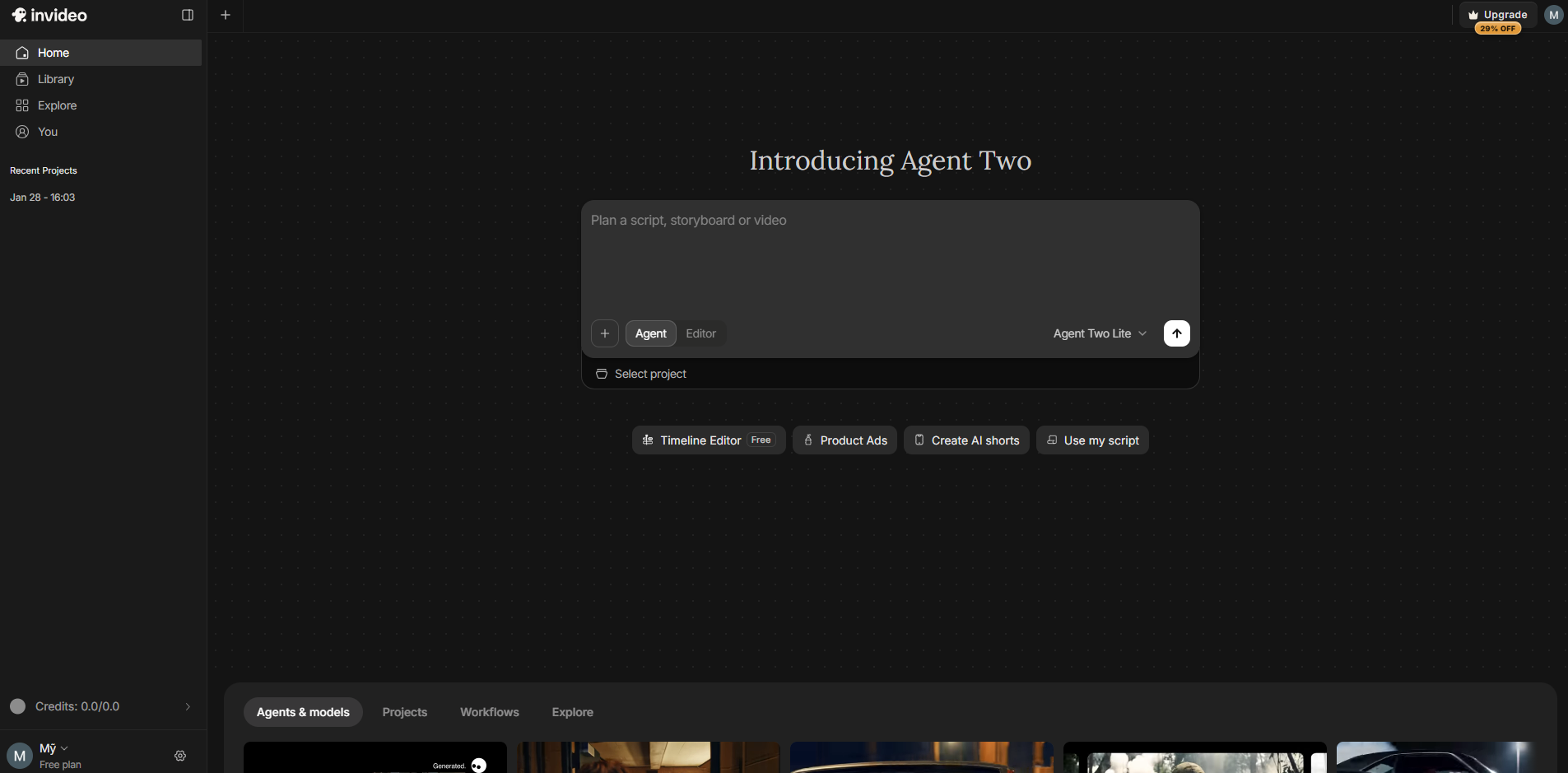
A hands-on test evaluating invideo AI, Agent Two, and prompt-to-video generation for ecommerce ads, September 2026.
Key takeaways
- invideo prices per seat: Basic at $9 a month with 190 credits, Pro at $30 with 1,000 credits, and Ultra at $80 with 3,000 credits (first month $72). invideo also appears to be testing a second price list, so check yours at checkout. (This pricing is collected in September 2026)
- At invideo's published rate of about 30 credits per five seconds of Seedance 2.0 Fast 720p video, Basic covers about six clips a month, and Basic has no access to Seedance 2.5 or standard Seedance 2.0.
- Timeline editing, editing existing videos and downloading use no credits. Generation does, and invideo shows the cost before you confirm each one.
- Unused credits, including purchased top-ups, reset every billing cycle. The terms allow a refund request within seven days only if no credits or premium features were used.
- Trustpilot shows 3.0 out of 5 from 885 reviews, split 62% five star and 29% one star. G2 shows 4.5 out of 5 from 171 reviews. Praise centres on support; complaints centre on credit consumption. (This data is collected in September 2026)
What invideo is in 2026: Agent Two, invideo AI, and the UGC Ads Agent
invideo in 2026 is an agent-driven video platform combining prompt-to-video generative tools with a professional browser-based NLE editor. It serves content creators, agency teams, and social advertisers who need to produce high-definition videos quickly without maintaining local desktop editing suites.
The platform styles its brand as invideo, leading with the tagline "The agentic video editor for serious creatives." The creation process centers on a clear four-part flow: upload your assets, describe the creative vision, refine the cuts, and export the finished render.
The flagship update is Agent Two. Rather than acting as a simple chatbot, Agent Two functions as an autonomous editing partner. It processes raw video files, transcripts, images, and audio tracks, creating a searchable memory bank of your project assets. You can instruct Agent Two to find the best take, eliminate filler words, cut footage to the musical beat, or apply consistent color grading across forty separate clips on the timeline simultaneously.
In addition to Agent Two, the platform maintains its dedicated invideo AI engine. This is the prompt-to-video system most marketers look for when researching an invideo AI review. It takes a text brief and generates a full video sequence complete with generated visuals, human-sounding voiceovers in over 50 languages, dynamic subtitles, and background audio.
For direct-to-consumer brands, invideo provides a specialized UGC ads agent. Marketers paste an Amazon, Shopify, or app store link, and the system pulls product imagery, interface details, and selling points into context. It allows you to lock an AI creator avatar and physical product appearance across multiple hook variations, creating authentic vertical ad cuts for TikTok, Instagram Reels, and YouTube Shorts.
From first prompt to usable ad: the invideo product ads flow, step by step
In Product Ads, everything the ad knows about your product comes from the words you type, so this walkthrough is mostly about writing that prompt well. The example uses a made-up product, an insulated 32 oz steel water bottle, so you can copy the structure and swap in your own details.
Step 1: Set the ad sentence
Product Ads opens a form titled "Short ad video" that builds one sentence from drop-downs: "Create a [15 seconds] [fast paced] ad for [YouTube] about". Those three values are the defaults. Set the length and pace you want and switch the platform to where the ad will run before you write anything else, so the draft is paced for that placement from the start. For a first test, keep it at 15 seconds: credit cost scales with every second generated.
Step 2: Write one topic line that carries the product
The field under the sentence says "Type your topic here", and it is a single line, not a chat box. The form finishes the sentence "Create a 15 seconds fast paced ad for YouTube about..." with whatever you type, so write it as the end of that sentence: the product, who it is for, the one benefit to sell, and the offer if there is one.
- Weak: water bottle
- Better: an insulated 32 oz steel water bottle that keeps water ice-cold for 24 hours, for people who train before work, 20% off the first order
The weak version leaves the benefit, the audience and the offer to the generator. The better one gives it all three in one line. What a single line cannot hold, such as the exact hook wording, the order of scenes or where the offer appears, belongs in Step 4 as edit commands, or in a fuller brief in the Agent Two box (see Step 5). Tone is set elsewhere too: pace comes from the drop-down in Step 1, and the voice from the Voice Actors setting in Step 3.
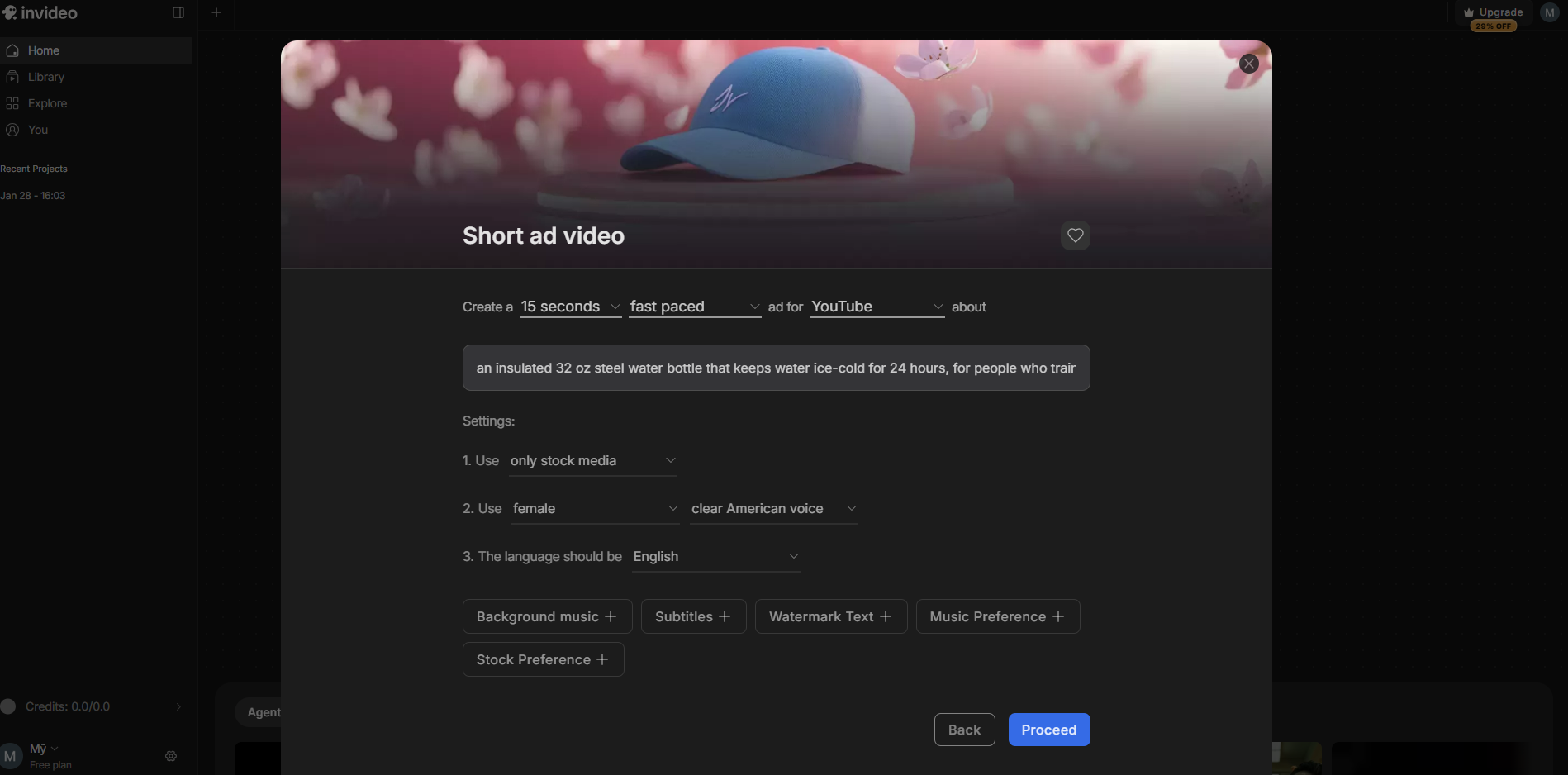
Drafting our structured creative brief inside the invideo Product Ads form, captured September 2026.
Step 3: Choose the settings before you generate
Seven optional settings sit under the topic field: Background music, Language, Subtitles, Voice Actors, Watermark Text, Music Preference and Stock / Generative. Three of them shape a first draft most:
- Stock / Generative. invideo's credits pay for generative models, so a first draft on stock footage is the cheaper way to check whether the script works. Switch to generative only for the version you plan to run.
- Voice Actors and Language. Pick them now rather than changing them after generation. invideo's generator page lists AI voiceover in over 50 languages.
- Subtitles. Turn them on for social placements, where many people watch with the sound off.
Step 4: Proceed, then check the prompt the form writes
Proceed does not generate anything. It turns the form into a plain-text prompt in the Agent Two box on the home screen, and waits for you to press send.
For the example product, the form wrote this:
"Create a 15 seconds fast paced ad for YouTube about an insulated 32 oz steel water bottle that keeps water ice-cold for 24 hours, for people who train before work, 20% off the first order Settings: Use only stock media Use a female clear American voice for the Narrator"
That changes how to think about Product Ads. The form is a prompt builder, and the prompt stays editable until you send it. Anything the one-line topic could not hold, such as the exact hook, the call to action or the order of scenes, can be typed into this box before the first credit is spent. You can also skip the form entirely and write the prompt yourself, which is where the examples in Step 5 come in.
Step 5: Write your own prompt instead: 7 invideo prompt examples for product ads
invideo's own prompting guide for marketing videos recommends a few habits: state the video type and duration, front-load the most important details because the model weighs the start of a prompt most, describe the audio and visual mood, name the platform format, include a product page URL or labelled images, avoid contradictory directions, and end with a clear call to action. The seven prompts below apply that advice to ecommerce ads. Each keeps the "Settings:" block the Product Ads form uses, so the agent receives instructions in a shape it already produces. Results still vary by model, so treat these as starting points.
- The complete 15-second product ad. Everything the form produces, plus the hook and CTA it leaves out.Create a 15-second vertical (9:16) product ad for TikTok and Instagram Reels about an insulated 32 oz steel water bottle for people who train before work. Open with the spoken line: "Your water is warm by 10am. Mine isn't." Show the bottle in use within the first 3 seconds. Main claim: keeps water ice-cold for 24 hours. Proof: double-wall steel, leak-proof lid. End on screen and in voiceover: "20% off your first order. Tap Shop Now." Settings: Use only stock media Use a female clear American voice for the Narrator Add subtitles
- Product details from the page, not from memory. invideo's guide suggests including the product page URL so the AI can reference real details. Check what the agent actually used before you send it to video, and tell it not to invent anything.Create a 15-second vertical product ad for Instagram Reels using the product page at [your product URL] for the product name, key features and price. Only mention features and offers that appear on that page. Do not invent discounts or claims. End with: "Shop now at [yourstore.com]."
- Storyboard first, video later. The cheapest way to agree on structure, because you review text before any video is generated.Plan a storyboard only. Do not generate video yet. A 15-second vertical ad for an insulated 32 oz steel water bottle, 5 shots of about 3 seconds each. For each shot, give: what is on screen, the voiceover line, and any on-screen text.
- Timed problem and solution. Timestamps give the agent a structure to follow instead of guessing the pacing.Create a 15-second vertical problem-and-solution ad for an insulated 32 oz steel water bottle. 0-3s: a gym bag in a hot car, a warm plastic bottle. Voiceover: "Your water is warm by 10am." 3-10s: the steel bottle, ice still rattling after hours. Voiceover: "This one stays ice-cold for 24 hours." 10-15s: the bottle in a car cup holder, offer on screen. Voiceover: "20% off your first order. Tap Shop Now."
- One hook changed, everything else locked. For creative testing, change only the variable you want to test. Run this once per hook.Use the previous ad as the base. Change only the first 3 seconds. New opening line: "I stopped buying bottled water at the gym." Keep every scene, voice, music and on-screen text after second 3 exactly the same.
- Customer-style video, one mood. Describe the look and the sound in one clear direction. invideo's guide warns against mixing moods like "professional but super casual".Create a 15-second vertical ad that looks like a customer filmed it on a phone: handheld framing, natural daylight, kitchen and car settings. First-person voiceover, relaxed and conversational, no background music, light ambient sound only. Product: insulated 32 oz steel water bottle. End with: "Link in bio, 20% off this week."
- Same ad for a new market. Name the language, the voice and anything that must stay unchanged.Recreate the previous ad in Spanish for Mexico. Use a female Mexican Spanish voice for the Narrator and Spanish subtitles. Keep the same scenes, timing and music. Translate the offer as "20% de descuento en tu primer pedido".
Two rules keep generation affordable once you send. Read the credit cost invideo shows before each generation is confirmed. And if the same fix fails twice, rewrite the prompt and start fresh rather than chasing one scene.
Step 6: Edit, export and test in your ad account
After generation, invideo's generator page says edits happen as typed commands in what it calls the Magic Box, and gives deleting a scene, changing the voiceover and changing the accent as examples. Specific commands ("replace scene 2 with a close-up of the bottle in a car cup holder") usually need fewer rounds than general ones ("make it better").
The generator page describes the last step as exporting the video and sharing it. None of the invideo pages read for this review describe publishing into Meta Ads Manager or reading campaign results back, so the test itself happens in your own ad account.
invideo AI pricing: what Basic, Pro and Ultra buy in Seedance clips
invideo AI pricing is billed per seat, and each seat carries a monthly credit allowance that pays for generation. On 22 September 2026 the pricing page listed Basic at $9 per seat per month with 190 credits, Pro at $30 with 1,000 credits, and Ultra at $80 with 3,000 credits, with Ultra's first month shown at $72 after a 10% discount.
invideo's help center lists the larger allowances as separate price points: Pro 2x at $60 for 2,000 credits, and Ultra 2x and 3x at $160 and $240 for 6,000 and 9,000 credits. It also lists annual billing at the same monthly rate ($108 a year for Basic), and Team and Scale plans at $79 and $215 per seat for teams of 5 to 30.
Many invideo AI pricing reviews quote different numbers, and that is partly invideo's doing. On the same day, its pricing page also served a second version with plans named Starter, Plus and Max at $20, $50 and $100 per seat on annual billing, which suggests invideo is testing its pricing. Go by the plan names and prices shown at your own checkout, and treat every table, including these, as a dated snapshot.
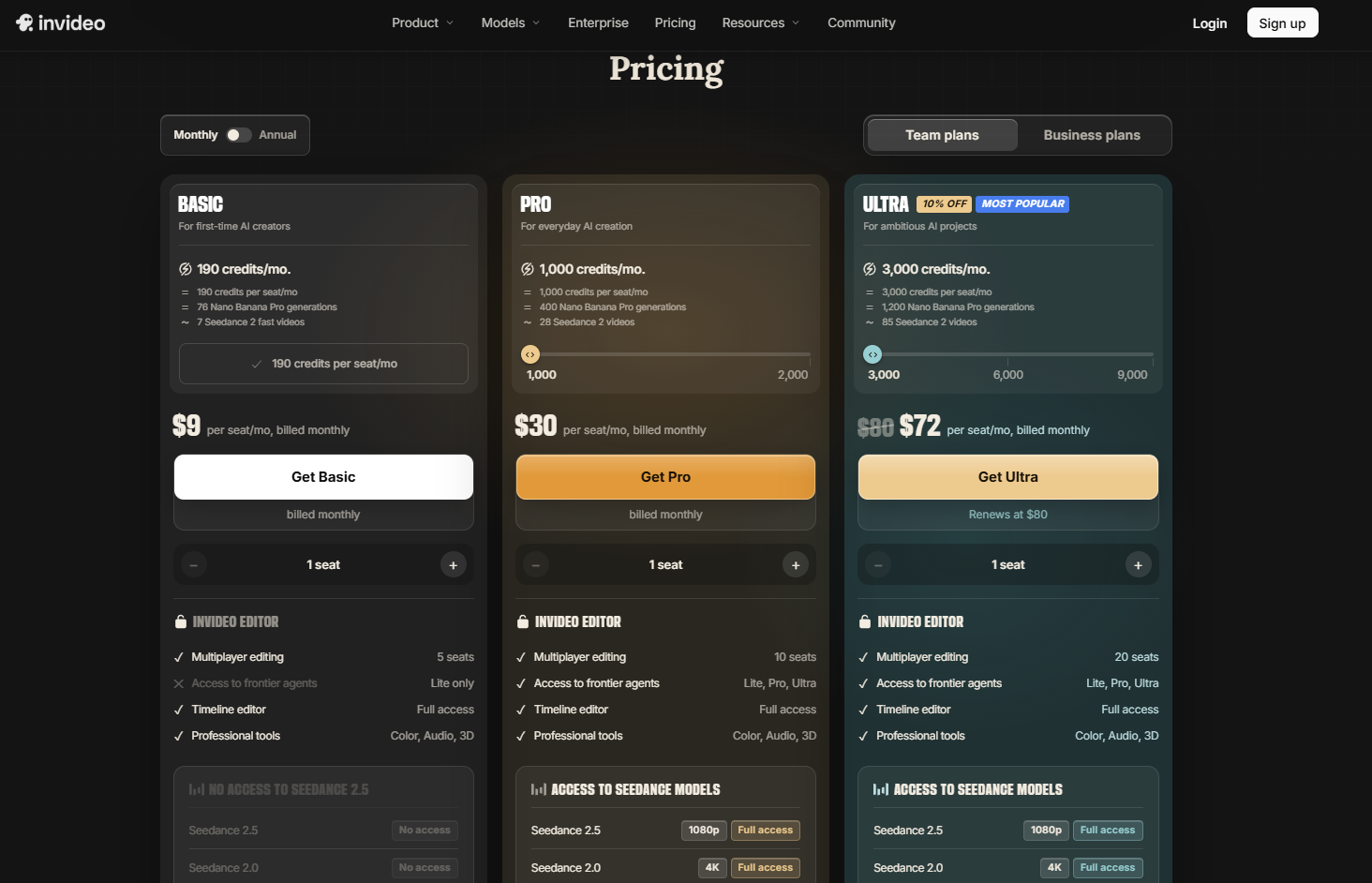
invideo seat pricing on monthly billing with credit allowances, captured September 2026.
What a credit buys in invideo video and images
invideo publishes credit costs in two places, and they answer different questions. The pricing page gives one approximate rate per model for a standard setting. The help center's credit pages give the full range for each model, from its cheapest tier (lowest resolution, shortest clip, no audio) to its most expensive (highest resolution, longest clip, with audio). The plan counts below use the pricing page rates, so read them as the best case for that model.
The ranges matter most at the top. At the upper end of Seedance 2.5's range, 981 credits for a 30-second 1080p clip works out to roughly 160 credits per five seconds, about three times the pricing page's rate of 50, and a single 15-second clip at 720p on Seedance 2.0 Fast can cost up to 102 credits. The help center's own advice for controlling spend is to use the lowest resolution that fits the placement (it calls 720p fine for most social formats), keep clips short, and choose Fast variants when top quality is not critical. invideo shows the exact cost of each configuration before you confirm a generation.
The plan cards on the pricing page use rounder estimates again: about 7 "Seedance 2 fast videos" on Basic, and about 28 and 85 "Seedance 2 videos" on Pro and Ultra. Either way, a $9 Basic seat buys roughly 30 seconds of generated 720p video a month at best, so for ad work it is an editor subscription with a small amount of generation attached.
What a 15-second ad costs in invideo credits
The arithmetic below is ours, built only from invideo's published rates. If a 15-second ad is built from three five-second generated shots on Seedance 2.0 Fast, one full draft costs about 90 credits of video: about two drafts a month on Basic, 11 on Pro and 33 on Ultra. At Seedance 2.5 1080p the same draft costs about 150 credits at the pricing page rate, roughly 6 on Pro and 20 on Ultra, and closer to 490 credits at the top of the help center's range. Voiceover and other generative steps also use credits, and this review did not price them.
The planning rule that follows is to count drafts, not finished ads. If a normal month needs five new hooks and each takes two drafts to land, that is ten drafts and about 900 credits: far past Basic, just inside Pro with almost nothing spare, and comfortable on Ultra.
The invideo credit, refund and rights rules to read before paying
Credits reset on the day of the month you subscribed, and unused credits do not roll over, including top-up packs bought mid-cycle. The pricing FAQ adds that invideo may update credit costs at any time without prior notice, so the price of a plan is fixed until renewal while the video it buys is not.
The cancellation and refund policy has two versions. invideo's terms, effective 8 July 2026, say fees are non-refundable except for a refund request within seven days of purchase or renewal, provided no credits or premium features were used. invideo's help center describes refunds as pro-rated, usage-based and reviewed case by case through [email protected]. Because the two documents disagree, get the refund terms confirmed in writing before an annual purchase. Cancelling stops the next renewal and keeps the plan active to the end of the paid period, and any remaining credits then expire.
The rights terms are friendlier. You keep ownership of your inputs and get a perpetual, worldwide licence to use and commercialise the outputs you generate, which survives cancellation. invideo also commits not to use your data to train or fine-tune its models.
What invideo AI reviews say: 3.0 on Trustpilot, 4.5 on G2
invideo AI reviews split sharply by platform. Trustpilot's profile for ai.invideo.io showed 3.0 out of 5 from 885 reviews on 22 September 2026, with 62% of reviews at five stars and 29% at one star. G2 lists invideo at 4.5 out of 5 from 171 reviews, with a quality of support score of 8.9 out of 10.
A distribution with most reviews at five stars and most of the rest at one star usually describes two different experiences rather than one average one. On invideo's main Trustpilot profile, the five-star side is dominated by support: reviewers name individual agents and describe patient help with billing and technical problems. Trustpilot's own AI summary of 343 recent reviews reads the same way, praising the support team and flagging credit consumption as the main complaint.
Trustpilot adds two pieces of context on the profile itself: invideo has not invited customers to review recently, so the page may not be representative, and the company had replied to 24% of negative reviews. G2's summaries lean positive on ease of use, setup and the media library, and note that text animation and clip editing are weaker than in dedicated editors.
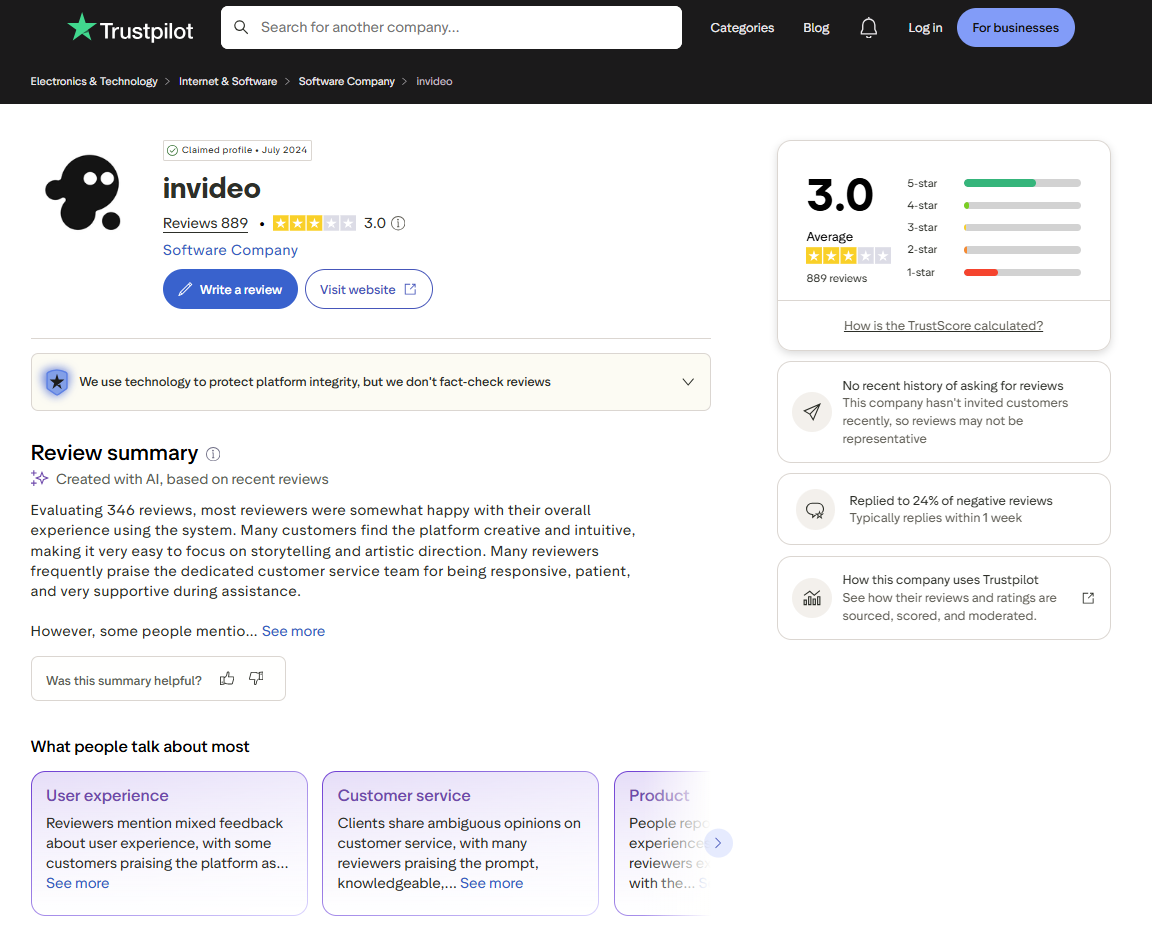
Trustpilot profile for ai.invideo.io showing the bimodal rating distribution, checked September 2026.
invideo AI reviews and complaints: where the credits go
Many one-star invideo complaints from August and September 2026 describe the same moment: a short video starts, the credit balance runs out mid-project, and the platform asks for more before it finishes. One reviewer on 10 September 2026 describes a 20-second TikTok draining a 400-credit plan. Another, posted on 2 September, describes credits spent on background preparation before any finished video existed.
A second cluster is about paying for fixes. Reviewers describe clips with objects they did not ask for, then spending more credits to remove them. On the separate Invideo Studio profile, a reviewer writing on 7 August 2026 reports lip sync drifting after the Agent Two upgrade and being charged for scenes they rejected. A third cluster is navigation: a reviewer working on an iPad in mid-September could not find the finished file among the project's threads until support pointed to it, and invideo replied publicly with export steps.
The five-star side has a pattern too. A reviewer in September 2026 who produced a five-minute music video wrote the script, location, wardrobe and atmosphere before generating, and put it plainly: "An incorrect prompt can obviously kill everything." That does not excuse credit estimates that are hard to read before a long project starts, and several reviewers are right about that. It does show where a buyer's control sits, which is why the walkthrough above puts the effort into Step 2 and the stock draft in Step 3.
Who invideo AI fits for ecommerce ads, and who should skip it
invideo for ecommerce ads makes the most sense when video is already a regular part of your paid social mix and you can write the brief yourself.
Buy it if:
- You can write a clear brief and want short ad drafts for YouTube, Reels or TikTok from a prompt.
- You want to edit by typing commands rather than working scene by scene.
- You also cut your own footage, since the timeline editor is on every plan and uses no credits.
- You need the same ad in several languages, since language and voice are settings in the ad form.
Skip it, or wait, if:
- You want to try AI video once before committing, because the seven-day refund exception in the terms closes once a credit is spent.
- Your monthly video volume swings a lot, because unused credits expire each cycle.
- You mostly need long videos, because credit cost scales with every five seconds generated.
The invideo lesson for any AI video tool: decisions are free, regenerations are not
Every AI video platform in this category charges for generation, not for thinking. The claim, the hook, the offer and the settings cost nothing to decide, and they decide how many paid drafts a video needs. In the invideo reviews read for this article, the people reporting good results arrived with those decided. The people reporting burned credits were deciding them inside the generation loop, one paid attempt at a time.
The same rule holds for creative testing in general. Ten ads that make the same claim are one test, not ten. The hook and the claim are the variables worth paying to test, and everything else should be locked before the first credit is spent.
invideo AI alternatives for ecommerce video ads
Three other routes, cheapest first. Each one fits a different job, and none of them replaces invideo's mix of prompt-to-video and a full timeline editor in one tool.
CapCut, the free baseline
If you film your own UGC or hire creators and only need to cut, caption and resize, check CapCut's free plan before paying anyone. It covers a multi-track timeline, basic AI voiceover and 1080p export, though some templates and effects marked Pro add a watermark on the free tier. What it does not do is write or generate the ad for you.
Creatify, the avatar library specialist
Creatify turns a product URL into avatar-led video ads. Its free plan includes 10 monthly credits, enough for around two video ads, with access to 300 AI actors and watermarked exports. Third-party pricing trackers reported paid tiers at $39 and $99 a month in July and August 2026. Pick Creatify if you want avatar-led ads built from a product URL; pick invideo if you would rather write the brief yourself and finish the edit on a timeline.
Promer AI, for ad creative built from product context
Promer AI is an ai ad creative performance platform for ecommerce advertisers, and it starts from a different input than invideo. Paste a product URL and it extracts the product's image, name, description and price, then builds ads around that product context and market-proven ad patterns.
For UGC-style video, Promer AI's AI UGC Ads starts from a product URL, an upload or an image from your library, and asks you to pick one of five formats: Direct Testimonial, Voiceover Product Review, POV Product Demo, Problem and Solution, or Routine / Day in the Life. It writes a scene-by-scene script (hook, solution, feature, call to action), then renders it with an AI avatar and AI voice you can filter by region, age, shooting style and industry. Against invideo, the trade is input: Promer AI starts from the product itself and guides you through five set formats, while invideo starts from the prompt you write and gives you a full timeline to finish the edit.
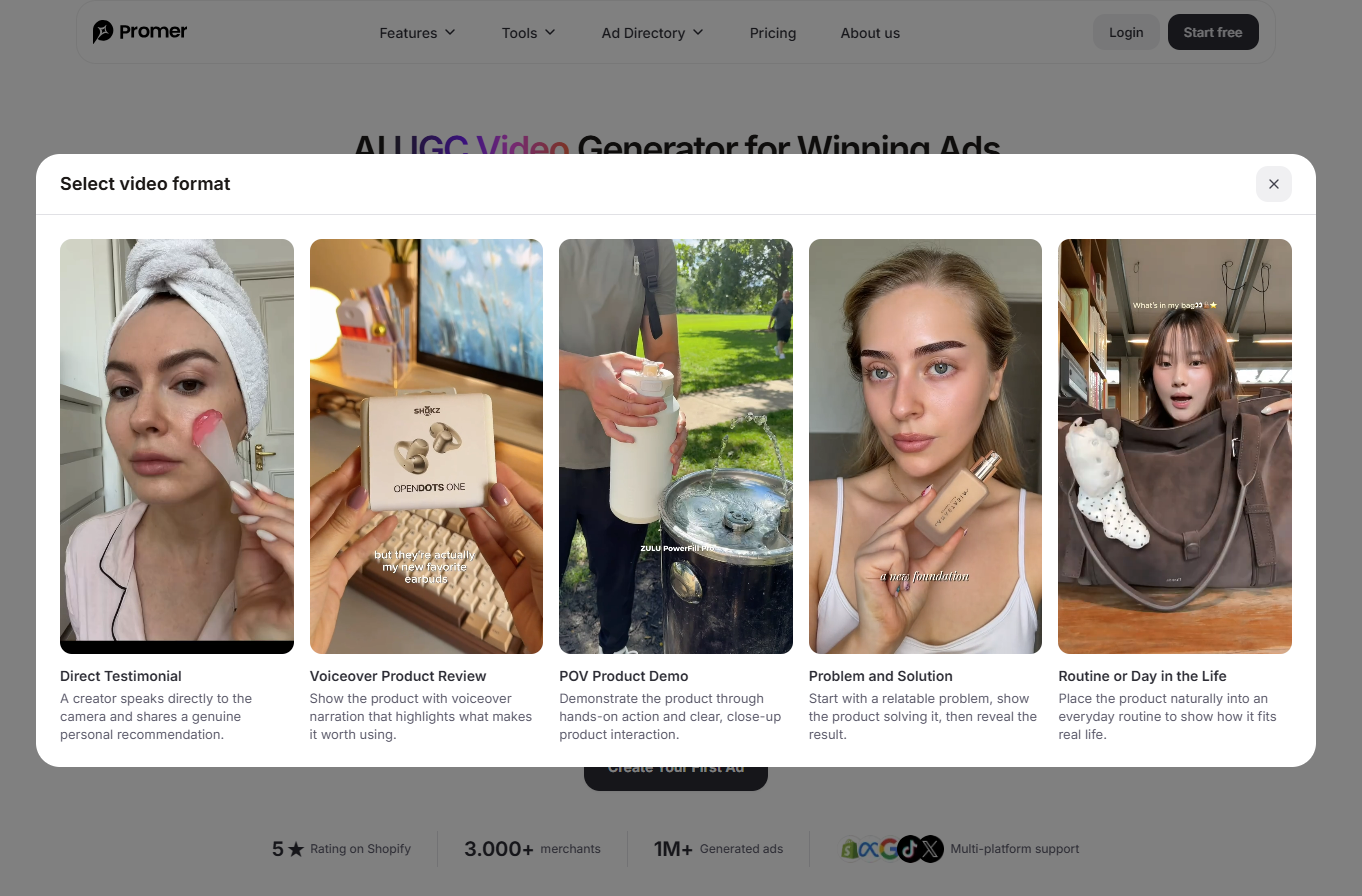
Selecting from five conversion-focused UGC video frameworks inside Promer AI, captured September 2026
If a static ad is already winning, Promer AI's AI Ad Animation turns that static creative into a short video ad in one of six motion styles, such as Product Showcase or Scroll Stopper, so you can see whether the concept holds up in motion before briefing a full UGC ad. Promer AI's Shopify app holds 4.7 out of 5 from 54 reviews (checked 22 September 2026), and the company reports 3,000+ merchants and 1M+ ads generated. Like any AI output, its creatives can contain mistakes and need a review before spend goes behind them.
If you want to write every ad from your own prompt, cut long edits or work on a real timeline, invideo covers ground Promer AI does not attempt. If the job is a steady supply of product ads to test, an AI ad generator built around product context is the closer fit, and you can create your first ad free, with no credit card required.
invideo AI review verdict: worth it once the brief is finished
invideo AI is a capable prompt-to-video ad tool for teams that decide before they generate, and a costly place to work an idea out from scratch.
Before paying, write the Step 2 brief for one real product and count the five-second shots a 15-second ad needs. Multiply by three to allow for regenerations, convert to credits with the rate table, and check the total against a plan. If it fits Pro with room to spare, invideo is a reasonable bet for your next batch of hooks. If it only fits Ultra, start with a shorter ad.
FAQ
Is invideo AI worth it for ecommerce ads?
invideo AI is worth it for ecommerce teams that can write a clear brief and make short video ads regularly. The Product Ads form turns a specific one-line topic into a short ad draft, and the timeline editor is included on every plan. Because every generation spends credits and unused credits expire, teams that test only occasionally usually get less value per dollar.
How much does invideo AI cost per month?
invideo AI costs $9, $30 or $80 per seat per month for Basic, Pro and Ultra. Basic includes 190 credits per seat, Pro 1,000 and Ultra 3,000, with larger allowances at $60 (Pro, 2,000 credits) and $160 or $240 (Ultra, 6,000 or 9,000 credits). Ultra's first month was discounted to $72 on 22 September 2026. invideo also showed a second price list that day, so confirm the price at checkout.
Can invideo AI make an ad from a product URL?
Not in the app's Product Ads flow, which has no product URL field. The Product Ads form asks for a length, a pace, a platform and a one-line topic, so product details go in as text. invideo's own prompting guide suggests pasting the product page URL into the prompt so the AI can reference real details; check what the agent pulled before generating video.
Is invideo AI legit?
Yes, invideo is a legitimate company with published terms, a public pricing page and a working product. Its terms name contracting entities in Singapore, the United States and India. invideo holds 3.0 out of 5 from 885 Trustpilot reviews, split between praise for support and complaints about credit consumption, and 4.5 out of 5 from 171 reviews on G2.
Why does invideo AI use so many credits?
invideo AI charges credits per generation, based on the model, the output length and the resolution. Five seconds of Seedance 2.0 Fast 720p costs about 30 credits, so a 60-second video built from five-second generated shots costs about 360 credits before any regeneration. Recent Trustpilot complaints describe credits running out mid-project on longer or loosely briefed videos. invideo shows the cost of each generation before you confirm it.
Can you get a refund from invideo AI?
invideo AI's terms allow a refund request within seven days of purchase or renewal, but only if no credits or premium features were used. The terms otherwise rule out refunds, including pro-rata ones. invideo's help center instead describes pro-rated, usage-based refunds reviewed case by case, so confirm the terms with [email protected] before buying an annual plan. Cancelling stops the next renewal but does not trigger a refund.
Can you use invideo AI videos in paid ads?
Yes, invideo's terms grant a perpetual, worldwide licence to use and commercialise the outputs you generate. That licence survives cancellation. You are responsible for disclosing AI-generated content where law or ad platform policy requires it, and for having consent from anyone whose likeness or voice appears. Stock assets inside an output follow their own licence terms.
How was this invideo AI review researched?
This invideo AI review is desk research from invideo's own pages, terms and help center, plus Trustpilot and G2 profiles, checked on 22 September 2026. The app's home screen and Product Ads form were checked in a live invideo account on the Free plan, and no videos were generated. Credit costs per ad are our arithmetic from invideo's published rates, not measured output.
Related reviews and ecommerce guides
If you are exploring other AI advertising tools or comparing video generators for social campaigns, check out our hands-on guides across the Promer AI blog:
- Promer AI Blog Hub: Practical guides on creative testing methodologies, prompt frameworks, and paid social performance for ecommerce stores.
- Zeely Reviews (2026): We tested mobile ad creation and direct Meta campaign launching to evaluate real costs and creative output.
- Higgsfield AI Reviews: We tested cinematic multi-model video generation to see if high-end visual clips can actually sell ecommerce products.
Sources
- invideo. (n.d.). Homepage: Agent Two and the agentic video editor. Retrieved 2026-09-22, from invideo.io
- Promer AI. (n.d.). Ads Creative on the Shopify App Store. Retrieved 2026-09-22, from apps.shopify.com/promer-creative-studio
- Creatify. (n.d.). Pricing page: free plan terms. Retrieved 2026-09-22, from creatify.ai/pricing
- Wireflow. (n.d.). Creatify pricing in 2026. Retrieved 2026-09-22, from wireflow.ai/blog/creatify-pricing
- G2. (n.d.). Product comparison: AI Studios vs invideo. Retrieved 2026-09-22, from g2.com/compare/ai-studios-vs-invideo
- BIGVU. (n.d.). CapCut pricing 2026, free vs Pro. Retrieved 2026-09-22, from bigvu.tv/blog/capcut-pricing-2026-free-vs-pro-whats-included-alternatives/
- Trustpilot. (n.d.). invideo reviews (ai.invideo.io). Retrieved 2026-09-22, from trustpilot.com/review/ai.invideo.io