Synthesia Review 2026: What Store Owners Can and Can't Use It For?
Category
Blogs
Date
Authored by
Huy Tran Quoc
Summary
Synthesia Starter costs $18 a month billed yearly, but its policy bars stock avatars from paid social ads without written consent.
Synthesia works well for product explainers, how-to videos and translated help content on your store, and it is the wrong default for paid social ads. Starter costs $18 a month billed yearly and includes 125+ stock avatars. But Synthesia's terms bar its stock avatars from promoted, boosted or paid social ads unless Synthesia gives written consent, and no plan on the pricing page sells that consent.
If you only want the price, skip to the pricing section. If you already know you need avatar ads for Meta or TikTok, skip to the alternatives section. And if "UGC-style ad" itself is a new term, is a quick primer before the rest of this gets specific.
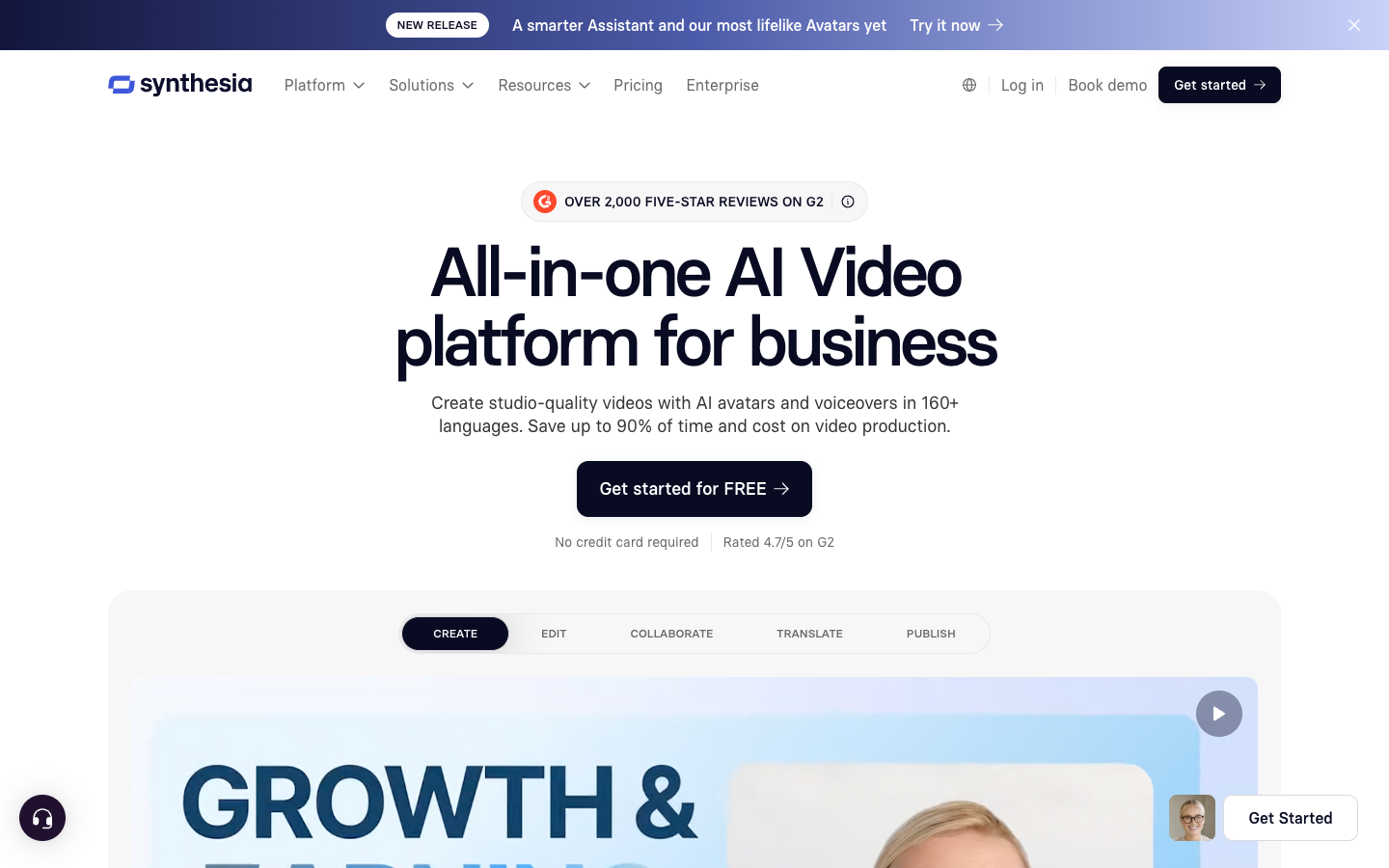
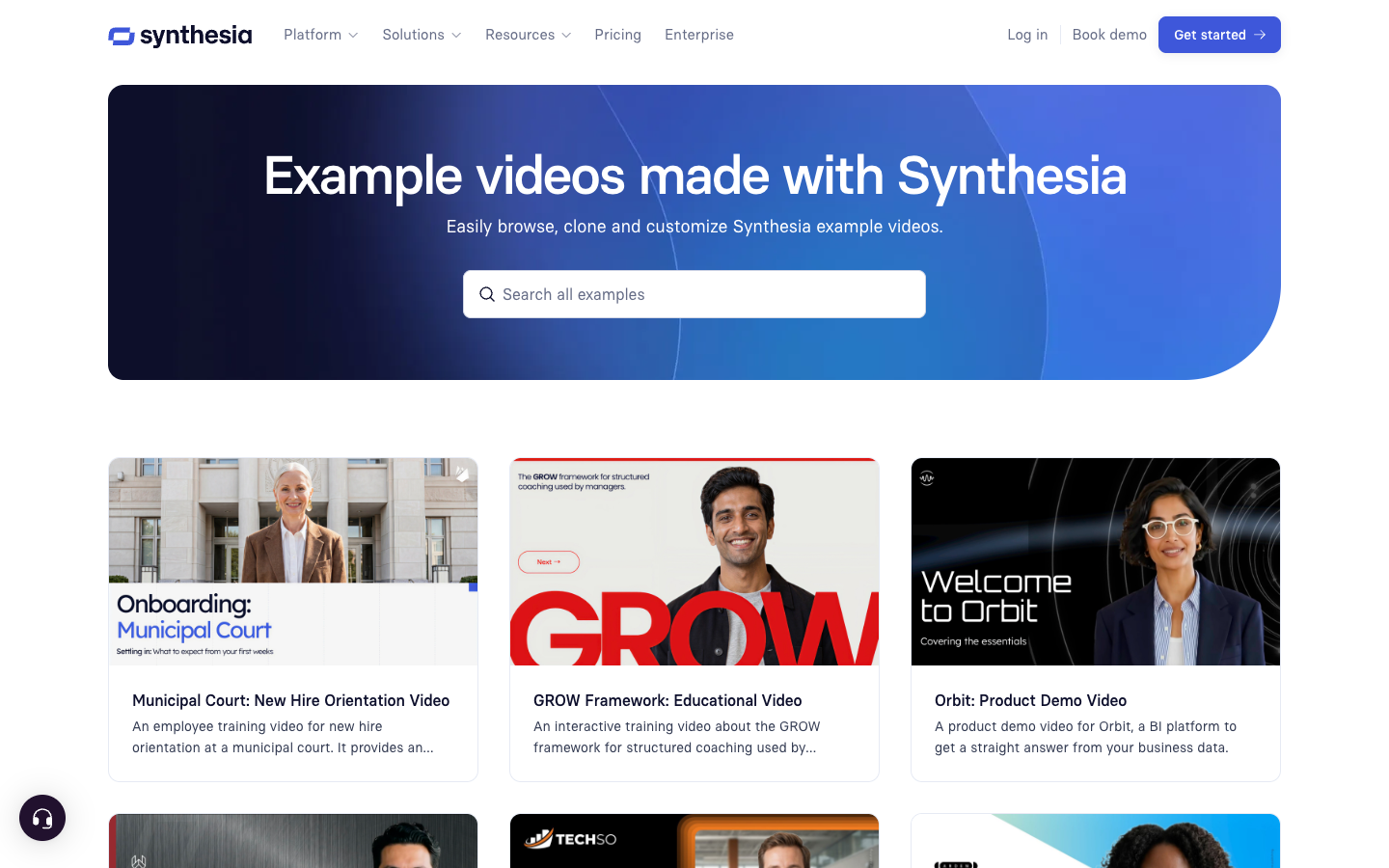
Synthesia is built for explaining, not selling. Its product is a presenter video: an AI avatar reading your script. It was designed for training and onboarding, and its own example library is mostly that.
The paid-ads limit is a contract rule. Stock avatars in paid, boosted or promoted social ads need written consent from Synthesia. Custom avatars (one built from a real person) can run in ads with that person's consent.
Store-friendly uses exist and are documented by customers: on-site explainer videos, how-to and setup videos, video emails, and help content in several languages.
Cost per video is low. By our arithmetic, a 15-second video uses about 30 credits, and Starter includes about 40 such renders a month on average. Editing a finished video charges only the seconds you change.
Read the fine print on money. Fees are non-refundable, unused minutes do not roll over, and Synthesia's pricing page contradicted itself in four places.
Evidence on ad performance is thin. The claim that avatar ads convert worse than human ones comes from an unnamed test in a competitor's blog post. Synthesia's own customer quotes are vendor-picked. Neither settles it, so test with your own product.
The job: What a merchant would hire Synthesia to do?
Skip the feature list and start with the job.
Job 1 (strong fit): "When a product or policy changes, I want to fix the video by editing text, so my product pages and help center stay correct." Version control keeps embeds current, and edits cost only the changed seconds.
Job 2 (strong fit): "When shoppers need instructions or an explanation, I want a person on screen talking them through it, so I get fewer support questions." Customers on Synthesia's reviews page describe exactly this. One garage owner says direction videos saved phone calls, and a product team says video explains its app better than blog posts and FAQs did.
Job 3 (strong fit, with paperwork): "When I am the face of my brand, I want a video version of me that reads any script in any language." This is the custom avatar route.
Job 4 (blocked by policy): "When I need UGC-style ads for Meta or TikTok, I want a stock presenter to deliver hooks and testimonials, so I can test creative without hiring creators." Most store owners arrive with this job, and it is the one the policy fences off.
What Synthesia competes with depends on the job. For Jobs 1 to 3, the alternative is filming yourself, hiring a presenter and voice actors, or writing more text. For Job 4, the alternatives are tools built around ad formats, covered later.
What Synthesia is in 2026?
Synthesia is a London company founded in 2017, and it sells to businesses that need to train, onboard and communicate. Its homepage claims 90%+ of the Fortune 100 as customers and 50,000+ companies overall. Treat both as self-reported.
You type a script, pick an avatar and voice, and get a finished video. Around that sit:
AI avatars and voices: 9 to 240+ stock avatars depending on plan, plus custom avatars built from real people.
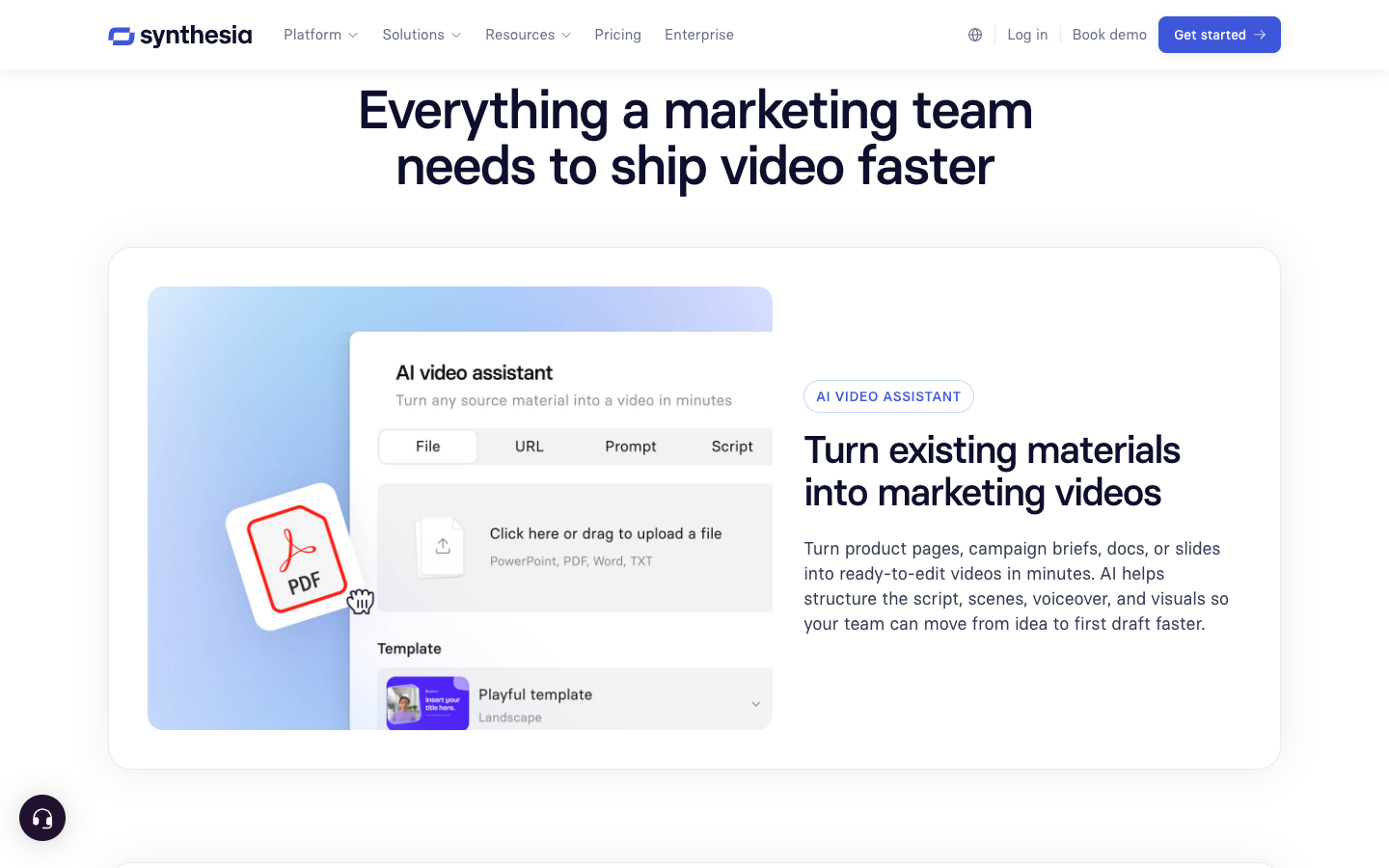
AI Video Assistant: turns a prompt, script, document, deck, PDF or website into a first draft.
AI Playground: generates B-roll clips and images inside the editor.
AI Dubbing and 1-Click Translation: the localisation tools, and the most mature part of the product.
Publishing: MP4 download, embeds, a share page, SCORM export and a multilingual player.
Analytics: views, watch time and drop-off inside Synthesia's own player. Nothing here reports ad results.
One outside review makes a point worth repeating: the avatar is not the product, the fast update cycle is. Leadde sells a competing tool, so weigh its conclusions accordingly. On this point, the customer quotes on Synthesia's own reviews page agree: many talk about fixing a video by editing the text and clicking Generate.
The Synthesia ad rule, in plain language
The Acceptable Use Policy (last updated 23 February 2024) is the first document a store owner should read.
Stock avatars in paid, boosted or promoted social ads need Synthesia's written consent. "Boosted" matters: an organic post you later put spend behind is inside the rule.
Organic use is outside the paid-ads rule. A stock avatar explaining your return policy on a product page, a setup video in your help center, or a pinned TikTok answering a sizing question does not trigger it.
Testimonial-style claims are restricted. A stock avatar may not voice a line implying the actor personally has a condition or opinion, except on enterprise plans. A skincare script about "two years of breakouts" is the clearest example. This is our reading of the policy, so confirm your script with Synthesia in writing.
Nine product categories are banned on every plan: alcohol, tobacco, vaping products, psychoactive substances, firearms, gambling, sex toys, escort services and dating services.
No jingles. Stock audio cannot be used as a musical theme for your products.
The way around it: a custom avatar of you
The policy leaves one door open: a custom avatar of a real person who agrees to the use.
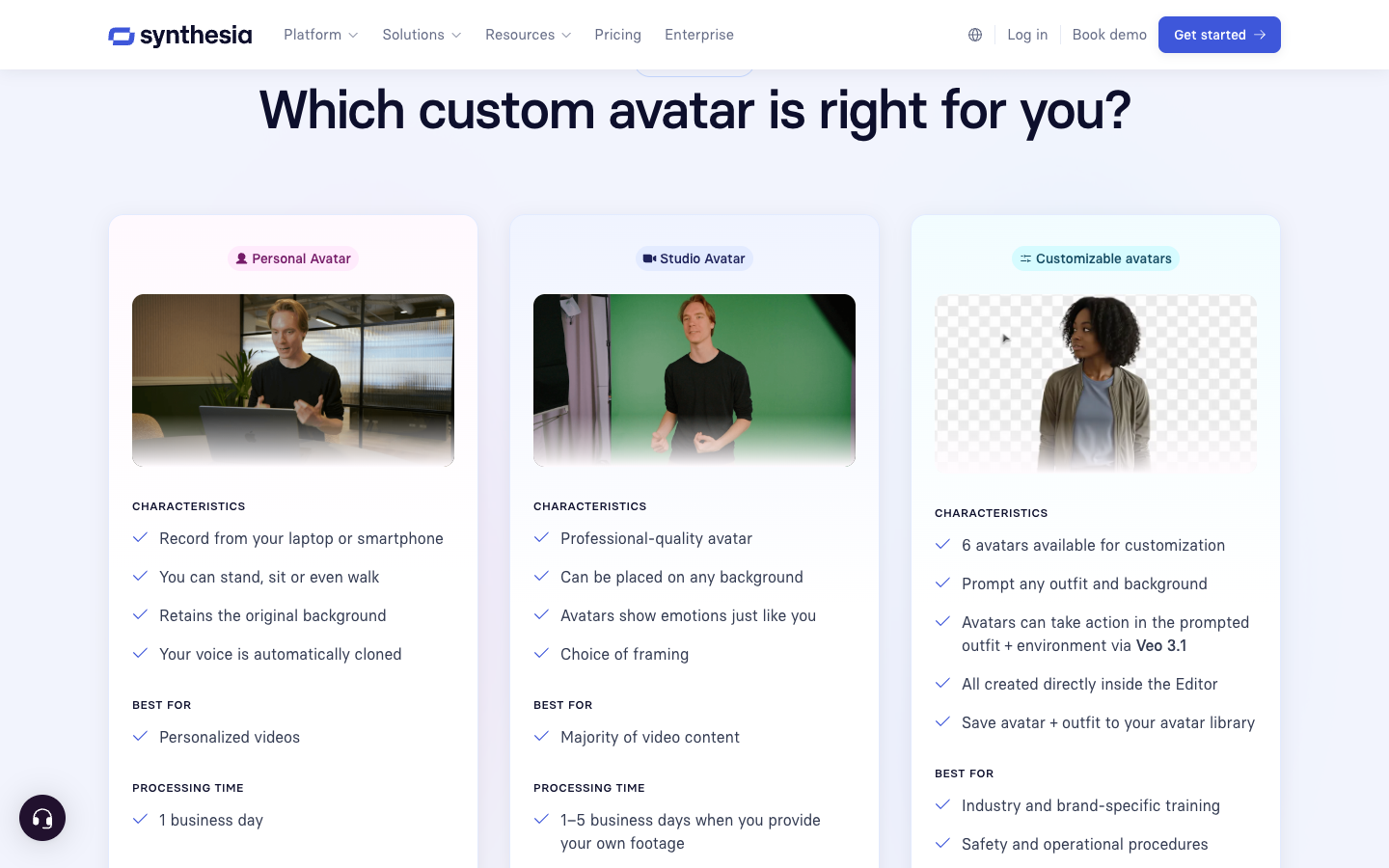
Personal avatar: recorded on a webcam or phone, or built from 2 to 3 minutes of uploaded footage, processed in 1 business day. The pricing table lists 3 on Starter and 5 on Creator, though the FAQ says one is included.
Studio avatar: a $1,000 a year add-on on paid plans.
Customizable avatars: six Synthesia avatars you can re-dress by prompt. The page does not say whether they count as stock, so treat them as stock until Synthesia confirms in writing.
For a founder-led store, a personal avatar may be the best use of Synthesia: record once, then publish scripts in 160+ languages. You also need a signed consent document if anyone other than you is the avatar.
4 things a store can do with Synthesia
Each use below comes from Synthesia's own pages or from customers quoted on its reviews page. Those quotes were chosen by Synthesia and mostly date from 2021 to 2023.
Product explainer on the page. A small team says it uses Synthesia videos on its website with good conversion, and can scale them across 6+ languages. A product team says video explains its app better than text did.
How-to and support videos. A garage owner says direction videos with a talking head keep people watching and saved phone calls. A nonprofit lead reports video emails and posts with open rates up 25%. Treat both as single self-reported results.
Localised help content. One customer translates training videos into 20 languages and calls the quality very good. Another reports that not every avatar works well in Brazilian Portuguese, so preview yours in each language.
Founder or brand-ambassador video. Several small business owners say they use a custom avatar or plan to order one.
The reviews page also lists results from large companies (a retailer reporting $56K saved on 100+ custom videos, a global snack company reporting 100 hours of translation done in 10 minutes). These are employee training numbers, not store results, and they are the vendor's picks. Use them as direction, not as a forecast.
Synthesia's workflow against a 15-second ad brief, step by step
This walkthrough follows the Synthesia workflow as its features and marketing pages describe it, applied to a typical ecommerce brief: a 15-second vertical ad for Meta and TikTok, one product, one hook to test. It's assembled from Synthesia's documentation rather than a session in the editor, so each step says what the pages confirm and what they leave open.
Step 1: Start from a product page with the Synthesia AI Video Assistant
The AI Video Assistant starts from "a prompt, script, or document," and the features page adds decks, PDFs and websites. The marketing page goes furthest: "Turn product pages, campaign briefs, docs, or slides into ready-to-edit videos in minutes," with AI structuring "the script, scenes, voiceover, and visuals."
That's the closest Synthesia comes to a product-link workflow. What none of the pages describe is an ad-shaped structure: no hook field, no ad-format presets, no slot for an offer or a platform-specific CTA. The Starter plan card lists the AI Video Assistant as one of the paid additions over Basic.
Step 2: Choose a Synthesia avatar and voice
Stock avatar counts scale with the plan: 9 on Basic, 125+ on Starter, 180+ on Creator and 240+ on Enterprise. Synthesia's Expressive Avatars "wave and point, based on your script," and voices come from "hundreds of natural-sounding voices" covering 160+ languages. Creator adds multiple avatars per scene, which is what a two-person dialogue script needs, and that range of delivery styles is really just one slice of the different styles of UGC ads advertisers actually test.
This is the step where the brief meets the policy. Any stock avatar chosen here is fine for an organic explainer and off-limits for a paid placement without Synthesia's written consent, so for an ad, the avatar decision is a licensing decision.
Step 3: Add product B-roll in Synthesia's AI Playground
AI Playground generates clips and images with Veo 3.1, FLUX.2 and Nano Banana Pro inside the editor. On Starter, the 14,500 yearly credits are described as covering "300 AI-generated video assets," offered as an alternative use of the same credits that buy 120 minutes of avatar video.
For product ads, generated B-roll carries the usual risk: the model draws its own version of your product. The Synthesia pages read for this review don't describe a way to lock a real product photo into generated footage, so the dependable route is uploading your own product clips, which the plan comparison lists as image and video uploads.
Step 4: Confirm the export format before you write a script
This is the step to verify yourself. None of the Synthesia pages read for this review state the available aspect ratios, and Synthesia's help center didn't load during research. The example library is built around presenter-in-scene layouts for training and demos. Before paying, open the free Basic plan and check that the editor exports 9:16 for Reels, Stories and TikTok, and how an avatar framed for a slide sits in a vertical crop.
Step 5: Translate and dub for other markets
Localisation is Synthesia's strongest ground. 1-Click Translation handles "voiceover, on-screen text, and captions," and the features page marks it as an Enterprise feature covering "80+ languages." AI Dubbing on self-serve plans covers 70+ languages according to the pricing table (140+ on Enterprise), with 120, 580 or 1,760 dubbing minutes a year on Basic, Starter and Creator.
For a store selling into Germany, France and Spain, dubbing one explainer beats booking three voice actors. Check each avatar in each target language first. One of the testimonials Synthesia chose to publish on its own marketing page, from e-learning creator Eliane Apolinario, notes that "with Brazilian Portuguese, not all avatars work well, but the ones that do are excellent."
Step 6: Publish from Synthesia, then measure somewhere else
Synthesia's publish options are MP4 download, embeds with auto-update, a branded share page, SCORM export and a multilingual video player. None of the pages read for this review mention a connection to Meta Ads Manager, TikTok Ads Manager or Shopify. Synthesia's analytics count views, watch time, drop-off and clicks inside its own player, which says nothing about an ad's click-through rate or ROAS once it runs as a native video in a feed.
So the last step for an ad is manual: download the MP4, upload it to the ad platform, and read performance there. For one video a month that's no burden. For a creative testing cadence of ten variants a week, it's ten uploads and no link between the Synthesia project and the ad result, which is exactly the gap scaling UGC ad creative production covers for teams running that cadence.
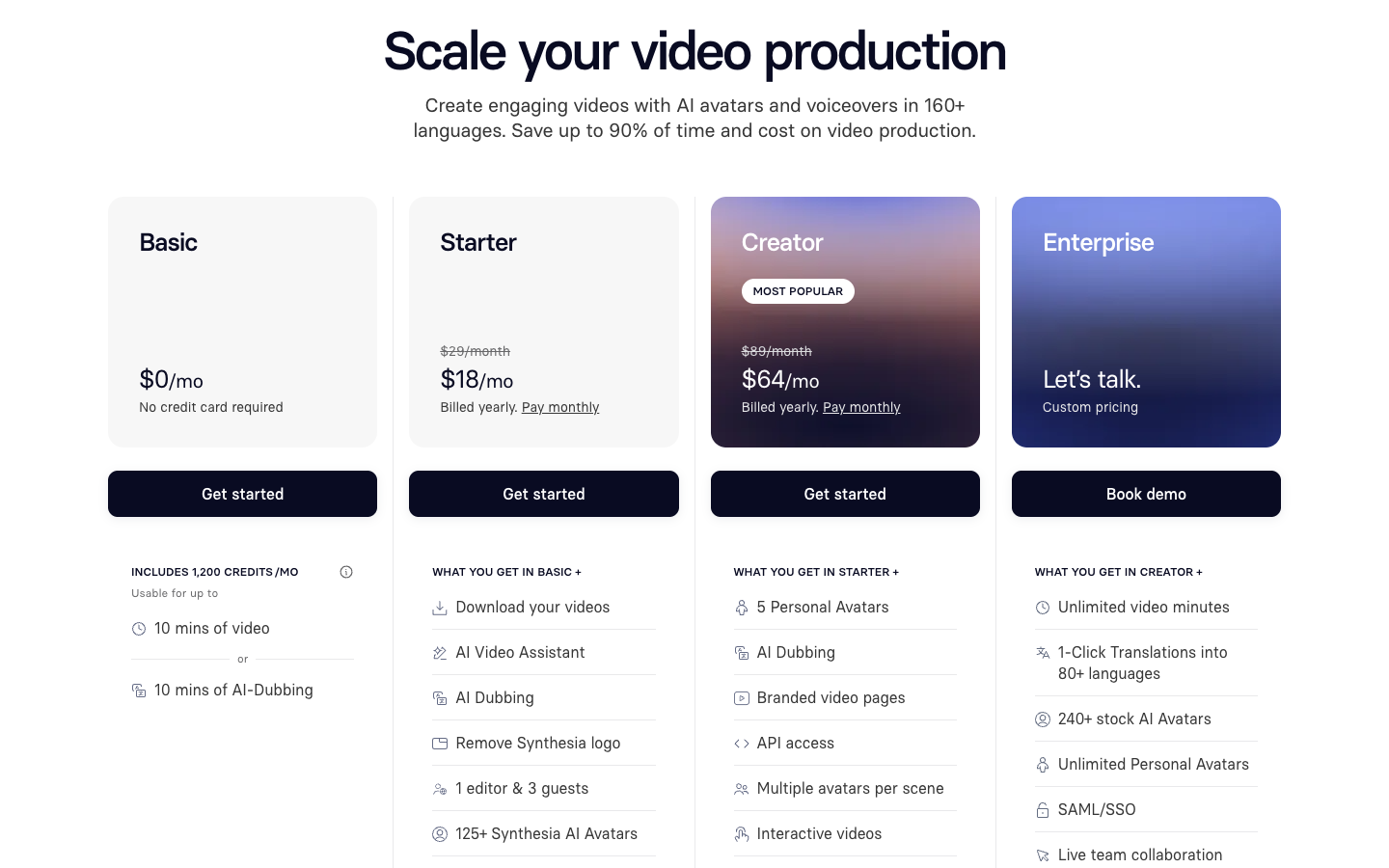
Synthesia pricing: what Basic, Starter and Creator buy
Pricing on 29 September 2026. Synthesia's page carried a banner announcing lower prices from $18 a month.
Synthesia plan
Basic
Starter
Creator
Enterprise
Price
$0, no credit card
$29 monthly, or $18/mo billed yearly
$89 monthly, or $64/mo billed yearly
Custom
Credits
1,200 per month
14,500 per year
44,000 per year
Custom
Avatar video
Up to 10 min a month
Up to 120 min a year
Up to 360 min a year
Unlimited
AI dubbing
120 min a year
580 min a year
1,760 min a year
Unlimited
Stock avatars
9
125+
180+
240+
Personal avatars
Not listed
3
5
Unlimited (fair use)
Studio avatars
Not listed
$1,000/year add-on
$1,000/year add-on
$1,000/year add-on
Seats
1 editor
1 editor, 3 guests
1 editor, 5 guests
Custom
The Starter card lists "download your videos" and "remove Synthesia logo" as additions over Basic. Read literally, the free plan is for trying the editor, and files you would publish start at Starter.
What a video costs in credits
By our arithmetic from Synthesia's published numbers, every plan works out to about 120 credits per minute of avatar video.
A 15-second video: about 30 credits, so Starter's 14,500 yearly credits cover about 40 such renders a month on average.
A hook swap: editing 3 seconds of a finished video charges 3 seconds, about 6 credits, per Synthesia's pricing FAQ.
Dubbing: about 25 credits per minute on Starter, nearly five times cheaper than generating avatar video.
Unknown: the pricing page shows credits per year and does not say how they release across the year, so check whether one month can draw on the full pool.
The friction: minute caps, contradictions and refunds
Leadde's post says buyers most often complain about minute caps and about features held back for higher tiers. That matches what the pricing page shows: usage is capped until renewal, unused minutes do not roll over, and there is no pay-per-video option.
The pricing page also disagreed with itself on 29 September:
Starter annual total: the FAQ says $264. The plan card's $18 a month billed yearly is $216.
Creator annual total: the FAQ says $804. The card's $64 a month is $768.
Starter minutes: the FAQ says 10 per month, the table says 120 per year (the same allowance over different periods).
Personal avatars: the FAQ says one, the table says 3 and 5.
On refunds, the Customer Terms (effective 20 July 2026) say fees are paid in advance and non-refundable except as the contract states. Cancelling stops the next renewal and gives no route to money back on an annual plan. Test on Basic, then pay monthly for the first month even though yearly billing is 38% cheaper on paper.
Do AI avatars hurt conversion? What the evidence shows?
Leadde's post says AI avatars produce lower click-through and conversion than human video in ads, and that even poorly filmed real-person video often wins. It attributes this to an unnamed marketing agency test comparing Synthesia, HeyGen, Veo and human-shot video. No agency, sample size, dates or numbers are given.
That means this review cannot repeat the claim as fact. Neither can it dismiss it:
For the claim: shoppers may spot artificial delivery, and the same Leadde post lists stiff mouth movement and weak emotional tone as common complaints (also unsourced).
Against a blanket version: Synthesia's own reviews page includes customers reporting better conversion or engagement from avatar videos on websites and in video chatbots. Those are vendor-picked and not ad tests.
What is missing: a named, dated, paid-social test of stock-avatar video against human video. This review found none.
The practical answer is a small test on your own product, and benchmarking UGC ad performance gives you something concrete to compare that test against instead of guessing from an unnamed agency study. Because paid-social use is restricted anyway, the cleanest test is organic or on-site.
Where Synthesia earns its price?
Translation. 160+ languages, dubbing that keeps the speaker's voice with lip sync, and a multilingual player. Both Leadde and Synthesia's customers name this as the strongest reason teams stay.
Fast fixes. Change a return policy or a sizing chart in the script and regenerate, instead of reshooting.
Compliance. SOC 2 Type II, GDPR and ISO42001 are listed, useful if a marketplace or partner asks for vendor security details.
Where the mismatch shows for stores?
The licence: stock avatars in paid social need written consent.
The examples: Synthesia's example library listed 32 videos, 25 of them training, compliance, onboarding or support. None is a social ad or physical-product ad.
No ad account link: no connection to Meta Ads Manager, TikTok Ads Manager or Shopify appeared on the pages read.
Seats: Starter and Creator include one editor.
Export format: the pages read do not state aspect ratios. Check that the editor exports 9:16 before paying.
Moderation: regular content moderation time on Basic, Starter and Creator, priority only on Enterprise. Turnaround is not stated.
Who Synthesia is actually for, and who should skip it?
Synthesia is for you if:
You need product explainers, setup guides or sizing videos on product pages or in a help center, organic or embedded.
You sell in several languages and want one video kept current in each.
You are a founder-led brand, willing to record a personal avatar and sign the consent that paid use requires.
You train staff (support, warehouse, retail) and want one onboarding video updated by editing text.
Skip Synthesia, or keep it off the ad account, if:
Your plan is stock-avatar UGC-style video for Meta, TikTok or Instagram ads, which needs Synthesia's written consent.
You sell any of the nine banned categories.
Your ads depend on first-person testimonial claims about a condition, such as skincare or wellness scripts, and you are not on Enterprise.
You need hook variants, ad formats and ad-account publishing in one tool.
Read the licence before the feature list: 7 checks for any avatar tool
An AI avatar is a licensed likeness of a real actor, and the licence decides where the video can run. Ask every vendor:
Paid social: can stock avatars appear in paid, boosted or promoted ads, and on which plans?
Consent: who grants permission, and does it have to be in writing?
Testimonials: can a stock avatar speak a first-person testimonial or health claim?
Categories: which product categories are banned?
Provenance: are there rules about removing watermarks or provenance marks from output?
Music: can stock music be used in ads?
Refunds: are fees refundable if the licence does not cover your use?
Synthesia's answers: (1) not without written consent; (2) Synthesia for stock avatars, the individual for custom ones; (3) enterprise plans only; (4) nine named categories; (5) removal of provenance marks is prohibited; (6) no jingles; (7) non-refundable except as the contract states.
Synthesia alternatives for E-commerce video ads
Two other routes, cheapest first. Neither matches Synthesia on localisation or enterprise compliance, and Synthesia stays the better pick for training and explainer video. Each route below fits a different ad job, and each deserves the same licence check as Synthesia before spend goes behind it.
Route
Entry paid price (checked 29 Sep 2026)
Starts from
Who's on screen
Best job
Promer AI
Free first ad, no credit card
A product URL or image
AI avatar with AI voice
Product ads built from product context and proven ad structures
CapCut
Pro $7.99-$19.99/month by region (BIGVU, July 2026)
Your own footage
Whoever you filmed
Cutting, captioning and resizing real footage
CapCut suits stores that already film UGC or buy it from creators. Its homepage lists auto captions, text to speech, and Reels and TikTok templates. It edits the ad and leaves the filming to you.
Promer AI, for product ads the paid-ads policy doesn't fence off
Promer AI is an ai ad creative performance platform for ecommerce advertisers, and it starts where Synthesia does not: from the product. Paste a product URL from Shopify, Amazon or another store and it pulls the product image, name, description and price, then builds ads around that context.
Set against Synthesia's own restrictions, the differences that matter most for a paid-ads brief:
No stock-avatar licensing fence. Synthesia's policy requires written consent before any stock avatar runs in a paid, boosted or promoted ad. Promer AI's AI avatars are built for that use case from the start, with no separate consent step to chase down.
Testimonial formats included, not enterprise-only. Synthesia restricts first-person testimonial claims to its Enterprise plan. Direct Testimonial and Voiceover Product Review are standard formats on every Promer AI plan.
Publish without the download-reupload step. Synthesia's own pages describe no connection to Meta Ads Manager or TikTok Ads Manager, so a finished video has to be downloaded and uploaded by hand. Promer AI pushes the finished video straight to a connected Facebook, Instagram or TikTok account from the same screen it was generated on.
Built from the product, not a script you write first. Synthesia starts from a script, document or deck you provide. Promer AI starts from the product URL or image itself and builds the concept from there.
First ad free, no credit card. See a real rendered output before picking a plan, rather than starting on a free tier that cannot render a publishable file.
Here's the generation flow itself, for avatar video specifically:
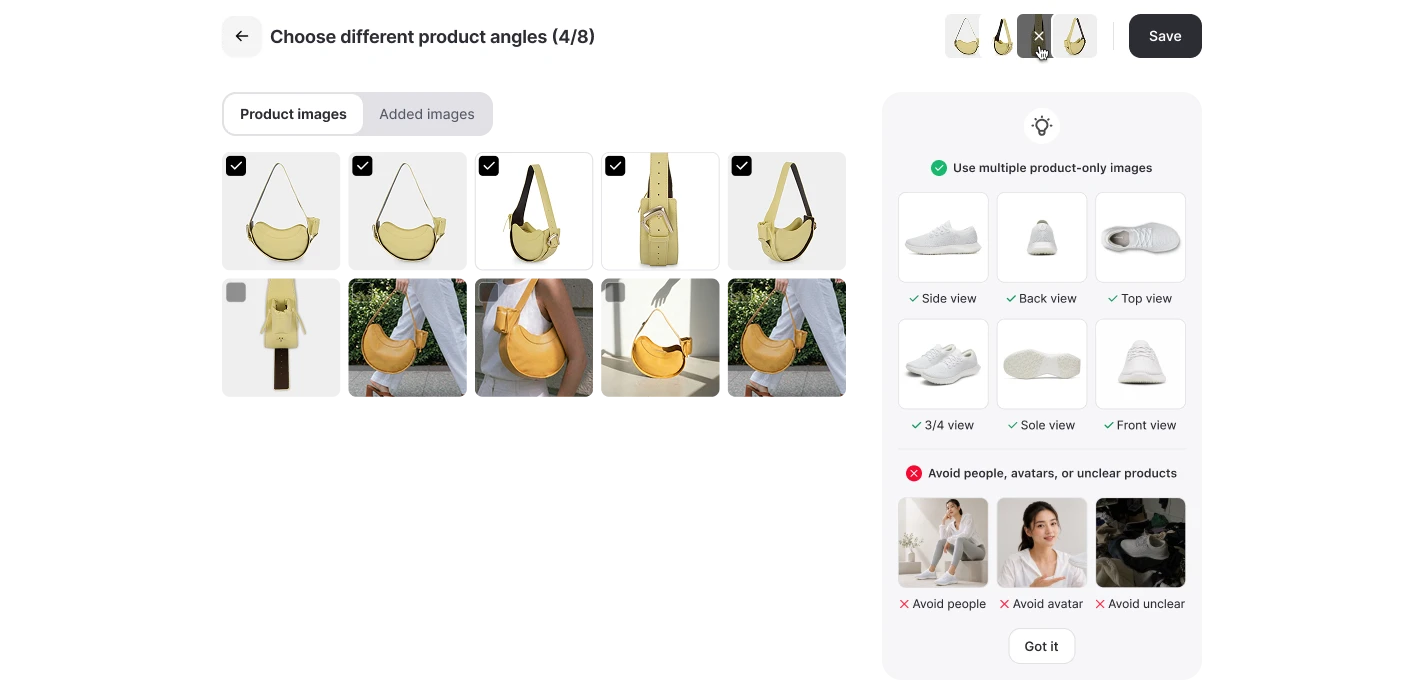
Step 1: Start from the product and its angle images.
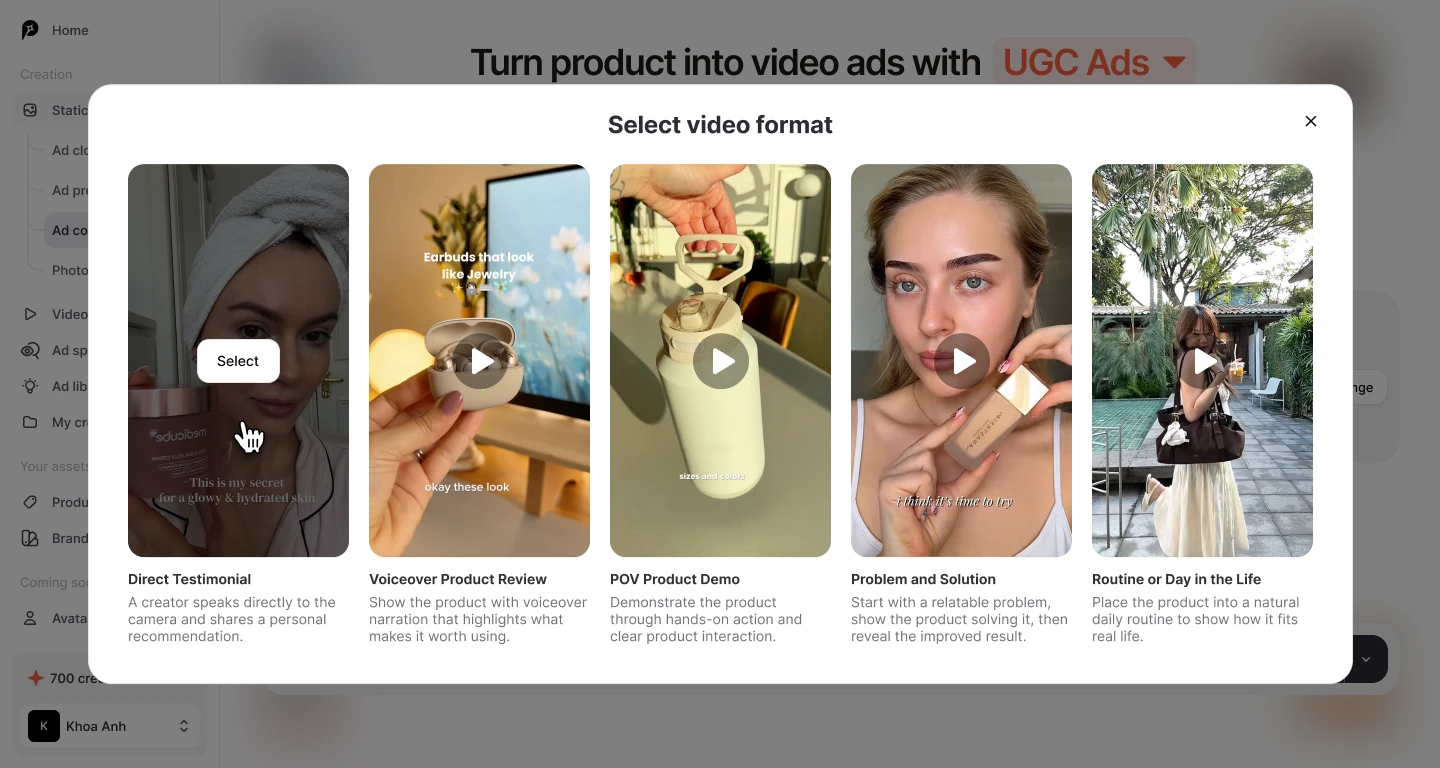
Step 2: Pick a format, such as Direct Testimonial, Voiceover Product Review, POV Product Demo, Problem and Solution, or Routine or Day in the Life.
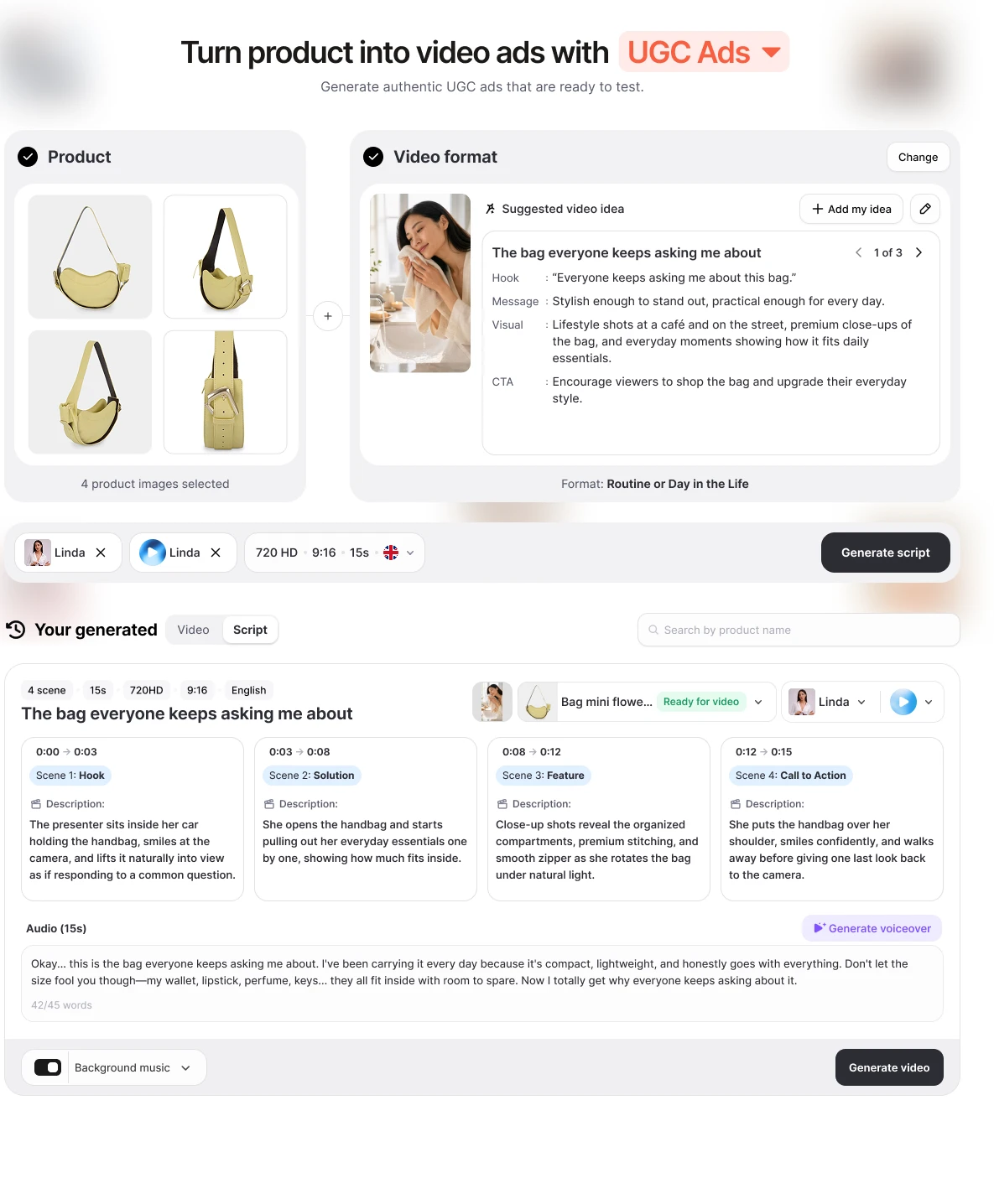
Step 3: Review the AI-suggested video idea: hook, message, visual and CTA.
Step 4: Choose an AI avatar and an AI voice, then generate a scene-by-scene script.
Step 5: Render a 15-second, 9:16 video in 720 HD, then download it or publish to connected Facebook, Instagram and TikTok accounts.
If a competitor's video ad already works in your niche, AI Video Ad Clone analyses its scene sequence, shows a product-fit assessment, and scripts a version for your product. Synthesia starts from a script you write for a presenter. Promer AI starts from your product and from ad structures that already run. Synthesia still wins on languages, enterprise compliance and long-form presenter video. As with any AI output, review each Promer AI creative before spend goes behind it, and check its terms with the same seven questions.
If the job is a steady supply of product ads to test on Meta and TikTok, an AI ad maker built around product context is the closer fit, and you can create your first ad free with no credit card required.
Synthesia review verdict: Use it on the store, not in the ad account
Synthesia is a mature platform for presenter video. For a store, that means explainers, how-to and support videos, translated help content and a founder avatar. It does not mean stock-avatar ads on Meta or TikTok.
Before paying, run two checks. Compare your plan against the paid-ads and testimonial rules, and if you would need a stock avatar in paid social, get Synthesia's consent in writing first. Then open the free Basic plan and confirm the export format you need. If both pass, or your real use is explainers and support video, Synthesia earns its $18 a month. If either fails, spend that money on a tool built for the ad account.
FAQ
Is Synthesia good for ecommerce stores?
Synthesia is good for explainer, how-to and support video on a store, and a poor fit for paid ads. Its policy bars stock avatars from paid, boosted or promoted social ads without written consent. Its example library of 32 videos is almost all training and onboarding, and customers on its reviews page mostly describe website, help and email video.
Can you use Synthesia avatars in Facebook or TikTok ads?
Not stock avatars, unless Synthesia gives written express consent. Custom avatars can run in paid ads with the consent of the person they are built from. Testimonial-style claims implying a stock actor has a condition are limited to enterprise plans. The policy was last updated 23 February 2024.
How much does Synthesia cost?
Basic is free, Starter is $29 a month or $18 billed yearly, Creator is $89 or $64, and Enterprise is custom. Those were the prices on Synthesia's page on 29 September 2026. A third-party post two days earlier listed lower Starter and Creator prices, so confirm at checkout.
Does Synthesia have a free plan, and does it add a watermark?
Yes, Basic is free with about 10 minutes of video a month and no credit card. The Starter card lists downloading videos and removing the Synthesia logo as additions, so treat the free plan as a way to test the editor rather than a source of publishable files.
Can you get a refund from Synthesia?
Fees are non-refundable except as the contract states. Cancelling stops the next renewal, and unused minutes do not roll over. Test on the free plan and pay monthly first.
Do AI avatar videos convert worse than human ones?
No named, dated test proving that was found for this review. One competitor's post cites an unnamed agency test with lower click-through for avatar ads, and Synthesia's reviews page shows vendor-picked positive results for website video. Test on your own product before scaling either way.
What is a good Synthesia alternative for ecommerce video ads?
Pick a tool built around ad formats: CapCut for editing your own footage, or Promer AI for ads built from your product page. Promer AI's AI UGC Ads generates 15-second vertical avatar videos from a product URL, without Synthesia's paid-ads consent requirement. Synthesia stays stronger for multilingual training and explainer video.
Related reviews and ecommerce guides
If you're comparing avatar video tools for paid social, these pieces on the Promer AI blog cover the neighbouring questions:
HeyGen Reviews 2026: the HeyGen review on the Promer AI blog, covering studio avatars, lip sync, credits, pricing and product placement for ecommerce video ads.
Creatify AI Reviews: a step-by-step look at Creatify's URL-to-video flow on a Shopify product, with plans, credits and refund terms.
How to Source UGC for Paid Social Ads: real customer content, paid creators and AI-generated UGC compared, including the permission and usage-rights questions to settle before content runs as an ad.
Reference Sources
BIGVU. (2026). CapCut pricing (2026): Free vs Pro, what's included, and alternatives. https://bigvu.tv/blog/capcut-pricing-2026-free-vs-pro-whats-included-alternatives/
SourceForge. (n.d.). Synthesia reviews in 2026. https://sourceforge.net/software/product/Synthesia/
Huy Tran Quoc is the Head of Product Management at Promer AI, part of FireGroup Technology, where he leads product strategy and execution across a cross-functional team spanning product, engineering, design, QC, customer success, and prompt engineering.
Over the past decade, Huy has progressed from Product Manager to Senior Product Manager to product leadership, working at EngineThemes, Zalo, TIKI Corporation, and now FireGroup Technology, across ecommerce SaaS, social networking, marketplace, supply chain, and fintech.
At TIKI, Huy owned the strategic roadmap and P&L alignment for a multi-vertical portfolio and partnered directly with the C-suite to translate company vision into executable plans.