Luma AI Reviews: Does Cinematic Motion Help an Ad Sell?
Category
Blogs
Date
Authored by
Huy Tran Quoc
Summary
Luma AI reviews for ecommerce: does cinematic motion give a product ad a working hook and CTA? Plans, credit math, terms, limits, and who it fits.
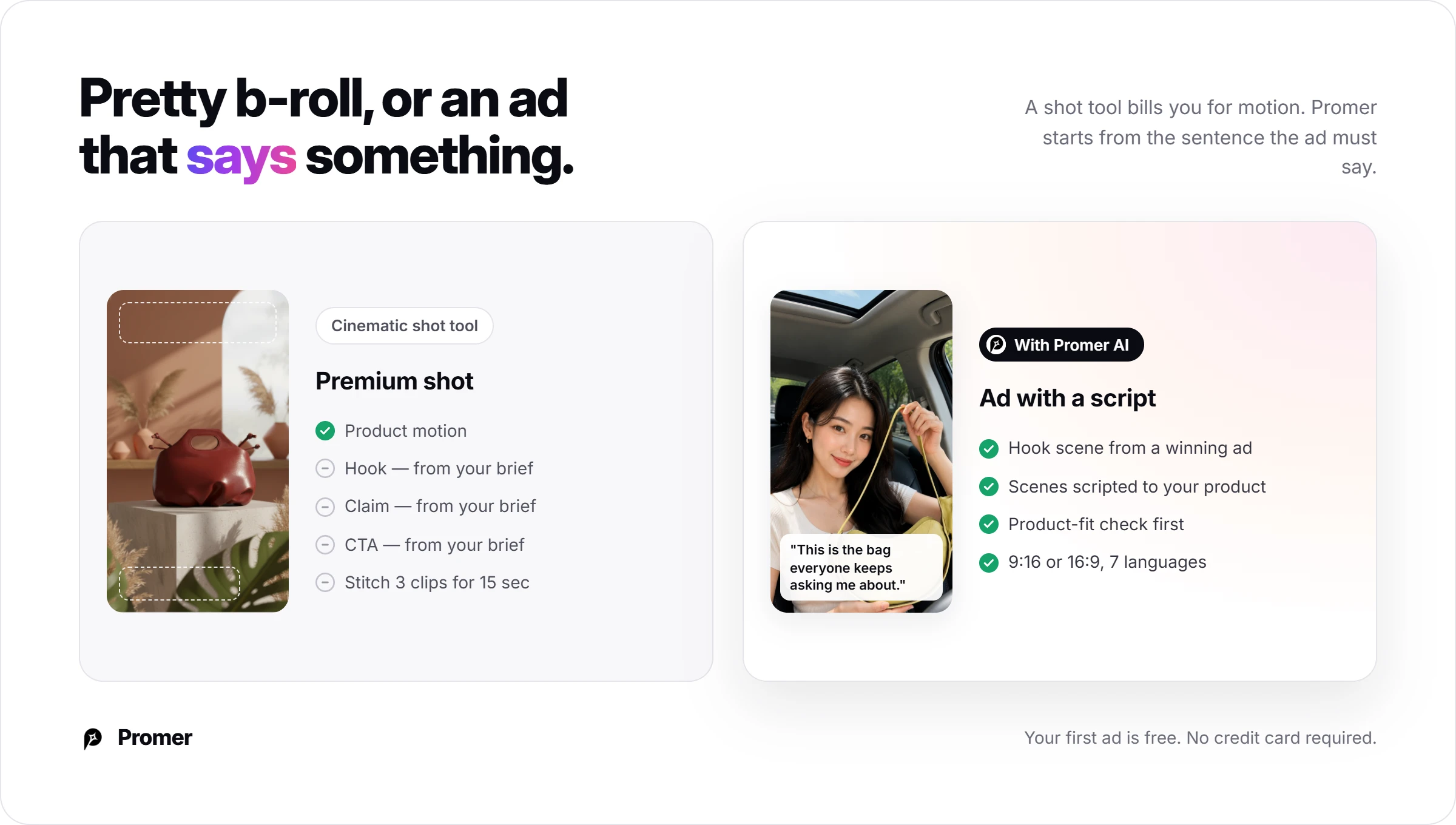
Most Luma AI reviews judge the clip: a perfume bottle turning in slow light, a sneaker landing in a puddle. You have to judge the ad around it, because that clip still needs a hook, a claim and a CTA inside 15 seconds of Reels.
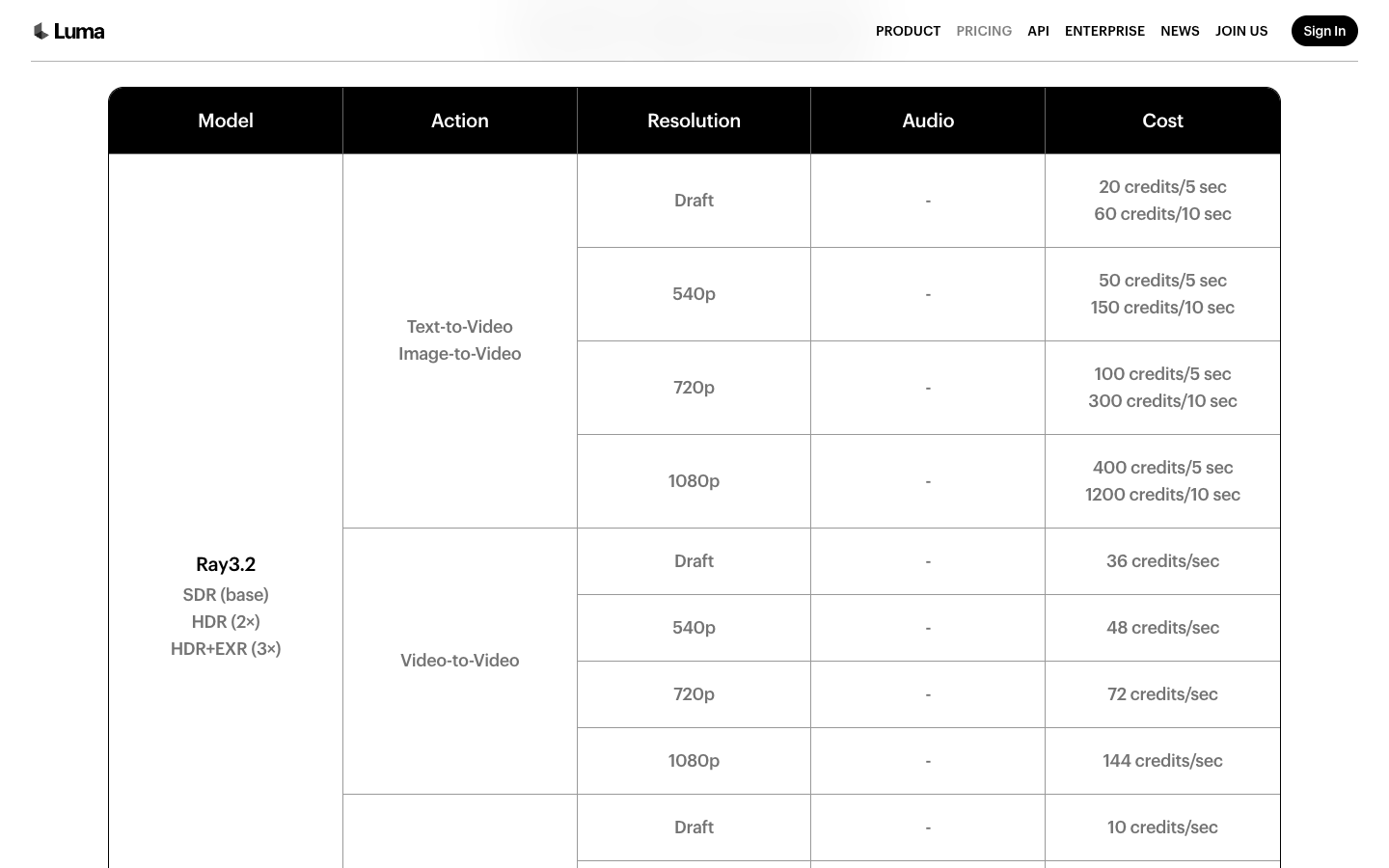
Getting this wrong costs real credits. On Luma's $30 Plus plan, one 10-second Ray3.2 clip at 1080p uses 800 of your 10,000 monthly credits, so 12 renders empty the month.
Luma AI is worth paying for when your hook, claim and CTA are already written and you need premium shots to carry them; it won't decide what the ad says. This article is for you if you run paid social for a physical product and want to know what a Luma clip costs, what you can legally run, and how to brief a shot so you stop burning credits. If you only need the numbers, skip to Luma AI pricing.
Key takeaways
Price the shot list before you open the app. Plus is $30 a month for 10,000 credits, and a 5-second Ray3.2 clip costs 100 credits at 720p and 400 at 1080p.
Draft first, finish last. Ray3.2 Draft costs 20 credits per 5 seconds, a fifth of a 720p render.
Luma sells shot control, not the argument. You get up to 16 keyframes per clip on its API. Your hook, on-screen claim and CTA still come from your brief.
Only subscription output is commercial. Luma's Terms limit commercial use to output made during an active paid term.
Buy it for premium product b-roll. Skip it if you need a finished, captioned ad tonight.
What Luma AI is in 2026: Models, app, and who uses it
Luma AI is a Palo Alto company that builds its own video and image models and wraps them in an agent workspace. Its homepage at lumalabs.ai is titled "Luma | AI Agents for Creative Work", and the pitch reads "Ten directions before the morning standup. Fifty variants by end of day."
That pitch tells you who Luma sells to: creative teams that need volume and direction, not a store owner who needs a finished ad. If you searched for a lumalabs review or lumalabs ai review, this page covers the plans, credits and terms behind that homepage.
Ray3.2, Uni-1 and the third-party model shelf
Ray3.2 is Luma's current video model, announced with an API on June 10, 2026. Luma says it "holds continuity across every cut". Uni-1 is the image model, and the Uni-1.1 API followed on May 5, 2026.
The bigger change is the shelf. Luma's pricing page lists third-party video models in the same credit pool: Veo 3.1, Kling 3.0 and Kling Omni, Seedance 2.0 and 2.5, MiniMax H3 and Flux 3, plus Sync lip sync and ElevenLabs audio.
That means one Luma subscription lets you compare a Ray3.2 shot with a Veo 3.1 shot of the same packshot. The prices differ by a wide margin, which the pricing section below spells out.
Luma Agents and Dream Machine
If you searched for Luma Dream Machine, the name survives in 2 places. The App Store lists an app called "Luma Dream Machine: Your Visual Thought Partner", and Luma's API FAQ mentions migrating from "the legacy Dream Machine video API".
The web product today is Luma Agents, which Luma says can "research, generate, and refine across video, image, audio, and text". Luma's news page dates Luma Skills to June 17, Layers to July 29, Luma Scenes to August 11 and Luma Variants to October 1, 2026.
Fast shipping cuts both ways for an ad workflow. Luma's Terms of Service, updated May 14, 2026, let Luma modify features, with "commercially reasonable efforts" to give 30 days' notice before deprecating a material one.
Who Luma says it's for?
Luma's enterprise quotes come from agencies and holding companies: Aperture, Boundless, The Wonder Project and Publicis Groupe Middle East & Turkey. Luma's buyer is a creative team with a brief, not a solo seller with a product page.
Luma AI reviews: Plan a 15-second product ad before you spend credits
The most useful thing you can do before paying is write the shot sheet and price it. Scenario: you sell a pink satin drawstring bag with embroidered flowers and green vine ties, you have one clean packshot on white, and you want a 9:16 Reels ad for gift season. Three shots of 5 seconds each give you 15 seconds, and each shot has one job.
The shot sheet: 3 shots, 3 jobs
Shot
Ad job
Image-to-video prompt to copy
Keep fixed
1. Hook (0-5 sec)
Stop the scroll with the gift moment
Start frame: your packshot. Camera: slow push-in at eye level. Action: a hand pulls the green vine ties and the bag cinches closed over a small gift. Light: warm window light.
Embroidery placement, tie color, satin sheen
2. Proof (5-10 sec)
Show the problem it solves
Start frame: bag open on a vanity. Camera: locked, slight 45-degree angle. Action: earrings and a lipstick drop into the bag, then the ties pull tight. Light: soft morning glow.
Bag shape when open, number of ties
3. CTA frame (10-15 sec)
Hold the offer long enough to read
Start frame: bag centered on a deep green backdrop. Camera: almost still, 2-degree drift. Action: none beyond a light glint on the satin. Leave empty space above the bag.
Whole composition, no new text
Add "Avoid: new text, extra bags, a different tie color" to every prompt. Luma's Learning Center has a guide titled "Stop Wasting Credits", and a short avoid line is the cheapest guard against it.
Prompting rules for ad shots
Start from your real packshot. Image-to-video keeps your actual product; text-only prompts invent one.
One action per shot. A hand pulling a tie is a shot. A hand pulling a tie while the camera orbits is a gamble.
Name what must not change. Write the fixed details (embroidery, tie color, logo) inside the prompt.
Write the hook line first. Then ask for the motion that proves it.
Pin the end frame. Luma's API page says Multi-Keyframe allows up to 16 keyframes in a single clip, which is the control for where the product sits at second 0 and second 5.
Leave space for text. Your price and CTA go on top in an editor, not inside the render.
What each step costs
Read the totals row first, then the 1080p line under the table:
Step
Luma setting (pricing page)
Credits
Motion tests, 3 drafts for each of 3 shots
Ray3.2 Draft, 20 credits per 5 sec
180
Final hook shot
Ray3.2 image-to-video, 720p, 5 sec
100
Final proof shot
Ray3.2 image-to-video, 720p, 5 sec
100
Final CTA frame
Ray3.2 image-to-video, 720p, 5 sec
100
Voiceover, about 250 characters
ElevenLabs v3, 21 credits per 1,000 characters
about 5
Total at 720p
about 485
Rendering the 3 finals at 1080p instead adds 900 credits, because 1080p costs 400 per 5 seconds against 100 at 720p. That brings the total to about 1,385 credits.
On Plus, each credit costs $0.003. The 720p version comes to about $1.46 and the 1080p version to about $4.16, before any shot you throw away. The 3 drafts per shot is a planning assumption for this review, not a Luma figure, so log your own number in month 1.
Motion quality vs product accuracy: What holds across Luma clips?
Luma promises continuity and gives you controls for it. Ray3.2 "puts every frame under your control, holds continuity across every cut". Uni-1 carries "style references, character references, and visual grounding into every asset". The Learning Center adds guides on "Character Consistency Techniques" and "How To Use References Properly".
Luma also documents where it slips. Its API FAQ includes the question "Why does V2V Modify ignore my source video motion and generate from the prompt only?" For a product shot, following the source is the whole point.
Don't expect a neutral accuracy benchmark either. Luma's terms (Section 3.4) list publishing "benchmarks or performance information about the Services" as a prohibited activity.
That leaves the check with you. Run this list on every final before it goes near Meta or TikTok:
Label or embroidery matches the packshot detail by detail, paused at each second.
Logo position and size match between the first and last frame.
Ties, caps, handles and straps keep the same count and shape.
Color under the new lighting still matches your product page photos.
Hands holding the product have 5 fingers and a believable grip.
No new text or extra product units appear in the background.
A Draft render is not the file you ship. Repeat the check on the final, because that's the version a shopper will pause on.
The ad gap: hook, on-screen text, and CTA after the Luma clip
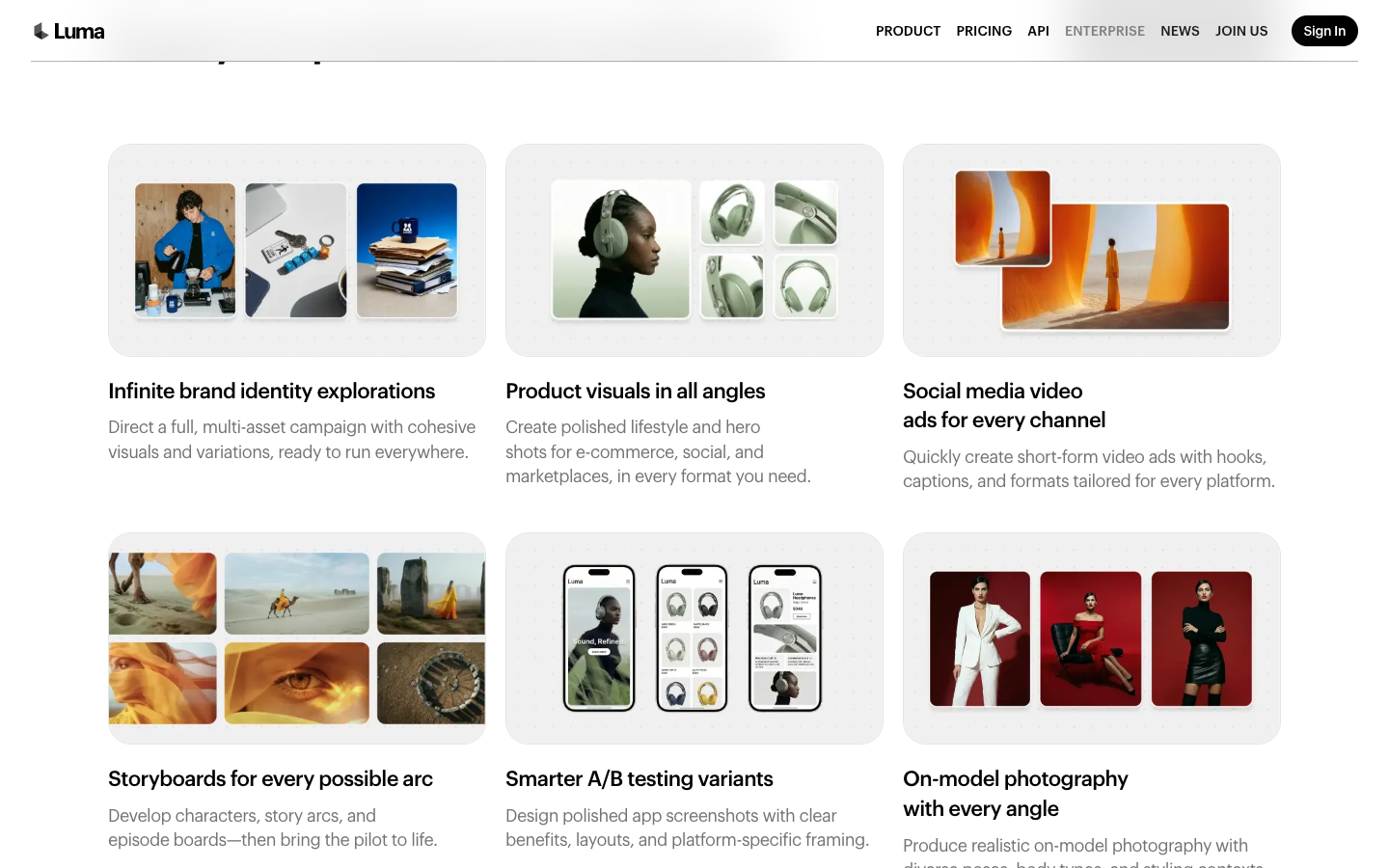
Luma reaches further toward ads than most cinematic tools. Its enterprise page promises to "quickly create short-form video ads with hooks, captions, and formats tailored for every platform", and the homepage prompt chips include "Paid Social Variants".
What the pages don't spell out is the decision layer: which pain point the hook names, which claim the text carries, which offer the CTA closes on. For big brands, Luma's answer is the Dumbstruck partnership, where emotion analytics flag what to change and Luma Agents make the edit.
The first 3 seconds: A camera move is not a hook
A slow orbit around a bag is a shot. A hook is a reason to keep watching: a problem ("lost earrings again?"), a visible result, or a price.
Write that line first, then ask Luma for the motion that proves it, such as earrings dropping into the pouch. Luma's 5-second units help here: 2 competing hook shots cost 200 credits at 720p.
On-screen text: keep claims in your editor layer
Generated text inside a frame is a risk for prices and claims, because a typo means a re-render. At 1080p, that re-render is 400 credits per 5 seconds on Ray3.2.
Luma sells a Layers editor at 75 to 175 credits per image and has a LipSync and Captions demo board. Even so, a $19.99 price or a "free shipping" claim is safer as editable text in your editor or ad tool, where a fix costs nothing.
The CTA frame Luma won't decide for you
The last 2 seconds need the product, the offer and the action, held still long enough to read. Multi-Keyframe can pin that end frame.
Whether it says "Shop the 2-pack" or "Free shipping today" comes from your offer, not from the model. If that offer isn't written yet, Ray3.2 motion won't fill the gap.
Luma AI pricing: Credits, plans, and commercial use terms
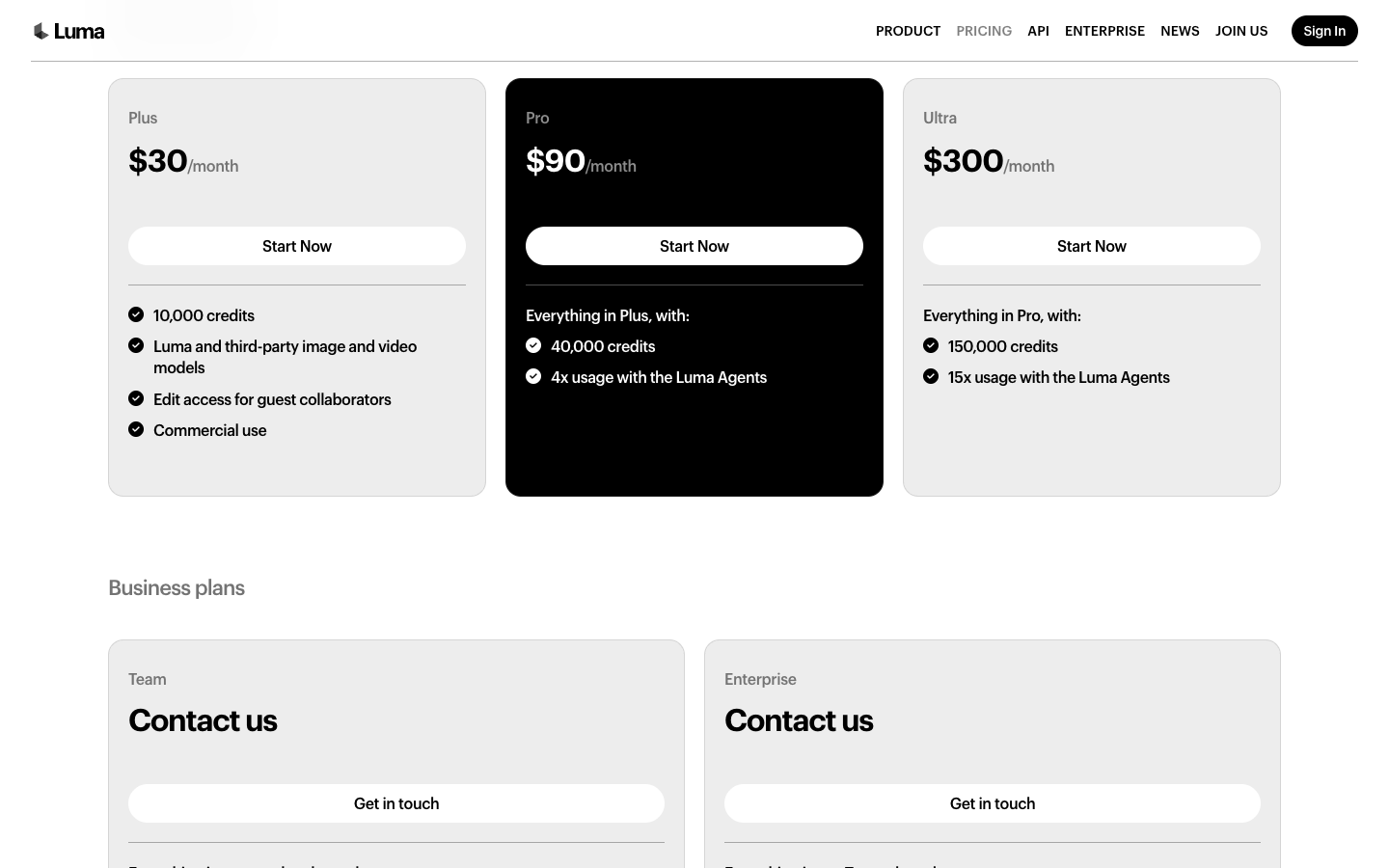
Luma AI pricing starts at $30 a month for 10,000 credits on Plus, or $25 a month billed yearly. Pro is $90 for 40,000 credits and Ultra is $300 for 150,000, and yearly billing saves "up to 20%". Team and Enterprise plans are quote-only.
Plans and credits
The table divides each plan's credits by Luma's published cost per clip. Notice how fast the Veo column shrinks:
Plan
Price a month
Credits
Ray3.2 5 sec, 720p
Ray3.2 5 sec, 1080p
Veo 3.1 8 sec with audio
Plus
$30
10,000
100 clips
25 clips
4 clips
Pro
$90
40,000
400 clips
100 clips
17 clips
Ultra
$300
150,000
1,500 clips
375 clips
66 clips
Counts are rounded down and assume zero failed renders. Veo 3.1 with audio costs 280 credits per second, so 8 seconds uses 2,240 credits.
Plus is a 25-clip month if you need 1080p Ray3.2, and a 4-clip month if you reach for Veo 3.1 with sound. Pro adds "4x usage with the Luma Agents" and Ultra "15x", which Luma doesn't define in credits on the pricing page.
What one clip costs at each plan
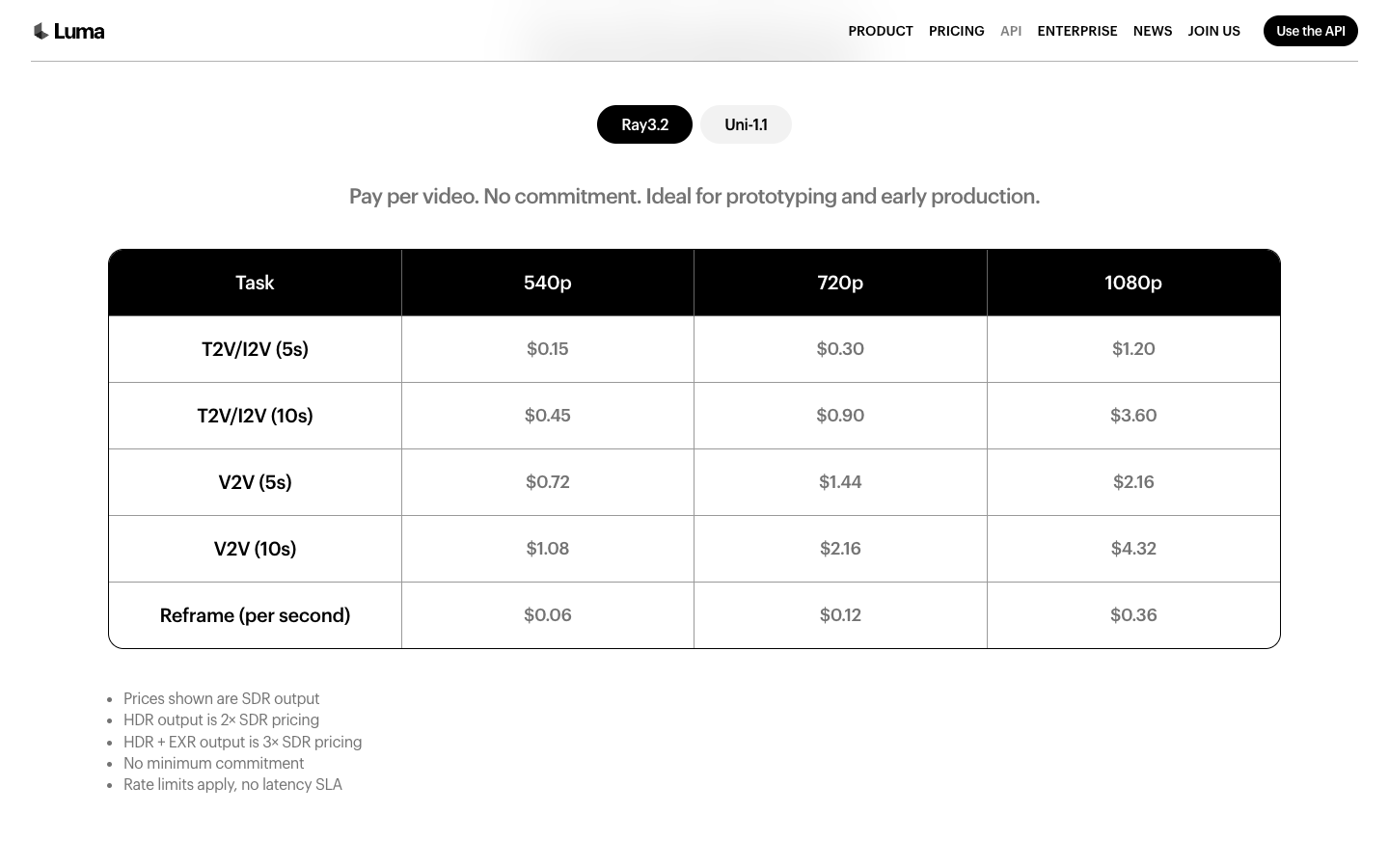
Per credit, Plus works out to $0.003, Pro to $0.00225 and Ultra to $0.002. A 5-second Ray3.2 clip at 1080p costs $1.20, $0.90 or $0.80 depending on plan.
Luma's API charges the same $1.20 for that clip pay as you go, $0.30 at 720p, with no minimum commitment. If you only need 10 premium shots a month, the API and Plus cost about the same. The plan's extra is the agent workspace and the third-party models.
Every rejected render costs the same as a kept one. If 1 in 3 renders is usable, your real 1080p cost on Plus is $3.60 per kept clip. HDR doubles the credit price and HDR with EXR export triples it.
Commercial use, watermark and renewal
Plus lists "Commercial use" as a plan feature, and Luma's Terms of Service, updated May 14, 2026, explain the condition. Section 4.9.1 says a customer can use output commercially only if it was produced during an active Subscription Term. Anything generated outside a paid term, such as a free trial render, stays out of your ads.
The same section lets Luma embed watermarks, content credentials and provenance metadata in output, and bars you from removing or obscuring them. The pricing page doesn't say which plans show a visible watermark, so export one test clip on your plan and inspect it before you build an ad set around Luma footage.
Subscriptions renew automatically (Section 7.1), cancellation must arrive at least one day before the term ends, and fees are final and non-refundable unless Luma decides otherwise (Section 7.2). If you test month to month before moving to yearly billing, you lose nothing but a month.
Luma AI pros and cons for product video ads
These points come from Luma's own pages and terms.
Where Luma AI is strong for product shots?
Shot control: up to 16 keyframes per clip on the API, plus Reframe and video-to-video up to 20 seconds.
One credit pool: Ray3.2, Veo 3.1, Kling 3.0, Seedance 2.5 and MiniMax H3 bill from the same 10,000 credits on Plus.
Cheap motion tests: Ray3.2 Draft costs 20 credits per 5 seconds, a fifth of a 720p render.
Published per-model prices: you can price a shot list before you pay, model by model.
Post-production formats: native HDR and 16-bit EXR export for teams finishing in Resolve or Nuke.
Where Luma AI falls short for ad work?
Resolution premium: 1080p Ray3.2 costs 4x the 720p rate, 400 credits against 100 per 5 seconds.
Paid-only commercial rights: output made outside an active subscription can't go into ads.
Known billing questions: Luma's API FAQ asks "Why are multiple videos generated from a single click (duplicate charges)?"
Failure modes on record: the same FAQ covers Extend failing with "Generation failed".
The ad is your job: hook, claim and CTA come from your brief, not from the model.
The pattern is clear. Luma is a shot studio with a deep model shelf, and the ad around the shot is your job.
The lesson beyond Luma: Write the ad sentence before the shot list
Every image-to-video tool, Luma included, bills you for motion. None bills you for the sentence your ad must say, and skipping that sentence is how a month of credits turns into pretty b-roll.
Luma's own Learning Center has a guide titled "Start At The End", dated March 9, 2026. Use the same idea for ads. Fill these 5 lines before you open any generator:
Line
What to write
Example for the pink bag
Who
One buyer
Someone buying a gift for her mom
Problem
What goes wrong without the product
A gift that looks plain out of the box
Proof
The one shot that shows it working
Ties pulled, gift inside, flowers on show
Offer
Price, bundle or shipping deal
2-pack at one price
CTA
Exact words on the last frame
Shop the 2-pack
If the Proof line is empty, more cinematic motion won't fill it.
You need a demo shot, a before and after, or a real customer quote. Once those 5 lines exist, a tool like Luma becomes a fast way to film the Proof line, and the cost per kept clip drops because you know what you're asking for.
Luma AI review verdict: Who it fits and who should skip it?
Buy Luma AI if you run ads for a brand that already knows its angles and needs premium product motion: hero reveals, HDR beauty shots, background variants. Plus at $30 covers about 25 finished 1080p Ray3.2 shots a month.
Skip it if you need a finished, captioned 15-second ad tonight from 1 product photo. Skip it too if your budget can't absorb rejected renders at $1.20 each.
Wait if clips will run in paid ads before you have read Section 4.9 of the terms: commercial use covers only output made during an active subscription.
Your next 30 minutes: write the 5-line ad sentence above, then price your shot list against Luma's credit table at 720p and 1080p. In month 1, log every render and divide spend by kept clips. That number, not the $30, is your Luma price.
Luma AI alternatives for ecommerce video ads
These 3 options run from the lowest entry price to the most ad-specific. Each closes a different part of the ad gap above.
Tool
Best for
Entry price
Ad-specific features
Luma AI
Premium shot control
$30/mo, 10,000 credits
Keyframes, Draft mode, HDR
Hailuo AI
Low-cost shot generation
From $9.99/mo
12-slot reference tray
Higgsfield
Preset camera moves and templates
$15 for 200 credits (Starter)
Marketing Studio: Product shot, Motion, UGC, Ads
Promer AI
Ad structure from product context
First ad free, no card
AI Ad Animation, AI Video Ad Clone, AI UGC Ads
Hailuo AI, the low-entry shot generator
Hailuo AI runs MiniMax H3, the same model Luma resells at 28 credits per second at 768p. Its navigation showed "From $9.99 /mo" on October 5, 2026, and its create form has a 12-slot reference tray labeled "Refs (0/12)".
The default ratio on that form was 21:9, so switch it before rendering for Reels. Our Hailuo AI reviews cover that form and its terms in detail.
Higgsfield, the cinematic preset suite with ad templates
Higgsfield's Cinema Studio 4.0 lists 30+ camera movement presets and 50+ color palettes. Its Marketing Studio has template categories for Product shot, Motion, UGC and Ads.
Starter was $15 for 200 credits when Higgsfield's pricing was read on September 17, 2026 for our Higgsfield reviews. Pick it over Luma if preset camera moves and ad templates matter more to you than keyframe control.
Promer AI, for the ad structure Luma leaves to you
Promer AI is an AI ad creative performance platform for ecommerce advertisers, and it is built for the step before the video: deciding what the ad should show and say, starting from your product.
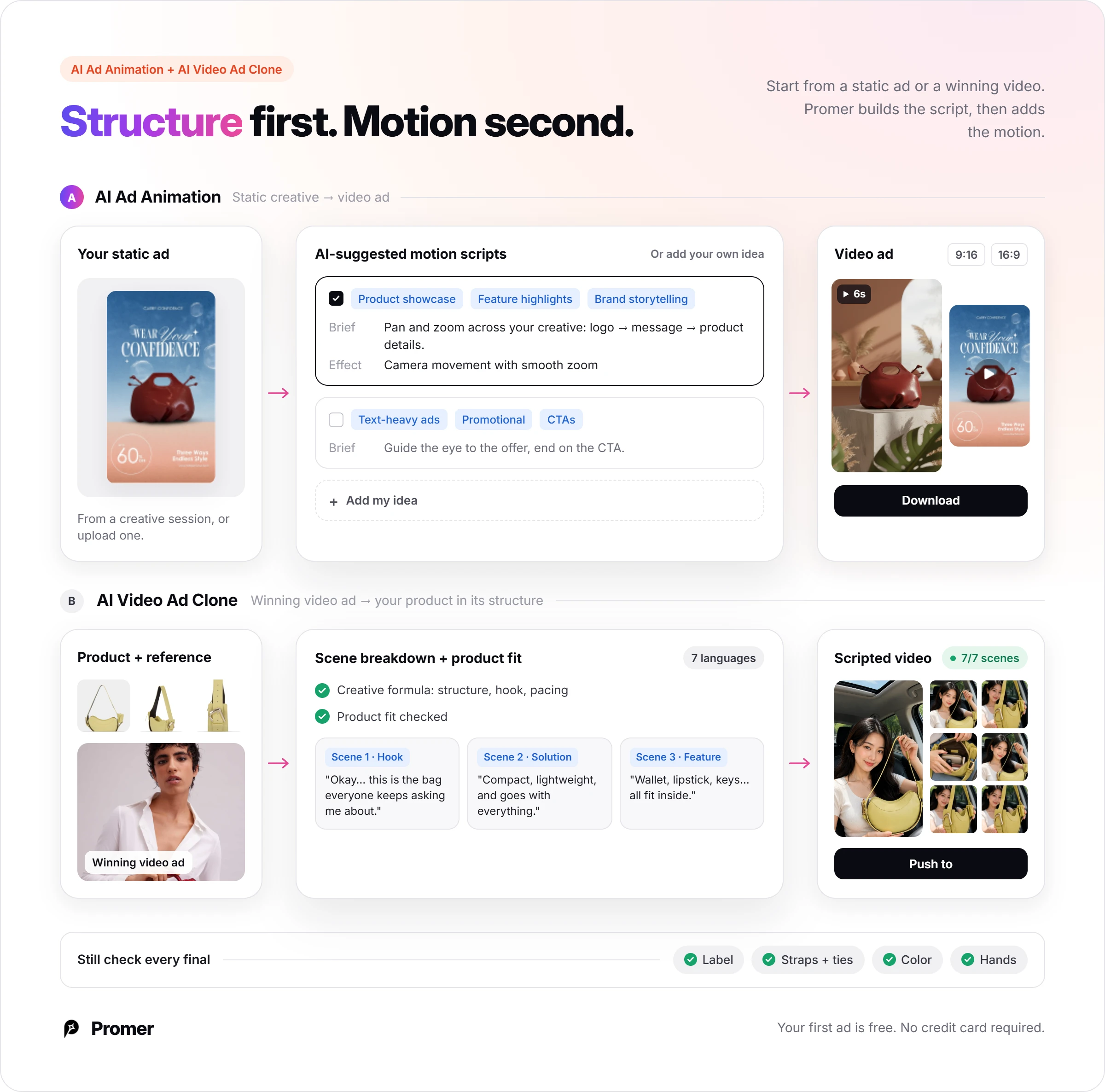
The flow starts from a static creative of your product made in Promer AI, not from a raw photo. AI Ad Animation then turns that creative into a video ad with multiple motion variations, built on AI-suggested motion scripts (each with Tags, a Brief and an Effect). You pick aspect ratio (9:16 or 16:9) and sound on or off, and the default is HD 720. For the pink bag, that means choosing between several motion ideas instead of writing and testing each one as a separate prompt.
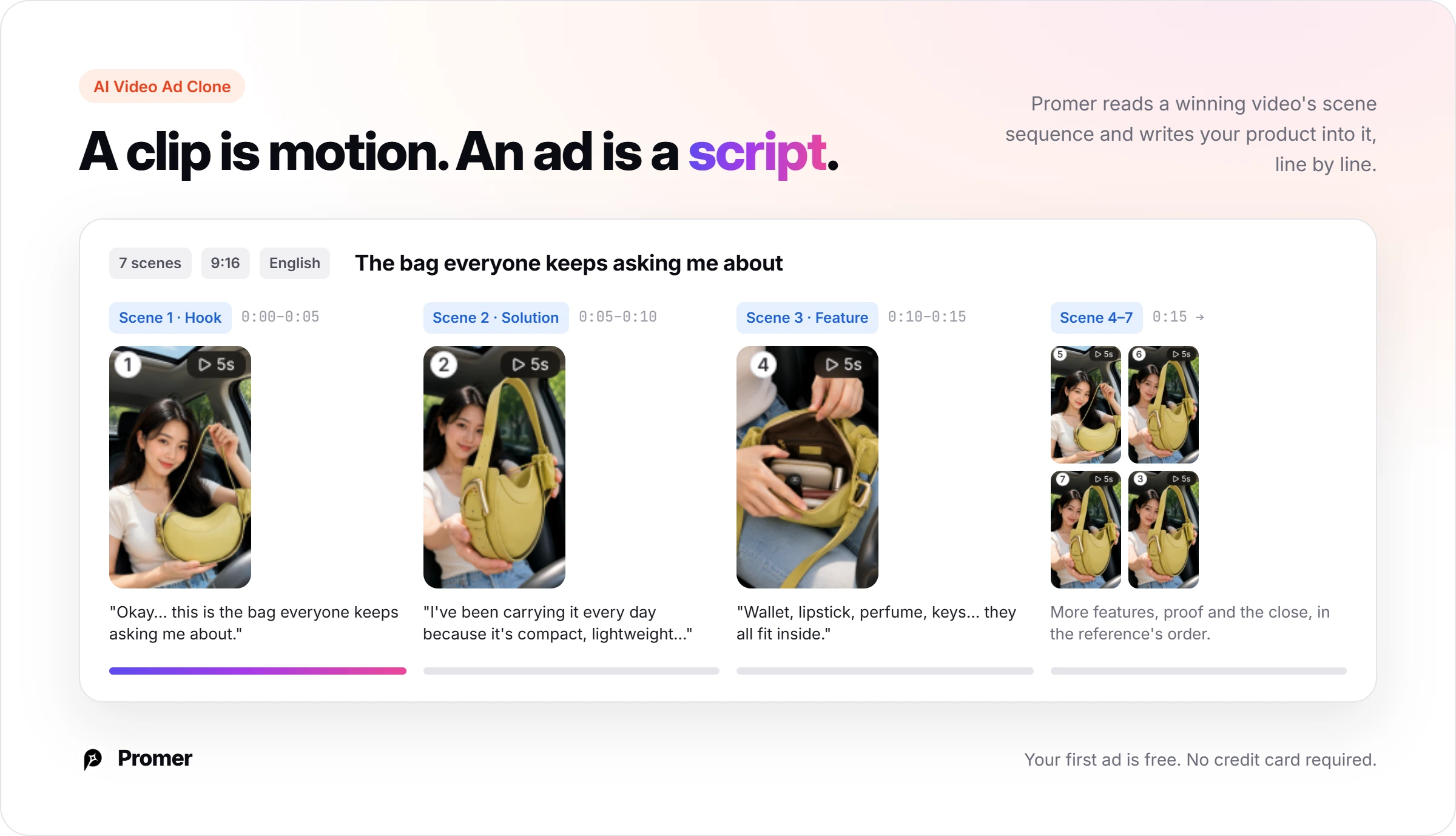
If you don't have an ad structure yet, AI Video Ad Clone starts from a winning video ad as the reference. It breaks down the scene sequence, shows a product-fit assessment so you can see whether your product suits that structure, then scripts your product into it. Output is 720 or 1080 HD in 9:16 or 16:9, in 7 languages.
Promer AI fits when you want to settle the ad angle and structure first, then get a video ad built around your product, with room to edit the result. AI-generated creatives can contain mistakes, so run the label checklist above on every output. You can test the flow with the AI advertisement generator; your first ad is free, with no credit card required.
FAQ
Is Luma AI free?
Luma AI's pricing page lists paid individual plans only; the cheapest is Plus at $30 a month for 10,000 credits. Luma's Terms of Service (updated May 14, 2026, Section 4.9.1) allow commercial use only of output produced during an active paid Subscription Term. Treat any free access as a test bench, not a source of ad footage. Yearly billing is $25 a month on Plus.
How many credits does a Luma AI video cost?
A 5-second Ray3.2 image-to-video clip costs 100 credits at 720p and 400 at 1080p, per Luma's pricing page. Draft mode is 20 credits per 5 seconds, and HDR doubles the cost. Third-party models bill per second: Veo 3.1 with audio is 280 credits per second, so an 8-second clip uses 2,240. Rejected renders cost the same as kept ones.
Can I use Luma AI videos in paid ads?
Yes, on a paid plan, for output made during an active subscription. Plus lists "Commercial use", and Section 4.9.1 of the Terms limits commercial use to output produced during an active Subscription Term. Confirm rights for any person or brand that appears in the clip before it runs on Meta or TikTok.
Does Luma AI add a watermark?
Luma's Terms reserve the right to embed watermarks, content credentials and provenance metadata in output. Section 4.9.1 also bars you from removing, altering or obscuring them. The pricing page does not say which plans carry a visible watermark, so export one clip on your plan and inspect it before you build an ad set around it.
What happened to Luma Dream Machine?
Dream Machine is the older name; Luma's web product is now Luma Agents, running Ray3.2 and third-party models. The App Store still lists an app called "Luma Dream Machine: Your Visual Thought Partner", and Luma's API FAQ addresses developers migrating from "the legacy Dream Machine video API". If an older tutorial shows Dream Machine screens, expect today's interface to differ.
How long can a Luma AI clip be?
Ray3.2 text-to-video and image-to-video are priced in 5-second and 10-second clips on Luma's pricing page. Extend Video adds 5 seconds at a time, and Luma's API page says video-to-video runs up to 20 seconds. A 15-second ad means stitching 2 or 3 Luma clips in an editor, so plan the cuts before you render.
Can Luma AI make a complete video ad with voiceover and captions?
Luma AI has the parts: ElevenLabs voice at 21 credits per 1,000 characters, Sync lip sync models, and a LipSync and Captions demo board. Its enterprise page also promises short-form video ads "with hooks, captions". The ad's argument is still your brief: which pain point, which claim, which offer.
What is a good Luma AI alternative for ecommerce video ads?
Promer AI fits if you need the ad structure built from your product rather than more cinematic motion. Promer AI's AI Ad Animation turns a static creative into a video ad, and AI Video Ad Clone applies a winning video ad's structure to your product. For pure shot generation at a lower entry price, Hailuo AI or Higgsfield sit closer to Luma.
Huy Tran Quoc is the Head of Product Management at Promer AI, part of FireGroup Technology, where he leads product strategy and execution across a cross-functional team spanning product, engineering, design, QC, customer success, and prompt engineering.
Over the past decade, Huy has progressed from Product Manager to Senior Product Manager to product leadership, working at EngineThemes, Zalo, TIKI Corporation, and now FireGroup Technology, across ecommerce SaaS, social networking, marketplace, supply chain, and fintech.
At TIKI, Huy owned the strategic roadmap and P&L alignment for a multi-vertical portfolio and partnered directly with the C-suite to translate company vision into executable plans.