Pollo AI Review 2026: Is It Worth It for Product Videos?
Category
Blogs
Date
Authored by
Huy Tran Quoc
Summary
Pollo AI review: one 15-second ad brief routed across six bundled models, plus the 3-day, 50-credit refund rule and the credit costs it leaves out.
This review is for you if you sell physical products, run your own Meta or TikTok ads, and are weighing Pollo AI as a way to get product video clips without a shoot. It is also for you if you have seen Pollo AI's list of 20-plus video models and want to know which ones are worth your credits before you pay.
Pollo AI is worth paying for if you already think in short product shots and want to try several video models from one credit wallet. If you want a finished ad from a product link without learning which model does what, expect to spend real credits finding out. On Trustpilot, the praise is mostly about ease of use, while the 1- and 2-star reviews posted in September 2026 mostly describe prompts that were not followed after the credits were spent. My own test ran into a bit of both.
Short on time? Jump to the pricing section for what a 15-second ad costs in credits, or to "Who Pollo AI fits" for the buy-or-skip list.
Why you can trust this Pollo AI review?
Before writing anything about Pollo AI, I signed up and used it on a real product photo. Here is exactly what that test looked like, so you can judge how far to trust what follows.
Tested on: 30 September 2026, free plan, 10 sign-up credits
Product: one photo of an unbranded pink ceramic cup on a grey background
What I made: two 4-second image-to-video clips on Pollo 2.5 at 720p, one studio shot and one lifestyle shot
What it cost: 4 credits per clip with sound off; the same clip with sound on was priced at 10
What went wrong: one image-check error that blocked a run until I uploaded the photo again
What else I checked: Pollo AI's plan prices, refund policy, and its Trustpilot reviews, all on 30 September 2026 and linked at the bottom
Those 10 credits showed me whether Pollo AI keeps a product looking like itself, and which one setting more than doubles the cost of every clip. Below are both clips, the cost math for a full 15-second ad, and what paying users on Trustpilot found after spending far more than 10 credits.
Key takeaways
Product clips from one photo, no shoot needed. Upload the product photo you already have, and Pollo AI turns it into short studio or lifestyle clips. In my test, a simple product kept its shape, color and texture, even when a generated hand picked it up.
You get clips, not a finished ad. Image-to-video gives you single 4 to 15-second shots. You still put them in order, add your offer text and upload the ad yourself. URL to Video Ads and Pollo Agent go further from a product link, but Pollo AI's own support says the agent uses a lot of credits.
A 15-second ad costs a few dollars on the cheap model. Four short Pollo 2.5 shots with sound and three tries each come to about 120 credits, roughly $4 on Pro ($29 for 800 credits). Run the same ad on Seedance 2.5 and it costs several times more.
The model and the sound set your bill, not the plan. Turning sound on took my clip from 4 credits to 10. Draft every shot silent on Pollo 2.5, then move only the shot that fails to a premium model.
Pick a plan you will use every month. Unused credits expire at the end of each cycle, and extra credit packs are only on Ultra. A store that makes video in bursts ends up paying for the quiet months.
Test before you pay, because the refund window barely exists. Refunds close after 3 days or 50 used credits. Spend the 10 free credits on your own product first and see whether it survives the model.
What 10 free Pollo AI credits bought me: 2 product clips from 1 photo
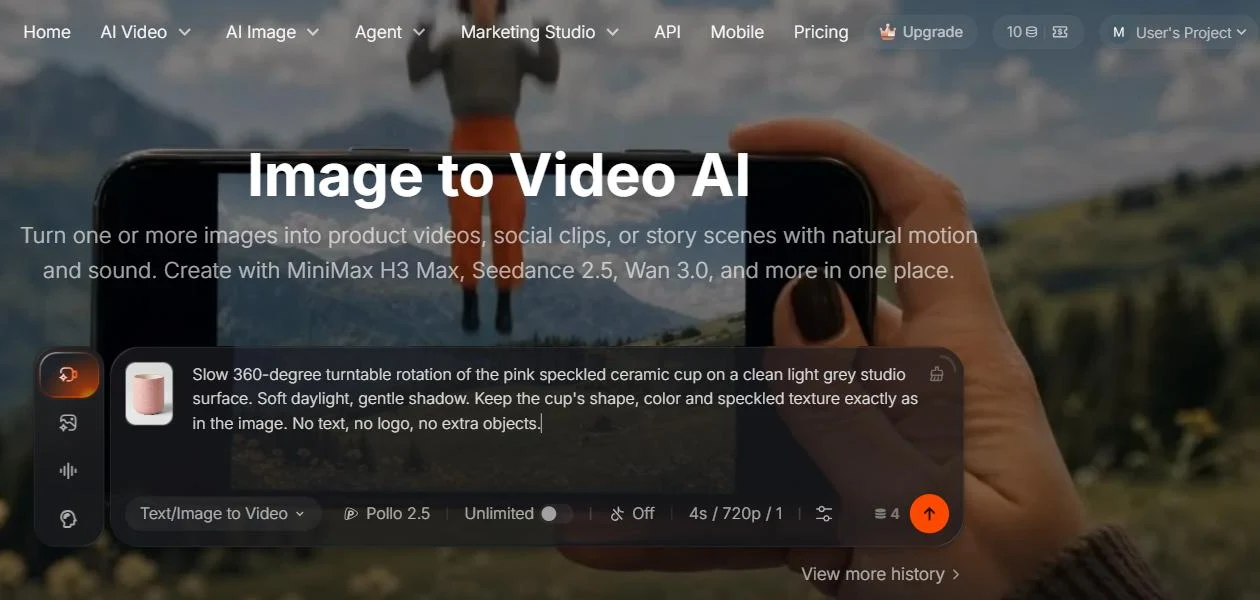
Pollo AI's image-to-video page is the fastest way in. You add a product photo with the plus button, write what should happen, pick a model and press the arrow. The number next to the arrow is the credit cost of that run, and it changes live as you touch the settings, which is the most useful thing on the screen.
The default was Pollo 2.0 at 5 seconds, 480p, sound on, for 10 credits. Switching to Pollo 2.5 at 720p raised it to 12. Dragging the length down to 4 seconds brought it to 10, and turning sound off brought it to 4. Same model, same clip length, and the audio toggle alone was worth 6 credits.
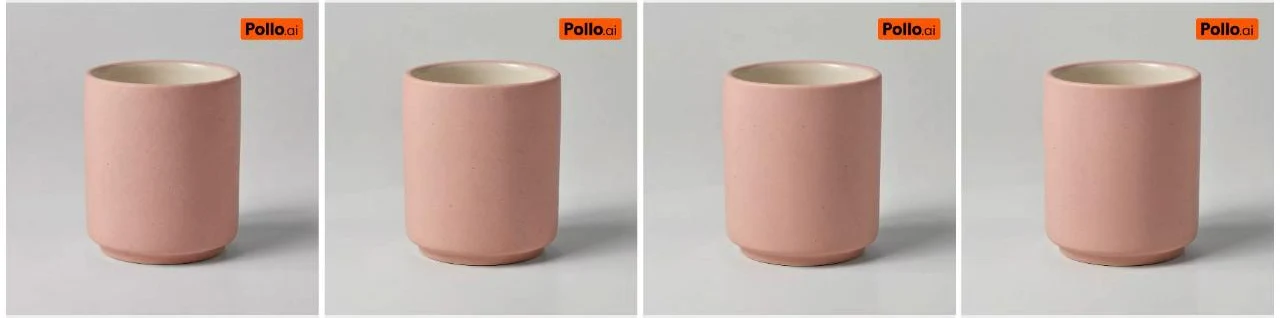
Test 1, the studio shot. I asked for a slow 360-degree turntable rotation on a clean grey surface and told it to keep the cup's shape, color and texture. It came back in under a minute. What I got was a gentle camera drift rather than a full turn, which on a plain cylinder reads as a calm product shot. The speckles and the rim stayed put. It is usable as a 3-second product beat, not as a spin.
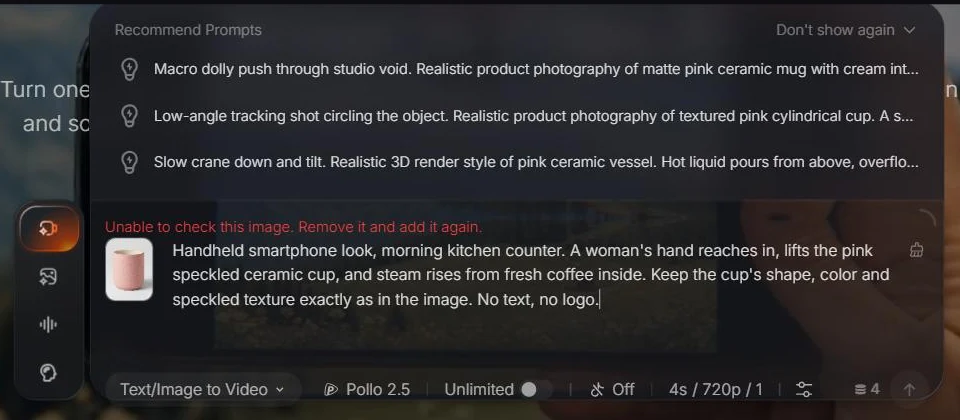
Test 2, the lifestyle shot. This time I asked for a handheld phone look: a hand lifts the cup on a kitchen counter and steam rises from the coffee. The first attempt did not start. The composer showed "Unable to check this image. Remove it and add it again," even though it was the same photo that had worked minutes earlier. Uploading it again fixed it. That run took a few minutes rather than seconds.
The result was better than I expected. A hand comes in from the right, lifts the cup, the background softens into a kitchen, and steam appears in the last second. The cup still looked like my cup. What it skipped was the coffee: you never see liquid, only steam. For a lifestyle beat in a UGC-style ad, this is the clip I would keep.
One more thing worth knowing. While I typed, Pollo AI offered three "Recommend Prompts" written from my photo, each with a named camera move such as a macro dolly push or a low-angle tracking shot. If you do not know how to direct a camera, these are a better starting point than a blank box.
My takeaway from the 10 credits: on a simple product with a clean photo, the cheap model already keeps the product intact. The risk is not that it wrecks your product. The risk is that every retry, sound track and premium model quietly multiplies the cost.
Which Pollo AI model fits which product shot, and what each one costs?
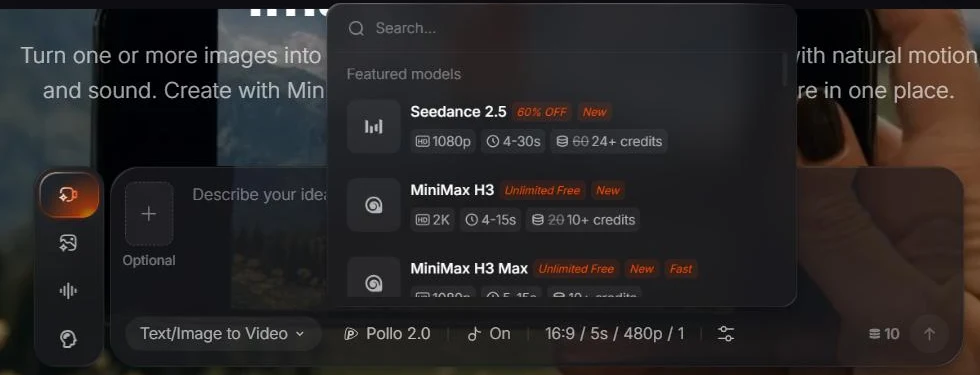
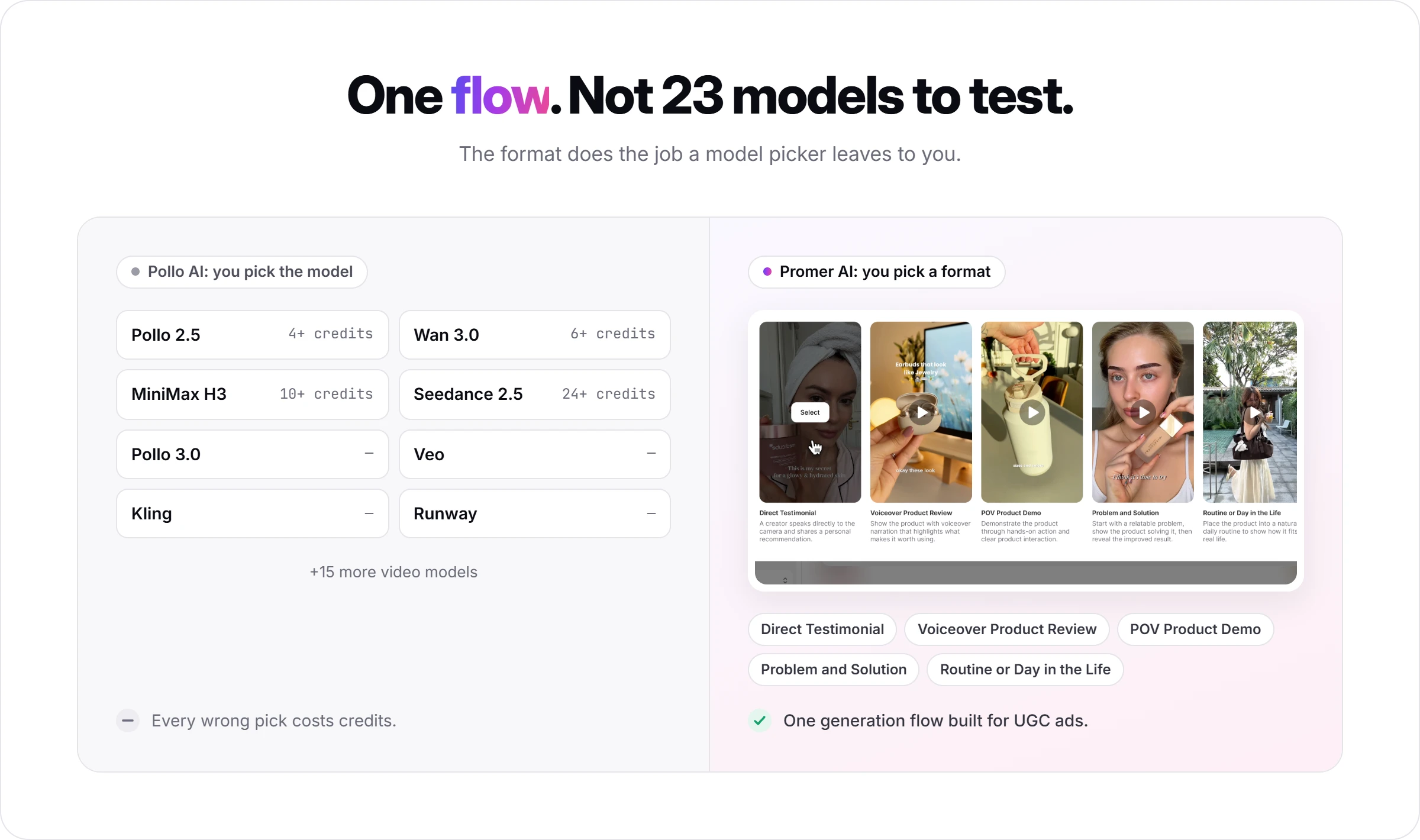
Pollo AI's plan comparison lists 23 video models, from Pollo's in-house Pollo 2.5 and Pollo 3.0 to Seedance, Wan, MiniMax (Hailuo), Veo, Kling, Vidu and Runway. You do not need most of them. Split your ad into shots first, then pick one or two candidates per shot.
Shot in a 15-second product ad
Model to try first
Why, per Pollo AI's own model pages
Starting cost in the picker
Cheap test of any shot
Pollo 2.5
Consistent characters, native audio, style and camera control
4+ credits
Product close-up that must match the real item
Seedance 2.5
Up to 30 reference images, local edits without a full re-render, 30-second clips
24+ credits (promo, normally 60)
Fabric, strap or pouring motion
Wan 3.0
Physics for fluids, fabrics and collisions; lip sync to an uploaded voice track
6+ credits
Talking hook or several shots in one go
MiniMax H3
Native audio and multi-shot sequences, up to 2K
10+ credits (promo, normally 20)
So what does that mean for a store? A Seedance 2.5 test at the lowest setting costs about six Pollo 2.5 tests. Run your first drafts on Pollo 2.5 or Wan 3.0, and move a shot to Seedance 2.5 only when the product detail is what is failing.
Here are four prompt templates for the four shots of a short product ad. Swap in your own product and keep the last line, because it stops the model from drawing text you would have to fix later.
Shot
Prompt template
Hook (0 to 3s)
Handheld smartphone look. A woman in her late 20s faces camera and says: "[one-line hook]." Natural lip sync. No subtitles.
Product proof (3 to 8s)
Close-up of [product], matching the reference image exactly: [color], [material], [one detail]. Slow push in. No text, no logo.
Lifestyle (8 to 12s)
Handheld phone look, [real setting]. A hand picks up [product] and [one natural action]. Keep the product's shape and color exactly as in the image.
End card (12 to 15s)
[Product] on a plain [color] background, empty space at the top for text. Static camera. No text, no music.
Add your offer text in your editor or Ads Manager, not in the prompt. A misspelled "15% off" baked into a clip costs a re-render; a typo in a caption costs nothing.
Pollo AI pricing: What a 15-second ad really costs in credits?
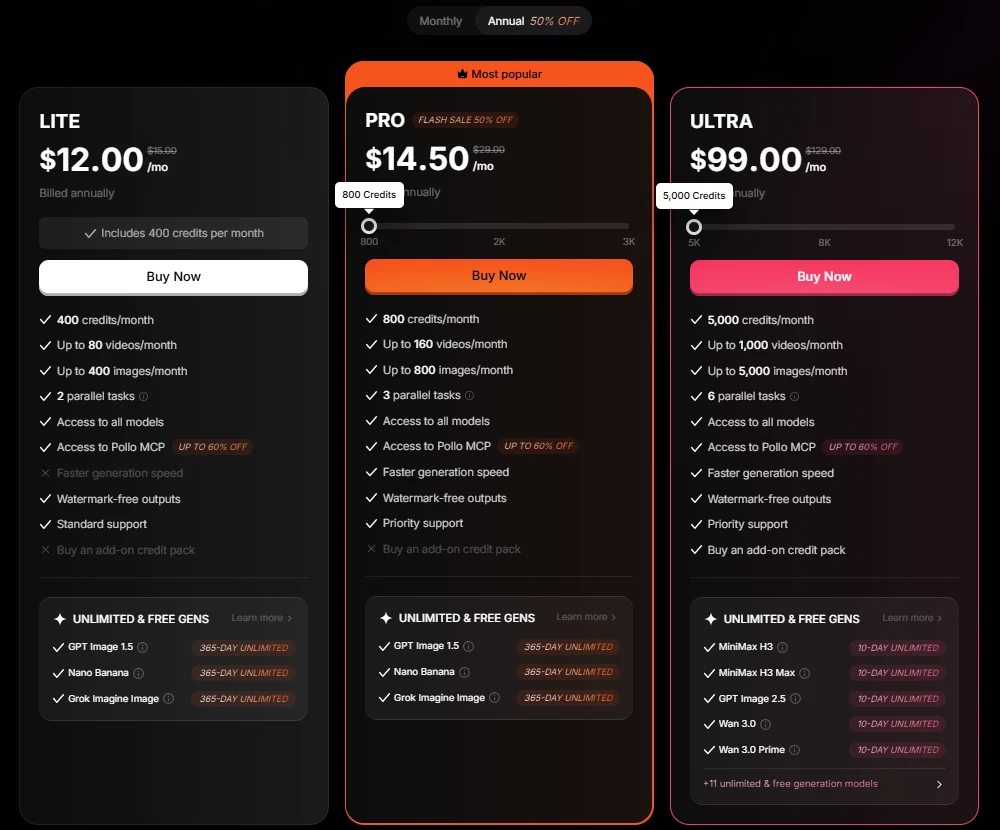
Pollo AI pricing is credit-based. Every plan buys a monthly pile of credits, and the model, clip length, resolution, sound and number of outputs decide how fast you burn it. Here is what the pricing page listed in US dollars on 30 September 2026.
Plan
Monthly billing
Annual billing (per month)
Credits a month
Videos at once
Free
$0
$0
10 on sign-up
1
Lite
$15
$12
400
2
Pro
$29 / $59 / $89
$14.50 / $49 / $69
800 / 2,000 / 3,000
3 to 5
Ultra
$129 / $219 / $299
$99 / $169 / $229
5,000 / 8,000 / 12,000
6 to 10
The annual Pro 800 price was running as a 50% flash sale that day, so check whether it still is. Prices exclude VAT, and the page shows local currency in some countries. Every paid plan removes the watermark; Pro and Ultra add faster generation.
Now the math that matters. On Pro at $29 for 800 credits, one credit is about 3.6 cents. My silent 4-second Pollo 2.5 clip cost about 15 cents; the same clip with sound, about 36 cents. A Seedance 2.5 clip at the lowest setting starts near 87 cents on the current promo.
Build a 15-second ad from four 4-second shots with sound, allow three tries per shot, and you are around 120 credits on Pollo 2.5, or roughly $4.35 of a Pro plan. Do the same on Seedance 2.5 and it is several times that. The model you test on, more than the plan you pick, decides your monthly bill.
Three credit rules to know before you choose a plan:
Unused subscription credits expire at the end of each billing cycle. A quiet month is money gone.
Add-on packs sit on Ultra. The plan cards list "Buy an add-on credit pack" only on Ultra. On Lite and Pro, you get more credits by sliding to a bigger tier, such as Pro 2,000 or 3,000.
Add-on credits never expire, but are never refunded. They stay usable even after your subscription ends.
The "Unlimited" labels on some models, such as Pollo 2.5, Wan 3.0 and MiniMax H3, are perks tied to paid plans, and the banners name different plans for different models. Read the plan card at checkout before you count on any "unlimited" model for volume.
Pollo AI refunds, cancelling, and using the clips in paid ads
Pollo AI's refund policy is short and strict, and it decides how you should test:
Window: subscription credits only, requested within 3 days of purchase.
The 50-credit cutoff: once you have used more than 50 subscription credits, you are not eligible, however recent the purchase.
Add-on credits: never refundable.
Fee: an approved refund may carry a processing fee of up to 6% of the initial payment.
Requests: to [email protected] with account details, order number, purchase date and reason.
Cancelling: avatar menu, then Billing, then Cancel Subscription. The plan runs to the end of the cycle, and the terms rule out prorated refunds for unused time, mid-cycle cancellations or downgrades.
In practice, 50 credits is five Pollo 2.5 clips with sound, or two Seedance 2.5 clips. Run your product test on the free credits, and only pay once you know which model does the job.
Using Pollo AI clips in ads
Commercial use: the homepage FAQ ties commercial use to paid plans, naming ads, client work and monetized channels.
Ownership: the terms say you keep ownership of what you upload or generate.
Licence back: Pollo AI takes a worldwide licence to submitted content to run and promote the service, and a perpetual one to anything you make public, for example on the Explore feed. Keep unreleased products private.
Content rules: the terms bar using a real person's likeness or voice without permission and presenting AI content as a real person's endorsement. If your ad uses an AI "customer," label it as AI wherever Meta or TikTok require it.
Pollo AI for ecommerce: URL to Video Ads, UGC video ads and Marketing Studio
Beyond the model picker, Pollo AI has three things built for sellers. They all run through Pollo Agent, which you brief in a chat box with a link, image or script.
URL to Video Ads is for the day you add a product and want a first video ad before bed. You paste a Shopify, Amazon or Etsy product link, and it pulls the listing's images, claims, pricing and reviews into a video, with a text prompt to steer the style. It is the closest Pollo AI gets to "give me an ad" rather than "give me a clip."
The AI UGC video generator is for creator-style testimonial videos made without filming anyone. It builds a video from product images or a link with an AI actor, lip sync and a voice, and it can re-voice the ad in another language from a translated script. Exports are sized for Shopify, Amazon, Meta and TikTok.
Marketing Studio handles the static side of a listing: Listing Image Set, Product Staging, Flat Lay, Ghost Mannequin, A+ Content, Image Ads and a background remover, plus an Ad Library and "bulk clone viral videos." A Brand Kit stores your logo, colors and fonts. If you're still deciding which format to lean on for a given product, UGC ads vs static ads covers when each one wins.
One warning on cost. In a reply to a 1-star review on 21 September 2026, Pollo AI's own support wrote that the agent feature "consumes a significant amount of credits" and suggested a basic model for volume. If you are on 400 Lite credits, build your first agent ad on the free credits and watch the counter.
What Pollo AI reviews say on Trustpilot?
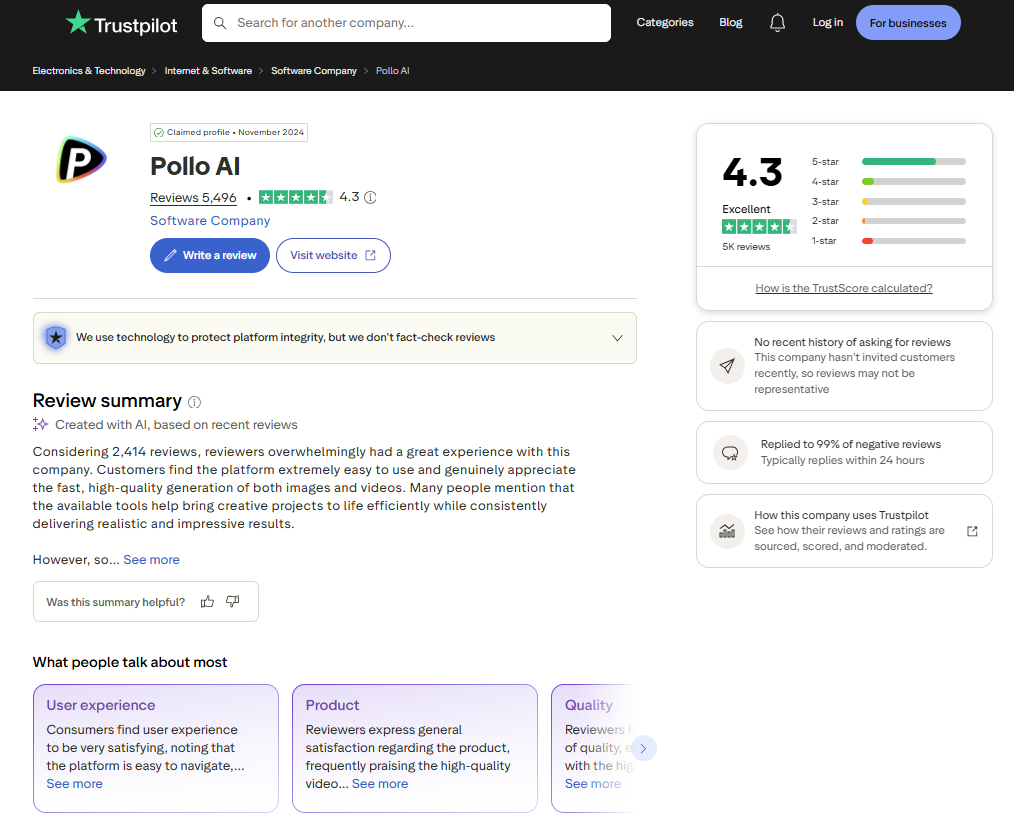
On 30 September 2026 Pollo AI held 4.3 out of 5 on Trustpilot across 5,495 reviews, 4,030 of them from the last 12 months. The spread is lopsided: 71% five-star and 11% one-star. Trustpilot also notes Pollo AI has no recent history of inviting reviews, so these are people who went there on their own.
The praise is about ease: simple prompts work, image-to-video is fast, and support answers. The 1- and 2-star reviews posted in September 2026 mostly tell one story: the video ignored part of the prompt, and the credits were spent anyway. Graciela Hernández (28 Sep 2026) asked for a multi-step mold-making process and got a result she called disappointing, "especially considering that it cost 20 credits." Sheridan Westphal (11 Sep 2026) rated the rendering highly but said the content filter can stop a render over one harmless word.
What this means for you: budget two or three tries per shot, and keep prompts to one subject and one clear action. That matches what I saw. My single-action lifestyle prompt worked on the first real run.
Who Pollo AI is for, and who should skip it?
Pollo AI is for you if:
You already make short video ads and want to try several models without paying for each one separately.
Your products are simple to show, like a cup, a bottle or a bag, where one clean photo is enough reference.
You also need listing images, flat lays or ghost mannequin shots from the same account.
You can commit to one tier for a few months, because extra credit packs only come with Ultra and unused credits expire.
Skip Pollo AI, or wait, if:
You want to test for two weeks before deciding. The refund closes at 3 days or 50 credits.
You ship ads in bursts, heavy one month and quiet the next. Unused credits expire each cycle.
You need help deciding what the ad should say. The tools generate from your brief, and the angle is yours to supply.
Your product has fine detail, like printed labels or jewelry clasps, and must be exact on the first try. Reviewers describe retries, and every retry is credits.
The lesson from any multi-model tool: choose the shot before the model
Every multi-model platform sells the same thing: all the models, one bill. What it really does is move the hardest decision from the vendor to you. A single-model subscription already picked the model. A platform like Pollo AI hands you twenty and charges for every wrong pick.
Split the ad into shots first, each with one job (hook, product proof, motion, end card).
Test every shot on the cheapest model first, silent, at the lowest resolution your placement accepts.
Keep the prompt identical across models so you are comparing models, not prompts.
Drop a model after two failed attempts on the same shot.
Then decide on billing. If the same model keeps winning most shots, a direct subscription to it is simpler to budget. If different shots keep picking different models, Pollo AI is earning its fee.
Pollo AI alternatives for ecommerce video ads
Each of these closes a different job. None copies Pollo AI's mix of a wide model shelf, seller apps and an agent in one account.
Tool
Entry price (checked 30 Sep 2026)
Best for
Pick it over Pollo AI when
Promer AI
Free plan (~30 credits) covers a static ad; video needs a paid plan
Ads built from the product page and proven ad patterns
You want the ad's angle and script worked out, not just the clip
Pollo AI
Lite $15 a month, 400 credits
Trying many video models on product clips
n/a
Higgsfield
Starter $15 a month billed annually, 200 credits
Cinematic clips and camera moves
You care more about camera control than seller apps
Creatify
Free plan (10 credits); Starter $39 a month
Avatar-led UGC ads from a product URL
Most of your ads are a person talking to camera
Promer AI, for ads built from product context
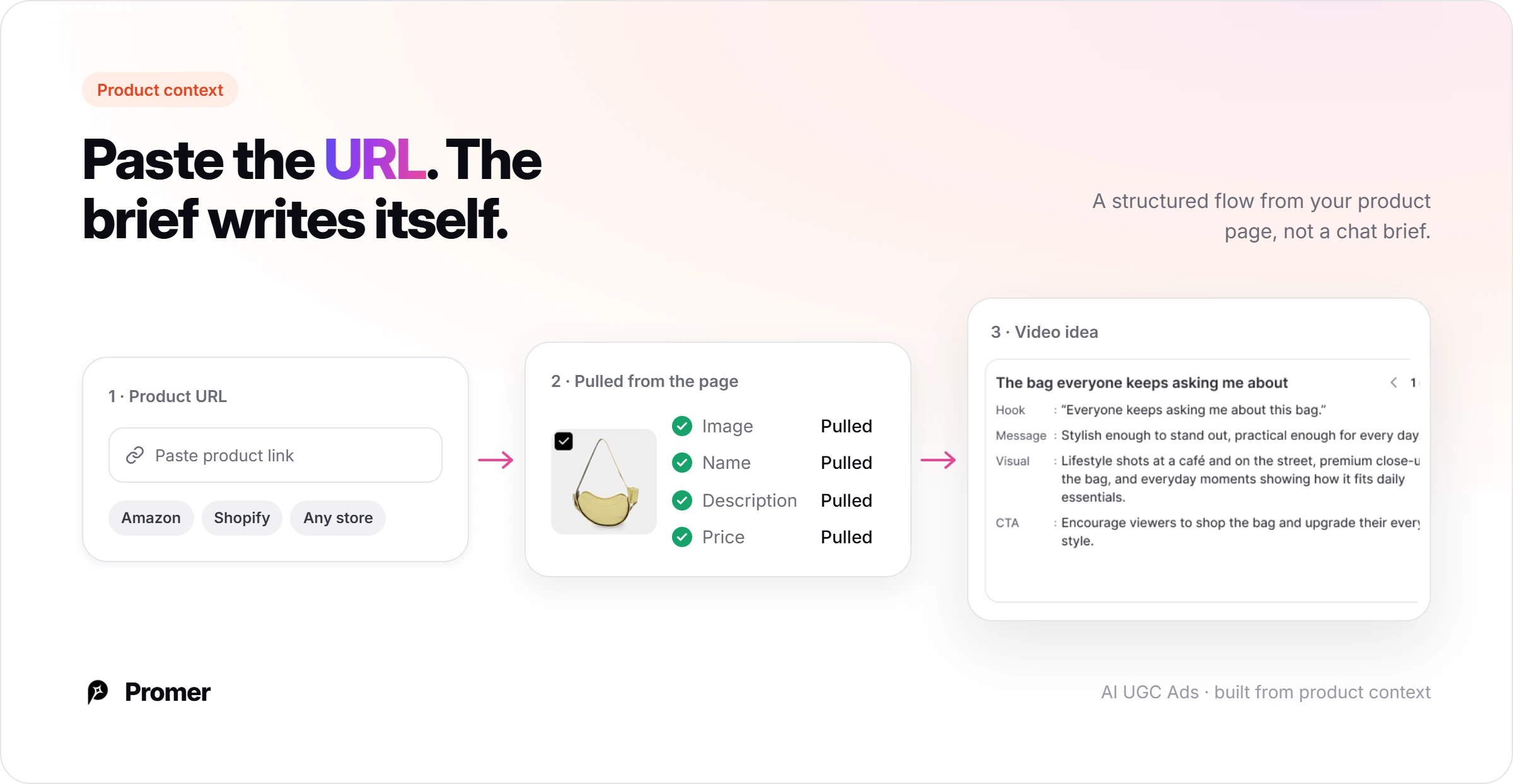
Promer AI answers a different question. Pollo AI asks which model should render your brief. Promer AI starts one step earlier: paste a product URL from Amazon, Shopify or any store, and it pulls the product image, name, description and price, then builds ads from that context and from ad structures already working in the market.
Set against this review's own findings on Pollo AI, the differences that matter most:
One flow, not 20-plus models to test. Pollo AI hands you a model picker and the job of finding which one fits each shot. Promer AI's AI UGC video generator uses one generation flow built specifically for UGC-style ads, with the chosen format doing the job Pollo AI leaves to model choice.
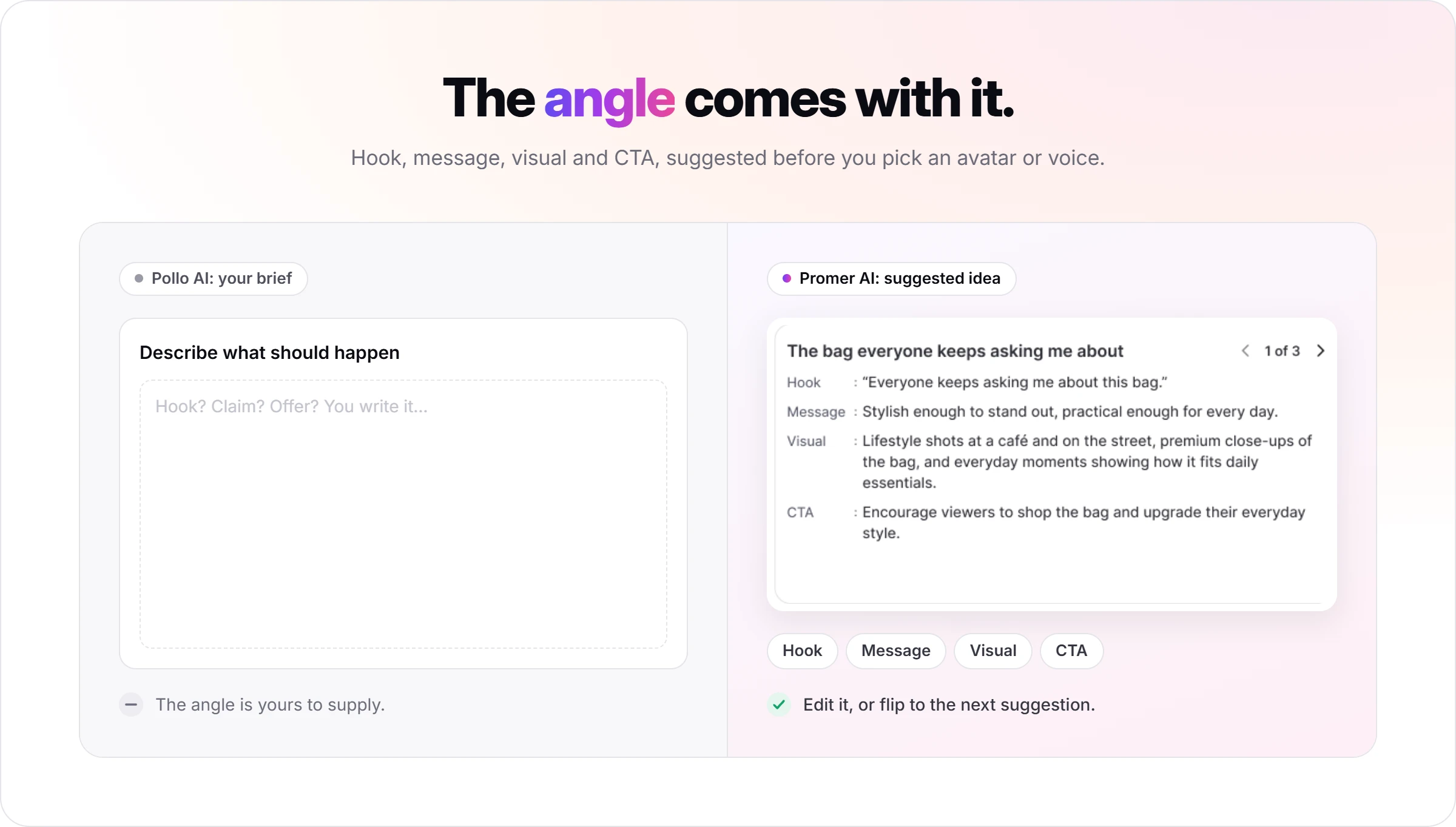
The angle is supplied, not left to you. This review's own verdict on Pollo AI notes its tools "generate from your brief, and the angle is yours to supply." Promer AI suggests the hook, message, visual, and CTA for the format you pick, before you choose an avatar or voice.
Built from the product page, not a model-agnostic brief. Paste a product URL and Promer AI pulls the image, name, description, and price before generating, the same product-first starting point Pollo AI's own URL to Video Ads reaches for, but through a chat brief instead of a structured flow.
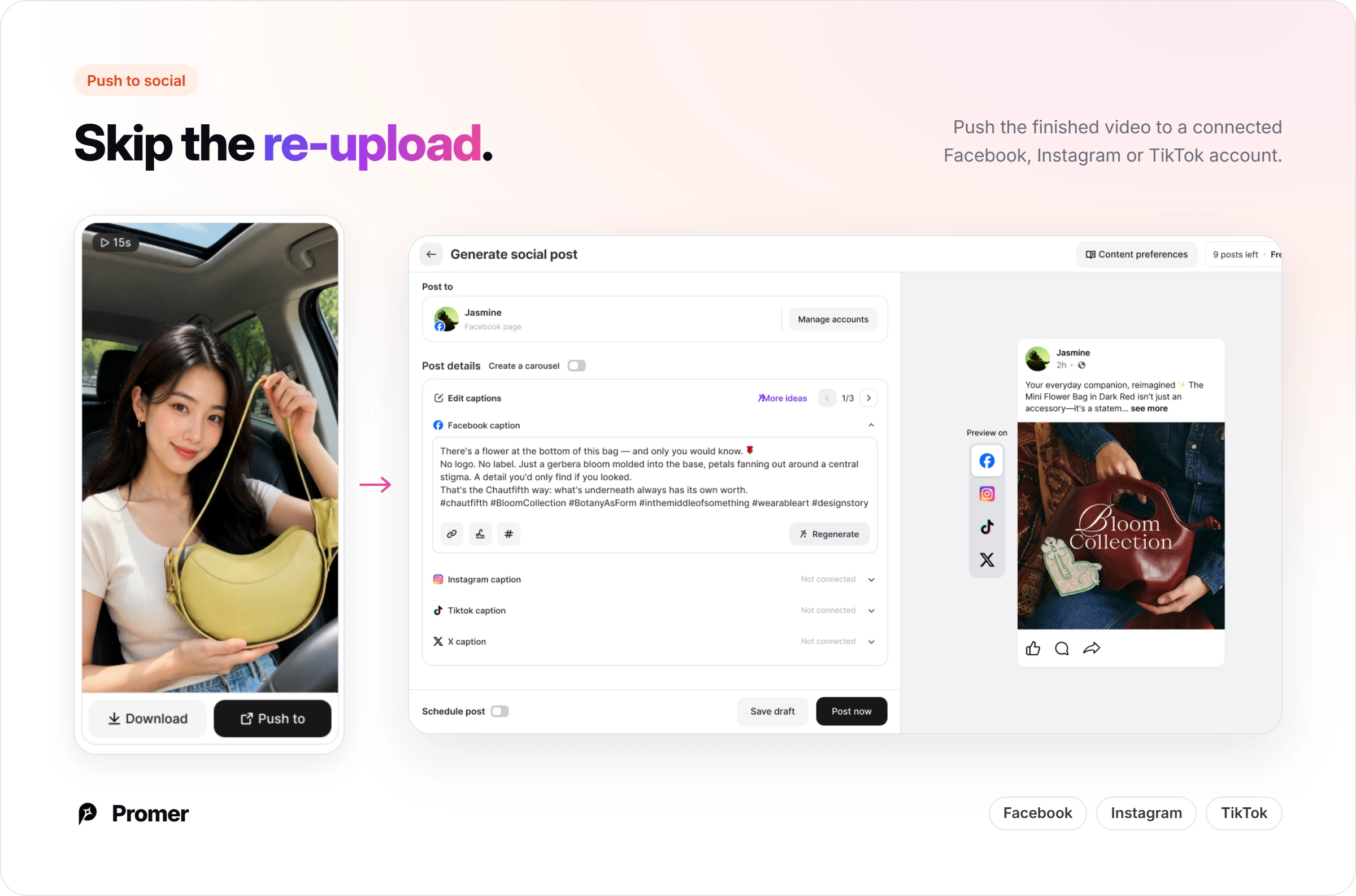
Publish without the download-reupload step. Push the finished video straight to a connected Facebook, Instagram, or TikTok account from the same screen it was generated on.
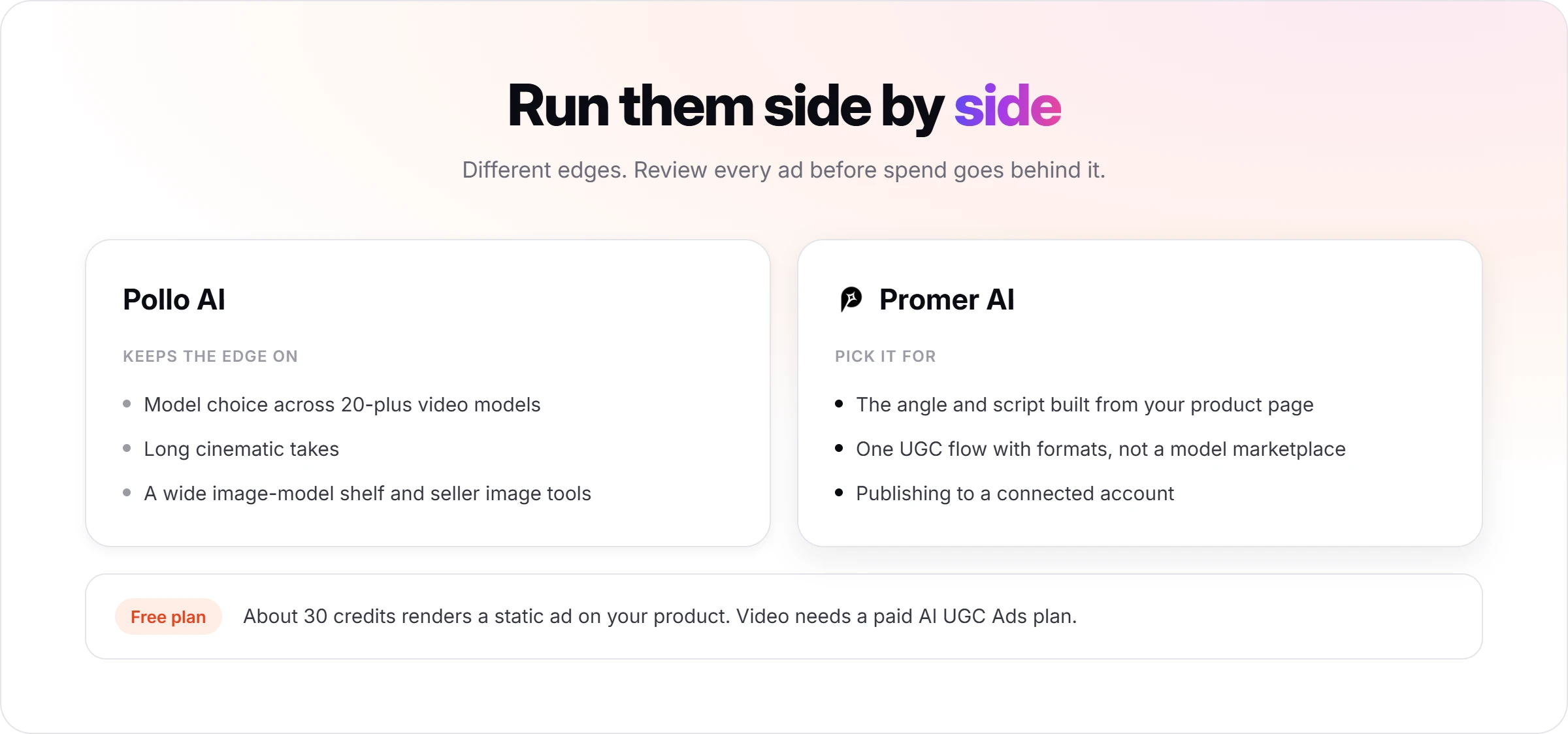
Free credits cover a static ad, not video. The Free plan's roughly 30 credits render a static ad for the same product; reaching a publishable AI UGC Ads video needs a paid plan.
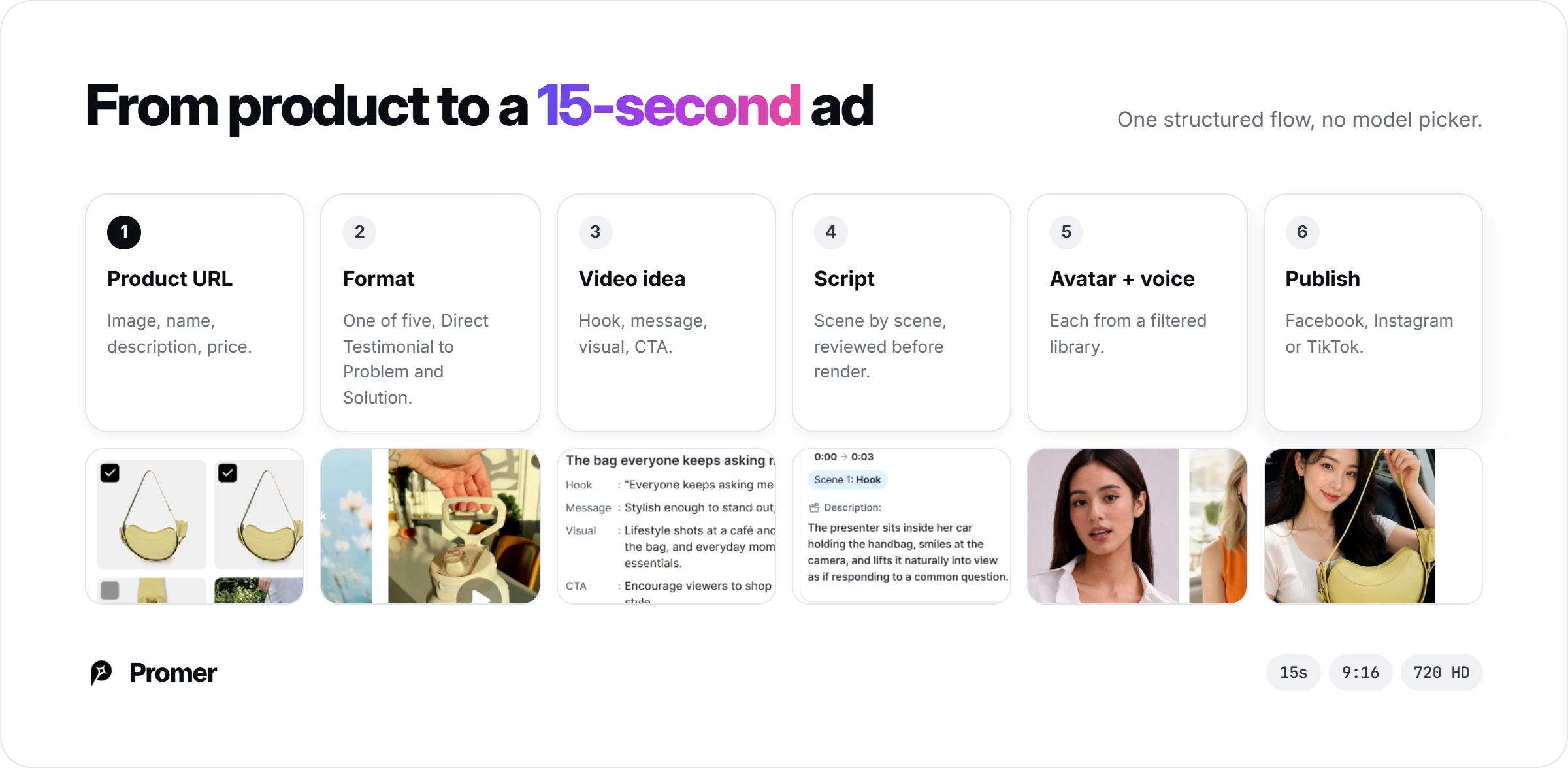
For a UGC-style ad without a camera or a creator, the flow runs: start from the product and up to 8 angle images, pick a format (Direct Testimonial, Voiceover Product Review, POV Product Demo, Problem and Solution, or Routine or Day in the Life), review the AI-suggested idea, choose an AI avatar and AI voice by gender, age, region, language and use case, then get a scene-by-scene script before rendering a 15-second, 9:16 video in 720 HD.
Promer AI reports 3,000+ merchants and 1M+ ads generated. Like any AI output, its creatives can contain mistakes and need a check before you put spend behind them.
Where Pollo AI is stronger: model choice, long cinematic takes, and a wide image-model shelf. Promer AI does not try to be a model marketplace. If what you need is a steady supply of product ads to test, where the angle comes from your product page rather than a blank prompt, an AI ad maker anchored to that product context fits the job better. The Free plan's roughly 30 credits are enough to test a static ad on the same product before paying for video credits.
Higgsfield, the cinematic model platform
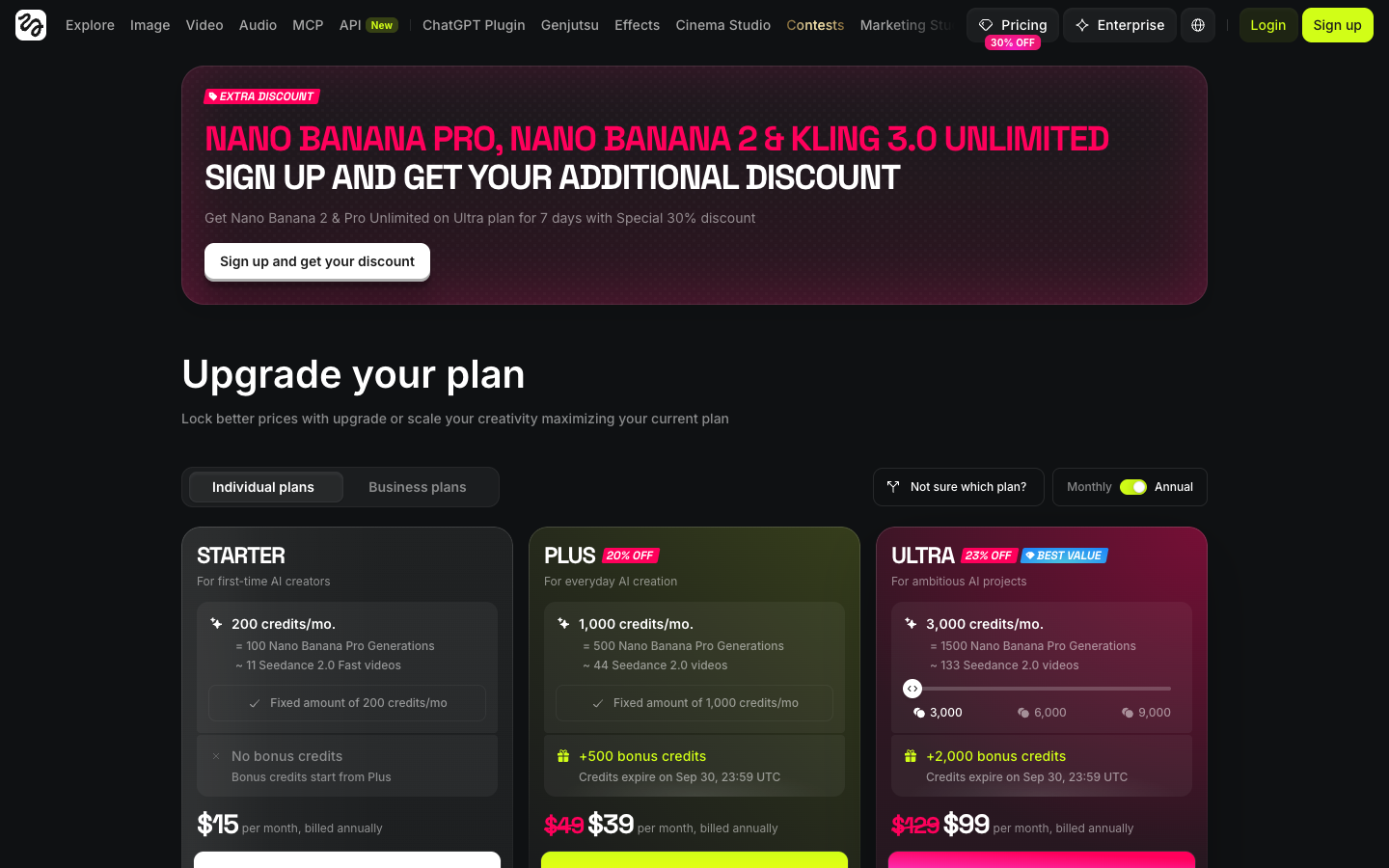
Higgsfield is the closest like-for-like swap: another multi-model platform, leaning toward cinematic video and camera moves, covered in more depth in our Higgsfield AI review. Starter is $15 a month billed annually for 200 credits and only includes Seedance 2.0 Fast and Mini. Plus is $49 monthly or $39 annually for 1,000 credits, and Ultra is $129 or $99 for 3,000. Stay with Pollo AI if its seller apps and product image tools are why you came.
Higgsfield pricing page. Recapture before publishing if the plans have changed since 30 Sep 2026.
Creatify, the avatar ad specialist
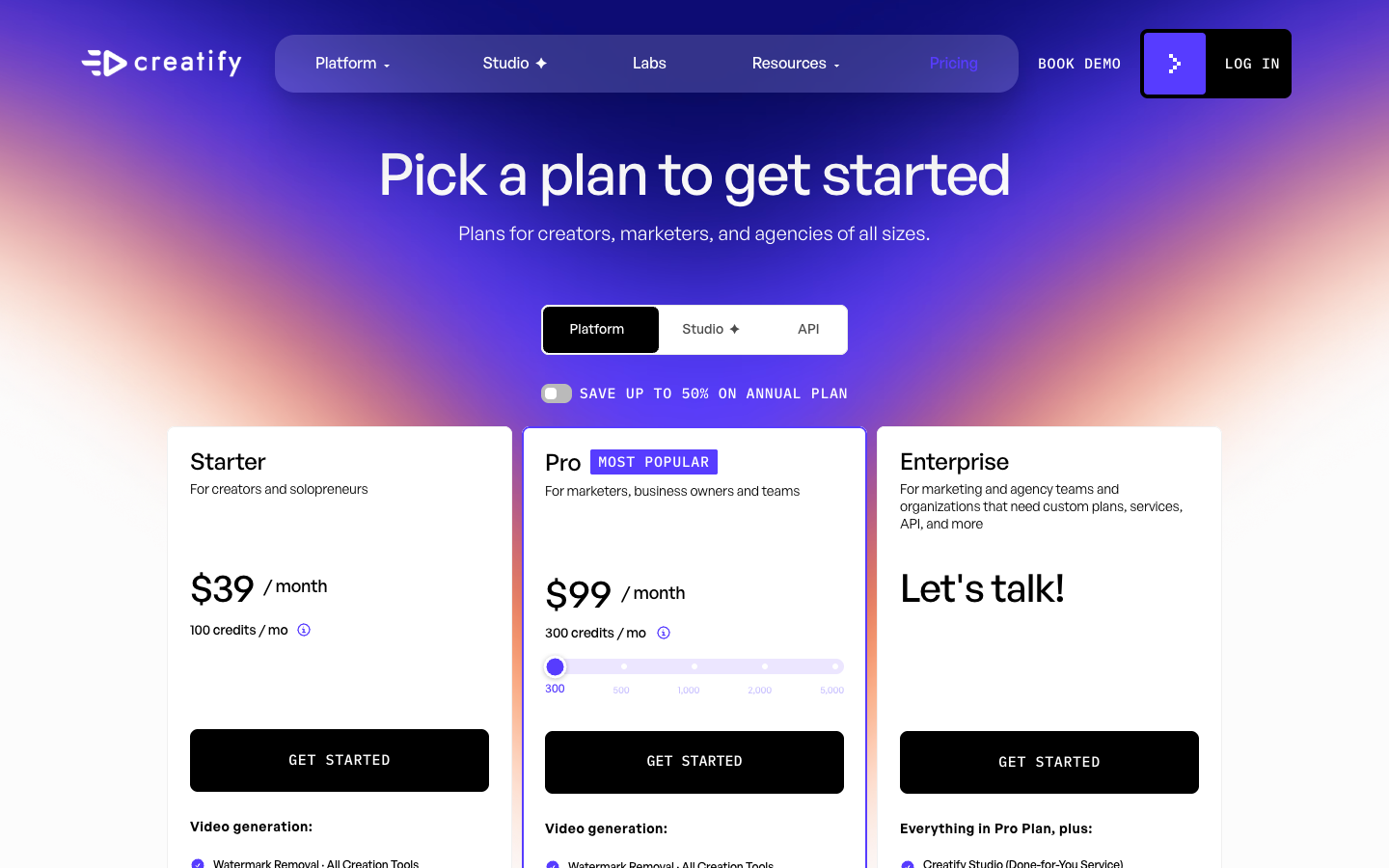
Creatify starts from a product URL and returns an avatar-led ad, with no model picker to learn, and our Creatify AI review covers its plans and credits in full. Its free plan gives 10 credits a month, about 2 video ads, with a watermark. Starter is $39 a month for 100 credits and 300 AI actors, and Pro starts at $99 with 1,500 actors. Pick Creatify if your ads are mostly talking-creator UGC. Pick Pollo AI if they lean on product motion and lifestyle clips.
Creatify pricing page, plans checked 30 Sep 2026.
Pollo AI review verdict: Worth it once you know your shots
Pollo AI kept my product intact on its cheapest model, in a studio shot and in a shot with a hand lifting it. The model picker, though, leaves the choice among 20-plus models to you, and the refund closes at 50 credits, so the learning happens on your own credits.
Before you pay, spend the 10 free credits like I did: one studio shot and one lifestyle shot of your real product, on Pollo 2.5, sound off. If both come back usable, Pro at $29 a month is a reasonable bet for a store that ships video weekly. If they do not, more credits on a pricier model will not fix a prompt problem. In that case, a tool that starts from your product page, like the alternatives above, is worth testing next.
FAQ
What do Pollo AI reviews say?
Pollo AI reviews are mostly positive, with a clear complaint about credits spent on prompts that were not followed. Pollo AI holds 4.3 out of 5 on Trustpilot across 5,495 reviews, with 71% five-star and 11% one-star, checked 30 September 2026. Reviewers praise ease of use and speed; critics mention prompts that were not followed and credits spent on outputs they could not use.
Is Pollo AI free?
Pollo AI is free to start, with 10 credits on sign-up. On 30 September 2026 those 10 credits bought two silent 4-second Pollo 2.5 clips at 720p, or one clip with sound. Free outputs carry a Pollo.ai watermark, and commercial use in ads is tied to paid plans, so the free credits are for testing your product, not for publishing.
How much does Pollo AI cost?
Pollo AI costs $15 a month for Lite (400 credits), $29 for Pro (800 credits) and $129 for Ultra (5,000 credits) on monthly billing. Annual billing lowers these, to $12, $14.50 and $99 a month on 30 September 2026. Unused subscription credits expire each cycle. Add-on credit packs are listed only on Ultra.
How many credits does a Pollo AI video cost?
A Pollo AI video costs from 4 credits to several dozen, depending on model, length, resolution and sound. A 4-second, 720p Pollo 2.5 clip cost 4 credits with sound off and 10 with sound on in my test. The model picker listed Wan 3.0 from 6 credits, MiniMax H3 from 10 and Seedance 2.5 from 24 on promotion.
Can I get a refund from Pollo AI?
Only on subscription credits, within 3 days, and only if 50 or fewer credits were used. Add-on credits are never refundable, and an approved refund can carry a fee of up to 6%. Mid-cycle cancellations and downgrades get no prorated refund. Requests go to [email protected] with the order number.
Can I use Pollo AI videos in paid ads?
Yes, Pollo AI's homepage FAQ allows commercial use, including ads, on paid plans. You keep ownership of what you generate, but Pollo AI takes a licence to submitted content and a perpetual one to anything you make public. You also need permission for any real person's likeness or voice, and AI content should be labeled where your ad platform requires it.
Is there a Pollo AI alternative built for ecommerce ads?
Yes, Promer AI starts from a product URL rather than a model picker. Promer AI pulls the product's image, name, description and price, then builds ads from that context, and its AI UGC Ads flow offers set formats such as Direct Testimonial and Problem and Solution with an AI avatar and AI voice. Pollo AI remains stronger for model variety and long cinematic takes.
Reference Sources
All pages accessed 30 September 2026.
Creatify. (n.d.). Pricing plans for best AI video generator. https://creatify.ai/pricing
Higgsfield. (n.d.). Pricing plans: Higgsfield AI video and image generator. https://higgsfield.ai/pricing
Pollo AI. (n.d.). Plans and pricing. https://pollo.ai/pricing
Huy Tran Quoc is the Head of Product Management at Promer AI, part of FireGroup Technology, where he leads product strategy and execution across a cross-functional team spanning product, engineering, design, QC, customer success, and prompt engineering.
Over the past decade, Huy has progressed from Product Manager to Senior Product Manager to product leadership, working at EngineThemes, Zalo, TIKI Corporation, and now FireGroup Technology, across ecommerce SaaS, social networking, marketplace, supply chain, and fintech.
At TIKI, Huy owned the strategic roadmap and P&L alignment for a multi-vertical portfolio and partnered directly with the C-suite to translate company vision into executable plans.