These Hailuo AI reviews notes are for you if your Reels and TikTok ads are still slideshows of the same 3 product photos, you can't book a video shoot, and you keep seeing Hailuo clips in your feed and wonder what one would cost you.
On October 6, 2026, I opened a free Hailuo account and set up a vertical product shot for a green six-panel cap: settings, reference, prompt, and credits.
Hailuo AI is a shot generator: worth paying for if you bring the brief and an editor, and a poor buy if you need a finished ad.
Skip to the pricing section for plan costs, or to Step 4 for copy-paste prompts.
Why you can trust these Hailuo AI reviews
I sell online and make my own ad creative, so I judge a video tool by one test: could this clip open an ad next to my product page without misleading anyone? I looked at Hailuo signed out, then signed in on a new account with its free credits and one real product photo.
Every setting, credit count, and screen below comes from that session on October 6, 2026. Nobody paid for this review.
Key takeaways
- Change the defaults first. The form opens at 21:9, 2K, and 5 seconds for 60 credits. At 9:16 and 768p, the same clip costs 35.
- 80 free credits is 2 test clips. New accounts get one-time trial credits; plan what each of your 2 tests should prove.
- Free clips wait in line. The card said "1minute wait"; my clip was still queued after 20 minutes.
- No 4:5 option. Ratios run from 21:9 to 9:16, so Meta feed ads need 1:1 or a crop.
- Paid plans start at $10.50 a month. Standard buys 1,000 credits, about 28 test clips at 768p.
What Hailuo AI is in 2026: a MiniMax H3 front end built for creators
Hailuo AI is a browser and app video generator that runs MiniMax's models, currently MiniMax H3. You add up to 12 references (images, video, or audio), describe the shot, and get a 4 to 15 second clip. It makes footage; captions, offers, and the ad itself happen in your editor.
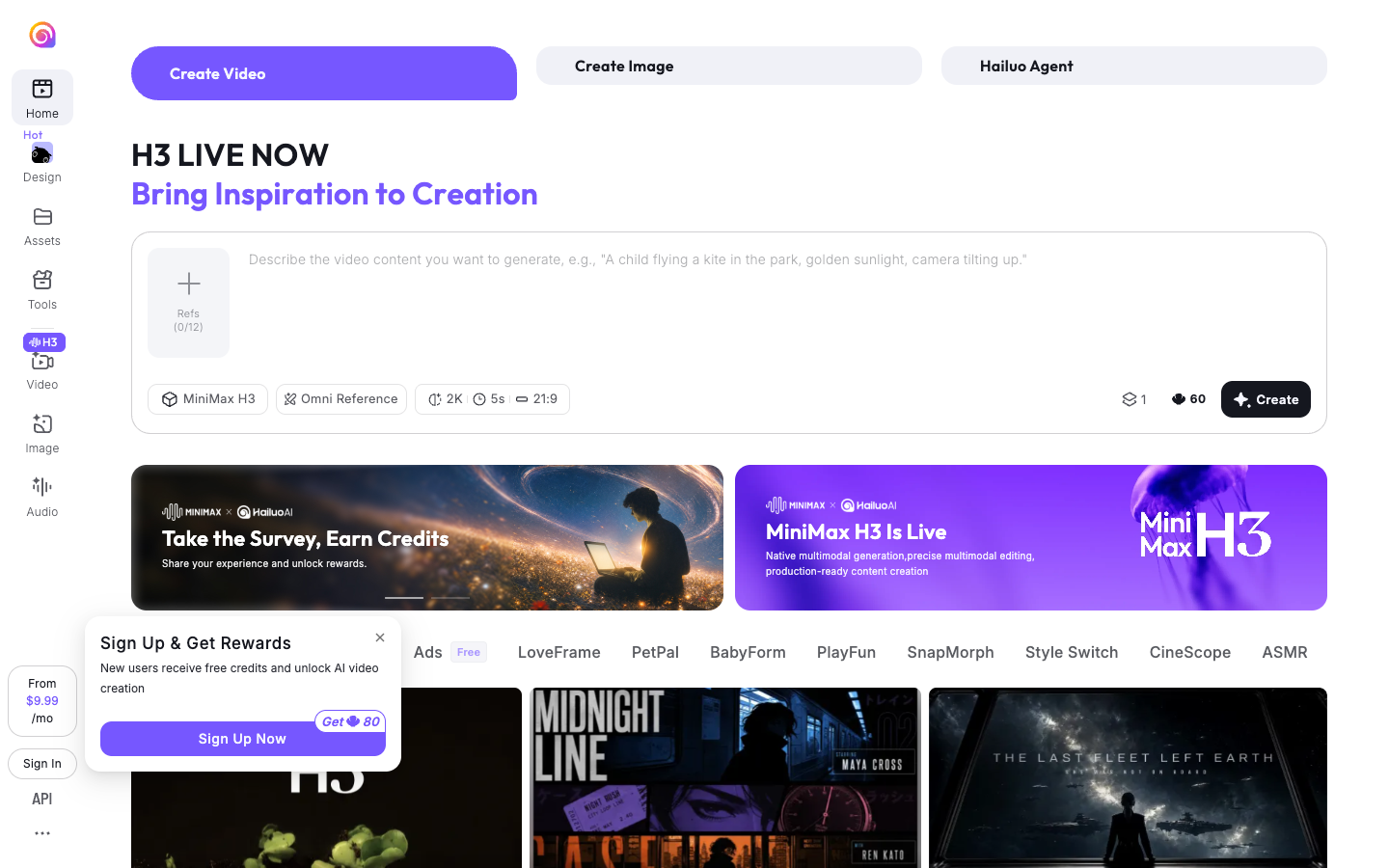
The site lives at hailuoai.video. The top of the home page offers Create Video, Create Image, and Hailuo Agent, with a prompt box, a "Refs (0/12)" tray, and a settings row underneath.
MiniMax announced "MiniMax H3 Is Now Open Source" on August 3, 2026. The in-app banner pitches H3 as built "from film and ads to games, brands, and e-commerce", with text, image, audio, and video references in one prompt.
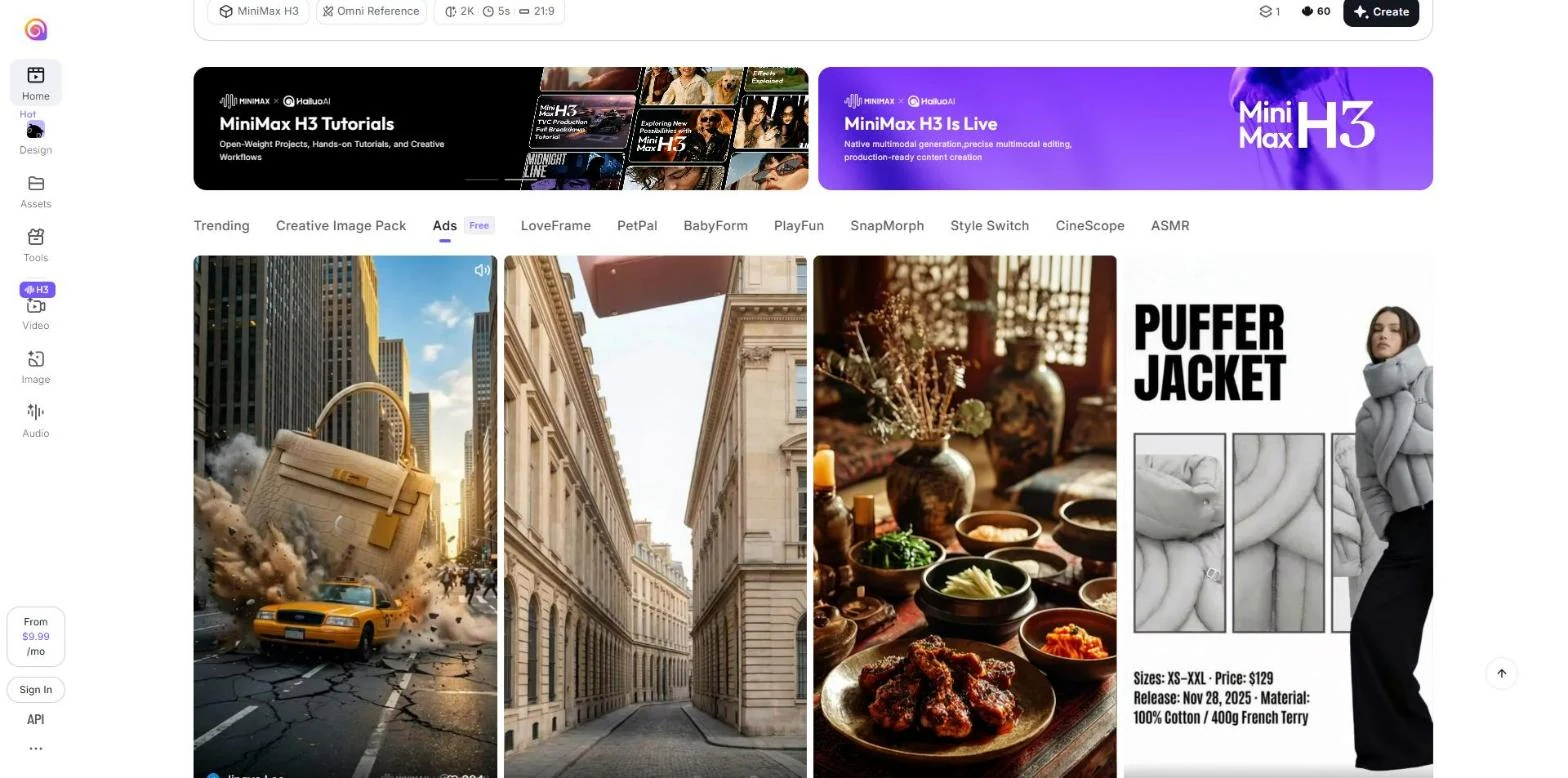
The homepage template library has 1 ad-flavored tab, named Ads, marked Free. It opens Hailuo's AI ad generator page, with product-led templates such as a handbag crashing into a city street and a puffer jacket spec card with sizes and price. Browse it for shot ideas even if you never use a template as-is.
Hailuo AI video generator review: from product photo to ad clip
The steps below follow the signed-in Create Video form on October 6, 2026. The example product is a forest green six-panel cap with a cream embroidered patch, so swap in yours.
Step 1: Pick the product photo Hailuo will work from
Hailuo's terms warn that generated content "may be inaccurate, incomplete, misleading, fictional, or inconsistent with real persons, objects, places". For a product, the details that must stay exact are the ones to make large and sharp in the photo. I used a plain studio shot of the cap at a three-quarter angle, patch facing forward.
Use this checklist before upload:
- The product fills at least a third of the frame, with the label or logo facing the camera.
- The background is plain, or it is the real setting you want the clip to live in.
- No price stickers, text overlays, or badges on the image. On-screen text goes on later in your editor, where it stays sharp.
- The color matches your store listing, because shoppers compare the ad with the product page.
Step 2: Fill the reference tray (Hailuo AI character consistency review)
"Refs (0/12)" sits above the prompt box. After upload, the box reads: "Upload images, videos or audio to freely combine characters, scenes, actions and music. e.g. @Image1 as start frame, @Video1 for motion, @Audio1 as soundtrack".
That @ naming is Hailuo's tool for consistency: you tell it which file is the product and which is the motion. I used my cap photo as the product reference, not the start frame, because a grey studio frame wasn't where I wanted the clip to begin.
For a product, a sensible tray looks like this:
- @Image1: the hero product shot, named as the product in the prompt.
- @Image2: a second angle showing the side or base, so a turning shot has something true to show.
- @Video1: a short phone clip of the motion you want, such as a hand lifting the product, used only for motion.
- @Audio1: leave it empty unless you own the track. The terms make you responsible for every right in what you upload.
Step 3: Change the settings the form picks for you
Click the settings row under the prompt and a menu opens with 3 choices. This is what it offered on October 6, 2026:
| Setting | Options | Pick for a Reels or TikTok ad |
|---|---|---|
| Ratio | Auto, 21:9 (default), 16:9, 4:3, 1:1, 3:4, 9:16 | 9:16 |
| Resolution | 768p, 2K (default) | 768p for tests, 2K for the winner |
| Duration | 4 to 15 seconds (5s default) | 4 to 6 seconds per shot |
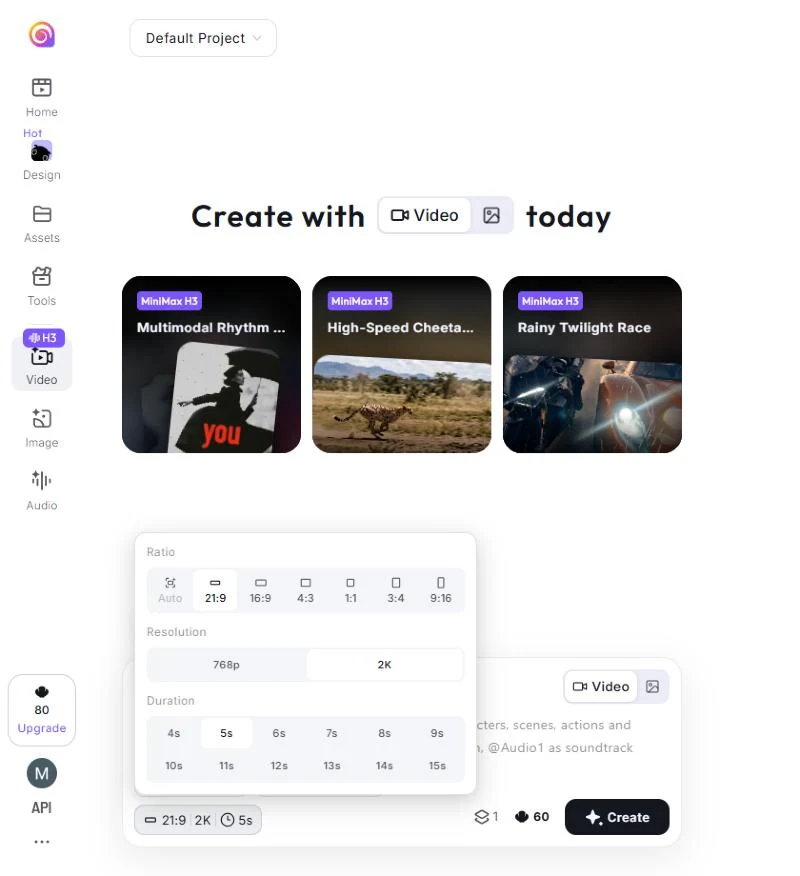
The 21:9 ratio is a cinema frame. Cut a 9:16 Reels version out of a 21:9 clip and you keep about a quarter of the width, which can crop the product out of its own shot. The list has no 4:5, so for the Meta feed pick 1:1 or crop a 3:4 clip.
Hover over 768p and Hailuo gives its own advice: "Lower cost, ideal for multiple creative attempts. Upscale to 2K after approval." A 5-second clip costs 60 credits at 2K and 35 at 768p, so test at 768p and pay for 2K only on the shot you'll run.
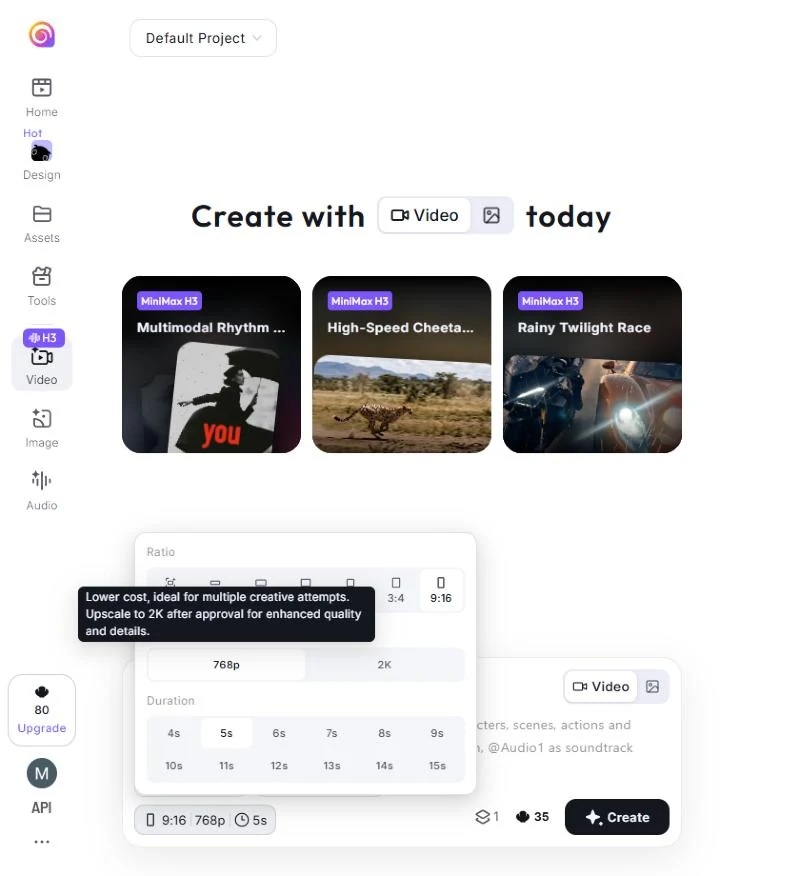
One gotcha: after a page reload, the form went back to 21:9 and 2K. Check the settings row every time before you press Create.
Step 4: Write the prompt in the order Hailuo's own example uses
Hailuo's homepage prompt example reads: "A child flying a kite in the park, golden sunlight, camera tilting up." It runs subject and action, then place, then light, then 1 camera move. For a product, add one more part at the front: a product lock that names the reference.
This is the prompt I used for the cap, part by part:
| Part | What I wrote |
|---|---|
| Product lock | @Image1 is the product: a forest green six-panel cotton cap with a cream square embroidered patch on the front. Keep the cap's shape, color and patch exactly as in @Image1. |
| Place and light | The cap rests on a mossy rock at a misty pine forest trailhead at sunrise, golden light through the trees. |
| Action | A hiker's hand enters the frame, picks up the cap and lifts it toward the camera so the patch faces the lens. |
| Camera and finish | Slow push-in, shallow depth of field. Natural documentary look, no text on screen. |
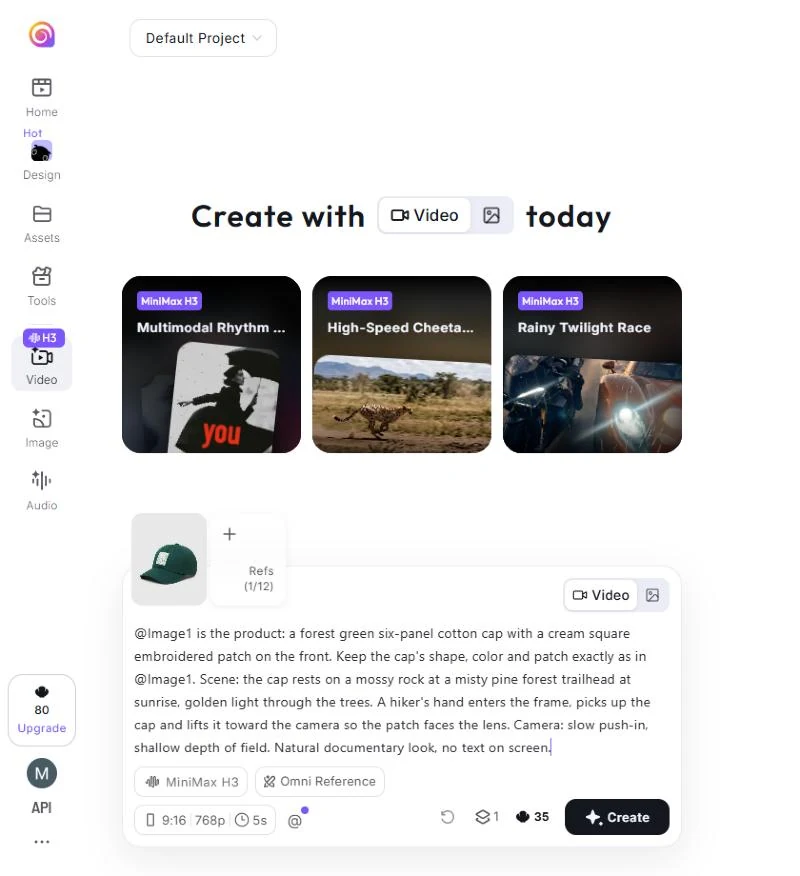
Each prompt names the product with the same words, because switching "cap" to "hat" halfway through a set invites a different object. These 6 prompts follow the same order for a full set of product ad shots:
- Problem hook, no product in frame. "A trail runner squints into harsh low sun, shading their eyes with a hand, sweat on the forehead, handheld camera with slight shake."
- Product reveal, for the opening shot. "@Image1 is the product. It rests on a mossy rock at a misty trailhead at sunrise, slow push-in toward the front patch, shallow depth of field."
- Product in use, for the middle shot. "@Image1 worn by a hiker who pulls the brim down against the sun and keeps walking, golden backlight, tracking shot from the side."
- Texture b-roll, for cutaways. "Macro shot of the embroidered patch on @Image1, light grazing the stitches, slow rack focus, static camera."
- Lifestyle shot, for the offer. "@Image1 on a wooden bench beside a tin mug and trail map, morning light, slow tilt up, empty sky in the top third."
- Test variant of prompt 2, one change only. Same prompt, with "warm evening lamp light" in place of "sunrise".
Each test is easier to read with 3 habits. Use 1 camera move per prompt, and keep claims, prices, and offers out of it, since on-screen text belongs in the editor. Change 1 variable per variant, so you know what each test measures.
Step 5: Queue, then check every clip (Hailuo AI video review)
Pressing Create took my balance from 80 to 45 credits straight away. The card then read "Non-member queue: 1minute wait", and the clip was still in that queue more than 20 minutes later, reload or not.
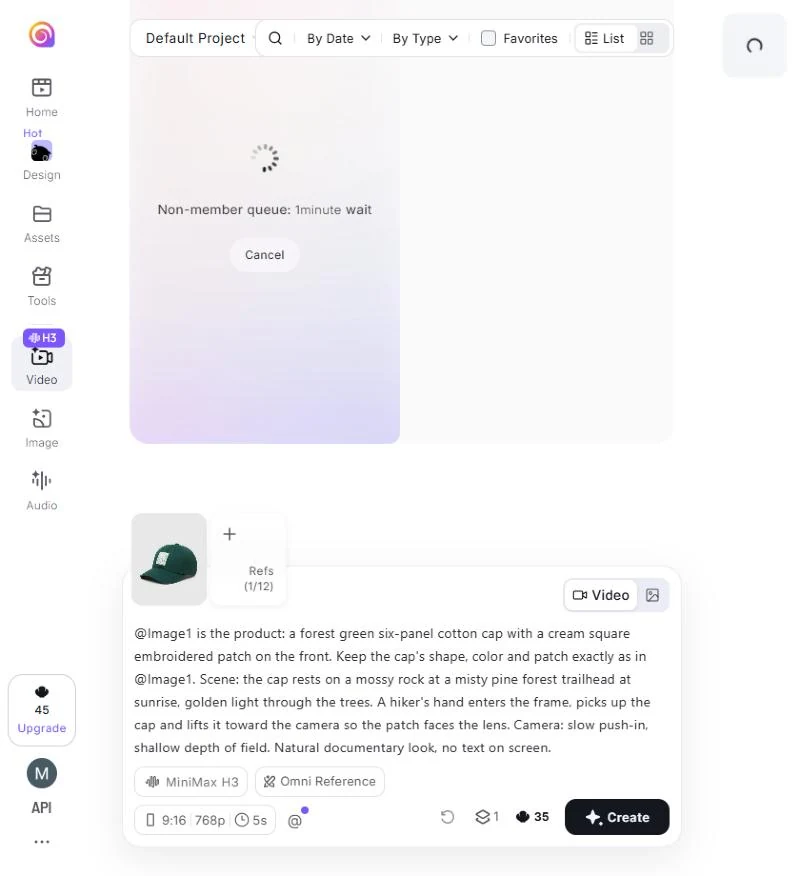
That means 2 things for you. On free credits, queue both test clips and come back later instead of iterating live. And if you test hooks the same day, the queue is the most practical reason to pay for a plan.
When the render finally completed, I downloaded the 5-second 9:16 vertical clip to evaluate how MiniMax H3 handled product fidelity and human motion. Hailuo's terms put the verification squarely on you: you "must independently review and verify User Generated Content before relying on it or using, publishing, distributing" it.
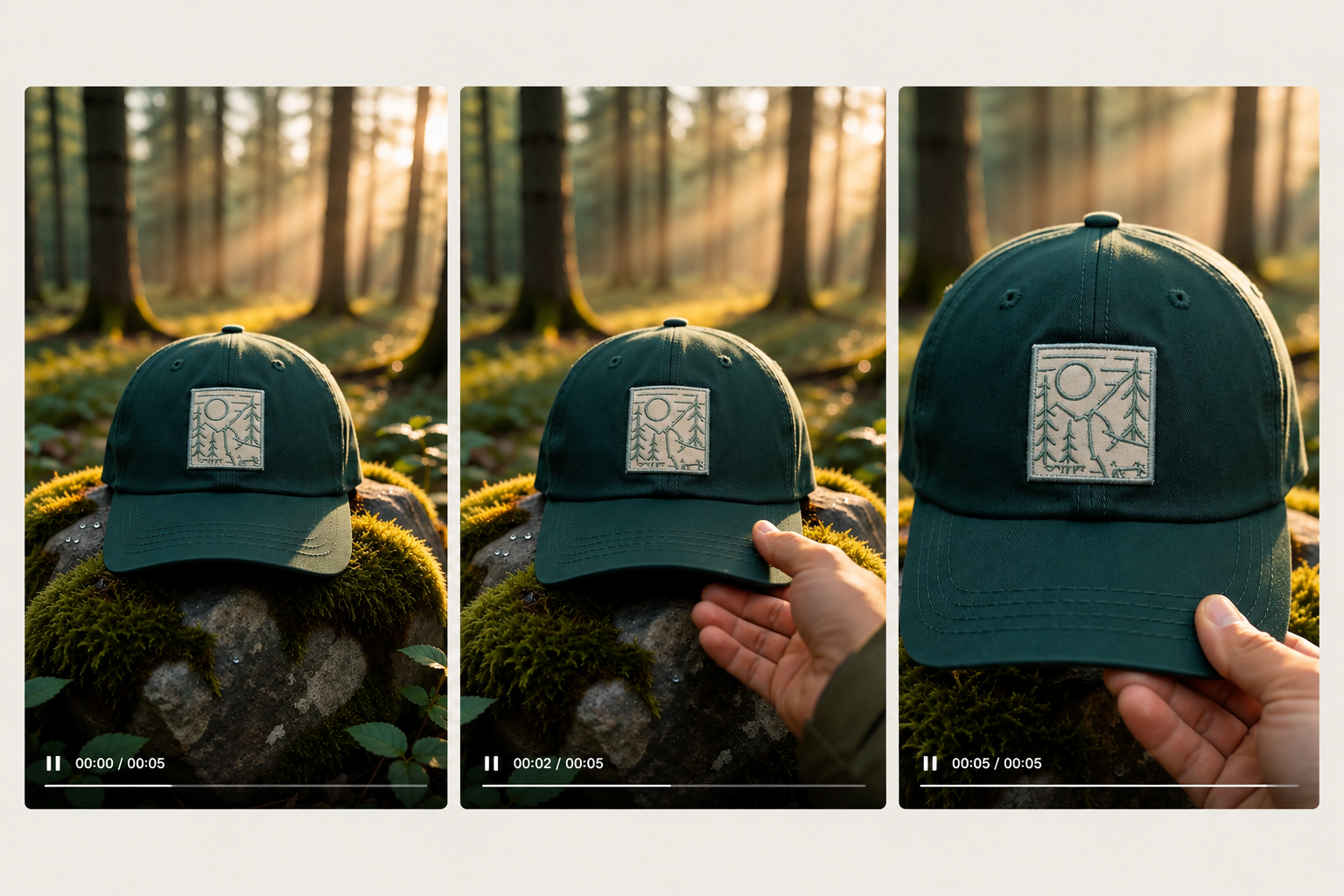
What the test clip delivered:
- Opening (0:00–0:01): The forest green cap and cream patch strictly matched @Image1, framed naturally on the mossy rock under golden morning light.
- Motion physics (0:02–0:03): The hiker's hand entered smoothly with accurate anatomy—all five fingers held the brim without rubbery warping.
- Close-up inspection (0:04–0:05): The push-in preserved stitch texture on the patch, with the free-tier "MINIMAX | Hailuo AI" watermark visible in the lower right corner.
Before you push any generated clip to your ad editor, run it through this quality checklist:
- Shape and proportions match the real product from every angle shown.
- The logo and label are either legible and unchanged, or out of shot. A misspelled brand name means a reshoot.
- Hands have 5 fingers and hold the product the way a person would.
- Nothing in the motion implies a feature the product lacks.
- The first second shows something happening, since that's often all a scroller sees.
- Any AI label or watermark is still there. The terms forbid removing one unless your plan includes clean exports.
Step 6: Build the ad around the clip outside Hailuo AI
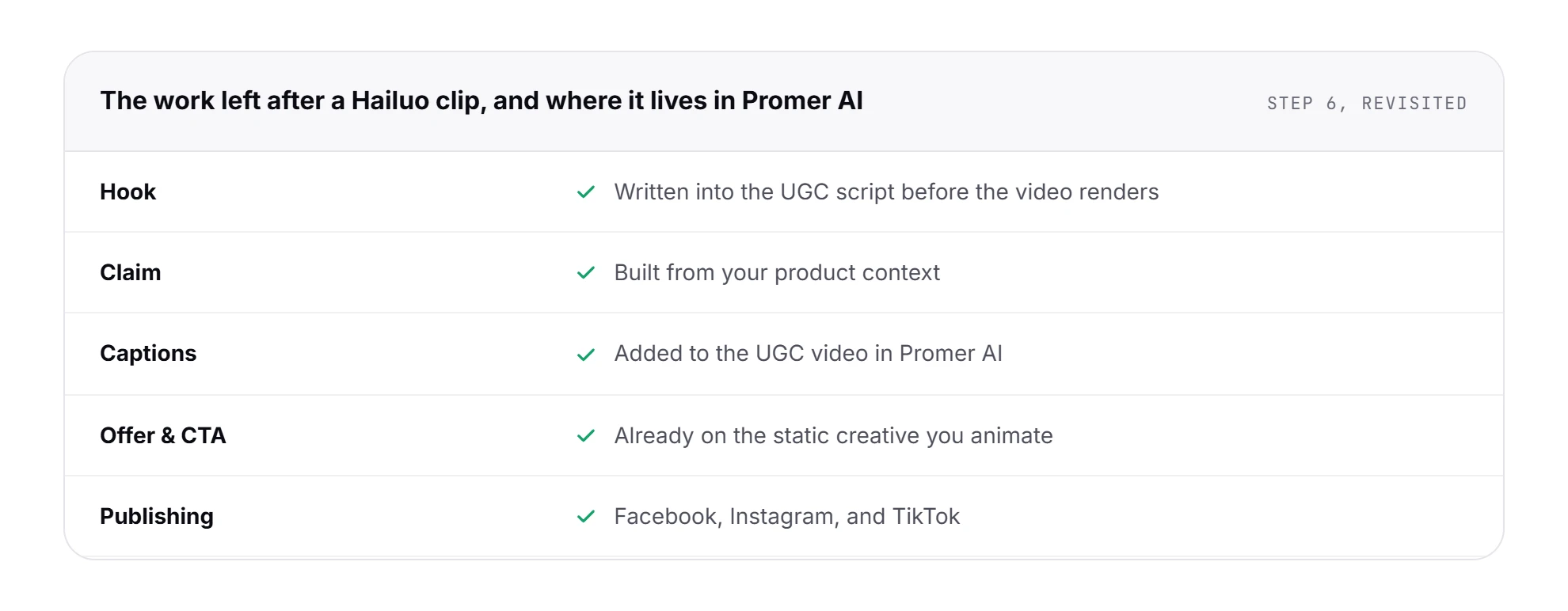
What comes out of Step 5 is footage. Hailuo's Create Video form has no captions, offer fields, product URL import, or publishing to Meta or TikTok. The work that remains, in the order a paid social ad needs it:
- The hook: the first 2 seconds of text or voice, written before the shots were chosen.
- The claim: 1 benefit, said plainly, with the clip as the proof.
- Captions, for viewers scrolling with the sound off.
- The offer and call to action, on screen in the last shot.
- Ratio versions: 9:16 for TikTok and Reels, 1:1 or a 4:5 crop for the Meta feed.
- An AI-content disclosure where the law or the ad platform requires it. Hailuo's terms make that your job.
In this creative workflow, Hailuo AI is the camera crew, and your editor is where the ad gets written.
Hailuo AI pricing: what each plan buys in test clips
Hailuo AI costs $10.50 a month for Standard (1,000 credits), $38 for Pro (4,500), $89 for Master (10,500), and $216 for Max (27,000), billed monthly on October 6, 2026. Yearly billing lowers Standard to $8.40 a month. New accounts get one-time free trial credits.
Signed out, Hailuo shows only a "From $9.99 /mo" label. Signed in, the Upgrade button opens the full plan page:
| Plan | Monthly | Yearly | Credits a month | 5s test clips at 768p |
|---|---|---|---|---|
| Free | $0 | $0 | One-time trial credits (80 on my account) | 2 |
| Standard | $10.50 (listed $14.99) | $8.40 a month ($100.80 a year) | 1,000 | About 28 |
| Pro | $38 (listed $54.99) | $30.40 a month ($364.80 a year) | 4,500 | About 128 |
| Master | $89 (listed $119.99) | $71.20 a month ($854.40 a year) | 10,500 | About 300 |
| Max | $216 | $184 a month ($2,208 a year) | 27,000 | About 771 |
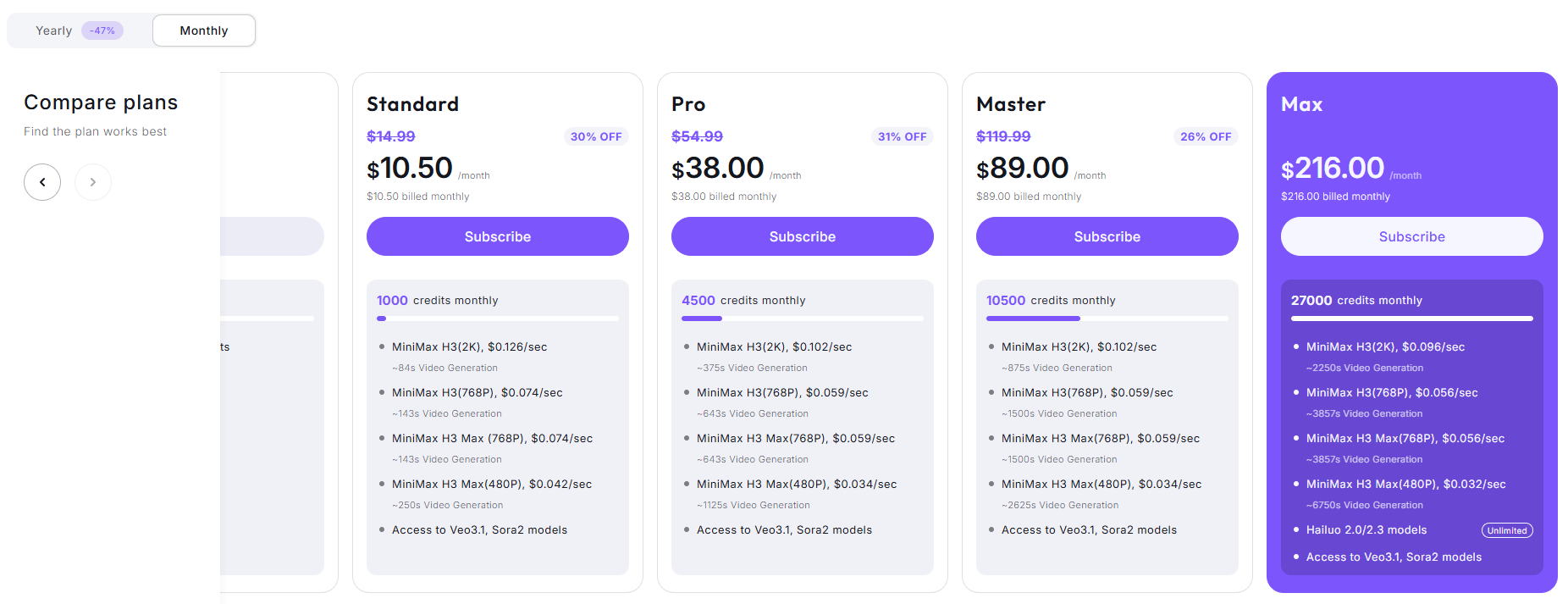
The plan page lists the same model in seconds: on Standard, 1,000 credits cover about 84 seconds of MiniMax H3 at 2K or 143 seconds at 768p. The Free plan is "Hailuo models only"; paid plans add Veo 3.1 and Sora 2. Free and Standard run 1 task at a time, Pro and up run 2.
Cost per usable clip: the math for one 15-second ad
A credit-based price is only comparable once you turn it into cost per usable clip. The sum: cost per usable clip = credits per clip × attempts per usable clip.
Scenario: your 15-second ad needs 3 shots and each shot takes 2 tries to pass Step 5. That's 6 clips at 35 credits, or 210 credits per ad at 768p, so Standard covers about 4 ads a month before you upscale the winners.
The attempts number moves the result most. A hook test with 5 different shot lists costs 5 times the footage, while 5 hooks laid over the same footage cost no extra credits.
Hailuo AI terms to read first: license, watermark, commercial use
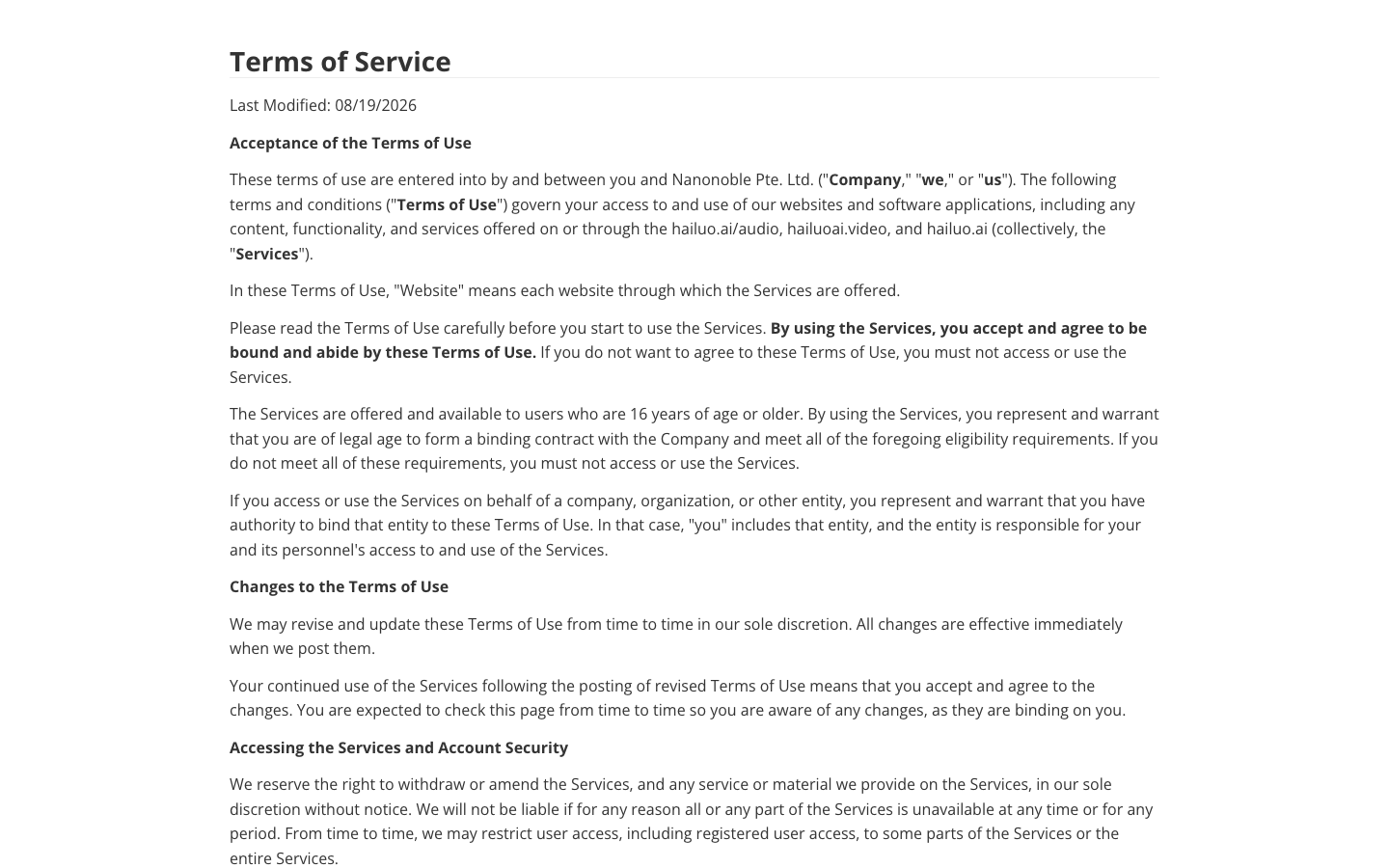
Hailuo's Terms of Service were last modified on August 19, 2026. For paid ads, 3 clauses matter.
The license comes first. The company says "We do not claim ownership" of what you upload or generate. In the same section, you grant it "a royalty-free, perpetual, irrevocable, worldwide, non-exclusive right" to use, license, modify, publish, and "derive revenue or other remuneration from" that content. Keep unreleased product designs and client assets out of the Refs tray.
Commercial use is "at your own risk". You are responsible for rights and consents "relating to intellectual property, privacy, publicity, image, voice, and personal data", and for following Meta's and TikTok's ad policies.
You "must clearly disclose that it is AI-generated or manipulated" where the law requires it or viewers could be misled, and you must not "remove, obscure, alter, or disable any watermark, metadata, label" Hailuo applies. The plan comparison has a "Watermarks removal" row, so check it before you buy if your ads need a clean frame.
Hailuo AI app and face photos: what the privacy policy promises
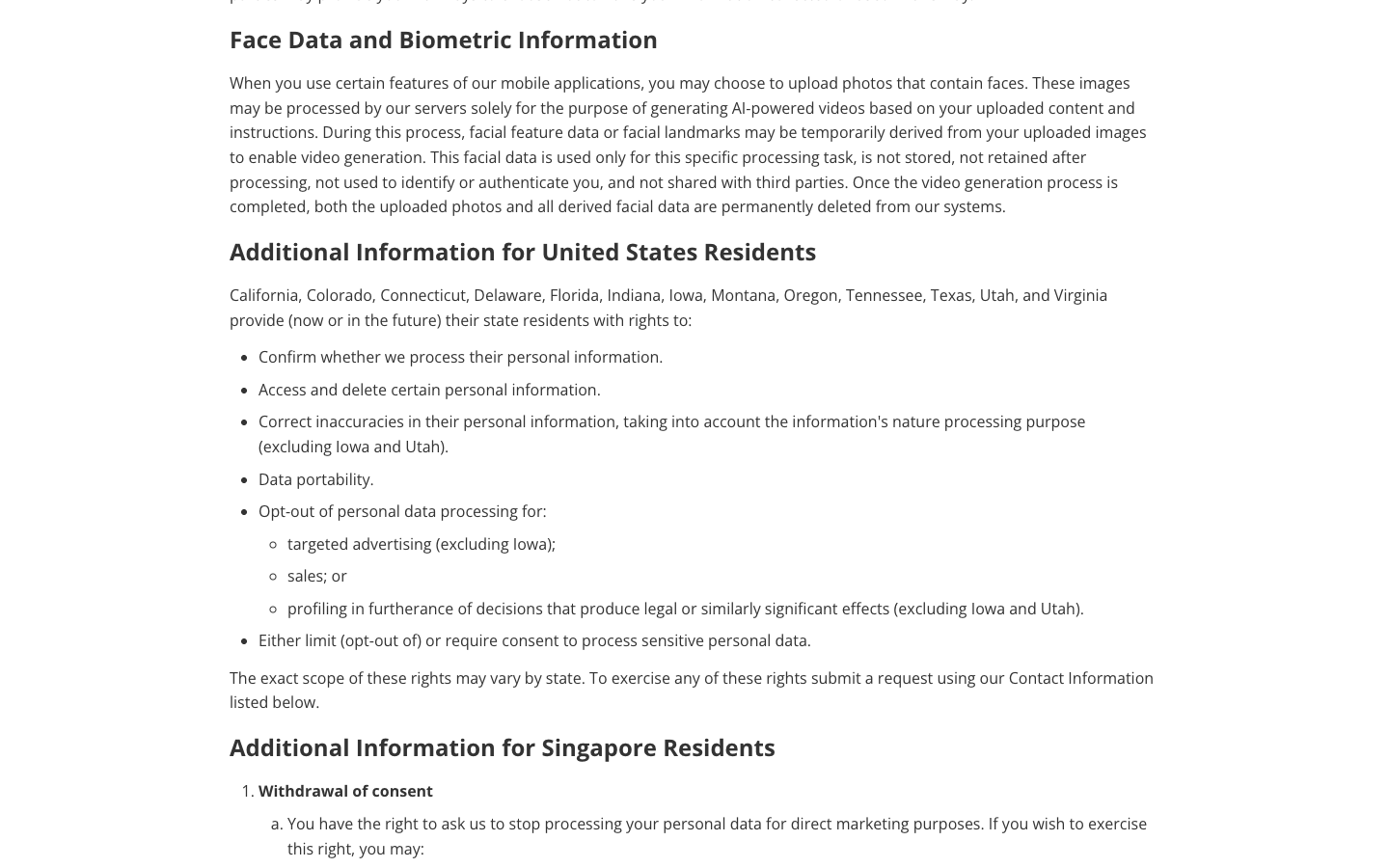
The privacy policy, updated December 9, 2025, covers the Hailuo AI app as well as the site. It refers to "mobile and desktop applications you download from this Website" and has a section on face data from mobile uploads.
Facial data derived from uploaded photos "is not stored, not retained after processing, not used to identify or authenticate you, and not shared with third parties". If you film a founder or a staff member, read this clause before uploading a face; the content license above still applies to what you generate.
Hailuo AI pros and cons for product ads
Each line comes from my October 6 setup or Hailuo's own pages. The weaknesses come first, because they decide whether the strengths matter to your store.
Where Hailuo AI falls short for ad work
- A cinema default. The form opens at 21:9 and 2K, and resets after a reload.
- No 4:5 ratio for the Meta feed.
- A non-member queue: my free clip was still waiting after 20 minutes.
- A broad license. The terms grant the company a perpetual, irrevocable license to your uploads and outputs, including the right to derive revenue from them.
- No ad layer in the form: no captions, script writer, product URL import, or publishing.
What Hailuo AI does well (Hailuo AI ease of use review)
- A 12-slot reference tray for images, video, and audio, with named roles (start frame, motion).
- A cheap test mode: 35 credits for 5 seconds at 768p, with 2K kept for the winner.
- Clip lengths from 4 to 15 seconds and a true 9:16 option.
- An Ads template tab, marked Free, full of product shot ideas.
- A low entry plan: Standard at $10.50 a month, or $8.40 billed yearly.
The form itself is easy to read: 1 prompt box, 1 reference tray, and 1 settings row. The @Image naming takes a run or two to learn, which a template-led ad tool does not ask of you.
Who Hailuo AI fits for ecommerce ads, and who should skip it
Hailuo AI makes sense when video production is already a step in your creative workflow and the missing piece is footage. It makes less sense when the missing piece is the ad.
Buy it if:
- You already write your own hooks and claims, and you have an editor for captions and ratios.
- You need product b-roll, reveal shots, or lifestyle shots without a studio day.
- You can supply clean product photos from several angles for the 12-slot reference tray.
Skip it, or wait, if:
- You want a finished, captioned 9:16 ad from a product link.
- You need to test several hooks the same afternoon on free credits, given the queue.
- Your product designs are unreleased or licensed from someone else, given the license in the terms.
Dropshipping stores that rotate products every week feel the gap most, since each new product needs its own clean reference photos and test credits.
The lesson for any image to video tool: test claims, not camera moves
Every image to video tool makes the camera cheap. In Hailuo AI, the camera move is the last few words of the prompt, the slot where the homepage example puts "camera tilting up". That cheapness pulls ad creative testing toward the variables that are easiest to generate.
A set of 10 orbit shots of the same cap asks your audience the same question 10 times. At 35 credits a clip, that's 350 credits spent on one idea.
The rule that holds for Hailuo AI and every model like it: decide the claim and the hook first, then generate only the shots that prove them. When a hook wins, that is the moment to spend credits on new camera moves for it.
Hailuo AI alternatives for ecommerce video ads
The 3 routes below run cheapest first. Each covers a different part of the workflow above. Here's how they compare:
| Tool | Starting price | Best for | Pick it over Hailuo when |
|---|---|---|---|
| CapCut | Free, 160 credits at sign-up | Editing and narrated photo sequences | You need the ad assembled, not new footage |
| Hailuo AI | $10.50 a month | Cinematic product shots from references | (this review) |
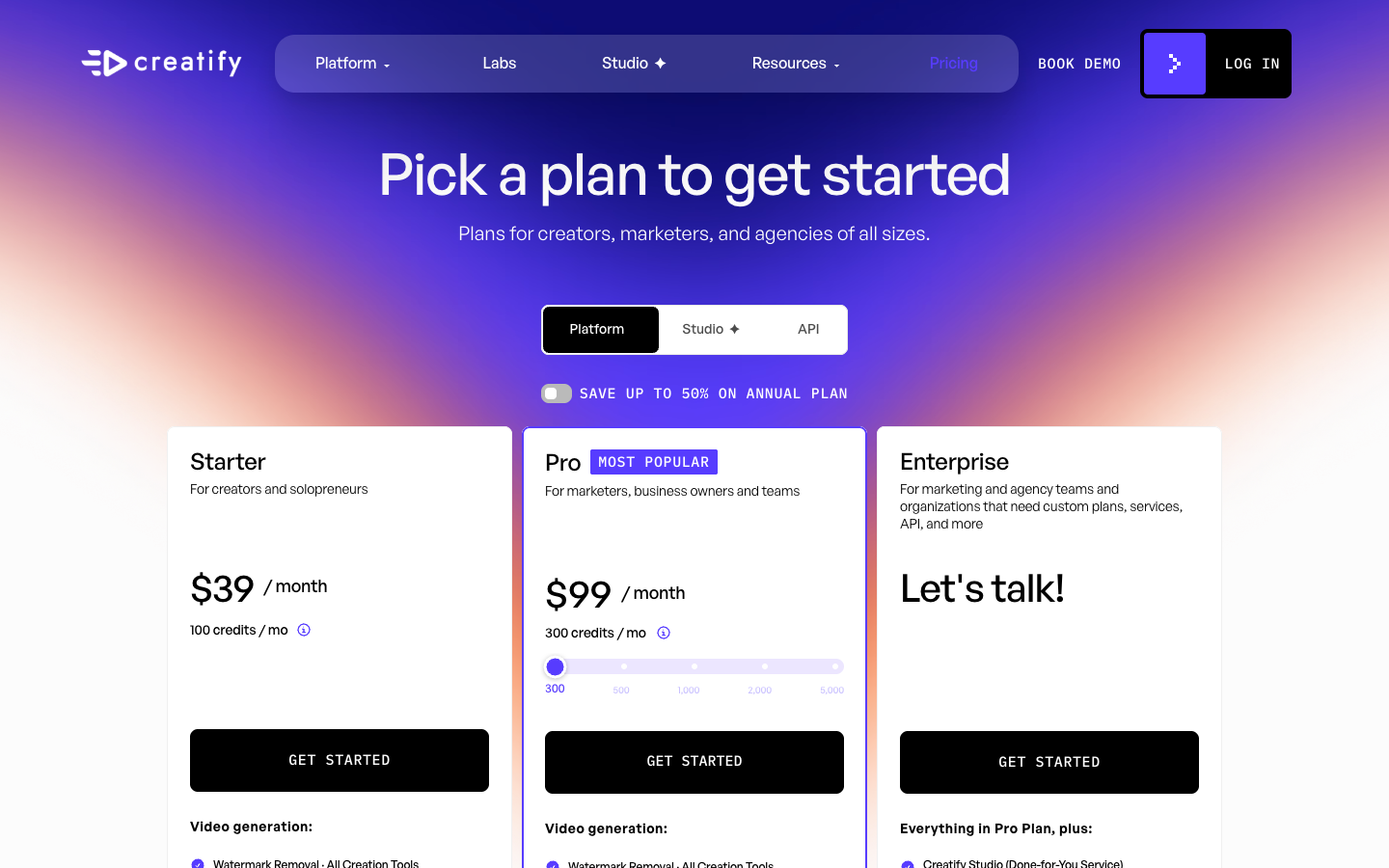
| Creatify | Free; Starter $39 a month | Avatar-led ads from a product URL | The ad needs a person talking |
| Promer AI | First ad free, no card | Ads built from product context | You want the hook and offer before the motion |
CapCut, the free baseline
CapCut's image-to-video page, read on October 5, 2026, lists 160 credits at sign-up, a "Generate script" option, and AI voiceover. After generation you can edit text, music, timing, and captions, and the page's FAQ says free image-to-video exports carry no watermark.
The job is different from Hailuo's: CapCut builds a narrated sequence from several photos, while Hailuo animates 1 photo into a camera move. Pick CapCut if you need Step 6 done for free, including for clips made elsewhere.

Creatify, the avatar library specialist
Creatify turns a product URL into avatar-led video ads. Its pricing page on October 5, 2026, listed a free plan with 10 monthly credits, "around 2 video ads or 20 image ads", and watermarked exports. Starter is $39 a month for 100 credits.
Pick Creatify when the ad needs a talking person explaining the product. Skip it when you want product footage with nobody on screen, which is the job Hailuo does.
Promer AI, for ad creative built from product context
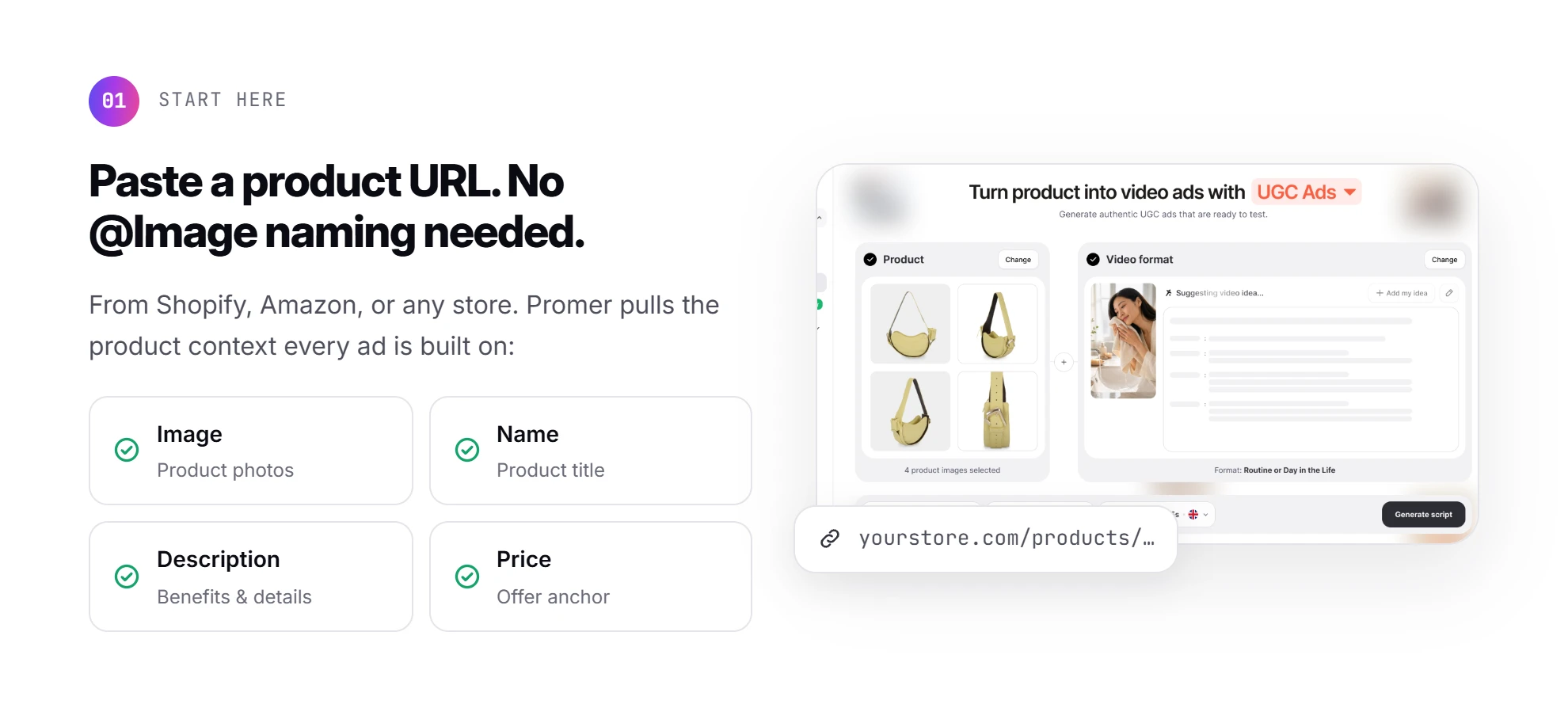
Promer AI is an AI ad creative performance platform for ecommerce advertisers, and it starts where Hailuo AI stops. Paste a product URL from Shopify, Amazon, or any store, and it pulls the product image, name, description, and price. It then builds ads around that product context and market-proven ad patterns.
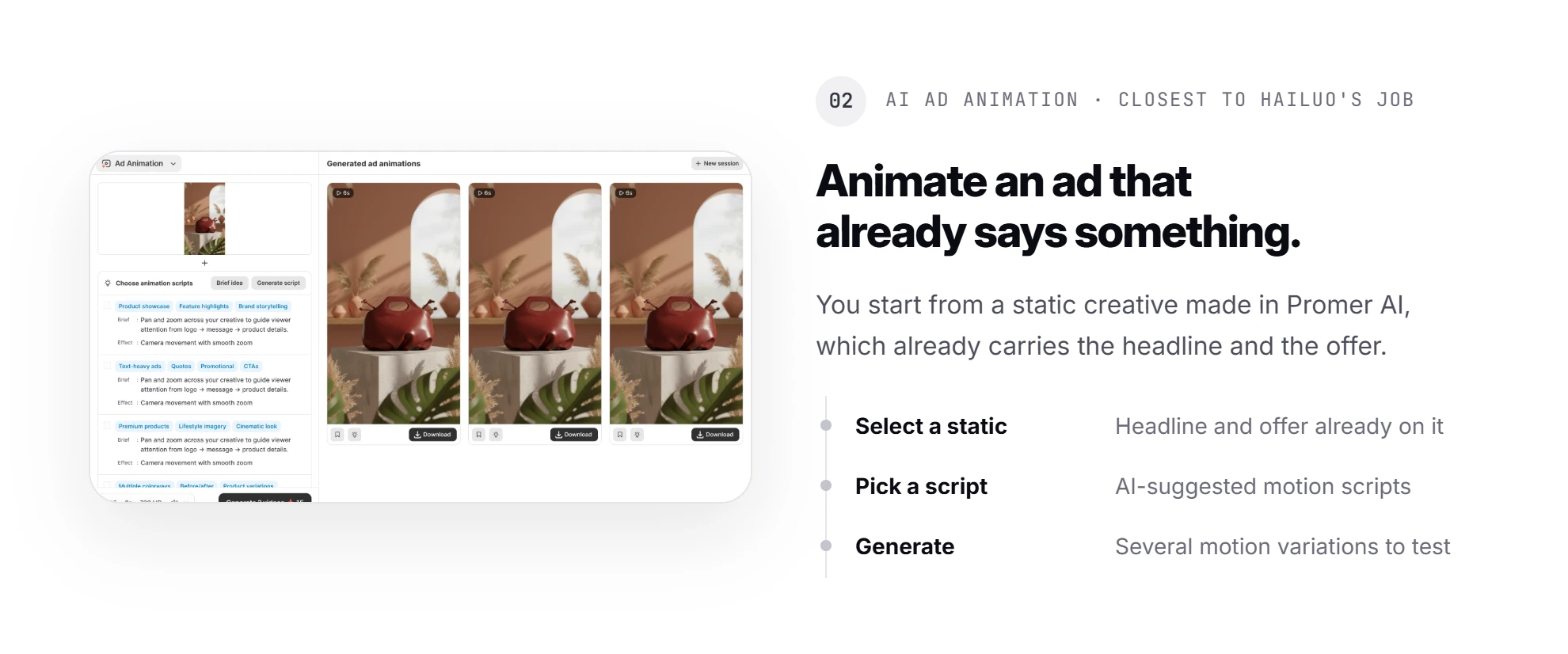
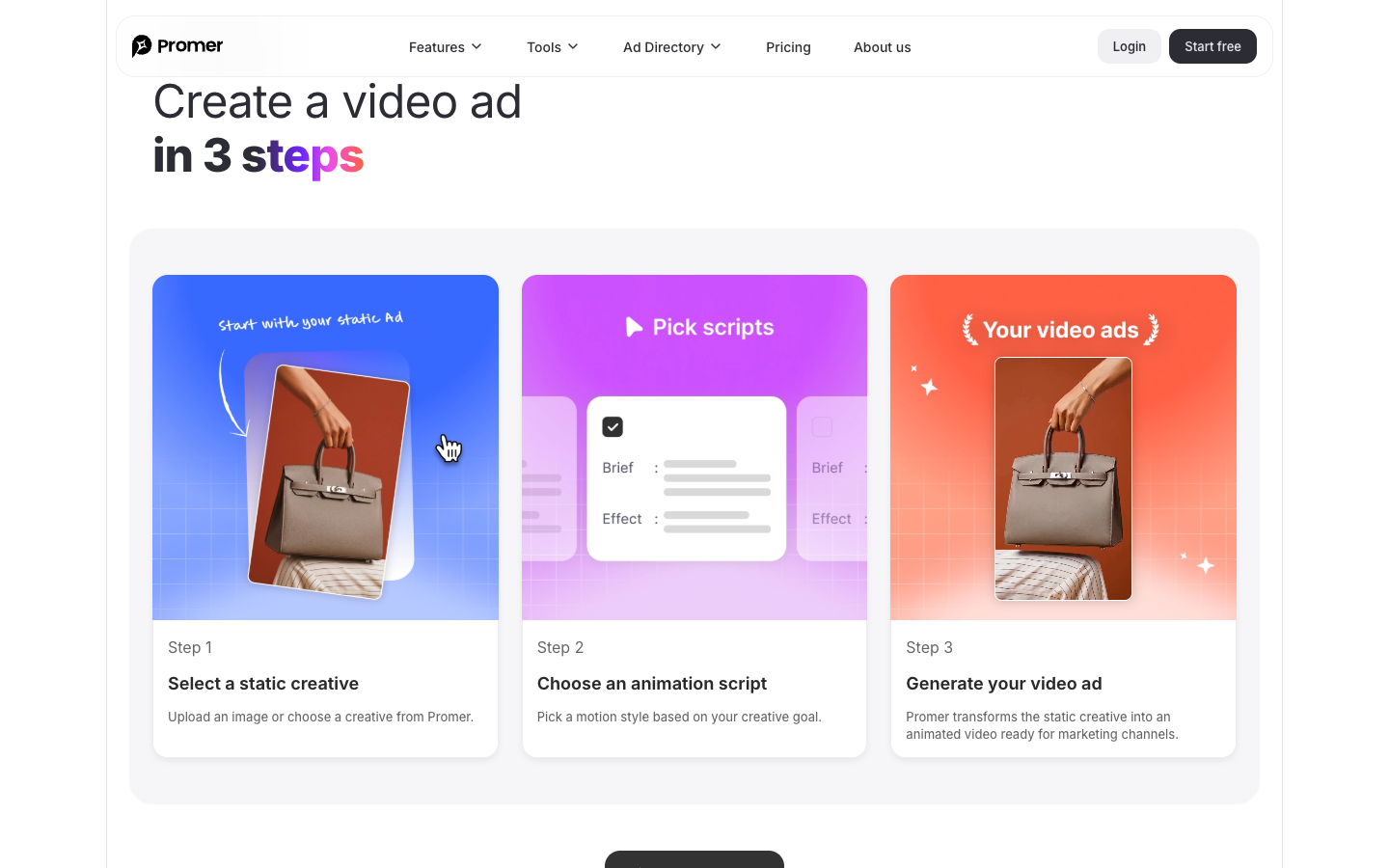
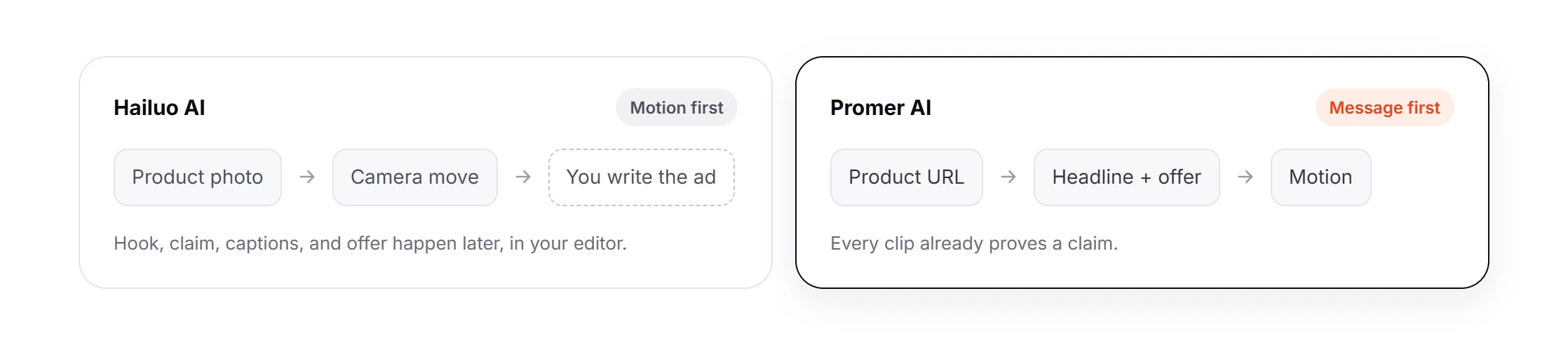
The closest match to Hailuo's job is Promer AI's AI Ad Animation. You start from a static creative made in Promer AI, which already carries the headline and the offer, then pick an AI-suggested motion script and get several motion variations. The claim exists before the camera moves, which is the order the lesson above argues for.
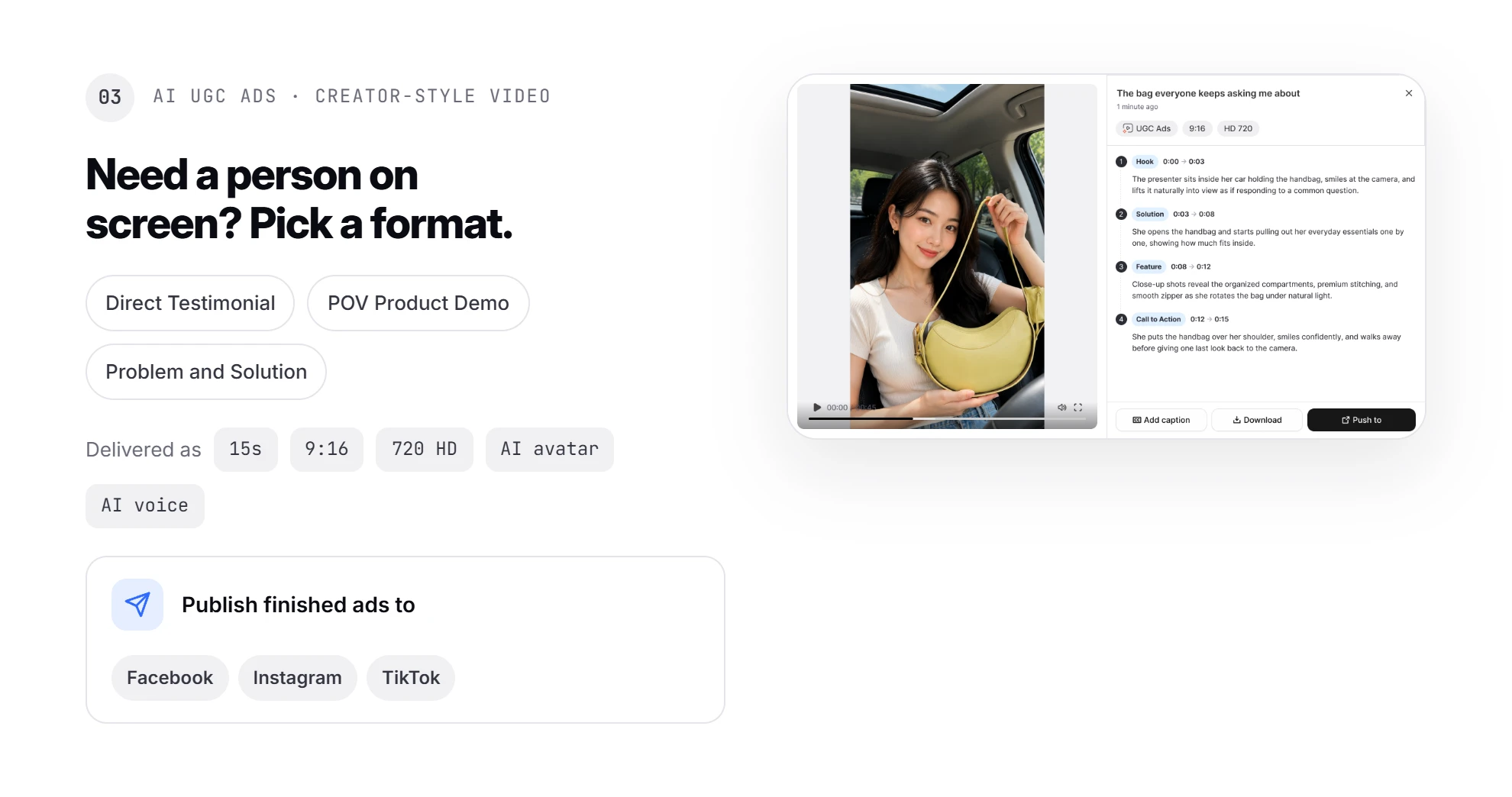
For creator-style video, Promer AI's AI UGC Ads generates 15-second, 9:16 ads in 720 HD with an AI avatar and AI voice, in formats such as Direct Testimonial, POV Product Demo, and Problem and Solution. Finished ads can publish to Facebook, Instagram, and TikTok.

Hailuo AI does some things better. Its 2K output beats Promer AI's 720 HD, and its 12-slot reference tray gives finer control over 1 cinematic shot.
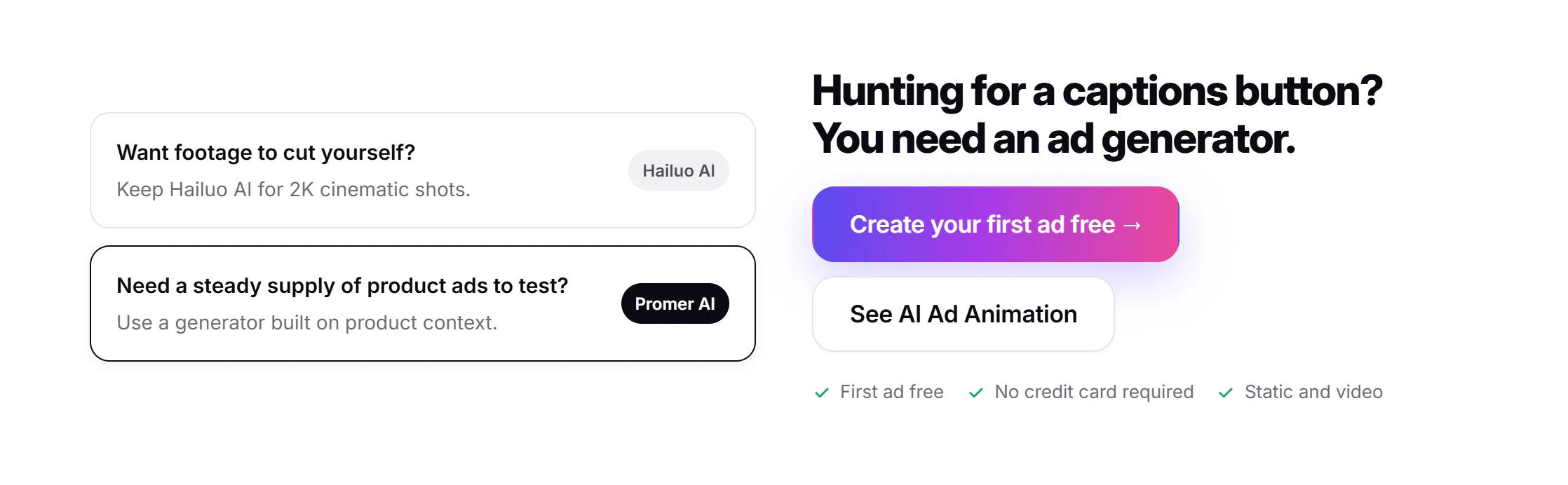
If you want footage to cut yourself, keep Hailuo AI. If the job is a steady supply of product ads to test, an AI ad maker built on product context fits better. You can create your first ad free, with no credit card required.
Hailuo AI review verdict: buy shots, write the ad yourself
Hailuo AI is a shot generator worth testing if you bring a brief and an editor, and the wrong tool if you want a video model to write the ad.
Spend your 80 free credits on 2 clips at 9:16 and 768p: 1 product reveal and 1 in-use shot. Queue both, come back later, and run them through the Step 5 list. If both pass, Standard at $10.50 a month gives you about 28 more test clips, and you upscale only the winner to 2K.
If you catch yourself hunting for a captions button or an offer field inside Hailuo AI, you need an AI ad generator. Start with the alternatives above.
FAQ
Is Hailuo AI free?
Hailuo AI gives new accounts one-time free trial credits, and paid plans start at $10.50 a month. The account tested on October 6, 2026 had 80 credits, enough for 2 five-second clips at 768p (35 credits each). Free clips wait in a non-member queue, and the Free plan uses Hailuo models only.
How much does Hailuo AI cost?
Hailuo AI costs $10.50 a month for Standard, $38 for Pro, $89 for Master, and $216 for Max, billed monthly. Those plans include 1,000, 4,500, 10,500, and 27,000 credits a month. Yearly billing lowers Standard to $8.40 a month. A 5-second MiniMax H3 clip costs 35 credits at 768p or 60 at 2K.
Who makes Hailuo AI, and is MiniMax Hailuo the same thing?
Hailuo AI runs MiniMax's video models, currently MiniMax H3. Its homepage title on October 6, 2026, read "Hailuo AI: MiniMax H3 LIVE NOW". MiniMax open-sourced H3 on August 3, 2026, and Hailuo is the browser and app front end where you use it with credits.
Can Hailuo AI turn a product photo into a video?
Yes, Hailuo AI takes an uploaded product photo as a reference for a video clip. You name it "@Image1" in the prompt and use it as the start frame or as the product to keep. Up to 12 references fit in one clip. Check every clip for product truth, since Hailuo's terms warn that output can be inaccurate.
How long is a Hailuo AI video clip?
Hailuo AI clips on MiniMax H3 run from 4 to 15 seconds, with 5 seconds as the default. Longer clips cost more credits, so for a 15-second ad it's usually cheaper to generate 3 short single-action shots and join them in an editor.
Is there a Hailuo AI app?
Yes, Hailuo AI runs in the browser and as downloadable mobile and desktop apps. Hailuo's privacy policy covers "mobile and desktop applications you download from this Website", including how face photos uploaded from mobile are processed and deleted once generation finishes.
Can I use Hailuo AI videos in paid ads?
Hailuo AI's terms allow business use of generated content at your own risk. You are responsible for rights and consents, including image and voice, and for following ad platform rules. You must disclose AI-generated content where law requires it or viewers could be misled, and you may not remove Hailuo's AI watermark or label.
What is a good Hailuo AI alternative for ecommerce ads?
For finished ecommerce ads instead of raw footage, Promer AI is a closer fit than Hailuo AI. Promer AI builds static and video ads from a product URL. Its video options include AI Ad Animation for static creatives and 15-second AI UGC Ads. Hailuo AI stays stronger for 2K cinematic shots controlled through 12 references.
Related reviews and ecommerce guides
More reviews of AI video tools and ad formats from this blog:
- LTX Studio Reviews: My Handbag Ad Test, Credits and All: a handbag ad test in a browser video studio, where one 5-second shot used 81% of the free credits.
- Higgsfield Reviews: Is a Cinematic Suite Worth It for Ads?: Cinema Studio's camera and lighting controls, credit math for batch generations, and where a cinematic suite fits in paid social.
- Hedra Review 2026: What You Are Really Hiring It For?: Character-3 lip sync from 2.5 cents a second, and 3 routes for getting a product into a talking ad.
- invideo AI Review: From First Prompt to Usable Ad: the Product Ads prompt flow step by step, with what a 15-second ad costs in credits.
- UGC Ads vs Static Ads: Which Wins for Ecommerce Brands?: when creator-style video beats a static image, and how to run both formats together.
Sources
- Creatify. (2026). Pricing plans. https://creatify.ai/pricing
- Hailuo AI. (n.d.). Hailuo AI: MiniMax H3 live now. https://hailuoai.video/
- MiniMax. (2026). News and updates. https://www.minimax.io/news
- Shopify App Store. (n.d.). Promer AI Ads Creative/Meta Ad. https://apps.shopify.com/promer-creative-studio