Do you have a product that deserves better than a 360 spin on a white background? A Reels slot that has sat empty since your last launch? Have you watched LTX Studio's cinematic demos and wondered how many credits one real ad would take?
Then this one's for you. I spent an evening turning a plain handbag photo into the opening shot of a Reels ad, and I logged every prompt and every credit along the way.
LTX Studio is worth it for a few directed hero videos, not for weekly ad variations: one 5-second shot cost me 2 prompts and 81% of the free credits.
Why you can trust this LTX Studio review?
I checked LTX Studio the way I check any ad tool before my card goes in: free plan, my own product, a real brief. Nobody paid for this review, and LTX didn't give me a special account.
The product was a dark red leather mini handbag with no logo, shot on a plain grey background, the kind of photo a supplier sends you. I wrote down each prompt, the settings, the render time, and the credit meter after every step.
For the paid plans, I read LTX's own pricing page and help center on October 2, 2026, then went through what real customers wrote on Trustpilot and G2. Where a number came from someone else, I say who.
Key takeaways from my LTX Studio test
- Budget $35, not $15. Free and Lite carry a personal use license, so a video that sells your product needs Standard ($35 a month, or $28 billed yearly).
- Fix the product in the photo step. My bag's handle changed shape in the keyframe. Redoing an image costs about 9% of free credits; redoing a clip, about 72%.
- Free credits buy one scene, not one ad. My 5-second shot used about 650 of the 800 free credits. A 3-shot ad needs a paid plan.
- Brief it like a videographer. Naming the shot, action, camera, sound, and where the camera ends got the camera move right on the first try.
- Test inside 1,200 credits. That is LTX's refund line for the first 14 days, per its own August 2026 reply on Trustpilot.
LTX Studio AI movie maker review: A film set in your browser
LTX Studio is an AI video production platform from Lightricks, the company behind Facetune, that calls itself "the all-in-one creative studio for AI video production." You direct each shot, LTX Studio renders it, and you assemble the shots into a story. Ads sit next to trailers, music videos, and pitch decks as one use case.
That framing matters for a store owner. LTX Studio assumes you think in shots: what the camera sees, how it moves, where it lands. LTX says 135,000 producers, creative teams, and designers use it, which tells you who it was built for first.
Here is what each part of the workspace does for an ad job:
So on the free plan, you get the shot-making engine and none of the tools that keep a product consistent across a full ad. Keep that in mind when you read my results.
The handbag ad brief I gave LTX Studio
A product spinning on white tells you little about an ad tool, because nobody runs that as an ad. So I wrote the kind of brief you would hand a freelance video editor, for the first 5 seconds of a 15-second Reels ad: the hook.
Storyboard Builder is locked on the free plan, so I built the shot by hand in Gen Space. That turned out to be useful: every storyboard shot is still one generation like these, so this is what each shot of a storyboard costs.
Step 1 in Gen Space: The keyframe where my bag changed shape
Image to video starts from a frame, and my photo was a grey studio shot. So the first job was a keyframe: my bag, in the cafe, in the light I wanted. I used Z-Image, the image model on the free plan, with my product photo as the reference, and wrote the prompt in blocks:
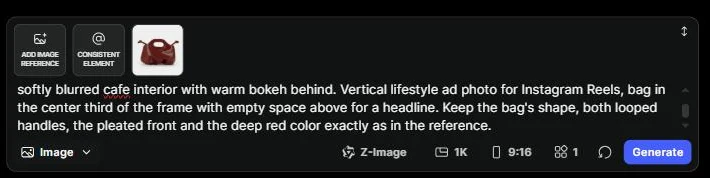
The keyframe came back in about 40 seconds and used 9% of the free credits. The mood was right on the first try: window light, marble, latte art, gold rings.
The bag was close, but not mine. The cutout handle came out smaller and rounder, and the folds at the base got softer. Put the two side by side and you can see it:
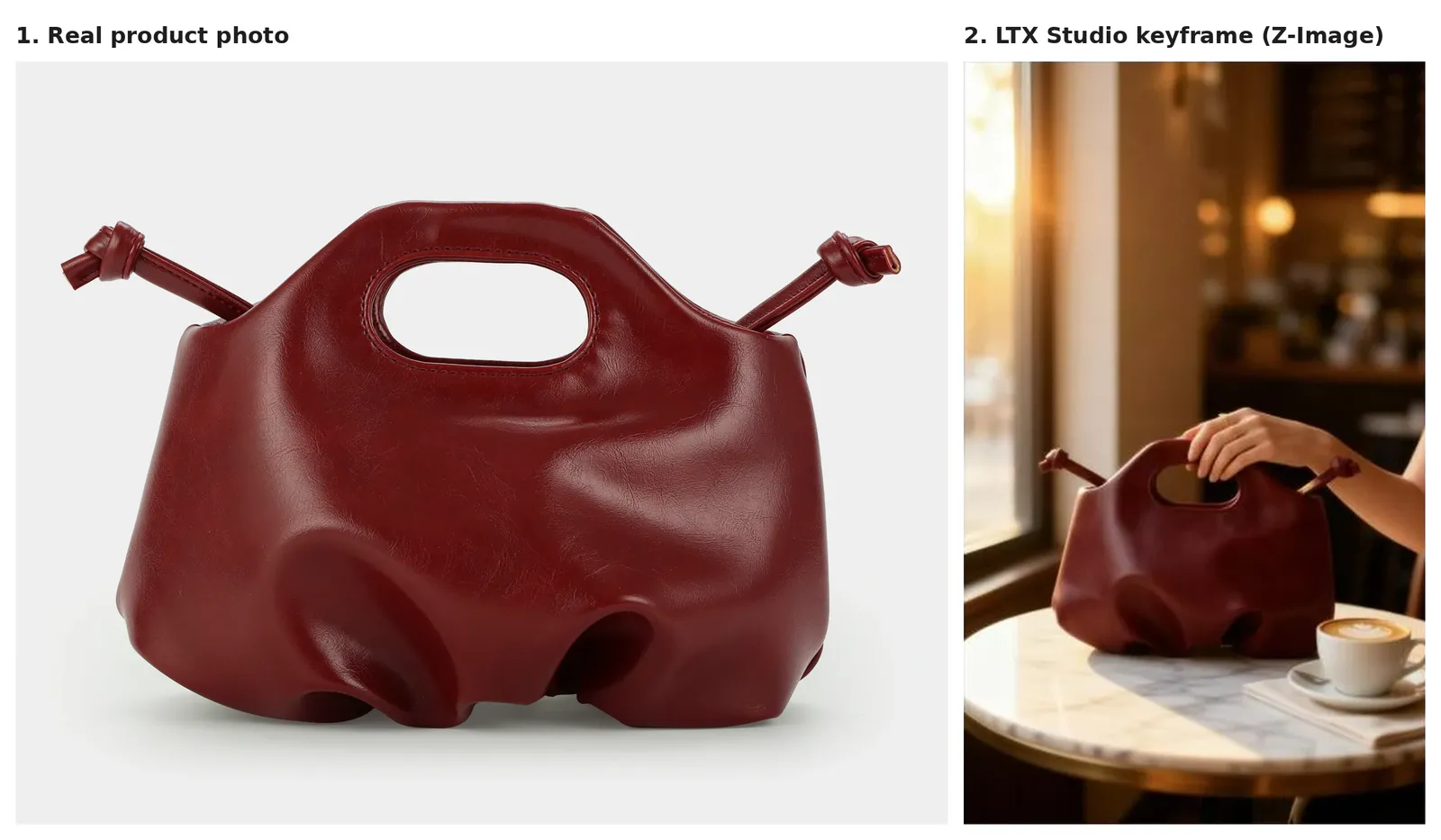
For a lifestyle mood board, that gap doesn't matter. For an ad, it does, because the buyer receives the real bag. That means you check handles, shape, and color at this step, while a retake costs 9% and not 72%.
Step 2: The image to video prompt, written in LTX's order
From the keyframe, "Create video" sent the image to the video prompt as the start frame. I kept the default LTX-2.5 Fast model at 1080p, set 9:16, and cut the length to 5 seconds. LTX Studio named the project "Luxury Handbag Ad" on its own.
Then I followed the order in LTX's own LTX-2.5 prompt guide: shot, scene and light, action, character, camera, audio. One flowing paragraph, present tense:
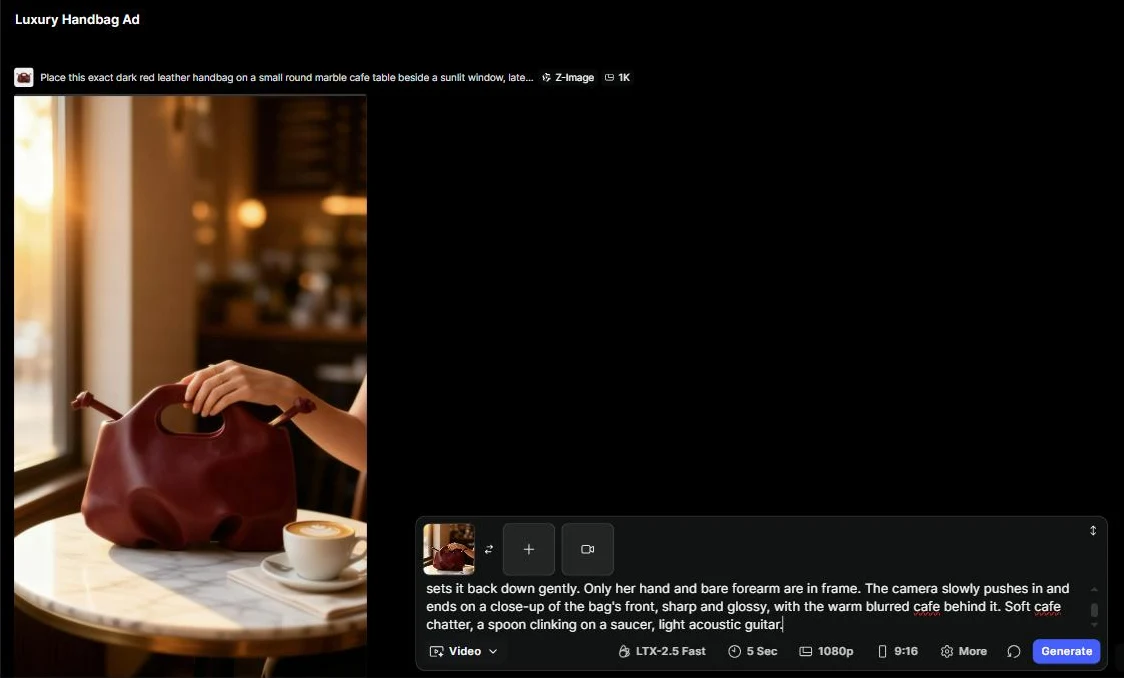
The clip rendered in about 50 seconds and took the credit meter down by another 72%. Here are 3 frames from it:

I scored the shot the way I'd judge a freelancer's first cut:
Here is my honest read: this is the best-looking product clip I have made from a single supplier photo with a text prompt. It also had a product flaw I would not run without a reshoot.
What one LTX Studio shot costs in credits and time?
One finished shot cost me 81% of the free plan's 800 credits and under 2 minutes of rendering. The part that took longer was writing the 2 prompts. Here is the measured cost:
| Step | Render time | Free-plan credits used |
|---|---|---|
| Keyframe (Z-Image, 1 image) | About 40 seconds | 9%, about 72 credits |
| 5-second clip (LTX-2.5 Fast, 1080p) | About 50 seconds | 72%, about 576 credits |
| 1 finished shot | Under 2 minutes | 81%, about 650 credits |
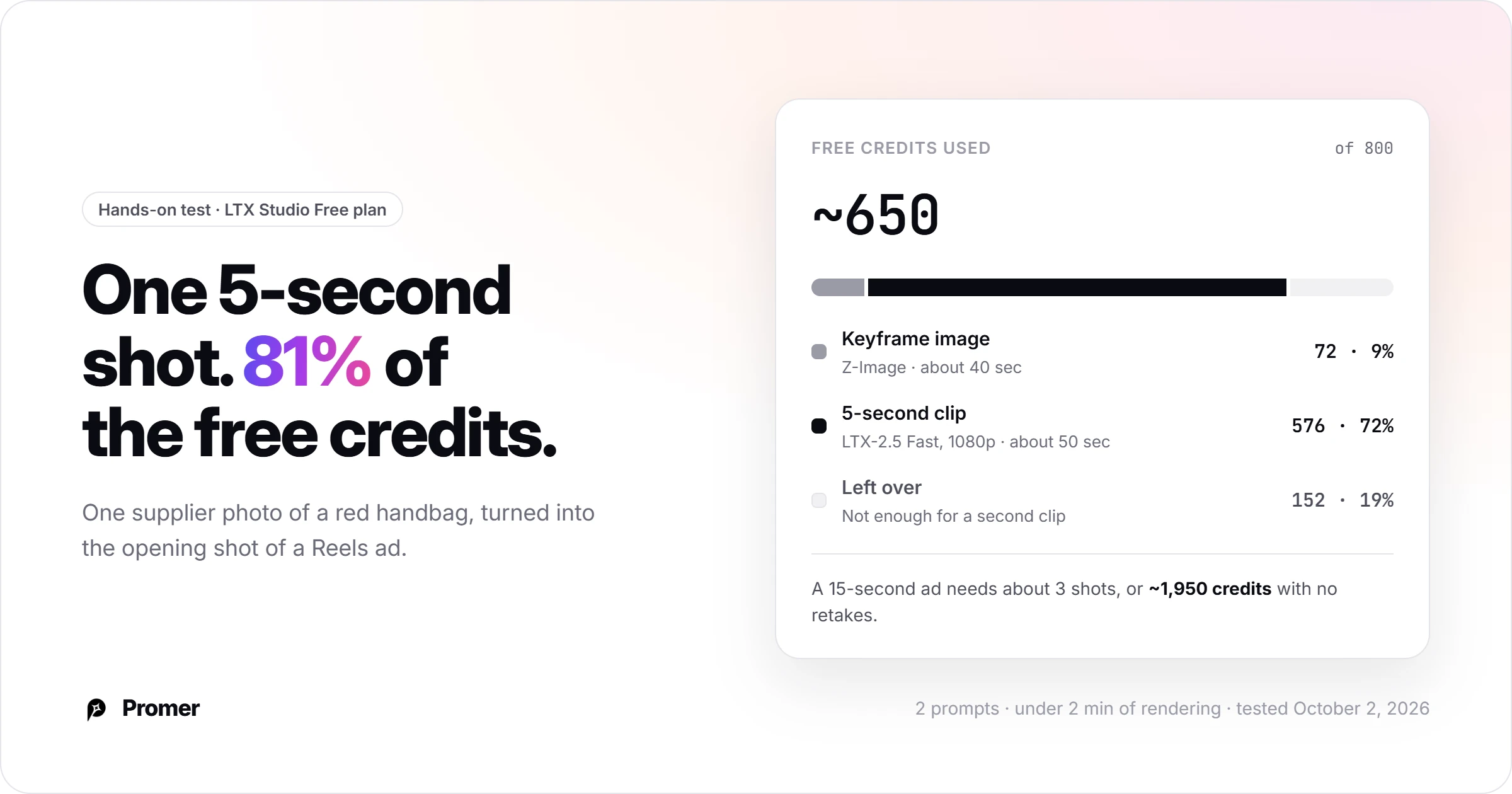
A 15-second ad usually needs 3 shots: the hook, a product detail, and the payoff with the CTA. At my rate, that is about 1,950 credits with no retakes, and about 3,900 if every shot needs one more try. That means the free plan can't finish a single ad.
The premium models cost more again. LTX Studio's model menu labels Seedance 2.0 "Long wait" and "Extreme cost." Seedance 2.0 Fast gets "High cost." The menu shows labels, not credit numbers, so draft on the Fast model and switch only for the final take.
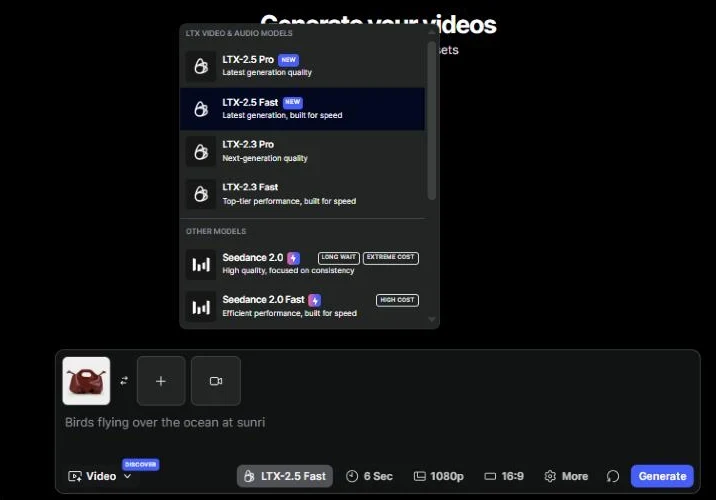
The real cost is the thinking between renders. Locking the product in one prompt and directing the motion in another took me longer than both renders combined. Multiply that by 3 shots and a round of fixes, and one ad becomes an afternoon.
LTX Studio script to video review: Storyboards start at Standard
Script to video is the workflow most of LTX Studio's marketing is built on. You paste an ad idea or a script, and Storyboard Builder breaks it into scenes, a cast, and shots. The payoff for a store owner: you fix one weak shot without regenerating the whole ad.
On the free plan, I typed a 15-second TikTok ad idea for the handbag. The button turned into "Upgrade to continue." Free includes Blank Storyboards only; AI Storyboards start at Standard.
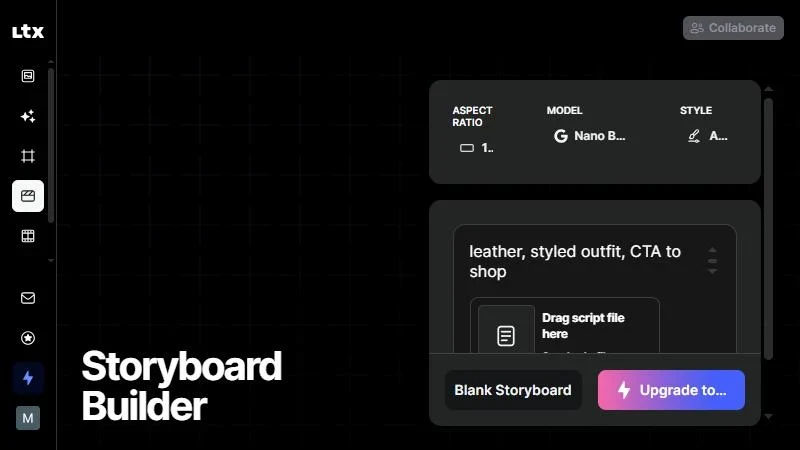
The storyboard is also where G2 reviewers are happiest. Across 123 G2 reviews, the praise clusters around storyboarding and character consistency, and the complaints around credit cost and output that doesn't match the prompt. Keep in mind that a storyboard organizes shots; each shot still costs a generation like mine.
LTX Studio prompt rules and 4 product ad templates
LTX Studio gives you a blank prompt box, so your brief decides your result. These rules come from my test plus LTX's camera motion guide and its LTX-2.5 prompt guide:
- Lock the product at the image step. Regenerate the keyframe until shape, handles, and color match your photo.
- Write in LTX's order. Shot, scene and light, action, character, camera, audio, as one paragraph.
- Use LTX's camera words. "Pushes in," "pulls back," "circles around," "tracks," "static frame." Keep to one simple move per shot.
- Describe where the camera lands. LTX's camera guide calls this "the highest-value tip," and it is what got my push-in right.
- Keep image to video in one take. LTX advises a single continuous shot from a start frame unless you describe a cut.
- Keep motion simple. LTX notes chaotic motion still causes artifacts, so a lift and set-down beats a toss or a spin in the hand.
- Leave prices and offers out. LTX says exact spelling of on-screen text "is not guaranteed," so add the headline, price, and CTA in your editor.
- Write the sound. Audio is generated with the clip, so name the ambience you want, like my cafe chatter and spoon clink, instead of getting a random track.
The first template below is the one I ran. The other 3 use the same structure for common ad angles, so swap in your product, scene, and buyer:
Each template is one shot. For a 15-second ad, chain the lifestyle hook, one middle angle, and a detail close-up, then add your offer on the last shot in your editor.
LTX Studio pricing: Why $35 is the real price of an ad?
LTX Studio's $15 Lite plan looks like the cheap way in, and for your store it isn't. LTX's help center lists Free and Lite as personal use only. The pricing page adds that they "cannot be used for business, marketing, or paid work."
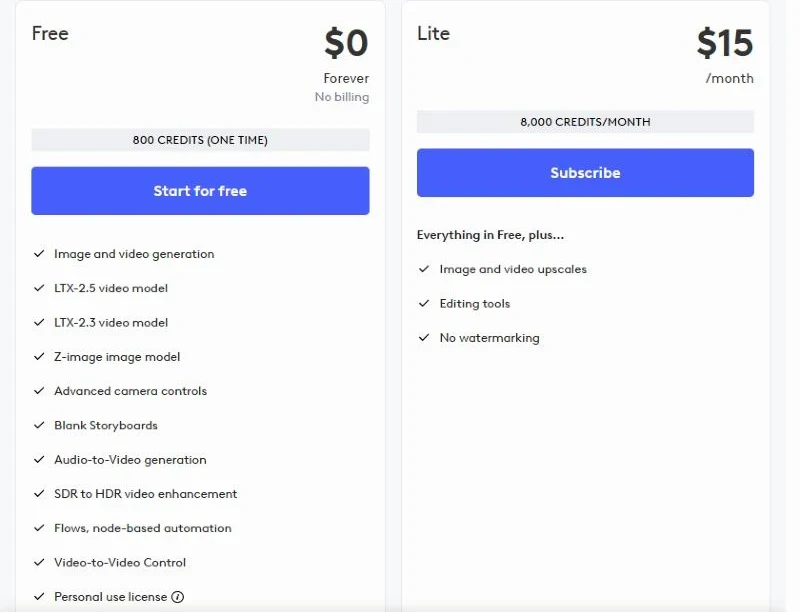
Here are all 5 plans, with the one question that matters for an ad:
Source: LTX Studio pricing page, checked October 2, 2026.
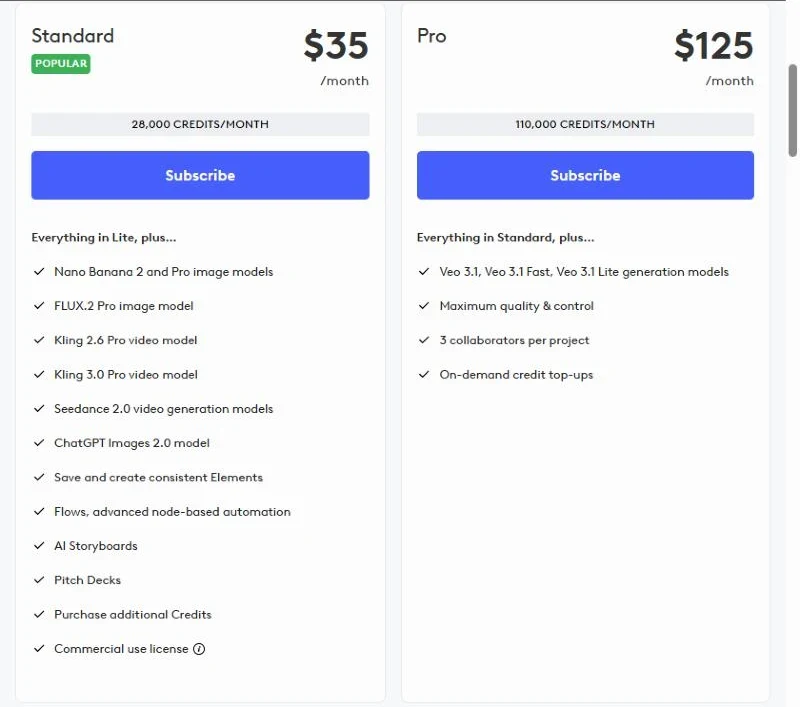
Run my numbers through Standard's 28,000 credits: that is about 43 shots like mine a month. At 3 shots per 15-second ad, you get roughly 14 ads with no retakes, or about 7 with one retake per shot, before touching a premium model.
That makes $35 the honest comparison number for a store, or $28 a month if you commit to a year. It is also the first plan with the tools that keep a product consistent across shots.
What LTX Studio reviews on Trustpilot and G2 say?
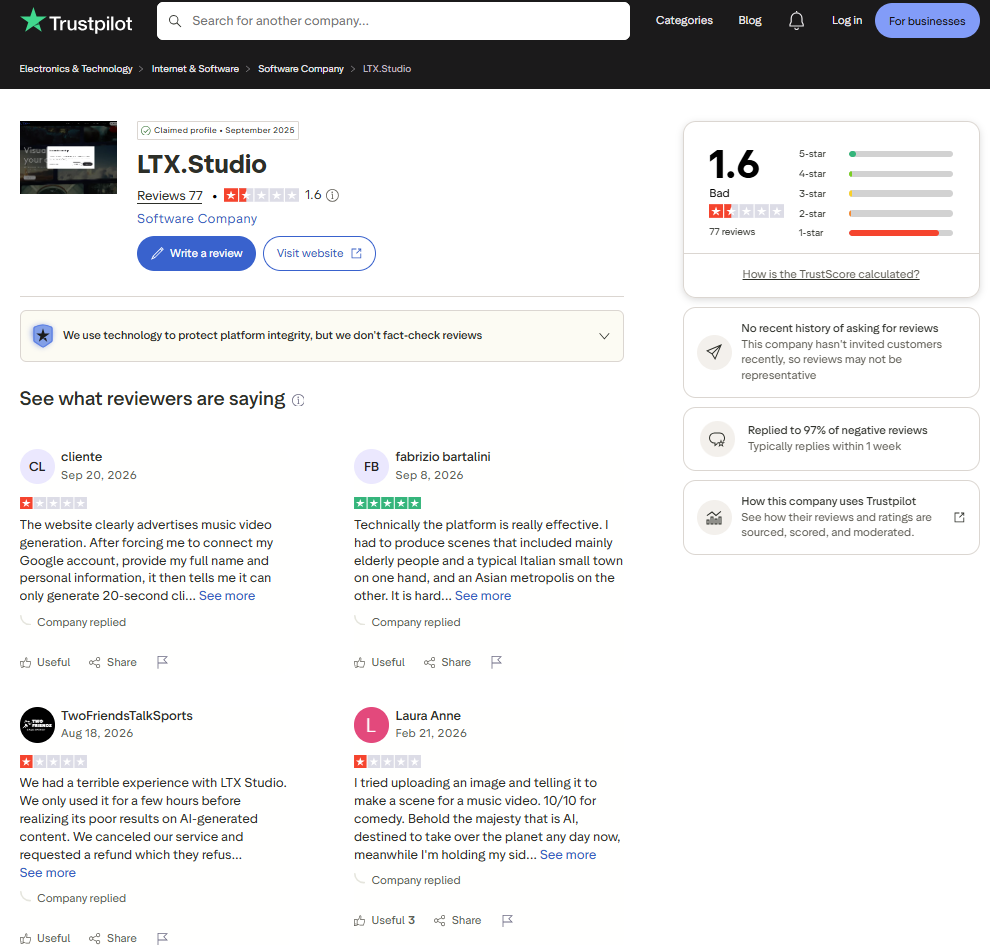
LTX Studio reviews split hard by platform. On Trustpilot, LTX.Studio holds 1.6 out of 5 across 77 reviews, with 87% at 1 star. Trustpilot also notes the company hasn't invited customers to review recently, so the page leans toward people who came to complain.
LTX replied to 97% of negative reviews there, so you can read its side of each complaint.
On G2, the score flips to 4.3 out of 5 across 123 reviews, mostly from small creative teams. The pattern across both sites is the same as my test: people like what the shots look like and dislike what the credits cost.
Here are two real Trustpilot reviews, one from each side.
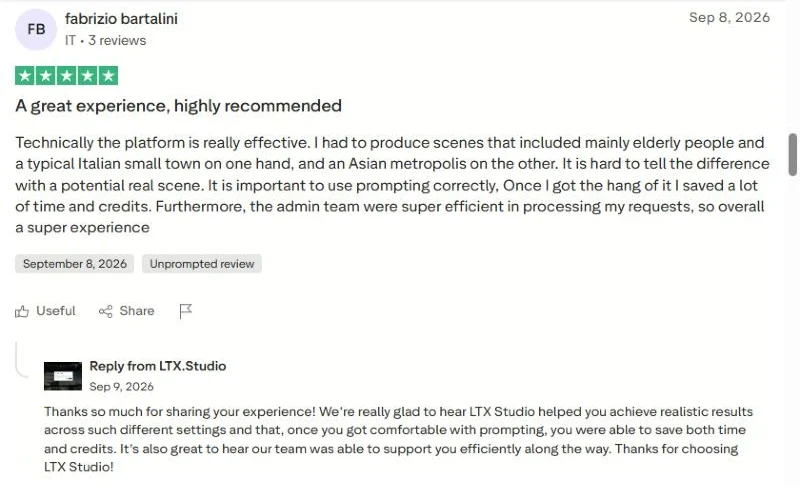
Fabrizio found his scenes "hard to tell the difference with a potential real scene," and said he saved time and credits once he got the prompting right. That matches what I saw: the realism is there, and the prompt structure is what you pay to learn.
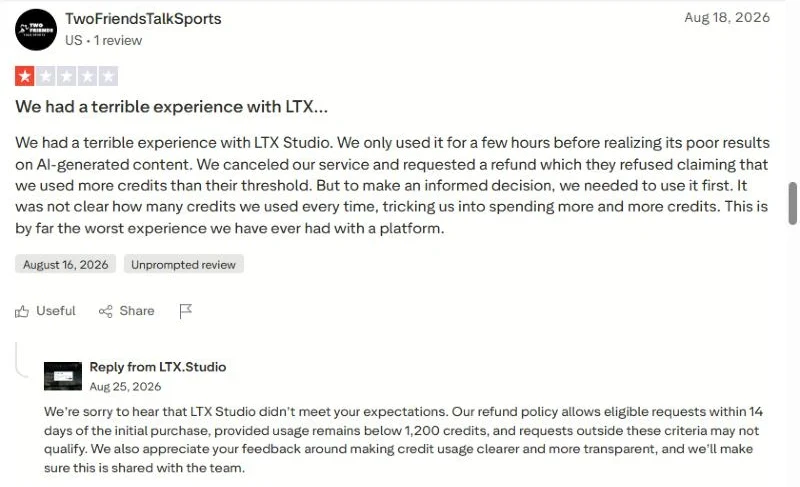
This team was refused a refund after a few hours of testing. LTX's reply states the rule: refunds within 14 days of the first purchase, while usage stays below 1,200 credits. At my rate, that is under two finished shots, so do your testing on the free credits before you upgrade.
LTX Studio review for marketing: who it fits and who should skip it
LTX Studio closes one job well: making a short piece of video look directed. It closes another job poorly: making many ad variations fast on a small budget. Which one your store needs decides the answer.
LTX Studio fits you when:
- You need 1 to 3 hero videos for a launch, a lookbook, or a seasonal campaign.
- Someone on your team enjoys directing and will write 2 prompts per shot.
- Your product forgives small shape changes, like clothing or decor seen in a room.
- You also make other video, such as brand films or YouTube intros, so credits get used.
Skip it when:
- Your ad account needs 5 to 10 new creatives per product every week.
- Your product's exact shape is the selling point, like my handbag's cutout handle.
- Most of your ads run in the Meta feed at 4:5; Gen Space offered 16:9, 1:1, and 9:16 for video in my test.
- You want the tool to suggest the angle and the hook, not only render yours.
LTX Studio alternatives: When your ad account needs angles, not shots?
Here is the lesson I took from this test, and it holds for any AI video tool. An ad account doesn't run on one great shot; it runs on new angles, because the same people keep seeing your ads. Ten beautiful clips that make the same claim are, to your buyer, one ad.
LTX Studio gives you control over the shot. It doesn't tell you which angle to shoot. That is the gap the next tool fills.
Promer AI: the same handbag, with the ideas already written
Promer AI is an AI ad maker for ecommerce, and it comes at the job from the opposite side. Instead of a blank prompt box, it reads your product and hands you ad ideas to pick from. I gave it the same handbag photo on the same day.
From 1 photo, AI Ad Concept read the product and wrote the angles. It pulled the highlights (soft premium leather, drawstring shape), the ideal customer (career-focused women 25 to 40) and the pain point (hard to find a bag that's compact and still looks refined), then returned 5 static ads in about a minute. Each came with its own audience and core idea, such as "Career Confidence Catalyst," aimed at women 25 to 32 in early-career urban jobs.
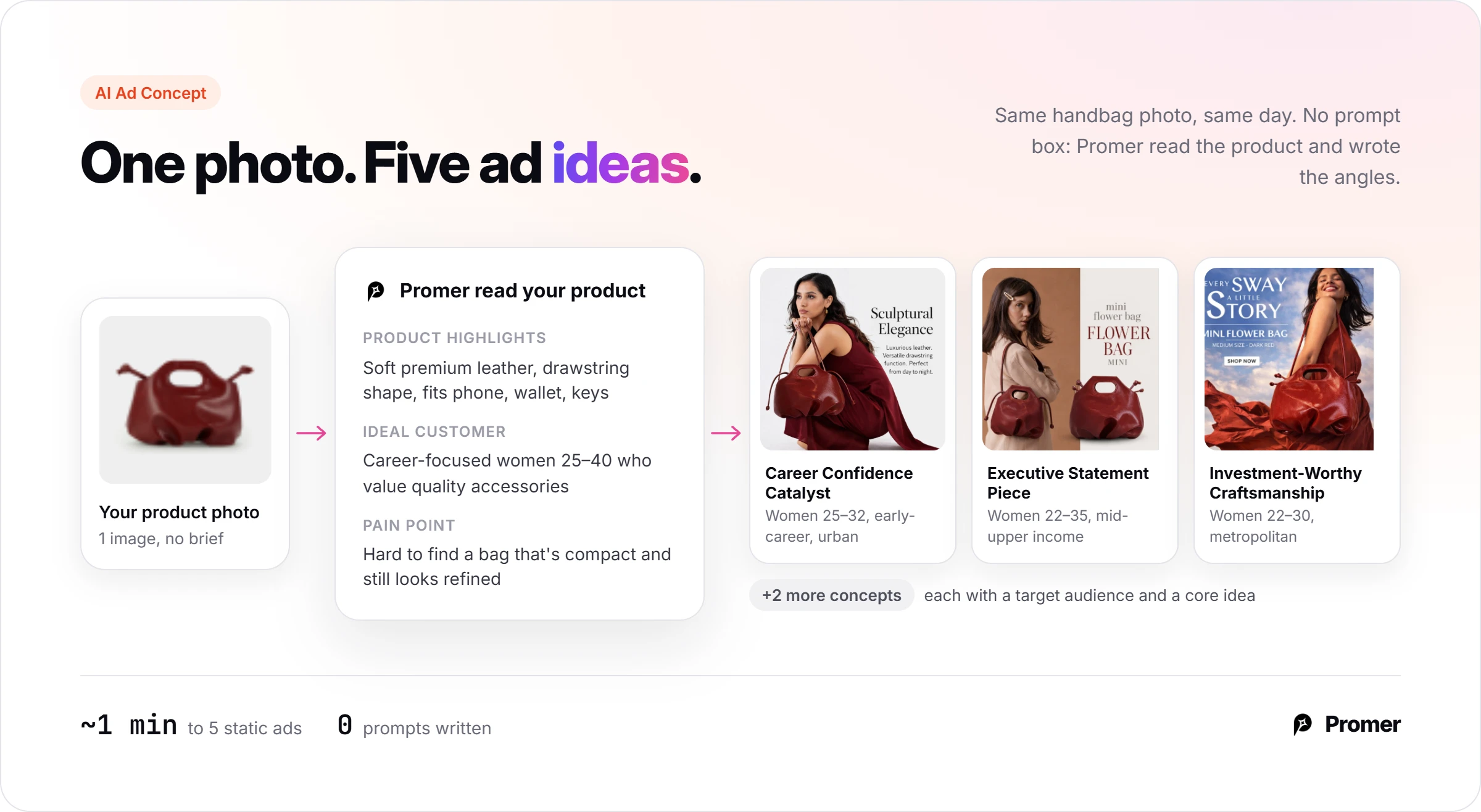
Then Promer AI's AI Ad Animation read a static creative and suggested 5 motion scripts. Each was tagged for a placement: a slow arc for the Instagram feed, a spotlight reveal for Stories, a snap zoom for TikTok.
I ticked 2 and had 2 videos of 8 seconds in under 5 minutes, without writing a prompt.
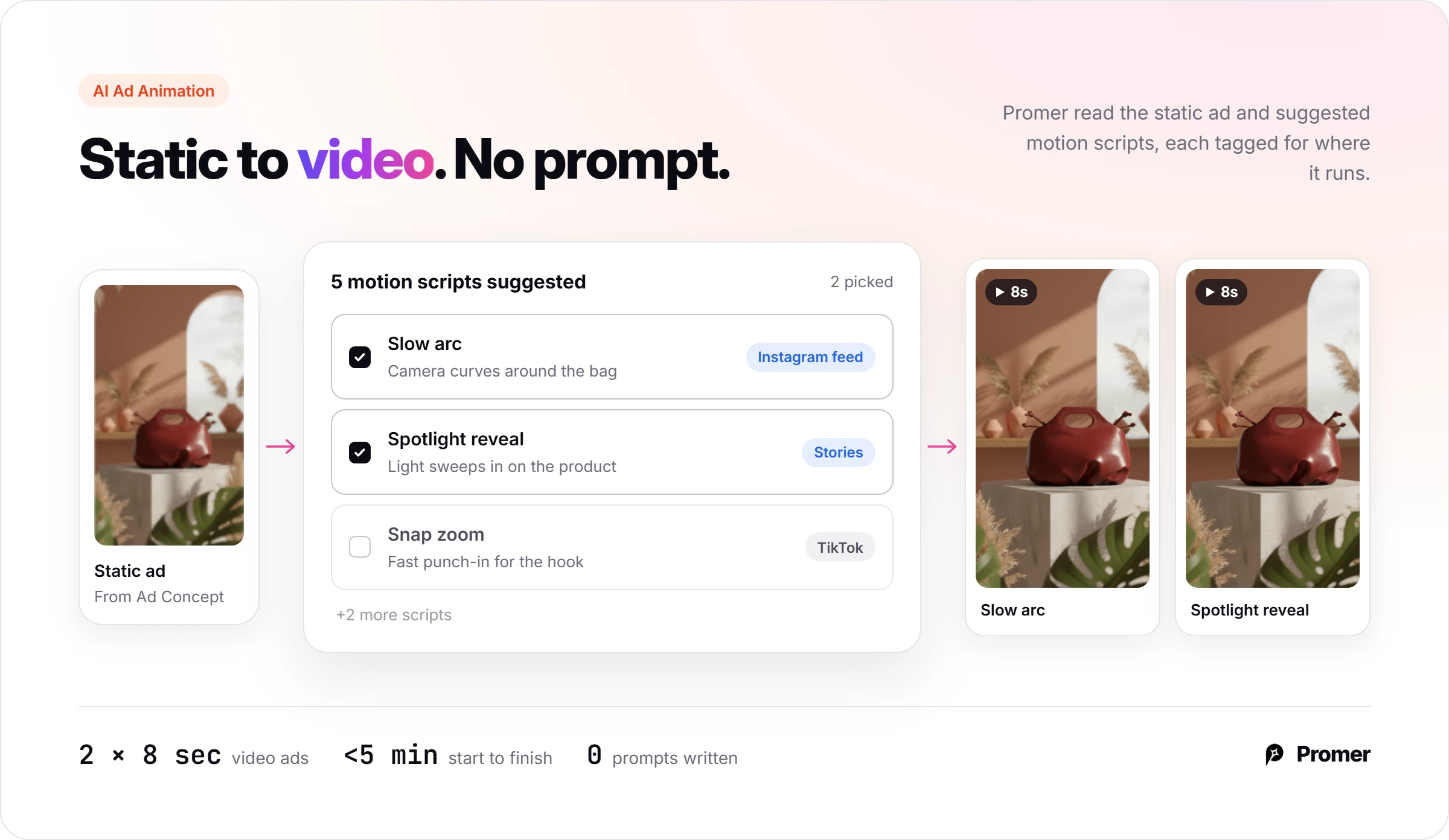
The cutout handle, the knotted straps, and the folded base matched my photo in every concept and every frame. That is the detail LTX Studio's keyframe changed. When an ad is ready, AI Social Content can schedule and publish it to a connected Facebook, Instagram, or TikTok account.
The trade is real. Promer AI chose the scene, a concrete pedestal, not my cafe, and LTX Studio gives you far more camera control and sharper 1080p video. AI-made creatives can carry mistakes in either tool, so check every frame before it runs.
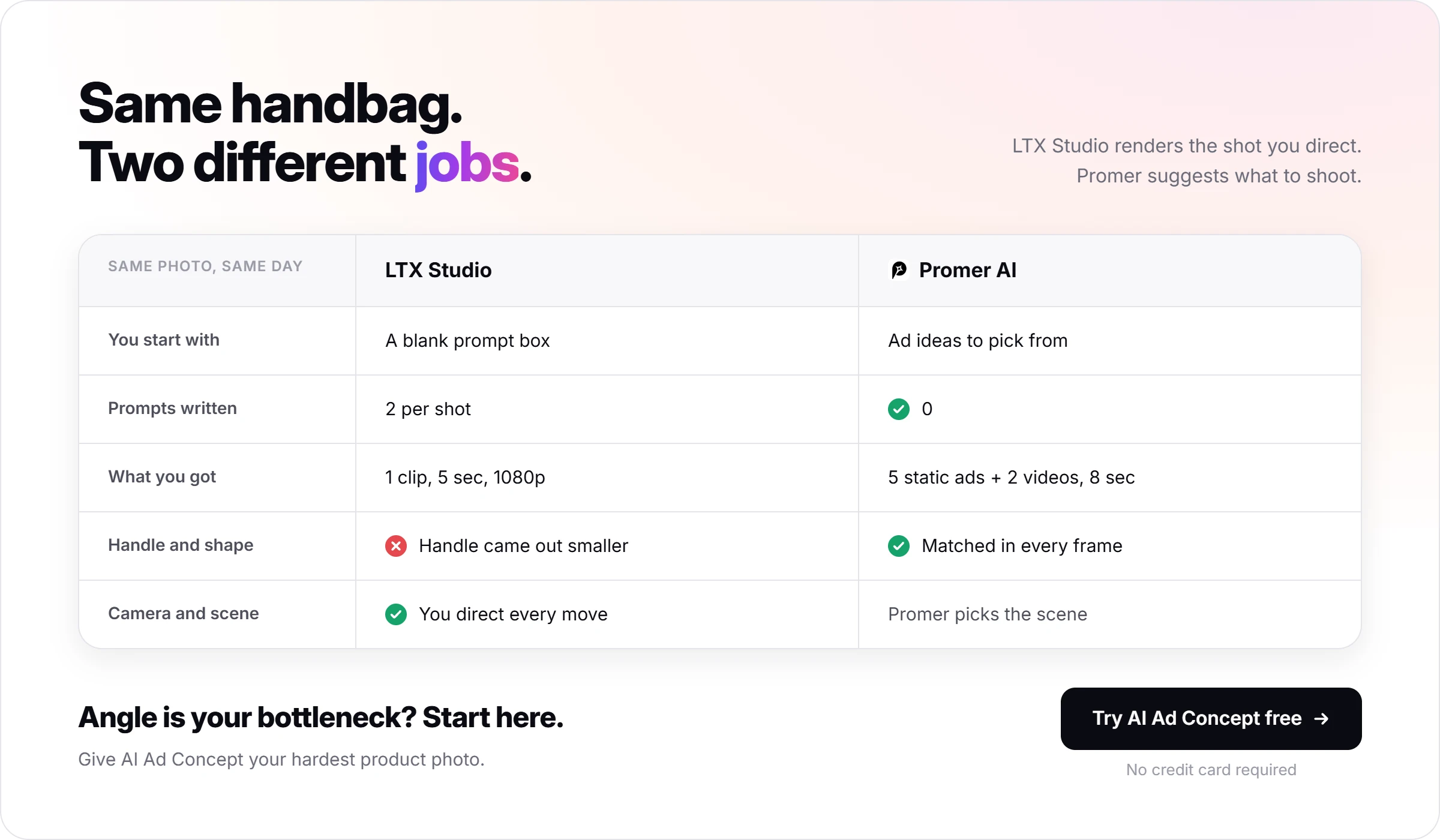
If the angle is your bottleneck, start with Promer AI's AI Ad Concept and give it your hardest product photo. It returns concepts that each name a target audience and a core idea. Pick one and check the product's shape against your photo before you spend credits in any video tool.
How the LTX Studio alternatives compare?
Notice the price column first, then the "best for" column, because they rarely point the same way:
Prices on monthly billing, checked October 2, 2026. For more on avatar ads, see this Creatify review for ecommerce ads.
So the cheapest line on the table isn't the cheapest ad. Count the hours your team spends writing prompts next to the monthly fee.
Is LTX Studio worth it for your store?
Pay for LTX Studio Standard when you need a few directed hero shots and someone on your team likes directing them. Skip it when your ad account lives on weekly variations, because every shot costs 2 prompts, real credits, and a product check. Wait on Pro until Standard's credits run out in a real month.
Your next 30 minutes: spend the 800 free credits on one shot of your hardest product, using the 2-step method and the lifestyle hook template above. Compare the keyframe with your product photo before you animate it.
Watch the refund line in your first paid month: 1,200 credits goes fast. And when you'd rather have the angles suggested for you, turn a product image into a video ad with Promer AI and compare the two.
FAQ
Is LTX Studio good for making ads?
LTX Studio is good for directed, cinematic ad shots and slow for high-volume ad variations. In my test, one 5-second Reels shot of a handbag took a keyframe prompt, a motion prompt, and 81% of the free credits. The camera move landed as written. The bag's handle changed shape at the image step, so plan time to check the product in every shot.
Can I use LTX Studio videos for commercial use?
Only on the LTX Studio Standard, Pro, or Enterprise plans. LTX Studio's help center lists the Free and Lite plans as personal use only, and the pricing page says they cannot be used for business, marketing, or paid work. Standard costs $35 a month, or $28 a month billed yearly, as of October 2, 2026.
How many credits does an LTX Studio video use?
A 5-second 1080p LTX Studio clip on LTX-2.5 Fast used about 576 of my 800 free credits. The Z-Image keyframe before it used about 72 more. Premium models such as Seedance 2.0 carry "High cost" or "Extreme cost" labels in the model menu, so draft on the Fast model and switch only for a final take.
What do LTX Studio reviews say about refunds?
Most negative LTX Studio reviews are about credits and refunds, not video quality. On Trustpilot, LTX.Studio holds 1.6 out of 5 from 77 reviews as of October 2, 2026. In an August 25, 2026 reply, LTX stated refunds apply within 14 days of the first purchase while usage stays under 1,200 credits. On G2, LTX Studio scores 4.3 out of 5 from 123 reviews.
Is LTX Studio free?
LTX Studio has a free plan with 800 one-time credits. In my test, that covered one keyframe and one 5-second 1080p clip, with about 19% left. Free videos carry a watermark and a personal use license, so you can't run them as ads. Lite at $15 a month removes the watermark and adds credits, but keeps the personal use license.
What is a good LTX Studio alternative for ecommerce ads?
The best LTX Studio alternative depends on whether you need hero shots or many ad variations. Runway costs $15 a month for general AI video. Creatify, from $39 a month, makes avatar ads from a product link. Promer AI starts from your product photo or URL, suggests ad concepts and motion scripts, and lets you create your first ad free with no credit card.
Sources
- LTX Studio homepage and platform overview, https://ltx.io/studio - accessed 2026-10-02
- Runway pricing, https://runway.com/pricing - accessed 2026-10-02
- Hands-on tests in LTX Studio (Free plan) and Promer AI with one unbranded handbag photo, October 2, 2026