Does every ad you make look like it came from a different shoot? Do you have a mood board in your head (warm film grain, misty greens, soft morning light) but no designer to turn it into 20 matching creatives? Or are you weighing Recraft against a cheaper image tool and want to know what the credits actually buy?
Then this Recraft AI review is written for you. I took one product, a forest green six-panel cap with an embroidered patch, and tried to build a consistent set of ad images around it on Recraft's free plan.
Recraft AI is worth paying for when your ads sell a look: the style lock held my film mood across every image, but it did not hold my product, so plan to check (or composite) the real item in every frame.
Key takeaways
- Lock the look first. One mood image saved as a style kept the same grain and light across every Recraft V4.1 image I made, at 2 credits each.
- Switch the style to Precise. The Create panel applied my saved style as Flexible until I changed it next to the style name.
- The style doesn't hold your product. Recraft V4.1 takes style references only, so my cap came out as a generic green cap.
- Your product photo needs another model. Nano Banana 2 kept the cap and its patch, but shows "No styles in this model".
- Free images can't run as ads. Free plan images are public, owned by Recraft, and not licensed for commercial use. Basic starts at $10 a month billed annually.
What Recraft AI is in 2026: image models plus a design studio
Recraft AI is an AI image studio that runs its own V4.1 models and outside models such as Nano Banana, GPT Image, and Flux on one canvas. For an online store, its main job is keeping a batch of ad images in one saved style, then editing and exporting them as PNG or SVG.
Recraft calls itself "AI for designers, creatives, sellers, and teams." It is 2 products behind one login: its own family of image models, now at V4.1, and Recraft Studio, the canvas where those models sit next to outside ones.
In the Studio model picker on October 6, 2026, Recraft's own models were V4.1 Flash, V4.1, V4.1 Pro, V4.1 Vector, and V4.1 Pro Vector. The Vector models write editable SVG files, which matters for logos, icons, and print far more than for a Meta feed ad.
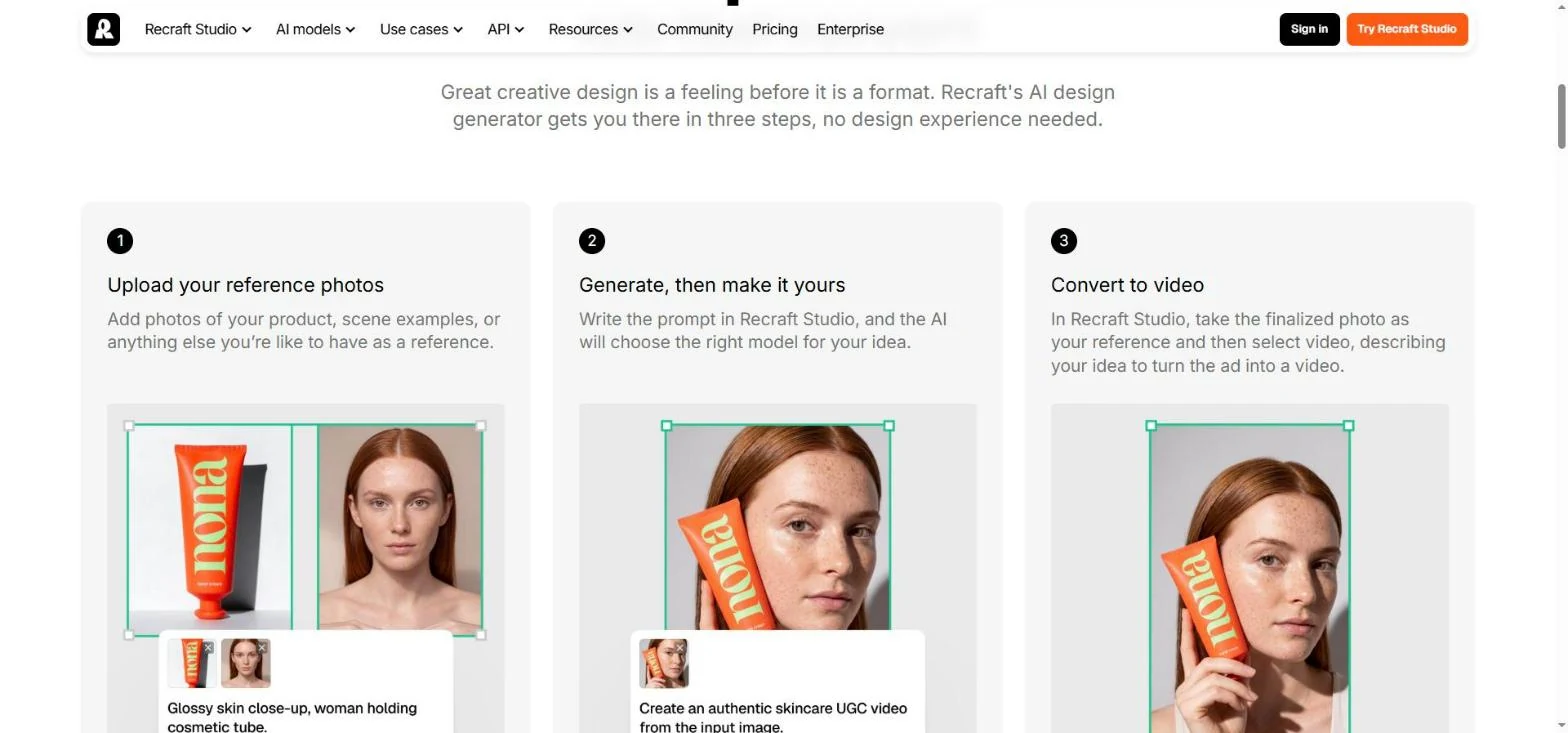
Recraft also runs a dedicated AI ad generator page with a 3-step pitch. You upload reference photos of your product or scenes, write the prompt in Recraft Studio, then turn the finished image into a video.
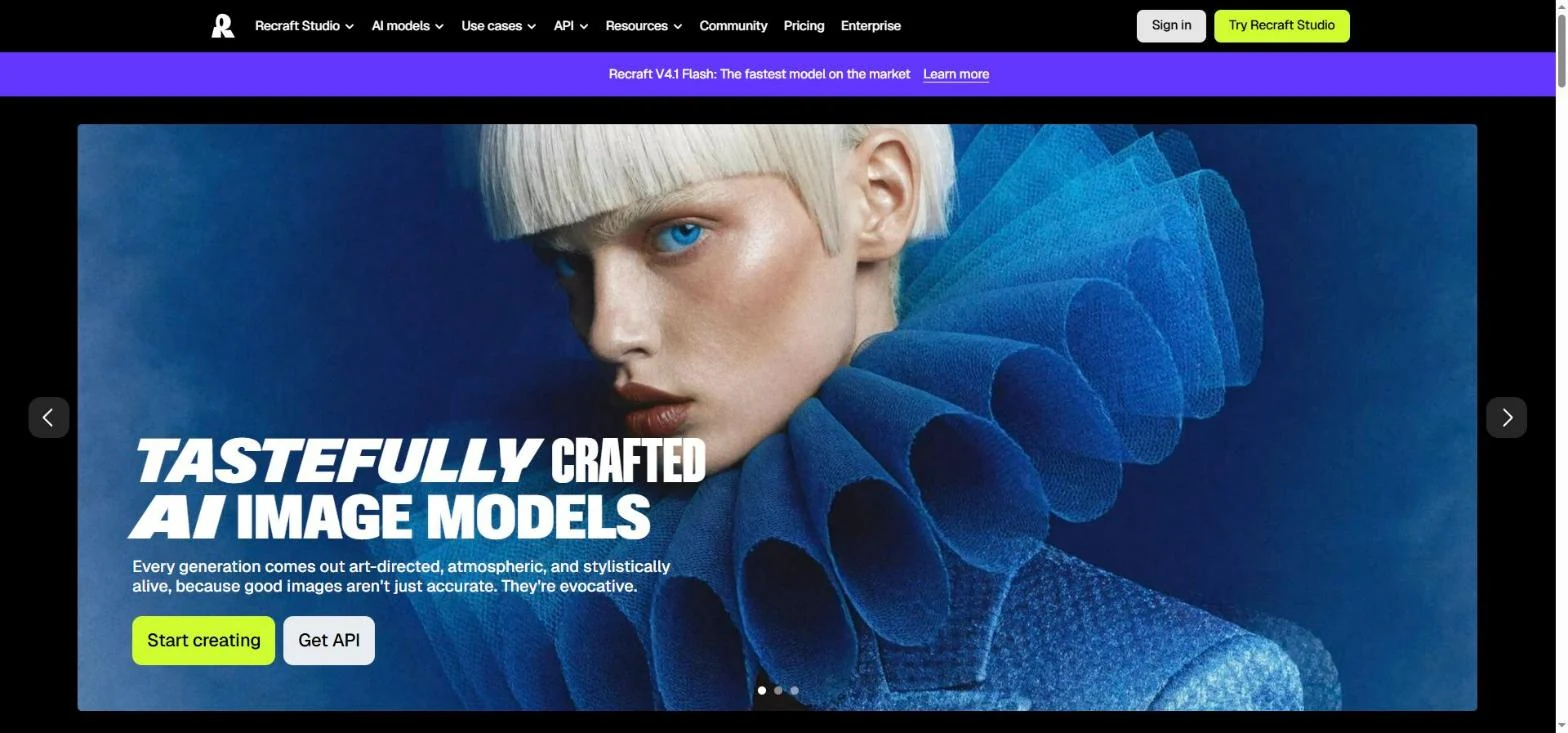
The page promises "Up to 30 free image generations per day," though a single style on Free is capped at 3 a day. Plan your free test around the 3, not the 30.
Export is a PNG "or other supported format," which you upload to Meta or TikTok yourself. Recraft makes the image; the angle, the copy, and the test plan stay with you.
How Recraft locks a brand style: V4 Styles, references, and image sets
The style system is the reason you would open Recraft for ads at all. Recraft turns a set of up to 10 reference images into a saved style that any later prompt can attach.
Creating the style: the exact clicks
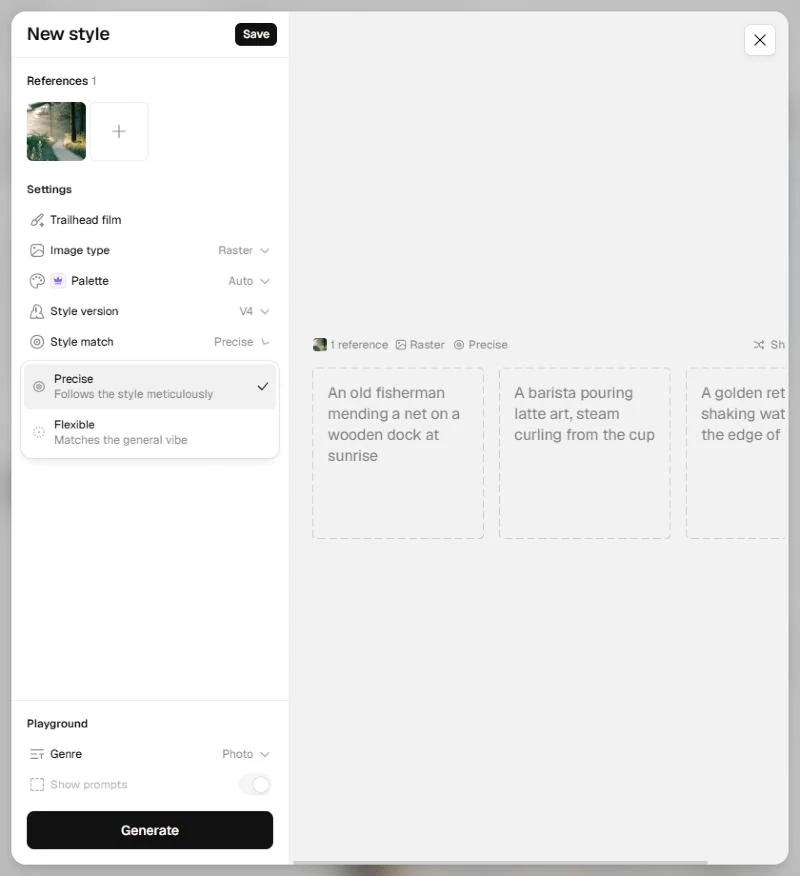
In Recraft Studio, switch the left panel to Create (it opens on Chat, where each message costs credits). Click Style, then Create style. The New style window shows these settings:
- Add references with Upload or History. V4 Styles takes up to 10.
- Name the style, then set Image type (Raster or Vector).
- Palette is a paid-plan setting; Style version is V4.
- Set Style match, then click Save. It joins your style library for any future project.
No training job runs. When I saved my style from 1 reference, it was ready to use as soon as I clicked Save, so your first styled ad is one generation away.
Precise or Flexible: two strengths of the same lock
V4 Styles has 2 matching modes. The app describes Precise as "Follows the style meticulously" and Flexible as "Matches the general vibe".
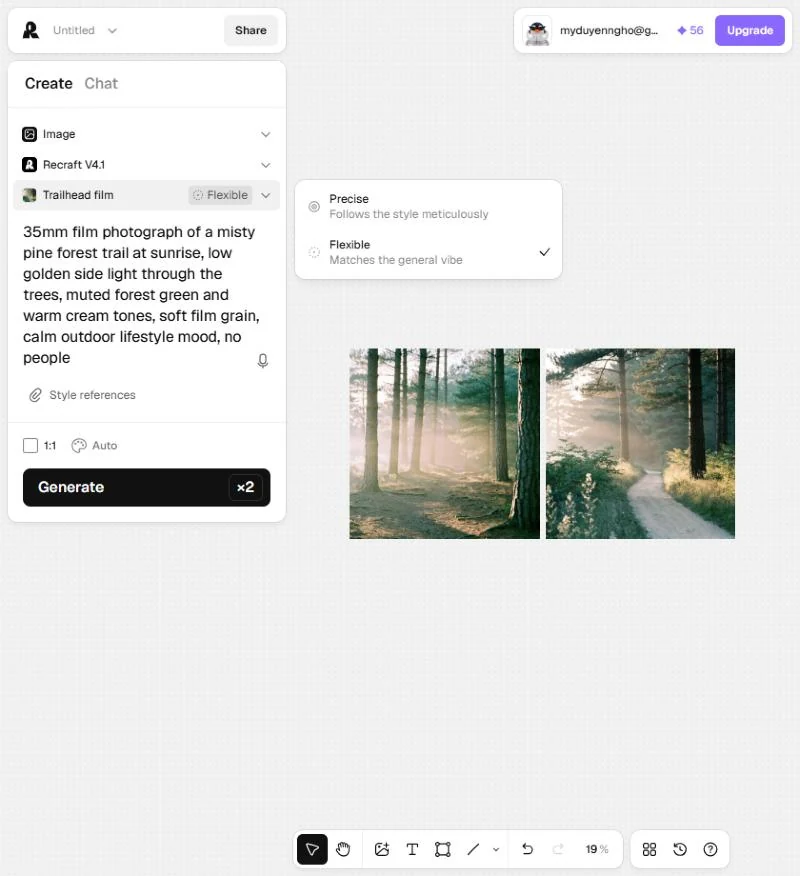
Here's the catch from my test. The style saved as Precise, but the Create panel attached it as "Flexible" until I clicked the label next to the style name. If ad 20 has to look like ad 1, switch it before the first generation.
What the reference controls and what the prompt controls
Recraft's field guide draws a clear line. The reference owns "line weight, color logic, texture, and rendering style." The prompt owns "subject, scene, composition, pose, and object."
For your ads, that means your product, your offer scene, and your layout all go in the prompt text, every time. The style will not remember that your cap has a cream patch on the front.
The guide is as direct about references that disagree. "Mixed references don't blend, they collide," it says. Its advice when unsure is to use a single reference.
Recraft style sets in practice: 6 prompts per image set
Image sets are Recraft's batch tool. Right-click the canvas, choose "Image set," and enter up to 6 prompts that share one style, palette, and aspect ratio.
Changing one image's prompt "regenerates only the selected image while leaving the rest of the set unchanged." So a bad frame costs you 1 regeneration instead of 6.
The Recraft stress test on a real cap: what holds, wobbles, and breaks
I ran the first frames of a 20-ad batch on Recraft's Free plan with 60 credits on the account. The product was a forest green six-panel cap with a cream embroidered patch. The brief: a film look at a pine forest trailhead, with room on the left for a headline.
The test plan: 20 variants, 4 image sets, one style
The 20 variants fit into 4 image sets: 3 sets of 6 and 1 set of 2. Keep one saved style on Precise across all 4. Change only the scene, and describe the product in identical words every time.
This is the prompt structure I used for the cap. Copy it and swap in your product:
The 20 scenes below are grouped by ad angle, so each set tests a different reason to buy:
A scorecard to copy, one row per check and one column per frame:
Holds: rendering, texture, and light across the batch
The look held. I made one mood image first (a misty pine trail at sunrise, 35mm film, 2 images for 4 credits in under 10 seconds), saved it as the style "Trailhead film", then ran the cap prompt on Recraft V4.1.
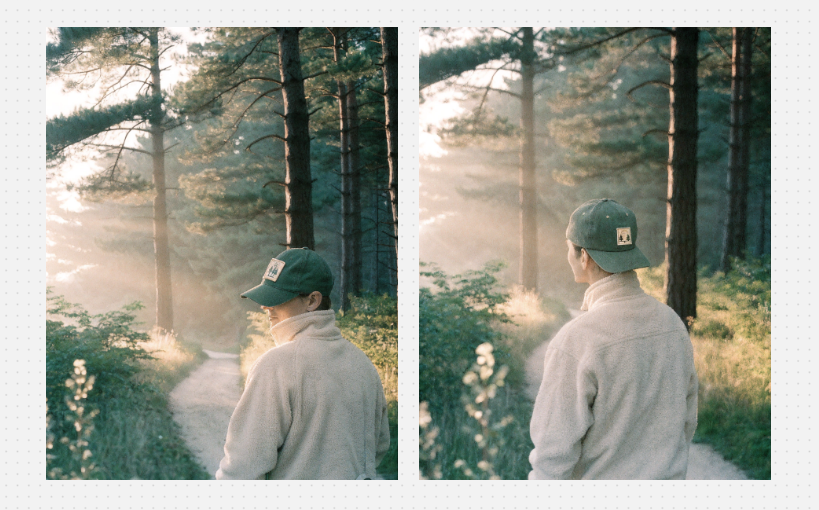
Both 896 × 1152 results had the same grain, haze, and muted greens as the reference, for another 4 credits.
Recraft's V4 Styles documentation backs this layer with its own benchmark across 159 real-world styles, where Precise mode won 91.6% of head-to-head matchups against 7 models. Recraft ran that test itself and says it measures holding a style, "not overall image quality," so treat it as a vendor claim about this one layer.
Wobbles: exact brand color and the color palette
Color is where Recraft's own documents hedge. The field guide says reference-to-output color consistency "isn't guaranteed" and tells you to check before approving. The palette doc adds that complex prompts and styles make it "harder for the model to strictly adhere to limited palettes."
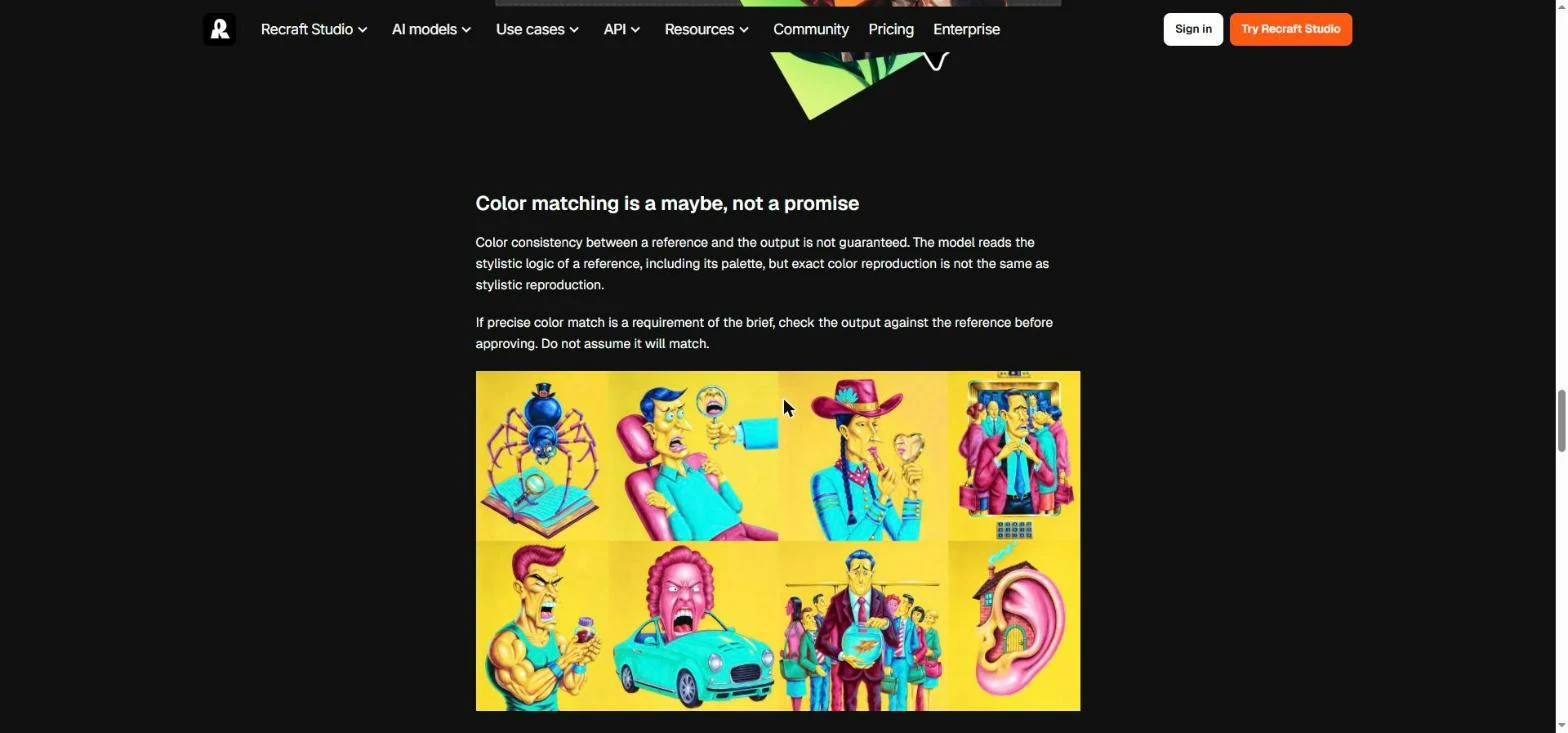
Paid plans can save a custom color palette and apply it to any generation. Neither document promises an exact hex value, so keep scene prompts short and run the eyedropper check on every frame if your brand color matters.
Breaks: the product itself
This is the layer that decided my test. In both V4.1 images the hiker wore a green cap, but the patch was a small generic badge, and in one image the hiker faced away so the front wasn't visible. A shopper comparing the ad with your product page would see a different cap.
The reason sits in the panel. With Recraft V4.1 selected, the attach button reads Style references, not product references. Recraft's character consistency page says Recraft "doesn't offer a dedicated character-tracking feature," and it counts products as characters.
So I switched the model to Nano Banana 2 (marked "Try for free" on my account). The button changed to Add references and accepted my cap photo, but the style row changed to "No styles in this model". The saved style and your product photo can't ride in the same generation.
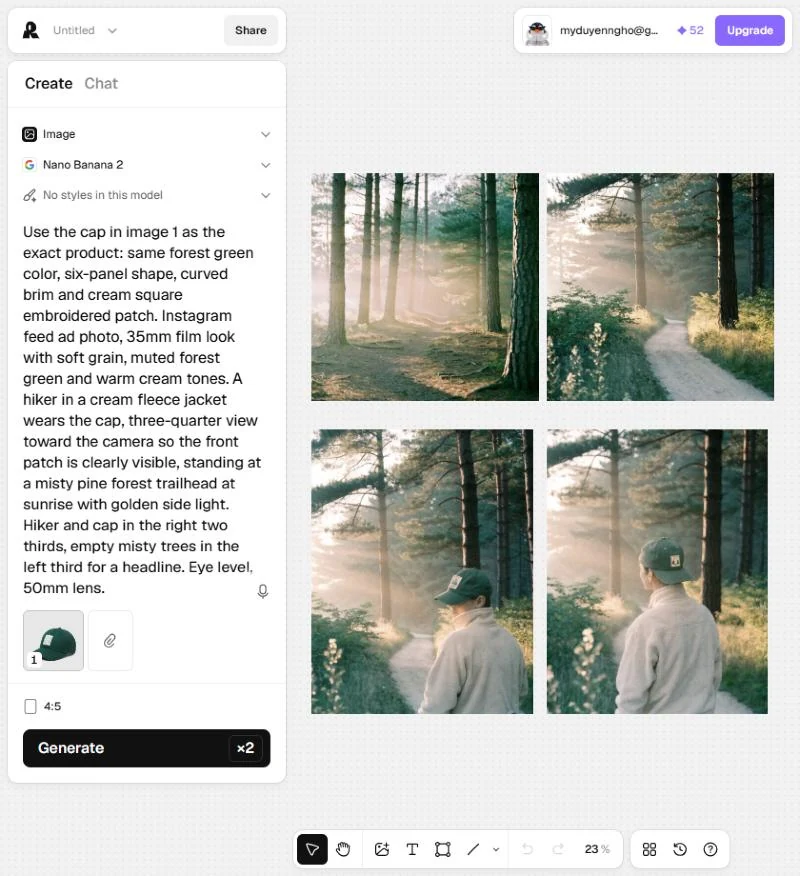
Two 928 × 1152 images cost 22 credits. The cap was right this time: same green, same shape, cream patch facing the camera. The film look drifted toward a cleaner, cooler photo, since I could only describe it in words.
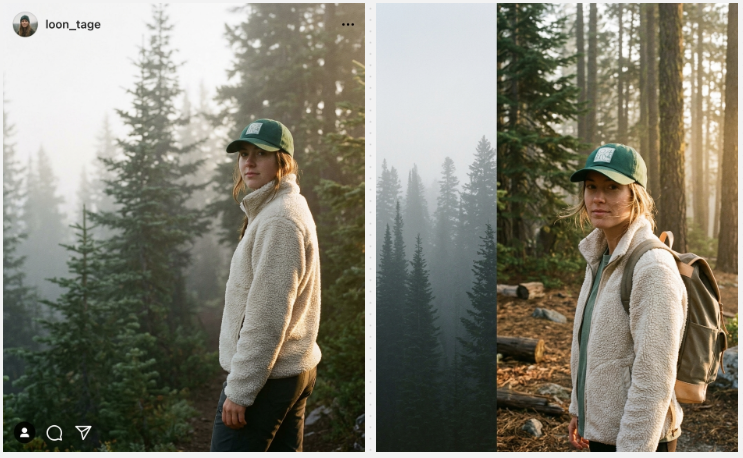
Two prompt lessons came with that run. "Instagram feed ad photo" in my prompt made one image come back inside a fake Instagram post frame, with a made-up handle and icons.
"Empty left third" became a separate dark strip in the other. Describe the scene, never the app, and ask for a "soft misty background" instead of "empty" space.
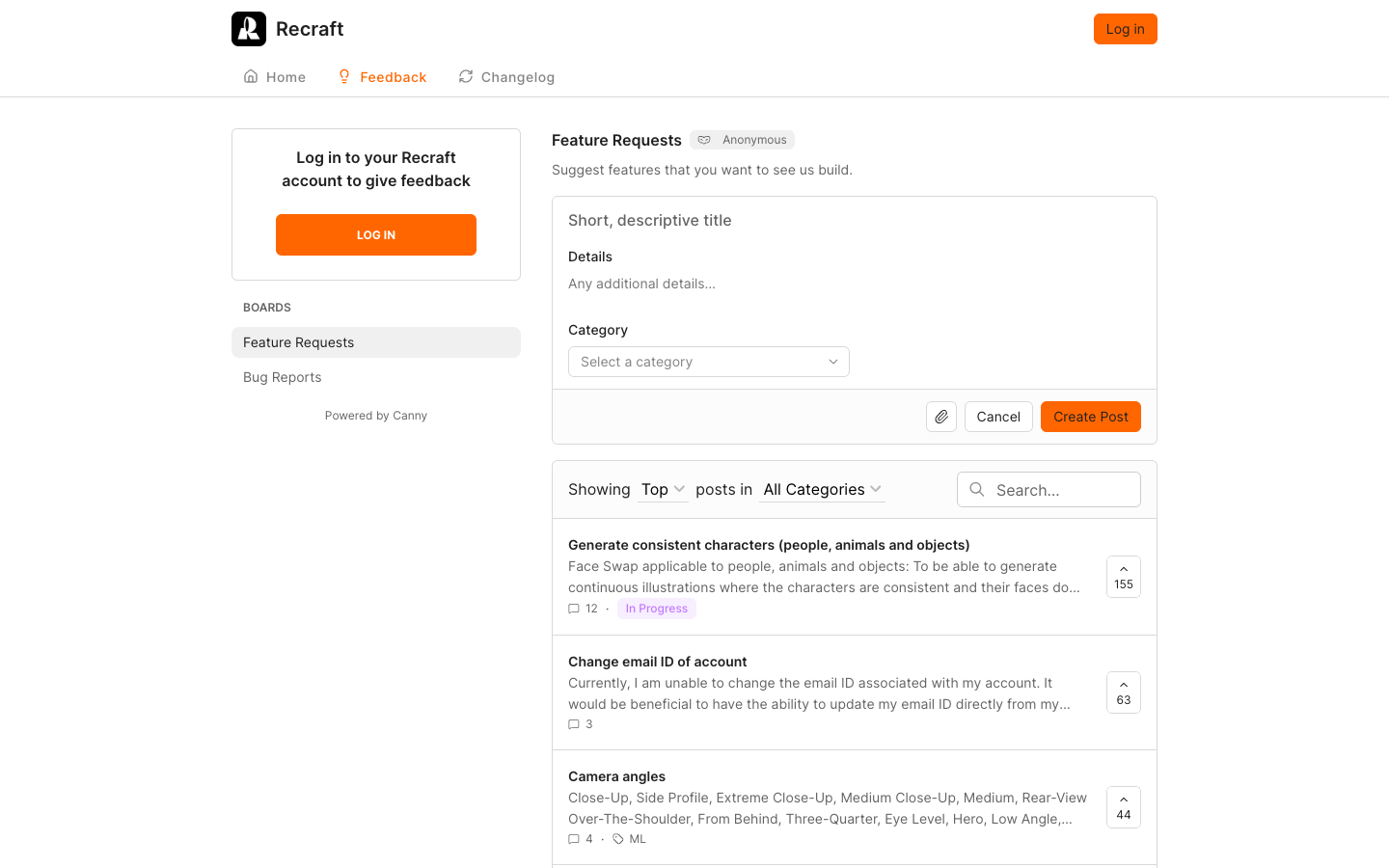
Recraft's public feedback board points the same way. On October 5, 2026, its most-voted feature request was "Generate consistent characters (people, animals and objects)," at 155 votes and marked In Progress.
Building the Recraft ad batch: product photo, headline, and sizes
Turning styled frames into ads you can run takes 3 production steps: placing the real product, adding the headline, and making the extra sizes. Recraft has a tool for each, and each one adds credits or a check.
The workaround: generate the scene, keep the real product photo
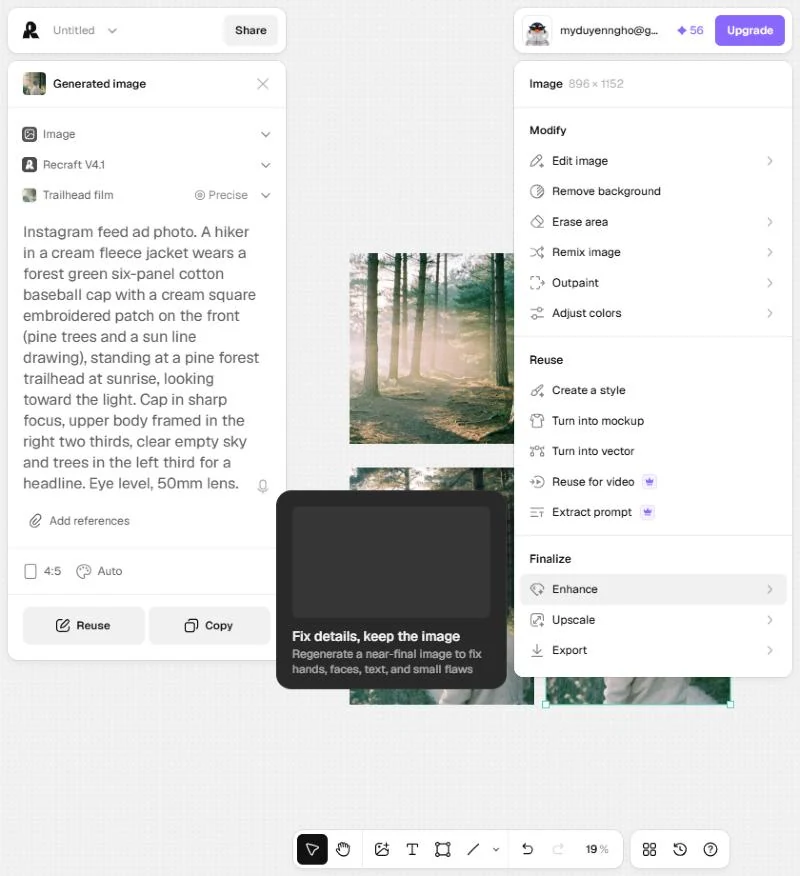
Based on my test, this is the route I'd use. Generate the styled scenes on Recraft V4.1 at 2 credits each, then place your real product photo into each one. The style governs everything except the object a shopper compares against your listing.
Click any image to open its menu. Remove background costs 1 credit, and the same menu holds Erase area, Outpaint, Adjust colors, Turn into mockup, Upscale, and Export. Free allows 3 image uploads a day, while paid plans allow unlimited uploads.
The text layer: headlines, fonts, and Frames
Static ads carry words, and Recraft offers 3 ways to add them: text in quotes inside the prompt, the text tool, or text boxes in a Frame.
The text tool is the one to use for ad headlines. It takes Google Fonts or your own font file (.woff, .woff2, .ttf, or .otf), and the layer stays editable. Text generated through a Frame "becomes part of the generated image and cannot be edited afterward," so a typo there means a regeneration.
Resizing the batch for 1:1, 4:5, and 9:16 ad sizes
The ratio menu in the Create panel offered 15 options on October 6, 2026, including 1:1, 4:5, and 9:16. Recraft's aspect ratio doc warns that the ratio is set separately for each generation type, so a ratio picked for Image does not carry over to Image set, Vector, Mockup, or Video.
For a size the presets do not cover, the documented route is an empty Frame with typed W and H values, then "Generate frame" to outpaint the gap. Count that as 1 extra generation per non-standard size, plus 1 more frame to check.
Recraft AI pricing: what Free, Basic, Pro, and Teams buy in ad images
Recraft AI costs $0 on Free, $10 a month on Basic, $16 on Pro, and $18 per seat on Teams, billed annually and before VAT, as of October 6, 2026. Basic includes 1,000 credits a month. Only paid plans allow commercial use, and subscription credits don't roll over.
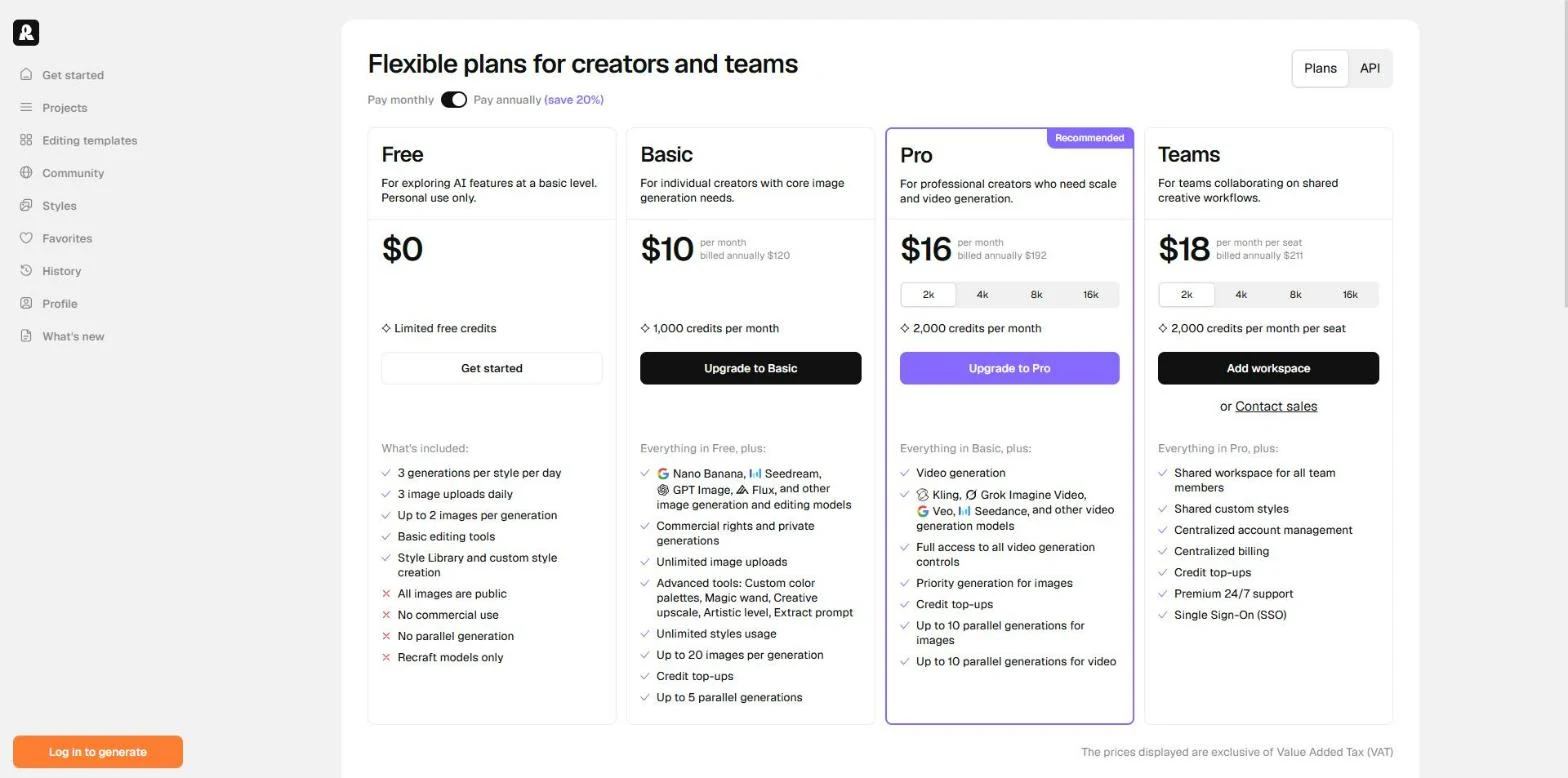
Credits reset at the start of each billing cycle and do not roll over, annual plans included. Read the Commercial use row first:
Teams adds a shared workspace, centralized billing, SSO, and "Premium 24/7 support," while other plans route support through [email protected]. Recraft's terms also say it "regularly test[s] different prices," so confirm the number at your own checkout.
What a credit buys in Recraft images
The model picker shows the price before you generate. These are the numbers it showed me on October 6, 2026:
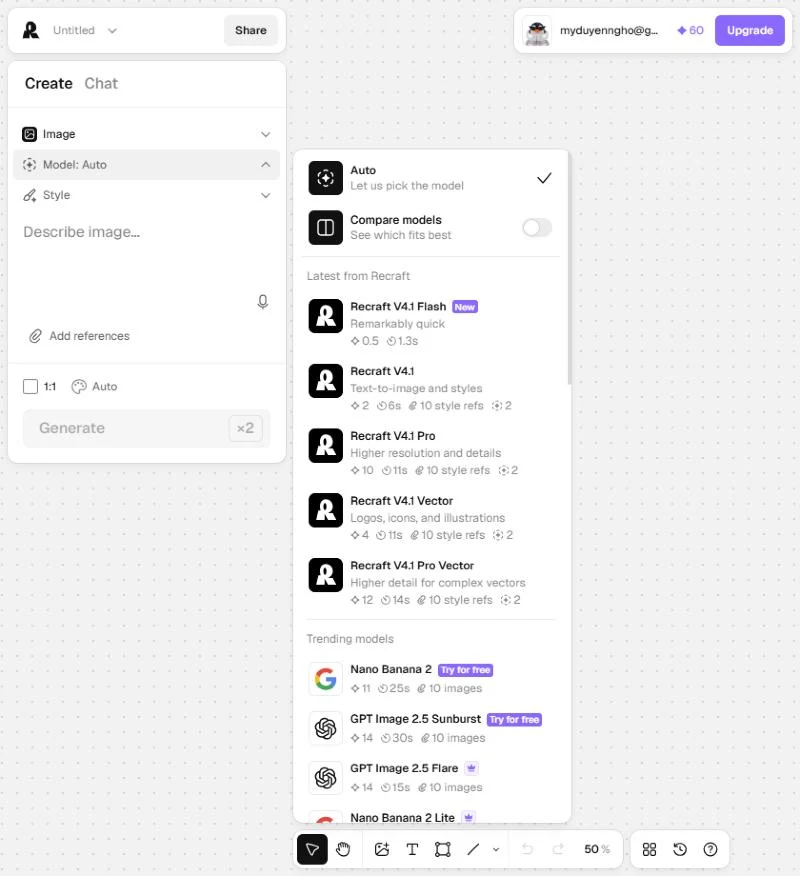
On Basic, the model you pick decides how far 1,000 credits go: 500 images on V4.1, 90 on Nano Banana 2. In my test, the styled pair cost 4 credits and the product-accurate pair cost 22.
Editing operations have their own prices. Background removal, vectorizing, and erasing an area cost 1 credit each, and the prompt enhancer costs nothing. Top-up credits cost $2 per 200, never expire, apply once monthly credits run out, and only paid plans can buy them.
What the 20-variant batch costs in credits
The arithmetic below uses the in-app prices above, with 2 options per prompt (the most the Free plan allows). The jump to watch is the product-photo route:
At these rates the cost per ad creative is measured in cents, so price will not decide this for you. What decides it is how many frames pass your product check.
Recraft's docs and terms hold 2 cost traps. In AI Chat mode each message costs credits, and "the cost grows progressively" as the chat gets longer. Agentic features use a number of credits that "cannot be calculated in advance," so stay in Create mode for ad batches.
Recraft's cancellation and refund policy, and commercial use
Recraft "may offer a refund at our discretion" if your latest payment was within 30 days, and either no credits were used since that payment or the account has used fewer than 30 credits in total. Requests go to [email protected].
My test alone used 30 credits, so one real batch on a paid plan can close that window. Run your first test on Free.
Cancelling takes 3 clicks: your profile in the upper right, "Manage subscription," then "Cancel plan." Annual plans carry a 12-month minimum term under terms last updated August 11, 2026.
Paid images are private, fully owned, and keep their commercial rights after you cancel. Free images "are owned by Recraft," "are not licensed for commercial use," and appear in the public community gallery. Any image you plan to run as a Meta or TikTok ad needs a paid plan at the moment it is generated.
Recraft AI pros and cons for ecommerce ad images
Each line below comes from my October 6 test or Recraft's own pages. Where Recraft is strong for ad images:
- A saved style from 1 reference, ready in seconds, held the same look across every V4.1 image in my test.
- Image sets run 6 prompts on one style and regenerate a single frame without touching the rest.
- Low cost per image: 2 credits on V4.1, so Basic's 1,000 credits cover 500 images.
- Vector image generation as editable SVG.
- Outside models on the same credit balance, so the product-photo route lives on the same canvas.
- Paid images are private and fully owned, and ownership survives cancellation.
Where Recraft costs you time:
- Style and product photo can't share a generation: V4.1 takes style references only, Nano Banana 2 takes no styles.
- A saved Precise style is applied as Flexible until you switch it in the Create panel.
- Exact color match is "a maybe, not a promise."
- Free images are public, owned by Recraft, and not licensed for commercial use.
- Subscription credits do not roll over, annual plans included.
- No ad strategy layer: no angle suggestions, ad copy, or ad account connection.
Who Recraft AI fits for ecommerce ads, and who should skip it
Recraft fits you if a recognizable look carries your ads: an illustrated mascot, a flat-graphic identity, or a photo mood every ad has to share. It is weaker when the exact product carries the ad, because the style lock covers rendering and not the object.
It's a good buy when:
- Your brand look is illustration, flat graphics, icons, or vector graphics. A V4.1 Vector image costs 4 credits and comes back as editable SVG.
- A designer on your team, or you, will check every frame for product shape and color before it goes live.
- You need many backgrounds, banner ads, or scene images in one look and will composite the real product photo on top.
- You want Nano Banana, GPT Image, Flux, and Recraft's own models on one credit balance, which starts on Basic.
Wait, or look elsewhere, when:
- Your ads depend on the product looking exactly like the listing photo straight out of the generator.
- You want the tool to suggest angles, hooks, and ad copy, since Recraft starts from the prompt you write.
- You plan to stay on the Free plan and run the outputs as ads.
The lesson from any style-lock tool: brand consistency has 3 layers
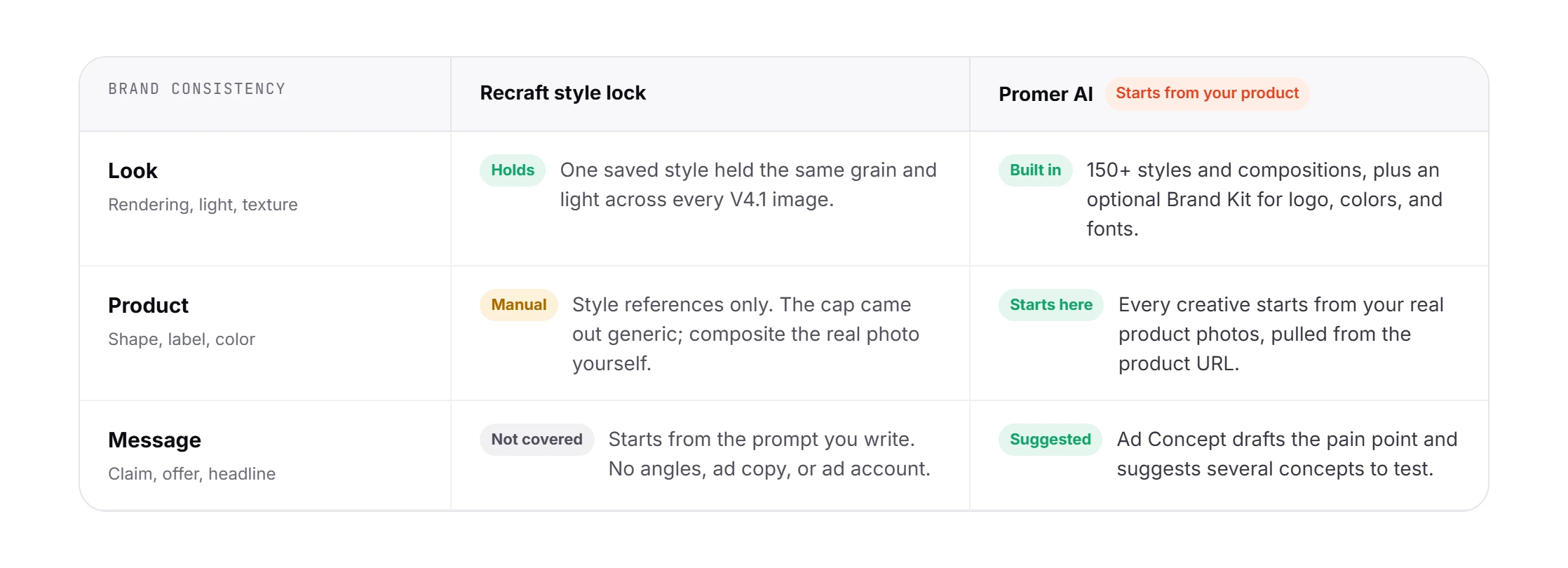
Brand consistency in paid social has at least 3 layers: the look (rendering, light, texture), the product (shape, label, color), and the message (the claim, the offer, the headline). My cap test showed it plainly: the style lock nailed the look, the product photo route fixed the product, and neither touched the message.
The message layer is the one ad creative testing pays for. A batch of 20 ads that share a look and make the same claim is one idea shown 20 times, and click-through rate cannot tell you anything new about it.
Lock the look so it stops being a variable. Keep the product honest with a manual check, and spend the 20 variants on different reasons to buy.
Recraft AI alternatives for brand-consistent ad images
Each of these solves a different part of the job. Cheapest first:
Canva, the free brand-kit baseline
If your static ads are mostly templates carrying your logo and fonts, check Canva Free before paying for generation. Canva's pricing page lists 1 Brand Kit (3 colors only), 1.6M+ templates, and up to 20 Standard or Premium AI uses on Free. Canva Pro raises that to 5 Brand Kits and adds "Design in bulk". Canva's brand control works at the template level; Recraft's works at the rendering level.
Midjourney, the style-reference generalist
Midjourney's Style Reference captures "colors, medium, textures, or lighting" and "doesn't copy objects or people," with a --sw parameter from 0 to 1000 setting the strength. Plans start at $10 a month for Basic and $30 for Standard. Stealth Mode, which keeps images private, is only on the $60 Pro and $120 Mega plans, and companies with more than $1,000,000 in yearly gross revenue must buy Pro or Mega.
Promer AI, for ad creative built from the product
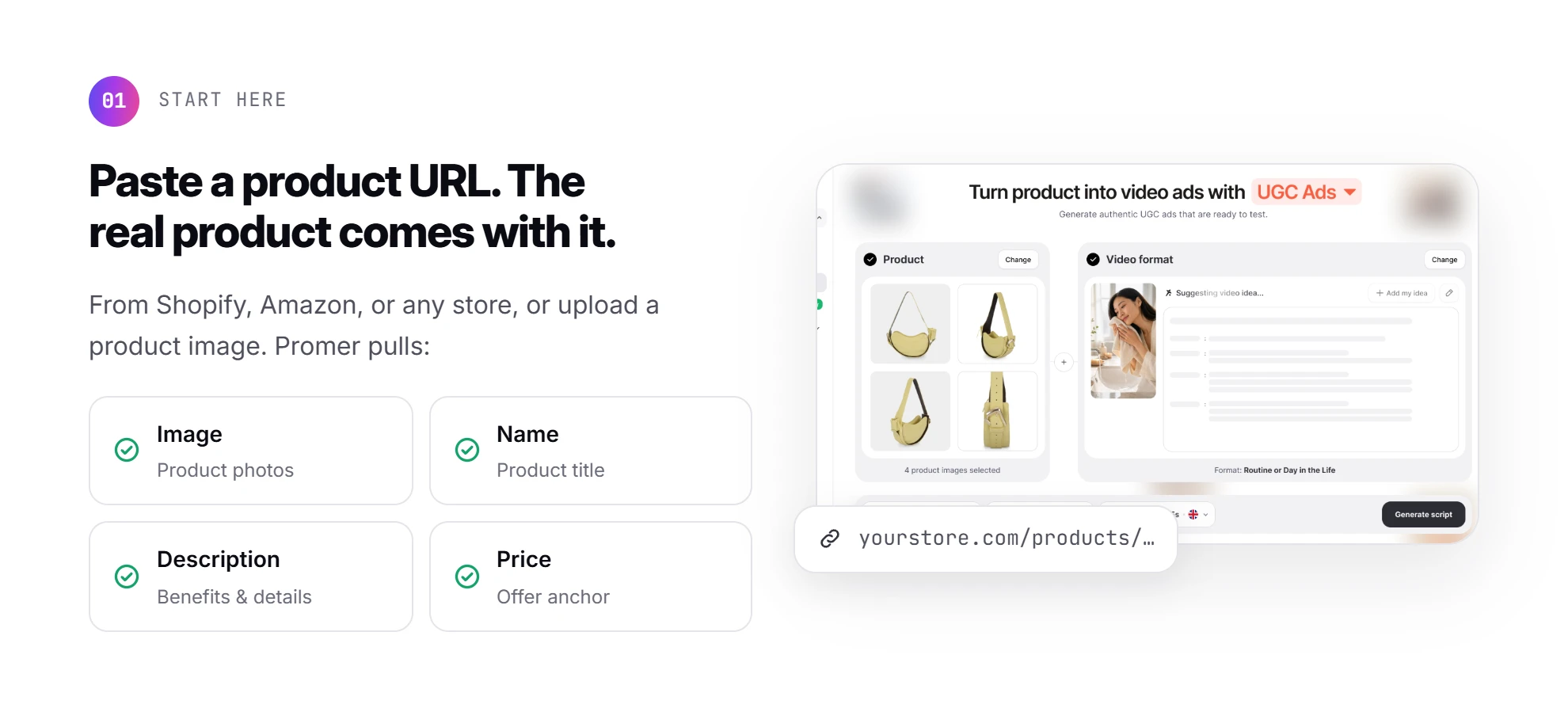
My test kept running into the same wall: the look and the product live in different places. Promer AI starts from the other end. You paste a product URL from Shopify, Amazon, or any store (or upload a product image), and it pulls the image, name, description, and price, so the real product is the starting point of every creative.
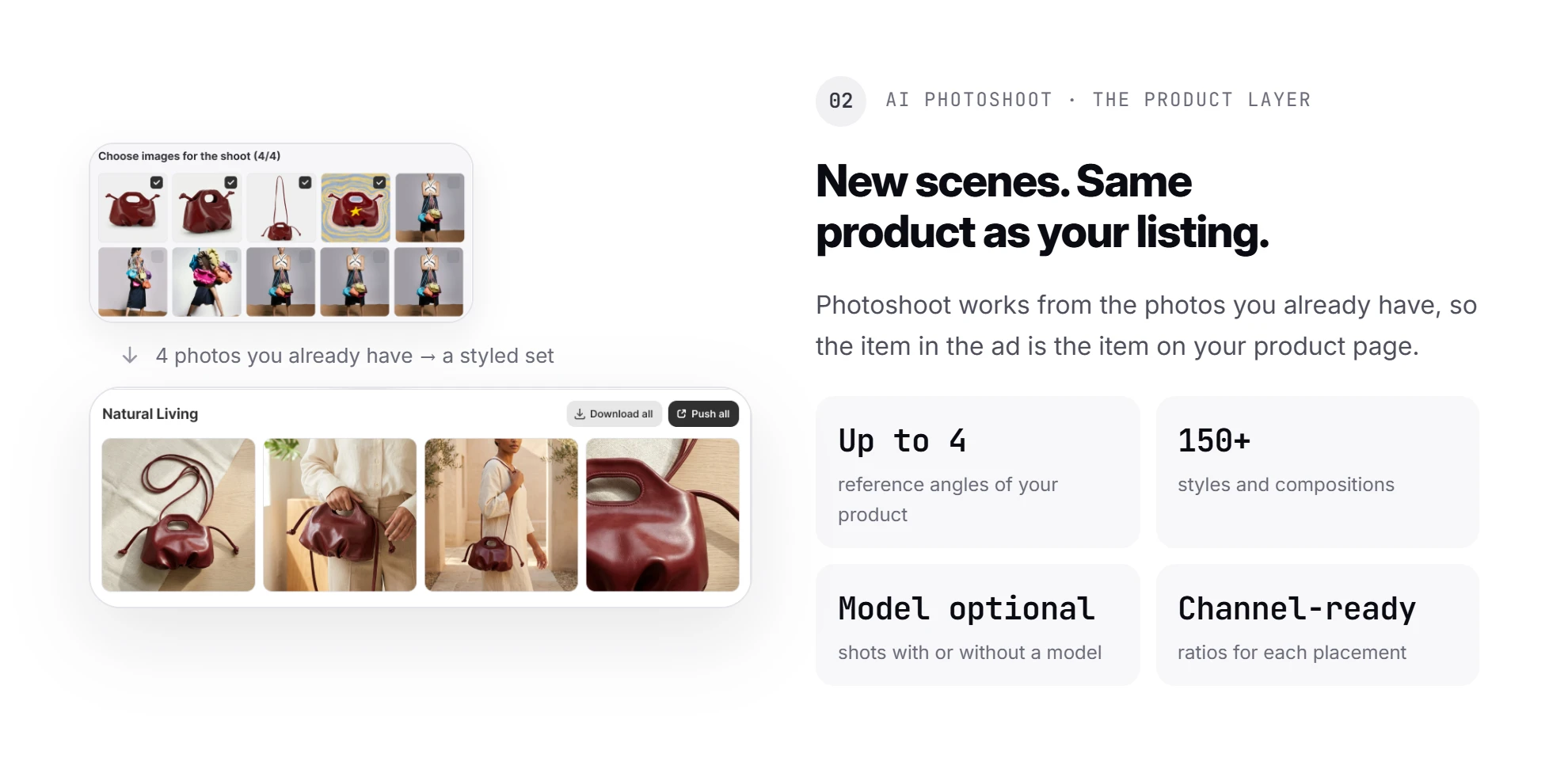
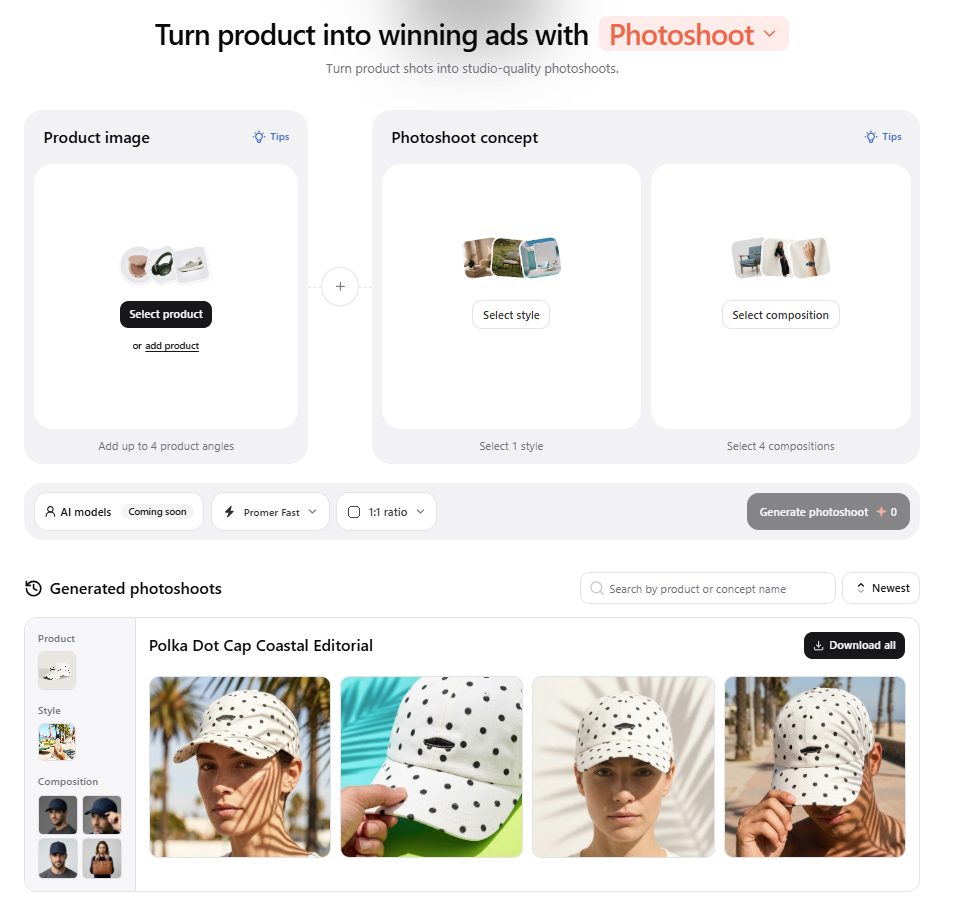
For the product layer, Promer AI's AI Photoshoot works from photos you already have. It takes up to 4 reference angles of your product and offers 150+ styles and compositions, with or without a model, in channel-ready ratios. An optional Brand Kit holds your logo, colors, and fonts.
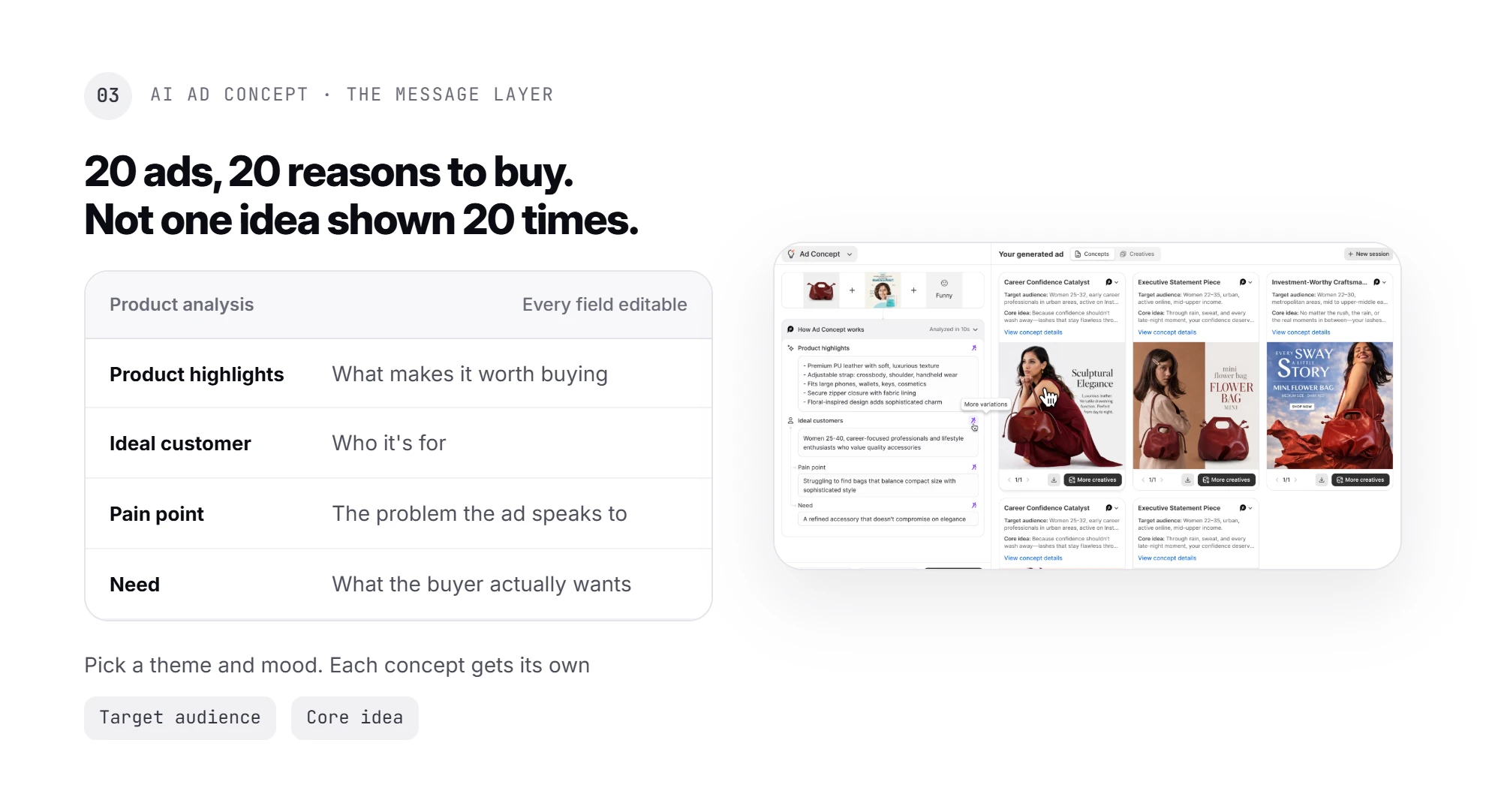
For the message layer, the part no style lock touches, AI Ad Concept reads the product and drafts Product highlights, Ideal customer, Pain point, and Need (all editable). Then it suggests several ad concepts from a creative theme and mood you pick, each with its own target audience and core idea, so your batch tests different reasons to buy instead of 20 versions of one.
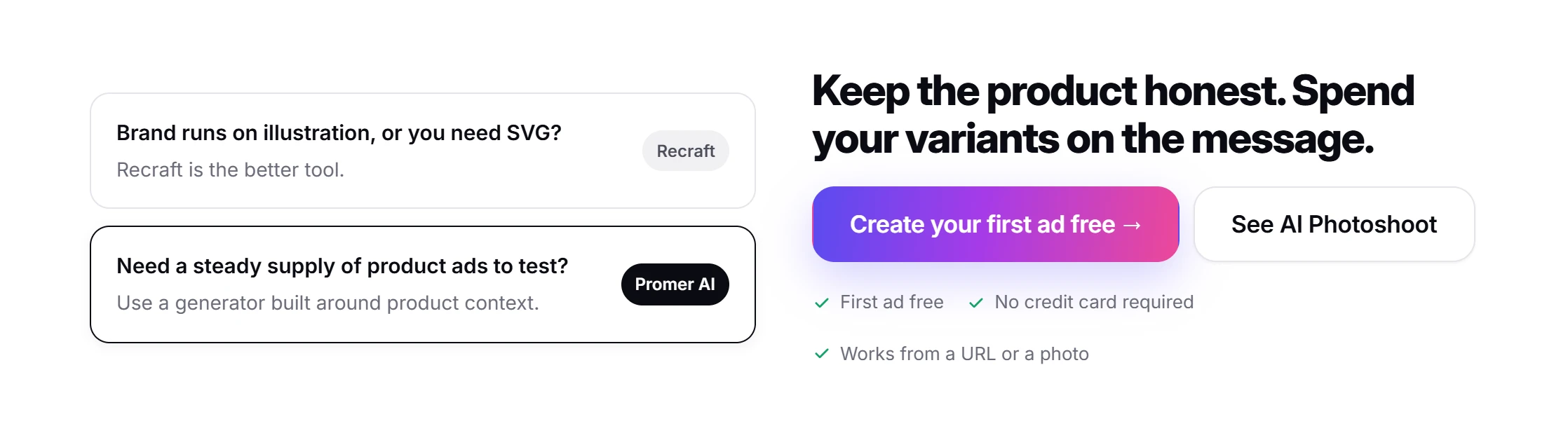
Recraft does things Promer AI does not attempt. It writes editable vectors, learns a style from any image you give it, and puts outside models on one credit balance. If your brand runs on illustration or you need SVG files, Recraft is the better tool.

If the job is a steady supply of product ads to test on Meta and TikTok, an AI ad generator built around product context is the closer fit. Promer AI reports 3,000+ merchants and 1M+ ads generated, and its output, like any AI-generated content, still deserves a quick review before spend goes behind it. You can create your first ad free, with no credit card required.
Recraft AI review verdict: buy it for the look, check the product
Recraft AI is a strong style-lock tool for ecommerce brands whose ads are carried by a look, and a manual job for brands whose ads are carried by the exact product.
Buy it if your ads share a mood or illustration style and you're happy to place the real product on top. Skip it if every ad must show the exact product without extra steps.
Before paying, repeat my test on the Free plan: 1 mood image, 1 saved style switched to Precise, 2 styled prompts on V4.1, then 1 run on Nano Banana 2 with your product photo. It fits in about 30 credits and 15 minutes.
If the look holds and your composite keeps the label sharp, Basic covers a 20-ad batch many times over.
FAQ
Is Recraft AI good for ecommerce ads?
Recraft AI is good for ecommerce ads whose appeal rests on a consistent visual style, such as illustration, flat graphics, or a fixed photo mood. In a cap ad test on October 6, 2026, a style saved from 1 image held the same look across every Recraft V4.1 result, while the cap itself came out generic. Sellers who need the exact product should composite the real photo.
How much does Recraft AI cost?
Recraft AI costs $0 on Free, $12 a month on Basic, $20 on Pro, and $22 per seat on Teams when billed monthly. Annual billing lowers those to $10, $16, and $18 a month. Basic includes 1,000 credits a month and Pro 2,000. A Recraft V4.1 image costs 2 credits, so Basic covers about 500 images. Prices exclude VAT.
Can you use Recraft AI images for ads commercially?
Recraft AI images can run as ads on a paid plan; Free plan images are owned by Recraft and are not licensed for commercial use. Paid plans grant full ownership and commercial rights for images generated while subscribed, and those rights survive cancellation. Free images also appear in Recraft's public community gallery.
Does Recraft keep the same product across different images?
Recraft AI does not keep a product identical through a style alone, because Recraft V4.1 accepts style references, not product references. Switching to Nano Banana 2 lets you attach your product photo, which kept the cap's color and patch in testing. That model shows "No styles in this model", so describe the look in words or composite the product onto styled scenes.
How many reference images can a Recraft style use?
A Recraft V4 Styles style can use up to 10 reference images. Recraft's field guide recommends one reference when unsure, because references from different visual worlds "collide" instead of blending. Style match can be Precise or Flexible, and the Create panel lets you switch it per generation.
What do Recraft AI reviews say about the free plan?
The Recraft AI Free plan is enough to test a style, not to run ads. It includes limited free credits, 3 generations per style per day, 3 image uploads a day, and up to 2 images per generation. Every Free image is public and can't be used commercially, so treat Free as a trial before paying.
Can you get a refund from Recraft?
Recraft may refund at its discretion within 30 days of your latest payment, if you have used few or no credits. The condition is no credits used since that payment, or fewer than 30 credits used in total. Requests go to [email protected]. Recraft cannot refund once an account is deleted, and annual plans carry a 12-month minimum term.
Related reviews and ecommerce guides
- AdCreative.ai Reviews: Does the Creative Score Predict Results?: another static-ad tool review, covering what an AdCreative.ai credit covers, how its creative score works, and what each plan costs per download.
- AI Prompts for Photoshoot: Formula + 20 Copy-Paste Examples: a 5-part prompt formula and 20 product-photo prompts, including why text alone will not preserve your product.
- UGC Ads vs Static Ads: Which Wins for Ecommerce Brands?: when static ads win, how cost and production speed compare, and how to combine both formats.
Sources
- Canva. (n.d.). Canva pricing: Compare Free, Pro, Business and Enterprise plans. https://www.canva.com/pricing/
- Midjourney. (n.d.). Comparing Midjourney plans. https://docs.midjourney.com/hc/en-us/articles/27870484040333-Comparing-Midjourney-Plans
- Midjourney. (n.d.). Style reference. https://docs.midjourney.com/hc/en-us/articles/32180011136653-Style-Reference
- Recraft. (n.d.). Adding text to an image. https://www.recraft.ai/docs/recraft-studio/image-generation/working-with-text-and-prompts/adding-text-to-an-image