Kapwing Reviews: 5 Things I Learned Editing My First Ad
Category
Blogs
Date
Authored by
Huy Tran Quoc
Summary
Kapwing reviews from a real ad test: one 15-second draft used all 10 free credits. What the AI editor gets right, what to fix, and who should pay.
Do you have product photos sitting in a folder and no video ad to run? Do you need captions, a voiceover, and a 9:16 cut, but not a full editing course? Are you wondering whether Kapwing's free plan can get one ad out the door before you pay?
Then this one's for you. I gave Kapwing the job I'd give a freelance editor: turn 2 photos of a pink keyboard into a 15-second TikTok ad. I logged every prompt, every credit, and every wall I hit on the free plan.
Kapwing reviews hold up for the finishing work (captions, voice, resizing), but the free plan is a test drive: my first AI-built ad used all 10 lifetime credits, and the draft still needed hand fixes.
Why you can trust this Kapwing review?
I run my own product ads, so I test tools the way I'd use them on a busy evening: free plan, a real product, a real brief. Nobody paid for this review, and Kapwing didn't give me a special account.
The product was a pink 60% mechanical keyboard with white keycaps and RGB lights. I had 2 photos: a close-up of the keys and the full board. I wrote down each prompt, how long each step took, and what the credit counter said after.
For the paid plans, I read Kapwing's pricing page and help center on October 2, 2026, then went through what real users wrote on Trustpilot, G2, and Capterra. When a number comes from someone else, I name them.
Key takeaways from my first Kapwing ad
Your real entry price is $24 a month, not $0. Free exports are 720p with a Kapwing watermark, which is not a file you want to put ad spend behind. Start on monthly billing before you commit $192 for a year.
There is no safety net once you pay. Kapwing offers no trial on paid plans and no refunds on subscriptions. Run your whole ad workflow on Free first, and set a reminder before your renewal date.
Free credits cover one AI test, not one campaign. My single 15-second ad used all 10 lifetime credits. On Pro's 1,000 credits a month, that is up to about 100 drafts like mine, or about 50 brand-new AI clips at 20+ credits each.
Kapwing speeds up finishing, not deciding. KAI built my draft in about 3 minutes because I handed it the hook, 3 callouts, and the offer. It followed my brief; it didn't suggest a stronger angle.
Every AI draft needs a human check before it runs. In mine, a caption covered "Shop Now," the offer was never spoken, and the timeline came in at 42 seconds, not 15. Paste your own voiceover script, offer included.
Download your free-plan work the same day. Free projects are deleted after 3 days, so a test ad you leave over the weekend may be gone on Monday.
Kapwing product info: A browser editor with an AI agent inside
Kapwing is a browser-based video editor from San Francisco that says over 30 million creators use it. You edit on a timeline like any editor, and you can also type a request to Kapwing AI (called KAI in the app), which builds or changes the project for you.
For an ad job, here is what each part does and where the free plan stops:
Part of Kapwing
The ad job it does
On the free plan
KAI (Kapwing AI)
Builds a draft video from your brief and assets: timing, text, voice, music, captions
Yes, until your 10 lifetime credits run out
AI Video Generator
Generates new clips from a text prompt, image, script, article, or PDF
Costs 20+ credits per clip, more than Free gives you
Auto subtitles
Adds captions people read with the sound off
Up to 10 minutes
Text to speech (AI Voice)
Reads your script as a voiceover
Up to 1 minute
Resize Project
Turns one edit into 9:16, 4:5, 1:1, or 16:9
Yes
Brand Kit
Keeps your logo, colors, and fonts on every ad
No, Pro and up
Source: Kapwing pricing page and help center, checked October 2, 2026.
So think of Kapwing as two tools in one tab: an AI that drafts, and an editor where you finish. My test used both.
Kapwing AI video editor review: The ad brief I gave KAI
A spinning product on white tells you nothing about an ad tool, because nobody runs that as an ad. So I wrote a brief the way I'd brief a freelance editor, with the buyer, the timing, and the exact words on screen:
Brief block
What I wrote
Why it's there
Format
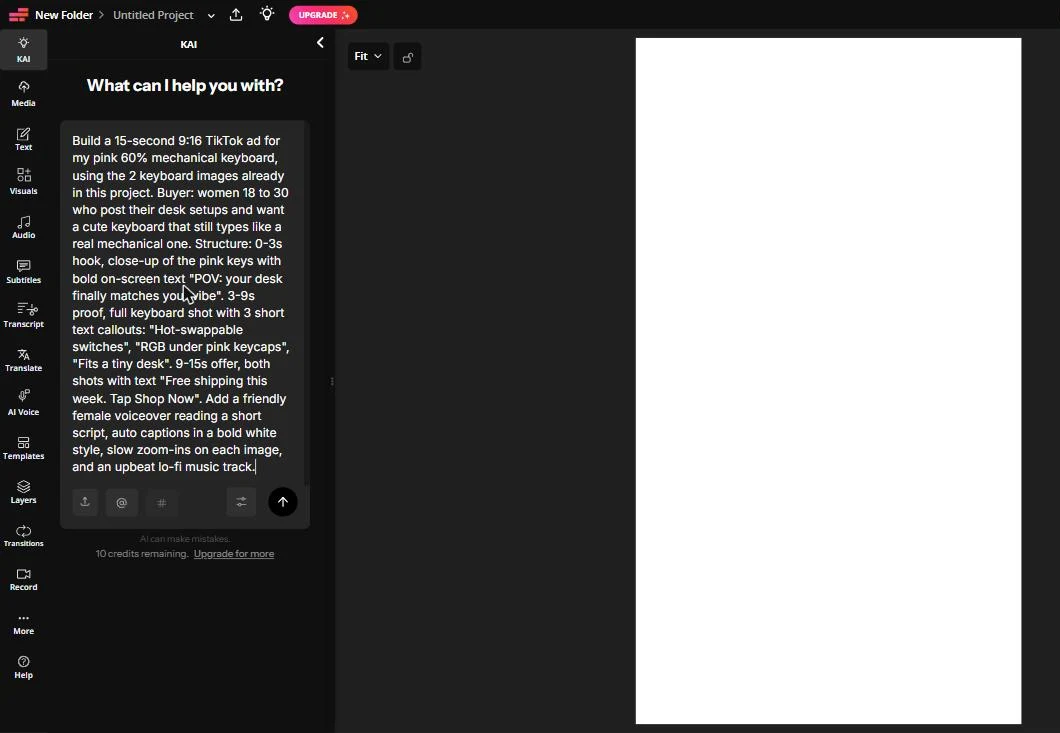
"Build a 15-second 9:16 TikTok ad for my pink 60% mechanical keyboard, using the 2 keyboard images"
Locks length, ratio, and placement first
Buyer
"Women 18 to 30 who post their desk setups and want a cute keyboard that still types like a real mechanical one"
Tells the AI who the tone is for
0 to 3s, hook
"Close-up of the pink keys with bold on-screen text: POV: your desk finally matches your vibe"
The scroll-stopper, in a TikTok-native format
3 to 9s, proof
"Full keyboard shot with 3 short text callouts: Hot-swappable switches, RGB under pink keycaps, Fits a tiny desk"
One reason to believe per callout
9 to 15s, offer
"Both shots with text: Free shipping this week. Tap Shop Now"
The call to action
Sound and style
"Friendly female voiceover, auto captions in a bold white style, slow zoom-ins on each image, upbeat lo-fi music"
Everything a finished ad needs, in one line
Lesson 1: KAI only sees what you attach to the message
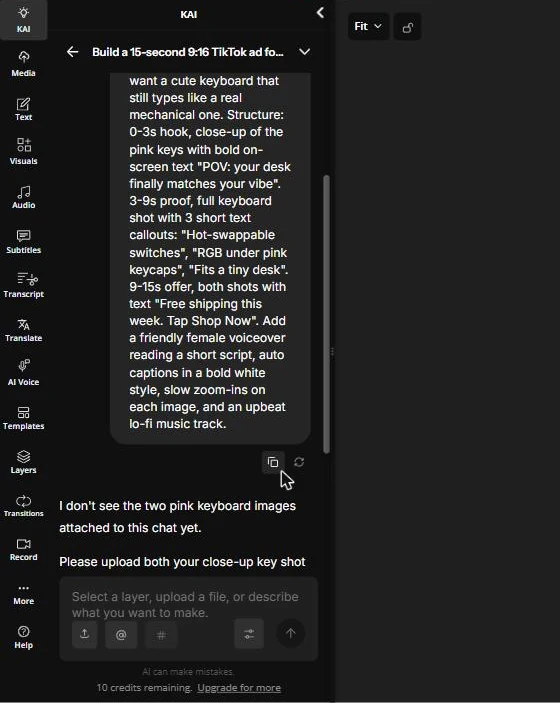
My photos were already uploaded to the project. KAI answered in about 40 seconds with: "I don't see the two pink keyboard images attached to this chat yet."
I attached both photos through the upload button in the chat (it lets you pick from files you already uploaded) and sent the brief again. That second round is the one that built the ad, so attach your assets in the same message as the brief.
Lesson 2: The draft followed my timing, and the text fought the captions
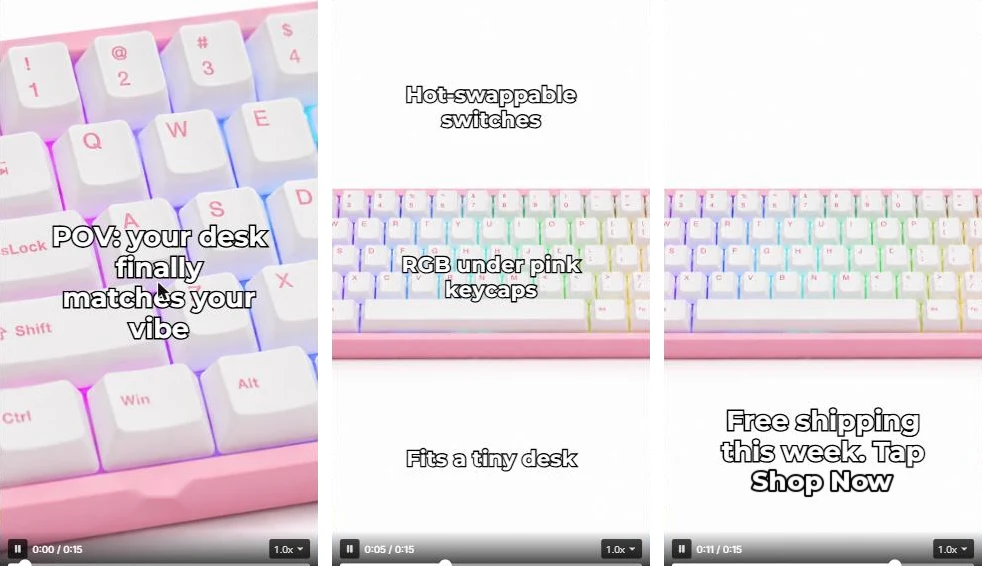
KAI showed "Planning your keyboard ad," then "Generating subtitles," and had a 15-second draft ready about 3 minutes after I sent the photos. It wrote the voiceover, picked a music track, added captions, and kept my 3 beats in order.
Here is how I'd score the draft if a freelancer sent it:
What I checked
Result
What it means for your ad
Hook
Close-up of the keys with my POV line, from frame 1
The first 3 seconds were usable as is
Proof beat
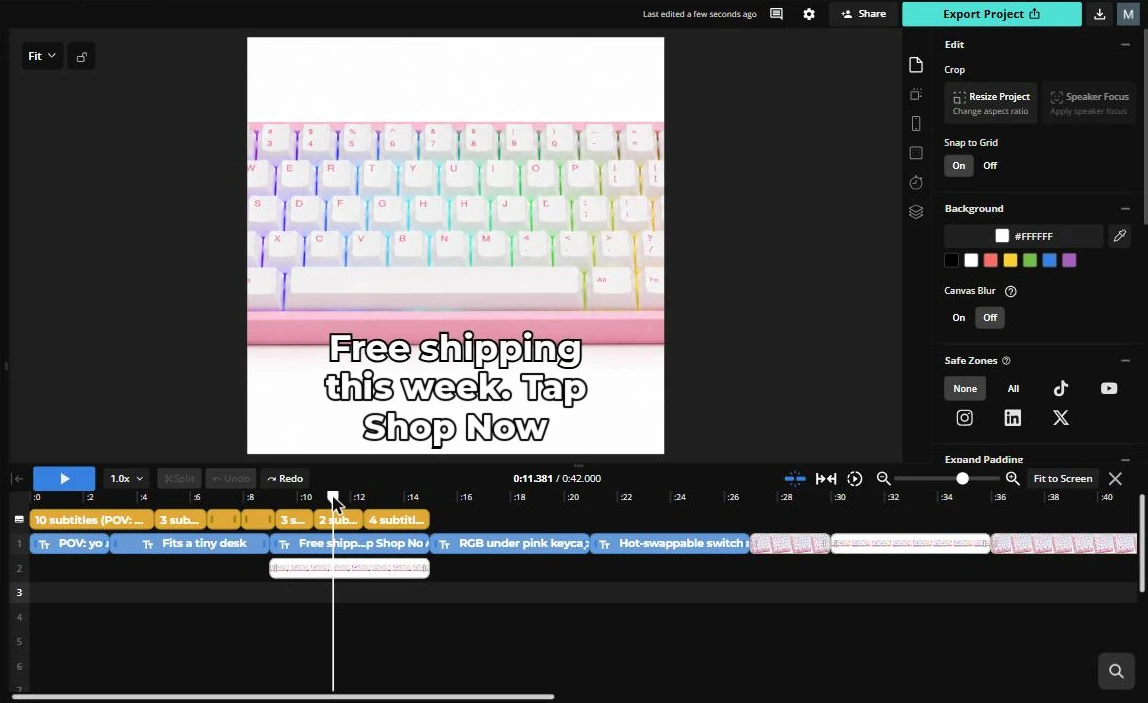
All 3 callouts appeared at once, and "RGB under pink keycaps" sat right on top of the keys
Stagger the callouts and move text off the product
Captions
Bold white captions, as asked, but at 11s the caption "keycaps," covered "Shop Now"
Pick one zone for captions and one for text
Framing
The full keyboard sat in a band with white space above and below
Fine for a callout layout; crop tighter for a cleaner feed look
Voiceover
"POV: your desk finally matches your vibe. This cute pink mechanical keyboard has hot-swappable switches, RGB under the keycaps, and fits perfectly on a tiny desk."
Clear script, but the offer was never spoken
Offer
"Free shipping this week" showed on screen only, and only over the full board
Write the CTA into your own script
My honest read: KAI got the structure right in one pass, which is the slow part when you edit by hand. It didn't check its own layout, so the text collisions are yours to catch.
Kapwing AI video generator reviews: What one ad costs in credits?
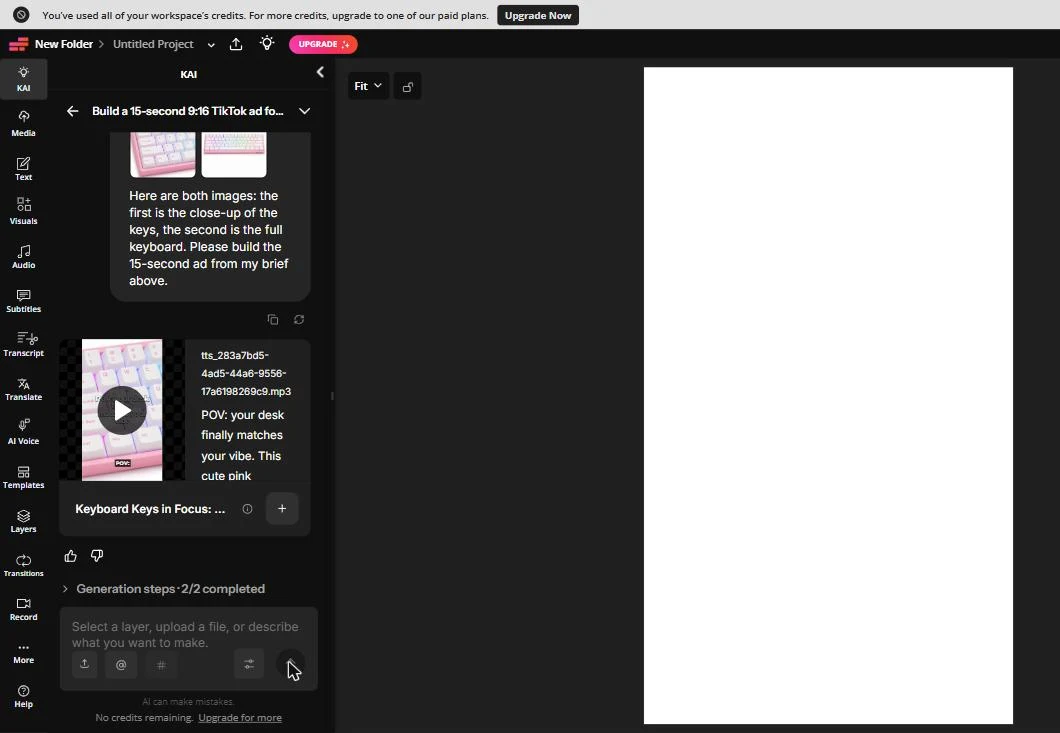
The moment the draft finished, a banner went across the top of the editor: "You've used all of your workspace's credits. For more credits, upgrade to one of our paid plans." The chat box under it changed from "10 credits remaining" to "No credits remaining."
That is lesson 3, and it is the one to plan your budget around. Kapwing's credits guide, updated September 10, 2026, lists what credits pay for:
Feature
Credit cost (Kapwing help center)
What it means on Free (10 credits for life)
AI video generation
20+ credits per generation, by length, resolution, and model
Out of reach on Free
AI images
4 to 6 credits each
About 2 images
Text to speech
1 credit per 100 characters
About 1,000 characters of voiceover
Dubbing
10 credits per 30 seconds
One 30-second dub
Credits don't roll over: they reset on the first of each month on paid plans. On Pro's 1,000 credits a month, a draft like mine is a small slice, but each brand-new AI clip starts at 20+.
Kapwing AI text to video reviews: what the generator takes in
Kapwing's AI Video Generator page says it can start from "a text prompt, image, script, article, or PDF," and lists models such as Seedance 2.0 and 2.5, Veo 3, Kling, and Grok Imagine. Kapwing quotes 3 to 30 seconds for short clips.
On the free plan, the generator is a window, not a tool: one clip costs more than your lifetime credits. If text to video is the reason you're looking at Kapwing, budget for Pro from day one.
Kapwing AI text to speech voice features review: write the script yourself
KAI added the voiceover as its own audio track (a TTS file in the chat), put a music track under it, and synced the captions to the script word by word. You can see the full script in the chat before you add anything to the timeline.
The weak spot was the script, not the voice. Because KAI wrote its own lines, it spent all 15 seconds on features and dropped my offer. Next time I'd paste the full voiceover script into the brief, offer line included.
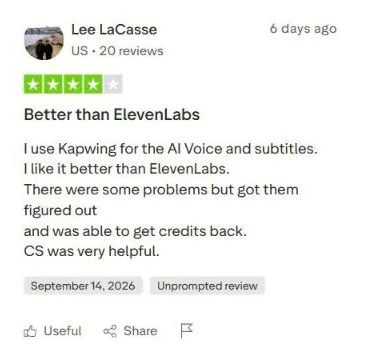
Real users like the voice too. In a 4-star Trustpilot review, Lee LaCasse (US) says he uses Kapwing "for the AI Voice and subtitles" and likes it better than ElevenLabs. On Free, text to speech stops at 1 minute; Pro raises that to 50 minutes a month.
Kapwing video editor review: the timeline is where you finish
Lesson 4: plan time in the editor. When I added KAI's draft to my project, the timeline read 0:42, not 0:15. The text layers sat one after another across the first 26 seconds over a white background, and the keyboard photos came after them.
Fixing it is ordinary editing work: drag the photos under the text, trim to 15 seconds, and nudge captions away from the callouts. Kapwing makes that part easy, with drag-and-drop layers, a Resize Project button, and safe zones for TikTok, Instagram, and YouTube in the side panel.
That is what most Kapwing ease of use reviews praise. On Capterra, Kapwing scores 4.4 out of 5 across 207 reviews, with 4.5 for ease of use. G2 reviewers call it intuitive and drag-and-drop, and list slow exports as the main complaint.
Kapwing free plan limits: 720p, a watermark, and 3 days
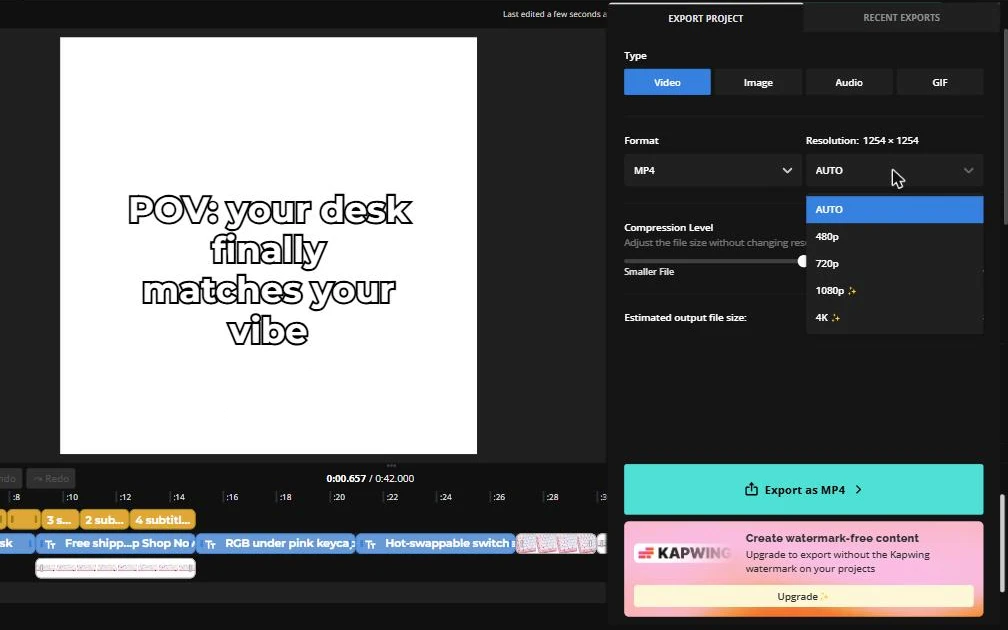
Lesson 5 came at export. The resolution menu offered 480p and 720p, with 1080p and 4K marked as paid. Under the Export button, a panel read: "Upgrade to export without the Kapwing watermark on your projects."
The export panel also read 1254 × 1254, a square, even though I had started a 9:16 canvas. Check the resolution line before you export, because a square file in a Reels slot looks like a mistake.
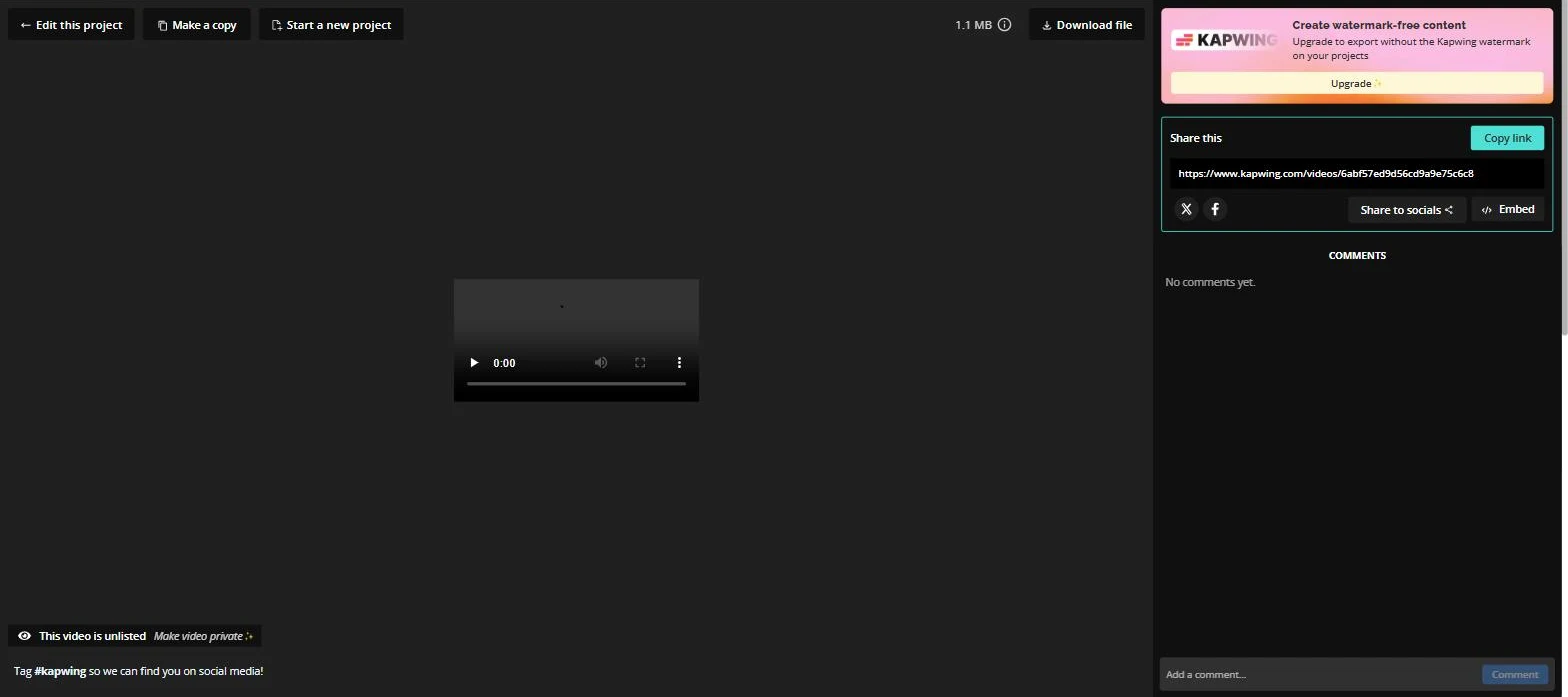
The finished export opened on a share page marked "This video is unlisted," with "Make video private" as a paid option. Here is every free plan wall from my test, next to Pro:
Wall I hit
Free plan
Pro plan
AI credits
10 for life
1,000 a month
Watermark
On every export
None
Export quality
720p
Up to 4K
Export length
4 minutes per video, 30 minutes a month
2 hours per video, unlimited
Storage time
Projects deleted after 3 days
Kept while you subscribe
Folders
1 folder, 3 projects per folder
Unlimited
Brand Kit and custom fonts
No
Yes
Sources: Kapwing pricing page and "Is Kapwing Free?" help article (updated August 31, 2026), checked October 2, 2026.
The 3-day rule matters most for a store. I saw "Deletion in 3 days" on a project card on my free workspace home, so download what you want to keep the same day.
Kapwing prompt rules and 4 ad brief templates
KAI does what the brief says, so a good brief saves you editing. These rules come from my test and the gaps I had to fix:
Attach the photos in the same message. KAI didn't use images that only sat in the project's media.
State length, ratio, and platform first. "15-second 9:16 TikTok ad" kept the structure tight.
Give exact on-screen words in quotes. KAI copied my hook and callouts word for word.
Write the voiceover yourself. Include the offer, or the AI may spend the whole read on features.
Assign zones. Say "captions in the bottom third, callouts in the top third" so they never overlap.
One callout per beat. Ask for each callout to appear on its own 2-second beat, not all at once.
Check the export line. Confirm 9:16 and the length before you spend export minutes.
The first template is the one I ran, fixed with what I learned. The other 3 use the same blocks for common ad angles. Swap in your product, buyer, and offer:
Ad angle
Beats and on-screen text
Voiceover script to paste in
Use it for
Feature callouts (my test)
0 to 3s close-up, "POV: [buyer wish]". 3 to 9s full product, 1 callout per 2 seconds: "[feature 1]", "[feature 2]", "[feature 3]". 9 to 15s both shots, "[offer]. Tap Shop Now". Captions bottom third, callouts top third.
"[POV line]. [Feature 1], [feature 2], and [feature 3]. [Offer] this week, tap Shop Now."
Cold traffic on TikTok and Reels
Problem and solution
0 to 3s the problem shot, "[pain in 5 words]?". 3 to 10s product shot, "[how it fixes it]". 10 to 15s "[offer]".
"Tired of [pain]? [Product] [fix in one sentence]. [Offer], link below."
Products that replace something annoying
Offer first
0 to 2s big text "[discount or free shipping]". 2 to 10s product shots with "[2 benefits]". 10 to 15s "[deadline]. Shop Now".
"[Offer] on [product], only until [date]. [Benefit 1], [benefit 2]. Shop Now."
Retargeting people who visited your store
Desk tour, POV
0 to 3s "my desk before" shot, "POV: you finally fixed your setup". 3 to 12s product close-ups with no text. 12 to 15s "[product name]. Link in bio".
Keep it short: "Okay, my desk finally looks the way I wanted. [Product]. Link below."
Organic posts you later boost
Paste the brief, the voiceover script, and your photos into one message. That gives KAI fewer decisions to guess.
Kapwing pricing: What Pro costs for one store?
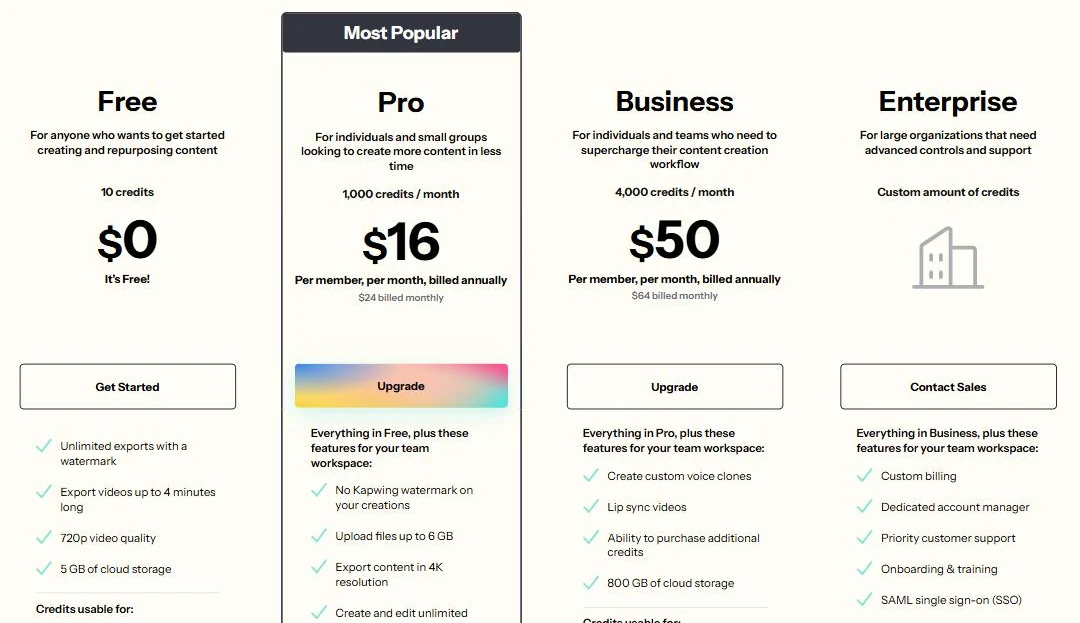
Kapwing has 4 plans. For a store running ads, Pro is the real starting price, because it removes the watermark and gives you credits to work with.
Plan
Billed monthly
Billed yearly
AI credits
Best for
Free
$0
$0
10 for life
Trying the editor and one AI draft
Pro
$24/month
$16/month ($192/year)
1,000 a month
One store making weekly ads
Business
$64/month
$50/month ($600/year)
4,000 a month, plus top-ups
Teams that need voice clones and lip sync
Enterprise
Custom
Custom
Custom
Large teams with SSO
Prices are per member. Source: Kapwing pricing page, checked October 2, 2026.
Read the FAQ under the plans before you pay. Kapwing says it doesn't offer a free trial for paid plans, subscriptions renew until you cancel, and it doesn't refund subscriptions because the free version exists.
That means you'll pay at least $24 the moment you upgrade monthly, or $192 up front on yearly. Run your whole workflow on Free first, then choose monthly until you know you'll use it every week.
What Kapwing reviews say on Trustpilot, G2, and Capterra?
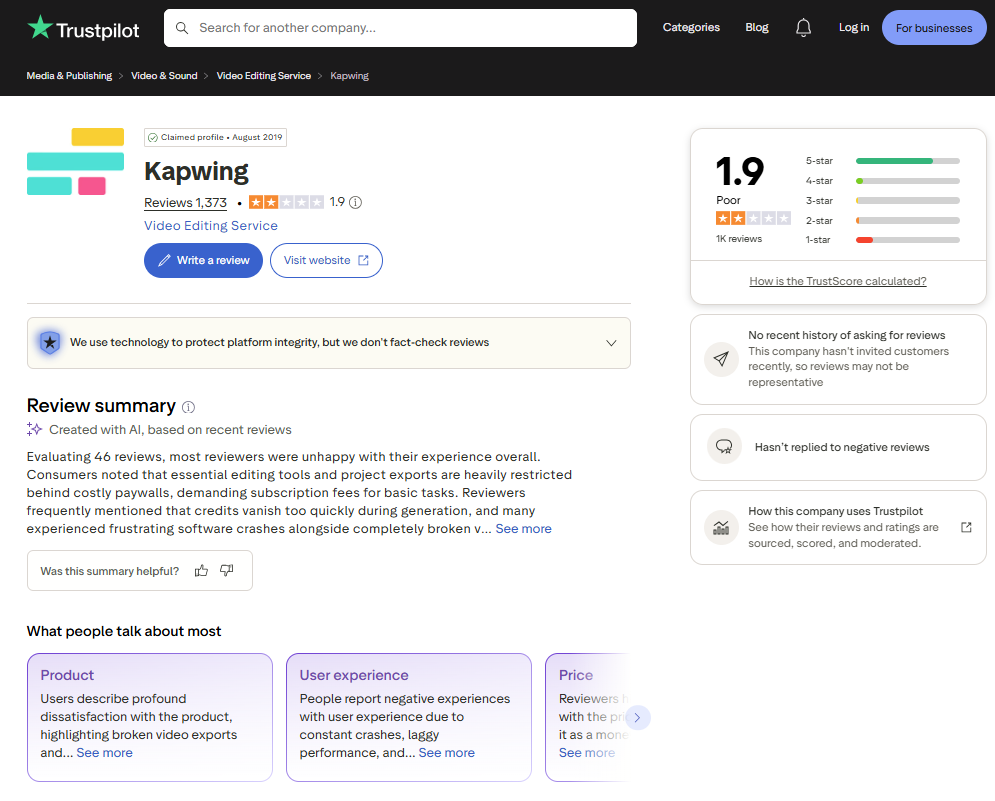
Kapwing reviews split hard by platform. On Trustpilot, Kapwing holds 1.9 out of 5 across 1,373 reviews. Trustpilot notes that Kapwing hasn't invited customers to review recently and hasn't replied to negative reviews.
The recent complaints cluster around paywalls, credits running out fast, broken exports, and refunds. On G2, Kapwing scores 3.9 out of 5 across 40 reviews, and on Capterra 4.4 out of 5 across 207. The happier reviews talk about subtitles, the AI voice, and how quickly a beginner gets going.
Here are two recent Trustpilot reviews, one from each side.
Lee had problems, got them fixed, and "was able to get credits back," with praise for customer support. That matches my test: the voice and subtitles are the parts people stay for.
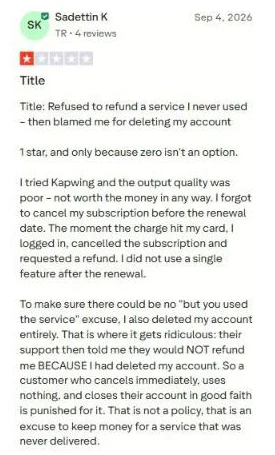
Sadettin forgot to cancel before a renewal, asked for a refund right away, and was refused. Kapwing's own FAQ says it doesn't refund subscriptions, so set a calendar reminder before your renewal date.
Kapwing review for stores: Who should pay and who should skip?
Kapwing does one job well: taking ad assets you already have and finishing them with captions, voice, and the right size. It does another job less well: deciding what your ad should say. Which one you need decides the answer.
Kapwing fits you when:
You already have clips or photos and need captions, a voiceover, and 9:16 and 4:5 cuts.
You know your hook and offer, and want an AI to lay out a first draft.
You also make other video, such as product demos, podcasts, or YouTube cuts, so credits get used.
Someone on your team will spend 10 minutes checking and fixing each draft.
Skip it, or wait, when:
You want to try AI video generation before paying: Free can't cover one clip.
Your plan is to download once a month: free projects are deleted after 3 days.
You need someone to suggest the angle and the hook, not only execute yours.
You want a refund safety net: Kapwing's FAQ says there isn't one for subscriptions.
Kapwing alternatives: When the brief is the hard part?
Here is the lesson I took from this test, and it holds for any AI editor. My draft came out fast because I already knew the hook, the 3 callouts, and the offer. KAI executed my brief well; it didn't question it.
For a lot of stores, the brief is the slow part. Ten polished edits of the same claim are, to your buyer, one ad.
Promer AI: the same keyboard, with the angles already written
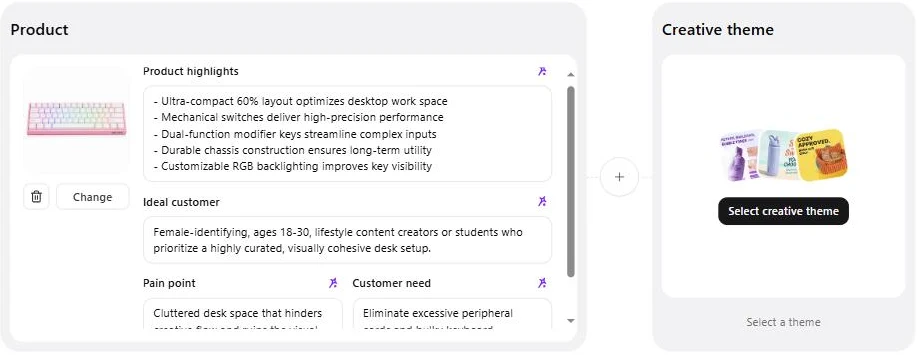
Promer AI is an ad creative platform for ecommerce, and it starts from the product instead of a blank brief. I gave it the same keyboard photo on the same day.
AI Ad Concept read the photo and filled in the buyer by itself: "Female-identifying, ages 18-30, lifestyle content creators or students who prioritize a highly curated, visually cohesive desk setup." That is close to the buyer I had written for Kapwing, without me typing it.
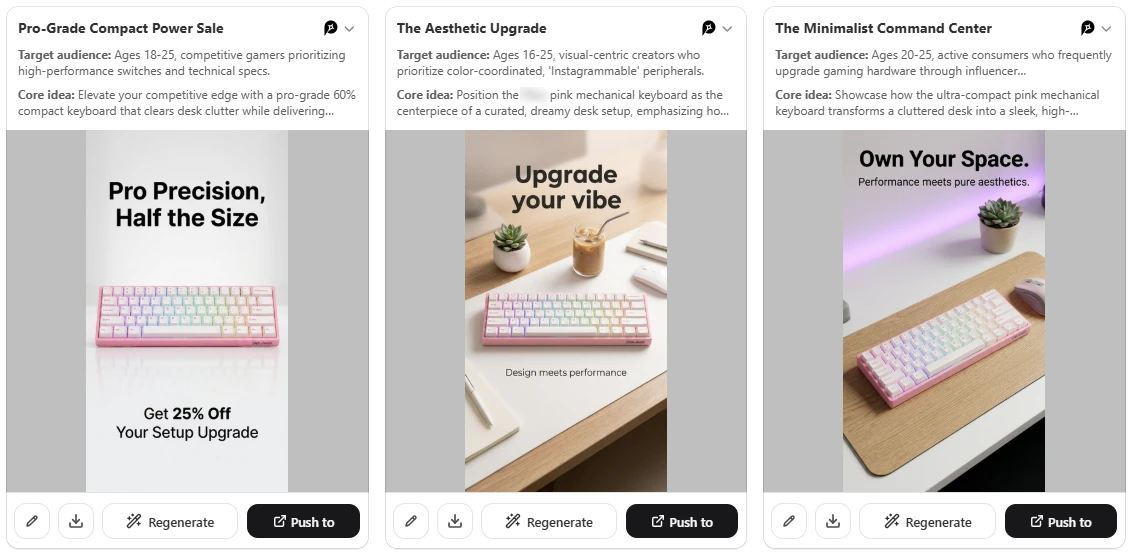
With 9:16 picked, it returned a set of static ads, each with its own name, audience, and core idea. "Pro-Grade Compact Power Sale" went after gamers who care about switches and specs. "The Aesthetic Upgrade" went after creators who want color-coordinated, Instagrammable gear. "The Minimalist Command Center" sold the clean-desk angle.
That is the part Kapwing left to me. I wrote one angle for KAI; Promer AI handed me 3 buyers and 3 angles to test against each other, from a sale offer to a desk-setup vibe.
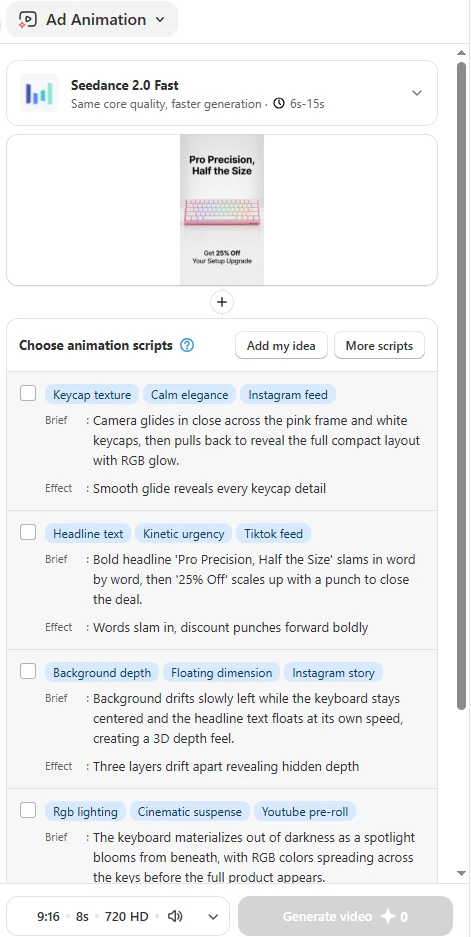
Then AI Ad Animation read the sale concept, "Pro Precision, Half the Size" with "Get 25% Off Your Setup Upgrade," and suggested motion scripts. Each came with a brief, an effect, and a placement: a keycap close-up for the Instagram feed, a word-by-word headline slam for the TikTok feed, a floating depth effect for Instagram Stories, and an RGB reveal for YouTube pre-roll.
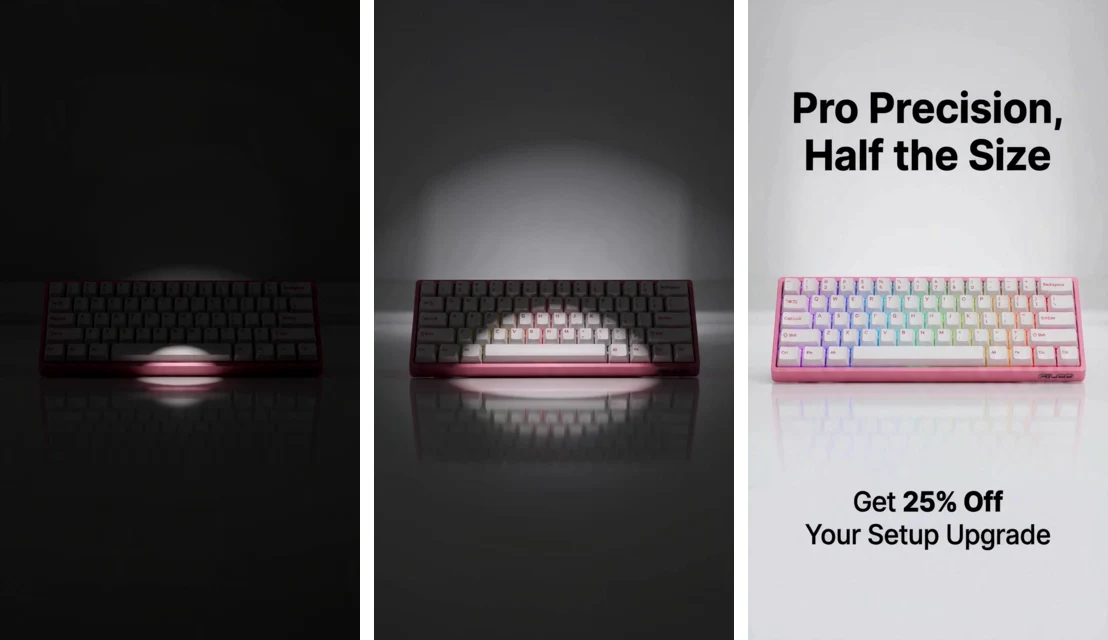
I picked the RGB reveal ("Cinematic suspense") and got an 8-second 9:16 video at 720 HD, with sound, without writing a prompt. The keyboard sits in darkness, a spotlight blooms from below, the RGB lights spread across the keys, and the headline and "25% Off" line land on a clean white set for the last seconds.
The keyboard kept its shape, colors, and RGB layout from the dark open to the final frame, and no text covered the product. Compare that with my Kapwing draft, where captions and callouts fought for the same space.
The trade is real. Kapwing gives you a full multi-track timeline, auto subtitles, and an AI voiceover, and Promer AI is built around making the ad, not hand-editing a timeline. The "25% Off" came from the concept, not from me, so swap in your real offer before the ad runs. When it is ready, Launch ads can push it to Meta with suggested settings.
How the Kapwing alternatives compare
Read the "best for" column first, then the price:
Tool
Paid plans from
Best for
Verdict
Kapwing
$24/month Pro ($16 billed yearly)
Finishing ads you already planned: captions, voice, resizing
Strong editor; the free plan is a short test drive
VEED
$10/month Creator, billed yearly ($116/year)
Browser editing with subtitles and AI voice at a lower entry price
Similar job to Kapwing; you still write the brief
Promer AI
Free to start, no credit card required
Static and video ads for ecommerce, from one product photo
Suggests the angles and motion for you; less hand-editing control than Kapwing
Pay for Kapwing Pro when you already know what your ads should say and need a fast place to finish them every week. Skip it when you want to test AI video before paying, because Free can't cover one clip. Pick monthly billing first, since there is no refund on subscriptions.
Your next 30 minutes: on Kapwing's free plan, paste the feature callouts template above with your own photos attached, and write the voiceover yourself. Check the export line for 9:16 before you download.
Watch the 3-day deletion rule and your renewal date in the first month. And when you'd rather have the ad angles suggested for you, try turning the same product image into a video ad on Promer AI and compare the two side by side.
FAQ
What do Kapwing reviews say overall?
Kapwing reviews praise the editor, subtitles, and AI voice, and complain about credits, paywalls, and refunds. As of October 2, 2026, Kapwing holds 1.9 out of 5 from 1,373 Trustpilot reviews, 3.9 out of 5 from 40 G2 reviews, and 4.4 out of 5 from 207 Capterra reviews. Trustpilot notes Kapwing hasn't invited reviews recently, so that page leans toward complaints.
Is Kapwing free to use?
Kapwing has a free plan, but it is built for testing, not for running ads. Free exports carry a Kapwing watermark, stop at 720p and 4 minutes, and projects are deleted after 3 days. Free gives 10 AI credits for life. In my test, one 15-second ad built with Kapwing AI used all 10.
How many credits does a Kapwing AI video use?
Kapwing's help center lists AI video generation at 20+ credits per generation, depending on length, resolution, and model. Text to speech costs 1 credit per 100 characters, and AI images cost 4 to 6 credits. Pro includes 1,000 credits a month and Business 4,000. Credits reset on the first of each month and don't roll over.
Is the Kapwing AI voice good for ads?
Kapwing's AI voice gets solid user praise, and the script is what you need to control. One 4-star Trustpilot reviewer in September 2026 says he likes it better than ElevenLabs. In my test, Kapwing AI wrote its own voiceover and dropped my offer line, so paste your own script into the brief. Free text to speech stops at 1 minute; Pro allows 50 minutes a month.
Does Kapwing give refunds?
No, Kapwing's pricing FAQ says it doesn't refund Pro or Business subscriptions. Kapwing also doesn't offer a free trial of paid plans, and subscriptions renew until cancelled. Test your full ad workflow on the free plan first, start on monthly billing, and set a reminder before your renewal date.
What is a good Kapwing alternative for ecommerce ads?
The right Kapwing alternative depends on whether you need an editor or ad ideas. VEED starts at $10 a month billed yearly for browser editing with subtitles. Promer AI starts from your product photo or URL, suggests ad concepts and motion scripts, and lets you create your first ad free with no credit card.
Huy Tran Quoc is the Head of Product Management at Promer AI, part of FireGroup Technology, where he leads product strategy and execution across a cross-functional team spanning product, engineering, design, QC, customer success, and prompt engineering.
Over the past decade, Huy has progressed from Product Manager to Senior Product Manager to product leadership, working at EngineThemes, Zalo, TIKI Corporation, and now FireGroup Technology, across ecommerce SaaS, social networking, marketplace, supply chain, and fintech.
At TIKI, Huy owned the strategic roadmap and P&L alignment for a multi-vertical portfolio and partnered directly with the C-suite to translate company vision into executable plans.