Venngage Review: Good Design Isn't the Same as a Good Ad
Category
Blogs
Date
Authored by
Huy Tran Quoc
Summary
Venngage review for ecommerce ads: Premium at $10 a month unlocks PNG export, but the AI ad generator still leaves the angle to you. Pricing, G2 and Trustpilot data.
Do you need a clean image ad for this week's sale, and nobody on the team designs? Have you seen Venngage's "Free AI Facebook Ad Generator" and wondered whether $10 a month could replace a freelancer? This Venngage review is for you.
Venngage is a good $10-a-month design tool for infographics, stat posts, and accessible documents. For paid social it lays out clean image ads, but the product, angle, hook, and test plan stay with you.
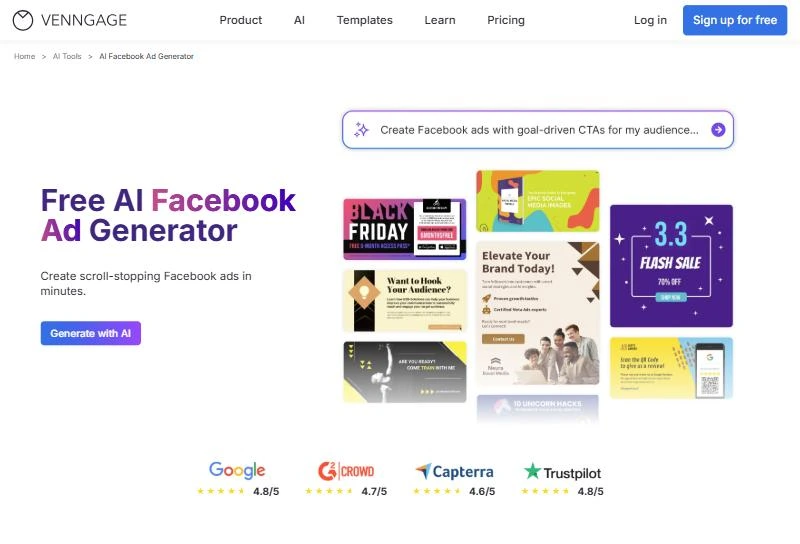
Venngage's Facebook ad page ends with one step: download your ad as a PNG and upload it to Facebook Ads Manager. PNG export starts on Premium, so the free plan shows you the ad but doesn't hand you the file.
Why you can trust this Venngage review?
I judge ad tools by one question: what does this do to the next ad I put money behind? So I read Venngage the way you would before paying: the pricing page, every ad generator page and its FAQ, and the help center article that explains AI credits.
Then I went through what paying customers wrote on G2 and Trustpilot, focusing on 2026 reviews. Nobody paid for this review. Where a number or a complaint comes from someone else, I name the source and the date.
Key takeaways
Test free, pay $10 to export. Judge the layouts with the 5 free AI ad designs. The PNG that Ads Manager needs starts on Premium.
Change the pain, not the palette. Venngage gives 1 layout per prompt. Write 3 buyer pains first for 3 real test variations, not 3 color schemes.
Upload your real product photo. Most Facebook templates are built for announcements. Your own photo turns a sale poster into a product ad.
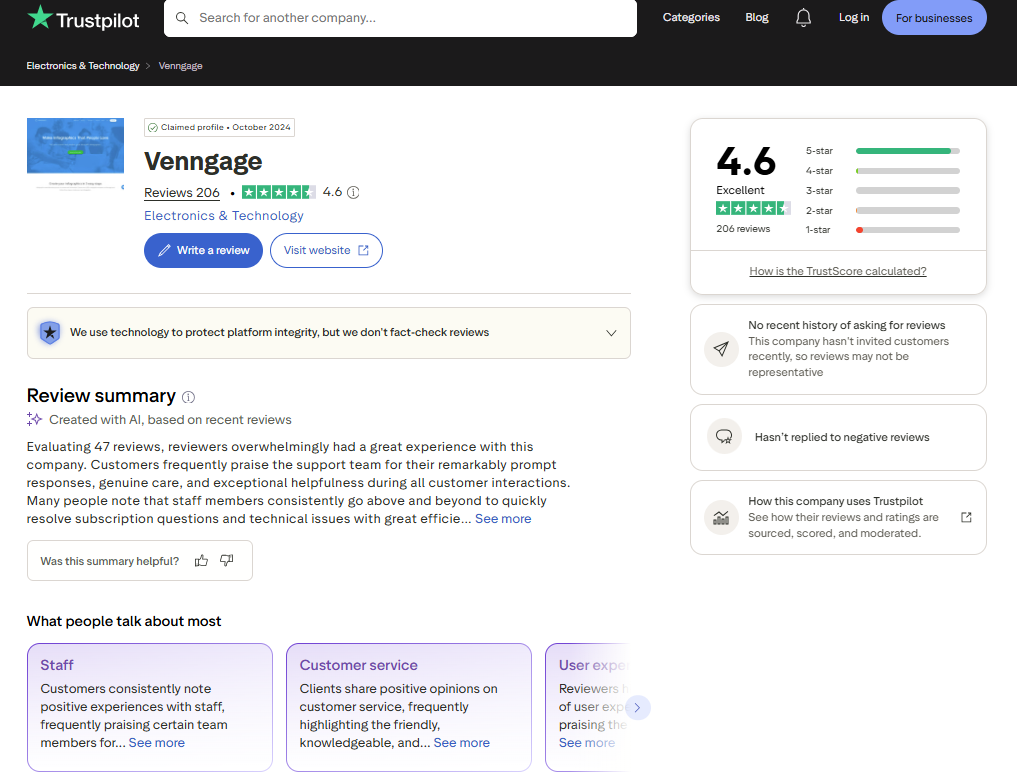
Customers love the support. Venngage holds 4.7 out of 5 from 134 G2 reviews and 4.6 from 206 on Trustpilot. Most complaints are about paywalls, not output.
Keep a second tool for Reels. Venngage exports static files only and itself points video ad buyers to tools like Creatify or InVideo.
What Venngage is: An infographic maker that also makes ads
Venngage is a browser-based design platform for non-designers who need infographics, reports, presentations, and social graphics. Founded in Canada in 2012, it adds AI generators, Brand Kits, and accessibility checks to 10,000+ templates. Its ad generators are one use case among many.
Venngage still titles its homepage "Professional Infographic Software". That tells you where the product's depth sits: charts built from a CSV or XLSX file, WCAG contrast checks, and accessible PDF export. Export formats are PNG, PDF, PPTX, and HTML.
The ad tools live in the AI tools hub: an AI Ad Generator, an AI Facebook Ad Generator, an AI Instagram Ad Generator, and an AI Google Ads Generator. The same hub lists generators for lesson plans, resignation letters, and tattoos.
For you, that means the ad generator is a general design engine with an ad prompt in front of it.
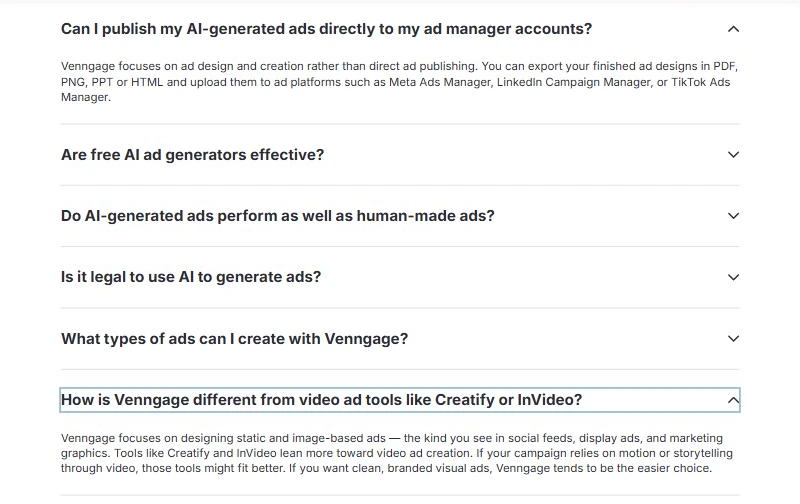
Venngage is direct about the limits. Its AI Ad Generator FAQ says it "focuses on ad design and creation rather than direct ad publishing". The same FAQ says tools like Creatify and InVideo fit better when your campaign relies on video.
How Venngage's AI Facebook Ad Generator works, in 5 steps?
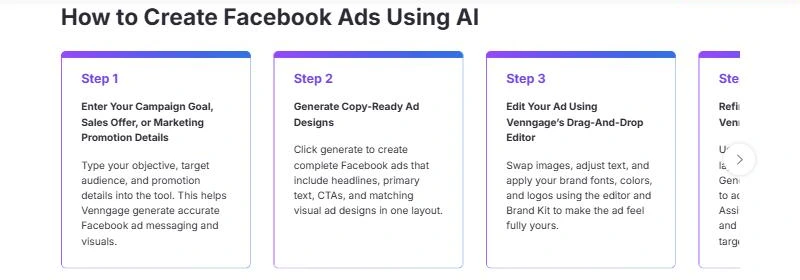
Venngage's AI Facebook Ad Generator page lists 5 steps. Here they are with what each step asks of you and which plan it needs:
Step on Venngage's page
What you do
What to know before you start
1. Enter your campaign goal, sales offer, or promotion details
Type your objective, audience, and offer
You can upload your own product photos and logo, per the page's FAQ. There is no product link import.
2. Generate copy-ready ad designs
Click generate
Returns headline, primary text, CTA, and the visual "in one layout". The page promises results "in less than 15 seconds" for ecommerce sellers.
3. Edit in the drag-and-drop editor
Swap images, adjust text, apply brand fonts and colors
Brand Kits start on Business. On Premium you apply logo, colors, and fonts by hand.
4. Refine with Venngage AI tools
AI Designer, AI Image and Icon Generators, AI Writing Assistant, Text Translation
Every AI action draws on the same daily credit pool (see pricing below).
5. Export your Facebook ad
Download a PNG and upload it to Facebook Ads Manager
PNG export starts on Premium. No publishing step follows.
Step 2 gives you 1 design per prompt. Venngage's FAQ says you then duplicate the design or change the prompt to build variations for an A/B test. That means the quality of every variation depends on the brief you write in Step 1.
A TrustRadius reviewer wrote on December 27, 2024 that the AI "can only generate the design once" and later changes are manual. Plan for hand edits on every ad, even if the AI has improved since.
Good design vs a good ad: Where Venngage stops?
A design tool and an ad tool can output the same PNG. They are graded by different judges: Venngage's checks grade the graphic, and Meta's auction grades the ad.
Venngage looks at contrast, alt text, and reading order, and its Brand Kit keeps logo, colors, and fonts consistent. For an infographic, that is most of the job, because the reader already chose to look.
Nobody in a feed has chosen to look at your ad. It wins on whether a viewer stops, clicks, and buys. What moves those numbers sits upstream of layout: the buyer pain the ad speaks to, whether the product is visible and in use, and whether the offer is believable.
Here is how the ad workflow maps to what Venngage's own pages say it does:
Ad workflow step
What Venngage does
What stays with you
Product input
Typed brief, plus your own uploaded product photos
Pulling product details from your store
Angle and audience
Uses the audience line you write
Choosing the buyer pain and the claim to test
Reference ads
Template library
Finding ads that already work in your niche
Variations
1 design per prompt, then duplicate and edit
Deciding what each variation tests
Formats
Static: PNG, PDF, PPT, HTML
Video, by Venngage's own FAQ
Publishing and results
Export only; no direct publishing
Uploading to Ads Manager and reading results
Venngage covers the layout and export rows well. The rows it leaves to you (angle, references, results) are the ones that decide whether an ad test teaches you anything.
Venngage prompts and templates for Facebook ads
Prompts that brief an ad, not a poster
Venngage's own sample prompt asks for bright colors, a hero product image, and a "Shop Now" call to action. That is a poster brief.
An ad brief adds the buyer, 1 pain, 1 claim, and the proof. Fill the brackets and paste one of these into Step 1:
Ad angle
Prompt for Venngage's Step 1
Use it when
Problem and solution
"Create a 4:5 Facebook feed ad for [product], sold on our Shopify store. Buyer: [who], frustrated by [one specific pain]. Headline names the pain in under 8 words. Show the product large, in use, using my uploaded photo. One claim only: [benefit with a number you can back up]. CTA: Shop Now. No stock people."
Cold audiences who don't know the product yet
Social proof
"Create a 1:1 Facebook ad for [product]. Lead with [review count] reviews and a 5-star line from a customer: '[short real quote]'. Product photo on the right, quote on the left. Small brand logo. CTA: See why. Max 2 lines of text on the image."
Retargeting people who viewed the product
Offer
"Create a 4:5 Facebook ad for [product] announcing [discount or bundle] until [date]. Offer shown once, next to the CTA. Product photo centered with empty space around it. Calm colors from [brand palette], no starbursts. CTA: Shop the sale."
Sales, launches, and seasonal pushes
A few rules make any of these prompts work harder:
Test pains, not palettes. Run the same angle with 3 different pains to get 3 real variations. 3 color schemes of 1 idea is still 1 ad.
Build 1:1 and 4:5 separately. Venngage's own FAQ names both sizes for the Facebook feed; don't stretch one into the other.
Keep image text to 2 lines. The primary text field in Ads Manager carries the rest.
Name each file by its variable, such as "pain-sleep_v1.png", so results map back to ideas.
Venngage templates: Built for announcements
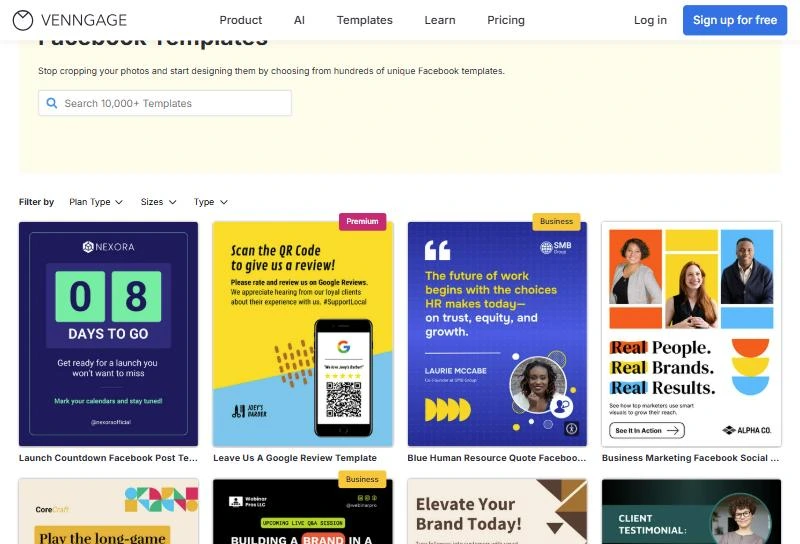
The social media templates page filters by Instagram, Facebook, LinkedIn, Twitter, Pinterest, Snapchat, and Carousel. There is no TikTok filter, so a TikTok ad starts from a resized Instagram or blank template.
On the Facebook templates page, 16 of the first 80 titles are labeled as ads. Most are lead magnets and events: "Free Mini Course Facebook Ad Template", "Bootcamp Sign-Up Facebook Ad Template", "Pop-Up Market Event Promotion Facebook Ad".
For retail, there are seasonal ad templates such as "Black Friday Sale Template" and "Business Flash Sale Template For Facebook". A product ad for your store will usually start from one of those, or from a blank canvas with your own photo.
The library has many ways to announce something and few ways to demonstrate a product.
Venngage pricing: What Free, Premium, and Business buy for ad work?
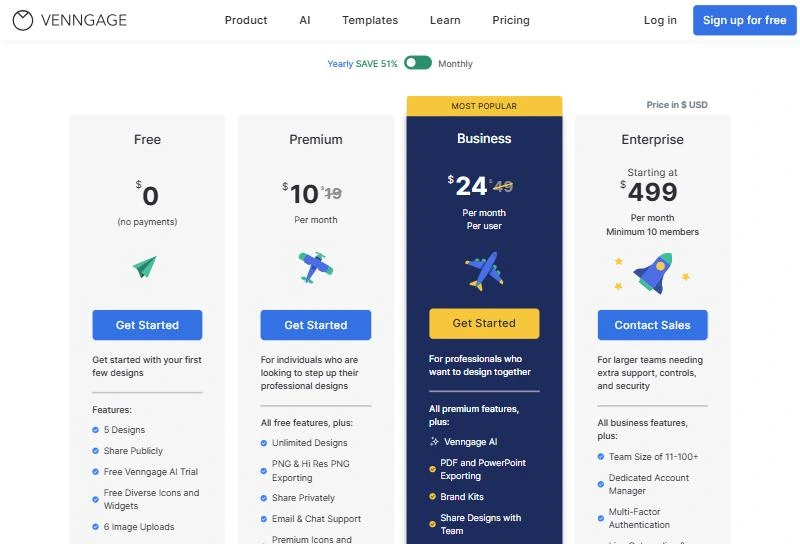
Venngage pricing is per user, with a yearly toggle the page labels "SAVE 51%". Nonprofits can apply a discount to any plan. Notice the export and AI rows first, because they decide what each plan does for an ad:
Venngage plan
Free
Premium
Business
Enterprise
Price, billed yearly
$0
$10/month
$24/month per user
From $499/month, 10 members minimum
Price, billed monthly
$0
$19/month
$49/month per user
Contact sales
Designs
5
Unlimited
Unlimited
Unlimited
Image uploads
6
50
1,000
Custom
Download
No (public link only)
PNG, HD PNG
Adds PDF and PowerPoint
Same as Business
Venngage AI
Trial
Extended trial
100 credits/day
Custom
Brand Kit
No
No
Yes
Yes
Support
Self-service
Email and chat
Priority
Account manager (3+ members)
Source: Venngage pricing page and "Compare All Plan Features" table, checked October 5, 2026.
So for ad work, Premium at $10 is the real entry price: it is the first plan that gives you the PNG. At $10 a month, 20 ads a month works out to $0.50 per ad creative. The bigger cost is your time, because every variation starts from a brief you write.
The free plan: 5 AI ad designs, no file
Venngage's AI Ad Generator FAQ says the free plan lets you generate up to 5 AI ad designs. Sharing is by public link, and the download row starts at Premium.
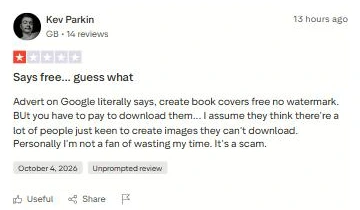
That paywall is the most common surprise in recent reviews. A G2 reviewer on September 18, 2026 wished the locked downloads had been stated upfront, and a 1-star Trustpilot review on October 4, 2026 makes the same complaint.
Treat the free plan as a preview.
Venngage AI credits: why "unlimited" has a daily cap
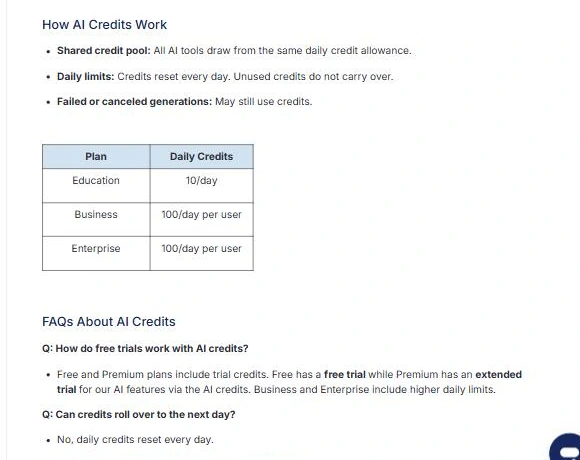
Venngage's help center explains that all AI tools draw from one shared daily credit pool. Business and Enterprise get 100 credits a day per user, Free gets a trial, and Premium gets an extended trial. Credits reset daily, don't roll over, and failed or canceled generations may still count.
The same article states that AI features are not unlimited, even on plans with unlimited designs. A Trustpilot reviewer in July 2026 complained that this sits in the help center, not on the pricing page.
So when AI generation is why you're buying, Premium is a design plan with an AI sample attached. Business is the plan that matches the ad generator page.
Business costs $288 per user a year on yearly billing, or $588 on monthly billing, a steep price if Brand Kits are your only reason to upgrade.
What Venngage reviews say on G2 and Trustpilot?
Venngage reviews are strongly positive on both large review sites, and the praise is consistent: easy to learn, many templates, and fast human support. Here are the numbers as of October 5, 2026:
92% five-star, 6% one-star; 32 reviews in the last 12 months
Read the Trustpilot score with one caution: Trustpilot labels the profile as not inviting customers recently, so its reviews arrive unprompted. Many recent 5-star reviews there name a support agent who solved a billing or setup issue.
What Venngage reviewers praise
On G2, 2026 reviewers mostly use Venngage for reports, infographics, and lecture material. An August 2026 reviewer valued exporting the same design as PDF, image, or PowerPoint. Another praised PDF exports that pass WCAG 2.0 with little extra work.
Support is the other theme. A July 2026 G2 reviewer called the help "immediate", and Trustpilot's AI summary of 47 recent reviews leads with support speed. For you, that means a stuck design rarely stays stuck for long.
What Venngage reviewers complain about
The complaints cluster around paywalls and limits, not output quality:
Downloads locked on the free plan (G2, September 18, 2026; Trustpilot, October 4, 2026)
AI credits not shown on the pricing page (Trustpilot, July 1, 2026)
Business priced high for one person (G2, August 7, 2026)
Stock photos thin for some regions (G2, August 18, 2026)
None of these reviewers judged Venngage as an ad tool. That gap is why the ad-specific sections above matter more for your decision than the star rating.
Who Venngage fits for ecommerce ads, and who should skip it?
Where Venngage wins: infographics, stat posts, and accessible PDFs
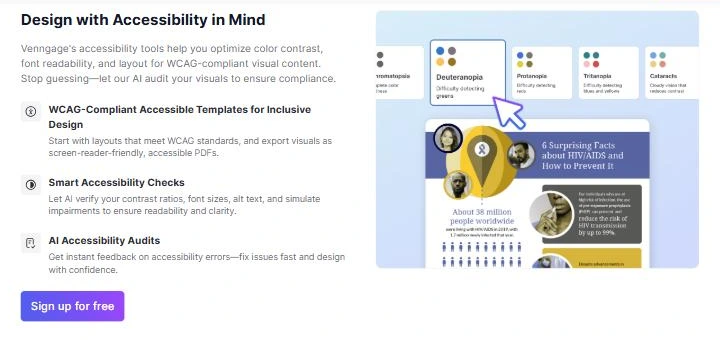
Venngage's strengths sit outside ad work. The accessibility toolset is the deepest part of the product: WCAG and ADA templates, contrast checks, a color blind simulator, automatic alt text, and PDF/UA export.
Data is the second strength. Charts, maps, and tables come straight from a CSV or XLSX file, which suits an organic carousel of customer stats or a "how we compare" graphic.
Price is the third. If your store needs consistent visuals for email, blog, and organic social media post design, $120 a year on Premium is a low bill.
Buy it or skip it
Venngage makes the most sense when ads are one of many visual jobs, not the main one.
Buy it when:
Your paid social mostly runs announcement-style image ads: sales, events, lead magnets, giveaways.
You also need infographics, stat posts, or reports, and want one tool for all of it.
Accessibility compliance is a requirement for your brand.
You already know your angles and only need help with layout.
Skip it, or pair it with another tool, when:
Meta or TikTok ads are your main growth channel and you need several product-led variations a week.
Video is part of your mix; Venngage itself points video ads to other tools.
You want the tool to suggest which angle to test.
You need Brand Kits but can't justify $24 to $49 per user.
Venngage alternatives: When you need angles, not layouts?
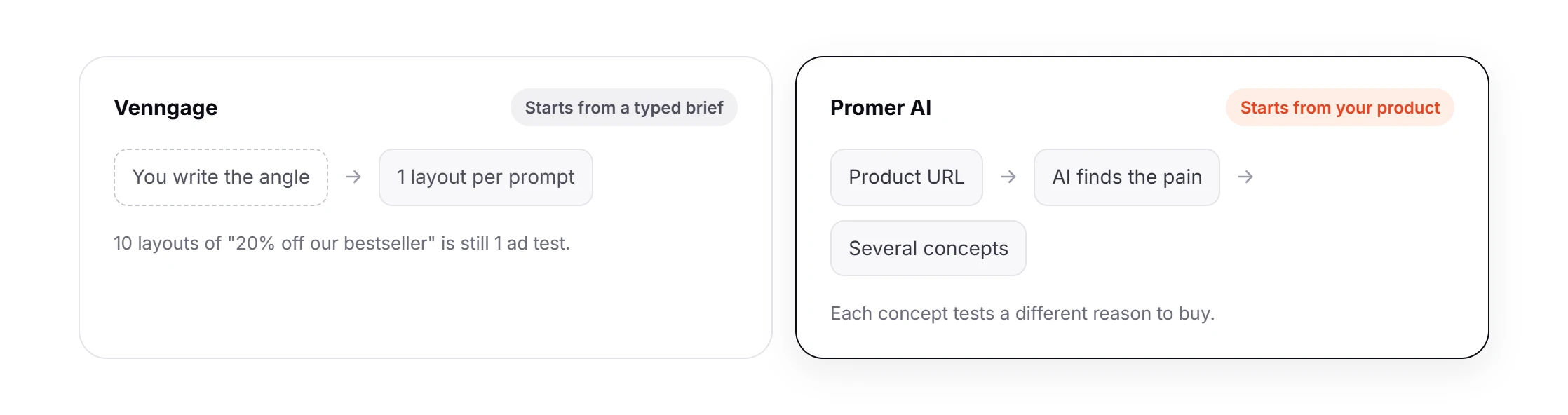
A design tool varies how a message looks. An ad test varies the message itself.
Build 10 Venngage layouts that all say "20% off our bestseller" and you have run 1 ad test. If one wins, you learn which colors your audience tolerates, not which reason to buy moves them.
So pick the alternative by the gap you need closed. Look at the "best for" column before the price column:
Suggests the angles for you; no infographics or accessibility audits
Prices checked October 5, 2026 on each vendor's pricing page. For a deeper look at per-download pricing, see this AdCreative.ai review.
Promer AI, for ad creative built from product context
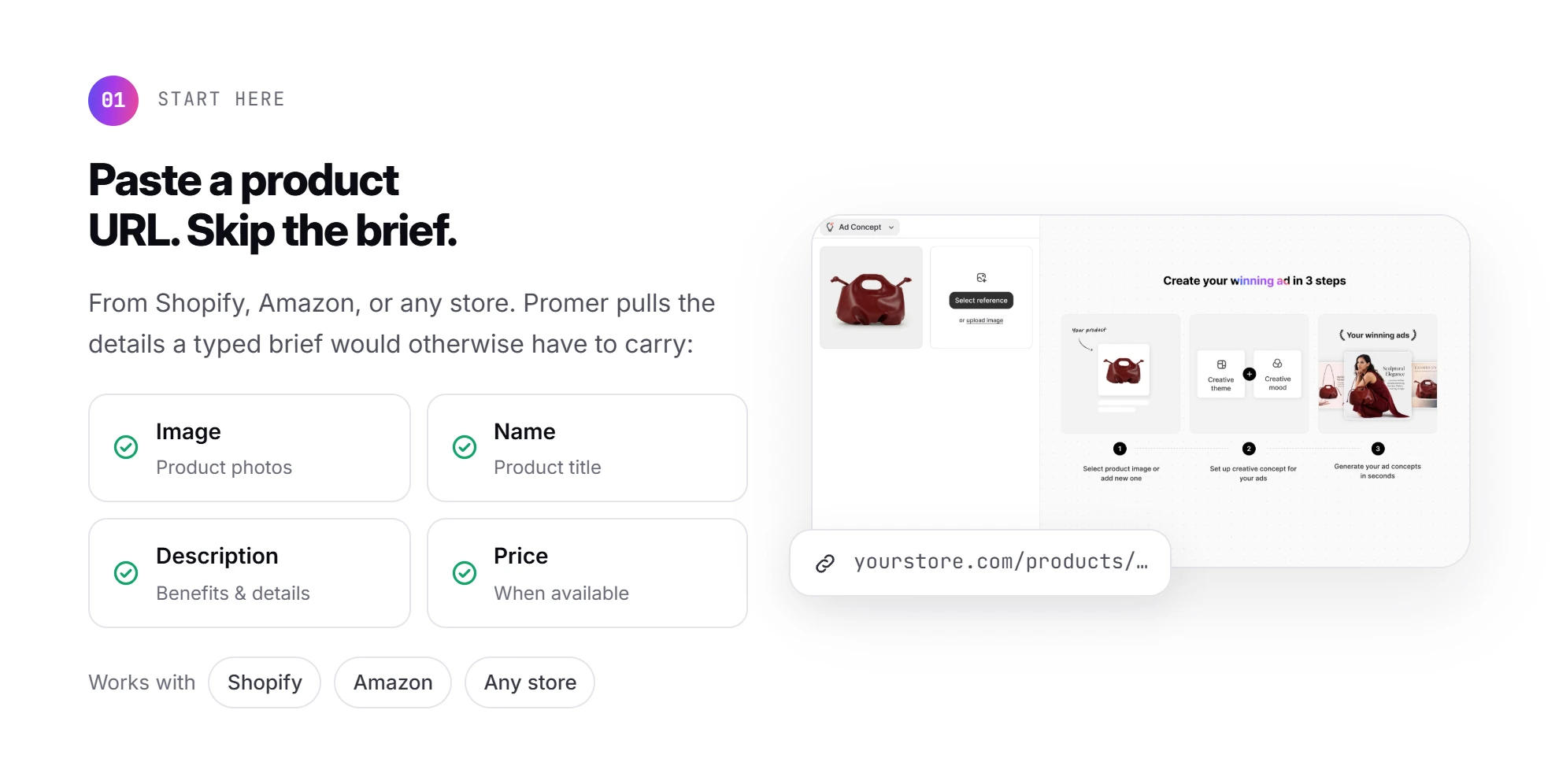
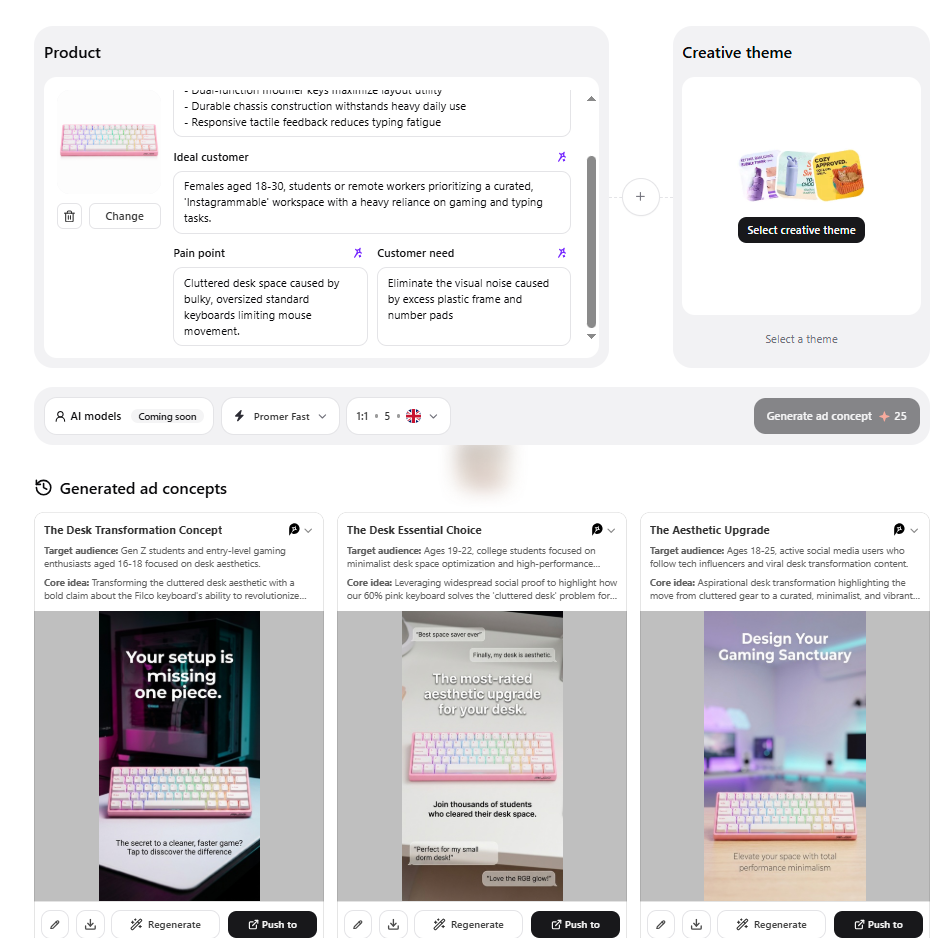
Promer AI is an AI advertisement generator for ecommerce advertisers, and it starts from a different input than Venngage. Paste a product URL from Shopify, Amazon, or any store, and it pulls the product's image, name, description, and price (when available).
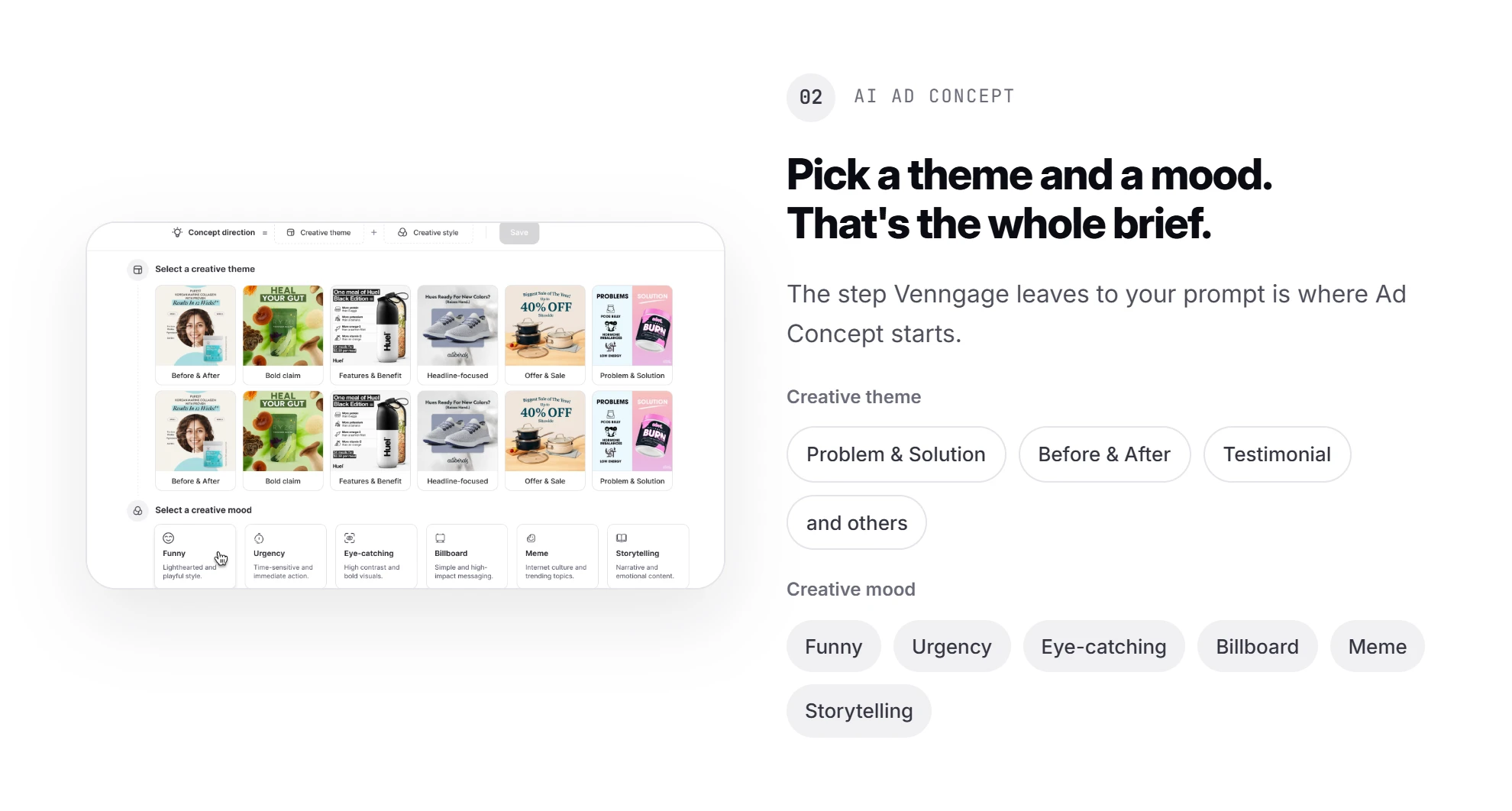
The step Venngage leaves to your prompt is where Promer AI's AI Ad Concept starts. You pick a creative theme (Problem & Solution, Before & After, Testimonial, and others) and a creative mood.
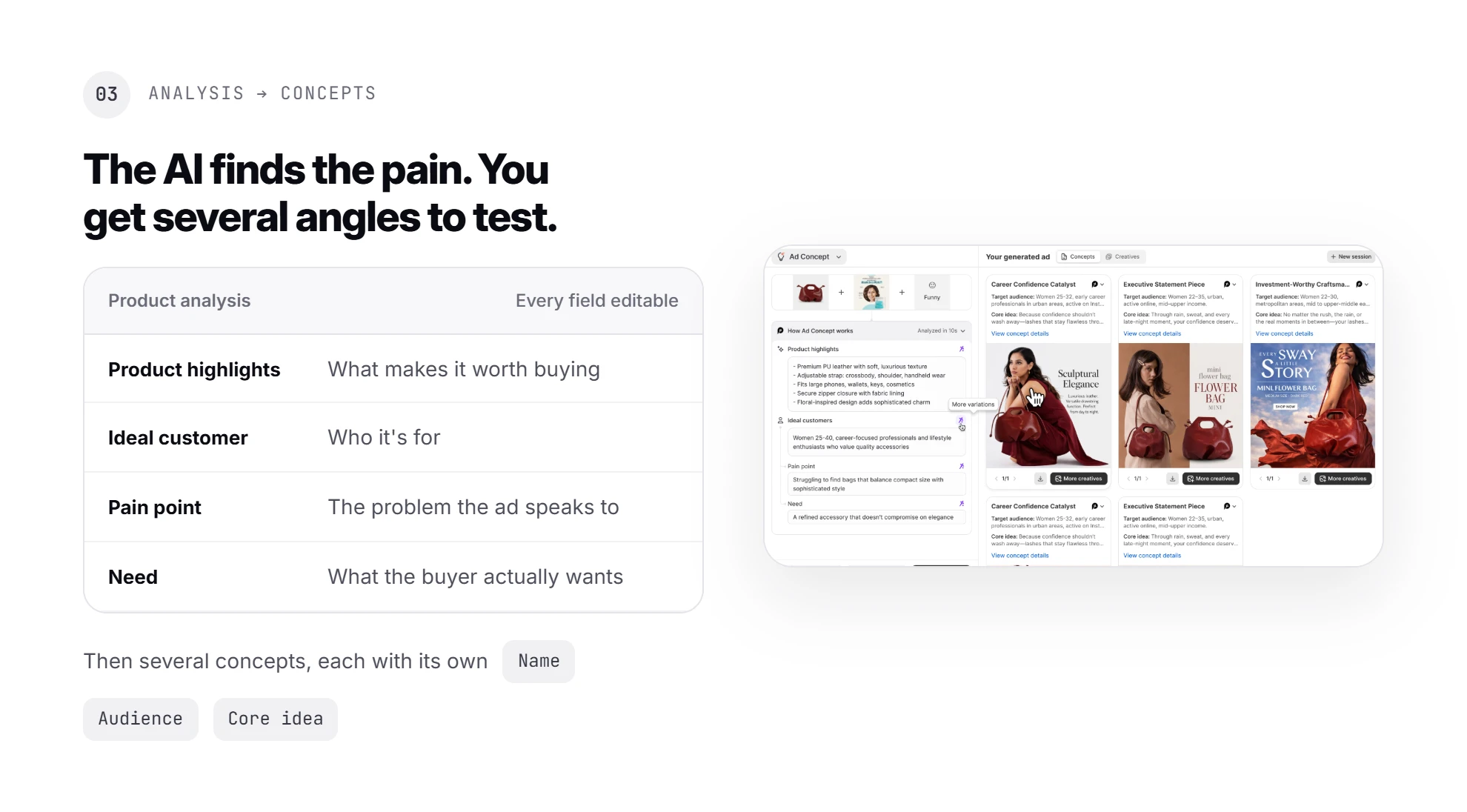
The AI then works out your product highlights, ideal customer, pain point, and need, each one editable. It returns several ad concepts, each with its own name, audience, and core idea.
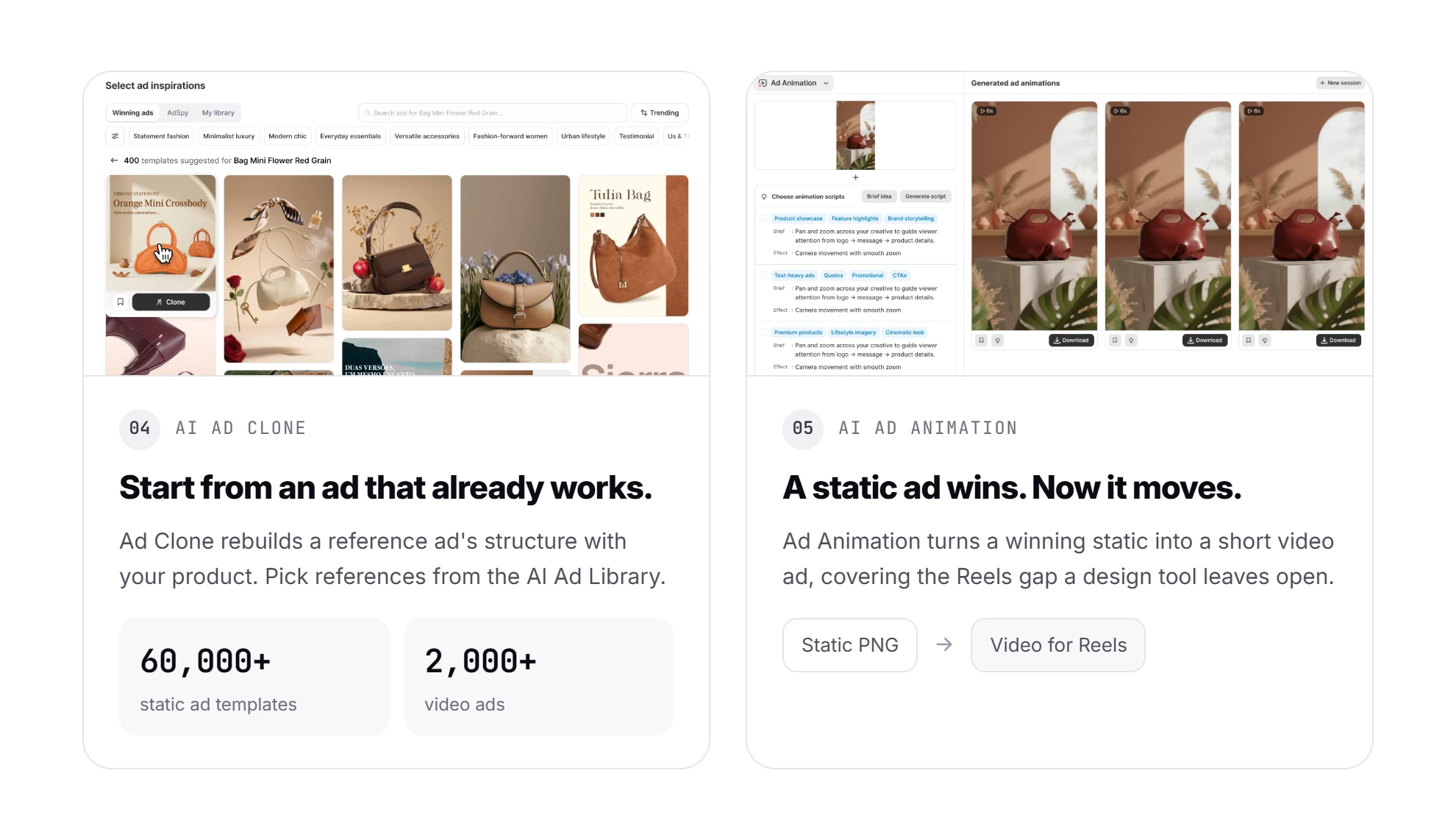
To start from an ad that already works, AI Ad Clone rebuilds a reference ad's structure with your product. References can come from the AI Ad Library of 60,000+ static ad templates and 2,000+ video ads.
When a static ad wins, AI Ad Animation turns it into a short video ad. That covers the Reels gap a design tool leaves open.
The trade is real. Promer AI won't build your quarterly report, and like any AI tool its output needs a check before budget goes behind it.
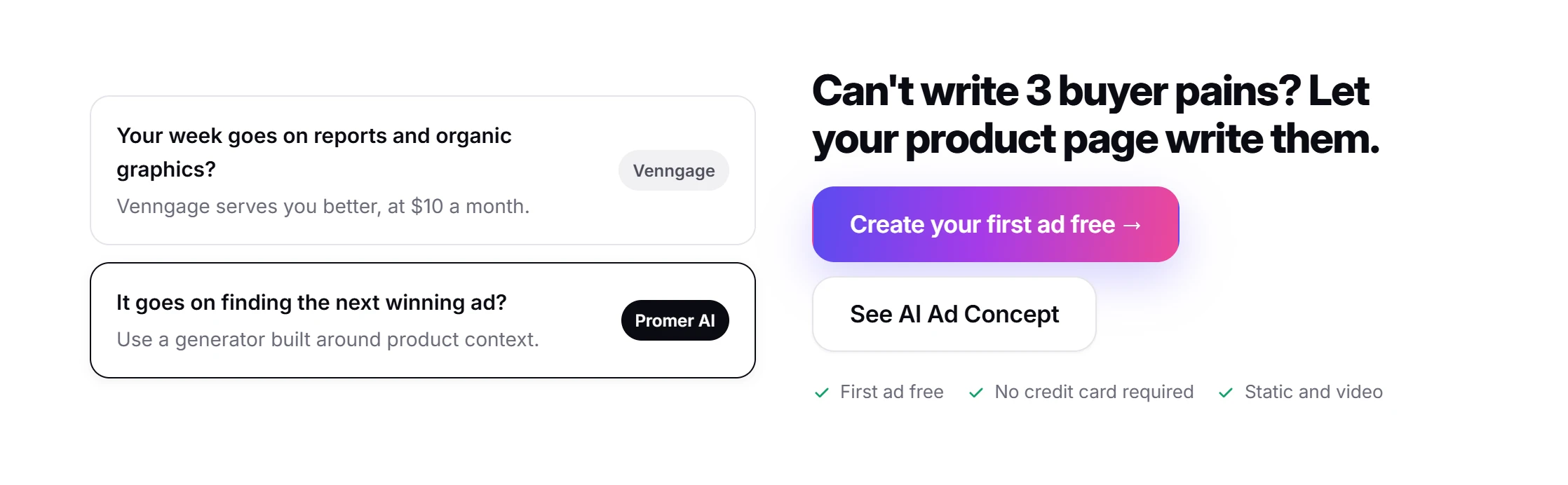
When your week goes on reports and organic graphics, Venngage serves you better. When it goes on finding the next winning ad, try an AI Facebook ad generator built around product context. Your first ad is free, with no credit card.
Venngage review verdict: Run 1 check before you pay
Pay for Venngage Premium if you need clean, accessible, on-brand graphics in many formats and can write your own ad angles. Move to Business only if daily AI credits or Brand Kits save you real hours. Skip it as your main ad tool if paid social is how your store grows.
Your next 30 minutes: write the next 3 ads you want to test as 3 different buyer pains. If you can write all 3, this Venngage review says Premium will lay them out well for $10 a month. If writing them is the hard part, a design tool won't fix that.
In the first month, watch the AI credits: they reset daily, and failed generations may still count.
FAQ
Is Venngage good for Facebook ads?
Venngage is good for laying out image-based Facebook ads once you know what the ad should say. It turns a typed brief and your uploaded product photos into 1 design per prompt, with headline, primary text, and CTA. Venngage's own FAQ says it focuses on static ad design, not publishing or video, so angle selection and testing stay with you.
Is Venngage free?
Venngage has a free plan with 5 designs, 6 image uploads, and a trial of its AI tools. Designs share by public link only. Download and PNG export start on Venngage Premium at $10 a month billed yearly, so for ad work the free plan is a preview.
How much does Venngage cost?
Venngage Premium costs $10 a month and Business $24 per user, billed yearly, or $19 and $49 monthly. Enterprise starts at $499 a month with 10 members minimum. Brand Kits and 100 AI credits a day start at Business, per the pricing page on October 5, 2026.
Is Venngage AI unlimited?
No, Venngage AI runs on a daily credit limit, even on plans with unlimited designs. Venngage's help center lists 100 credits a day per user on Business and Enterprise, with trial credits on Free and Premium. Credits reset daily, don't roll over, and failed generations may still use them.
Can Venngage make video ads?
No, Venngage focuses on static, image-based ads. Its AI Ad Generator FAQ names Creatify and InVideo as better fits when a campaign relies on video. Venngage exports PNG, PDF, PowerPoint, and HTML, so Reels, Stories, and TikTok video ads need a second tool.
Is Venngage legit?
Yes, Venngage is an established design platform with strong user reviews. Venngage holds 4.7 out of 5 from 134 G2 reviews and 4.6 out of 5 from 206 Trustpilot reviews as of October 5, 2026. Most negative reviews are about locked downloads and AI credits, so check the plan table before you upgrade.
What is a good Venngage alternative for ecommerce ads?
The right Venngage alternative depends on the gap: Canva for free video, AdCreative.ai for static volume, Promer AI for product-led ad concepts. Promer AI starts from a product URL, not a typed brief. If you mainly need infographics and accessible documents, Venngage remains the better fit.
Sources
Venngage. (n.d.). Professional Infographic Software. https://venngage.com/
Huy Tran Quoc is the Head of Product Management at Promer AI, part of FireGroup Technology, where he leads product strategy and execution across a cross-functional team spanning product, engineering, design, QC, customer success, and prompt engineering.
Over the past decade, Huy has progressed from Product Manager to Senior Product Manager to product leadership, working at EngineThemes, Zalo, TIKI Corporation, and now FireGroup Technology, across ecommerce SaaS, social networking, marketplace, supply chain, and fintech.
At TIKI, Huy owned the strategic roadmap and P&L alignment for a multi-vertical portfolio and partnered directly with the C-suite to translate company vision into executable plans.