CreateUGC Review 2026: Built for Small Stores, Priced for Them?
Category
Blogs
Date
Authored by
Huy Tran Quoc
Summary
CreateUGC AI reviews 2026: $19.90 is the annual rate, $26.90 monthly. What one usable UGC clip costs, the 3-video trial, and what Trustpilot users say.
You run a small store. Most of your ads are statics, the ones that worked in spring have gone flat (a common reason stores start weighing UGC ads vs static ads in the first place), and you want to test UGC-style video without filming yourself or booking a creator. Sound like your week? CreateUGC's $19.90 price card is aimed straight at you. Most CreateUGC AI reviews stop at that card; this one works out what the money buys once the videos land in your ad account.
Two things change the math before you start. The $19.90 is the annual rate: billed month to month, the same Launch plan is $26.90. And credits pay for attempts, while you only put ad spend behind the clips that pass.
CreateUGC is worth it for a store that needs a handful of avatar-led TikTok and Meta video ads a month and scores every batch before spending on it. When fewer than one clip in three is good enough to run, skip it or stay on monthly billing: at that rate, each usable ad on Launch costs about $8.
Plan prices and a plan picker are in the pricing section. Four ready-to-paste script formats are in the script section. For what a usable ad costs, go to the usable-clip section: it has the formula, a cost table and a batch checklist you can copy. New to this format? Start with how UGC ads work, then come back for what's specific to CreateUGC.
Key takeaways
No filming, but no auto-posting either. Your statics have gone flat and you won't film yourself? CreateUGC turns your product link into a video ad with an AI actor reading a script. Launch gives you about 10 videos a month, and you upload each one to Meta or TikTok yourself.
$19.90 is the yearly price; monthly is $26.90. The pricing page opens on annual billing, so a $20-a-month budget turns into a $238.80 yearly bill. A single month of Launch costs $26.90.
The trial ends at video four, not only on day three. You get three videos in three days, and the fourth video ends the trial and starts billing. Two Trustpilot reviewers in August and September 2026 describe being charged sooner than they expected.
Products people hold need Scale. Selling a serum, a bottle or a gadget? Only Scale lists Product in Hand, where the AI actor holds your product, so budget $39.90 a month from the start.
10 ads you can run takes about 30 videos. At one usable video in three, a month of 10 runnable ads needs Max at $66.90 a month, not Launch.
One login per account. Handing your login to a VA or freelancer can get the account closed without a refund.
What CreateUGC makes for your store, from product link to finished video ad
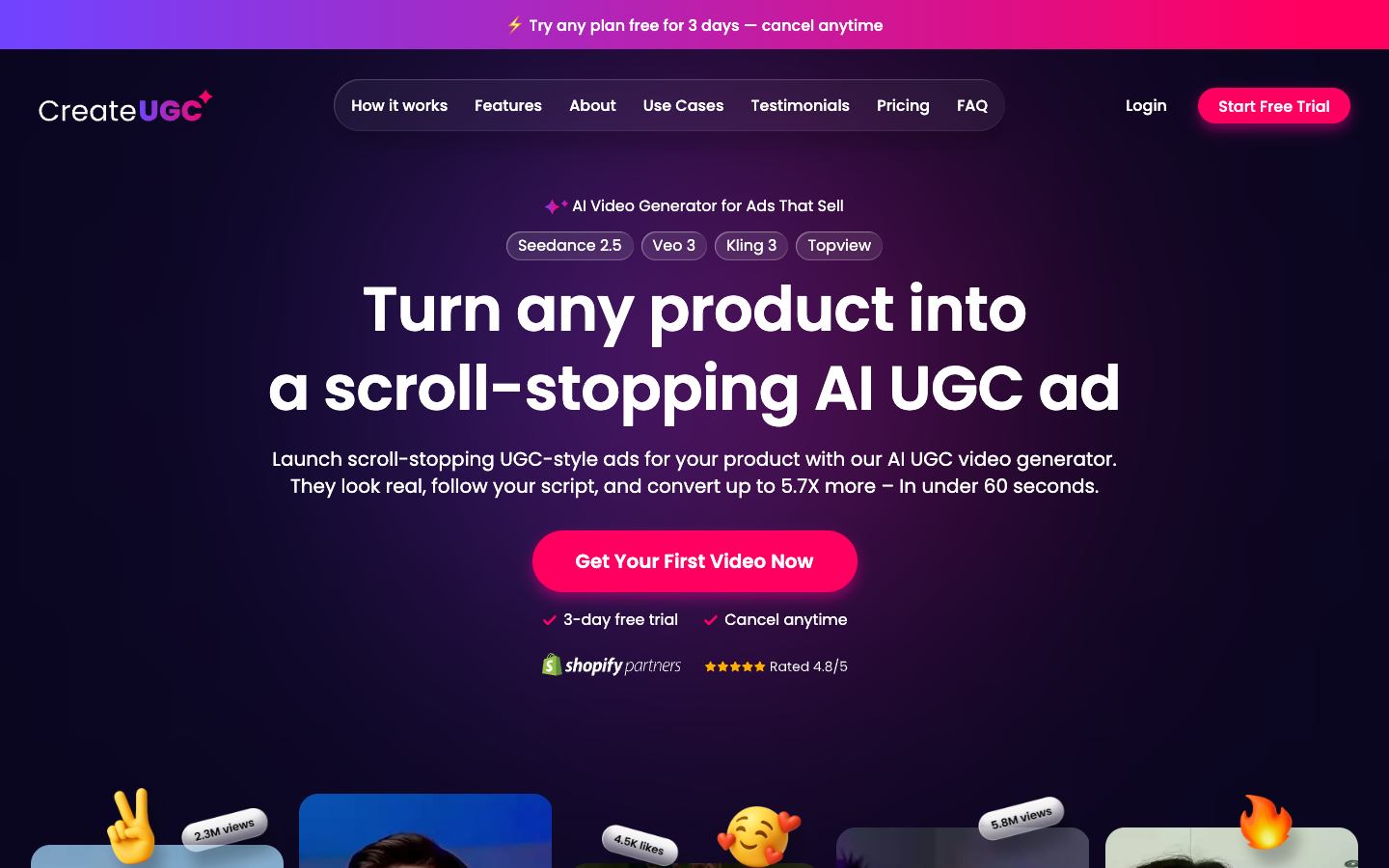
CreateUGC is an AI video tool that turns a product link from your Shopify or Amazon store into a UGC-style video ad, with an AI actor presenting your product for TikTok, Reels or Facebook. You pick the actor, write or approve the script, and download the finished video. Plans start at $26.90 a month, or $19.90 a month billed yearly.
Paste the link, then upload your best photos
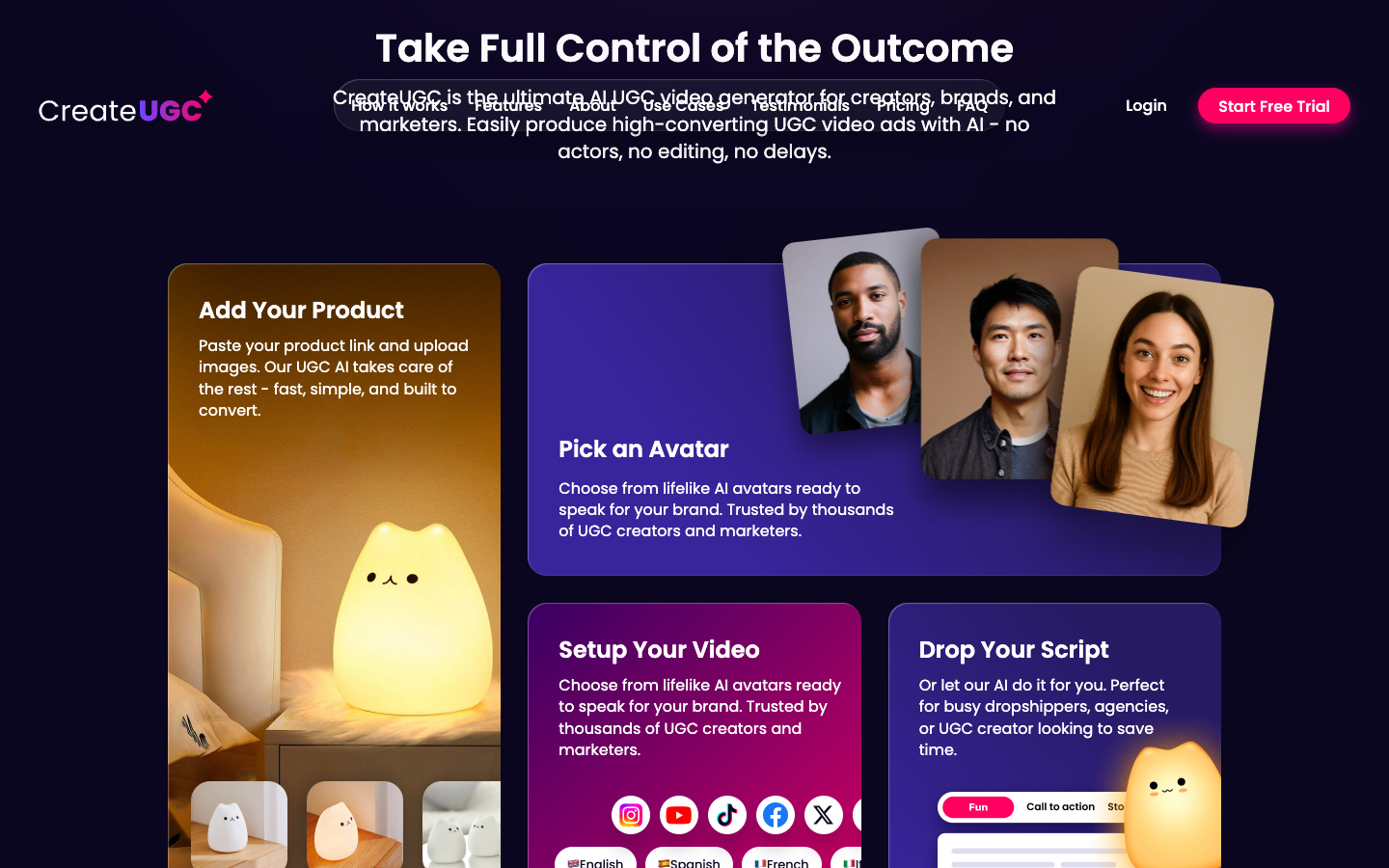
The first block reads "Add Your Product: Paste your product link and upload images." CreateUGC works with Shopify, Amazon "or any product page", and this is also where you "Choose the type of UGC ad you want."
For a small store, the image upload matters more than the link. A product link gives the model a title and some copy. Clean images from several angles are what keep a hand-held bottle from turning into a different bottle halfway through the clip.
Pick from 20, 120 or 1,000+ CreateUGC AI actors
Your plan sets the size of the actor library: 20 avatars with AI voices on Launch, 120 on Scale and 1,000+ on Max. On Scale, those voices speak "30+ languages", which matters the day you test a second market.
Twenty avatars sounds thin until you do the math. At about 10 videos a month on Launch, you would rarely use more than five or six faces. The count becomes a limit when you test across audiences (age, gender, region), or when other stores in your niche start running the same faces.
Write the hook yourself: the CreateUGC script workflow
The script block reads "Drop Your Script. Or let our AI do it for you." Launch includes "3 AI ready scripts Auto generated", a quick starting point when you're staring at an empty field.
This step sets your usable-clip rate more than any other. A script generator writes something plausible from your product page. It doesn't know which claim your last winning ad made or which objection keeps showing up in your comments, so write the hook and call to action yourself and let the AI fill the middle. The four formats in the script section below are built for exactly that.
Swap the Character: test a new face without redoing the ad
CreateUGC says a video is ready "In 60 seconds". The block worth your attention is labelled NEW: "Swap the Character. Keep everything else." It turns an existing video into a new one with a different avatar, keeping "Same script, same product, same setup, just a new face."
When a script works, you can find out whether the face was the reason without paying to change anything else. Once a face performs, flip it: keep the face and change the script in a new project. Both are clean single-variable tests.
"Launch Your Ad" means download and upload it yourself
The last block reads "Launch Your Ad: Download it. Post it. Test and scale." You get a video file, upload it to each ad account yourself, and track which version wins in Ads Manager. Name each file by script and actor before uploading (for example hook2-actorB.mp4), so the winner is obvious a week later.
Launch already includes 1:1, 16:9 and 9:16 aspect ratios, so the entry plan covers feed placements as well as Reels and TikTok.
CreateUGC script templates: four UGC formats you can paste in
The script field is where most of your money is won or lost, so it deserves more than one template. Start with these rules, then pick the format that fits the job your ad has to do. These four aren't the only ones; different styles of UGC ads covers the wider set if none of these fit your product.
Open on the problem or the result, never the brand. The first line decides whether anyone is still watching at second four.
One claim per clip. Two claims in 15 seconds means neither lands, and you can't tell which one did the work.
Take every claim from your product page. For skincare, supplements or anything with a health angle, a claim your page doesn't make is also the fastest route to a rejected ad.
Write for the ear. Short sentences, contractions, and about 40 words for 15 seconds, so the AI voice doesn't rush.
Get the product on screen by second 3 to 5. A face talking about an unseen product reads like a podcast clip.
End on one action and the offer, said out loud. "20% off this week, tap Shop Now" beats a vague "check it out".
Test the hook, keep the body. Make three versions with only the first line changed, then run Swap the Character on the winner.
1. Problem and solution: for a product that fixes something
The workhorse format for a first test. It fits Launch, and it works for almost any product with a clear before and after.
Time
Beat
What to write
0-3s
Hook
The problem, said the way a customer says it. Example: "My lipstick is gone before lunch."
3-7s
Product
The actor shows the product and one visible feature
7-11s
Proof
One fact from your product page: a number, a material or a guarantee
11-15s
CTA
Offer plus action. Example: "20% off this week. Tap Shop Now."
2. First-person review: for a product with good reviews
Borrow the words your real customers already use in your reviews. That keeps the claim honest and the phrasing natural. This is the one format where sourcing real customer content and writing a script converge, since the words themselves come from a real buyer.
Time
Beat
What to write
0-3s
Hook
"I didn't expect a [price] [product] to [result]."
3-8s
What changed
One specific thing, lifted from a real customer review
8-12s
Why
The feature that made it happen
12-15s
CTA
"Link's below. [Offer]."
3. Demo: for a product people need to see in use
Made for Scale, where Product in Hand and 30-second videos are included. Use it for gadgets, kitchen tools, anything where "how it works" is the selling point.
Time
Beat
What to write
0-3s
Hook
Show the result first, then: "Here's how I [do X] in [time]."
3-20s
Steps
2 or 3 steps, actor holding the product, one line per step
20-26s
Result
The finished state, in one sentence
26-30s
CTA
Offer plus action
4. Objection buster: for the question your comments keep asking
Scroll your ad comments and DMs, pick the doubt that shows up most (price, size, quality, shipping), and answer it head-on.
Time
Beat
What to write
0-3s
Hook
The objection as a question. Example: "Is a $49 [product] worth it?"
3-11s
Answer
One fact that settles it: warranty, material, size or returns
11-15s
CTA
A safety net plus action. Example: "[X]-day returns. Tap Shop Now."
Run the same product through two formats in your first batch. The format that clears your checklist more often tells you which job your buyers care about, before you spend a month of credits on the wrong one.
CreateUGC pricing: the $19.90 on the card is the annual rate
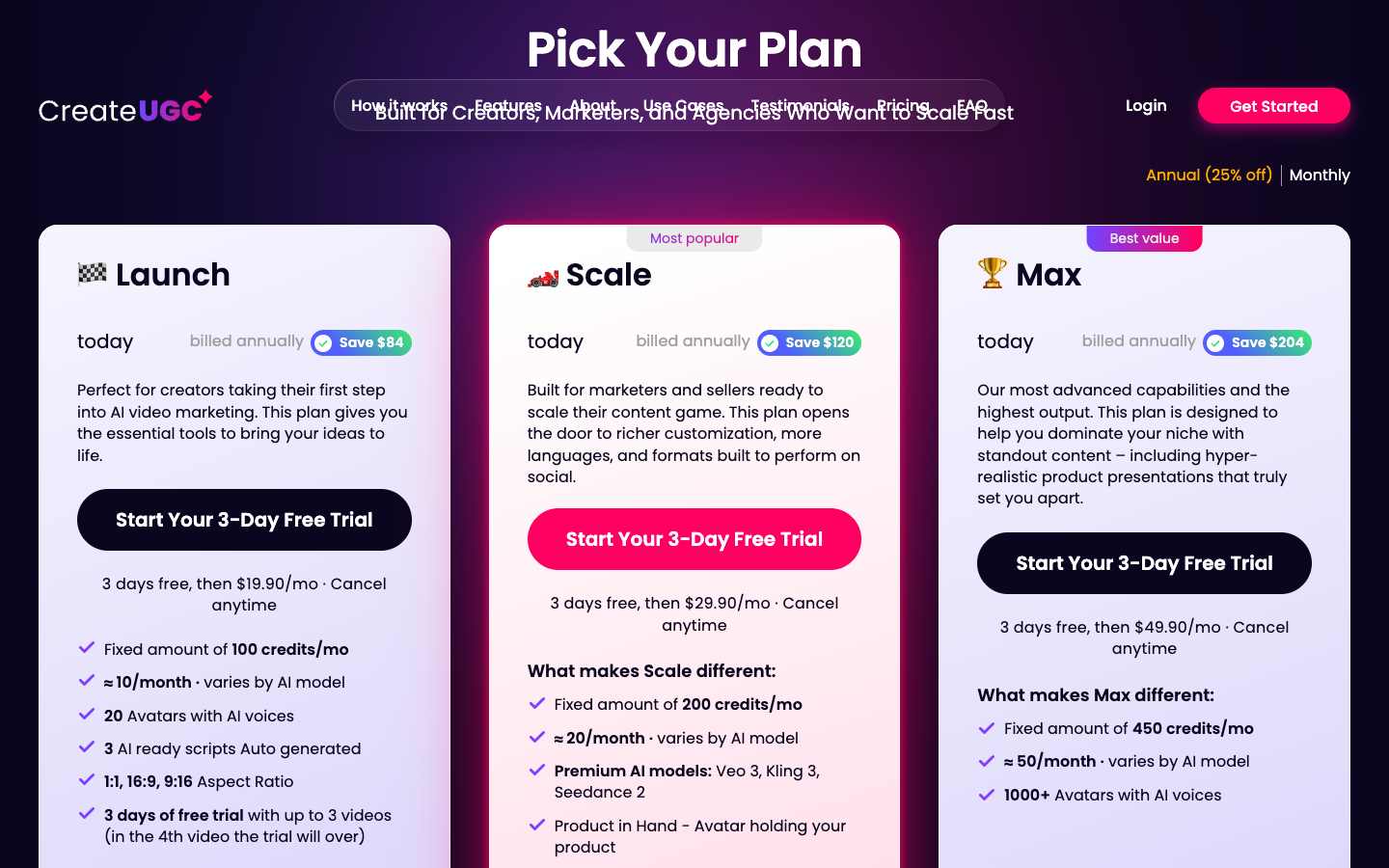
CreateUGC pricing has three plans, each with a three-day trial. Billed annually, Launch is $19.90 a month, Scale $29.90 and Max $49.90. Billed monthly, they are $26.90, $39.90 and $66.90. Plans include 100, 200 and 450 credits a month, which CreateUGC estimates at about 10, 20 and 50 videos, "varies by AI model".
Prices were checked on 30 September 2026. Per-video rows divide the price by CreateUGC's own video estimate.
CreateUGC plan
Launch
Scale
Max
Billed monthly
$26.90/mo
$39.90/mo
$66.90/mo
Billed annually (default view)
$19.90/mo
$29.90/mo
$49.90/mo
Annual saving shown on card
$84
$120
$204
Credits per month
100
200
450
CreateUGC's video estimate
about 10
about 20
about 50
Per estimated video, monthly billing
$2.69
$2.00
$1.34
Per estimated video, annual billing
$1.99
$1.50
$1.00
AI avatars with voices
20
120
1,000+
What each card adds, in CreateUGC's words:
Launch: 20 avatars with AI voices, "3 AI ready scripts Auto generated", and 1:1, 16:9 and 9:16 formats.
Scale adds: premium models (Veo 3, Kling 3, Seedance 2), Product in Hand, 120 avatars, AI voice in 30+ languages, and 15, 30 or 60-second videos.
Max adds: 450 credits a month and 1,000+ avatars.
The page opens with "Annual (25% off)" selected, and each card then reads "billed annually". Twelve months of Launch at $19.90 is $238.80, against $26.90 on monthly billing that you can stop after one month. Still finding out whether AI UGC works for your product? The $7 difference buys you the right to walk away. Switch the toggle to Monthly before you start the trial, and move to annual after a month or two of results.
A banner on the pricing page read "Limited-Time Launch Offer: Save 30% on Your First AI-Generated UGC Video Ad. Ends in 48 hours." on 30 September 2026. Decide on the plan math, not the countdown.
Which CreateUGC plan fits your store
Your situation
Start on
Why
Testing whether AI UGC works for one product
Launch, monthly ($26.90)
About 10 videos is enough to measure your usable-clip rate, and you can stop after a month
Selling skincare, a bottle, a gadget, anything people hold
Scale ($39.90)
Product in Hand puts your product in the actor's hand; 30 and 60-second videos fit demos
Selling into a second language market
Scale ($39.90)
AI voice in 30+ languages
Needing about 10 runnable ads every month
Max ($66.90)
About 50 videos covers a one-in-three usable rate
Two good months behind you and staying
Same plan, annual
Saves $84 to $204 a year
What a CreateUGC credit buys
On Launch and Scale the conversion is about 10 credits per video: 100 credits for about 10 videos, 200 for about 20. Max works out slightly better: 450 credits for about 50 videos.
Every card also carries the words "varies by AI model". On Scale and Max, choosing a premium model such as Veo 3 or Kling 3 may use more credits per video. Treat each estimate as the most videos you will get in a month, and use the trial to see your real number (the trial checklist below shows how).
What sits behind Scale: Product in Hand, 60-second videos and premium models
The Scale card holds most of what makes the product interesting for paid social. It adds "Premium AI models: Veo 3, Kling 3, Seedance 2", "Product in Hand - Avatar holding your product", 120 avatars, AI voice in 30+ languages, and 15, 30 or 60-second videos.
The premium models matter for how real your AI actor looks. CreateUGC runs on outside video models (the homepage lists Seedance 2.5, Veo 3, Kling 3 and Topview under "Powered by"), and the premium ones come with Scale.
Product in Hand is the one to weigh. A UGC ad where the presenter never touches the product reads like a voiceover over a still. For skincare, a gadget, a bottle or anything else people hold, that alone is reason enough to start on Scale. The step up is $13 a month on monthly billing ($10 on annual), and it doubles your credits.
CreateUGC free trial: three videos, and the fourth one ends it
The CreateUGC free trial lasts three days and covers up to three videos on every plan. The Launch card says "in the 4th video the trial will over", and each card reads "3 days free, then" the plan price with "Cancel anytime", so the trial becomes a paid subscription unless you cancel.
The trial runs on two clocks. Three days pass, or you generate a fourth video, and whichever comes first ends it. Make four videos on day one and you are a paying customer on day one, on whichever billing toggle was active when you signed up.
Three videos is a small sample, so spend them on one question: how many of these would I run? Put all three on the same product, with scripts you wrote, and set a reminder for day two.
Use the same three videos to check the five things that decide whether a paid month makes sense:
Credits per video. Note your credit balance before and after each render. That is your real videos-per-month number, for your model and your video length.
The exported file. Download one video and check its resolution and whether it carries a watermark before you plan to upload it to Ads Manager.
Your product on screen. Compare the label, colour and shape with your real product photo. This is check 1 of the scoring checklist below.
Premium model cost (Scale and Max). Render your strongest script once on Veo 3 or Kling 3 and compare the credits used with the default model.
What CreateUGC AI reviews on Trustpilot say about billing and support
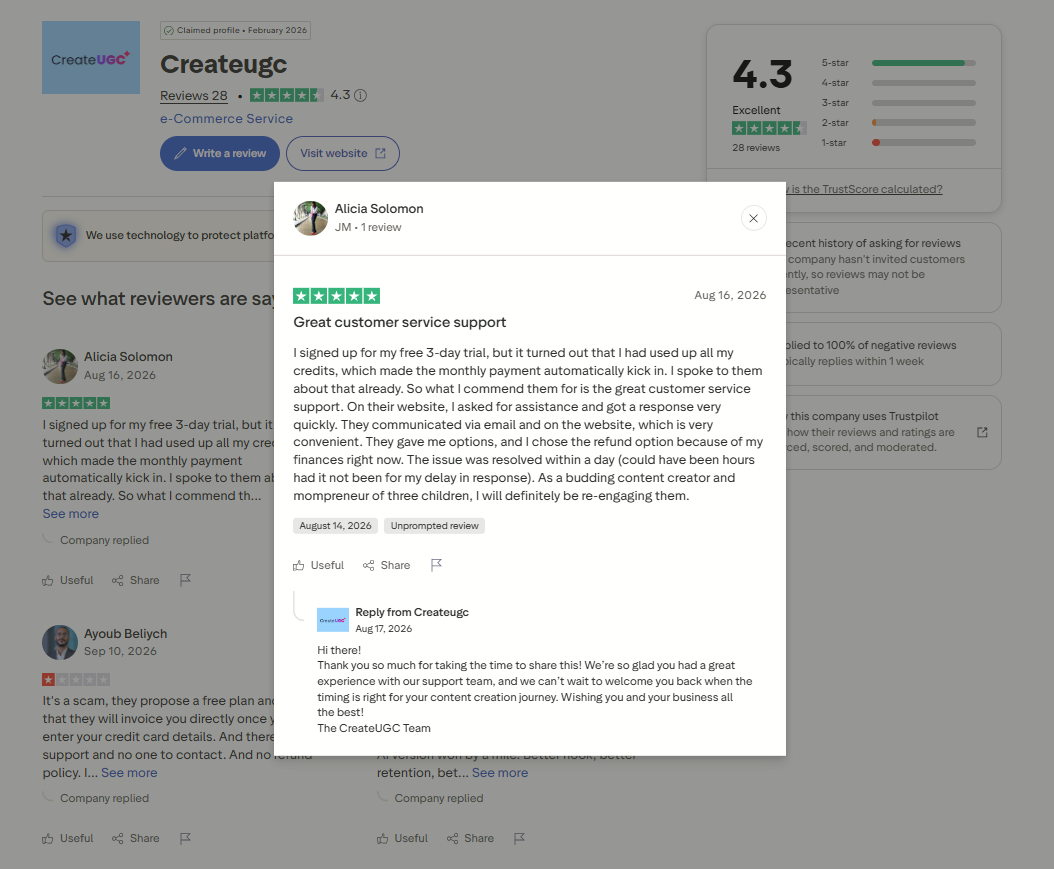
CreateUGC holds 4.3 out of 5 on Trustpilot from 28 reviews, checked 30 September 2026: 89% five-star, 4% two-star and 7% one-star. The critical reviews are about the trial turning into a charge, not about video quality, and CreateUGC has replied to every negative review.
Twenty-eight reviews is a small sample, and Trustpilot itself notes that the company "hasn't invited customers recently, so reviews may not be representative". Most of the five-star reviews on the first page are dated June 2026. The low ones tell you more about what to watch in your own first week.
Alicia, reviewing on 16 August 2026, started the three-day trial and found she had used up her credits, which made "the monthly payment automatically kick in". She gives the review a positive title because support answered quickly by email, offered options, and she chose a refund that was sorted within a day.
Ayoub, on 10 September 2026, titled his one-star review "It's a scam". He says he was invoiced once he entered his card details and could not find a refund policy or anyone to contact. CreateUGC replied on 14 September that a specialist would reach out by email.
Both stories match the pricing card: the trial needs a card, and it ends at the fourth video. The risk they describe is your calendar and your video count, not the output. On output, Ann (22 June 2026) reports a lip sync problem on one video that support fixed within hours. Several five-star reviews mention ROAS or conversion jumps; treat those as one store's result and trust the numbers from your own trial.
Before you enter a card, open the CreateUGC Trustpilot page and read the lowest-rated reviews first. They tell you what to watch in week one.
What one usable CreateUGC ad really costs a small store?
Every AI UGC generator prices the attempt. What you pay for in practice is the clip you would put ad spend behind, and that is always fewer than the clips generated. The usable-clip rate is the share of a batch that clears your bar without regenerating.
The formula for cost per usable clip
Cost per usable clip = monthly plan price ÷ (videos per month × usable-clip rate)
The table uses monthly billing, the price you pay while you are still testing. The rates are examples: after your trial, plug in your own. On annual billing, every figure drops by about a quarter. Cost per usable clip is only half the picture; benchmarking UGC ad performance is what tells you whether a cheap clip is genuinely a good ad.
Usable-clip rate
Launch ($26.90, about 10 videos)
Scale ($39.90, about 20)
Max ($66.90, about 50)
Every clip usable (100%)
$2.69
$2.00
$1.34
One in two (50%)
$5.38
$3.99
$2.68
One in three (33%)
$8.07
$5.99
$4.01
One in five (20%)
$13.45
$9.98
$6.69
The worst cell is $13.45 per usable ad. The number that bites is the monthly count: at one in three, Launch gives you about three usable clips a month, Scale about seven and Max about 17.
Say you want to test five new hooks a month, each with two avatars. That is ten usable clips, which at one in three means about 30 videos: more than Scale's 20, so you are on Max, or on Scale with a script hit rate well above average.
A month on Scale, worked through
Say Scale's estimate of about 20 videos holds on the default model. Spend 12 in week one: four scripts, each rendered with three avatars, all scored with the checklist below. At one in three you end the week with about four usable clips and you know which scripts produced them.
Spend the other eight on Swap the Character, putting new faces on your two strongest scripts. The script is already proven, so this batch should clear the bar more often. You end the month with roughly eight to ten usable clips and a record of whether the script or the face carried the results. Premium models may use more credits and shrink the 20, so test one on your best script only. This batch-and-score rhythm is the same discipline behind scaling UGC ad creative production once a store moves past the first few tests.
Score each CreateUGC batch: a six-point checklist
Score each clip pass or fail on six checks. A clip that fails any of the first four is not usable, whatever it cost.
USABLE-CLIP CHECK (one line per clip)
1. Product fidelity: the product on screen matches the real one (shape, label, colour, size).
2. Script accuracy: every claim and price matches your product page. No invented features.
3. Lip sync: mouth movement matches the AI voiceover for the whole clip, hook included.
4. Hands and objects: no warped fingers, floating products or garbled text on packaging.
5. Hook in 3 seconds: the first line and first frame would stop you scrolling on TikTok or Reels.
6. Brand fit: tone, avatar and setting fit the customer in your ad account.
Usable = passes 1-4 and at least one of 5-6.
Usable-clip rate = usable clips / clips generated.
Run it on the three trial videos, then on your first full batch. Two numbers per batch (clips generated, clips usable) tell you within a month whether the plan fits. Checks 5 and 6 are really about spotting high-converting UGC ads before you spend on them, not just confirming the product looks right.
The checklist also shows where failures cluster. Most fails on check 2 point to your script input, and more credits will not fix that: go back to the script formats above. Most fails on checks 1, 3 or 4 point to CreateUGC output consistency: the fix is a different model, a different avatar or a different tool.
What the $12,000 comparison on the homepage leaves out
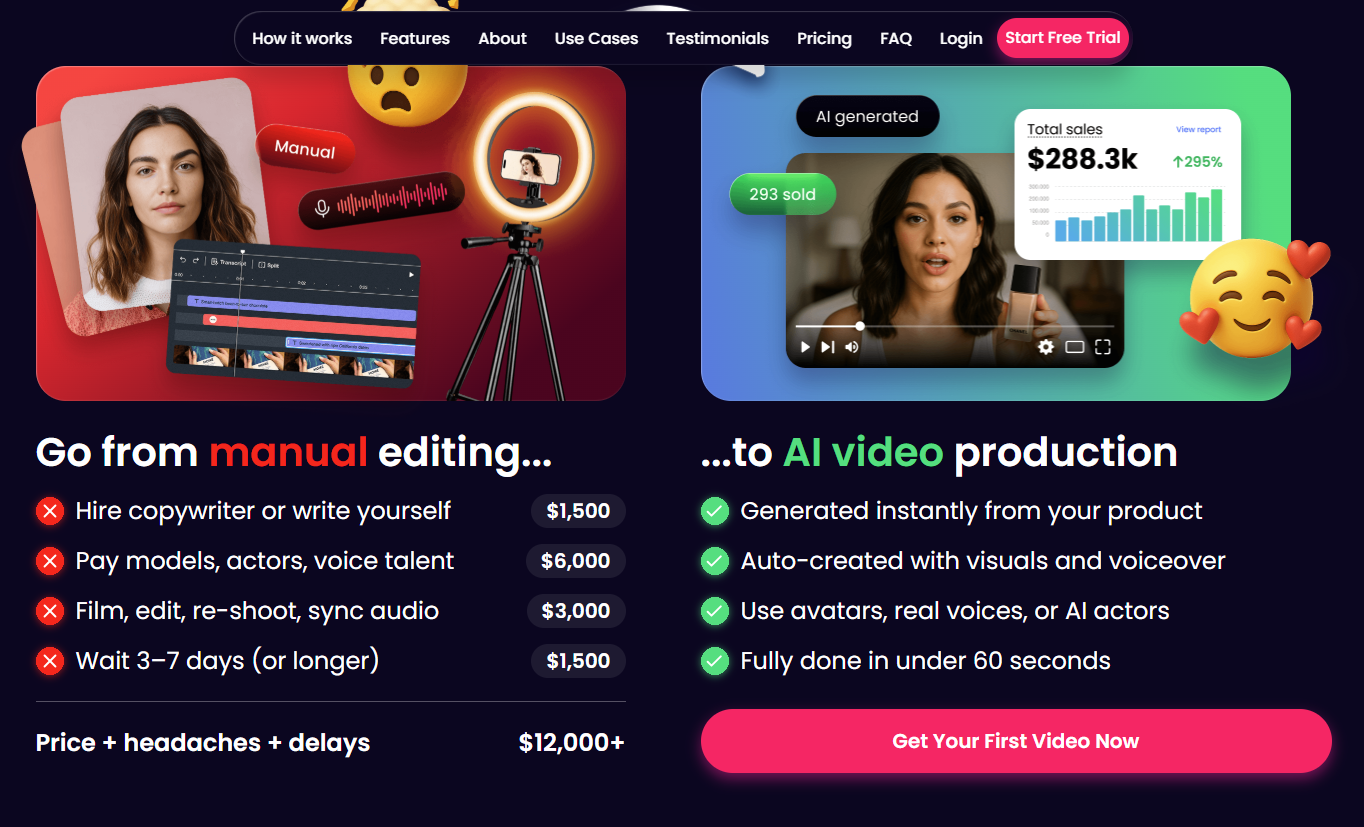
CreateUGC's homepage prices manual production at "$12,000+": $1,500 for a copywriter, $6,000 for models and voice talent, $3,000 to film and edit, and $1,500 to "Wait 3-7 days (or longer)". That last line is a cost of delay, not an invoice, and the $12,000 is not tied to a number of videos. You are not choosing between $12,000 and a $26.90 plan. The fair comparison is a freelance UGC creator's rate per video against your cost per usable clip, keeping in mind that a creator's clip shows your real product in a real hand.
The same homepage says CreateUGC ads "convert up to 5.7X more". Treat that as the vendor's headline, not a forecast for your store, and plan spend on what you measure in your own ad account.
Who CreateUGC fits, and who should skip it
CreateUGC's own audience list runs "from solopreneurs to 8-figure brands". The plan limits point to the smaller end. What it does better than most tools in this price band: the entry price is public, the credit-to-video estimate is printed on the card rather than hidden behind a sales call, and Swap the Character gives you a clean way to test faces.
Buy it if:
You run a Shopify store or dropshipping ads yourself and need roughly 3 to 15 new avatar-led clips a month for TikTok, Instagram Reels or Facebook ads.
You can write or edit a script, so the AI's job is presenting, not deciding the angle.
Your product is something a person holds, and you are willing to start on Scale for Product in Hand.
You want to test faces cheaply, which is what Swap the Character is built for.
Skip it, or wait, if:
A VA or freelancer needs access. CreateUGC's terms, written by owner AutoDS Ltd., say "Your User Account is to be used exclusively by you", and sharing it is "a material breach" that allows termination "without prior notice or refund". Creating a second account is also barred.
You need a fixed number of videos every month: credit use "varies by AI model", so the count moves with your settings.
You need static image ads as well as video from the same subscription.
You want finished ads to land straight in your ad accounts rather than in a downloads folder.
The lesson for any AI UGC tool: price the usable clip, not the video
CreateUGC's cards count videos, and so does every AI video ad generator in this category, because the video is the unit the vendor controls. Your cost sits in the usable clip, and that rate is set by two things no price card can see: how good your script is, and how well the model holds your product together.
So spend the first month measuring. One product, one script you already trust, one batch per avatar or model, all scored against the same checklist. Ten ads that make one claim with ten faces are one test of the claim and ten tests of the face. Decide which one you are paying for before the credits go.
CreateUGC alternatives for small-store video ads
Three other routes, cheapest first. None of them copies CreateUGC's mix of a low entry plan and avatar-led video from a product link, so pick by the job you need done.
Tool
Entry point
What the entry buys
Pick it when
Promer AI
Free plan (~30 credits) covers a static ad; video needs a paid plan
AI UGC Ads in five formats, plus static ad tools
You want the ad idea built from your product before any avatar is picked
CapCut
Free, no credit card
Online editor, auto captions, text to speech, 160 AI credits on sign-up
You already have footage and need to cut, caption and resize
Creatify
Free plan; Starter $39/mo
10 credits/mo free (about 2 video ads, watermarked); 100 credits and 300 AI actors on Starter
You want a bigger avatar library and image ads too
CapCut, the free editing baseline
For footage you already have, from your own phone or a paid creator, CapCut is the place to start: it cuts, captions and resizes. Its homepage offers online editing "for free" with "No credit card required", lists auto captions and text to speech, and gives new sign-ups 160 credits for its AI generators. Skip it when you want the tool to write and present the ad from your product page: CapCut's strength is the edit, not the brief.
Creatify, the avatar library specialist
Creatify also turns a product URL into avatar-led video ads, covered in more depth in Creatify AI reviews. On 30 September 2026 its pricing page listed a free plan with 10 monthly credits ("Create up to 2 video ads or 20 image ads"), 300 AI actors and watermarked exports. Starter was $39 a month for 100 credits, videos up to 2 minutes and one generation at a time; Pro was $99 for 300 credits, 1,500 actors and a Competitor Ad Tracker.
Against CreateUGC, Creatify costs more at entry, and a credit is not the same unit in both tools. What the extra buys is image ads, longer videos and a free plan you can test without a card. Choose Creatify when a bigger avatar library and static output matter more than entry price.
Promer AI, for UGC ads built from your product first
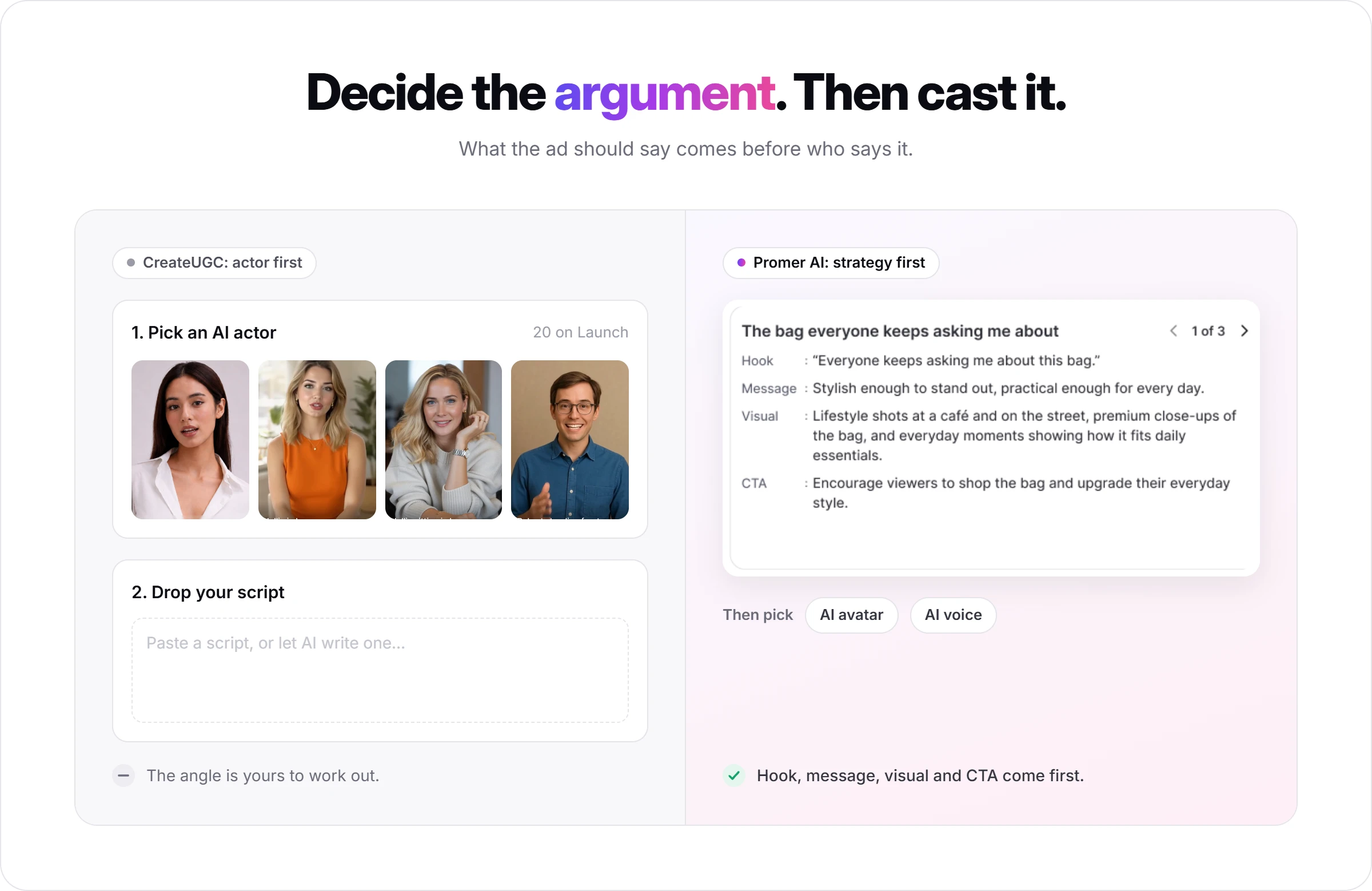
Promer AI is an AI ad creative performance platform for ecommerce advertisers. Both it and CreateUGC start from your product. The difference is what comes next: CreateUGC goes to an avatar and a script field, while Promer AI asks what the ad should argue before any avatar is picked.
Set against what CreateUGC's own workflow and checklist reveal, the differences that matter most:
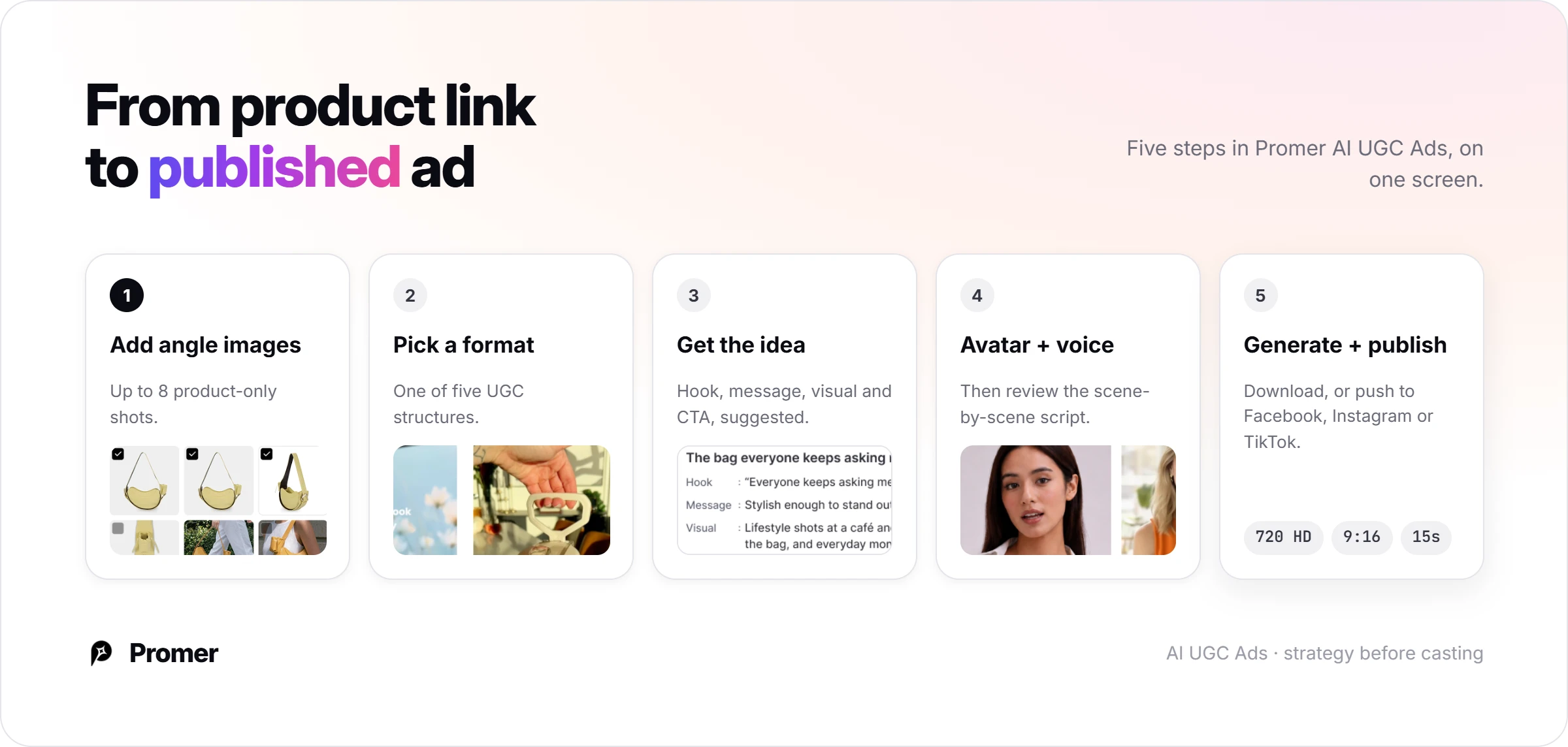
Strategy before casting. CreateUGC goes straight to an avatar and a script field. Promer AI's AI UGC video generator first turns the product into a hook, message, visual, and CTA, then you pick the avatar and voice to deliver it.
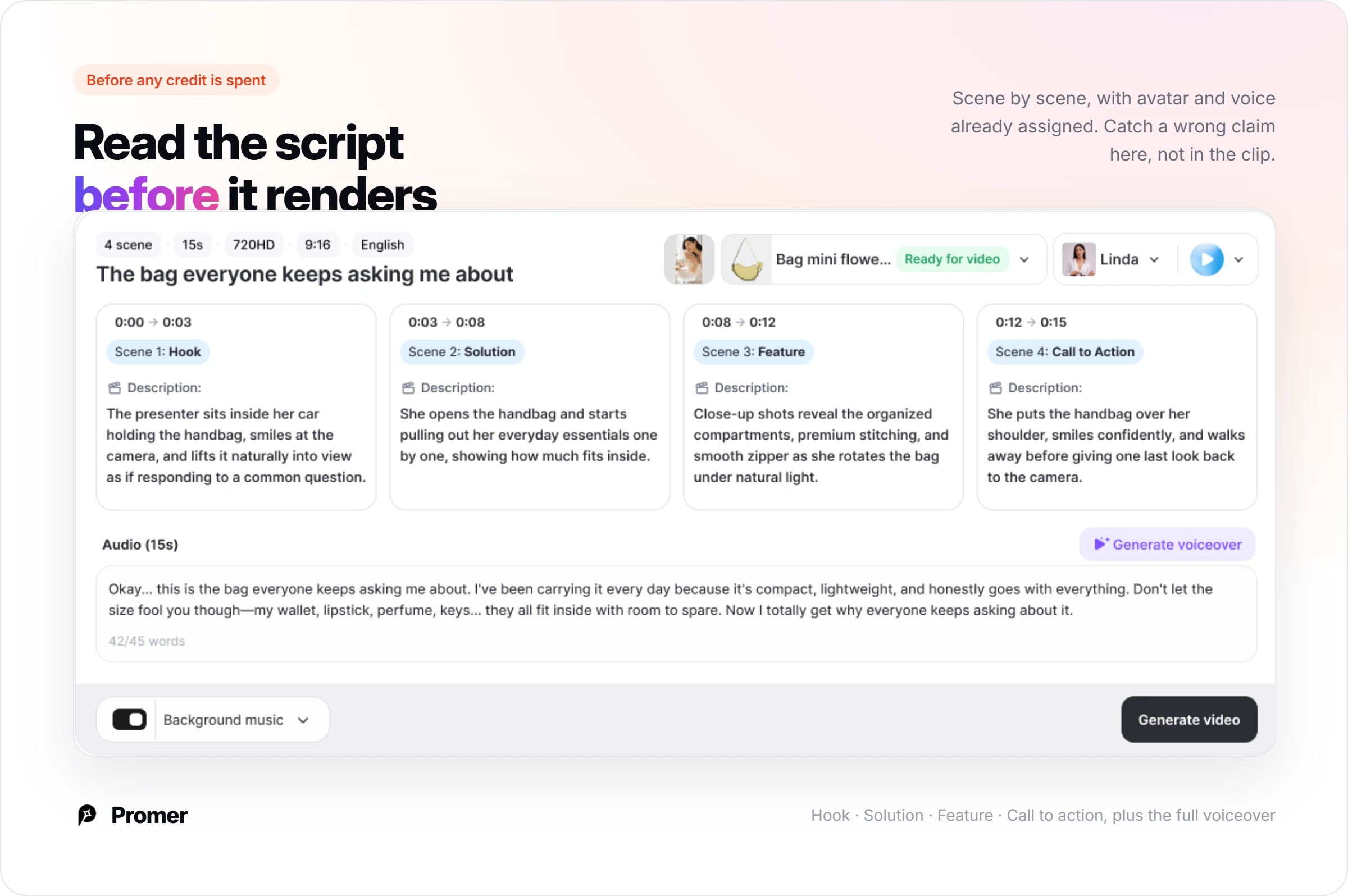
Script reviewed before anything renders. You see the full scene-by-scene script before generating, the same accuracy check CreateUGC's own usable-clip checklist flags as the most common failure point, instead of finding out after a credit is already spent.
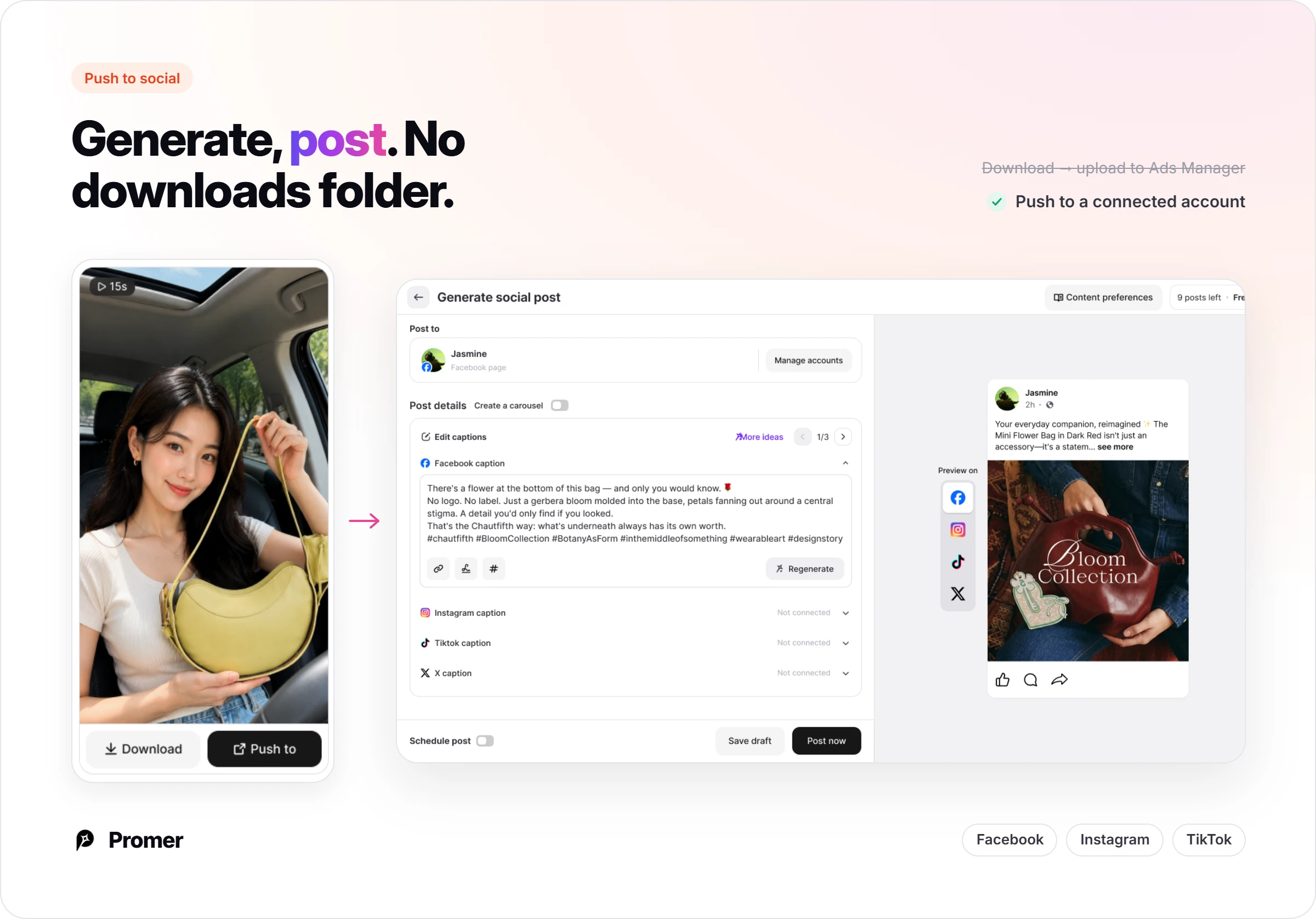
Publish without the download-reupload step. CreateUGC's flow ends at a downloaded file you upload to Ads Manager yourself. Promer AI pushes the finished video straight to a connected Facebook, Instagram, or TikTok account from the same screen it was generated on.
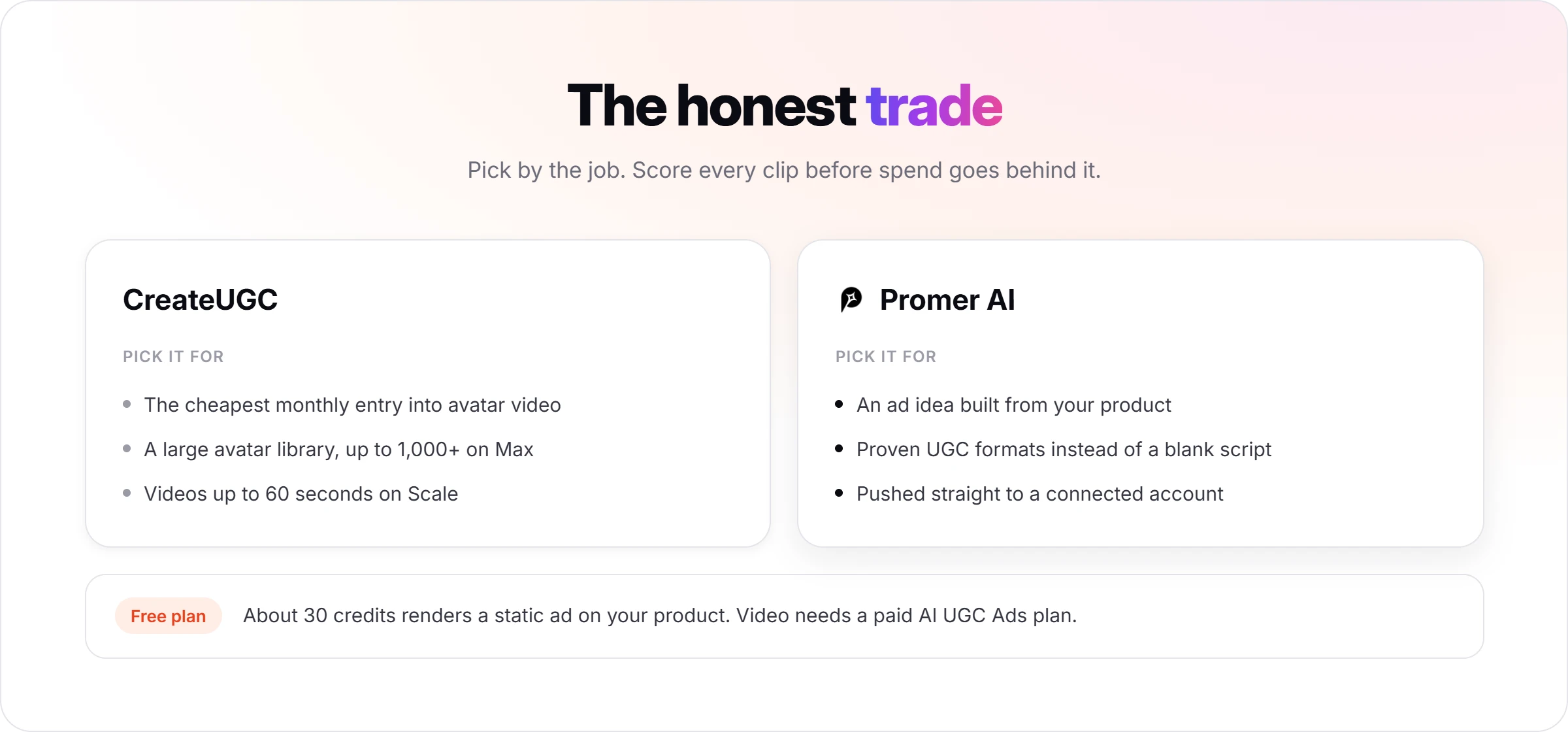
Free credits cover a static ad, not video. The Free plan's roughly 30 credits render a static ad for the same product; reaching a publishable AI UGC Ads video needs a paid plan, the same way CreateUGC's own free trial is capped at three videos before billing starts.
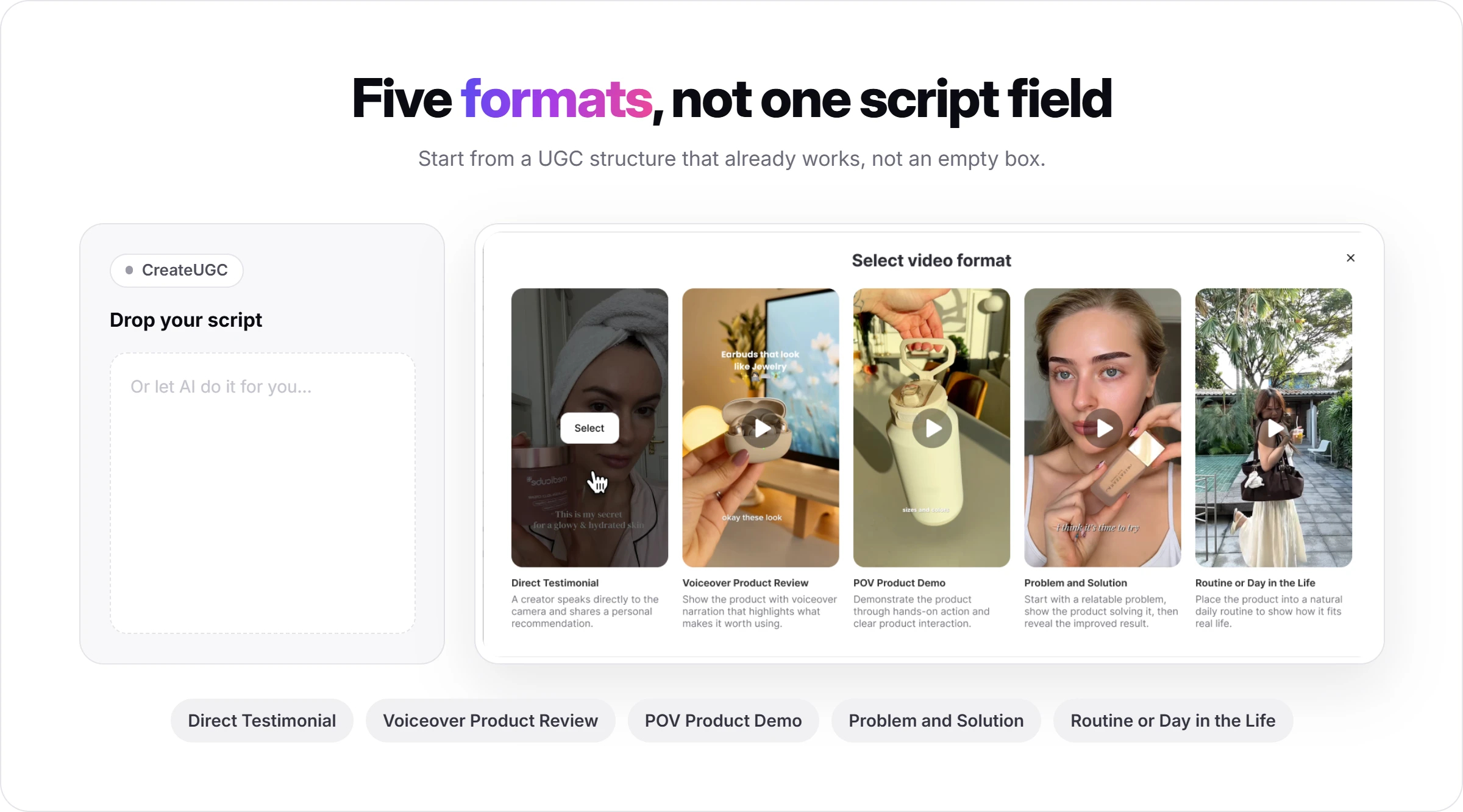
It takes a product with up to eight angle images and asks for one of 5 formats: Direct Testimonial, Voiceover Product Review, POV Product Demo, Problem and Solution, or Routine or Day in the Life.
AI suggests the video idea (hook, message, visual, CTA), you pick an avatar filtered by gender, age group, region, shooting style and industry, and a voice by language, accent and use case. Finished videos can be downloaded or published to Facebook, Instagram and TikTok.
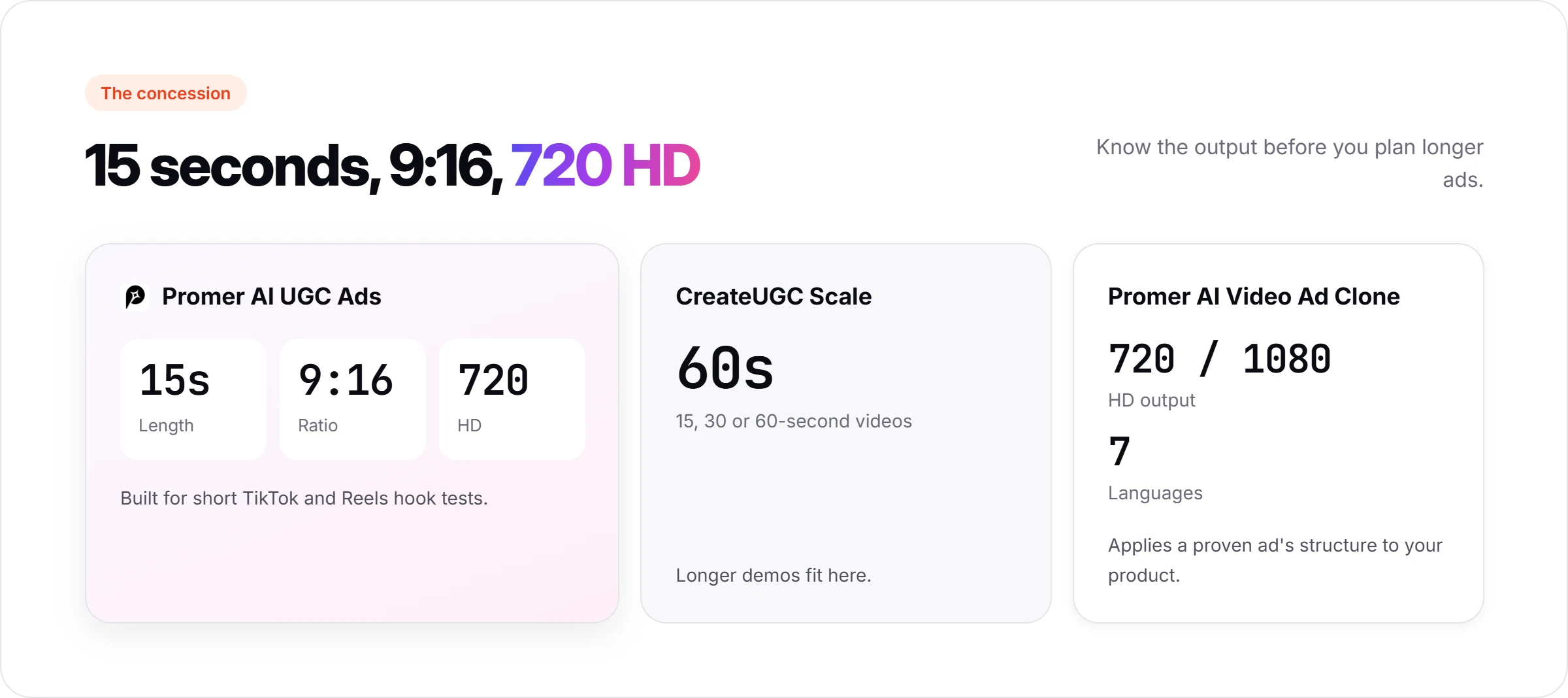
The concession is real: AI UGC Ads outputs 15-second, 9:16 video at 720 HD, where CreateUGC's Scale plan lists 60-second videos. For a UGC ad that already works, AI Video Ad Clone applies its structure to a new product after a product-fit assessment, in 720 or 1080 HD and seven languages. Promer AI reports 3,000+ merchants and 1M+ ads generated, and like any AI-generated content, its output can contain mistakes worth catching before spend goes behind it.
For the cheapest monthly entry into avatar video, CreateUGC's Launch plan is hard to undercut. For a steady supply of product ads built from what your product is and which formats already work,
Promer AI's AI advertisement generator is the closer fit. The Free plan's roughly 30 credits are enough to test a static ad on the same product before paying for video credits.
CreateUGC review verdict: cheap to start, priced per attempt
CreateUGC is a low-cost way for a small store to test avatar-led UGC video, and a good buy only after the three-video trial shows a usable-clip rate you can live with.
Before paying, do four things. Switch the pricing toggle to Monthly. Write one script you trust. Run all three trial videos on one product and stop at three. Score them with the checklist.
Two or three usable out of three: Scale on monthly billing is a reasonable next month, or Launch for just a few clips a month. One or none: rewrite the script before blaming the model, and when the fails are product fidelity or lip sync, cancel before day three ends. That is the same trial trap the critical CreateUGC AI reviews on Trustpilot describe, and it is the one part of this decision fully in your hands.
FAQ
Is CreateUGC legit?
Yes, CreateUGC is a real product operated by AutoDS Ltd., a company incorporated in Israel, according to its terms updated 8 August 2025. CreateUGC's About page names its leadership, the site publishes plan prices, and its Trustpilot profile shows 4.3 out of 5 from 28 reviews as of 30 September 2026. The critical CreateUGC reviews there concern trial billing, so check which billing toggle is active before you enter a card.
How much does CreateUGC cost?
CreateUGC costs $26.90, $39.90 or $66.90 a month on monthly billing, or $19.90, $29.90 or $49.90 a month billed annually, as listed on 30 September 2026. Launch includes 100 credits (about 10 videos), Scale 200 (about 20) and Max 450 (about 50), with every estimate marked "varies by AI model". The CreateUGC pricing page opens on the annual view, so confirm which one you are buying.
Does CreateUGC have a free trial?
Yes, CreateUGC offers a three-day free trial on every plan, capped at three videos. The CreateUGC pricing page says the fourth video ends the trial, and each plan card reads "3 days free, then" the plan price with "Cancel anytime", so the trial becomes a paid subscription unless you cancel. The trial asks for your card, so set a reminder before day three.
How many videos can you make with CreateUGC per month?
CreateUGC estimates about 10 videos a month on Launch, 20 on Scale and 50 on Max. Those counts come from monthly credits of 100, 200 and 450, and CreateUGC notes the number varies by AI model, so premium models such as Veo 3 or Kling 3 may yield fewer. How many CreateUGC videos you can run as ads depends on your usable-clip rate.
Can CreateUGC post ads directly to TikTok or Meta?
CreateUGC's workflow ends at download: "Download it. Post it. Test and scale." You upload each CreateUGC video to Meta Ads Manager or TikTok Ads Manager yourself, then track which version wins there. Naming each file by script and actor before uploading keeps a batch of test videos easy to read a week later.
What do CreateUGC AI reviews say?
CreateUGC AI reviews on Trustpilot average 4.3 out of 5 across 28 reviews, with 89% five-star and 11% one- or two-star, checked 30 September 2026. Positive reviews praise ease of use and quick support. The critical ones describe the trial turning into a paid plan sooner than expected, which matches CreateUGC's rule that the fourth video ends the trial. Trustpilot notes the company has not invited reviews recently, so the sample may not be representative.
Huy Tran Quoc is the Head of Product Management at Promer AI, part of FireGroup Technology, where he leads product strategy and execution across a cross-functional team spanning product, engineering, design, QC, customer success, and prompt engineering.
Over the past decade, Huy has progressed from Product Manager to Senior Product Manager to product leadership, working at EngineThemes, Zalo, TIKI Corporation, and now FireGroup Technology, across ecommerce SaaS, social networking, marketplace, supply chain, and fintech.
At TIKI, Huy owned the strategic roadmap and P&L alignment for a multi-vertical portfolio and partnered directly with the C-suite to translate company vision into executable plans.