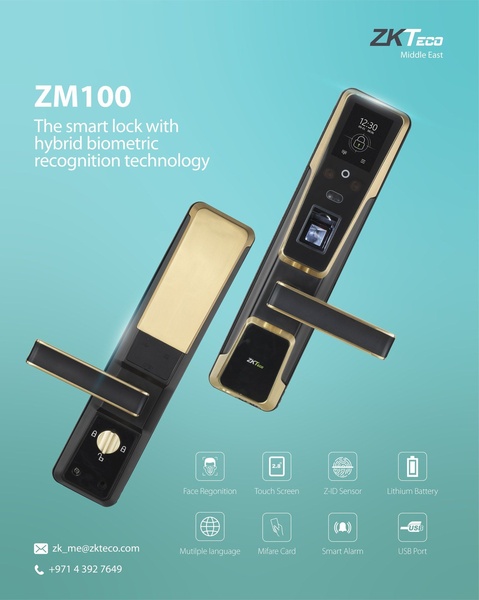
A clean, studio-lit display of the ZM100 smart lock paired with high-contrast icons representing key biometric and security features.

ZM100 Smart Lock Feature Ad

A clean, studio-lit display of the ZM100 smart lock paired with high-contrast icons representing key biometric and security features.

Ad Details
Style
Feature & Benefit
Format
4:5
Industry
Electronics
Platforms
Facebook · Instagram
Language
English
  • Electronics
  • Smart Lock
  • product photography
  • minimalist icon grid
  • 4:5
Clone this ad with AI

Free credits included. No card required

Why this ad works

This smart lock creative succeeds by isolating the product against a clean, recognizable background to ensure immediate focus on the hardware. The combination of premium gold-and-black product imagery with a structured, intuitive icon grid establishes instant credibility and clarity.

By organizing complex biometric features into accessible visual data points, this approach helps Promer AI users communicate value without overwhelming the viewer. This pattern typically performs well for electronics and hardware where consumers require a clear understanding of features like battery life and sensor technology before engaging.

The winning ingredients

  • Dual Product View The creative shows two angles of the smart lock to demonstrate both the front-facing biometric interface and the locking mechanism.
  • Iconographic Data Grid A structured layout of icons visually translates complex features like face recognition and smart alarms into a digestible format.
  • Consistent Branding The teal background provides a high-contrast backdrop that allows the metallic gold and black of the device to stand out effectively.
Great ads lead with a clean visual narrative that prioritizes the user's need to understand a product's primary functionality in seconds.

How to make it yours

  1. Initiate a project using the AI Ad Clone to import this high-converting visual structure.
  2. Upload your product photography so the platform can automatically map your branding, logo, and color palette onto the template.
  3. Refine the feature icons and copy to match your specific product benefits, select the 4:5 ratio, and generate your custom variations.

Pro tip

When using icon-based layouts, ensure your icons have consistent line weights to keep the overall look professional. A cluttered grid can confuse the user, so prioritize only the three most important selling points in your initial ad.


Vantrue N4S Feature Showcase
Adjustable Tripod Stand Feature Highlight
Digitek DTR-525 SS Tripod Offer
Sigma fp Deconstruction
Minimalist Camera Filter Reveal
Capture Every Moment Phone Tripod Ad
Capture Every Moment Phone Tripod Creative
Compact Tripod Feature Breakdown
High-Definition Baby Monitor Close-Up
Sleep Peacefully with Nanit
EOS R6 V Product Hero Shot
Camera Spotlight Hero
Enhance Your Travel Photography
Digitek Tripod Offer Creative
X-GO Carbon E Professional Tripod Spec Sheet
Everyday Filter Product Showcase
Baby Monitor Battery Comparison
CCTV Surveillance Direct Benefit Ad
Split View Baby Monitor Feature Showcase
K&F Concept Lens Filter Product Display

Your next winning adis already out there.

Promer helps you find the pattern, adapt it to your product, and create your own version in minutes.


Free credits included
No credit card required
Ship in minutes.




















