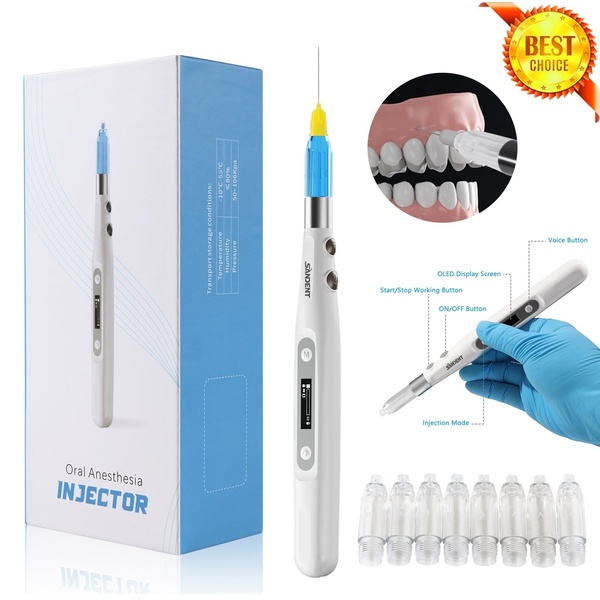
A high-clarity, instructional product shot highlighting device components, usage modes, and clinical application for an oral anesthesia injector.

Oral Anesthesia Injector Clinical Overview

A high-clarity, instructional product shot highlighting device components, usage modes, and clinical application for an oral anesthesia injector.

Ad Details
Style
Feature & Benefit
Format
1:1
Industry
Electronics
Platforms
LinkedIn · Facebook
Language
English
  • Electronics
  • Oral Anesthesia Injector
  • product-centric
  • minimalist
  • technical
  • 1:1
Clone this ad with AI

Free credits included. No card required

Why this ad works

This oral anesthesia injector creative succeeds by using a clean, annotated layout that treats the product like a high-end medical instrument. By isolating features with clear callouts, the creative reduces cognitive load for the professional buyer, allowing them to verify specifications without needing a lengthy video walkthrough. The use of sterile, high-contrast imagery builds instant credibility within technical niches where precision is paramount. For most teams aiming to market complex medical or industrial gear, this structural approach helps establish authority quickly. Promer AI enables you to replicate this clarity by organizing your own product attributes into a similar high-trust visual format.

The winning ingredients

  • Annotated Component Callouts The ad uses specific lines to point out the OLED screen, working button, and injection mode, making complex features immediately scannable.
  • Sterile Clinical Context By including a inset image of the injector being used on teeth, the creative bridges the gap between hardware specification and real-world application.
  • Standardized Grid Layout The 1:1 aspect ratio combined with a clean, isolated product render provides a modular design that performs well in most professional news feeds.
Complex professional tools deserve a presentation that highlights engineering accuracy over flashy marketing claims.

How to make it yours

  1. Start a new AI Ad Clone session to mirror the structured, annotated layout seen here.
  2. Paste your product URL so the AI can analyze your features and replace the brand colors, logo, and device imagery.
  3. Use the editor to call out your specific product benefits in the annotation boxes and generate variations across different aspect ratios.

Pro tip

When marketing technical hardware, ensure your annotation labels focus on performance-driven outcomes rather than just physical parts. For this injector, highlighting the 'Injection Mode' is more valuable than just naming the physical button.


Vantrue N4S Feature Showcase
Adjustable Tripod Stand Feature Highlight
Digitek DTR-525 SS Tripod Offer
Sigma fp Deconstruction
Minimalist Camera Filter Reveal
Capture Every Moment Phone Tripod Ad
Capture Every Moment Phone Tripod Creative
Compact Tripod Feature Breakdown
High-Definition Baby Monitor Close-Up
Sleep Peacefully with Nanit
EOS R6 V Product Hero Shot
Camera Spotlight Hero
Enhance Your Travel Photography
Digitek Tripod Offer Creative
X-GO Carbon E Professional Tripod Spec Sheet
Everyday Filter Product Showcase
Baby Monitor Battery Comparison
CCTV Surveillance Direct Benefit Ad
Split View Baby Monitor Feature Showcase
K&F Concept Lens Filter Product Display

Your next winning adis already out there.

Promer helps you find the pattern, adapt it to your product, and create your own version in minutes.


Free credits included
No credit card required
Ship in minutes.




















