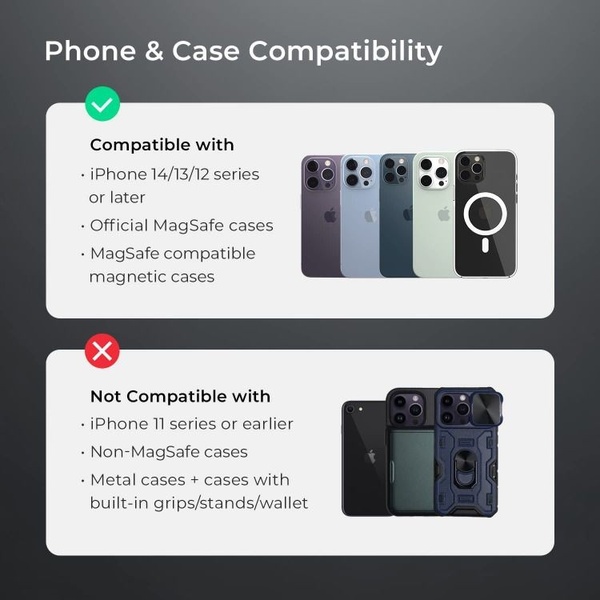
A clear, binary compatibility guide that uses green and red checkmarks to instantly educate the customer on which phone models work with the accessory.

Smartphone Accessory Compatibility Guide

A clear, binary compatibility guide that uses green and red checkmarks to instantly educate the customer on which phone models work with the accessory.

Ad Details
Style
Us and Them
Format
1:1
Industry
Electronics
Platforms
Instagram · Facebook
Language
English
Clone this ad with AI

Free credits included. No card required

Why this ad works

This binary compatibility chart for a smartphone case succeeds because it removes the cognitive load of decision-making for the buyer. By using a simple green-check vs. red-cross design, the brand immediately clarifies fitment without requiring the user to read through technical paragraphs.

This format is highly effective in ecommerce for products that rely on specific versioning or hardware requirements. Teams using Promer AI can replicate this instructional pattern to reduce support tickets and return rates for technical or accessory-based products.

The winning ingredients

  • Binary Indicator Icons The use of clear green checkmarks and red x-marks provides an instant visual shorthand that communicates compatibility before a single word is read.
  • Direct Device Grouping Grouping product models by generation (e.g., 14/13/12 series) allows the user to quickly identify their device rather than hunting through a long, unstructured list.
  • High-Contrast Background The simple, dark-to-light neutral color palette ensures that the focus remains entirely on the phone models and compatibility status without visual clutter.
The most effective ads don't just sell, they inform the customer precisely enough to make an confident, error-free purchase.

How to make it yours

  1. Launch an AI Ad Clone and select a layout that supports split-screen or dual-list information structures.
  2. Upload your product photography and allow the platform to intelligently swap your specific hardware, logo, and brand color palette into the template.
  3. Refine the comparison copy to clearly highlight your own compatibility requirements, adjust for a 1:1 ratio, and generate your final high-resolution assets.

Pro tip

When creating technical compatibility guides, always use real product photography that matches the visual style of your actual inventory. This builds immediate trust and ensures that the customer recognizes their own device when viewing the ad.


Vantrue N4S Feature Showcase
Adjustable Tripod Stand Feature Highlight
Digitek DTR-525 SS Tripod Offer
Sigma fp Deconstruction
Minimalist Camera Filter Reveal
Capture Every Moment Phone Tripod Ad
Capture Every Moment Phone Tripod Creative
Compact Tripod Feature Breakdown
High-Definition Baby Monitor Close-Up
Sleep Peacefully with Nanit
EOS R6 V Product Hero Shot
Camera Spotlight Hero
Enhance Your Travel Photography
Digitek Tripod Offer Creative
X-GO Carbon E Professional Tripod Spec Sheet
Everyday Filter Product Showcase
Baby Monitor Battery Comparison
CCTV Surveillance Direct Benefit Ad
Split View Baby Monitor Feature Showcase
K&F Concept Lens Filter Product Display

Your next winning adis already out there.

Promer helps you find the pattern, adapt it to your product, and create your own version in minutes.


Free credits included
No credit card required
Ship in minutes.




















