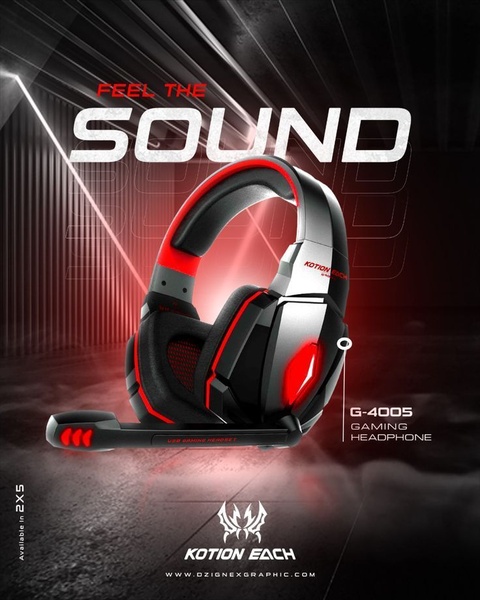
This creative showcases the G-4005 gaming headset with a moody, high-contrast lighting setup to emphasize audio quality and sleek product design.

Feel The Sound - G-4005 Gaming Headset

This creative showcases the G-4005 gaming headset with a moody, high-contrast lighting setup to emphasize audio quality and sleek product design.

Ad Details
Style
Product Hero
Format
4:5
Industry
Electronics
Platforms
Instagram · Facebook
Language
English
Clone this ad with AI

Free credits included. No card required

Why this ad works

This gaming headset ad centers on a high-contrast, sensory-focused hook that immediately establishes the product's premium feel. By using deep black backgrounds punctuated by red neon accents, the visual style creates an immersive environment that aligns with the target gamer demographic's expectations for high-performance audio equipment. This approach works because it moves beyond mere product features to sell the feeling of immersion, keeping the viewer's attention fixed squarely on the product. When you scale this approach via Promer AI, you can maintain this same level of visual intensity across multiple product variations while ensuring your branding remains the anchor. Typically, ads that leverage strong emotional or sensory cues like 'Feel the Sound' see higher engagement rates on social platforms where users scroll quickly past static imagery.

The winning ingredients

  • Sensory Headline The phrase 'Feel The Sound' acts as an immediate psychological trigger that connects the hardware to a superior auditory experience.
  • High-Contrast Palette The combination of deep black, bold red, and silver creates a aggressive, high-tech aesthetic that is a staple for gaming hardware ads.
  • 4:5 Aspect Ratio The vertical orientation maximizes screen real estate on mobile devices, ensuring the product image remains the focal point during a scroll.
Great ads start from an idea, a feeling, or a structure, not a blank design.

How to make it yours

  1. Initiate a new project using the AI Ad Clone to mirror this high-impact structural layout.
  2. Paste your product URL so that the engine automatically swaps the product, brand colors, and logo while retaining the original lighting and composition.
  3. Rewrite the headline to match your unique value proposition, select your preferred platform ratio, and generate high-conversion variations.

Pro tip

When focusing on a hardware product, always use rim lighting or glowing elements to separate the product from the dark background. This specific technique increases perceived quality and creates a 3D-like depth that catches the eye much more effectively than flat product photos.


Vantrue N4S Feature Showcase
Adjustable Tripod Stand Feature Highlight
Digitek DTR-525 SS Tripod Offer
Sigma fp Deconstruction
Minimalist Camera Filter Reveal
Capture Every Moment Phone Tripod Ad
Capture Every Moment Phone Tripod Creative
Compact Tripod Feature Breakdown
High-Definition Baby Monitor Close-Up
Sleep Peacefully with Nanit
EOS R6 V Product Hero Shot
Camera Spotlight Hero
Enhance Your Travel Photography
Digitek Tripod Offer Creative
X-GO Carbon E Professional Tripod Spec Sheet
Everyday Filter Product Showcase
Baby Monitor Battery Comparison
CCTV Surveillance Direct Benefit Ad
Split View Baby Monitor Feature Showcase
K&F Concept Lens Filter Product Display

Your next winning adis already out there.

Promer helps you find the pattern, adapt it to your product, and create your own version in minutes.


Free credits included
No credit card required
Ship in minutes.




















