Zebracat AI Review: Your Product on Screen, or Stock Footage?
Category
Blogs
Date
Authored by
Huy Tran Quoc
Summary
Zebracat AI review: I turned one pink satin bag photo into a TikTok ad. See the output, what the free plan blocks and the $23 to $119 plans.
You have one product photo, a TikTok ad due tonight and no editor. I gave Zebracat AI that exact job: turn a single photo of a pink satin bag into a 15-second spring wedding ad. This Zebracat AI review shows what came out, what the free plan blocks and what the paid plans cost.
Zebracat AI kept the bag recognizable in the three frames I checked, with no stock footage in them, but the free plan only lets you preview the ad, so you cannot download a test video before you pay.
If you only need plan numbers, skip to the pricing section.
How I tested Zebracat AI?
On 9 Oct 2026 I used a free Zebracat account (1 video, 10 AI credits) and ran one brief with one product photo. I checked the result frame by frame in Zebracat's editor and did not export, because export needs a paid plan.
One run is a sample, not a benchmark. Treat the output below as one real example of what a detailed brief gets you.
Key takeaways
Write the brief like a shot list. Zebracat turned my time blocks into a 3-scene script with voiceover, and it followed my face-out-of-frame instruction.
Expect small drifts in the product. The bag was recognizable at 0:00, 0:06 and 0:15, but the handle looked thicker and the embroidery fainter by the last frame.
Judge the ad in preview. The free plan blocks both download and publishing, and Zebracat offers a 7-day refund only if you have not downloaded a video.
Budget $23 to $39 a month for Cat Mode. It covers 15 videos and 350 generative AI credits a month.
Read the Trustpilot complaints before you pay. The 4.4 rating from 298 reviews is strong, but reviewers mention renewal prices and slow email support.
What Zebracat AI does for a store owner?
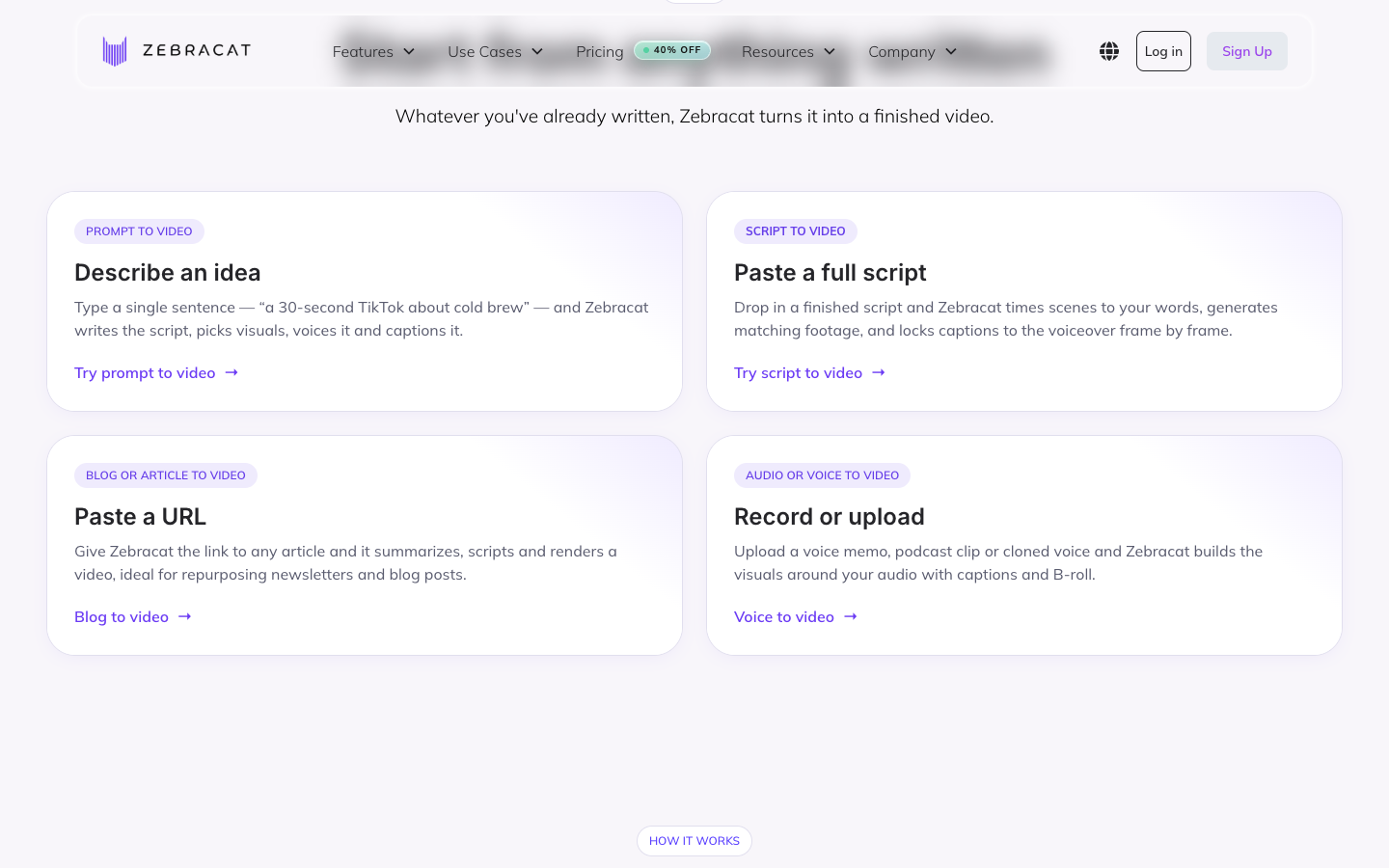
Zebracat AI is an AI video generator that turns a prompt, script, blog link or audio file into a short video with voiceover, captions and music. Its homepage calls it "the AI video agent for social media growth."
The URL option reads articles and blog posts, so for a product ad I started from a photo. Behind the scenes Zebracat uses video models such as Kling 3.0 and Seedance 2.5, which its site footer lists.
The question for a store owner is narrower than "does it make video." It is whether your product, with its real handle, label and color, ends up on screen.
The test: A spring wedding bag ad from one photo
The product is a pink satin drawstring bag with a scrunched handle, tiny embroidered flowers and green leaf-vine ties. I picked it because those three details are what a generic video loses, and they are what a wedding-guest shopper clicks for.
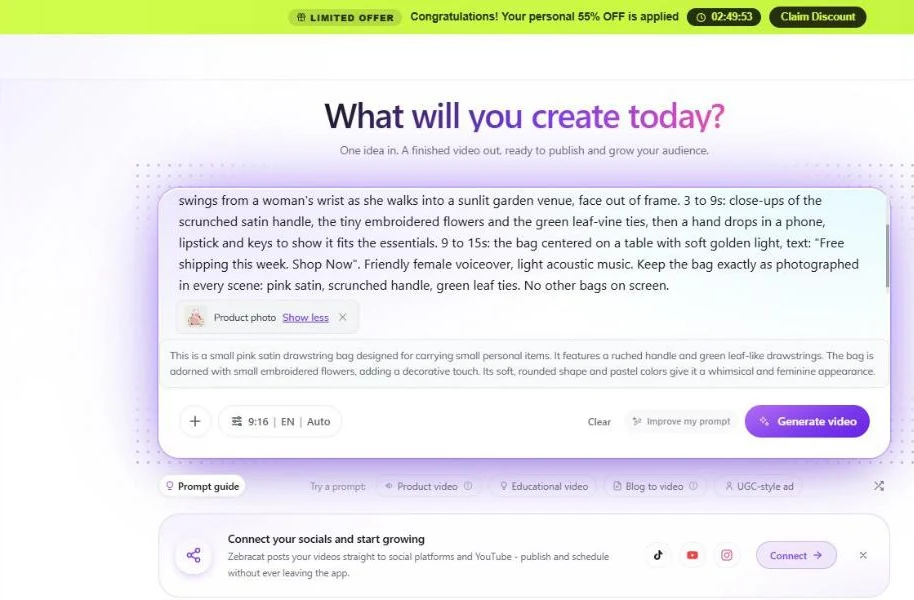
Most product prompts stop at "show the bag on a table." I wrote this one like a shot list for a real ad: who it is for, what the first 2 seconds do, what each time block shows, what the text says and what must not change.
The brief I typed
Part
What I wrote
Why it matters
Audience and format
15-second 9:16 TikTok ad for women going to a spring wedding
A named buyer gives the AI an occasion and a tone
Hook, 0 to 3s
The bag swings from a woman's wrist as she walks into a sunlit garden venue, face out of frame. Text: "Wedding guest outfit done. Is your bag?"
The hook shows the occasion and asks the shopper's own question. Face out of frame avoids a random AI face
Proof, 3 to 9s
Close-ups of the scrunched satin handle, the embroidered flowers and the green leaf-vine ties, then a hand drops in a phone, lipstick and keys
Each close-up is a reason to buy. The "fits the essentials" beat answers the size question
Offer, 9 to 15s
The bag centered on a table in soft golden light. Text: "Free shipping this week. Shop Now"
One offer and one call to action
Voice and music
Friendly female voiceover, light acoustic music
Sets the mood without naming a brand or a song
Lock line
Keep the bag exactly as photographed in every scene: pink satin, scrunched handle, green leaf ties. No other bags on screen
Names the details that must not drift and blocks look-alike products
A template you can reuse for your own product
Swap the brackets for your product. Keep the six slots, because each one removes a decision the AI would otherwise make for you.
Slot
Fill in
1. Buyer and format
[length]-second 9:16 TikTok ad for [buyer] who needs [occasion or problem]
2. Hook, 0 to 3s
[Product in use in a real setting, face out of frame]. Text: "[question your buyer asks]"
3. Proof, 3 to 9s
Close-ups of [detail 1], [detail 2], [detail 3], then [one action that answers the size or use question]
Keep the product exactly as photographed in every scene: [3 details that must not change]. No other [product type] on screen
Three other angles to try with the same photo, each a new brief and a new ad:
The gift angle. Hook: "Last-minute bridesmaid gift?" Proof: a hand opens the drawstring and lifts a small gift out.
The what-fits angle. Spend the whole proof block on what goes inside: phone, lipstick, keys, a card.
The problem-first angle. Hook: "Tired of holding a clutch all night?" Proof: the handle sits on the wrist while both hands stay free.
What Zebracat AI did with the brief?
Here is the sequence from upload to editor:
I attached the photo. Zebracat wrote its own description of the bag: pink satin, ruched handle, leaf-like drawstrings and small embroidered flowers. That matched my brief.
I kept aspect ratio at 9:16 and length on Auto. The length menu offers 10s, 20s, 30s, 60s, 90s, 2m, 3m and 5m, but no 15s.
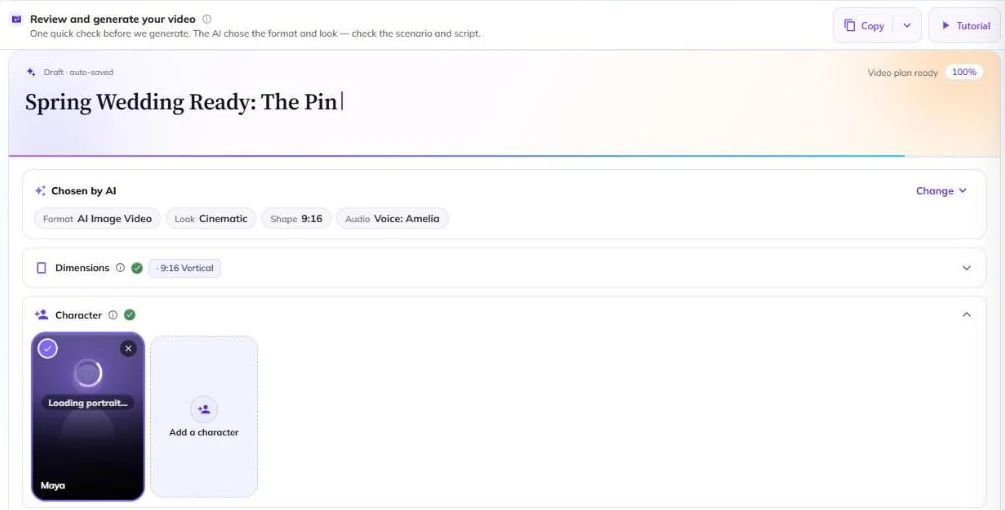
The video plan took about 5 minutes. Zebracat chose AI Image Video as the format, a Cinematic look, the voice Amelia and a character named Maya.
The plan was a 3-scene script of 38 words that followed my three time blocks. I clicked Generate Video and the editor opened a few minutes later.
Your product or stock footage: What Zebracat AI put on screen?
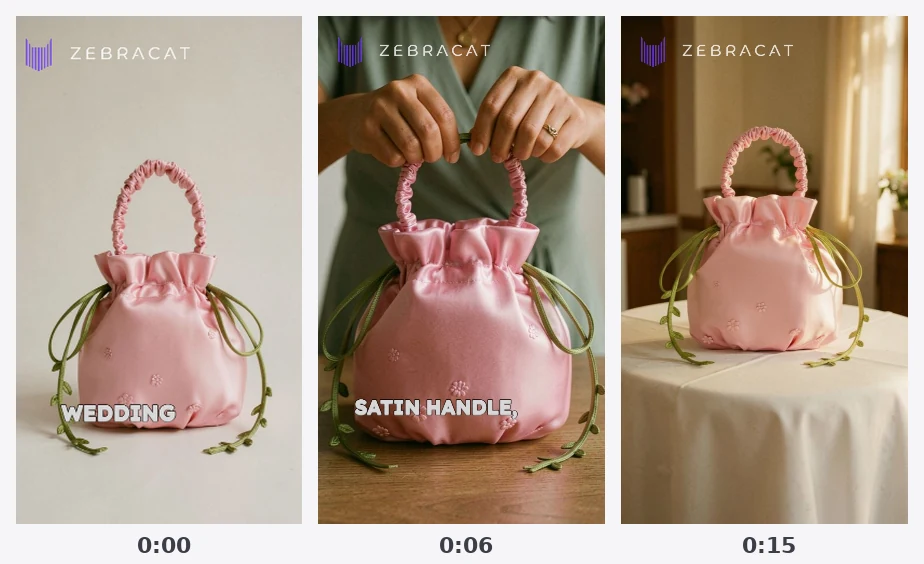
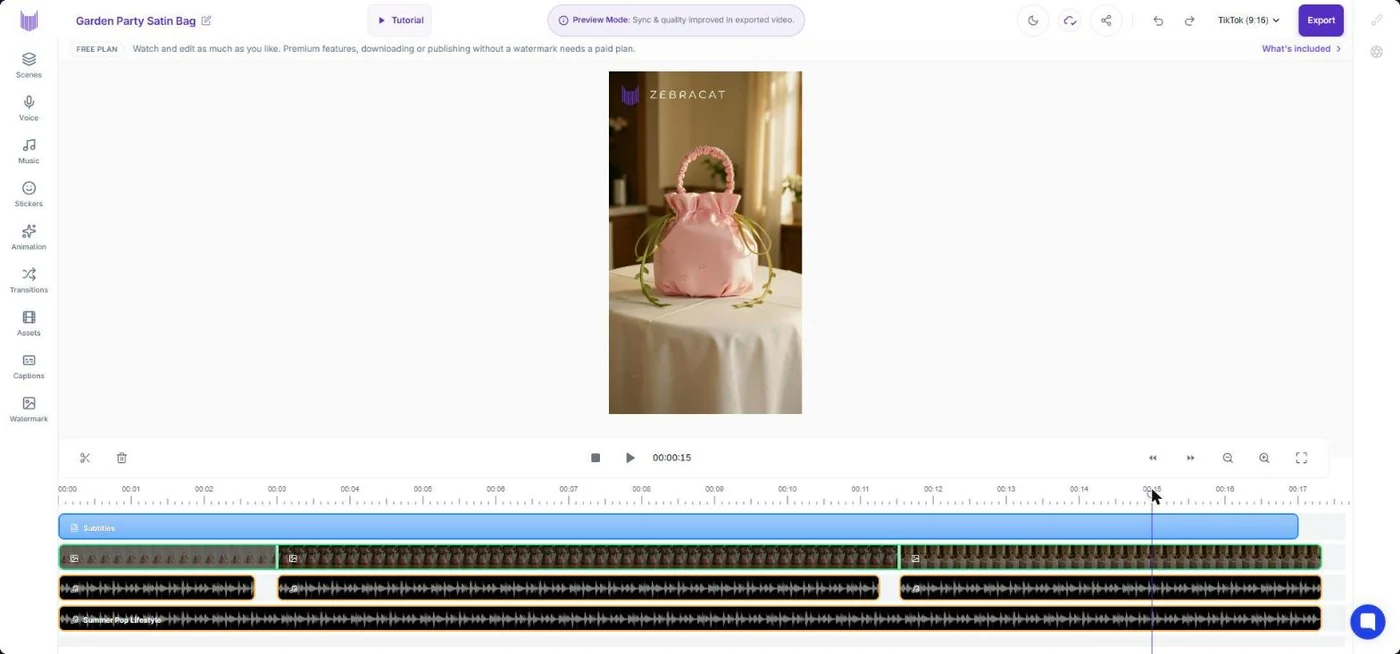
Zebracat AI put my real pink satin bag on screen, not stock footage, in the three frames I checked. The handle, leaf ties and embroidery were recognizable, though the handle looked thicker and the embroidery fainter by 0:15. The timeline also ran to about 17 seconds, not the 15 I asked for.
That is one run on the free plan, checked in three still frames, with no export. Treat it as a real example, not a guarantee for every product.
I checked three still frames in the editor, not the playback, so judge motion yourself in your own preview. Here is brief against result:
What I asked for
What I saw
Verdict
Same bag in every scene
Pink satin, scrunched handle and green ties at 0:00, 0:06 and 0:15
Kept
Embroidered flowers
Clear at 0:00 and 0:06, faint at 0:15
Partly kept
Handle and ties as photographed
At 0:15 the handle looks thicker and rope-like, and the ties loop differently
Drifted
Woman with face out of frame
At 0:06 hands hold the handle over a green top, no face shown
Kept
15 seconds
Timeline runs to about 17 seconds
Missed
Light acoustic music
A track named "Summer Pop Lifestyle" was added
Listen before you keep it
Garden walk-in at the start
The 0:00 frame is my uploaded photo, so I could not confirm the walk-in from stills
Not confirmed
One more fix to make before any export. The caption "WEDDING" sat across the bag at 0:00, and "SATIN HANDLE," covered the lower half of the bag at 0:06. Move captions off the product in the editor.
What you can do on Zebracat's free plan?
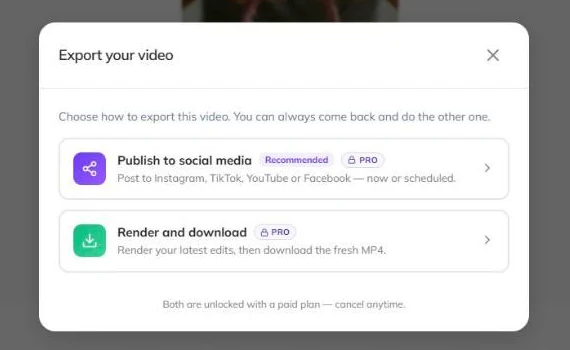
On the Zebracat free plan you can generate one video and edit it, but you cannot download or publish it. The export dialog marks both "Publish to social media" and "Render and download" as PRO, and says both are "unlocked with a paid plan." The preview also carries a Zebracat logo in the top left.
That shapes how you test. Zebracat's pricing page offers a full refund within 7 days only if you did not download any video, so judge the ad in preview and pay once the preview clears your bar.
Run these five checks in the preview before you pay:
Scrub to 0:00, the 3-second mark, the midpoint and the last second. Compare handle, label and color with your photo.
Check that captions do not cover the product.
Compare total length with what you asked for.
Listen to the voice and the music track from start to end.
Note how many scenes you would need to fix. Cat Mode includes 3 free edits per video.
Zebracat pricing: What one finished video costs?
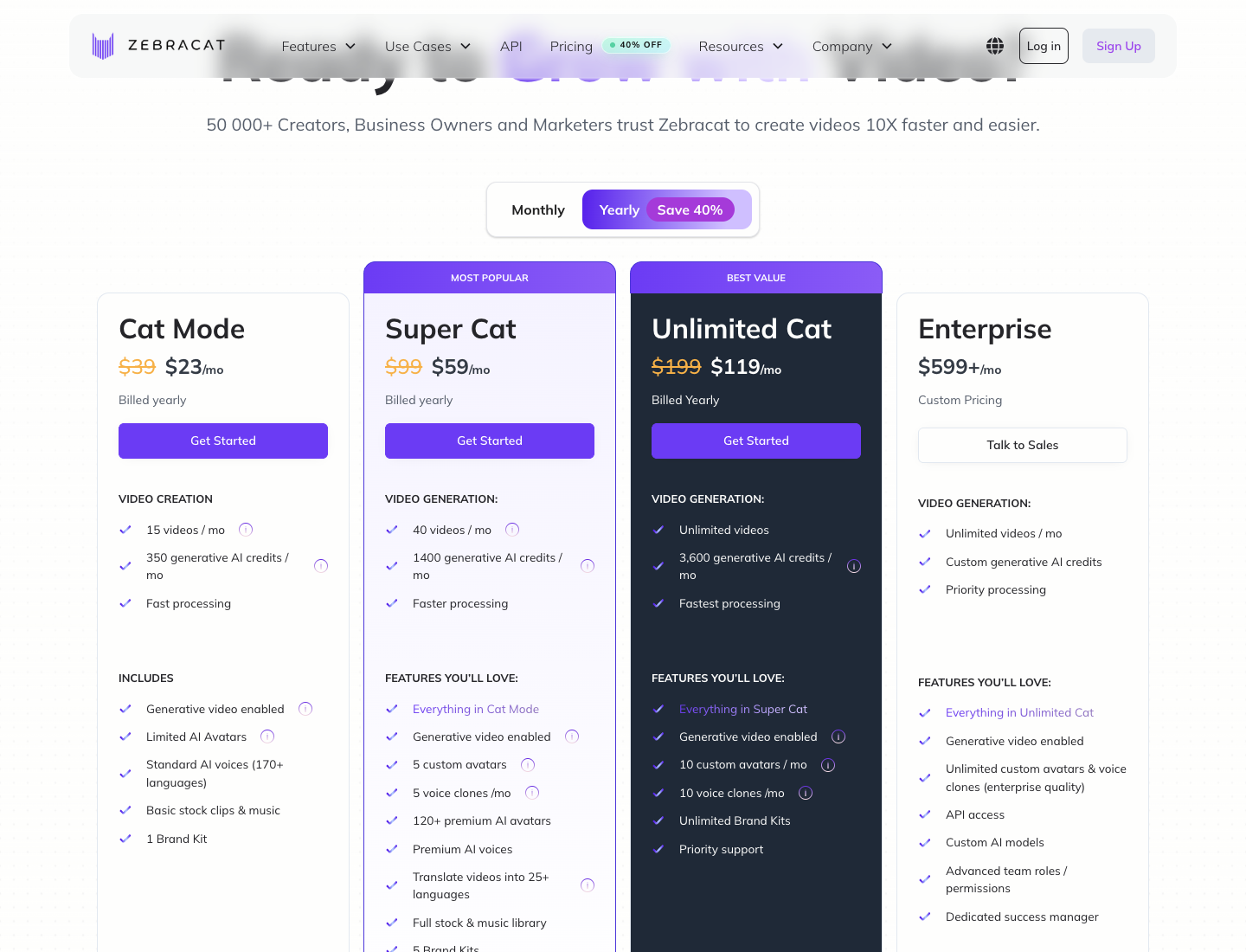
Zebracat has four plans: Cat Mode at $39 a month ($23 billed yearly), Super Cat at $99 ($59), Unlimited Cat at $199 ($119) and Enterprise from $599. Cat Mode covers 15 videos and 350 generative AI credits a month. I checked the pricing page on 9 Oct 2026, when it showed 40% off yearly billing.
Read the video cap column first, because it sets your cost per ad:
Plan
Monthly
Yearly, per month
Videos/mo
Generative credits/mo
Free edits per video
Cat Mode
$39
$23
15
350
3
Super Cat
$99
$59
40
1,400
3
Unlimited Cat
$199
$119
Unlimited
3,600
5
Enterprise
$599+
Custom
Unlimited
Custom
Unlimited
Every plan exports 1080p and offers AI voices in 170+ languages. Cat Mode includes limited AI avatars and basic stock clips and music.
Super Cat adds 120+ premium AI avatars, premium AI voices, 5 voice clones a month and the full stock and music library. My test used the AI Image Video format, built from my photo, not stock clips.
Cost per video on each Zebracat plan
Divide price by video cap. Cat Mode works out to $2.60 per video monthly or about $1.53 billed yearly. Super Cat is about $2.48 monthly or $1.48 yearly.
Scenario: your best ad fatigued in week 2 and you need 5 replacements by Friday. Cat Mode's 15 videos cover that, and the real limit is how many of the 5 need fixing in the editor.
Zebracat AI reviews: What 298 Trustpilot users say?
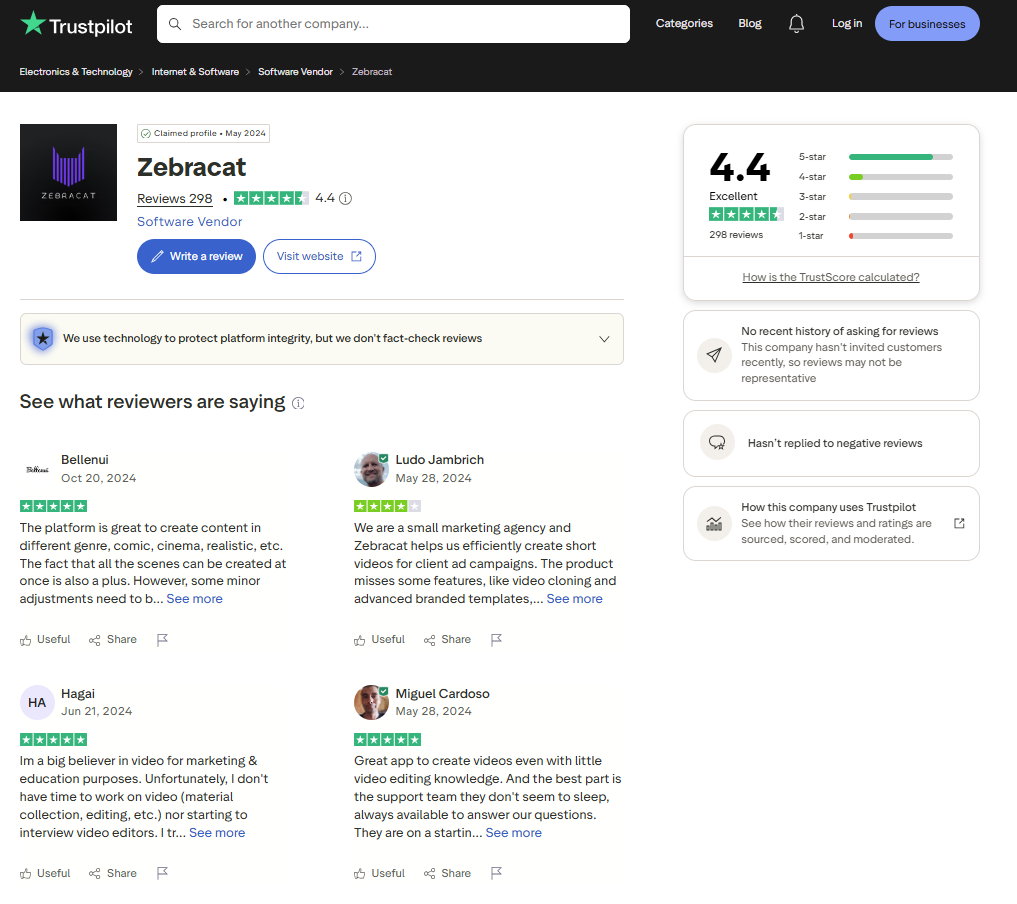
Zebracat holds 4.4 out of 5 on Trustpilot across 298 reviews, with 80% at five stars and 4% at one star. I checked the profile on 9 Oct 2026. Thirteen of those reviews were posted in the last 12 months.
Praise centers on ease of use, the range of visual styles and time saved on short-form video. One reviewer calls it a "great app to create videos even with little video editing knowledge" (Miguel Cardoso, Trustpilot, 28 May 2024).
Complaints in the reviews I read were about billing and support: a subscription price that renewed higher without notice, slow email replies, a lowest plan without features such as voice cloning, and music tracks missing from a video.
Trustpilot's page notes the company has not recently invited reviews and has not replied to negative reviews. Trustpilot also does not fact-check reviews.
Before you pay, screenshot the price and renewal date at checkout. Voice cloning starts on Super Cat, per the pricing page.
Zebracat AI pros and cons for product video ads
Zebracat is fast from photo to a finished draft, and it follows a detailed brief. Its weak spots are what you can test for free and how closely the product holds through the video.
What worked in my test:
One photo and a timed brief became a 3-scene ad with voiceover, captions and music.
It followed my time blocks and my face-out-of-frame instruction.
1080p export and AI voices in 170+ languages on every plan.
Publishing to social platforms from the editor, on paid plans.
What held it back:
The free plan cannot download or publish, so you cannot test a real export first.
Product details drifted by the last frame: a thicker handle and fainter embroidery.
The length menu has no 15s option, and my ad ran about 17 seconds.
Captions landed on top of the product.
The video plan took about 5 minutes before any video existed.
Zebracat AI review verdict: Buy, skip or test first
Buy Zebracat AI if you post short social video ads at volume, have a clean product photo and are happy to fix captions and length in the editor. Cat Mode at $23 a month billed yearly covers 15 videos.
Skip it if every frame must match your product exactly, or if you need to download a test file before you pay. Test it first if you sell 1 or 2 hero products with clean photos.
Your next 30 minutes: fill in the six-slot template with your best photo, generate on the free plan and run the five preview checks. Pay only after the preview clears your bar.
Zebracat AI alternatives for product video ads
The tools below start from your product link or product images instead of a text brief. Prices come from each vendor's own page, checked on 9 Oct 2026.
Topview, the product-link tool
Topview's Link to Video page says it reads a product URL for images, pricing, headlines, reviews and benefit claims, then drafts a video with script, scenes and captions. Its Plus plan is $36 a month billed annually with 100 credits a month.
Creatify, the URL-to-video avatar tool
Creatify's Starter plan is $39 a month for 100 credits, 300 AI actors, videos up to 2 minutes and watermark removal. Its free plan gives 10 credits a month, up to 2 video ads, with a watermark. Creatify suits you if you want an AI actor fronting an ad built from your product link.
Promer AI, for video ads built from your own product images
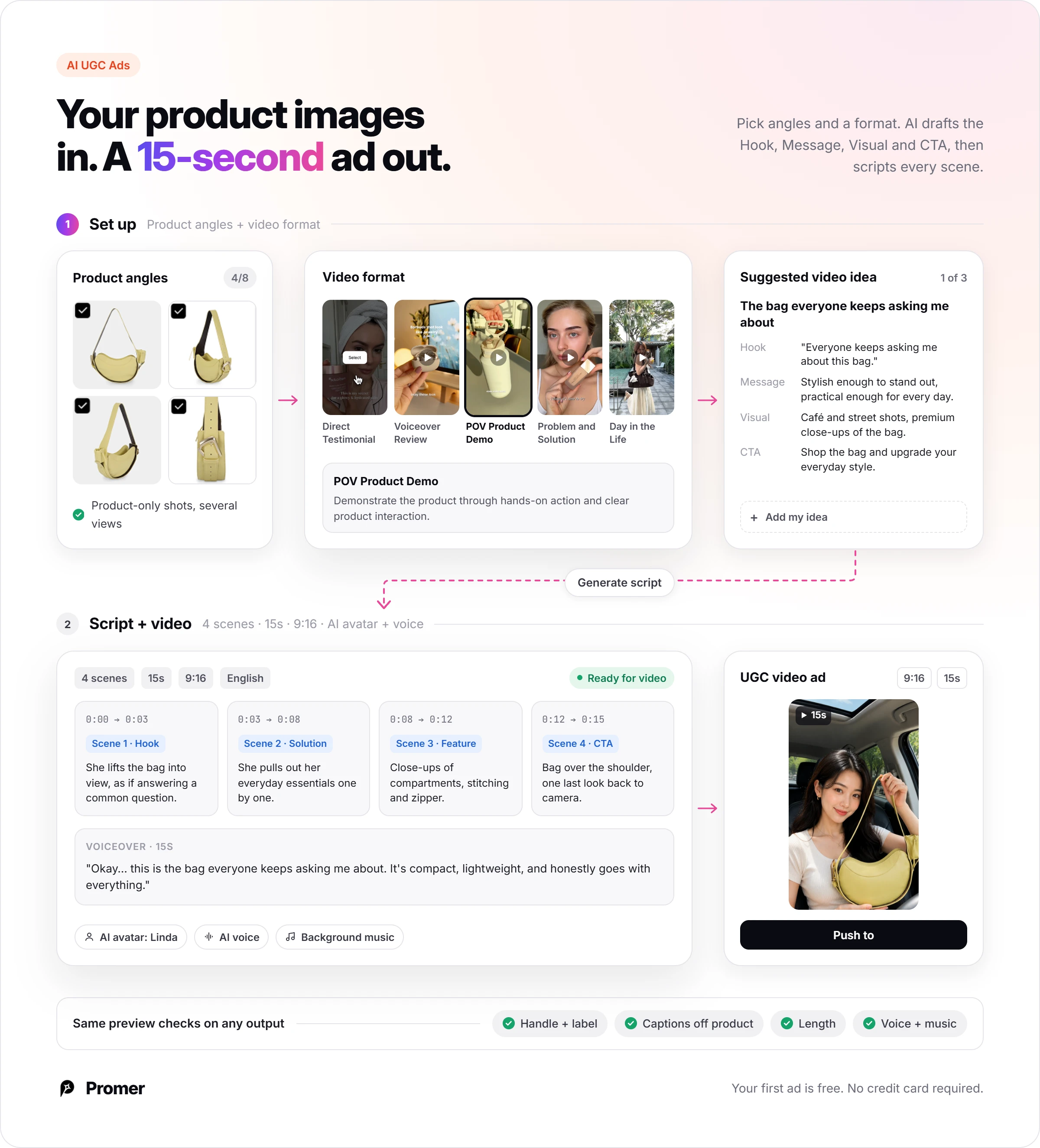
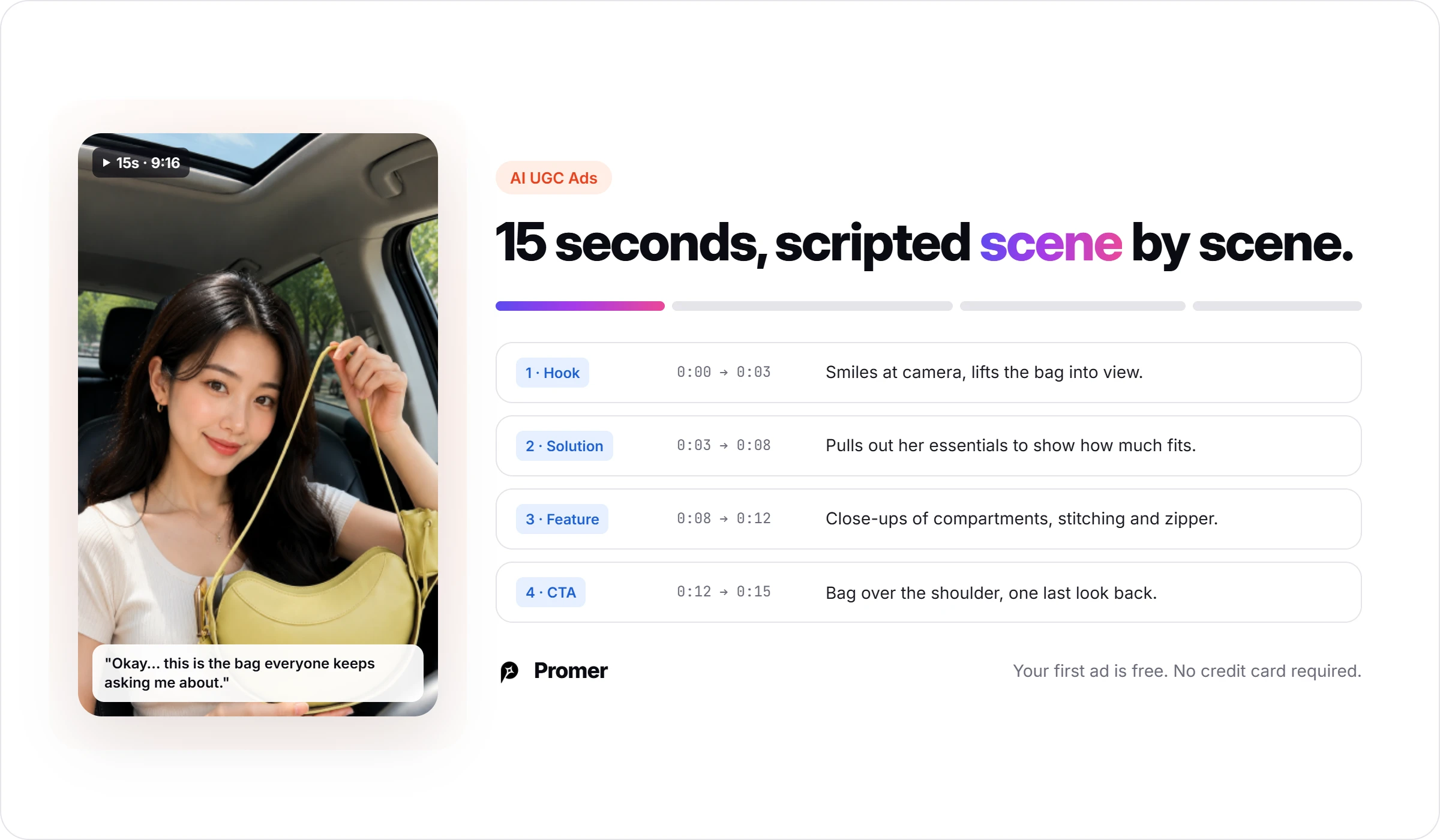
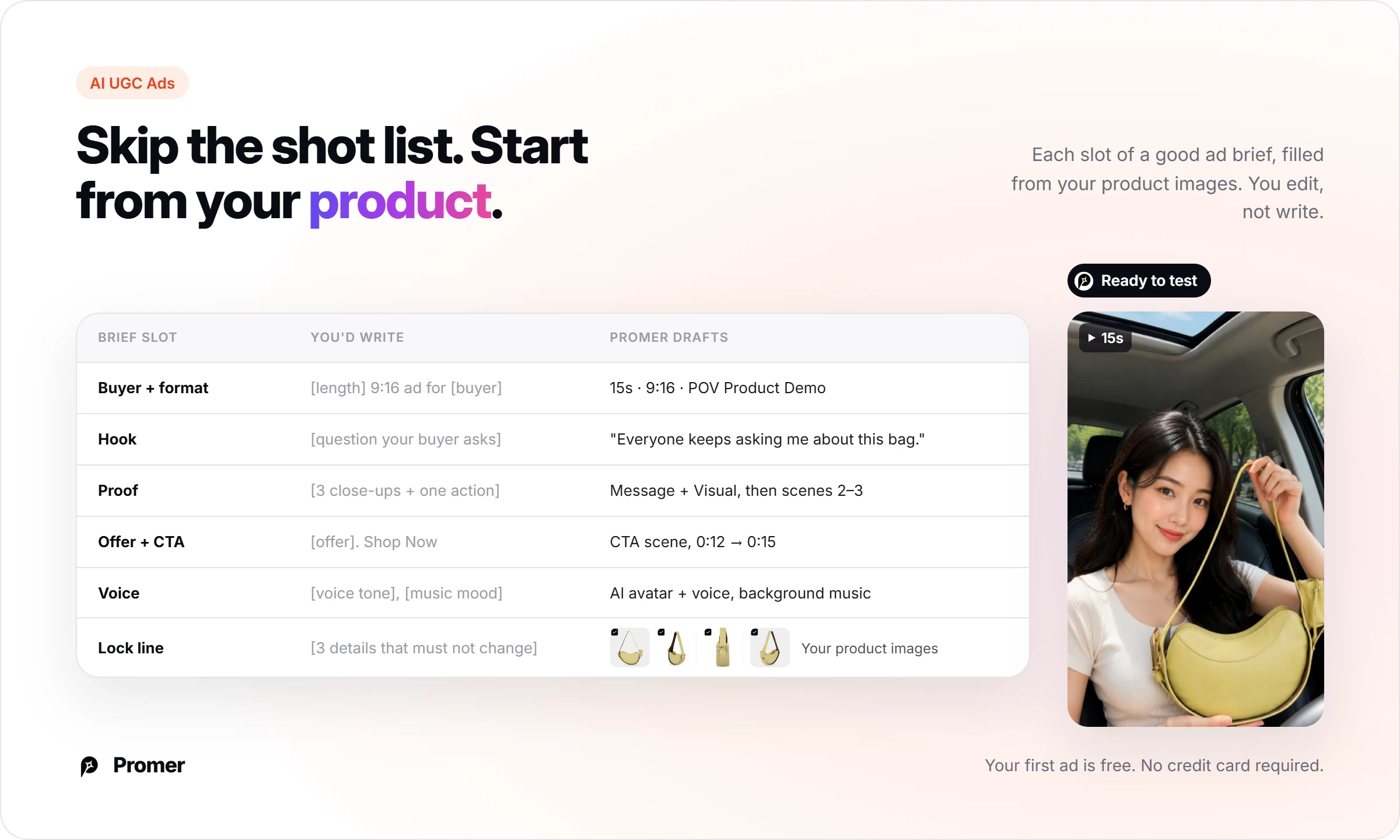
Promer AI is an AI ad creative platform for ecommerce advertisers. In AI UGC Ads, you add product images from several angles and pick a format such as POV Product Demo. AI suggests a Hook, Message, Visual and CTA, then writes a scene-by-scene script for a 15-second 9:16 video with an AI avatar and voice.
AI Video Ad Clone takes a winning video ad's scene sequence and applies it to your product. AI-generated creatives can contain mistakes, so run the same five preview checks on any tool's output, and no tool here promises ROAS.
Pick Topview for product-link drafts, or Creatify for AI actors on a URL-based ad. Pick Promer AI if you want video ads built from your product images inside an AI ad generator made for ecommerce; you can create your first ad free, with no credit card required.
FAQ
Is Zebracat AI free?
Zebracat AI has a free plan with 1 video and 10 AI credits, but on it you can only preview and edit. The export dialog marks both "Publish to social media" and "Render and download" as PRO, and the preview carries a Zebracat logo. Judge your test ad in preview, then upgrade to export.
How long does Zebracat AI take to make a video?
In my test, Zebracat AI took about 10 minutes from prompt to a finished preview. The video plan took about 5 minutes, and rendering took a few minutes more. Your time will vary with video length and queue speed, and paid plans list faster processing.
Does Zebracat AI use stock footage?
Zebracat AI includes a stock library, but my photo-based test used its AI Image Video format. The three frames I checked showed my bag, not stock clips. Cat Mode lists "Basic stock clips & music," while Super Cat and higher list the "Full stock & music library."
How much does Zebracat AI cost per video?
On Cat Mode, Zebracat AI costs $2.60 per video monthly or about $1.53 billed yearly. That is $39 or $23 divided by the 15-video cap on the pricing page. Super Cat works out to about $2.48 or $1.48 across 40 videos.
Can I use Zebracat AI videos in paid ads?
Check the "Commercial Rights" row in Zebracat's plan comparison before you run a paid ad. It sits under Legal on the pricing page, so confirm which plan includes it. Free-plan previews carry the Zebracat logo, so do not use them as ads.
Is this Zebracat AI review based on a real test?
Yes, this Zebracat AI review is based on one real run on 9 Oct 2026. I used a free account, one product photo and the brief shown above, and checked three frames in the editor. I did not export, because export needs a paid plan.
What should I use instead of Zebracat AI for product-first video ads?
Pick a tool that starts from your product images or product link, such as Promer AI, Creatify or Topview. Promer AI's AI UGC Ads builds a scene-by-scene script around your product images. AI output can contain mistakes, so run the same preview checks on any of these tools before you launch.
Reference Sources
Creatify. (2026). Pricing plans. Accessed 9 Oct 2026. https://creatify.ai/pricing
Trustpilot. (2026). Zebracat reviews. Accessed 9 Oct 2026. https://www.trustpilot.com/review/zebracat.ai
Zebracat. (2026). AI video generator for social media growth. Accessed 9 Oct 2026. https://www.zebracat.ai/
Huy Tran Quoc is the Head of Product Management at Promer AI, part of FireGroup Technology, where he leads product strategy and execution across a cross-functional team spanning product, engineering, design, QC, customer success, and prompt engineering.
Over the past decade, Huy has progressed from Product Manager to Senior Product Manager to product leadership, working at EngineThemes, Zalo, TIKI Corporation, and now FireGroup Technology, across ecommerce SaaS, social networking, marketplace, supply chain, and fintech.
At TIKI, Huy owned the strategic roadmap and P&L alignment for a multi-vertical portfolio and partnered directly with the C-suite to translate company vision into executable plans.