QuickAds AI Review: Is $99 a Month Worth It for Your Store?
Category
Blogs
Date
Authored by
NaNa Phan
Summary
QuickAds AI review: the $99 Pro plan, a 32M+ ad library and a 3.3 Trustpilot rating, weighed against a $300 monthly ad budget for small stores.
You spend about $300 a month on ads, you have no designer and your creative needs a refresh every 2 weeks. QuickAds AI promises a fix: search its ad library for an idea, then generate your own version. This QuickAds AI review checks what that costs and who it suits.
QuickAds AI fits stores spending well past $300 a month on ads; below that, the $99 Pro plan takes a third of your budget. If you only need the numbers, skip to the pricing section.
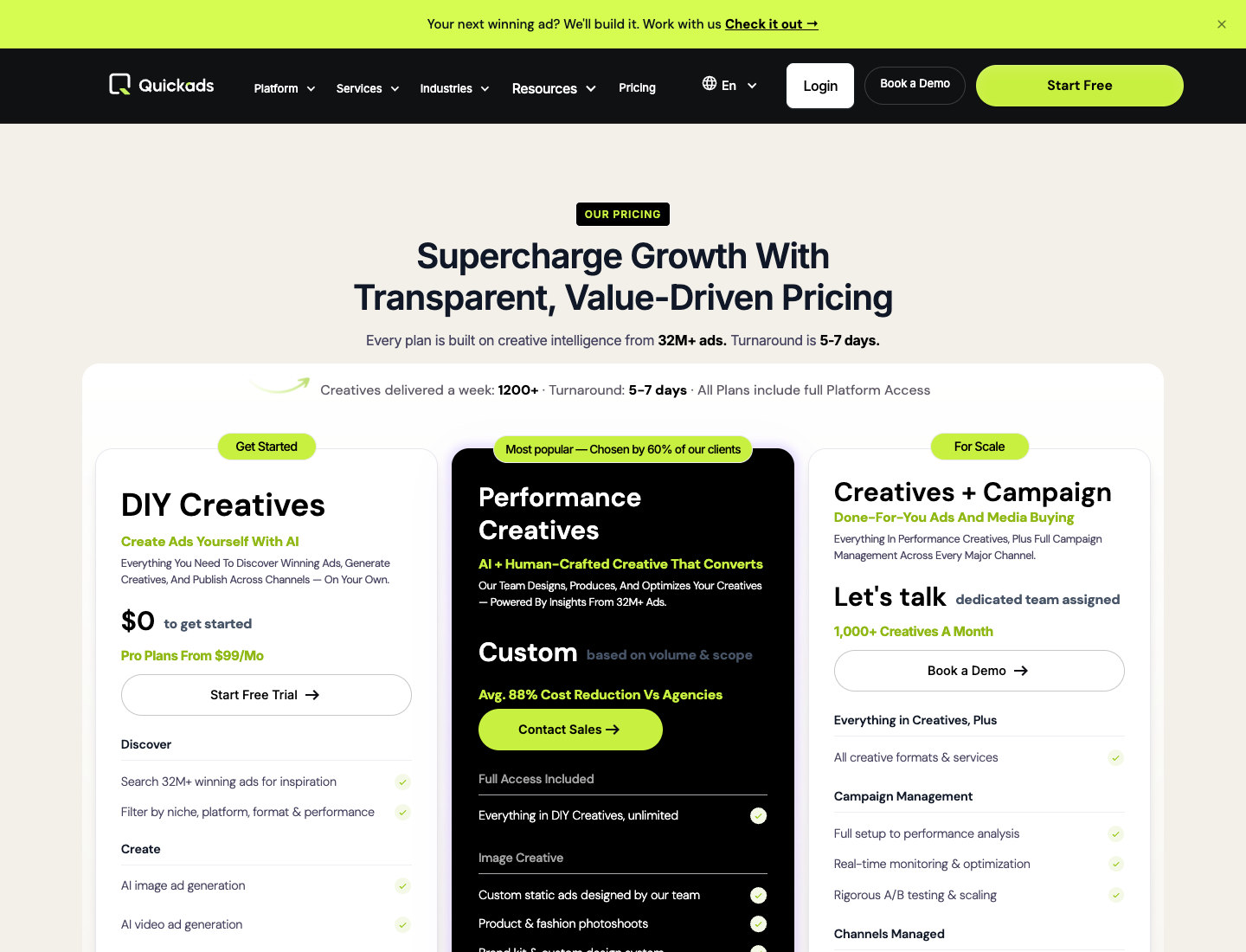
QuickAds leads its pricing page with the 32M+ ad figure, before any price.
How I reviewed QuickAds AI?
This review is based on QuickAds' public pricing, features and formats pages and its Trustpilot profile, all checked on 9 Oct 2026. I turned that into the decisions a small store has to make: what to pay, what the library can tell you and what to check before you enter a card.
Key takeaways
Budget $99 a month for the self-serve Pro plan. It sits in the DIY Creatives column, which starts at $0.
Treat "winning" as a sort order, not proof. QuickAds says its 32M+ ad library includes inactive ads and doesn't publish how an ad qualifies.
Do the budget math first. On a $300 monthly ad budget, $99 adds 33% on top of spend, or $1,188 a year at the monthly rate.
Read the Trustpilot complaints before you start a trial. The rating is 3.3 from 15 reviews, and the 1-star reviews center on billing, refunds and cancelling.
Check 4:5 in the size picker. The formats page lists 30+ sizes, but I saw no 1080x1350 feed size.
QuickAds AI in 2026: 3 offers under 1 name
QuickAds AI is three offers under one name: a self-serve research library with an AI ad generator, a managed creative service, and a done-for-you media buying team. The QuickAds website prices them as 3 columns: DIY Creatives, Performance Creatives, and Creatives + Campaign.
For a small store, only the first column is a self-serve purchase. On the pricing page, "Book a Demo" sits beside "Start Free" in the header, and 2 of the 3 columns end in a sales call.
Here is the DIY Creatives column as a set of jobs you would actually do:
Your job
What the DIY column lists
What it means for your ad
Find an angle to borrow
Search of 32M+ ads, filtered by niche, platform and format
Where you pick the idea
Make your own version
AI image ad generation and AI video ad generation
Where your version gets made
Show the product without a shoot
Virtual product and fashion photoshoots
Replaces a studio shoot for the product layer
Get ads out the door
Ad performance pre-testing, multi-platform scheduling and basic analytics
You still run your own ad accounts
The QuickAds AI library: what "32M+ winning ads" can tell you
The QuickAds AI library is the strongest part of the offer on paper. QuickAds says it holds 32M+ ads, searchable by niche, platform, format, performance, industry, country and theme.
What the 32M+ ad figure covers?
The pricing page labels the library "32M+ winning ads." The homepage tour describes the same library as "32M+ ads from TikTok, Meta and other platforms, including active and inactive ads."
An inactive ad can be a winner that ran for 6 months or a loser switched off on day 3. QuickAds doesn't publish how an ad qualifies as winning, so read the performance filter as a sort order to check, not as proof an idea will work for your product.
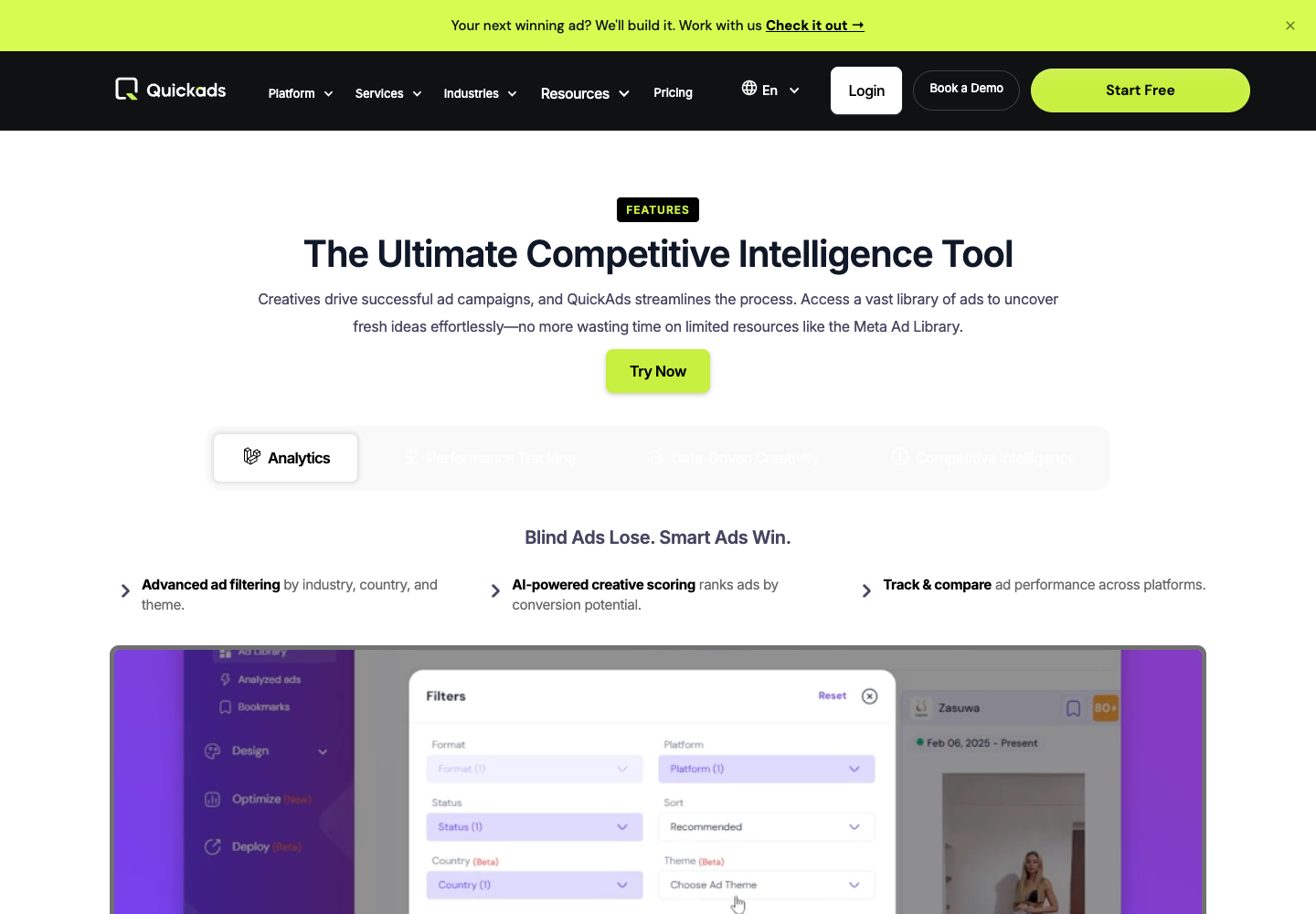
The features page also lists "AI-powered creative scoring" that ranks ads by conversion potential. Treat that score as a hint, and compare any ad you like against your own product page before you build on it.
A 4-step library check for your first trial session
The trial is where you find out whether the library holds up for your niche. Run these 4 checks before you generate anything:
Search your exact product category, such as "posture corrector." You want at least 10 ads in your niche worth comparing.
Filter by the country you sell in. If results drop to a handful, the library is thin for your market.
Use the status filter to separate active from inactive ads, then open the top 5 results and look at run dates.
Save 1 ad and see whether you can use it as a reference for your own version.
From library idea to your own product ad: Write the brief first
A library ad shows what another brand ran, not why it worked for their product. Before you rebuild any ad in any tool, fill in this brief so the borrowed layout has something to carry.
Slot
Fill in
Example: a vitamin C serum
Whose problem
[buyer] who struggles with [problem]
Women 30+ whose skin looks dull after winter
Structure you borrow
[layout or format from the library ad]
A before-and-after split with one headline
Proof you can show
[review, photo or result you own]
A customer photo after 4 weeks of use
Hook, first 3 seconds
[the question your buyer asks]
"Dull skin by March?"
Offer and call to action
[offer] + [button text]
Buy 2, get 1 free. Shop Now
Sizes you need
[feed, story, banner]
4:5 feed and 9:16 story
Scenario: you find a problem-and-solution ad for a neck pillow, and you sell a laptop stand. The layout transfers to your product, but the problem in the copy has to be your buyer's. If your product page can't fill the "whose problem" row, the borrowed layout has nothing to carry.
Sizes and languages for your own version
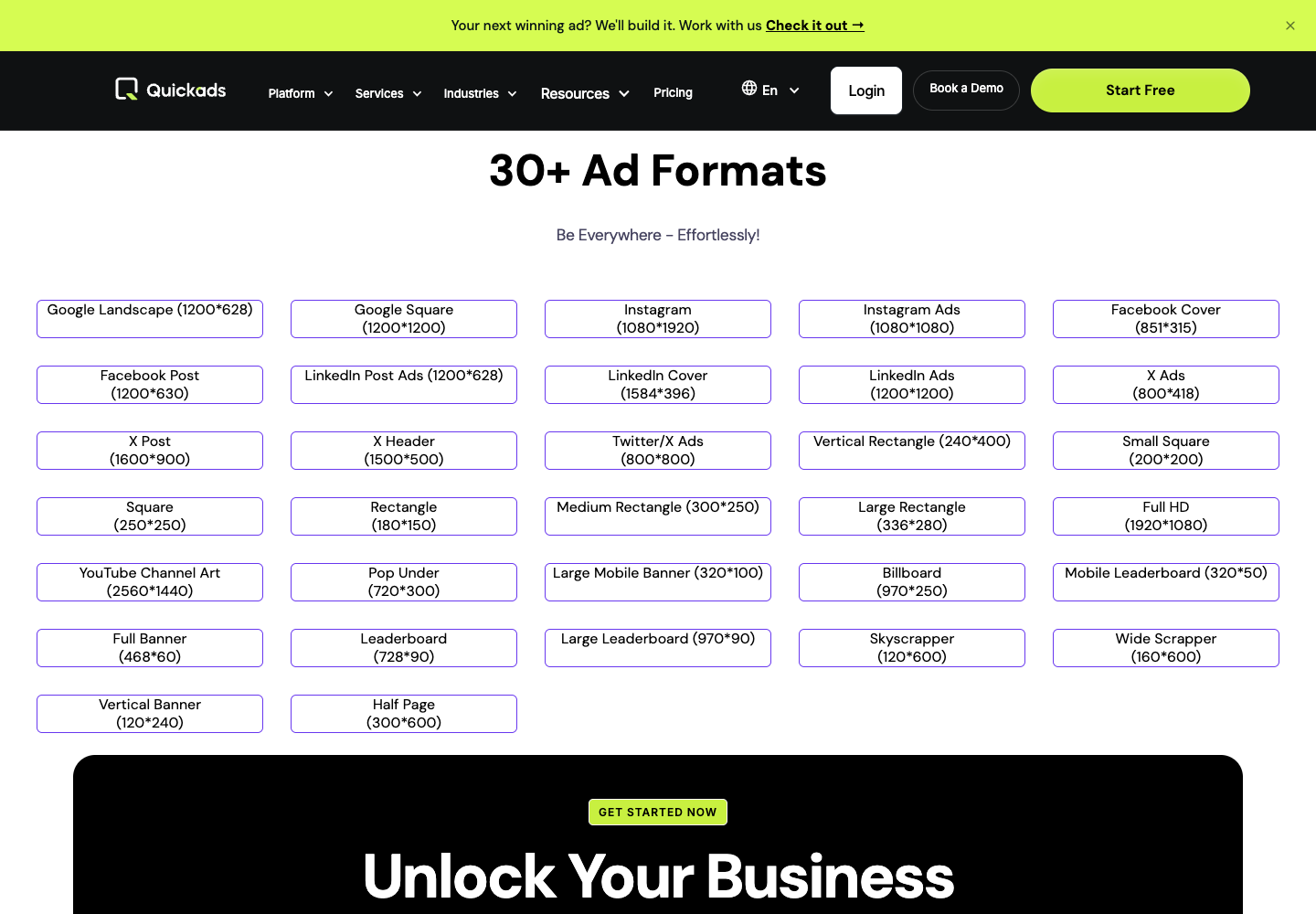
QuickAds' formats page lists display banners next to social sizes: Instagram 1080x1920, Instagram Ads 1080x1080, and Google Display sizes like Medium Rectangle 300x250 and Leaderboard 728x90. If you run Google Display next to Meta, that saves you a resize step.
I saw no 1080x1350 size, the 4:5 ratio used in Meta feeds. If your feed ads run 4:5, open the size picker in the trial before anything else.
Copy runs in 35+ languages, according to QuickAds' FAQ, and templates let you change font, text size, color, resolution, brand logo and product images. The DIY tier includes 1 saved brand kit, so a second store likely means swapping logos and colors by hand.
The $300 question: Is QuickAds AI worth it on a small budget?
On a $300 monthly ad budget, the QuickAds AI library and generator cover ideas and production, but the math is tight. The $99 Pro plan adds 33% on top of ad spend, and the number that decides it is how many finished ads you download each month.
$300 a month works out to about $10 a day.
Here is what the $99 plan costs per ad shipped, next to the ad spend each ad would get. Read the two right columns together:
New ads shipped per month
QuickAds Pro cost per ad
Ad spend per ad at $300 a month
4
$24.75
$75.00
8
$12.38
$37.50
16
$6.19
$18.75
The trade runs both ways. The more ads you ship, the cheaper each one is to make, and the less budget each one gets to prove itself.
At $10 a day, running 3 ads at once gives each about $3.33 a day. For a $300 store, the limit is how many ideas the budget can test, not how many ads a tool can make.
Over a year, $99 a month is $1,188 at the monthly rate. The pricing page labels annual billing "Save 20%", so confirm the annual price at checkout. The share falls fast as spend grows: at $990 a month in ads, $99 is 10% of spend.
Scenario: your best ad fatigued in week 2, you have $150 of budget left, and you need 2 replacements by Friday. The library shortens the hunt for angles and the generator makes the 2 ads, while the fee stays the same whether you ship 2 or 20.
QuickAds AI pricing: The one plan a small store can buy
QuickAds AI has one self-serve plan family and two managed services. Only the DIY Creatives column, "$0 to get started" with Pro plans from $99 a month, is priced for a small store; the other two are quoted per client.
The 3 QuickAds plans side by side
Notice that only one row carries a price:
Plan
Price
What QuickAds lists
Fit for a $300 a month store
DIY Creatives
$0 to start, Pro from $99/month
32M+ ad search, AI image and video ads, virtual photoshoots, 1 brand kit, pre-testing, scheduling, basic analytics
The only realistic option
Performance Creatives
Custom, by volume and scope
Everything in DIY unlimited, team-made static ads, UGC video production, ElevenLabs voiceover
Priced for larger spend
Creatives + Campaign
"Let's talk"
Dedicated team, 1,000+ creatives a month, 5 to 7 day turnaround, Meta, Google, Amazon and TikTok management
Agency retainer territory
That leaves a $300 store one real choice: DIY Pro at $99 a month or more. QuickAds also claims an "avg. 88% cost reduction vs agencies" on the middle tier, a vendor figure with no method published.
Before you enter a card
Each plan card on the pricing page shows a "$1 Trial Only For New User" label next to the "$0 to get started" tier. The Trustpilot section below shows why billing terms deserve a minute of your time. Do these 4 things first:
Screenshot the trial terms and the price shown at checkout.
Find the cancel option inside the account before you generate a single ad.
Set a calendar reminder for the day before the trial ends.
Count your downloads in the first week, so you know your real cost per ad before month 2.
QuickAds.ai reviews: What 15 Trustpilot users say?
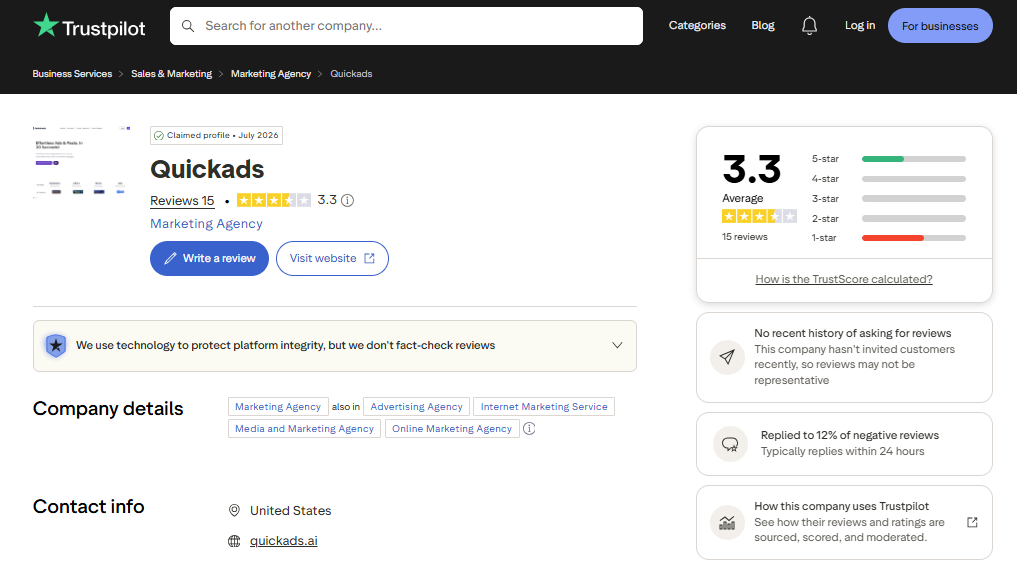
QuickAds holds 3.3 out of 5 on Trustpilot across 15 reviews, split between 40% five-star and 60% one-star, with nothing in between. I checked the profile on 9 Oct 2026. Fourteen of the 15 reviews were posted in the last 12 months.
The 5-star reviewers praise ad quality for their products, tasks that took days finishing in minutes, and an easy process. Several mention helpful support.
The 1-star reviews center on billing: charges after or during a free trial, refund requests going unanswered, trouble cancelling online, and accounts blocked while charges continued. Some also say the ads looked templated or distorted the product image.
Fifteen reviews is a small sample, so read this as a pattern to check, not an average. Trustpilot's page notes the company has not recently invited reviews and has replied to 12% of negative reviews, and Trustpilot does not fact-check reviews.
If you start a trial, generate one ad with your real product photo and look closely at the product edges and label.
QuickAds AI pros and cons for a small ecommerce store
QuickAds AI is strong on breadth, and its public reviews point to billing as the risk.
What QuickAds AI does well:
Library and generator in one login: 32M+ ad search plus AI image and video ad generation on the DIY tier.
Filters by niche, platform, format, performance, industry, country and theme.
30+ named ad sizes, including Google Display banners such as 728x90 and 300x250.
35+ languages, with an AI Copywriter writing ad copy in each.
A managed path if you outgrow DIY, up to 1,000+ creatives a month on the top tier.
Where QuickAds AI falls short for a small store, each line a cost or a risk:
$99 a month is 33% of a $300 ad budget.
The library includes inactive ads, and "winning" is never defined.
Trustpilot shows 3.3 from 15 reviews, with billing and refund complaints in the 1-star reviews.
1 saved brand kit on DIY, which pinches if you run 2 stores.
No 4:5 feed size in the formats list I saw.
Most of these can be checked in one trial session. The pros, library scale and display sizes, are things a cheaper tool can't add later.
QuickAds AI review verdict: Buy, skip or wait
Buy QuickAds AI if your monthly ad spend is around $1,000 or more, so $99 stays near 10% of it, and you run Google Display next to Meta or TikTok.
Skip it if you spend about $300 a month, need to know your cost per ad before paying, or run 2 stores on one brand kit. Wait if 4:5 feed ads are your main format, until a trial confirms the size.
Your next 30 minutes: start the free trial, run the 4-step library check above, screenshot the trial terms and find the cancel option before you generate a single ad. That is the quickest way to settle this QuickAds AI review's open question for your own store.
QuickAds AI alternatives: Ad research with built-in creation
Two tools pair ad research with ad creation at a different entry point than QuickAds AI. Prices come from each vendor's own page, checked on 9 Oct 2026.
Predis.ai, the credits-and-scheduling model
Predis.ai's Core plan is $24 a month billed yearly ($288 a year) for 1,300 credits a month, which Predis says buys about 325 images or 33 videos. It also includes 60 competitor analysis runs a month.
Every Predis plan starts with 3 days free, but your card is taken at signup and charged when day 3 ends. Payments after the trial are non-refundable, so cancel before day 3 if you are only testing.
Promer AI, for rebuilding a winning ad around your product
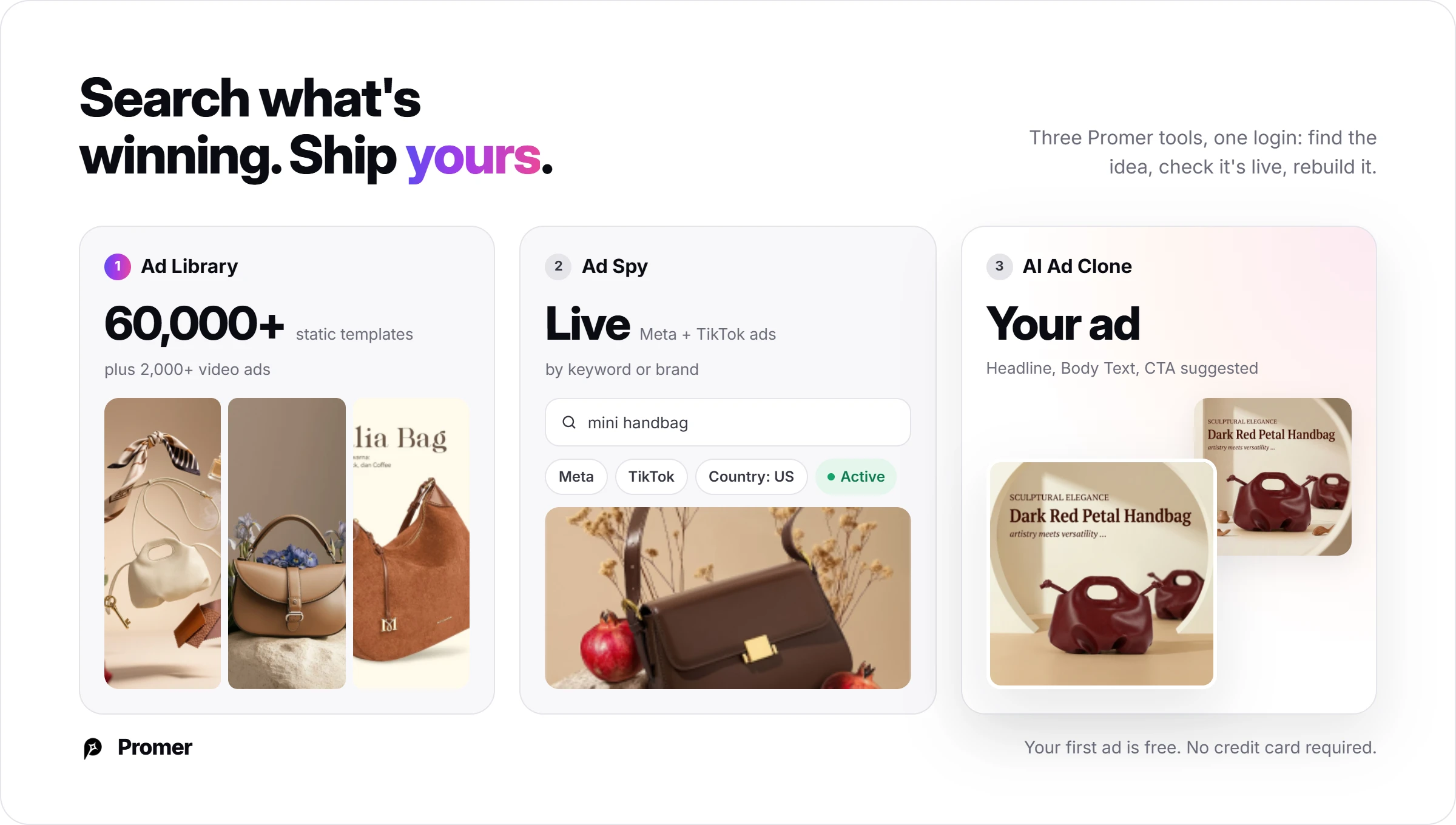
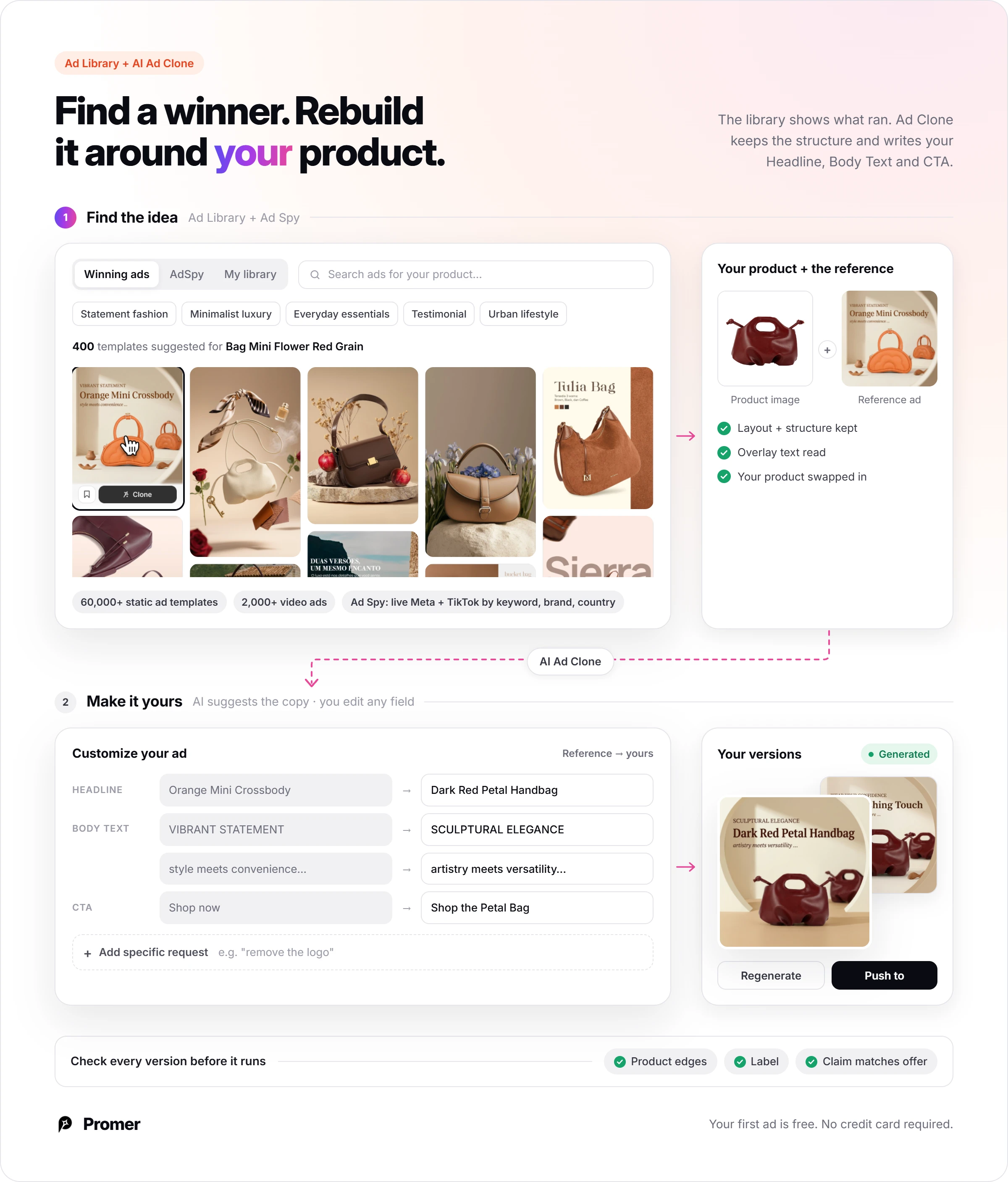
Promer AI is an AI ad creative performance platform for ecommerce advertisers. Its AI Ad Library holds 60,000+ static ad templates and 1,300+ video ads, and AI Ad Spy searches top live Meta ads by keyword or brand, filtered by country.
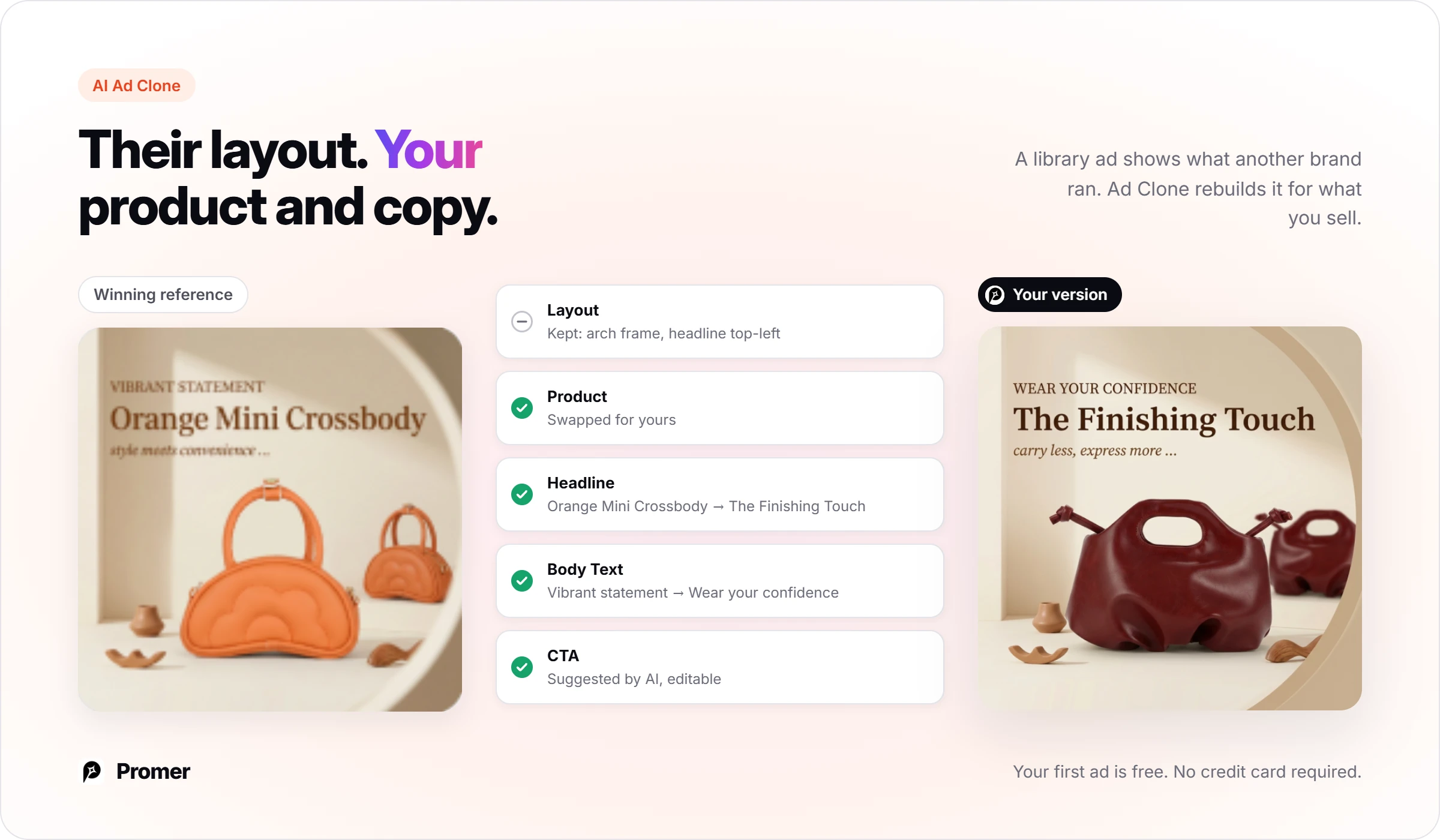
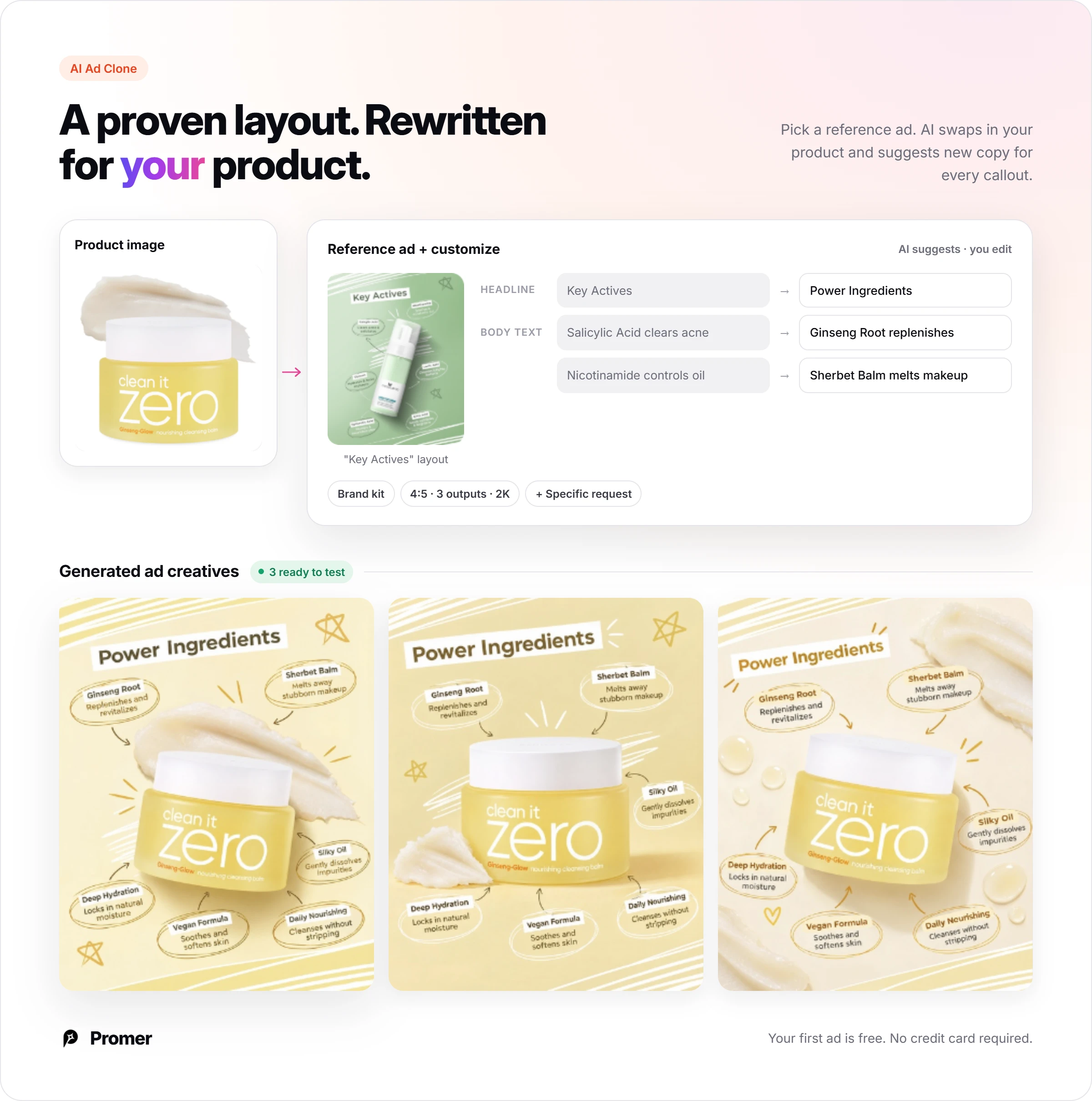
The difference is what happens after you find an idea. With Promer AI's AI Ad Clone, you pick a reference ad and your product, and AI suggests the Headline, Body Text and CTA for your version, each editable.
The trade is real. AI-generated creatives can contain mistakes, so check product edges and labels, and Promer AI doesn't run campaigns or buy media. QuickAds AI is the better pick if you need Google Display sizes or a managed team.
To test the library-to-ad loop on your own product, start on the free plan of the Promer AI AI ad generator.
FAQ
How much does QuickAds AI cost?
QuickAds AI's self-serve Pro plan starts at $99 a month, according to its pricing page. The two managed tiers, Performance Creatives and Creatives + Campaign, are quoted per client based on volume and scope. Annual billing is labeled "Save 20%", so confirm the annual price at checkout.
Is QuickAds AI free?
QuickAds AI advertises "$0 to get started" and a Start Free Trial button. Each plan card also shows a "$1 Trial Only For New User" label. Read the trial terms at signup and set a reminder before the trial ends, because Trustpilot reviewers report charges around the trial period.
Where do the ads in the QuickAds AI library come from?
QuickAds says its 32M+ ad library comes from TikTok, Meta and other platforms, and includes both active and inactive ads. The pricing page calls them "winning ads," but QuickAds doesn't publish how an ad qualifies. Check run dates before you rebuild any ad, because an inactive ad may have been switched off early.
Can QuickAds AI make video ads?
Yes, QuickAds AI lists AI video ad generation in its DIY Creatives tier. The same tier lists AI image ad generation and virtual product and fashion photoshoots. UGC video production and premium ElevenLabs voiceover sit under the managed Performance Creatives tier, which is quoted per client.
Does QuickAds AI run my ads for me?
Only on its top managed tier: Creatives + Campaign includes campaign management on Meta, Google, Amazon and TikTok. That tier adds a dedicated strategist and campaign manager and 1,000+ creatives a month, priced after a sales call. The self-serve DIY tier offers scheduling and basic analytics, but you still run your own ad accounts.
Is QuickAds AI legit?
QuickAds AI is a working product with a public pricing page and a claimed Trustpilot profile, but its public reviews are split. Trustpilot shows 3.3 out of 5 from 15 reviews, with 40% five-star and 60% one-star. The 1-star reviews center on billing, refunds and cancelling, so screenshot the terms before you pay.
Is QuickAds AI worth it for a small store?
QuickAds AI is worth it for a small store only if $99 a month is a small share of ad spend. In this QuickAds AI review's math, a $300 monthly budget carries a 33% fee on top of spend, or $1,188 a year. Stores spending around $1,000 a month or more carry it more easily.
What is a good QuickAds AI alternative for building ads from winning examples?
For a lower entry price, Predis.ai pairs competitor analysis with creation from $24 a month billed yearly. If you want to rebuild a proven ad structure around your own product, Promer AI's AI Ad Clone works from its AI Ad Library and AI Ad Spy. AI Ad Spy covers top live Meta ads.
Related reviews and ecommerce guides
More reviews of ad tools that sit close to QuickAds AI:
AdCreative.ai reviews: how its creative score and download credits work for a small store.
Predis.ai reviews: what one month of Predis credits covers in posts and ads.
Nana Phan has 16 years of experience across marketing, ecommerce, and SaaS, including running her own dropshipping business and nearly 8 years at FireGroup working on products for online merchants. Her experience spans both selling online and building software for the people behind those businesses.
As Head of Growth at Promer AI, she works across customer research, product, and marketing. She writes about ecommerce growth, ad creative, and practical applications of AI, informed by firsthand experience and conversations with merchants about the challenges they face.