You know the plan. Post one short video a day, every day, and let the algorithm find your buyers.
You also know how it ends. Day 4 is a rerun, day 9 is skipped, and by week 3 the account has gone quiet because filming, scripting and editing ate every evening.
That is the exact gap Vidgenie AI sells into. Type a topic, get a narrated, captioned video back, and do it 30 times a month for $29. So in this Vidgenie AI review I wanted one answer: how much of that daily-video plan can a store owner hand off?
Vidgenie AI can put about 30 faceless videos a month on your desk for $29, but you still approve every one, post every one, and you can't get your money back.
Everything below comes from Vidgenie's own calculator, pricing table and terms, checked in October 2026. If you only want the money part, jump to the credit calculator section. If you need ads for a specific product, skip to the alternatives.
Key takeaways
- One default one-minute video costs 66 credits, so the $29 Starter plan covers about 30 videos a month, one a day, with no spare for redos.
- Vidgenie writes, voices and renders the video for you. No plan includes scheduling, so posting is still your daily job.
- Two calculator settings swing your month the most: longer scenes add videos for free, while motion clips can cut 75 videos down to 4.
- Podcast-style ads, motion clips and your own avatar start on Creator at $59 a month.
- All fees are non-refundable, and plans renew unless you cancel 24 hours before the period ends.
- Vidgenie is built for story channels. For ads that must show your real product, look at the alternatives.
What Vidgenie AI does for a store: A faceless video factory
Think of Vidgenie as a faceless video factory. You pick a topic, and it hands back a finished video: script, AI images for each scene, an AI voiceover, music and captions, sized for TikTok, Reels, Shorts or YouTube.
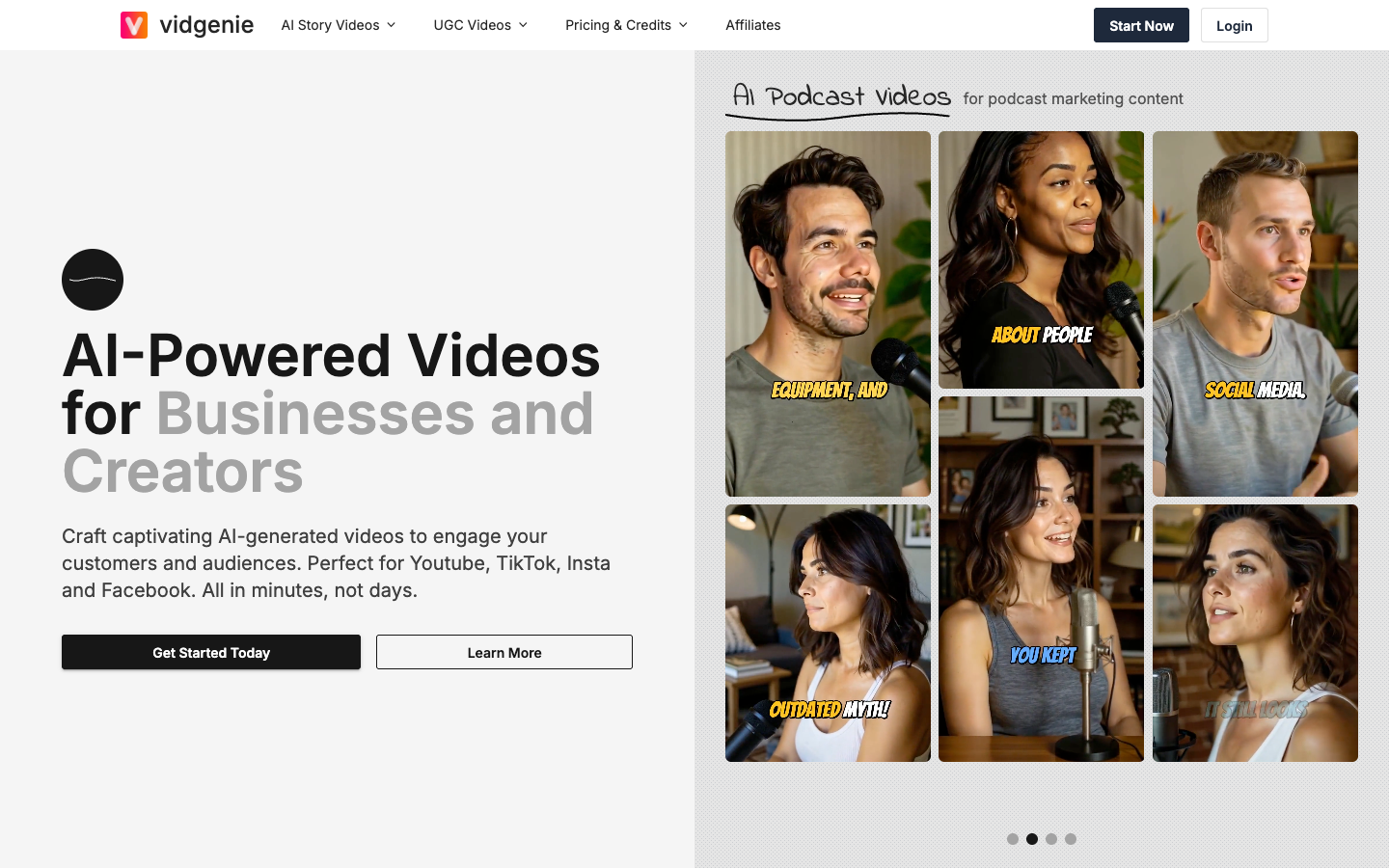
It sells 4 kinds of video, and they fit different jobs in your store:
Story Videos are the heart of the product, with 100+ AI voices, 1,600+ music tracks and 109 art styles.
Notice, though, that Vidgenie's public example gallery is all stories, from World War 1 to Sleeping Beauty. It was built first for channels that post narrated content, not for stores that need their exact product on screen.
The autopilot test: Which Vidgenie AI steps run without you?
Vidgenie runs the making on autopilot: topic, script, scenes, voice, music and batch rendering. The checking and the posting stay with you. That is the trade, and it is a good one if you plan for it.
The top 4 rows are the slow, expensive part of making video, and they are covered. That alone can turn "post daily" from a full evening into a Sunday batch.
The bottom 3 rows are where a "set and forget" plan breaks. Picture a skincare store running a podcast-style video where one AI host praises a benefit your label never claims.
Vidgenie won't catch that, and its terms say the output is yours to review. Your approval step is the safety net.
My suggestion: batch-render on Sunday, review in one sitting, then load the week into the scheduler you already use. That keeps the factory running without the risk.
Vidgenie credit calculator: 4 settings that decide your monthly videos
Before you pick a plan, spend five minutes on Vidgenie's credit calculator. It's the most useful page on the site, because "2,000 credits" means nothing until you know what one of your videos costs.
At the default settings (1-minute video, 4-second scenes, Starter Plus images, Standard SD voice), one video costs 66 credits. That's 30 videos a month on Starter, exactly one a day.
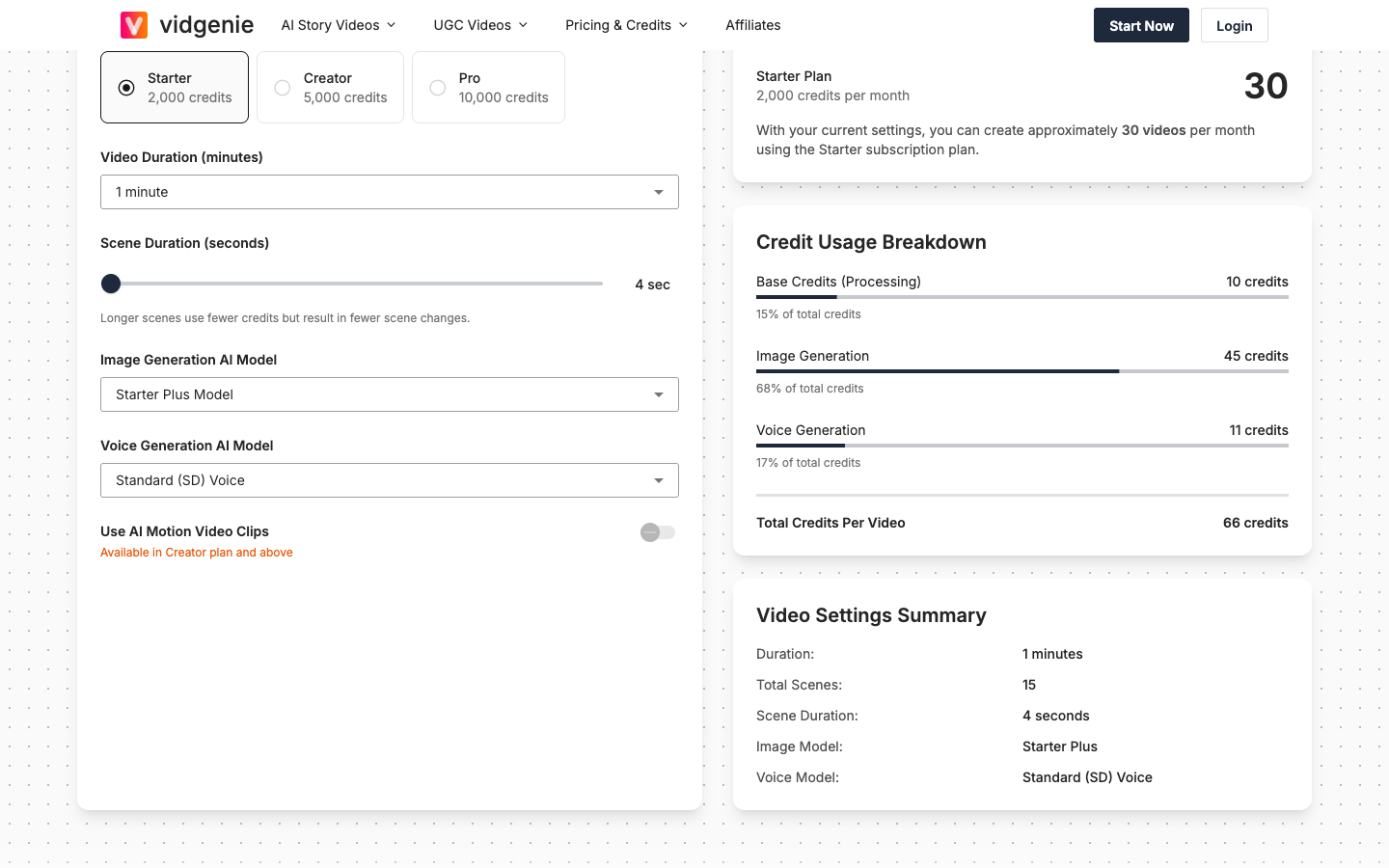
Images are two thirds of that bill, which tells you where to save. Here's what each setting does to your monthly count, all read from the calculator in October 2026.
Setting 1: Scene length, the free way to get more videos
Every scene is one AI image. Longer scenes mean fewer images, so the same video costs less.
Going from 4 to 8 seconds turns 30 videos into 44 on the same $29. The trade is pace: an explainer about your niche can live with slower cuts, but a hook video that has to stop the scroll usually can't. My take: use long scenes for evergreen tips, short scenes for anything that sells.
Setting 2: Image model, the quality tax
The image model sets the price of every scene:
- Starter: 2 credits per image. Vidgenie itself notes "occasional anatomy issues".
- Starter Plus (default): 3 credits per image.
- Creator: 10 credits per image, Creator plan and above.
- Red Panda: 16 credits per image, best at text inside images, Creator plan and above.
- Pro: 16 credits per image, Pro plan only.
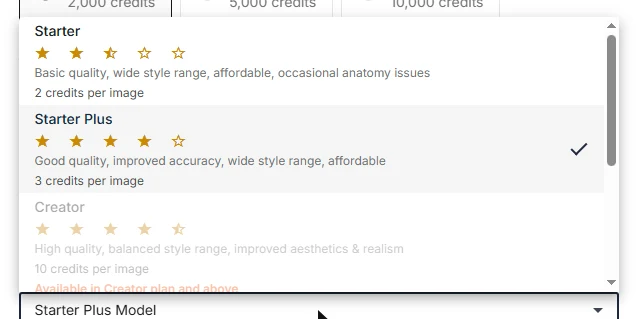
Jumping from Starter Plus to the Creator model more than triples your image cost. If your videos show text on screen, like a price or an offer, Red Panda is the one Vidgenie recommends for that, at 16 credits a scene.
Setting 3: Voice, the setting that can halve your month
Voice is charged per 1,000 characters of script: 8 credits for Basic, 12 for Standard SD, 25 for Standard HD and 75 for Premium.
That sounds small until you switch to Premium. A default 1-minute video jumps from 66 to 119 credits, and Starter drops from 30 videos a month to 16. Going the other way, Basic voice plus Starter images brings a video down to 47 credits, or 42 a month.
Listen to the Standard voices in the free credits first. For a faceless niche channel, viewers usually forgive a slightly flat voice more than they forgive no post at all.
Setting 4: Motion clips, where budgets disappear
Motion clips turn a still scene into a moving one, and they're only on Creator ($59) and above.
You choose what share of scenes get motion (10% to 100%) and a motion model: Runway Gen 3 or Kling 1.6 Standard at 35 credits per clip, Luma Ray 1.6 at 55, or Kling 1.6 Pro at 65.
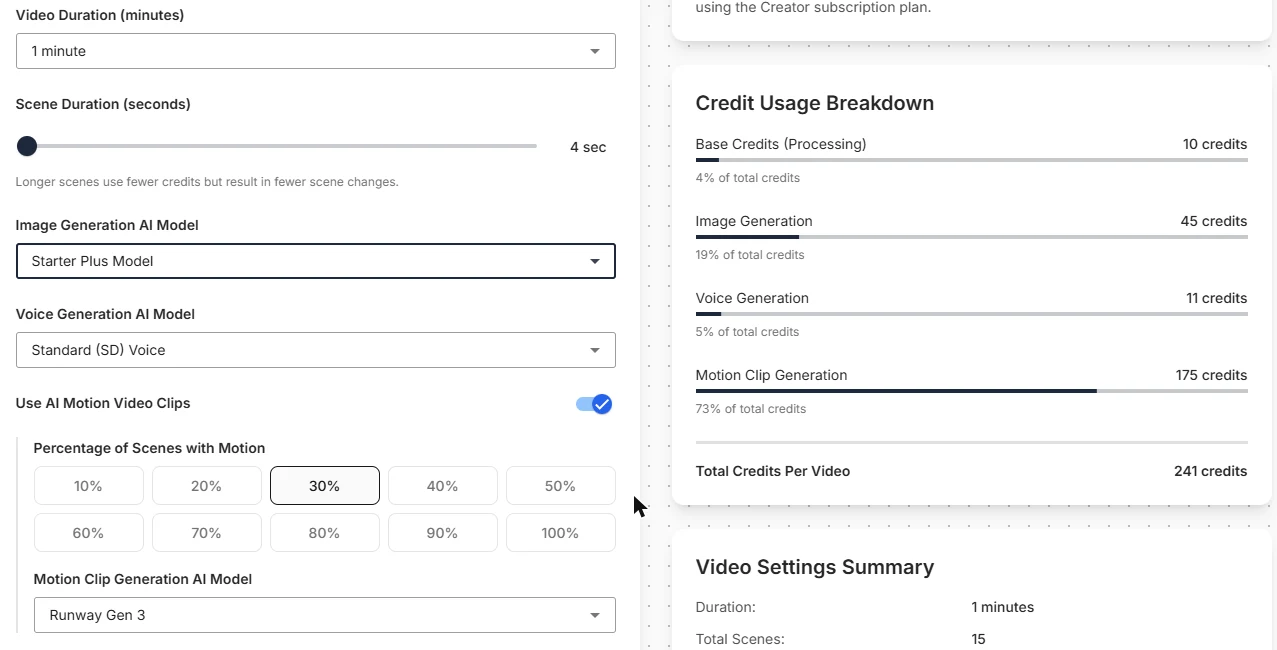
Turn on motion for 30% of scenes with Runway Gen 3, and a video goes from 66 to 241 credits. Creator's 5,000 credits now buy 20 videos instead of 75.
Push it to 100% of scenes on Kling 1.6 Pro, and one video costs 1,041 credits. That's 4 videos a month on a $59 plan.
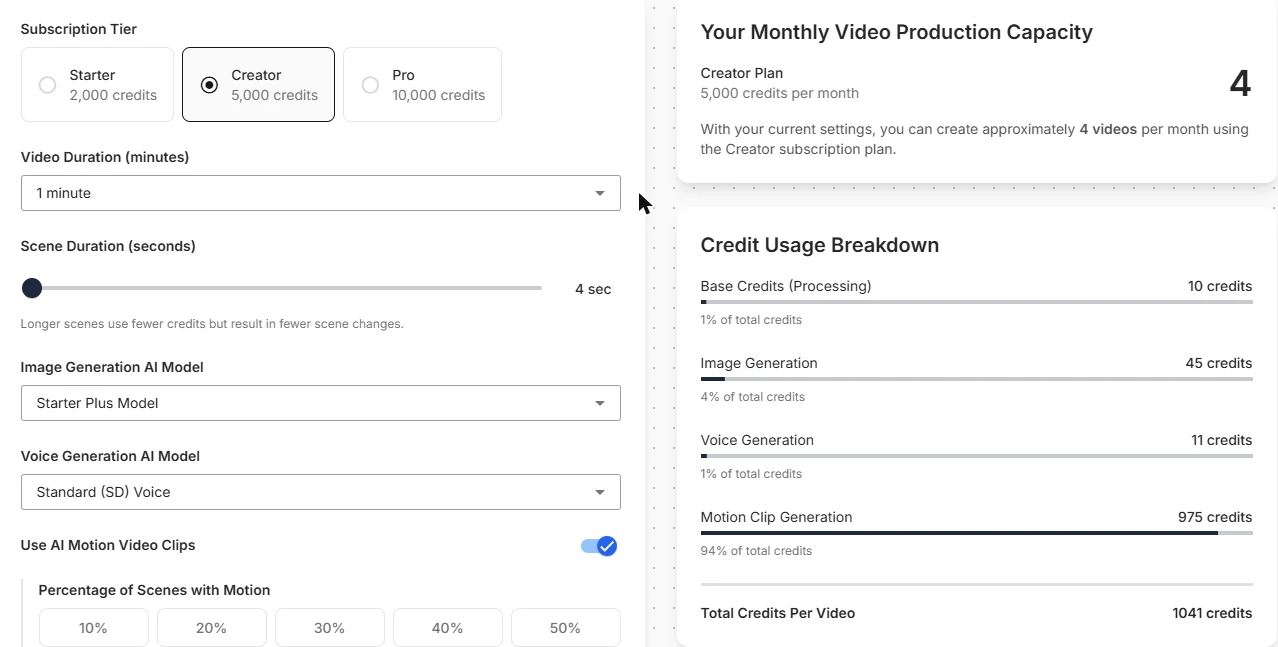
Vidgenie's own tip is the right one: "Use motion clips for key scenes rather than the entire video". Put motion on the opening hook and the product moment, and keep the rest still.
What the calculator can't tell you?
The shortest length in the calculator is "1 minute (30 to 60 seconds)", priced as 15 scenes. If you plan 15-second clips, the calculator will overstate your cost, and you'll only see the real number in the app.
It also doesn't price AI Podcast or Hook+Demo videos, the two ad formats. So use it to plan your organic story videos, and use the free credits to price the ad formats.
At the default 66 credits, Starter ($29) makes 30 videos a month at $0.97 each, Creator ($59) makes 75 at $0.79, and Pro ($99) makes 151 at $0.66.
Under $1 a video is cheap next to any creator fee, but remember what that dollar buys: a narrated slideshow of AI images, not your product in someone's hands.
Vidgenie AI pricing: Starter, Creator, Pro and what each unlocks
Vidgenie has 3 paid plans: Starter at $29, Creator at $59 and Pro at $99 a month. Annual billing gives you 2 months free. You can start with up to 200 free credits and no credit card, enough for about 3 default videos.
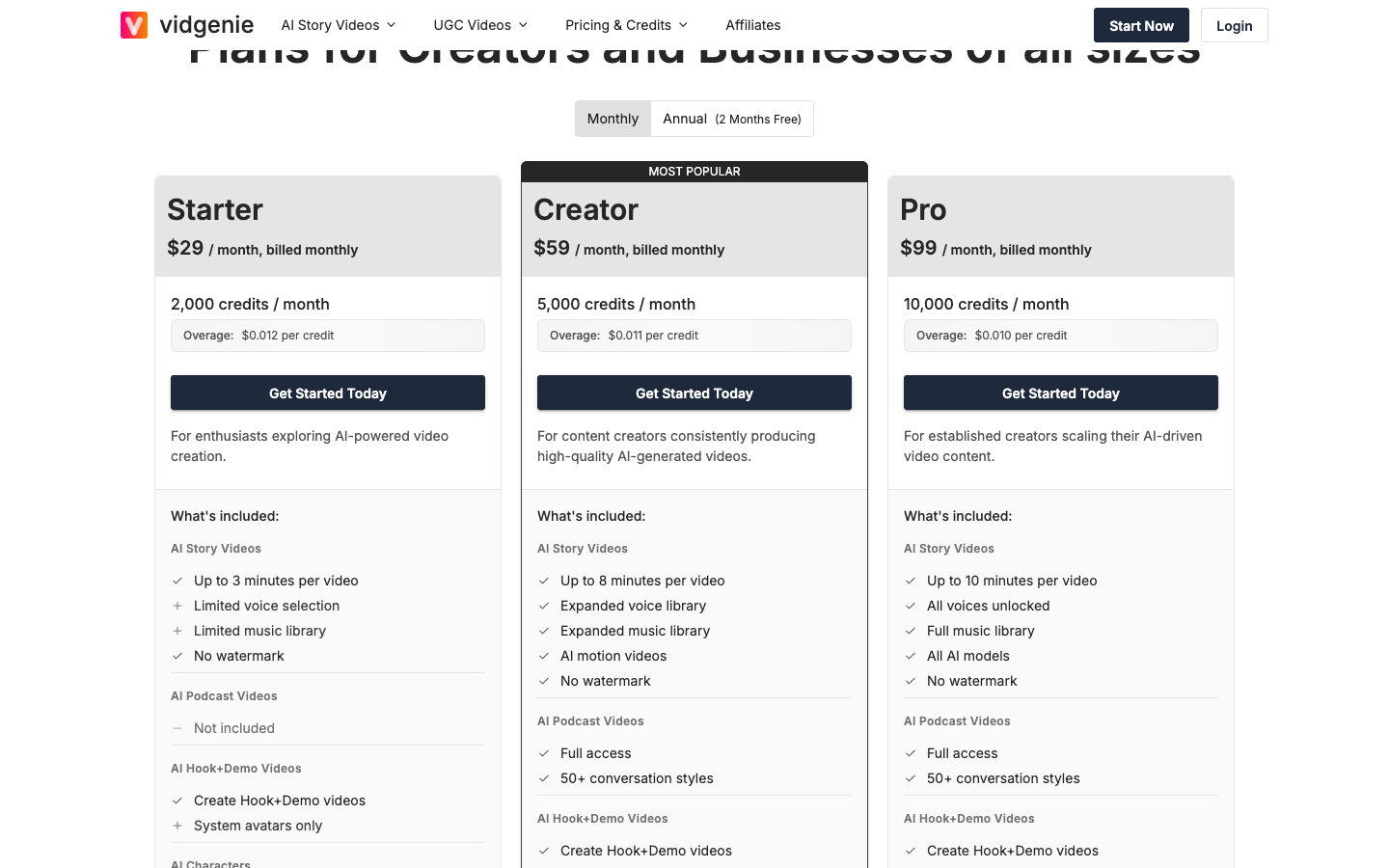
The credit count isn't the only thing that changes between plans:
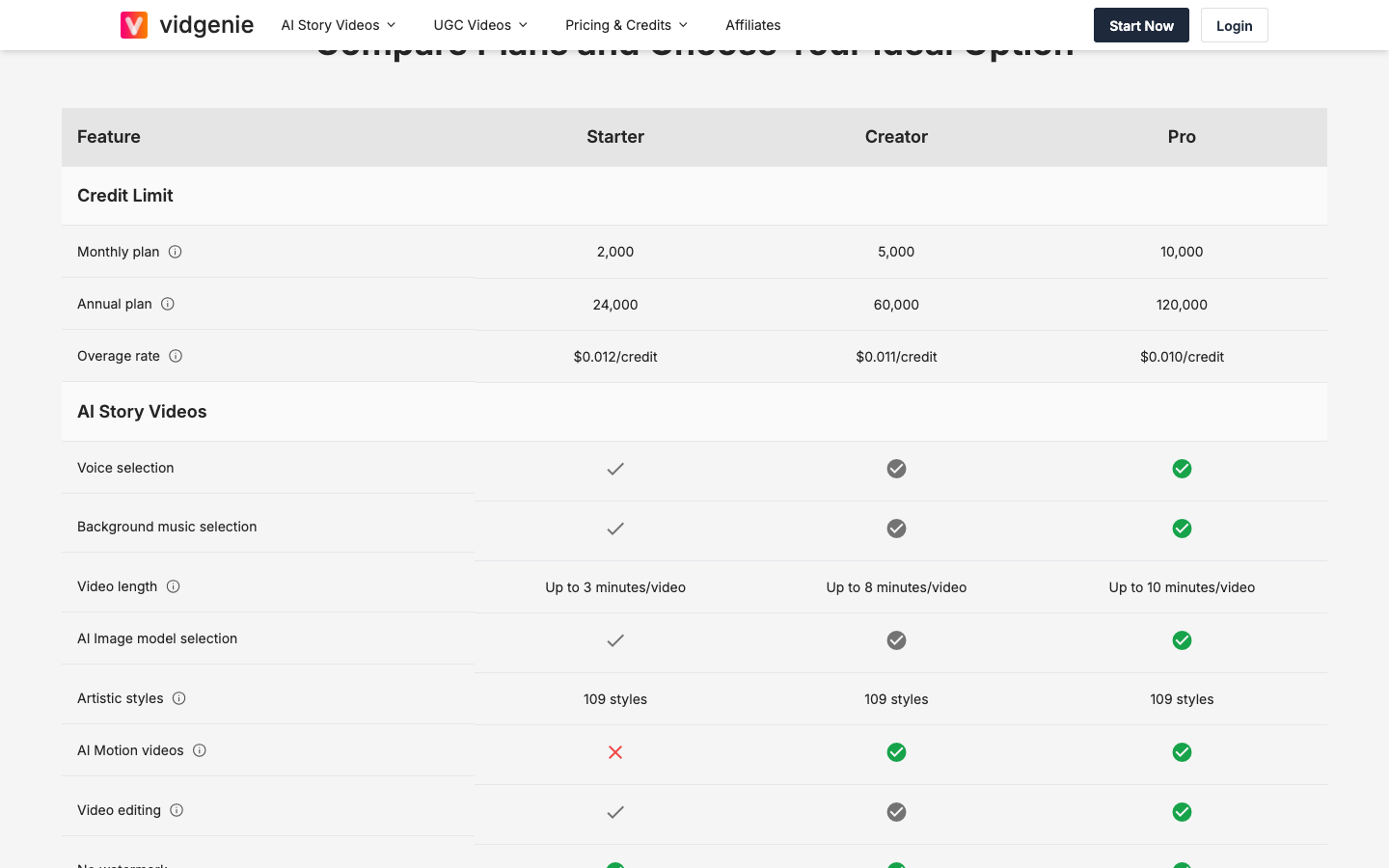
For a store, the jump that matters is Starter to Creator. Starter is a story-video plan: limited voices, limited music, stock avatars only, no motion and no podcast format.
If you want UGC-style ads with a consistent face, your real starting price is $59. If you only want daily niche content, Starter does the job.
Two small things worth knowing: every plan includes a commercial license, and every plan includes unlimited seats. If your VA or a teammate does the reviewing, they don't cost extra.
Read this before you pay: Vidgenie refunds and renewal
Vidgenie's terms say, in capital letters, that all subscription fees are non-refundable, whatever the reason, including being unhappy with the service. Plans renew automatically unless you cancel at least 24 hours before the period ends.
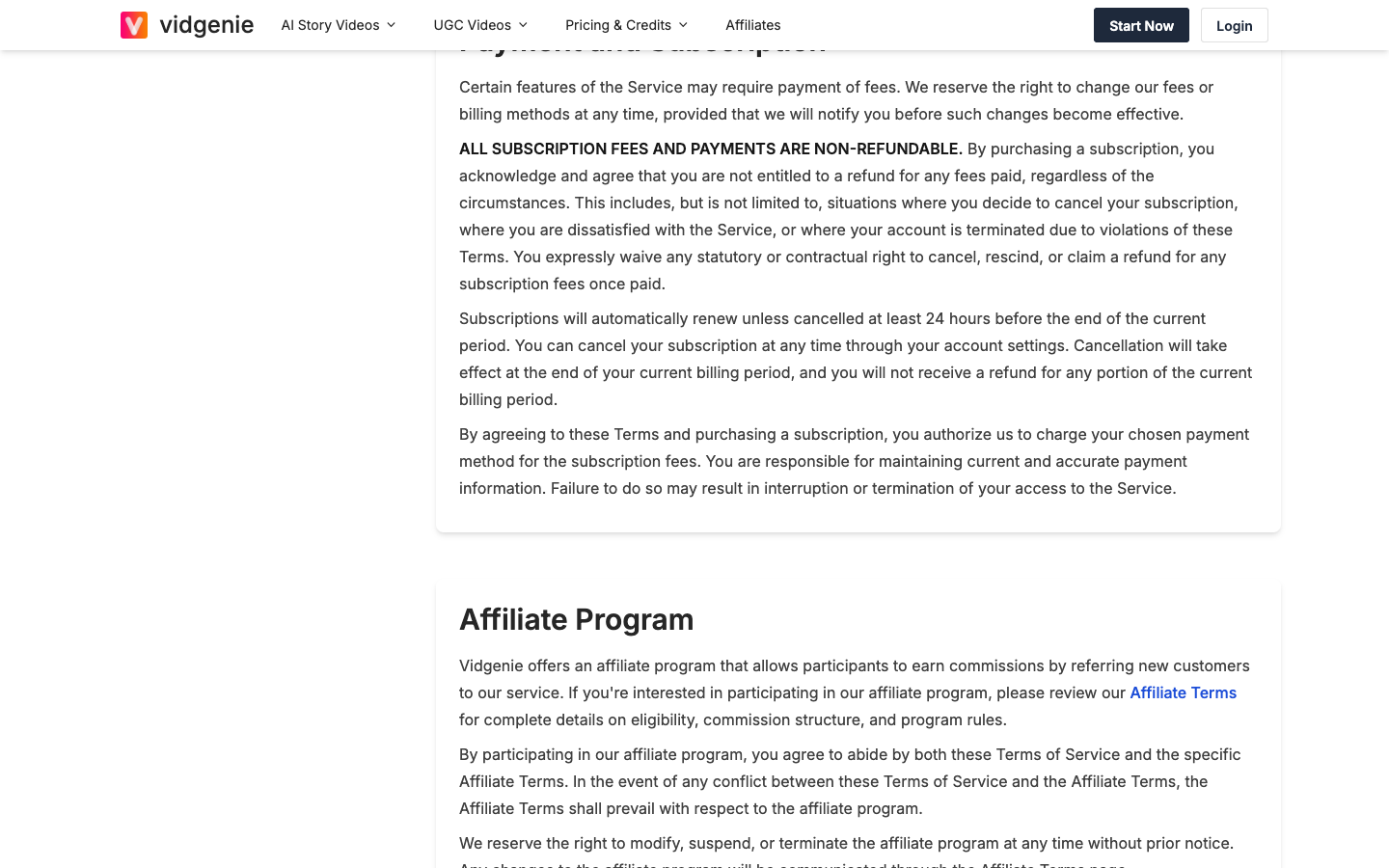
So "cancel anytime" on the homepage means you can stop the next charge. It doesn't mean you get anything back. Two habits protect you:
- Use the 200 free credits first and make your 3 test videos on the settings you'll use.
- Pay monthly, not yearly, until one full month of posting proves the tool fits. Then set a cancel reminder 2 days before each renewal.
Vidgenie AI for product ads: Hook+Demo and podcast videos
Vidgenie has 2 formats aimed at selling.
Hook+Demo, on every plan, promises up to 500 hooks per product, but the hook is the cheap part: check how your actual product looks in the demo before you plan a test around it.
AI Podcast Videos, from Creator, put 2 AI hosts in a chat about your product; Vidgenie's "3x more engagement" claim has no study behind it, so let your ad account decide.
What you won't find is the plumbing a paid-ads store wants: Shopify product import, a brand kit, or a push to Meta Ads Manager. Vidgenie is a social video tool that added ad formats, not an ad tool.
Vidgenie AI reviews: Who is saying good things, and why?
Vidgenie has no Trustpilot profile as of October 2026, so most Vidgenie AI reviews you'll find come from two places: Vidgenie's own homepage and blogs that review it.
The homepage shows 12 five-star testimonials. One user from Phoenix calls it the easiest video creator he has tried.
Another, from Perth, thanks Vidgenie for accepting Bible stories for kids. Every one of the 12 is about story content. None mentions a store, a product or an ad.
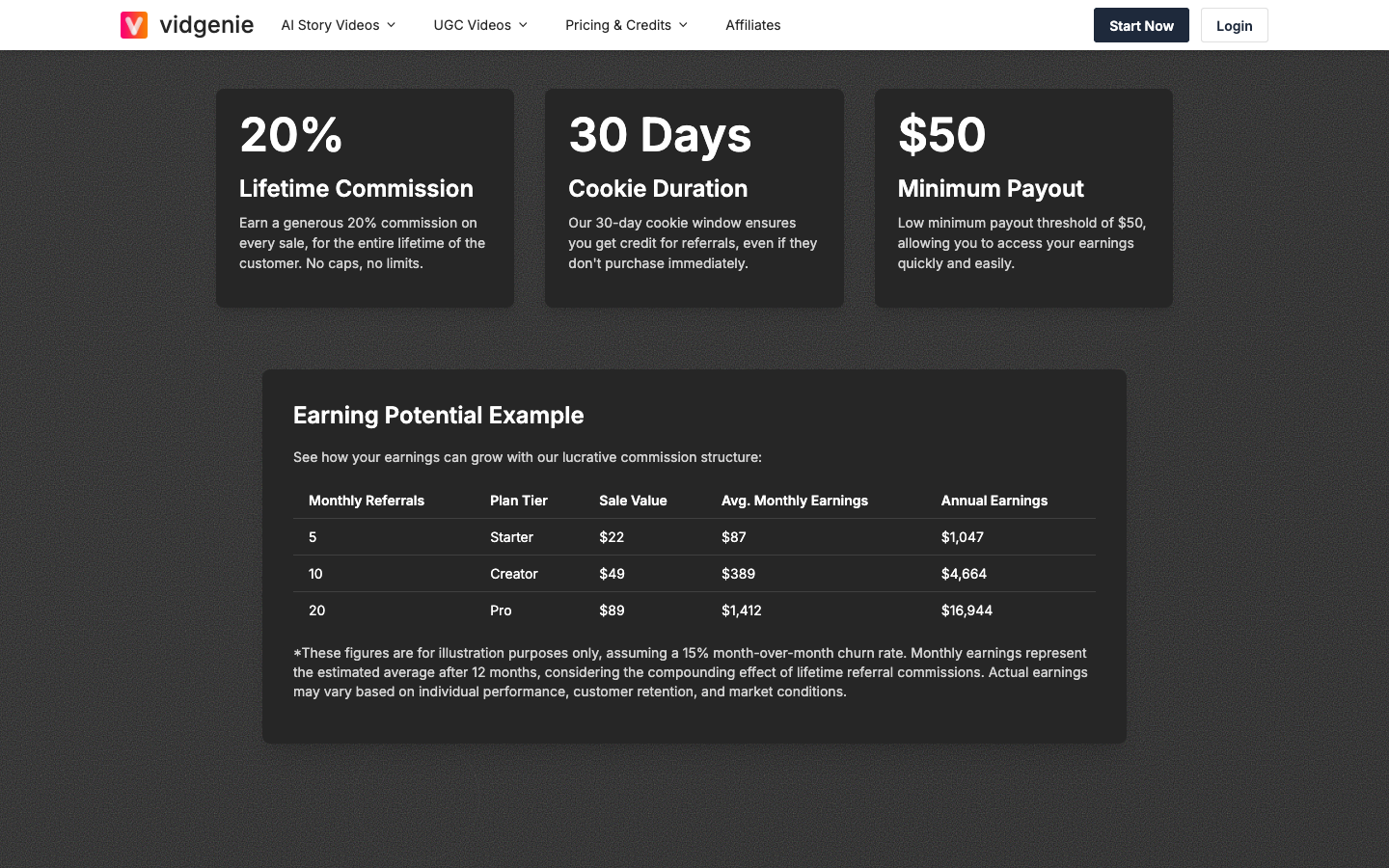
Then there's the affiliate program. Vidgenie pays reviewers 20% of every sale they refer, for life.
Its affiliate terms require a disclosure, so when you read a glowing Vidgenie review, scroll for that line. A lifetime cut is a good reason to be warm.
Who Vidgenie AI fits, and who should skip it?
Vidgenie fits a store that wants a steady organic feed around its niche, and has someone to review and post each video.
Buy it if:
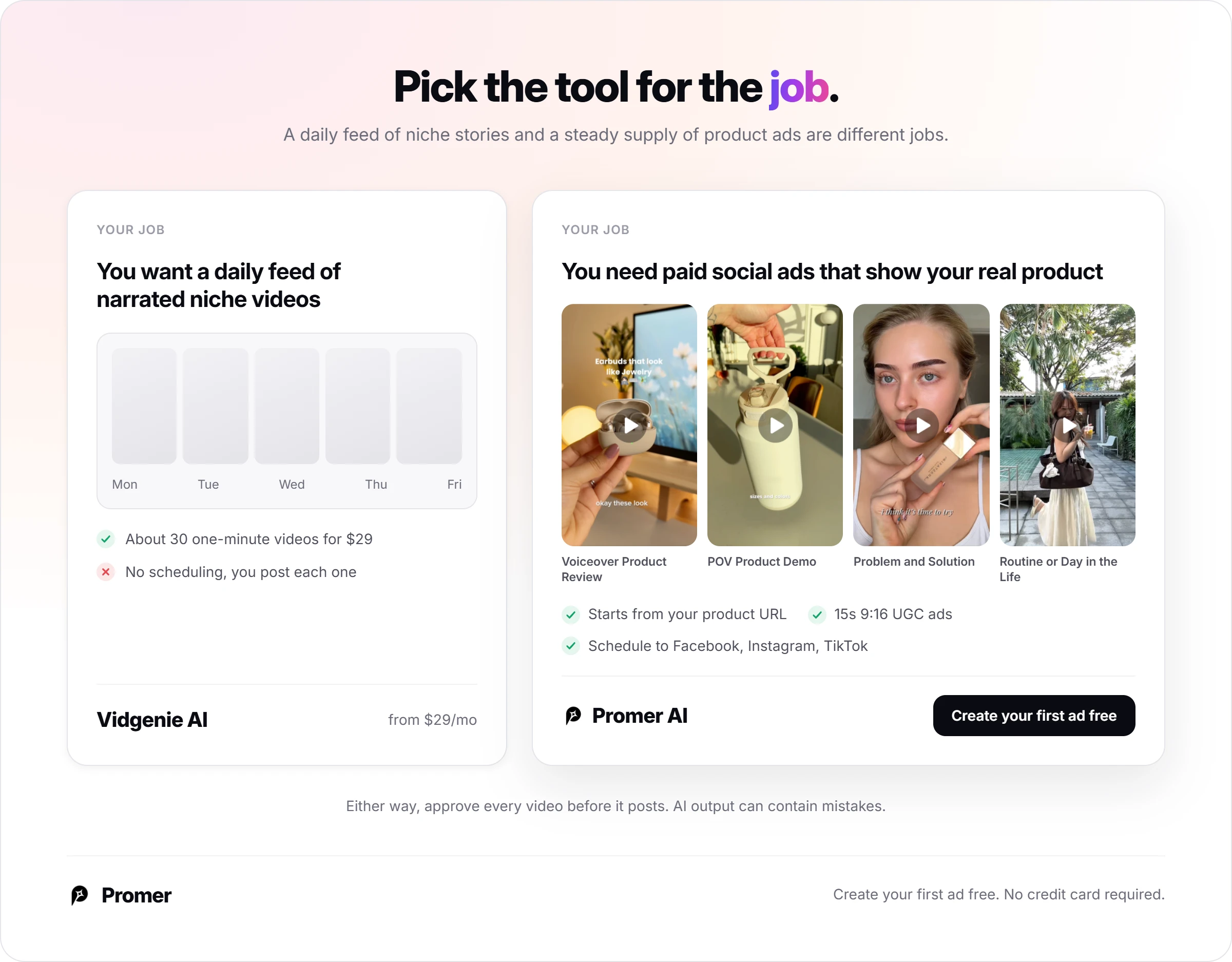
- You want 1 narrated video a day about your niche (recipes for a kitchen store, styling tips for a fashion brand) for $29.
- You sell in several countries and want the same video in different languages.
- A teammate will do the reviewing, since seats are unlimited.
Skip it, or wait, if:
- Your videos need to show your real product in most scenes.
- You need scheduling built into the same tool.
- You want a refund window on your first month.
Here's the clearest test: you added a product this morning, you have only supplier photos, and you want a Meta ad running tonight. Vidgenie isn't built for that job.
The autopilot lesson for any AI video tool: Budget the approval time
Every "autopilot" video tool moves your time, it doesn't delete it. Your job changes from making 30 videos to approving 30 videos.
That's a great trade, because approving is much faster than making. It only works if approval is a real task on your calendar, with a checklist:
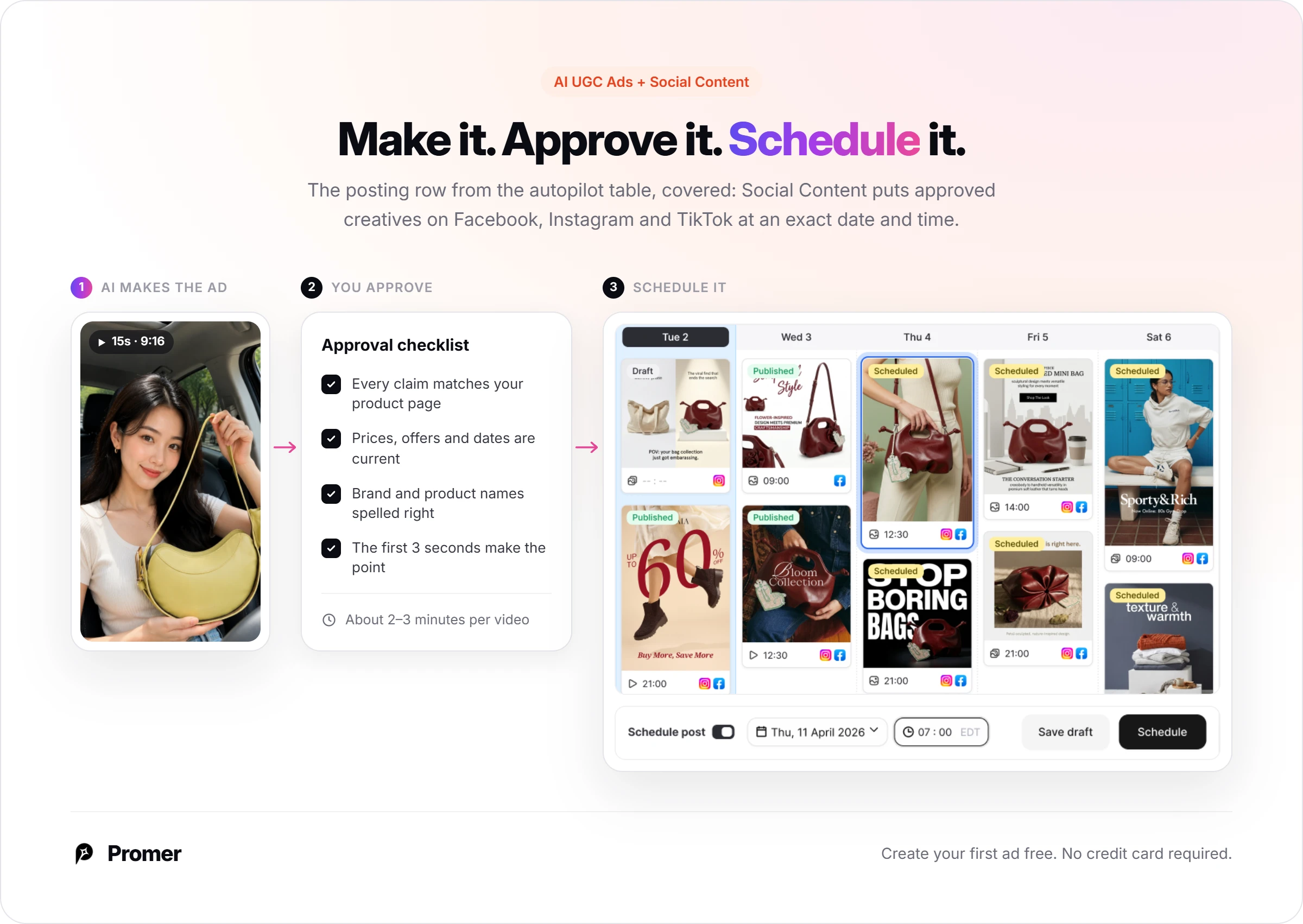
- Every claim about your product matches your product page.
- Prices, offers and dates are current.
- Your brand and product names are spelled right in the captions.
- The first 3 seconds make the topic obvious.
- The music, voice and avatar are covered by your plan's commercial license.
At 2 to 3 minutes a video, 30 videos is roughly an hour or more a month. Small, but not zero, and it's the hour that keeps a wrong claim off your feed.
Vidgenie AI alternatives for a store's social video
Each of these fits a different job. If long narrated story videos in 29 languages are what you want, Vidgenie may still be your best pick.
Predis.ai, the scheduler that also makes ads
Predis.ai Core costs $32 a month ($24 billed yearly), and auto posting starts on Rise at $79 ($55 yearly). Pick it if a content calendar with static posts matters more than long videos.
Zebracat AI, faceless video that posts what you approve
Zebracat AI's Cat Mode costs $39 a month ($23 yearly) for 15 videos at 1080p, schedules approved videos to your social channels, and offers a 7-day money-back guarantee if you haven't downloaded a video. Pick it if posting and a refund window matter more than volume.
Promer AI, for ads built from your product
Promer AI is an AI ad creative performance platform for ecommerce advertisers, and it starts where Vidgenie doesn't: your product. Paste a product URL from Shopify, Amazon or any store, and Promer AI pulls in the image, name, description and price before it makes anything.
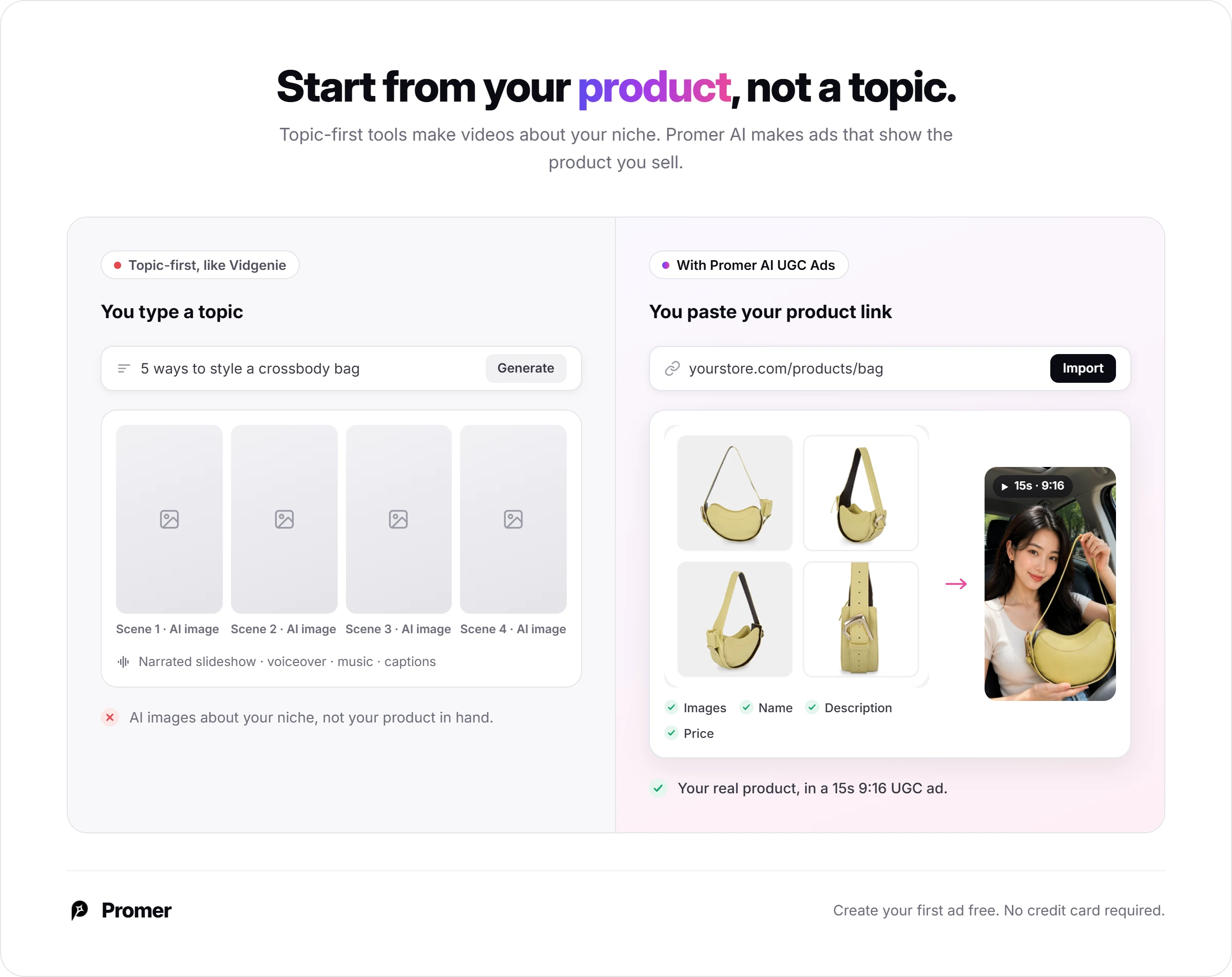
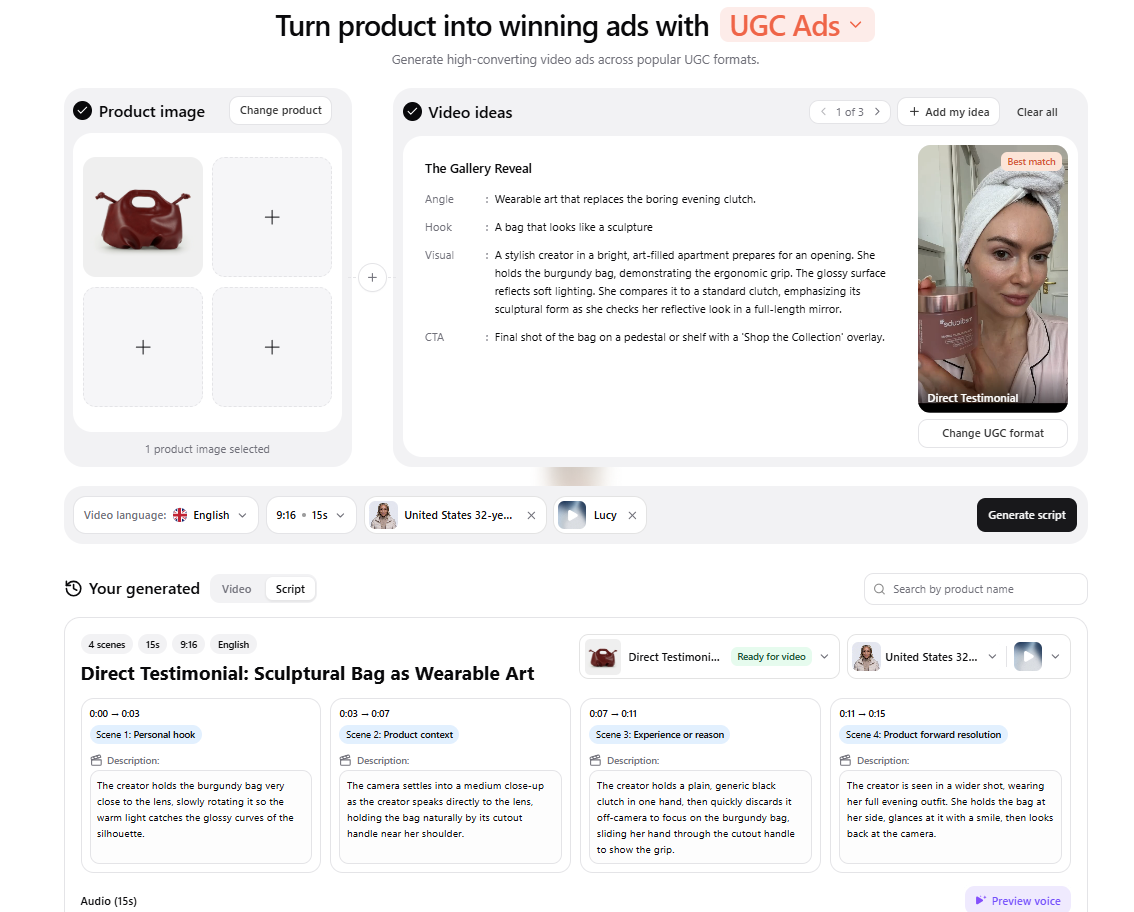
For video, AI UGC Ads turns that product into a 15-second, 9:16 UGC-style ad. You pick a format, such as Direct Testimonial, POV Product Demo or Problem and Solution. AI suggests the hook, message and call to action, writes a scene-by-scene script, then renders it with an AI avatar and voice.
And the posting row from the autopilot table is covered too. Social Content lets you publish or schedule posts to Facebook, Instagram and TikTok from the creatives you made, with an exact date and time.
The trade: Promer AI doesn't make long narrated story videos, and you still approve every ad, since AI creatives can contain mistakes. If the job is paid social for your store, an AI advertisement generator built around your product is the closer fit. You can create your first ad free, no credit card required.
Vidgenie AI review verdict: Autopilot for drafts, not for your feed
Buy Vidgenie if you want about 30 narrated faceless videos a month for organic social and you'll check each one before it posts. Choose Creator over Starter if you want podcast ads or your own avatar.
Skip it if your ads need your real product on screen, or if you need posting built in.
Your next 30 minutes: claim the 200 free credits, set the calculator to the video you'd post, and make 3. If you'd happily post all 3 after a quick review, Starter is a fair bet. Pay monthly, and set that cancel reminder.
FAQ
Is Vidgenie AI free?
Vidgenie AI lets you start with up to 200 free credits and no credit card. At the calculator's default of 66 credits per one-minute video, that's about 3 videos. Use them on the exact settings you'd post with, so the test tells you what a paid month will look like.
How much does Vidgenie AI cost?
Vidgenie AI costs $29, $59 or $99 a month for Starter, Creator and Pro. Those plans include 2,000, 5,000 and 10,000 credits, or about 30, 75 and 151 default one-minute videos.
Extra credits cost $0.010 to $0.012 each. Annual billing gives you 2 months free.
How many credits does a Vidgenie video use?
A default 1-minute Vidgenie video uses 66 credits, according to its credit calculator. Longer 8-second scenes cut that to 45, Premium voice raises it to 119, and motion clips on 30% of scenes push it to 241. Set the calculator to the video you'll post before choosing a plan.
Can Vidgenie AI post videos to TikTok and YouTube for me?
No Vidgenie AI plan includes scheduling or auto-posting, so plan to post the videos yourself. Vidgenie makes the finished files. Batch them on one day, review them, then load the week into TikTok, Meta Business Suite or the scheduler you already use.
Does Vidgenie AI offer refunds?
No, Vidgenie AI's terms say all subscription fees are non-refundable, whatever the reason. Plans renew automatically unless you cancel at least 24 hours before the period ends. Cancelling stops the next charge, and your plan keeps working until the paid period runs out.
Can you use Vidgenie AI videos in ads?
Yes, every Vidgenie AI paid plan includes a commercial license for the videos you make. The terms still make you responsible for reviewing what the AI generates. Check every claim about your product before a video goes into paid social.
What do Vidgenie AI reviews say?
Most Vidgenie AI reviews praise how easy it is to make story videos. The 12 testimonials on Vidgenie's homepage all come from creators making story content. Vidgenie pays affiliates 20% of referred sales for life, so look for a disclosure line on any review you read.
What is a good Vidgenie AI alternative for ecommerce ads?
For product ads built from your product page, Promer AI is the closer fit. It starts from a product URL and makes UGC-style video ads, with Social Content for scheduling posts.
Reference Sources
- Vidgenie.ai. (n.d.). AI-Powered Videos for Businesses and Creators. https://vidgenie.ai/
- Vidgenie.ai. (n.d.). Plans for Creators and Businesses of all sizes. https://vidgenie.ai/pricing