Magic Hour AI Reviews: Is It Worth It for Product UGC Ads?
Category
Blogs
Date
Authored by
Promer Team
Summary
Magic Hour AI reviews, tested: a 5-second handbag UGC ad cost 290 credits, the bag held its shape until I asked it to turn. Prompts and costs inside.
If you sell physical products, you already know the UGC math. One creator video costs you a fee, a sample, a brief and a two-week wait. Then the ad fatigues in a month, and you need five more.
That's the promise of AI UGC tools like Magic Hour: upload a product photo, pick an AI actor, and get a "creator" holding your product by tonight. Most Magic Hour AI reviews stop there, at the features.
The catch nobody puts on the landing page: AI is great at inventing the person and much worse at keeping your product exactly as it is. And a buyer who sees one bag in your ad and a slightly different bag on your product page has a reason to leave.
Magic Hour is worth using for product UGC test clips when your product looks good from the front and the action stays simple. It is not the tool for ads where your product has to be opened, worn or turned on camera.
This one is about whether it holds up for a store: I ran a real product through it (a sculpted leather handbag).
Below you'll find what it costs per ad, the prompts that keep your product intact, and the rights traps to avoid.
Want the prompts? Jump to the templates. Want the price? Go to the pricing section.
Key takeaways
A 5-second product UGC clip cost 290 credits: 50 for the opening shot with the product, 240 for the video on the LTX-2.5 model.
The bag's shape, handle and color held well. The knotted strap details softened, and a "turn the bag" prompt warped it.
Free accounts get clips up to 5 seconds, a watermark and LTX-2.5 only. Kling 3.0 and Veo 3.1 need a paid plan.
Two short test clips can pass the 400-credit refund line, so do your testing on free credits before you pay.
The lip sync voice library is celebrity voices. For ads, use your own recording or a voice you have rights to.
What Magic Hour does for a store?
Magic Hour is a browser suite of 100+ AI video, image and audio tools, started in 2023 by David Hu and Runbo Li. For ads, 4 tools matter, and each saves you a different shoot:
Magic Hour tool
What it does
The shoot it saves you
AI UGC Ads
An AI actor holds your product and talks to camera
Hiring a creator for a first test
Lip Sync
Makes the speaker in a clip say new audio
Reshooting for a new hook, offer or language
Face Swap Video
Puts a different face on footage you already have
Recasting a winning ad
Talking Photo
Animates a still photo to speak
A quick talking head from one image
If you have a product but no footage yet, AI UGC Ads is where you start. If you already have a creator clip that sells, skip ahead to the lip sync and face swap route.
How to make a product UGC ad in Magic Hour, and the step that decides if it works?
The flow is four steps and takes about five minutes. One of them matters far more than the rest, and it's the one most people rush.
Step 1: Upload your product and pick an actor
Open AI UGC Ads and use the two upload boxes: Upload Actor and Upload Product. Use your cleanest product photo, the one on a plain background that you'd put on your product page. For the actor, pick from 90+ stock AI actors, or upload your own creator's photo if you have their permission.
Pick an actor who looks like your buyer, not the most "influencer" face in the library. For a handbag aimed at 25 to 35 year old women, I'd skip the gym-selfie looks and go for someone who'd plausibly own the bag.
Step 2: Get the opening shot right before anything else
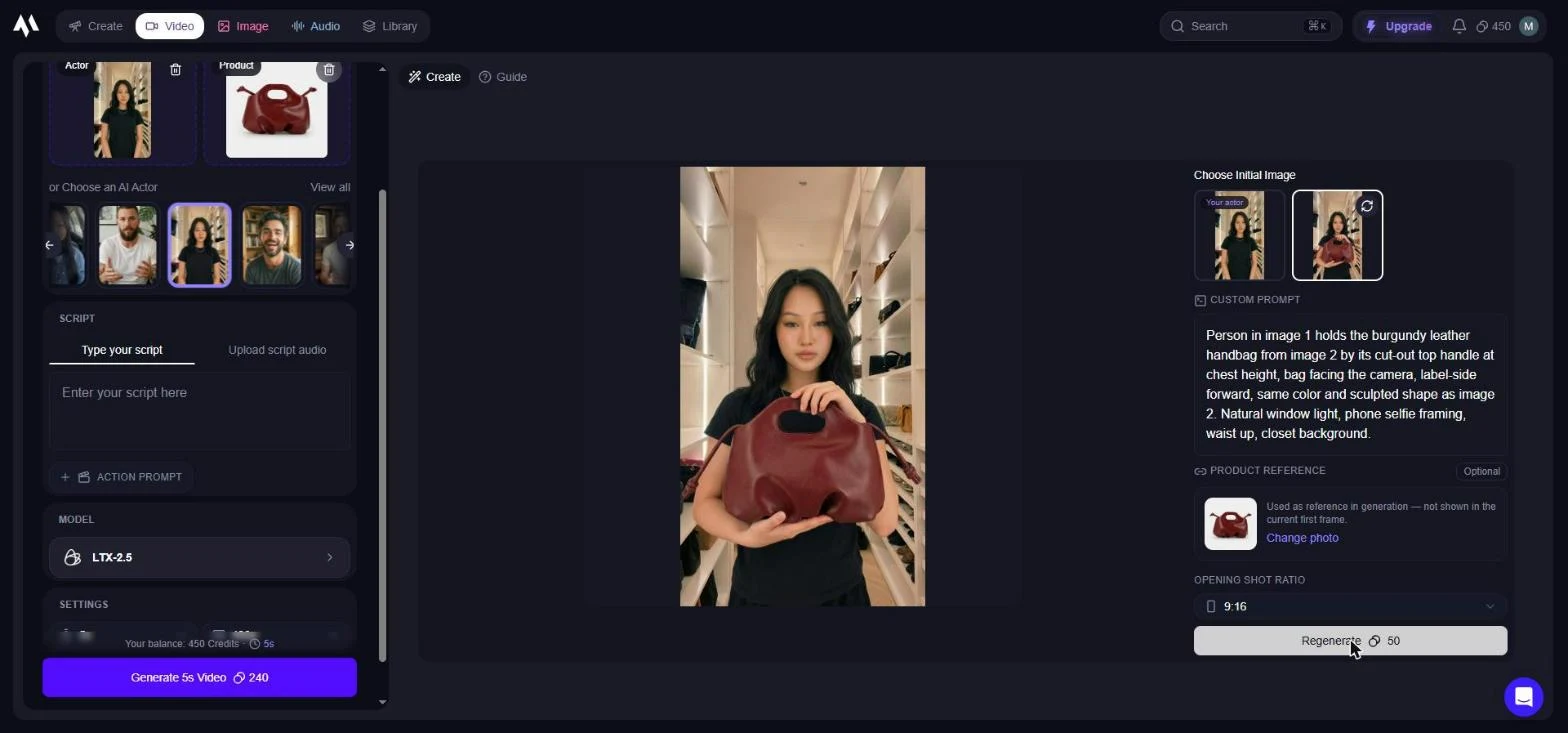
This is the step that decides whether the ad works. Once you add a product, Magic Hour first generates an opening frame of the actor holding it (50 credits), and the whole video is built from that frame. If the product is wrong here, it will be wrong for every second after.
Magic Hour pre-fills a prompt: "Person in image 1 holding the product in image 2 in a UGC ad". Don't settle for it. Rewrite it to name what makes your product yours, how it's held and where the scene is (Template 1 below does this for you).
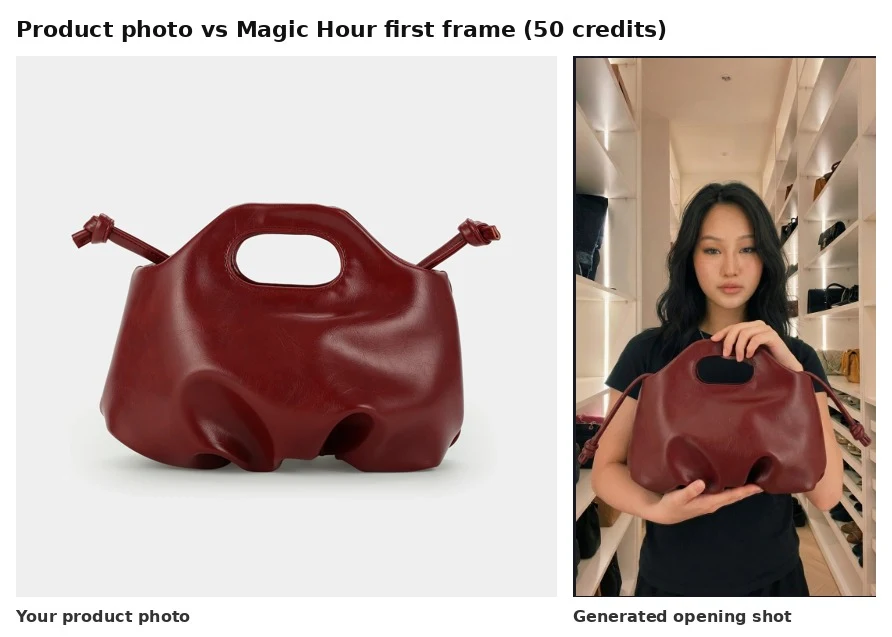
With a detailed prompt, my handbag came back with the cut-out handle, the knotted straps and the dimpled base all intact, in about 20 seconds. The color drifted slightly browner.
My rule: put the frame next to your product photo, and if anything is off, regenerate here for 50 credits. It's much cheaper than finding the problem after a 240-credit video.
Step 3: Write a short script and a small action
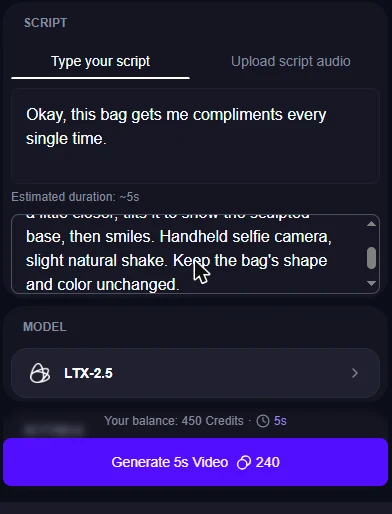
Two boxes sit under the actor: the script (what the actor says) and an optional action prompt (what happens on screen). Magic Hour estimates the clip length from your script, so a 9-word line comes out at about 5 seconds, the most a free account allows.
Keep both short. One hook line, one simple action. You're making a scroll-stopper to test an angle, not a 30-second story.
Step 4: Check every frame before it goes anywhere
A 5-second clip renders in about a minute. Don't judge it at full speed. Scrub through it frame by frame, especially every moment the product moves.
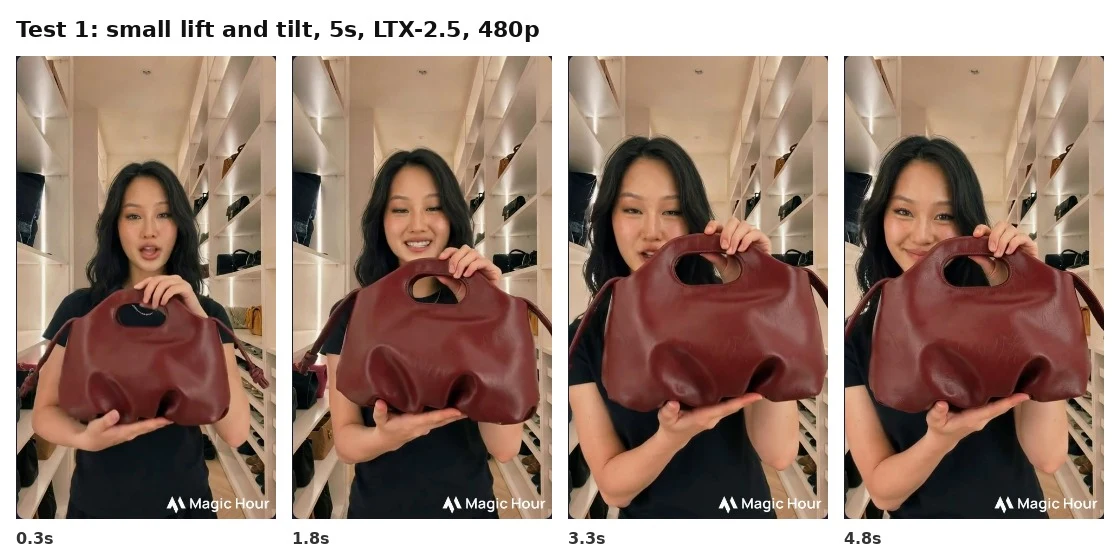
With a small action ("lift the bag a little closer, tilt it, smile"), the result was a usable first draft: natural selfie framing, a believable smile, and a bag that stayed recognizably the same bag.
The one loss was detail. The knots on the straps faded into plain straps after the first second. If a small detail is your selling point, check it closely.
Two things to know on a free account: the output was 478 by 856 pixels at the default 480p, with a Magic Hour watermark. Fine for judging the idea, not for running the ad.
The one prompt mistake that breaks your product
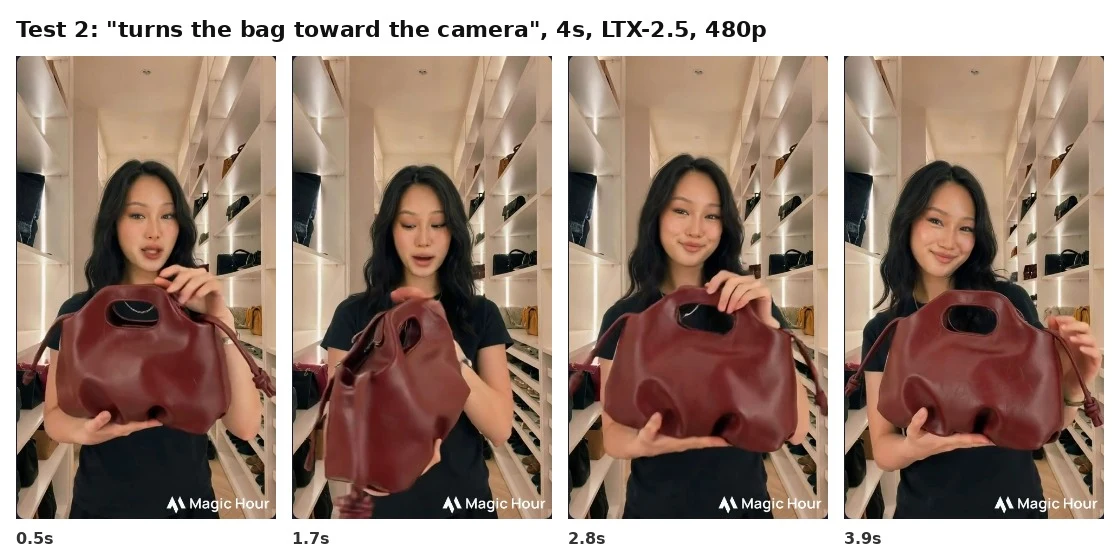
Here's where most AI UGC ads go wrong: asking the actor to do too much with the product. I reused the same opening shot and asked for one extra move, "she turns the bag toward the camera and runs her fingers along the handle".
At 1.7 seconds the bag turned into a different bag: taller, slouchier, no sculpted base.
A second later it snapped back. At scroll speed you might miss it. Your buyer comparing it to the product page won't.
The reason is simple: the model only knows the side of your product you showed it. Ask it to rotate, open or flip the product, and it has to invent the rest. If you need the back or the inside, film a 2-second close-up on your phone and cut it in after the AI clip.
Magic Hour prompt templates for product UGC ads
Copy these, swap the brackets for your product, and you'll skip most of the trial and error (and the credits that go with it).
Template 1: The opening shot prompt
This one decides whether your product looks right, so name what makes it yours.
Person in image 1 holds the [color] [material] [product type] from image 2 by its [handle / cap / grip] at [chest height / beside face], [product] facing the camera, same color and shape as image 2. [Natural window light], phone selfie framing, waist up, [setting that fits your buyer: closet, kitchen counter, bathroom shelf].
Name 2 or 3 features. "Cut-out top handle", "pump cap", "matte black lid". These are what the model tends to lose first.
Say how it's held. Hands placed on a handle or base keep the product steady through the video.
Pick a setting your buyer lives in. A closet for a bag, a bathroom shelf for skincare. It does the "who is this for" work for free.
Template 2: The action prompt
Keep the motion small. One action per clip.
Talking to her phone camera, she [lifts the product slightly closer / taps the lid / points at the label], then smiles. Handheld selfie camera, slight natural shake. Keep the [product]'s shape, color and [key detail] unchanged.
Safer actions
Risky actions
Lift it closer to the camera
Turn or rotate it
Tilt it slightly
Open it, unzip it, pour from it
Tap or point at one feature
Put it on, take it off, hand it over
Hold it still while talking
Two actions in one clip
If you need the back or the inside of your product, shoot it on your phone and cut it in after the AI clip. A 2-second real close-up does more for trust than any prompt.
Template 3: the script
Magic Hour times the clip from your script, and free accounts stop at 5 seconds. Plan about 8 to 10 words for 5 seconds.
Compliment hook: "Okay, this [product] gets me compliments every single time."
Problem hook: "If your [problem] keeps happening, look at this."
Curiosity hook: "This is the [product] everyone asks me about."
Offer line (for a lip sync swap later): "It's [X]% off this week only."
Keep the actor talking as a presenter, not a past customer. "I've used this for 3 months" from an AI actor is the kind of line the FTC's fake review rule targets (more on that in Check 2).
Magic Hour pricing: What a 15-second product ad costs?
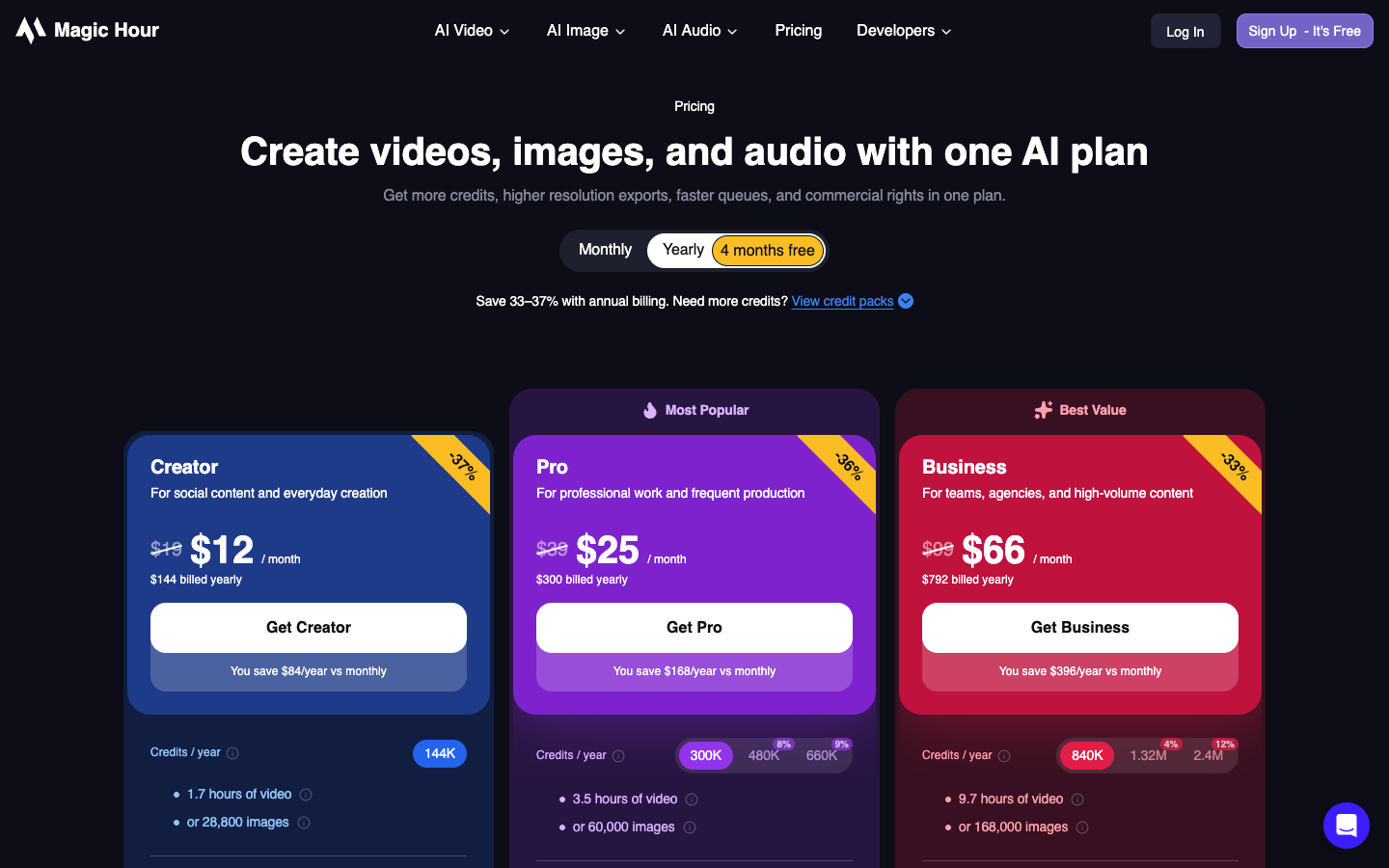
Magic Hour runs on credits, sold in 3 paid plans. Creator is $19 a month for 12,000 credits, Pro $39 for 25,000, and Business $99 for 70,000. Billed yearly, they drop to $12, $25 and $66 a month.
Plan
Monthly
Billed yearly
Credits a month
Face swap video, long edge
Free
$0
n/a
Starter credits plus daily credits
576 px
Creator
$19
$144 ($12/mo)
12,000
1024 px
Pro
$39
$300 ($25/mo)
25,000
1472 px
Business
$99
$792 ($66/mo)
70,000
4096 px
The model you pick changes the price 7x
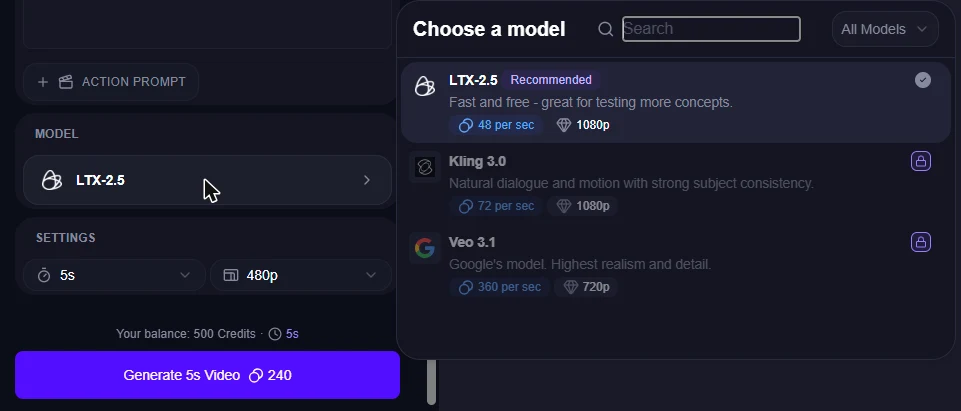
In AI UGC Ads, you pay per second of video, and the model sets the rate. On a free account, the picker shows 3 models:
Here's what one 15-second product ad costs on each, including the 50-credit opening shot, at the $19 Creator price:
Model
Credits per second
15-second ad, credits
15-second ad, cost on Creator
Ads per Creator month
LTX-2.5 (up to 1080p)
48
770
About $1.22
15
Kling 3.0 (up to 1080p)
72
1,130
About $1.79
10
Veo 3.1 (up to 720p)
360
5,450
About $8.63
2
That explains a number on Magic Hour's pricing page that looks scary: Creator's yearly credits buy "7 minutes" of the AI UGC Ad Generator. That matches the Veo 3.1 rate. On LTX-2.5, the same credits buy about 50 minutes.
And budget for redos. In my handbag test, one of two clips was clean. If your product has a complex shape, plan on 2 renders per usable ad and double the cost.
Lip sync and face swap cost less
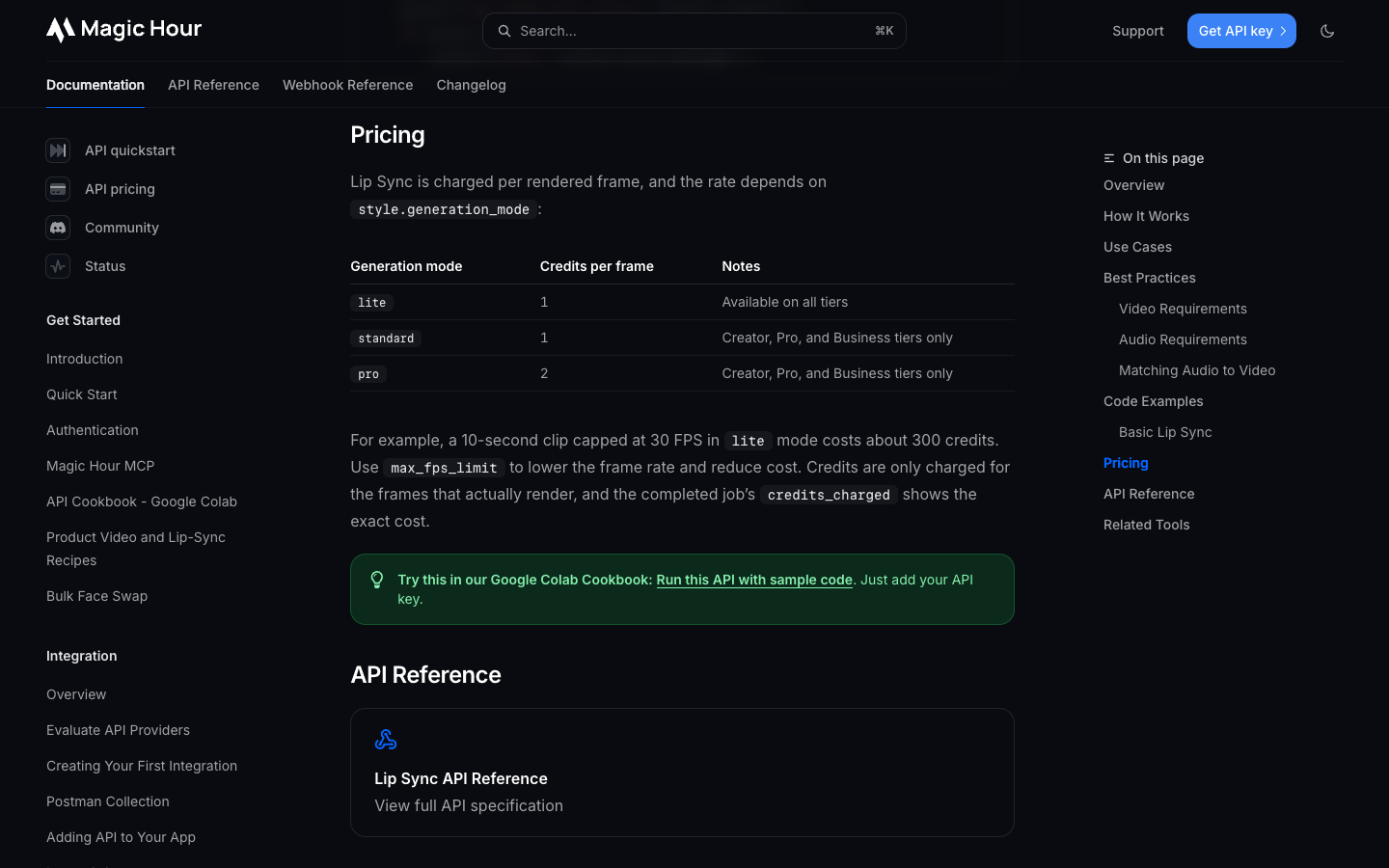
Editing a clip you already have is cheaper than making one. Lip sync costs 1 credit per frame in lite or standard mode and 2 in pro mode. When I opened Lip Sync on my 5-second clip, standard mode quoted 123 credits.
So a 15-second lip sync at 30 fps is about 450 credits, roughly $0.71 on Creator. Face swap video starts at 24 credits a second, about $0.57 for 15 seconds. That's the case for Magic Hour if you have footage: make one good clip, then change the line or the language for under a dollar.
Credits, refunds and the 400-credit line
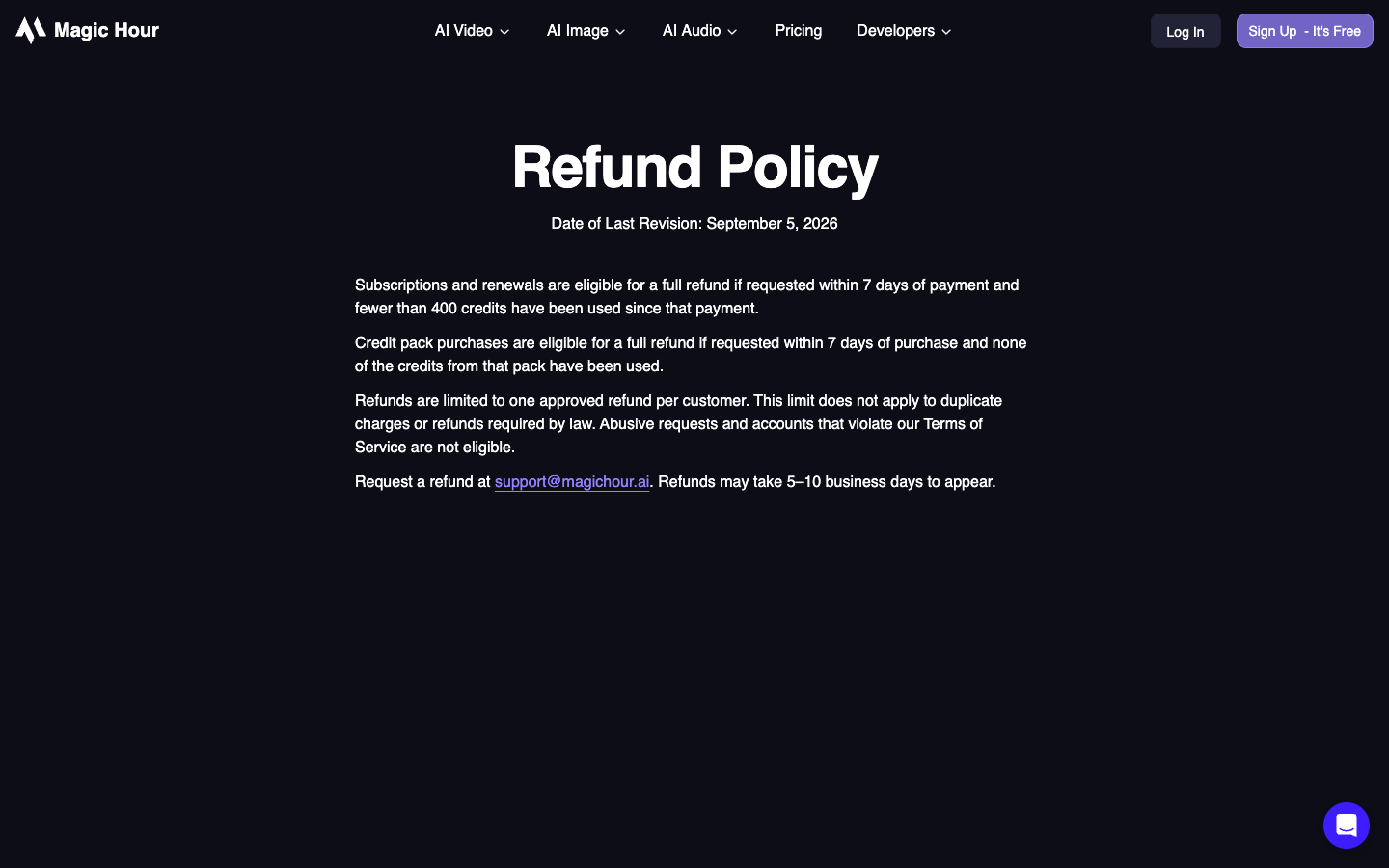
Magic Hour credits never expire, even after you cancel. The refund rule is the tight one: a full refund within 7 days of paying, only if you've used fewer than 400 credits, and only once per customer.
That line comes up fast. An opening shot plus a 5-second and a 4-second clip is already 482 credits. So test on a free account first (it comes with starter credits, and you can claim more daily), and pay only once you've seen your own product on screen.
Already have footage? The lip sync and face swap route
If you already have a creator clip that sells, Magic Hour can make more versions of it.
Lip Sync takes a video and an audio track. Your creator said "10% off this week" and the offer changed? Record the new line yourself and sync it.
Selling in Mexico? Sync a Spanish voiceover onto the same clip. On a free account, lip sync output is capped at 322 by 576 pixels, so judge quality on a paid plan.
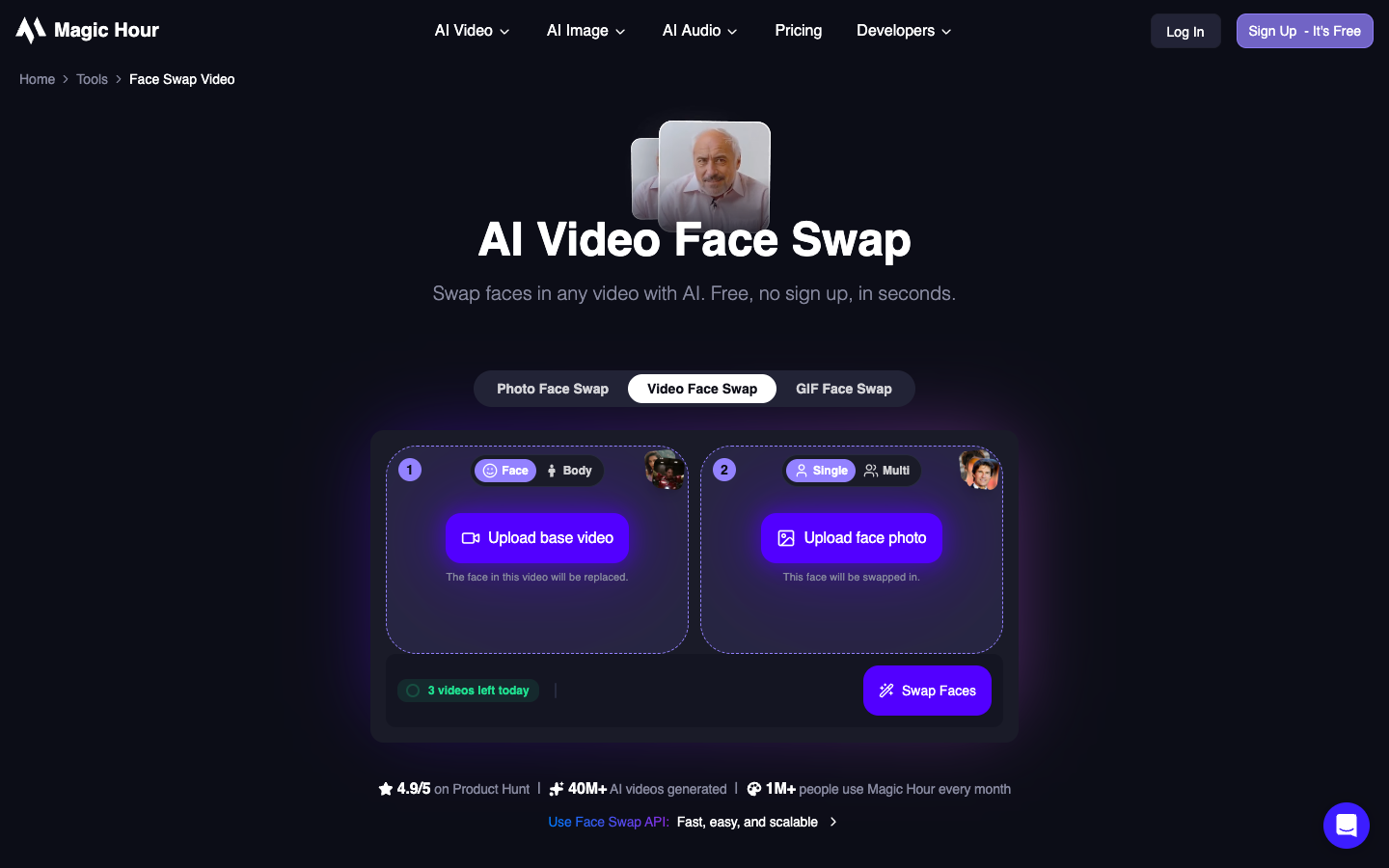
Face Swap Video puts a new face on your footage. Magic Hour gives you 3 free face swaps a day, no sign-up. Before you upload anyone's face, get a signed release that covers AI edits (see Check 2).
Check 1, the output: Will it hold up on a phone?
Before any Magic Hour clip goes into an ad set, run these checks. The first two come straight from my test.
Scrub frame by frame through any moment the product moves. That's where it warps.
Compare one frame side by side with your product photo: shape, color, logo, small details.
Watch at half speed for the mouth on p, b and m sounds.
Check hands and fingers on the product for extra or melting fingers.
Confirm the export size fits the placement, 9:16 for Reels and TikTok.
Read any product name or offer on screen against your store page.
Magic Hour AI face swap review: The resolution cap by plan
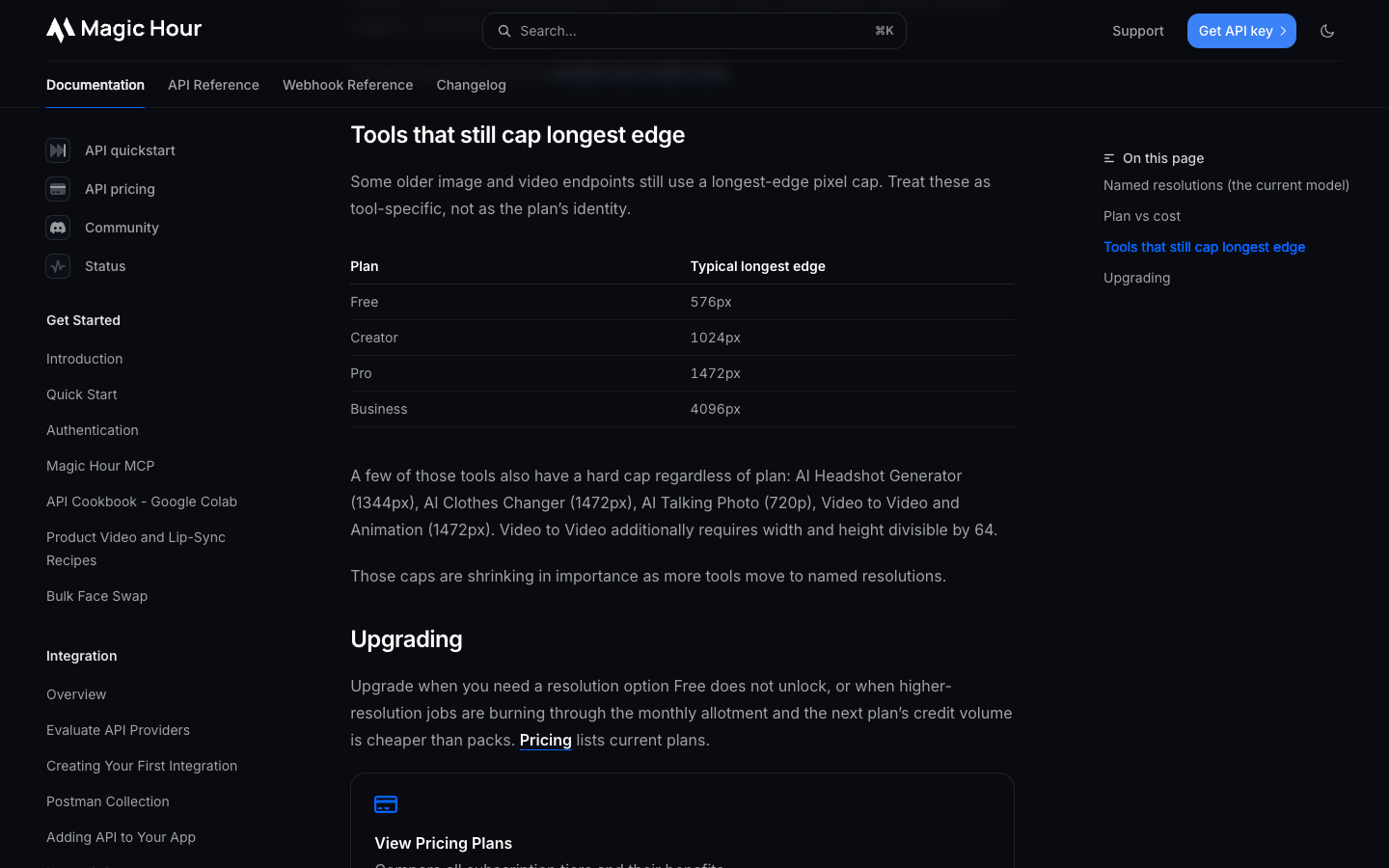
Face swap video exports at a maximum long edge of 576 pixels on Free, 1024 on Creator, 1472 on Pro and 4096 on Business.
A full vertical phone video is 1080 by 1920. Only Business clears that, so on Creator and Pro a swapped clip comes out softer than the footage you shot. Export one test and look at it on a phone before you build a batch.
Check 2, the rights: Whose face and voice can you use?
A paid Magic Hour plan lets you use what you make commercially. That covers Magic Hour's side.
The person whose face or voice is in the clip still has to agree, and Magic Hour's terms say getting that permission is your job. Nothing in the app asks for proof.
Magic Hour AI lip sync review: the voice library is celebrities
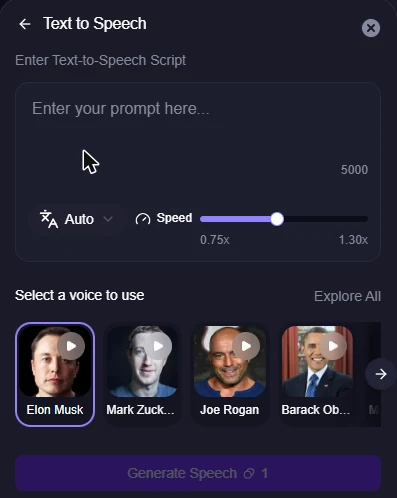
This is the trap I'd warn every merchant about. Open Text to Speech inside Lip Sync, and the default voice is Elon Musk.
The full library of preset voices was public figures: Donald Trump, Taylor Swift, Kim Kardashian, Barack Obama, Morgan Freeman and more. Filtering by Conversational or News/Host still showed only famous names.
The lip sync templates gallery is the same: press conferences and interviews with athletes, actors and politicians. Fun for memes. In a product ad, a famous voice or face implies an endorsement you don't have, and TikTok bars AI content that falsely shows public figures endorsing something.
So for ads, you have two safe options in Magic Hour: upload audio you recorded or licensed, or use Clone My Voice on your own voice. If you don't have either yet, don't fill the gap with a preset voice.
The release to keep for every face and voice
The person's name and the date they signed.
Where the clip can run: paid or organic, which platforms, which countries.
How long the permission lasts, and what happens to live ads when it ends.
Whether it covers AI changes: a swapped face, new lines via lip sync, a cloned voice.
Proof the person is 18 or older.
On data, Magic Hour's terms say it doesn't sell or train AI on your prompts, uploads or outputs.
The testimonial trap
Magic Hour's Lip Sync page suggests customer testimonials as a use case. The FTC's 2024 rule on fake reviews bans testimonials from people who don't exist, naming AI-generated fake reviews, and from people who never used the product. An AI actor saying "I've used this for 3 months" fits that description.
Script AI actors as presenters, never as past customers. This isn't legal advice; for US campaigns, run testimonial scripts past counsel.
Check 3, the platform: AI labels on TikTok and Meta
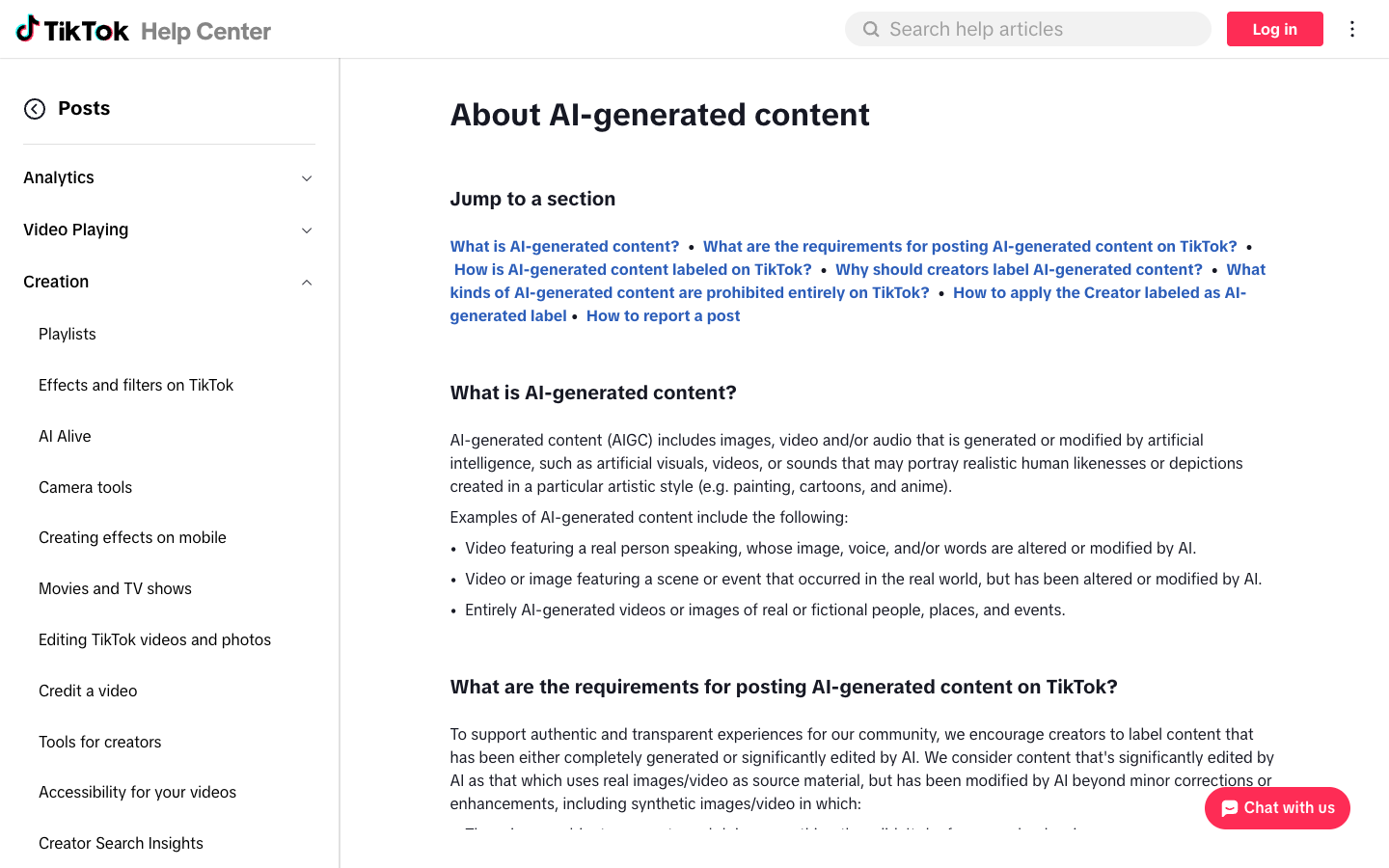
TikTok counts AI-generated people and AI-edited speech as content that needs a label. It can also add an "AI-generated" label on its own when a file carries C2PA content credentials, and once it does, you can't remove it.
The toggle sits under More options as "AI-generated content", and TikTok says it won't hurt distribution if the post follows its rules. Meta adds an "AI info" label when it detects AI signals or when you disclose AI, so check the disclosure options in Ads Manager before launch.
Magic Hour AI reviews: What users say on Trustpilot?
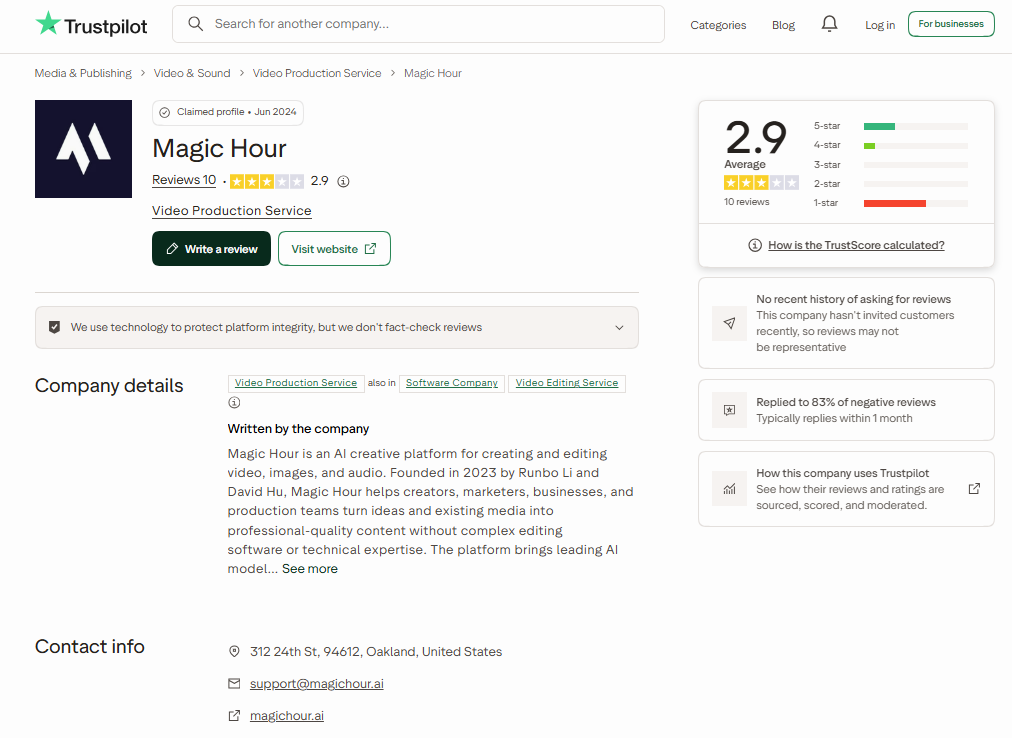
On Trustpilot, Magic Hour holds 2.9 out of 5 from only 10 reviews, with 60% at 1 star and 40% at 4 or 5 stars. Read it for patterns, not a verdict.
The happy side sounds like a store owner. One reviewer, writing in August 2026, says they've used Magic Hour for 3 months to run AI UGC content on TikTok and Instagram, and calls it cheaper than other providers.
The unhappy side is mostly about credits. A US user in June 2026 says his free daily credits stopped and his balance was wiped; Magic Hour replied that it had changed how daily credits work without updating its FAQ fast enough. Screenshot your balance after each purchase.
Magic Hour pros and cons for ecommerce ads
Where Magic Hour helps:
One product photo became a believable UGC opening shot for 50 credits.
A 5-second clip rendered in about a minute.
LTX-2.5 at 48 credits a second makes a 15-second ad about $1.22 on Creator.
Lip sync and face swap at under $1 per 15-second edit.
Credits never expire, even after you cancel.
Where it costs you:
Products warp when the prompt asks them to turn or move a lot.
Small details, like the knots on my bag's straps, fade.
The voice presets are celebrities, so plan your own audio.
The refund window closes at 400 credits, less than two short tests.
Free output is watermarked, capped at 5 seconds, and personal use only.
Who Magic Hour fits, and who should skip it?
Buy it if:
You want cheap UGC-style test clips of a product with a clear front view, like a bag, a bottle or a box.
You have creator footage with releases that cover AI edits, and want new hooks, offers or languages.
You'll record or license your own voiceovers.
Skip it, or wait, if:
Your ad needs the product opened, worn, poured or rotated on camera.
Your plan depends on a famous face or voice.
You need full 1080 by 1920 face swaps and $99 a month is out of budget.
The lesson: The product is the part you can't fake
Magic Hour made the actor, the closet, the lighting and the smile for 290 credits. The only thing it struggled with was the one thing a store can't let it get wrong: the product.
That's true of every AI video tool. Spend your effort on the product side: a clean photo, a prompt that names its features, small motions, and a frame-by-frame check. The actor is the easy part.
Magic Hour alternatives for ecommerce video ads
Each fits a different job.
CapCut, the free editing baseline
If you film your own UGC and only need to cut, caption and resize, try CapCut first. Its online editor is free to start, includes auto captions and text to speech, and exports HD video without a watermark.
HeyGen, avatars that come pre-cleared
HeyGen casts from a library of 1,100+ stock avatars cleared for commercial use, and a digital twin of a real person needs that person's verified consent. Paid plans start at $29 a month.
Promer AI, UGC ads built from your product
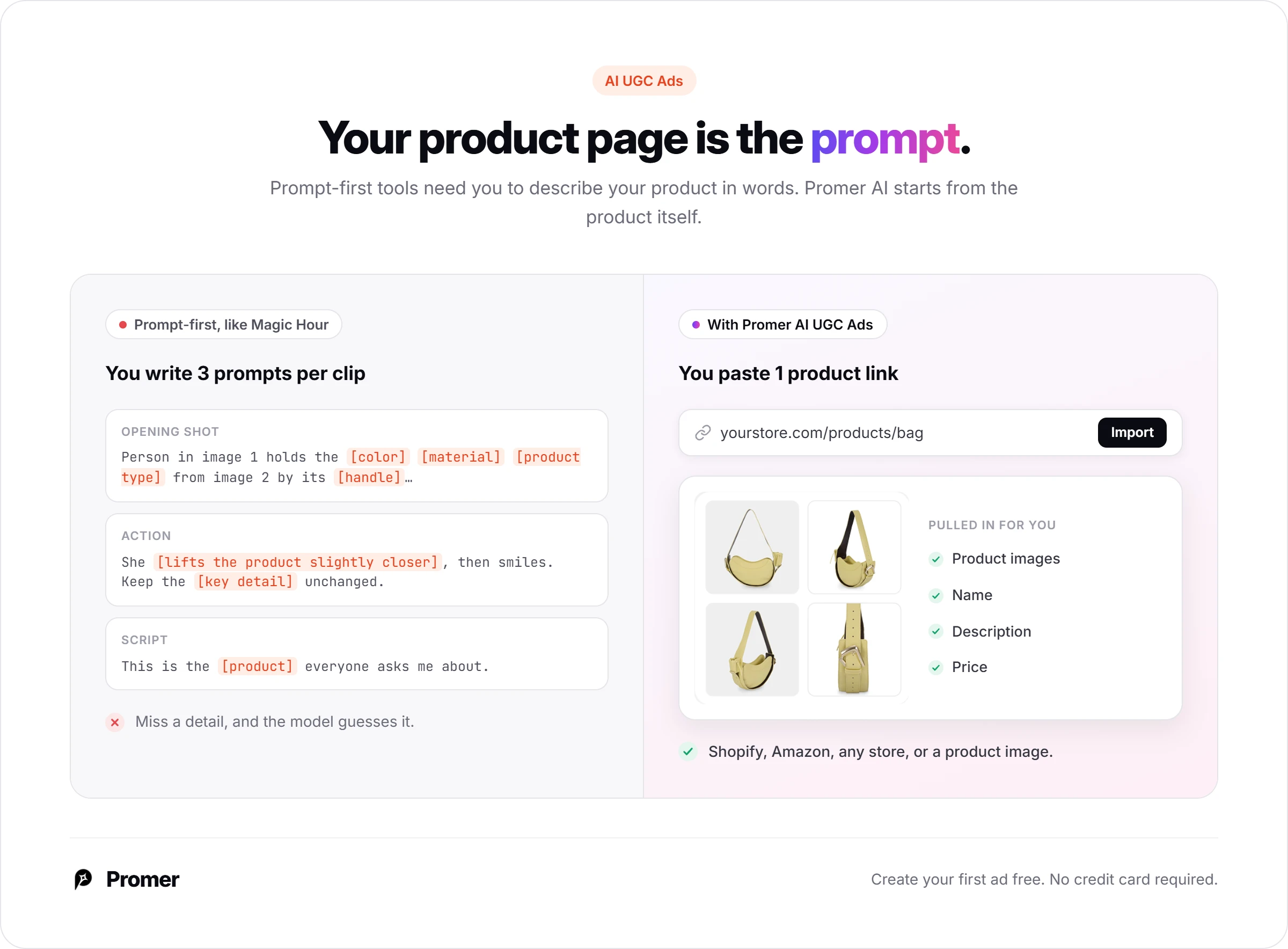
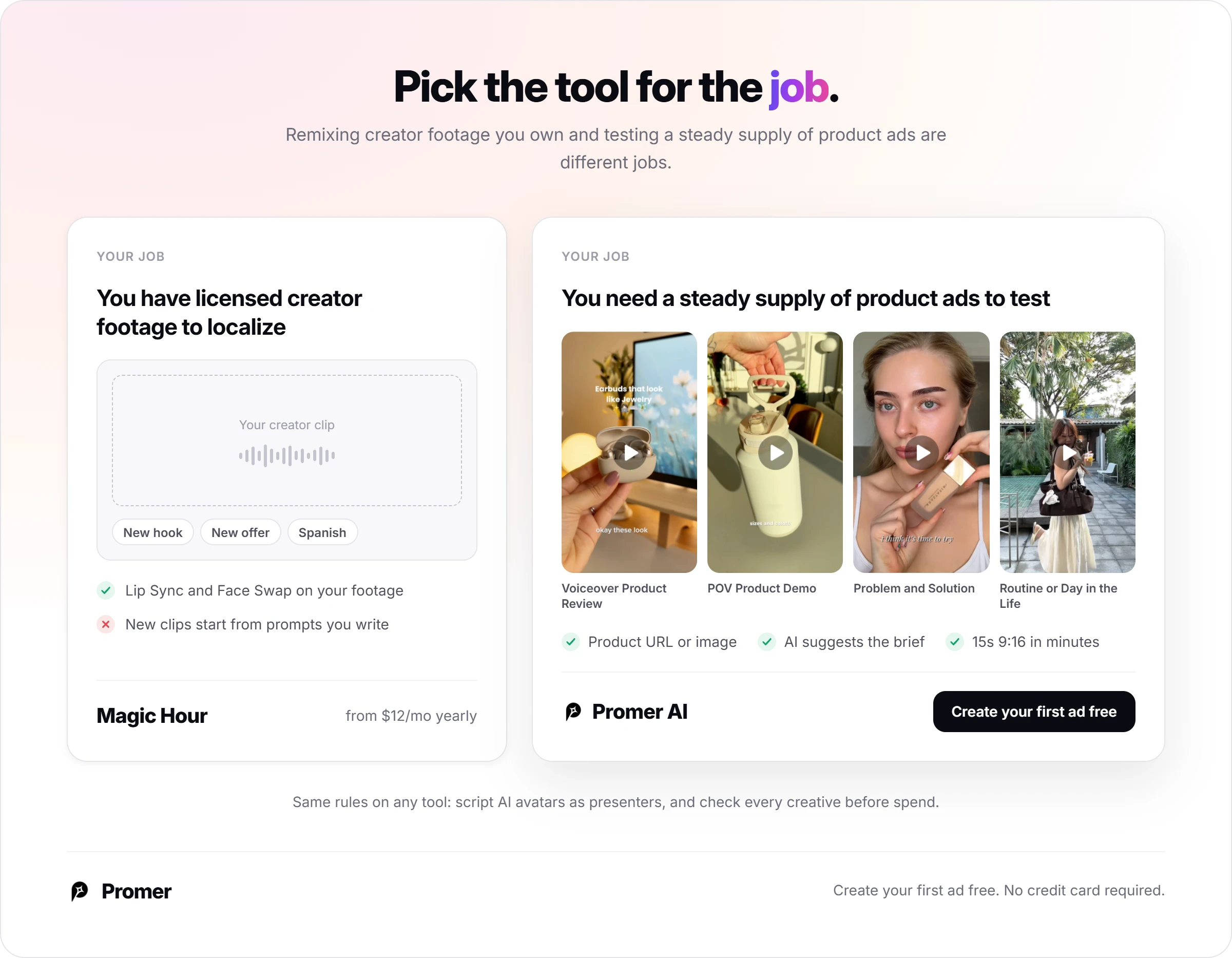
Promer AI is an AI ad creative performance platform for ecommerce advertisers. Instead of writing the first-frame prompt yourself, you paste a product URL or upload a product image, and it pulls in the image, name, description and price.
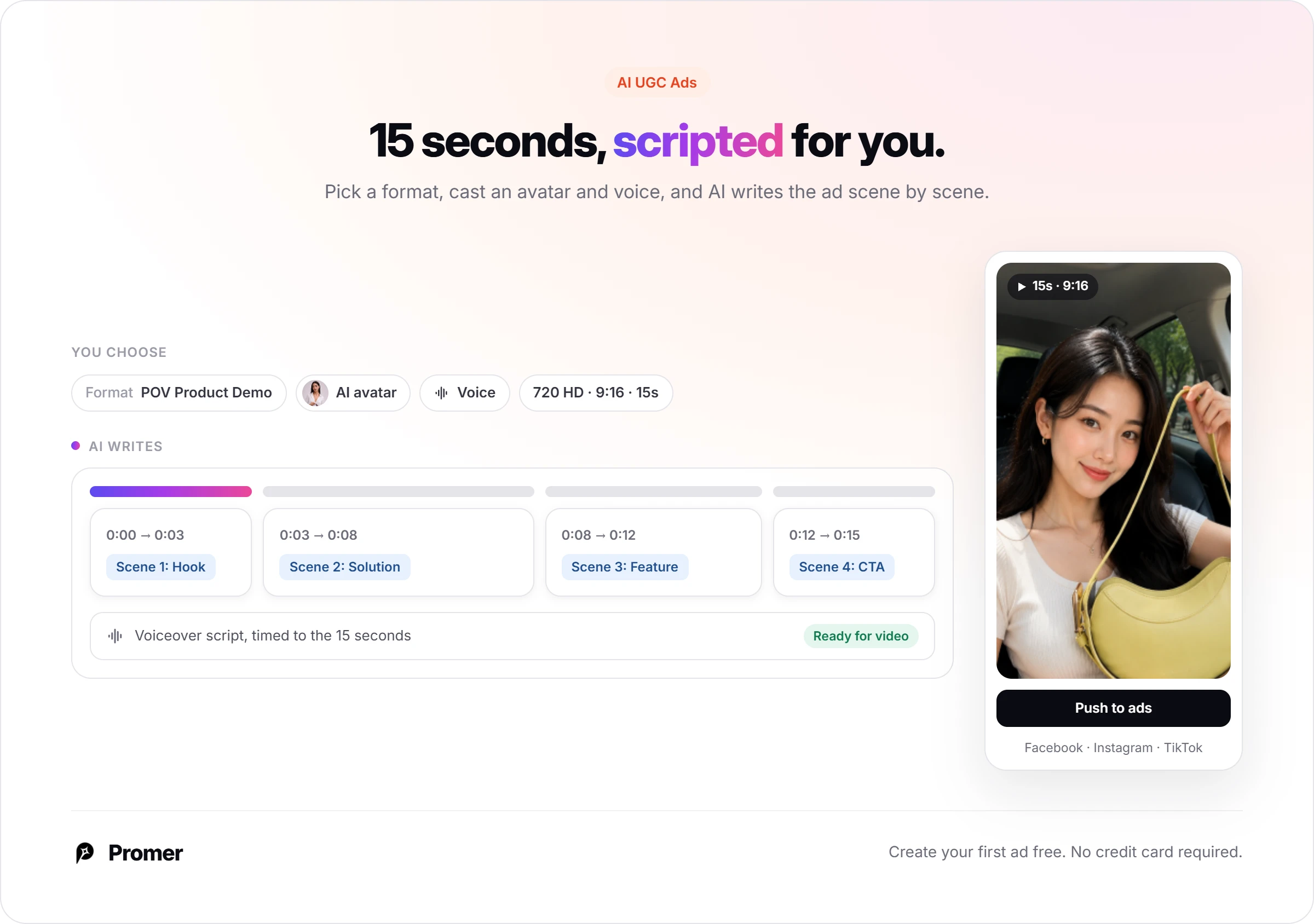
AI UGC Ads then asks you to pick a UGC format, such as POV Product Demo or Problem and Solution, and AI suggests the hook, message, visual and call to action.
You cast an AI avatar and voice from filterable libraries, AI writes a scene-by-scene script, and you get a 15-second 9:16 ad in 720 HD in a few minutes, ready to download or push to Facebook, Instagram or TikTok.
The same rules apply: script the avatar as a presenter, and check every creative before spend goes behind it, since AI output can contain mistakes. If you have licensed creator footage to localize, Magic Hour does a job Promer AI doesn't.
If the job is a steady supply of product ads to test, an AI ad generator built around your product is the closer fit. You can create your first ad free, no credit card required.
Magic Hour AI review verdict: good for product clips with small moves
Buy Magic Hour if you want low-cost UGC test clips of a product that looks good from the front, or more versions of creator footage you own. Skip it if your ad needs the product handled in complex ways, or if your plan leans on a famous voice.
Your next 30 minutes: open a free account, claim the daily credits, upload your best product photo, and generate one opening shot with Template 1. If the product looks right, spend 240 credits on a 5-second clip with Template 2. Check it frame by frame before you think about a paid plan.
FAQ
What do Magic Hour AI reviews say?
Magic Hour AI reviews on Trustpilot average 2.9 out of 5 from 10 reviews, as of October 2026. Positive reviews praise the price for AI UGC content; negative ones are mostly about credits. In our handbag test, one product photo became a usable 5-second UGC clip for 290 credits.
Can Magic Hour make a UGC ad from a product photo?
Yes, Magic Hour's AI UGC Ads takes a product photo and an AI actor and generates an opening shot of the actor holding the product. The opening shot costs 50 credits and a 5-second LTX-2.5 video 240 more. Keep the action small: asking the actor to turn the product can warp it.
How much does Magic Hour cost?
Magic Hour costs $19, $39 or $99 a month for Creator, Pro and Business, or $12, $25 and $66 a month billed yearly. Those plans include 12,000, 25,000 and 70,000 credits a month. A 15-second product ad costs about 770 credits on LTX-2.5 and about 5,450 on Veo 3.1.
Is Magic Hour free?
Yes, Magic Hour has a free account with starter credits and claimable daily credits. A new account showed 400 credits, plus 100 more from the daily claim. Free AI UGC clips stop at 5 seconds, carry a watermark, use LTX-2.5 only, and are for personal use, not ads.
Can I use Magic Hour videos in ads?
Yes, Magic Hour allows commercial use of videos made on a paid plan or with a credit pack. You're responsible for permission from anyone whose face or voice appears, and the preset voices are celebrities, so use your own audio. TikTok asks you to label realistic AI content.
How much does Magic Hour lip sync cost?
Magic Hour lip sync costs 1 credit per frame in lite or standard mode and 2 in pro mode. A 5-second clip costs about 123 credits in standard mode. A 15-second clip at 30 fps is about 450 credits, roughly $0.71 on the $19 Creator plan.
Can you get a refund from Magic Hour?
Magic Hour refunds a subscription within 7 days of payment only if you've used fewer than 400 credits, and only once per customer. Our two short test clips used 482 credits, so test on free credits before you pay.
Reference Sources
Federal Trade Commission. (2024). Federal Trade Commission announces final rule banning fake reviews and testimonials. https://www.ftc.gov/news-events/news/press-releases/2024/08/federal-trade-commission-announces-final-rule-banning-fake-reviews-testimonials
Magic Hour. (n.d.). About Magic Hour. https://magichour.ai/about