Media.io Review: We Tested Its Free Tools on an Ecom Ad
Category
Blogs
Date
Authored by
Huy Tran Quoc
Summary
Media.io review: we tested its free tools on an ecom ad. Images are free to draft, but one 5-second clip cost 60 credits and exports carry a watermark.
Free AI tools feel free until the ad you built carries a watermark, or the clip you need costs more credits than you have. This Media.io review shows exactly where that line sits, before you spend an evening on an ad.
I ran Media.io's free image generator with a real product prompt, then priced a video clip on a free account. Two findings will save you time: free images come back watermarked, and one 5-second clip on the default model asked for 60 credits when the account held 5.
My take: use Media.io free for drafts, captions, and voiceover, and budget $7.99 a month for Standard before any ad goes live.
You also get my prompt structure, the free-tier wall in one table, and the commercial-use clause to read before paid ads.
Key takeaways
Images are the free part. Signed out, Media.io gave 2 free image runs of 4 images each. Every image carried a "Media.io AI Gen" watermark.
Video is where the credits go. One 5-second, 480p clip on the default model asked for 60 credits. My free account held 5.
The real entry price is Standard. $7.99 a month billed $95.88 a year buys 200 credits and 1080p exports without a watermark.
Download the same day. Creations are stored for only 7 days on free, and uploads are deleted within 7 days with no backup.
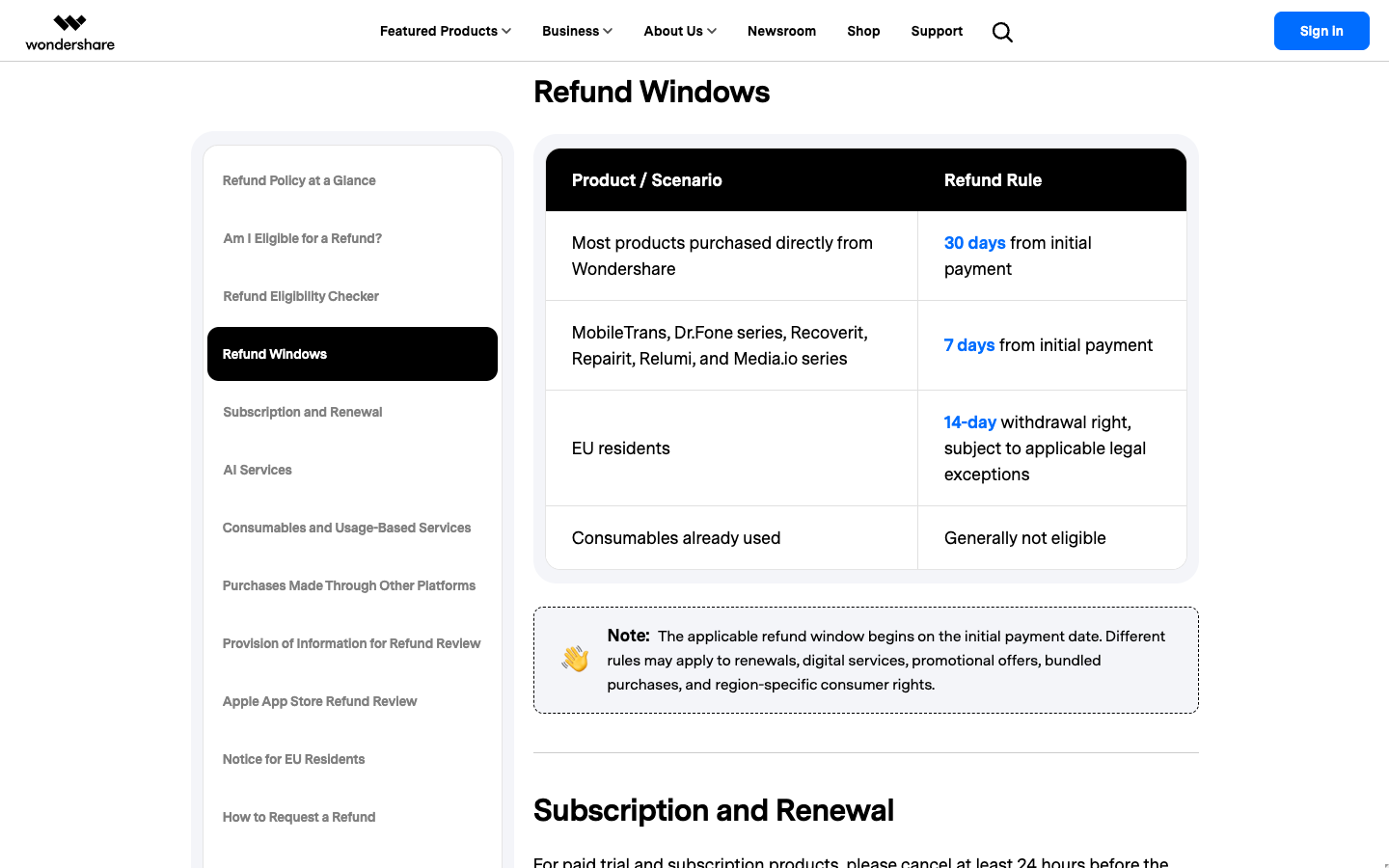
Refunds close fast. Wondershare gives Media.io purchases 7 days, and used credits are generally non-refundable.
Why you can trust this Media.io review
I tested Media.io the way a store owner on a budget would: signed out first, then on a free account, with no paid plan. Every screenshot below is from that run on October 7, 2026, including the outputs that went wrong.
Nobody at Media.io reviewed this before it went live. Where a number is Media.io's own claim, such as its rating widget or "Commercial-Ready" label, it is marked as a vendor claim.
What Media.io is in 2026: A browser toolkit that grew AI studios
Media.io is a browser media toolkit, with a converter, compressor, subtitles, text to speech, and an editor, plus a newer layer of AI image, video, and ad generation. Wondershare's refund policy lists it among Wondershare's product series.
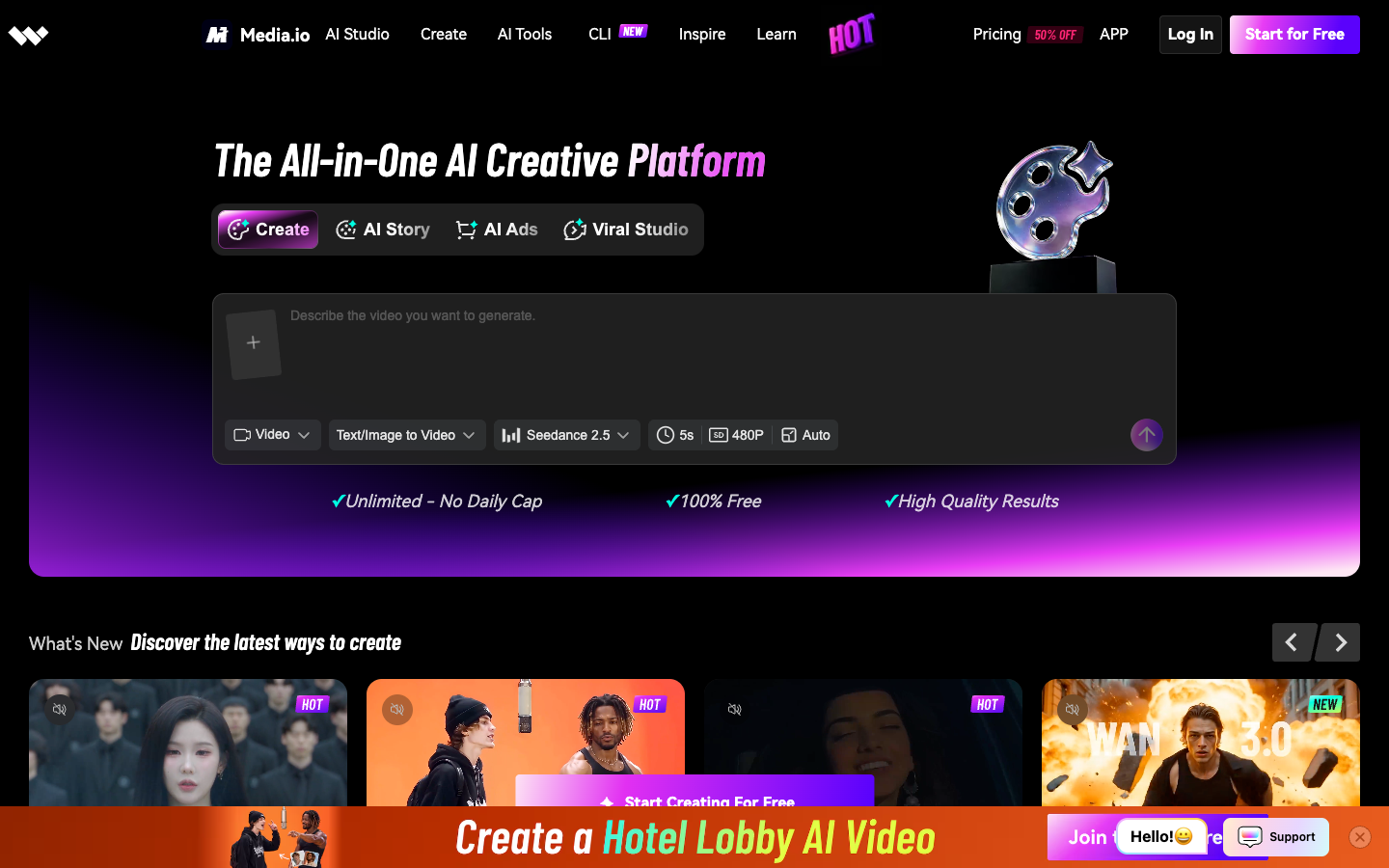
Media.io calls itself "The All-in-One AI Creative Platform," and its plan cards list "30+ AI models." Its terms name AI Intelligent Technology Co., Limited as the contracting company, and the refund rules come from Wondershare's policy.
The split matters for your budget. The utility pages carry loose free limits, and the generation tools carry strict ones.
The homepage groups generation into 3 AI studios:
AI Story: "Character-driven story creation."
Viral Studio: "Trend-ready video and image creation."
AI Ad Generator: "Product ads and conversion creatives."
Media.io AI Ads studio: 8 image modes and 6 video formats
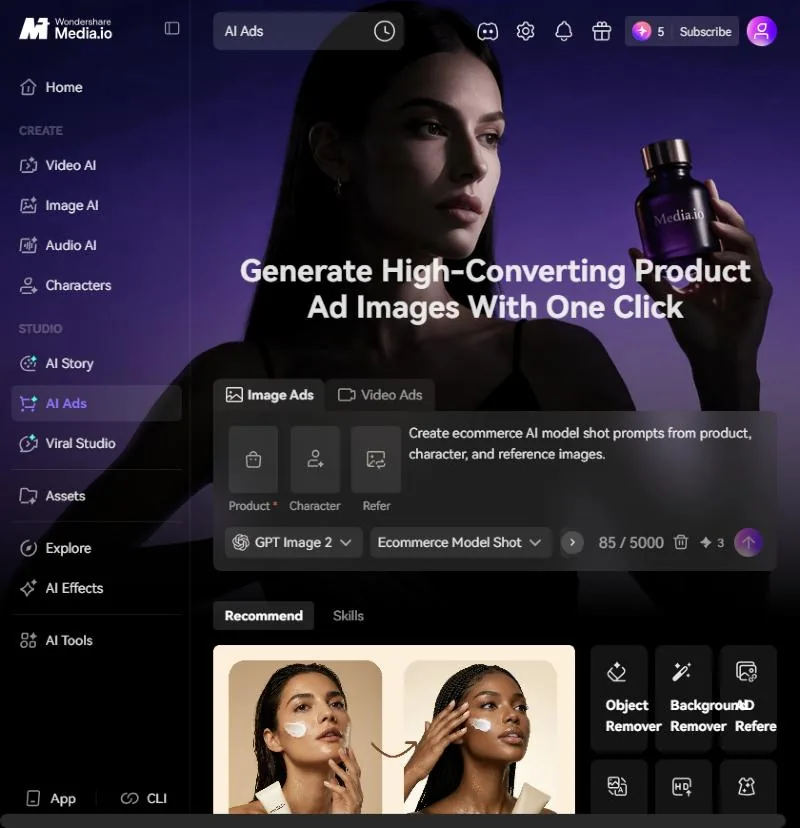
AI Ads is the studio a product seller opens first. You add a product image (required), an optional character, and an optional reference ad, then pick a mode. On a free account, one image ad on the default GPT Image 2 model costs 3 credits.
The image modes map to the shots most stores already brief a photographer for:
Image Ads mode
The job it does for your store
Ecommerce Model Shot
Puts your product with an AI model, from product, character, and reference images
Try-On Photo
Turns fashion product and model images into a virtual try-on
Product Shot
Builds product photos from product details and references
Product Beautifier
Retouches and cleans up an existing product photo
Lifestyle Scene
Places the product in a lifestyle setting
Flat Lay
Lays out product sets as a flat lay, bundle, or poster
AD Reference
Recreates an ecommerce visual from a reference ad
Image Translator
Translates text on a product image for another market
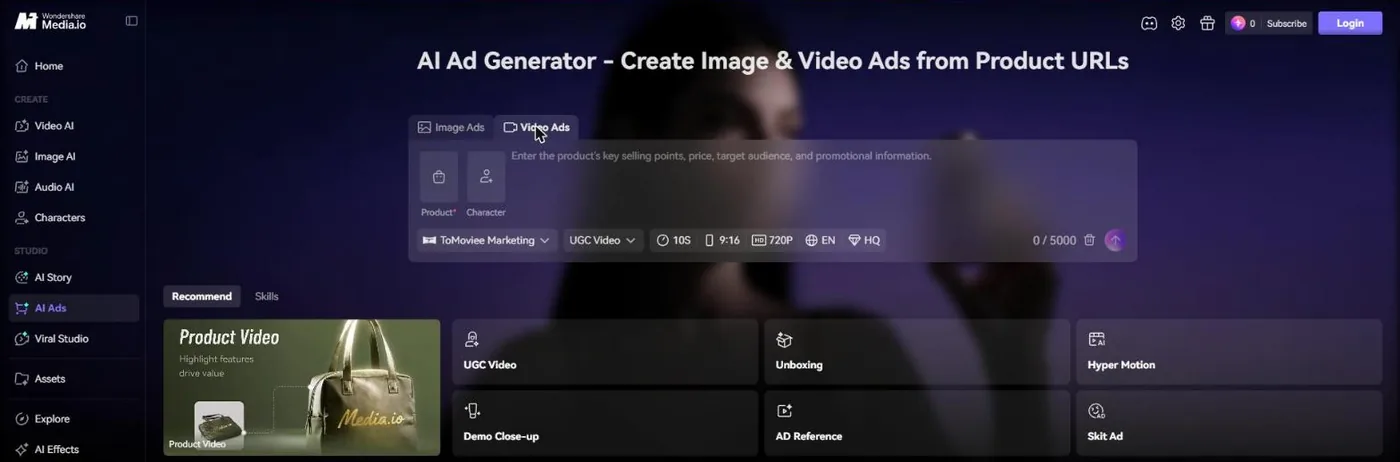
The Video Ads tab defaults to the ToMoviee Marketing model at 10 seconds, 9:16, 720p, in English, with 6 formats: UGC Video, Unboxing, Hyper Motion, Demo Close-up, AD Reference, and Skit Ad. The product picker also has a "Paste your product link" field, so you can start from a store URL instead of an upload.
That means you can brief 8 image shot types and 6 video formats from one screen. Limit: every run spends credits, so on a free account you get about 1 image ad before the balance runs out.
Media.io free tools: Compressor, subtitles, and text to speech
Media.io's utility tools carry its friendliest free terms. The video compressor handles MP4, WEBM, MOV, AVI, MKV, and WMV, promises "No Watermark & No File Limits," and compresses "without quantity limit after signing up."
The auto subtitle generator claims up to 90 languages with an SRT download, and lets you edit font, color, size, and border. That matters when your ad plays muted in a Meta feed.
The text to speech page takes "up to 1,500 words at a time," exports MP3, and offers "Add to Timeline." A 15-second ad script needs about 40 of those words.
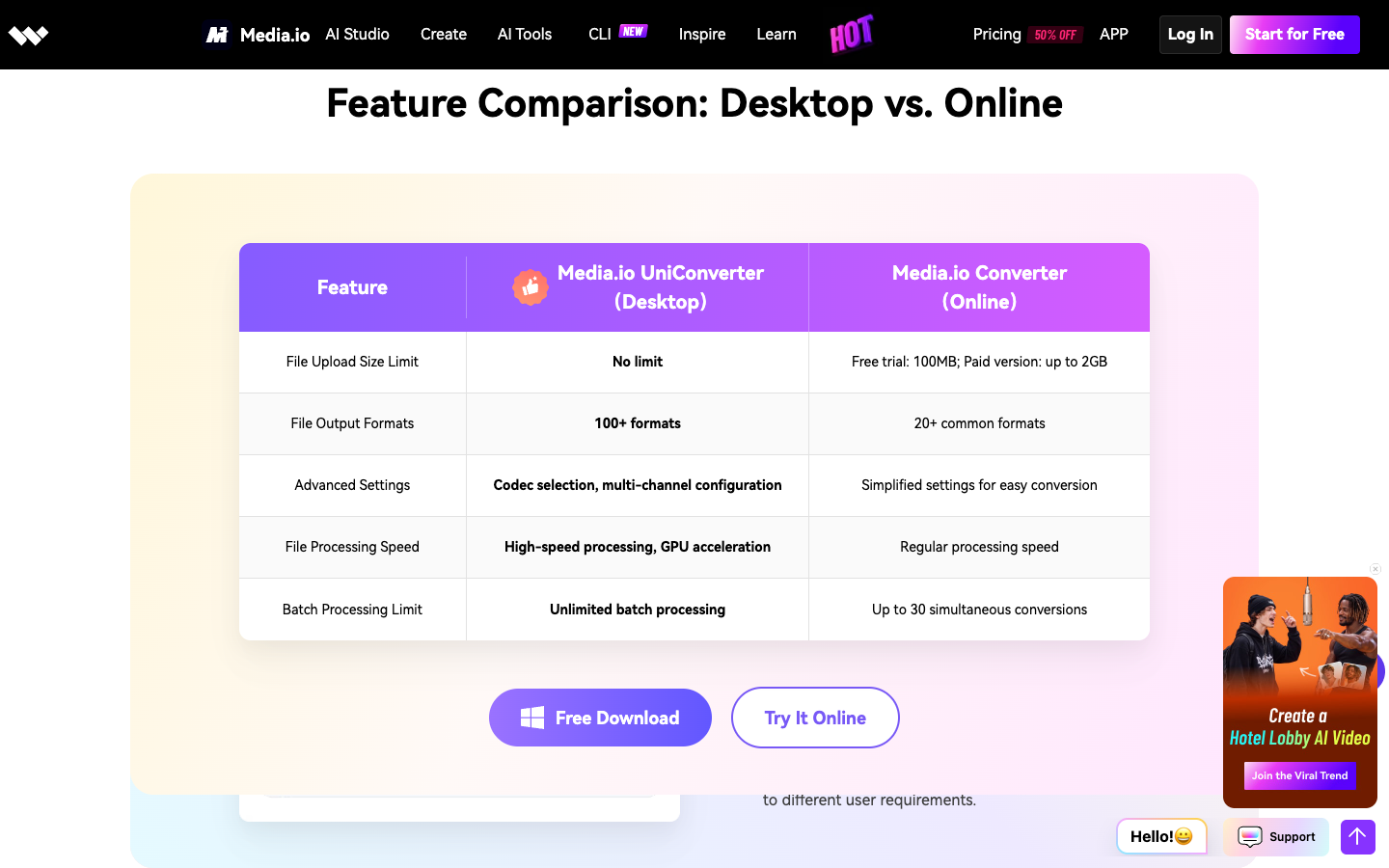
Limit: the converter page lists a 100MB free upload while the pricing table lists 512M, so the free limits depend on which page you read.
One ecommerce ad on Media.io: The product image and the clip
The plan was one 15-second vertical ad for Reels and TikTok plus one feed image, built only with Media.io's free tools. The product: a 500 ml insulated steel water bottle, with no budget for a product shoot.
Step 1: The product image from the free AI image generator
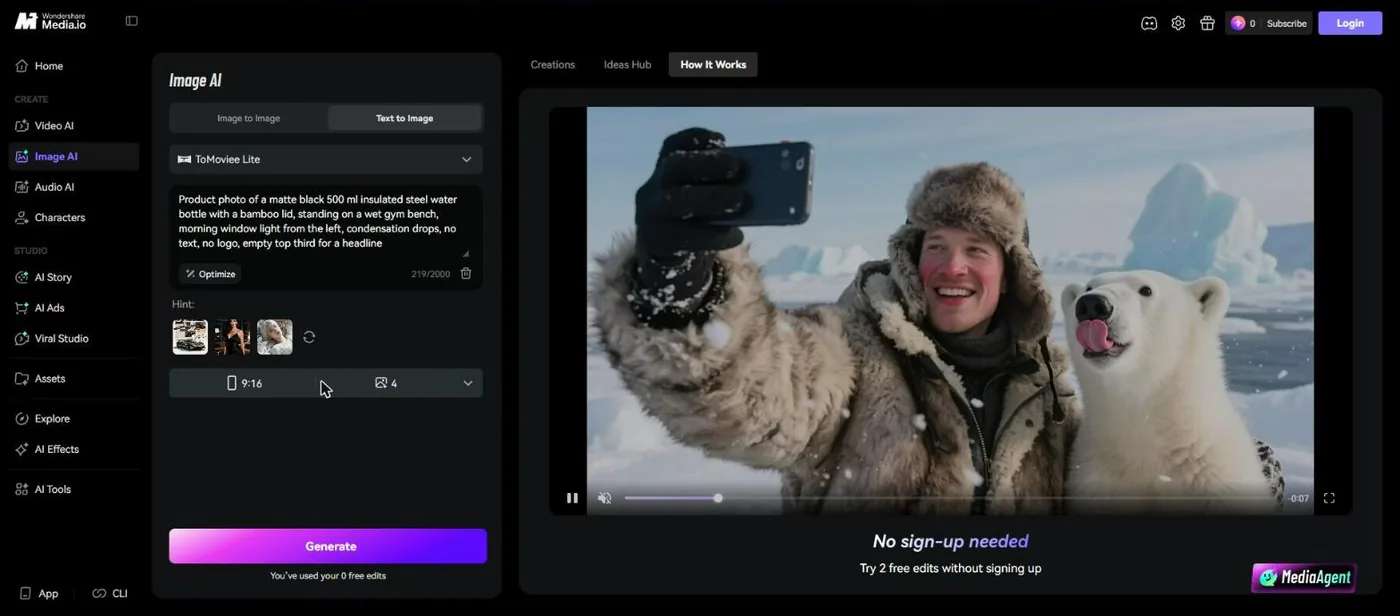
Signed out, Image AI switched to ToMoviee Lite, the model marked "Ltd Free," and showed "No sign-up needed. Try 2 free edits without signing up." The default was 4 images per run. I set the ratio to 9:16 for Reels and Stories.
The prompt follows the structure I use for any product scene, one line per job:
Prompt part
What I wrote
Why it is there
Product
Matte black 500 ml insulated steel water bottle with a bamboo lid
Color, size, and material the buyer checks first
Scene
Standing on a wet gym bench
Shows the use moment, not a white studio
Light and detail
Morning window light from the left, condensation drops
Signals "cold" without a word of copy
Exclusions
No text, no logo
Keeps the label area clean for your own branding
Layout
Empty top third for a headline
Leaves room for the hook in a 9:16 ad
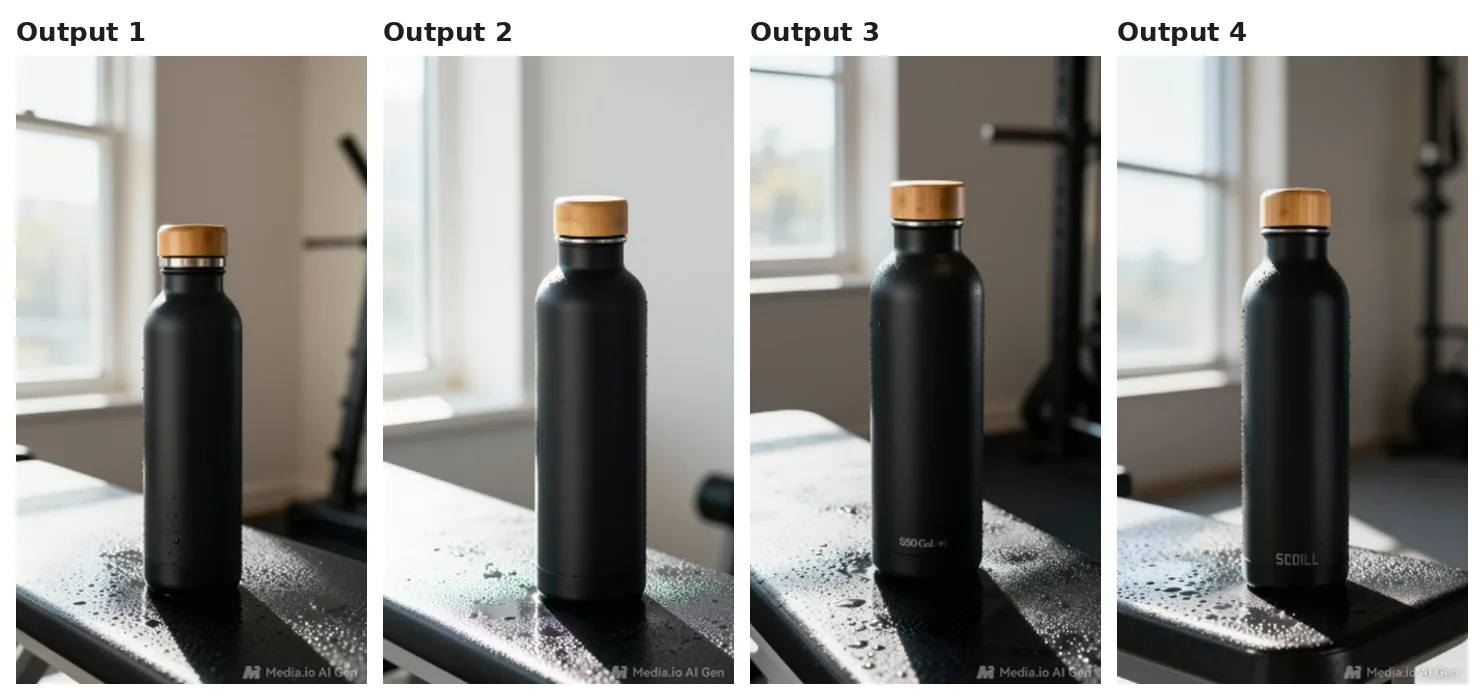
The 4 images came back in about a minute. All 4 got the bottle shape, bamboo lid, and wet bench right. Output 3 printed "550" and a cropped word on the bottle, and Output 4 printed an invented brand word.
That means 2 of 4 images broke the "no text, no logo" line, which is the error a buyer spots on a label. Every image also carried a "Media.io AI Gen" watermark, and the Creations panel read: "Creations are stored for only 7 days."
Limit: text to image invents a bottle, not yours. For a real listing, start from your own product photo in AI Ads or Image to Image, and zoom into the label area of every output before it runs.
Step 2: The 5-second clip, where the free tier stops
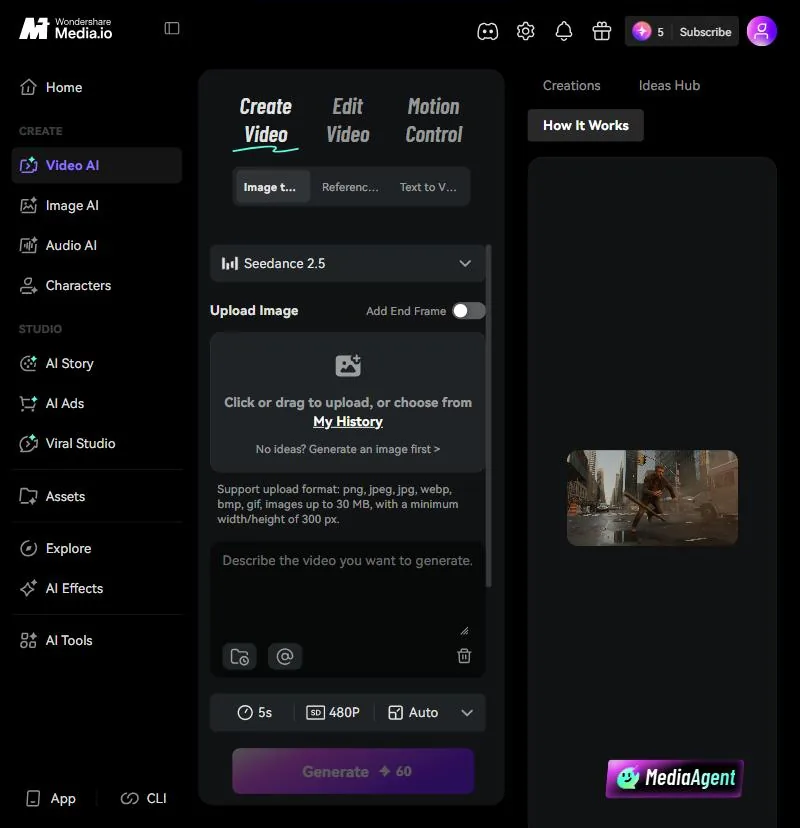
On a free account, Video AI opened on Seedance 2.5 at 5 seconds and 480p. The Generate button asked for 60 credits. The account balance showed 5.
So the free account cannot animate the bottle on the default model, even once. The pricing card still says the free plan gets "Up to 1 video," which reads as a best case on a cheaper setting, not the default.
The workaround for a free draft: build the hook from stills. Use 2 or 3 of the bottle images with text overlays and transitions in the editor, and save credits for the one clip that carries the first 3 seconds.
Finishing the Media.io ad: Voiceover, captions, export, and compression
Media.io's audio and caption allowances cover a 15-second ad with room to spare. The export is where the free plan stops.
The free plan gives 2,000 characters of text to speech and 5 minutes of auto subtitles. The script below runs about 190 characters, and the plan also lists "Up to 1 audio," so paste only the final version:
Script beat
Line
Hook, 0 to 3 seconds
My water used to be warm by ten a.m.
Proof, 3 to 9 seconds
This one still has ice after a full day in the car. Double-wall steel, leak-proof lid, 500 ml.
Offer and CTA, 9 to 15 seconds
Twenty percent off your first bottle. Tap Shop Now.
The video editor page lists "Video Ads" and "Product Demos" templates, aspect-ratio presets, AI voiceovers, and a shared workspace link. It also promises "Video Editor without Watermark" exports up to 1080p.
The pricing page disagrees: free exports are 720p with "Export with watermark," and 1080p starts at Standard. The editor page still lists "URL to Video" as upcoming, so it looks older. Plan on the pricing page's terms.
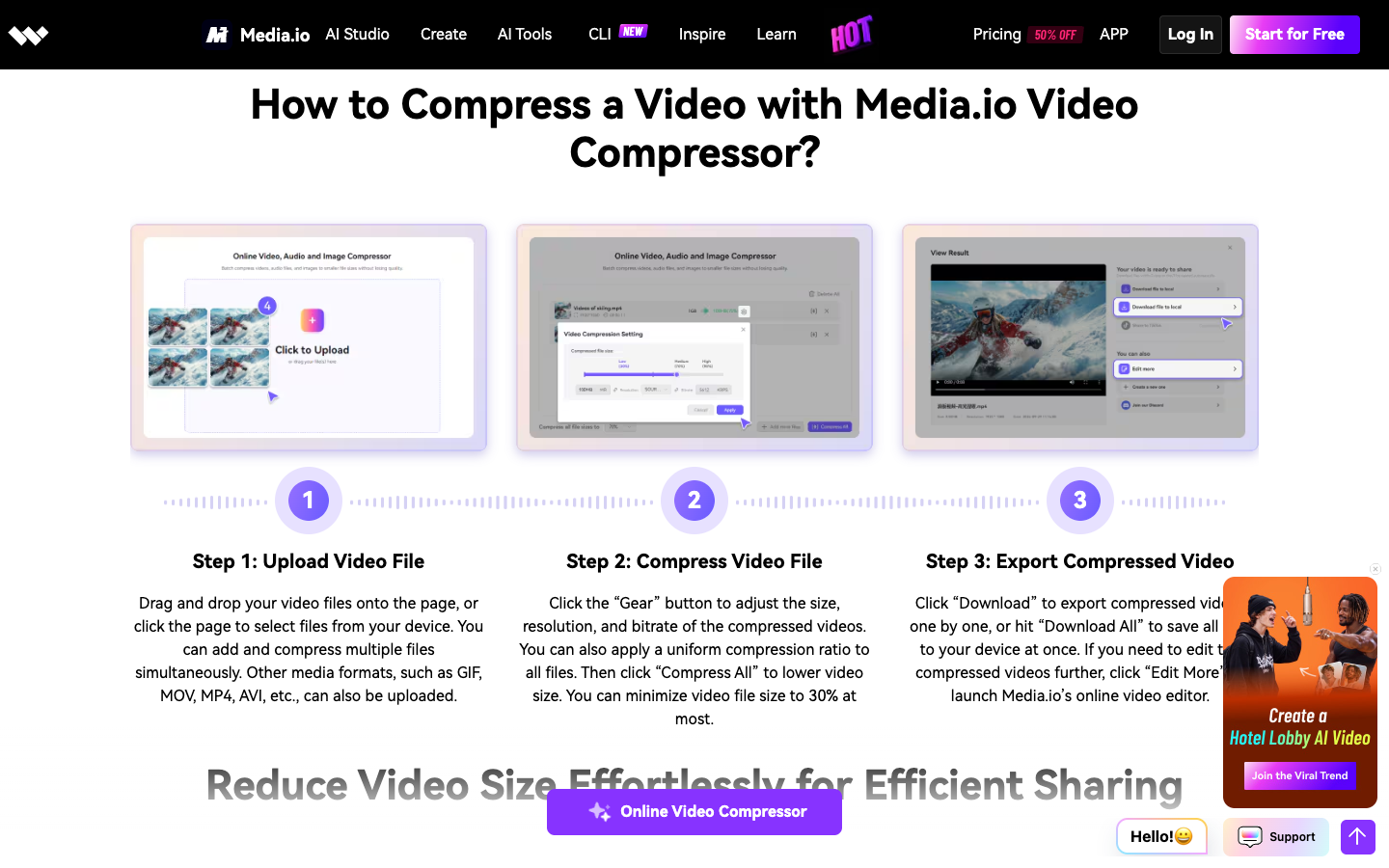
After export, the compressor's 3 steps are upload, set size and bitrate under the "Gear" button, then "Compress All" and "Download All." The page says it can shrink a file to 30% of its size "at most."
Limit: the pricing FAQ says uploads and generated content are "automatically deleted from our servers within 7 days," with no backup. Download every asset the same day.
The Media.io free-tier wall, in one table
Three of the 7 steps stop a clean ad on the free plan. Read the last column first:
Step
Media.io free tool
Free limit
Stops the ad?
Product image
Image AI, ToMoviee Lite
2 runs of 4 images signed out
Yes, at the "Media.io AI Gen" watermark
Product ad image
AI Ads, Image Ads
3 credits a run, 5 credits in my free account
After 1 run
5-second clip
Video AI, Seedance 2.5
60 credits a clip
Yes, before the first clip
Voiceover
Text to speech
2,000 characters, 1 audio
No
Captions
Auto subtitles
5 minutes
No
Export
Video editor
720p with watermark
Yes, at the watermark
Compress
Video compressor
No watermark, no quantity limit
No
Animated stills can replace the second and third clips. The watermark cannot be designed around, because Media.io's terms forbid you to "modify or remove" proprietary notices or marks displayed through the service.
That means the free plan gives you a draft. A test needs at least 2 clean exports that differ in one variable, usually the hook.
Media.io pricing: What Standard and Premium buy beyond the watermark
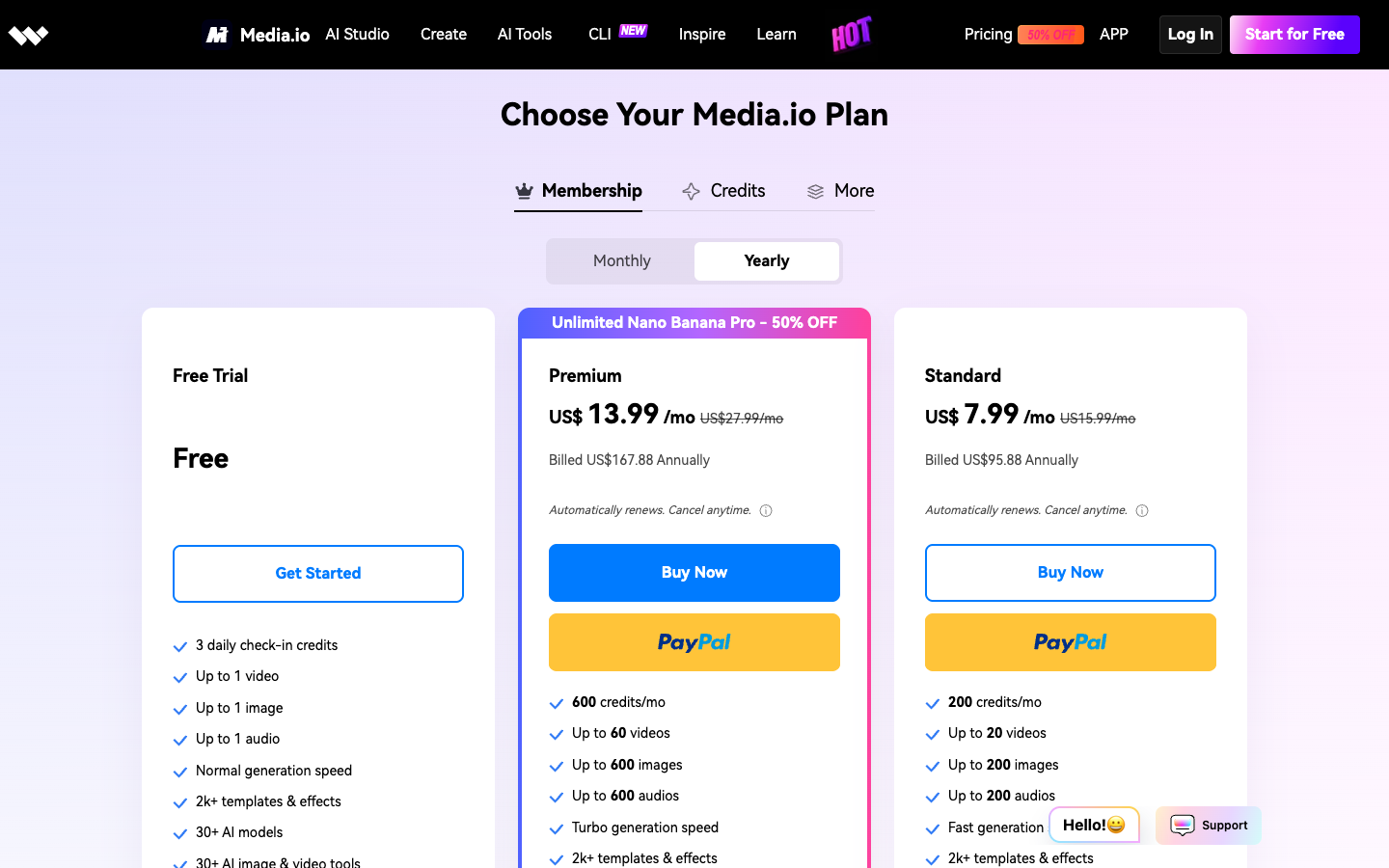
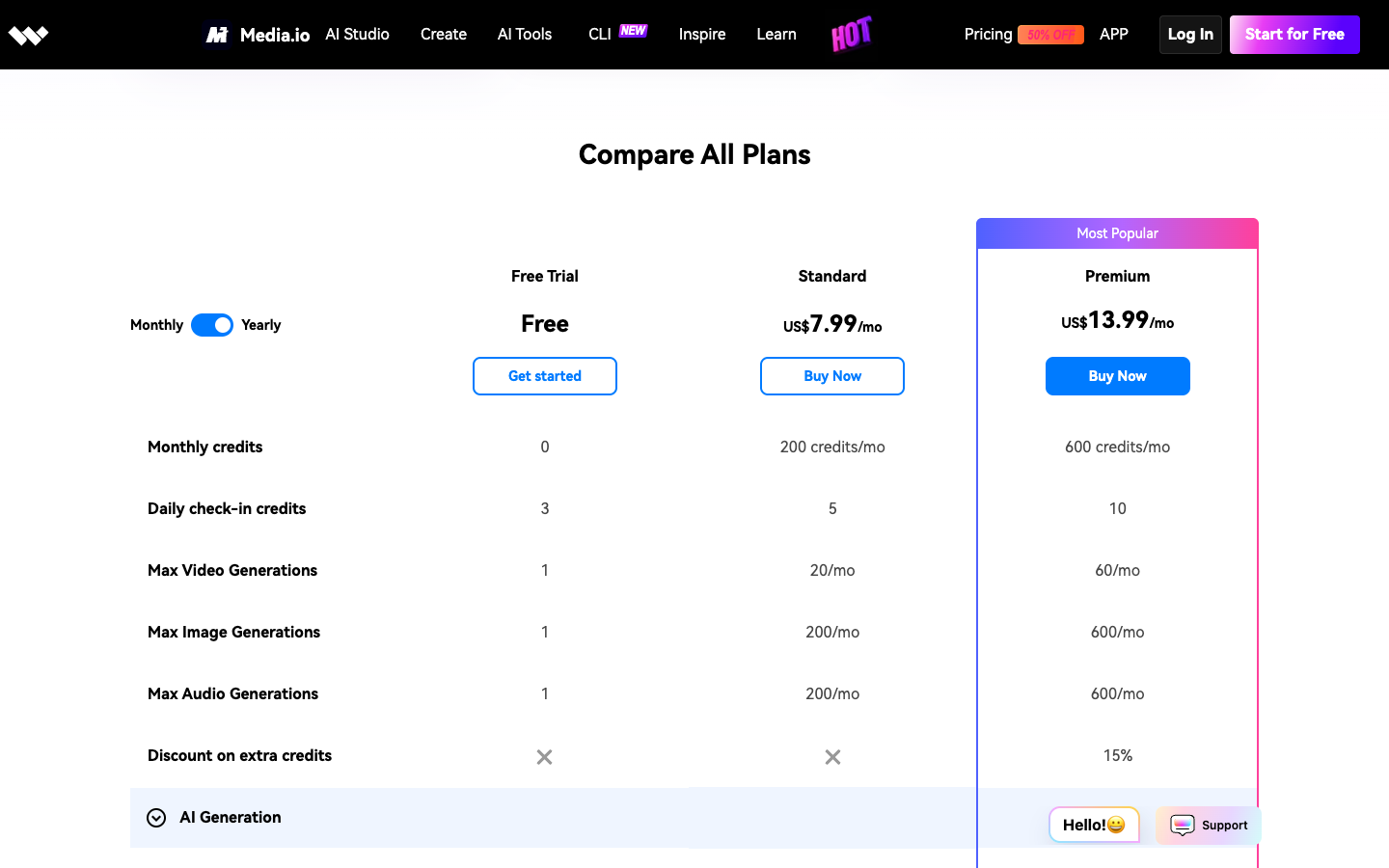
Media.io pricing has a free plan, 2 memberships, and credit packs. On yearly billing on October 7, 2026, Standard showed $7.99 a month billed $95.88 and Premium $13.99 billed $167.88. Read export quality first:
Row
Free Trial
Standard
Premium
Price, yearly billing
Free
$7.99/mo, $95.88 a year
$13.99/mo, $167.88 a year
Monthly credits
0
200
600
Daily check-in credits
3
5
10
Max video generations
1
20 a month
60 a month
Max image generations
1
200 a month
600 a month
Export quality
720p, watermark
1080p, no watermark
1080p, no watermark
Auto subtitles
5 min
60 min a month
120 min a month
Text to speech
2,000 characters
10,000 a month
80,000 a month
Both paid cards say "Automatically renews. Cancel anytime." Every plan lists the same "2k+ templates & effects" and "30+ AI models," so the price buys credits, speed, and export quality, not a bigger library. Premium adds "Unlimited Nano Banana Pro."
Storage runs 1GB, 20GB, and 50GB by plan, and only Premium lists a 15% discount on extra credits. The pricing page promises support "via live chat or email within 24 hours."
The Credits tab sells packs that stay valid for 2 years, from 100 credits for $14.99 to 1,000 credits for $47.99, about $0.05 a credit. A monthly credit plan starts at 100 credits for $8.99.
Media.io credits: What 200 and 600 buy in ad clips
Media.io's plan cards say Standard's 200 credits buy "up to 20 videos," about 10 credits a clip at best. The default clip in my test asked for 60, which is 3 clips a month on Standard and 10 on Premium.
Model choice moves the cost of images too. On the free account, Nano Banana Pro asked for 6 credits an image and Nano Banana 2 asked for 3, so check the number on the Generate button before every run.
Count drafts, not finished ads. A month with 4 new hooks at 2 drafts each needs 8 clips. On the default video model that is 480 credits, past Standard's 200 and inside Premium's 600.
The navigation reads "Pricing 50% OFF," and the cards show $15.99 and $27.99 beside $7.99 and $13.99. Treat $95.88 and $167.88 as first-year prices and confirm the renewal at checkout.
Media.io refunds and commercial use: 2 clauses to read first
Media.io gives 7 days for a refund, and its terms call the service mostly non-commercial. Both clauses matter before you run paid ads.
Wondershare's refund policy lists the "Media.io series" under a 7-day window from the initial payment, against 30 days for most direct Wondershare purchases. These requests are not eligible:
Used credits, "generally non-refundable once consumed."
A request "based solely on dissatisfaction with AI-generated output."
A renewal you forgot to cancel at least 24 hours before the period ended.
App Store or Google Play purchases, which those stores refund.
The guarantee protects you if you sign up and do not use the plan, not if you spend 150 credits and dislike the clips. EU residents get a 14-day withdrawal right, subject to the policy's exceptions.
Media.io's Terms of Service, last updated August 26, 2024, say the service is "generally provided for private, non-commercial use (except for the commercial-use Service expressly provided under these Terms)." The same terms say you retain ownership rights in content you generate with Media.io's tools.
The image generator's FAQ is more direct: images from Text to Image "can be used commercially, including marketing, social media, branding, and content creation, under Media.io's usage terms."
Two details matter for a product launch. On free accounts, the terms give Media.io a license to use your content to improve its platforms, which paid subscribers can object to. And the Public Visibility toggle in Image AI was switched on by default, so turn it off before you generate an unreleased product.
Media.io reviews: Pros and cons for an ecommerce store
Media.io's image generator page shows its own "Online AI Tools Quality Rating" of 4.8 from 162,347 votes. The widget runs on Media.io's site, so read it as a vendor rating, not an independent score.
My own Media.io reviews notes from the test come down to this:
Pros
Cons
2 free image runs with no sign-up, 4 images each
Every free image carries a "Media.io AI Gen" watermark
Bottle shape, lid, and scene matched the prompt in all 4 images
2 of 4 images printed text despite "no text, no logo"
8 image ad modes and 6 video ad formats in AI Ads
The default 5-second clip costs 60 credits
Compressor and subtitles export without watermark
Free creations stored 7 days, uploads deleted within 7 days
Clean 1080p from $7.99 a month billed yearly
Terms say "generally" non-commercial; read the exceptions
The pros sit in the utilities and the entry price. The cons sit at the export and in the terms, which is where an ad either runs or does not.
Media.io alternatives: CapCut, Creatify, and Promer AI
Each option below does a different part of the ad job. Here is how they compare on October 7, 2026:
Tool
Free start
The job it does
Best for
Media.io
2 image runs signed out; paid from $7.99 a month
Images, clips, voice, captions, and compression in one login
Utility work plus light generation
CapCut
Online editor, no credit card required
Editing and finishing footage you already have
Cutting and captioning existing clips
Creatify
10 credits a month, watermarked
Avatar-led video ads from a product URL
A talking AI creator in the ad
Promer AI
First ad free, no credit card
Ad concepts, static ads, and video ads from product context
Testing several angles for one product
CapCut, the free editing baseline
On October 7, 2026, CapCut's homepage said its online editor needs "No credit card required" and exports HD videos "Without Watermark." Pick CapCut when the footage already exists and the job is finishing.
Creatify, the avatar ad specialist
Creatify turns a product URL into avatar-led video ads. Its pricing page on October 7, 2026 listed a free plan with 10 monthly credits, "around 2 video ads or 20 image ads," with watermarked exports, and Starter at $39 a month for 100 credits without a watermark.
Pick Creatify for a talking AI creator in the ad. Our Creatify AI review covers its credits and refund terms.
Promer AI, for ad creative built from product context
Promer AI is an AI ad creative performance platform for ecommerce advertisers, and it starts from a product URL instead of a prompt box. Paste a link from Shopify, Amazon, or any store, and it extracts the image, name, description, and price when available.
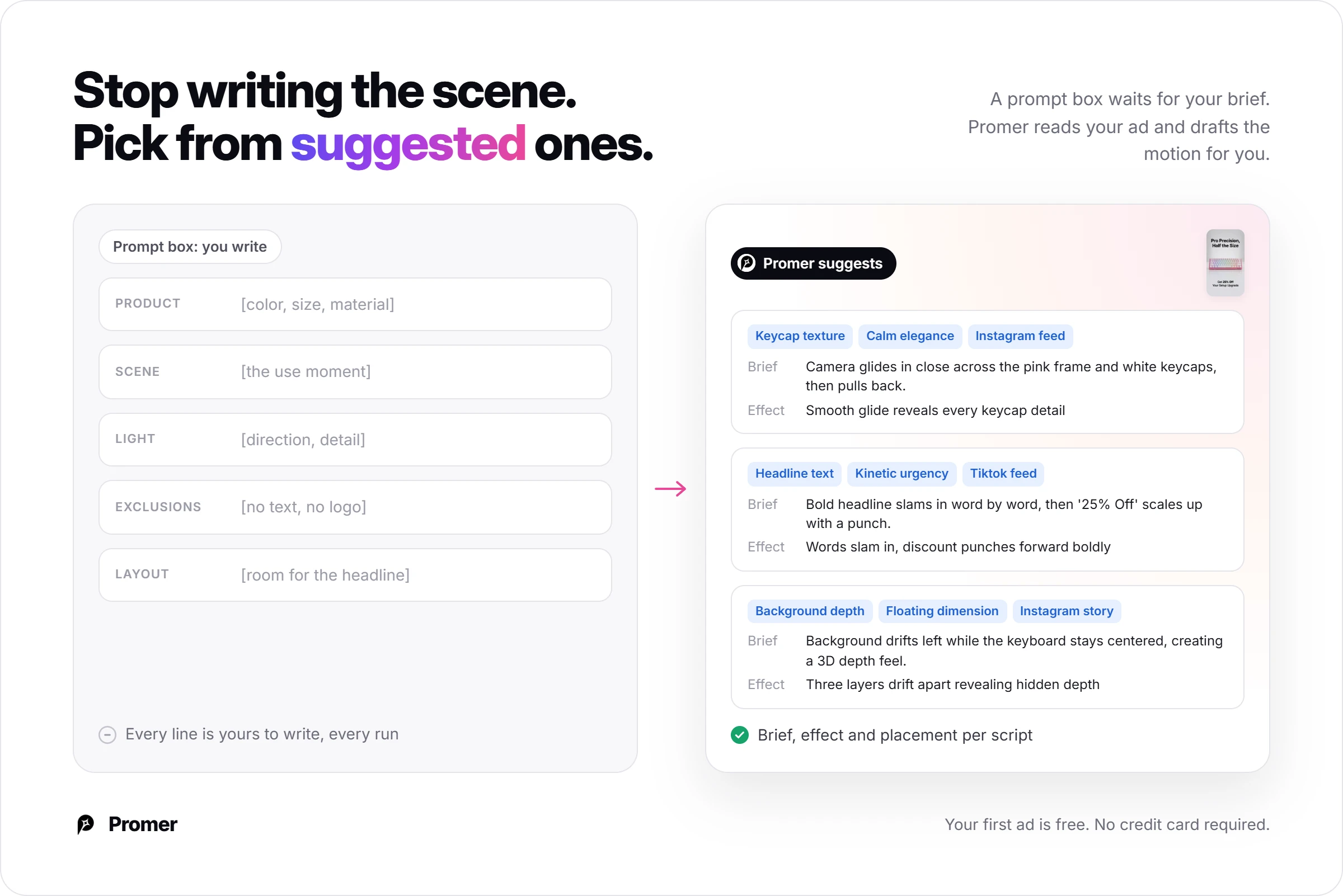
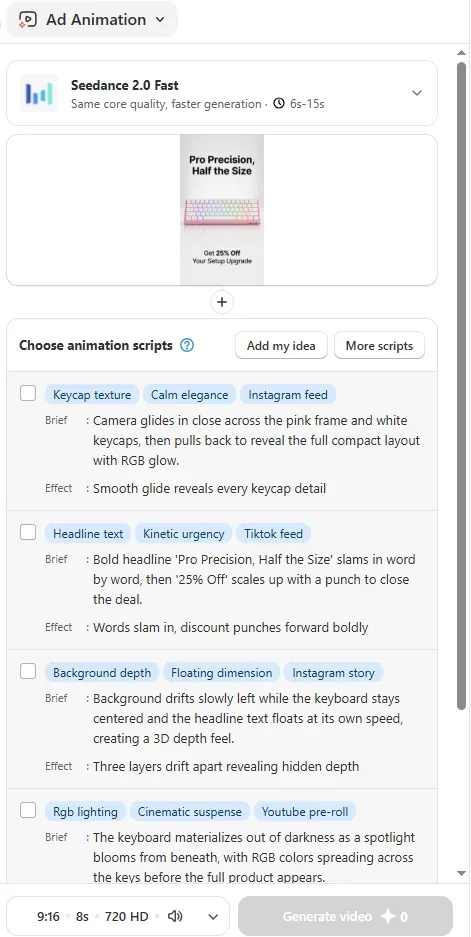
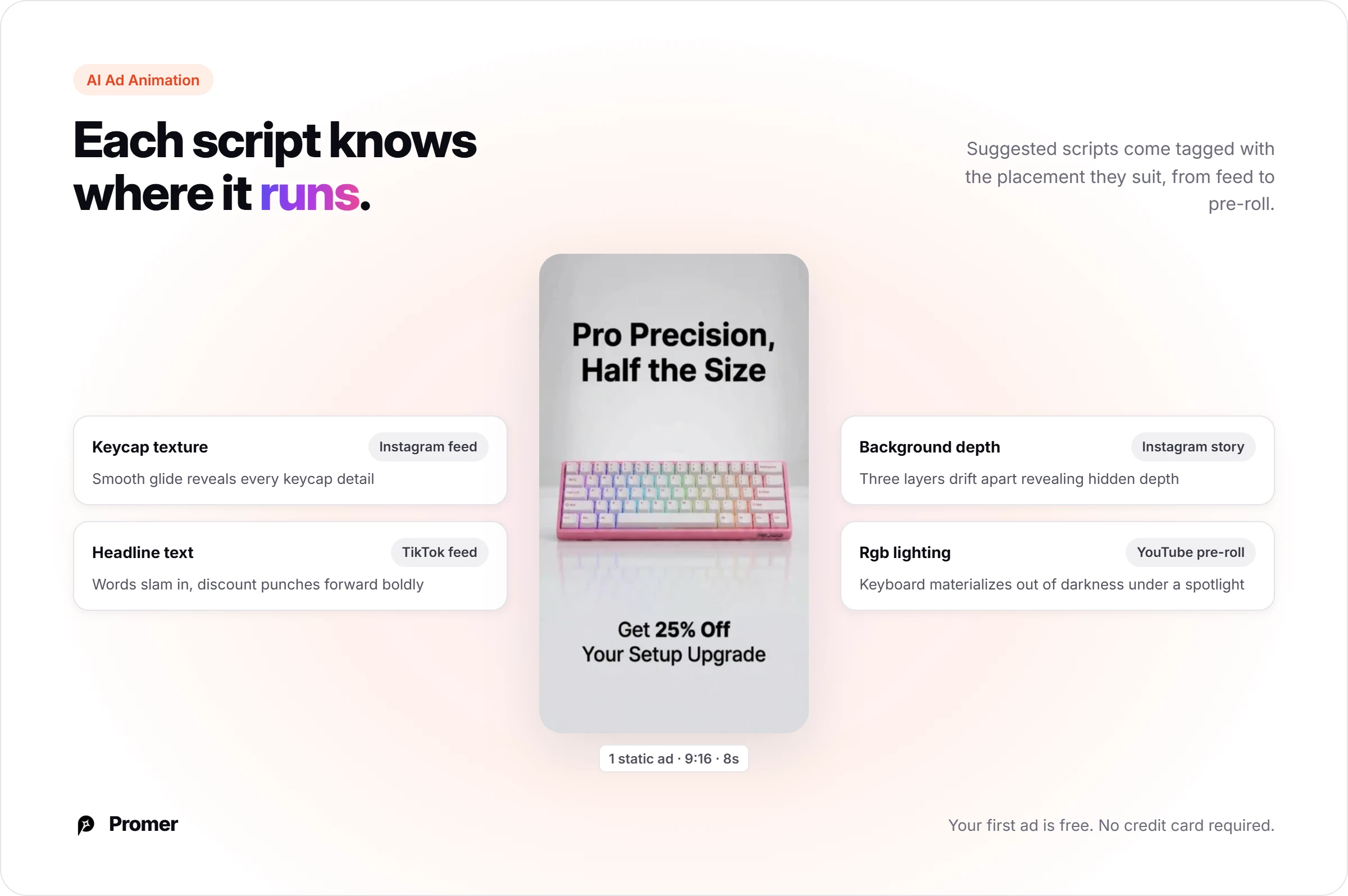
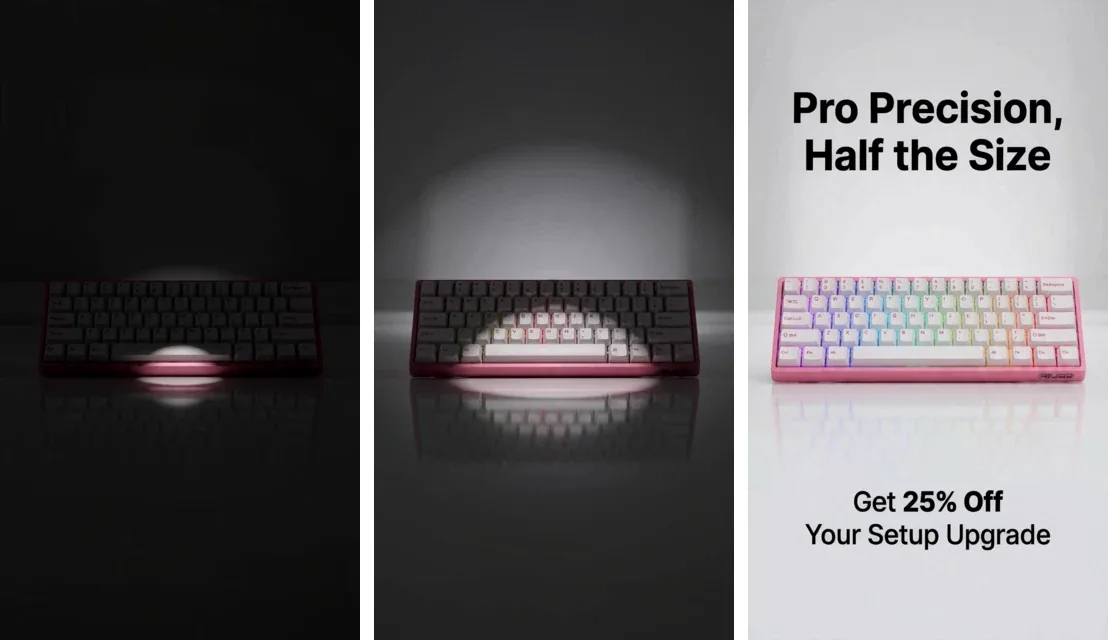
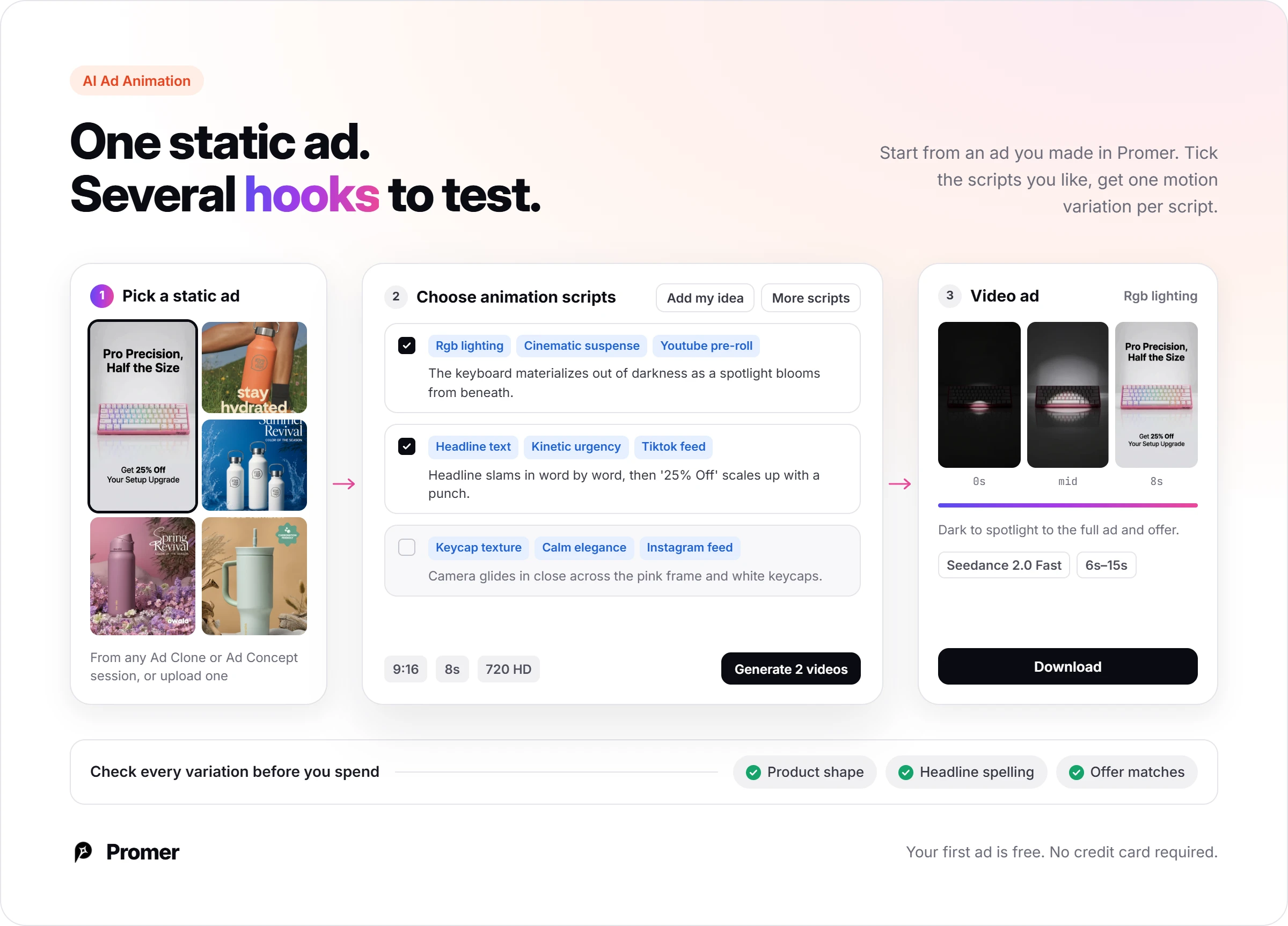
Where Media.io asks you to write the scene, Promer AI suggests it. AI Ad Animation starts from a static ad you made in Promer AI and offers ready-made animation scripts, each with a brief, an effect, and the placement it suits.
For a pink keyboard ad, the scripts included "Keycap texture" for an Instagram feed and "Headline text, Kinetic urgency" for a TikTok feed. Tick more than one script and you get more than one motion variation, so a single static ad turns into several hooks to test.
Media.io does jobs Promer AI does not attempt: compression, format conversion, music, and long-form subtitles. Promer AI's creatives can contain mistakes, so check each one before you spend.
Media.io verdict: Free for drafts, paid at the export
Buy Media.io Standard if you need clean 1080p exports, captions, and voiceovers more than you need many video clips. Skip it for video creative if you test several hooks a month, since 200 credits cover about 3 default clips. Keep the free tools for compression and captions either way.
Next action, about 15 minutes: open Video AI on a free account, pick the model you would use, and note the credits on the Generate button. Multiply by the clips you make a month, and compare the total with 200 on Standard and 600 on Premium.
In week 1, download every file the day you make it, because Media.io deletes uploads within 7 days.
FAQ
Is Media.io free?
Media.io has a free plan, but its generation tools are limited and watermarked. Signed out, the image generator allowed 2 free runs of 4 images each on October 7, 2026, all with a "Media.io AI Gen" watermark. The free plan lists 720p exports with a watermark, and utility tools such as the video compressor advertise no watermark.
Does Media.io add a watermark?
Yes, on free output: Media.io's pricing page lists "Export with watermark" for free accounts. In a test on October 7, 2026, every free AI image carried a "Media.io AI Gen" mark. Standard and Premium list 1080p exports without a watermark. The compressor and subtitle tools advertise watermark-free output on free.
How much does Media.io cost?
Media.io Standard costs $7.99 a month billed $95.88 a year, and Premium $13.99 billed $167.88. Those prices were shown on October 7, 2026, with 200 and 600 monthly credits. A "First Subscription up to 50% OFF" banner runs on the site, and the cards also show $15.99 and $27.99, so confirm the renewal price at checkout.
How many credits does a Media.io video cost?
A 5-second, 480p clip on Media.io's default Seedance 2.5 model asked for 60 credits on October 7, 2026. The plan cards say Standard's 200 credits buy "up to 20 videos," which only holds on cheaper settings. Check the number on the Generate button before each run, since model, length, and resolution change the cost.
Can I get a refund from Media.io?
Media.io purchases have a 7-day refund window from the initial payment, under Wondershare's refund policy. Used credits are generally non-refundable, and requests based only on dislike of AI-generated output are not eligible. App Store and Google Play purchases are refunded by those stores, not by Wondershare.
Can I use Media.io content in paid ads?
Media.io's image generator FAQ says its AI images can be used commercially under Media.io's usage terms. The Terms of Service call the service "generally provided for private, non-commercial use," with exceptions they name, and say you keep ownership of content you generate. Before running Meta or TikTok ads, ask [email protected] in writing which plans include commercial use.
Is there a Media.io alternative built for ecommerce ads?
Promer AI is built for ecommerce advertisers and starts from a product URL instead of a blank prompt. It extracts the product image, name, description, and price when available, then generates static and video ads, including animated versions of a static ad with AI Ad Animation. Media.io covers compression and format conversion, which Promer AI does not offer.
Huy Tran Quoc is the Head of Product Management at Promer AI, part of FireGroup Technology, where he leads product strategy and execution across a cross-functional team spanning product, engineering, design, QC, customer success, and prompt engineering.
Over the past decade, Huy has progressed from Product Manager to Senior Product Manager to product leadership, working at EngineThemes, Zalo, TIKI Corporation, and now FireGroup Technology, across ecommerce SaaS, social networking, marketplace, supply chain, and fintech.
At TIKI, Huy owned the strategic roadmap and P&L alignment for a multi-vertical portfolio and partnered directly with the C-suite to translate company vision into executable plans.