VEED Review 2026: Is It Worth It for Ecommerce Ads?
Category
Blogs
Date
Authored by
Huy Tran Quoc
Summary
VEED review for ecommerce teams: published pricing, credit plans, AI avatars, free-plan limits and the ad workflow gaps to check before you buy.
VEED is worth it for ecommerce ads if your primary bottleneck is trimming, captioning, and localizing video footage in a flexible browser workspace. It is not worth it if you expect an automated ad engine that extracts product links from Shopify, generates static feed banners, or publishes directly to Meta and TikTok ad accounts.
For an ecommerce brand or paid social media buyer, evaluating creative software comes down to return on ad spend and time saved per asset. Many video editors market themselves as all-in-one AI generators, but the day-to-day reality often splits between deep manual editing control and automated, high-velocity creative testing.
To find out whether VEED truly delivers for online store ads, we spent a week testing its core creative tools inside the workspace. We ran customer testimonial cuts through the timeline, tested AI avatars with physical product scripts, evaluated animated auto-subtitles, and calculated real credit consumption. Here is an honest, hands-on breakdown of what VEED does well, what it leaves you to do manually, and whether it earns a spot in your ad workflow.
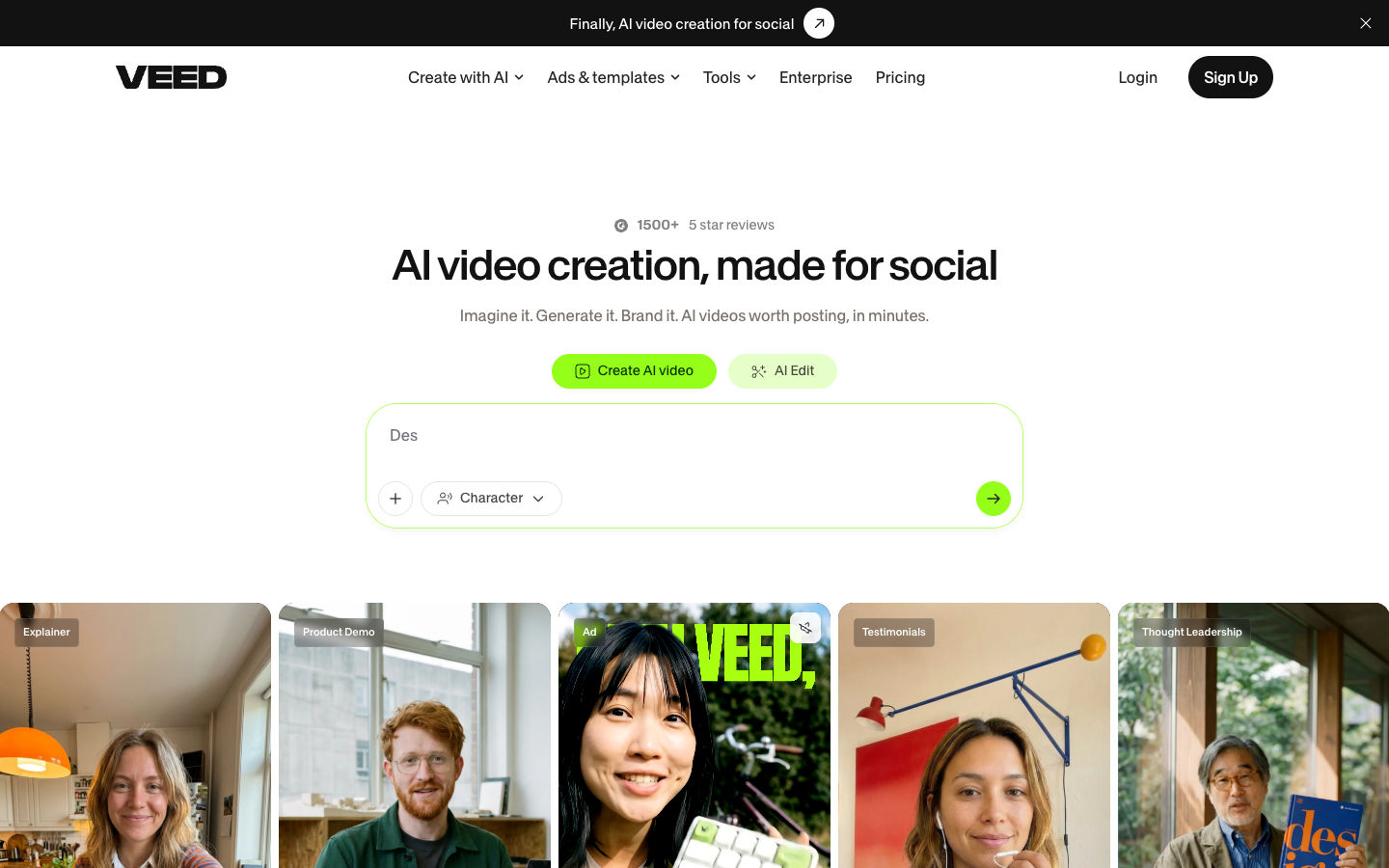
Testing VEED inside the workspace to see how a browser video editor handles ecommerce ad creative, captured September 2026
Key takeaways
VEED is fundamentally a browser-based video editor enhanced with generative AI, built primarily for content creators, marketers, and social media teams.
Its strongest tools are transcription-based text editing, auto-subtitles in 125+ languages, Clean Audio, and Eye Contact AI, making it ideal for polishing raw creator recordings.
Generative visual features include 60+ stock AI avatars and Fabric 1.0, which animates an uploaded still image into an expressive talking presenter.
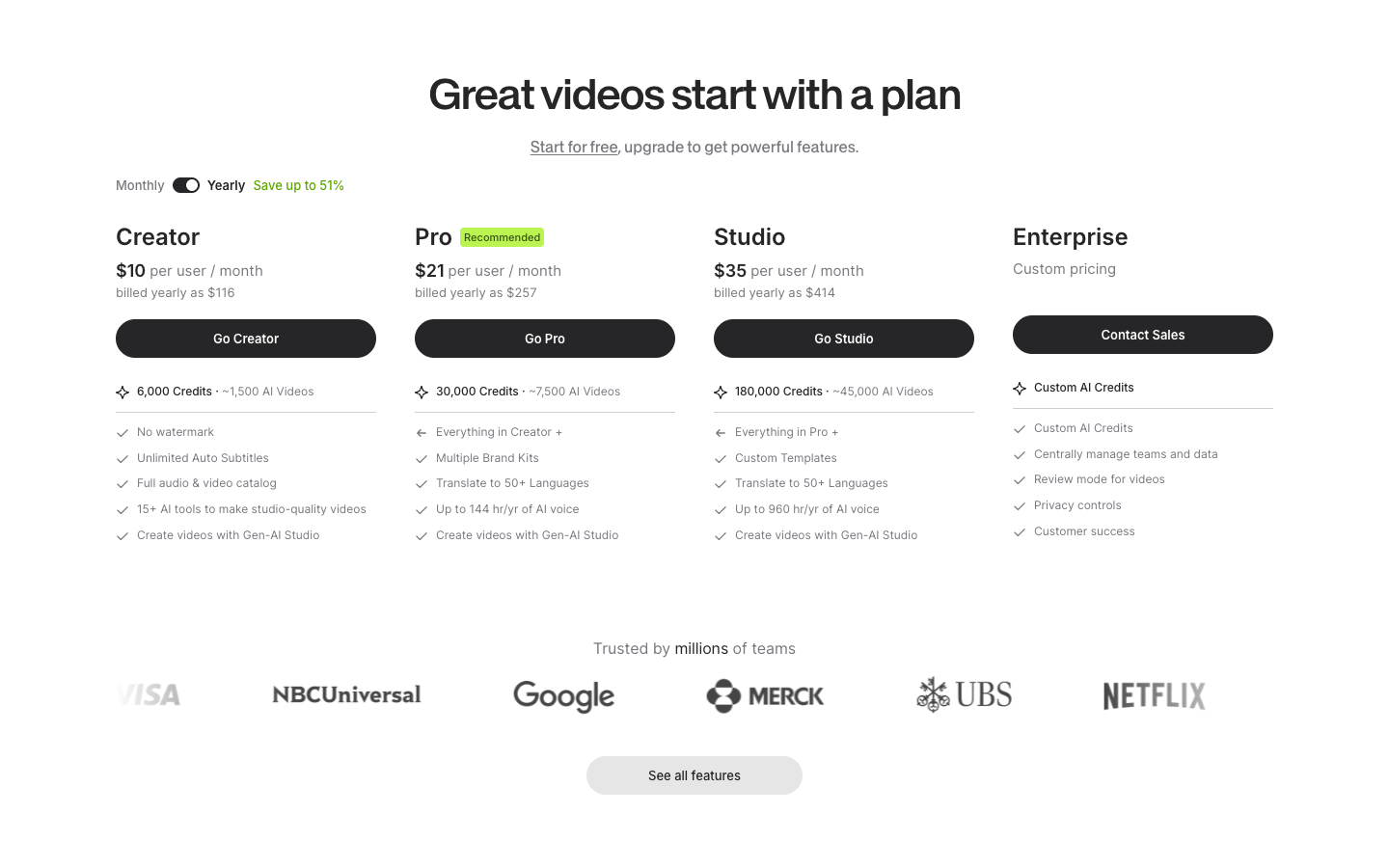
Paid tiers start at $10, $21, and $35 per user per month billed annually for Creator, Pro, and Studio plans, operating on monthly credit allowances.
VEED does not include product URL ingestion, Shopify catalog feeds, static banner exports, or direct publishing to Meta and TikTok ad accounts.
Independent user sentiment is solid, holding a 4.6 out of 5 rating on G2 from over 2,100 reviews and 4.6 on Trustpilot from over 4,000 customers.
What VEED is: a browser video editor built for social
VEED is a cloud-based creative workspace founded in March 2018 by Sabba Keynejad and Tim Mamedov in London. After bootstrapping its initial growth, the company secured a $35 million investment from Sequoia Capital in 2022 and expanded its team beyond 150 specialists. Originally recognized as an accessible online video editor, VEED has steadily added generative models to its workspace.
The platform positions itself around three core pillars: Generate, Subtitles, and Brand. Rather than locking users into a single generative architecture, the platform integrates external frontier engines such as Google Veo 3, Kling AI, and MiniMax alongside proprietary systems like Fabric 1.0. This allows creators to generate b-roll or talking clips without leaving the browser tab.
Despite these generative additions, the backbone of the application remains its linear editor. Users upload recorded files, manipulate audio and video layers on a timeline, and edit spoken content directly through an automated transcript. This design provides precise control over pacing and phrasing, bridging the gap between casual consumer video apps and complex desktop suites like Premiere Pro.
Hands-on testing: the core VEED features that touch video ads
For an online store owner or media buyer testing creative on Meta, TikTok, and YouTube Shorts, standard video effects matter less than turnaround speed and viewer retention. During our testing, four specific capabilities stood out as the most relevant for short-form video advertising.
Timeline editing and text-based transcript cutting
The central workspace feels familiar to anyone who has used modern editing software, but it operates entirely in the browser. When you upload a video, VEED automatically transcribes the dialogue. Deleting a sentence or filler word in the text transcript cuts the corresponding video clip from the timeline instantly.
For editing founder stories, customer testimonials, or user-generated content (UGC) clips, this text-based method saves substantial time. You do not need to hunt through waveforms to remove an awkward pause. You simply highlight the text and press delete. The multi-track timeline allows you to layer b-roll footage, sound effects, stickers, and animated lower thirds on top of the base cut.
Trimming footage by deleting words directly in the auto-generated transcript inside VEED, captured September 2026
Subtitles and auto captions: the strongest part of the platform
Because the vast majority of social media users scroll through feeds with the sound muted, clear captions are essential for ad engagement. Subtitles are easily VEED's most polished feature. The automatic speech recognition supports over 125 languages and regional accents with impressive accuracy on clear audio.
The subtitle menu offers trendy word-by-word karaoke highlighting, custom fonts, brand color palettes, and preset animations seen across viral TikTok and Instagram Reels accounts. Beyond styling, the editor allows users to download subtitles in SRT, VTT, or plain text formats, or burn them permanently into the exported video file.
AI avatars and Fabric 1.0: talking characters tested
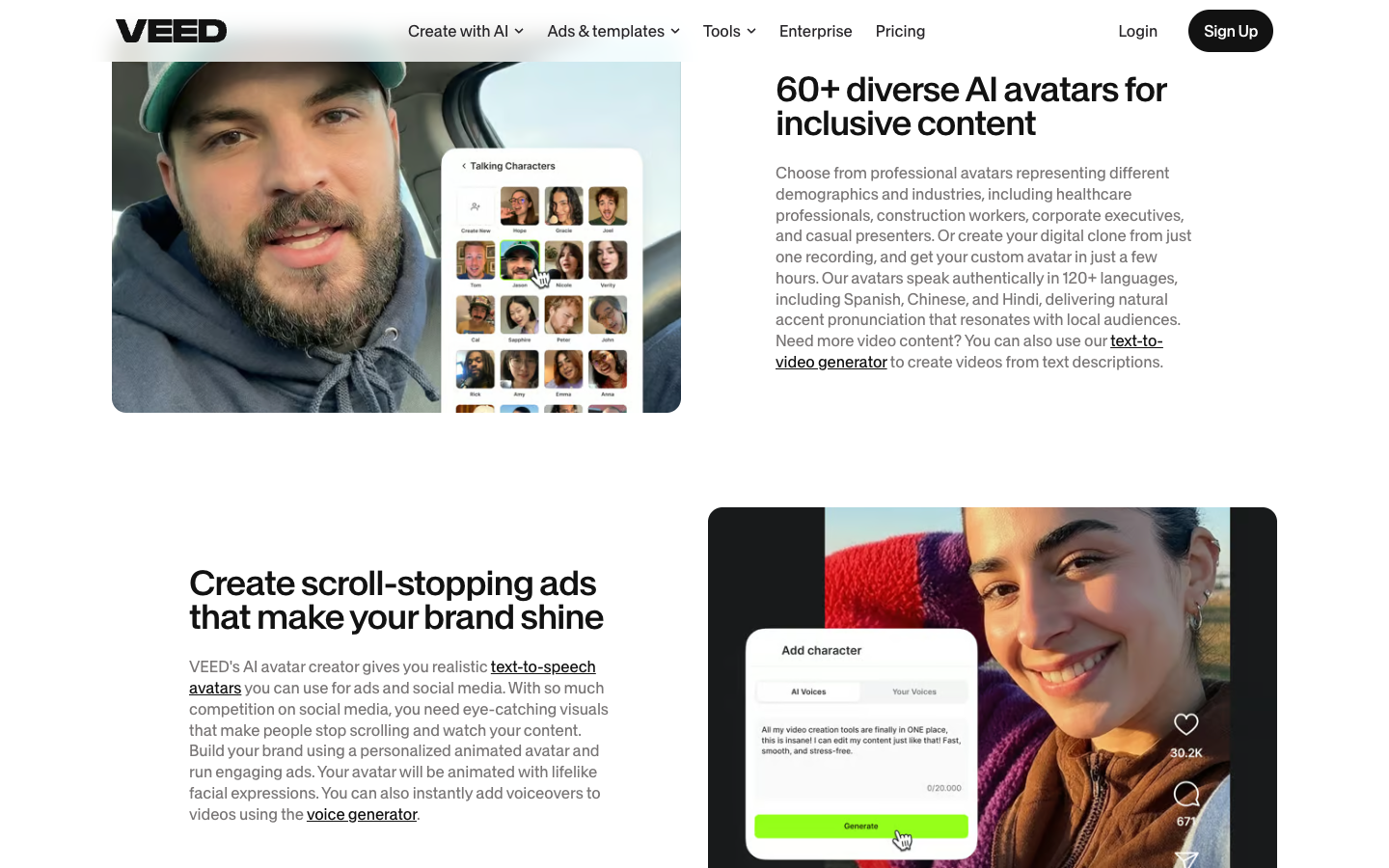
When you lack on-camera talent, VEED provides two ways to generate synthetic presenters. The first is a stock library containing over 60 AI avatars across various demographics and professional styles. You paste a script, pick a voice from the integrated ElevenLabs voice library, and the avatar speaks the text with synchronized mouth movements.
The second option is Fabric 1.0, an image-to-video model designed to animate any uploaded image. Whether you provide a photo of a team member, an illustrated mascot, or a stylized character, Fabric animates the mouth, head posture, and subtle hand movements based on a typed script or voice recording. Fabric Emotions enhances this further by letting you insert emotional tags like [excited], [whisper], or [sigh] directly into the script, giving the spoken ad creative a more natural cadence than monotone text-to-speech engines.
Footage polish: Eye Contact AI and Clean Audio
Real creator footage often suffers from poor microphone quality or shifting eye lines. Two AI utility tools in VEED help solve this without reshooting:
Clean Audio: Removes ambient room hum, street noise, and microphone hiss with a single toggle, leaving the spoken voice crisp and balanced.
Eye Contact AI: Uses computer vision to subtly redirect the speaker's gaze toward the camera lens. If an influencer or founder glanced sideways at notes or read from a teleprompter, this tool brings their attention back to the audience.
In our tests, Eye Contact AI worked smoothly on minor eye shifts. Extreme head angles produced slight visual artifacts around the eyelids, but for casual phone-recorded clips, it makes raw video look considerably more professional.
VEED pricing plans and credit math: what you actually pay
VEED operates on a tiered subscription model billed monthly or yearly, with paid plans starting at $10 per user per month. Yearly billing provides roughly a 50% discount compared to month-to-month checkout.
Each tier is priced on a per-seat basis, meaning a marketing team of three creators will require three seats. Below is the breakdown of the primary plans on annual billing:
Reviewing the annual credit allowances and export limits across VEED paid subscription plans, captured September 2026
Subscription plan
Annual price (per user)
Monthly billing (approximate)
Annual credits
Core inclusions and limits
Free
$0
$0
Limited trial credits
720p export with watermark, basic timeline editing, trial access to AI tools
Creator
$10 / month ($116/yr)
~$19 / month
6,000 / year
No watermark, 1080p export, unlimited auto-subtitles, full stock library, 15+ AI tools
Pro
$21 / month ($257/yr)
~$39 / month
30,000 / year
4K export, multiple Brand Kits, video translation (50+ languages), Clean Audio, Eye Contact AI
Studio
$35 / month ($414/yr)
~$69 / month
180,000 / year
Everything in Pro, custom video templates, team sharing, up to 960 hours of AI voiceover
Enterprise
Custom quote
Custom quote
Custom volume
Dedicated account manager, single sign-on (SSO), custom API limits, review mode
Understanding credit consumption is important before committing to a plan. Standard video trimming, manual text editing, and auto-subtitling do not consume credits on paid plans. However, generative tools draw from your monthly credit allowance. For example, rendering a talking video with Fabric 1.0 consumes approximately 480 credits for a 60-second generation. If your team plans to generate dozens of synthetic avatar ads every week, you will likely need the Pro or Studio tier to maintain continuous production.
VEED video editing company reviews: trust, G2 scores, and customer sentiment
When searching for a genuine VEED io review, marketing teams frequently evaluate overall company credibility and support responsiveness. Beyond marketing claims, public review platforms show that VEED maintains a large and active user base across small agencies, solo creators, and corporate brands like Visa, Pinterest, and P&G.
On G2, VEED holds an aggregate rating of 4.6 out of 5 stars across more than 2,100 user submissions. Positive reviews consistently highlight the speed of auto-captioning, the convenience of working inside Chrome without downloading heavy desktop software, and the low learning curve for non-technical team members. Users frequently note that turning a rough 5-minute webinar recording into several captioned shorts takes under thirty minutes.
On Trustpilot, the platform similarly carries a 4.6 out of 5 rating based on over 4,000 customer reviews. The positive feedback centers on user-friendly interface design and regular feature updates. Where criticisms arise, they typically point to two operational challenges: browser performance slowdowns when editing projects longer than 15 minutes with multiple layers, and confusion around automatic subscription renewal terms if a cancellation is initiated late in a billing cycle. Contacting customer support during standard business hours generally resolves billing tickets, but testing the platform thoroughly on monthly billing before locking into an annual contract is sound practice.
VEED Studio reviews: workspace collaboration for marketing teams
For agencies and growing marketing departments, individual desktop tools create bottlenecks when sharing project revisions. The Studio tier addresses this through centralized team workspaces and collaborative project management.
Team members can invite internal colleagues or external freelance editors into shared project folders. Instead of exporting large video files and sending them over Slack or Drive, editors can share a direct review link. Reviewers can leave time-stamped comments directly on the video player, allowing the editor to jump straight to the exact second where a logo adjustment or text tweak is requested.
The Studio plan also unlocks custom team templates and multiple Brand Kits. A marketing manager can configure predefined font pairings, approved color codes, and official logo overlays. When a junior content creator builds a new social clip, they apply the preset Brand Kit in one click, ensuring visual consistency across all client or store assets.
Where VEED fits an ecommerce ad workflow, and where it stops short
VEED is a versatile production studio, but it is important to distinguish between general video editing and performance ad creative generation. Here is how its capabilities align with real ecommerce advertising needs.
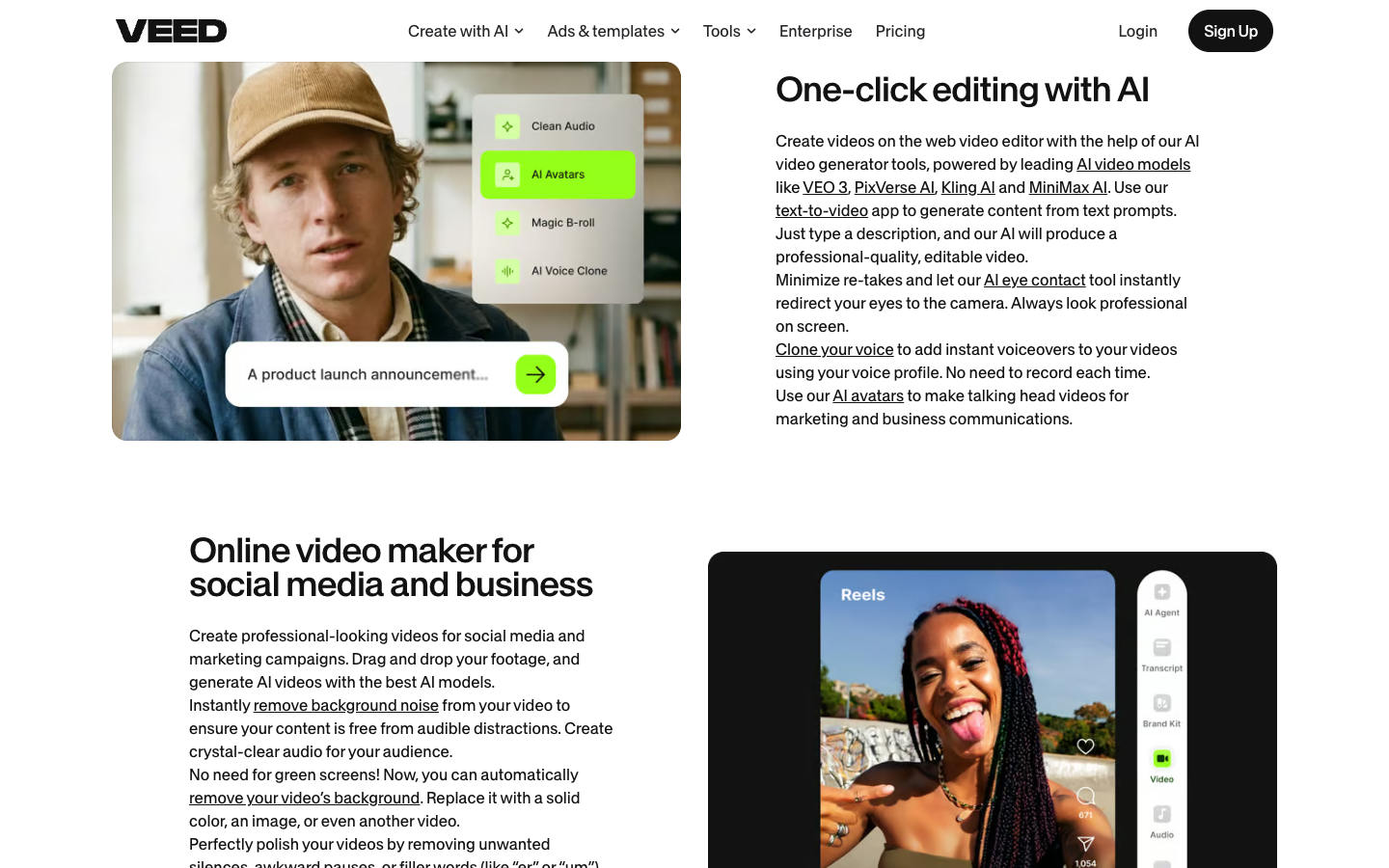
Applying brand assets and aspect ratios inside the VEED video editor, captured September 2026
Where VEED genuinely helps an ecommerce store
Polishing UGC and influencer deliveries: When creators send you raw unboxing or testimonial videos, VEED lets you remove background noise, cut dead pauses, fix gaze direction, and add high-converting subtitles in minutes.
Multilingual ad localization: If you sell across multiple international markets, VEED's dubbing and translation suite can translate spoken dialogue and captions into dozens of languages, allowing you to run localized Meta campaigns without hiring foreign voice actors.
Repurposing long-form content: With Magic Clips, you can feed in an existing YouTube product review or founder podcast and automatically generate short vertical clips suitable for TikTok and Instagram Reels.
Where VEED stops short for performance advertisers
Across the entire VEED interface and feature set, several critical ecommerce advertising components do not exist:
No product URL extraction: You cannot paste an Amazon or Shopify product link to automatically pull images, bullet points, customer reviews, and pricing into an ad storyboard. All product media must be prepared and uploaded manually.
No static ad creative generation: VEED is purely a video editor. It does not generate high-converting static banner ads, 1:1 image collages, or carousel graphics for Facebook feed placements.
No ad account connection: VEED exports files as MP4 downloads. It does not connect directly to Meta Ads Manager, TikTok Ads Manager, or Google Ads to publish campaigns or suggest targeting structures.
No structured angle or hook matrix: The tool does not analyze your product's target buyer, pain points, or emotional hooks. Developing the core marketing angle remains entirely the advertiser's responsibility.
Who VEED is best for, and who should look elsewhere
VEED is best for:
Content marketers and social media managers producing organic shorts, product explainers, and talking-head videos.
DTC brands that frequently receive raw footage from UGC creators and need a fast, browser-based editor to clean audio and add branded captions.
Solo entrepreneurs and small marketing teams who want professional video output without learning complex desktop software like Final Cut Pro or Premiere Pro.
Businesses expanding into international markets that need reliable multilingual dubbing and localized subtitles.
VEED is not the ideal fit for:
Performance advertisers whose primary bottleneck is testing high volumes of static and video ad variations directly from a product catalog.
Media buyers who need an end-to-end ad creative performance system that extracts copy and visuals straight from a Shopify or Amazon URL.
Brands looking for automated winning ad frameworks, competitive ad research, or direct-to-Meta campaign publishing.
VEED alternatives for ecommerce: video editor vs dedicated UGC ad platform
Choosing an alternative comes down to where your actual bottleneck sits: in editing footage you have already recorded, or in producing high-converting ad variations from scratch for your product catalog.
Platform
Primary focus
Key strength
Product-to-ad workflow
Starting price
VEED
Browser video editor & captions
125+ language subtitles, Clean Audio, timeline trimming
None (manual upload and manual scripting)
$10 / user / month
Promer AI
Ecommerce ad creative performance
Product URL extraction, AI UGC Ads, multi-format testing
Automated (Shopify, Amazon, any store link)
Free to start, no card required
CapCut
Social video editing
Trending mobile templates, viral audio syncing
Limited (generic social presets)
Free tier, Pro ~$9.99 / month
HeyGen
Corporate avatar presentations
Studio avatar realism, multi-speaker webinars
None (requires pre-written scripts)
$29 / month (credit-based)
Kapwing
Collaborative online editor
Smart Cut, team workspaces, meme creation
None (blank canvas editor)
$16 / user / month
VEED remains an exceptional editing studio if you already film your own clips, hire on-camera creators, or need to turn long webinars into captioned social snippets. However, on paid social channels like TikTok, Instagram Reels, and Meta feeds, raw footage alone does not guarantee sales. High-converting ecommerce ads require persuasive direct-response angles, authentic creator presentation, and consistent testing to outpace creative fatigue.
This is where Promer AI addresses the ecommerce workflow directly. Rather than handing you a blank timeline, Promer AI operates as an AI ad creative performance platform built specifically for online sellers. You begin by pasting an Amazon or Shopify product URL. The platform automatically pulls your product images, titles, pricing, and customer review highlights into its analysis layer.
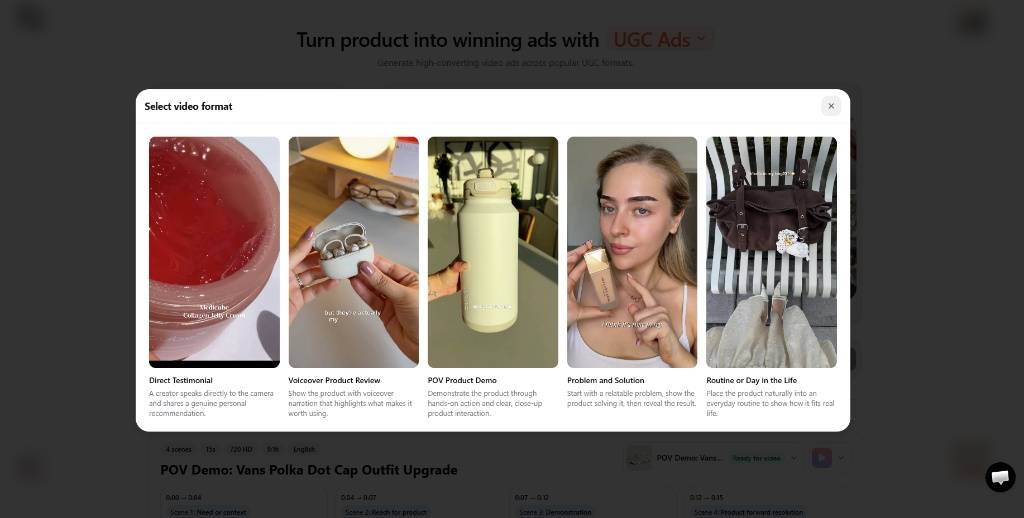
For video advertisers, Promer AI's AI UGC Ads feature turns flat product photos into authentic user-generated-style video ads in minutes. Instead of requiring you to draft thirty-second scripts or hire freelance actors, the system suggests video concepts structured around five proven direct-response frameworks: Direct Testimonial, Voiceover Product Review, POV Product Demo, Problem and Solution, and Routine or Day in the Life.
Testing Promer AI to see the difference: turning an imported product link directly into five direct-response UGC video frameworks, captured September 2026.
The creation engine structures the script scene by scene, timing the Hook, Solution, Feature, and Call to Action to the second. You can cast AI creators filtered by age, region, and casual handheld shooting styles, paired with natural voiceovers in vertical 9:16 format built for mobile feeds. If your product page lacks secondary lifestyle angles, the tool even flags the missing views and lets you generate them with AI so your product is featured from every side.
Beyond video generation, Promer AI also covers static image ads via AI Ad Concept and AI Ad Clone, allowing you to run balanced creative tests across Facebook feeds and Instagram Stories. Once your assets are ready, Launch ads lets you push creatives directly to Meta with suggested settings. Promer AI lets you create your first ad free, no credit card required.
Verdict: is VEED worth it for ecommerce ads in 2026?
VEED is definitely worth the subscription if your main requirement is post-production craft: trimming filmed creator clips, cleaning up background hum, fixing presenter gaze, and generating animated subtitles in your browser. At $10 per user per month on annual billing, the Creator plan delivers excellent utility for solo founders and social media managers who produce their own video assets and want to publish polished content quickly.
However, VEED is not built to serve as an autonomous ecommerce ad generator. It will not ingest your Shopify catalog, formulate psychological hook angles, generate static feed banners, or build authentic UGC ads from product photos alone. If you have footage ready to edit, VEED is a dependable browser studio. If your primary goal is scaling paid ad testing directly from your product links, pairing VEED with a dedicated creative system like Promer AI gives you the complete production and performance loop.
Frequently asked questions
Is VEED completely free to use?
Yes, VEED provides a permanent free plan, but it includes visible limitations. Free exports carry a watermark and are capped at 720p resolution. In addition, generative AI tools such as AI Avatars and Clean Audio are offered as one-time trials rather than ongoing allowances, making the tier suitable for interface testing rather than commercial publishing.
Can VEED create UGC video ads directly from a product URL?
No. VEED does not support product link ingestion, catalog syncing, or automated ecommerce script generation. Products must be uploaded manually, and scripts must be written by the user. If you want to paste a Shopify or Amazon URL and automatically generate authentic creator-style video ads using proven direct-response frameworks, dedicated tools like Promer AI provide that specific product-to-UGC workflow.
Does VEED support static image ad creation?
No. VEED is exclusively an online video creation and editing suite. While it offers an AI image tool for generating individual background graphics, it does not support static ad design templates, feed banner ratios, or multi-size ad exports for Meta campaigns.
How do credits work on VEED paid subscriptions?
Standard timeline cutting, audio trimming, and automated subtitling do not consume credits on paid tiers like Creator (6,000 credits/yr) or Pro (30,000 credits/yr). Credits are deducted only when running generative visual models, such as animating images with Fabric 1.0 or using third-party video generation engines.
Can I translate and dub video ads using VEED?
Yes. Multilingual localization is one of VEED's standout strengths. On paid plans, you can translate transcripts and auto-subtitles into over 50 to 125 languages, as well as generate localized voiceovers using synthetic voice profiles or cloned speech.
Can VEED publish finalized ads directly to Meta Ads Manager?
No. VEED exports finished video projects as downloadable MP4 files or web share links. It does not integrate directly with Meta Ads Manager or TikTok Ads Manager to configure campaigns, meaning media buyers must upload video files and set up ad copy manually inside their ad accounts.
Sources
VEED official platform and feature index, accessed September 2026.
G2 VEED user reviews and company profile, verified September 2026.
Trustpilot customer ratings and service reviews for VEED, verified September 2026.
Huy Tran Quoc is the Head of Product Management at Promer AI, part of FireGroup Technology, where he leads product strategy and execution across a cross-functional team spanning product, engineering, design, QC, customer success, and prompt engineering.
Over the past decade, Huy has progressed from Product Manager to Senior Product Manager to product leadership, working at EngineThemes, Zalo, TIKI Corporation, and now FireGroup Technology, across ecommerce SaaS, social networking, marketplace, supply chain, and fintech.
At TIKI, Huy owned the strategic roadmap and P&L alignment for a multi-vertical portfolio and partnered directly with the C-suite to translate company vision into executable plans.